Sonarr: MacOS 10.15 - Full Disk Access Required
Describe the bug
The next version of MacOS (10.15) requires physical interaction by the user to allow access to the either the file system, or to any networked shares. At the moment Sonarr just accepts being refused access to the filesystem/network shares and doesn't trigger any option to allow access on the desktop.
Logs
19-6-14 21:40:59.0|Trace|MediaInfo|Read a total of 89270 bytes (0.0%)
19-6-14 21:40:59.0|Debug|AggregateLanguage|Using language: English
19-6-14 21:40:59.0|Debug|Parser|Parsing string 'Too.Old.to.Die.Young.S01E04.1080p.WEB.H264-METCON'
19-6-14 21:40:59.0|Trace|Parser|^(?<title>.+?)(?:(?:[-_\W](?<![()\[!]))+S?(?<season>(?<!\d+)(?:\d{1,2})(?!\d+))(?:[ex]|\W[ex]){1,2}(?<episode>\d{2,3}(?!\d+))(?:(?:\-|[ex]|\W[ex]|_){1,2}(?<episode>\d{2,3}(?!\d+)))*)\W?(?!\\)
19-6-14 21:40:59.0|Debug|Parser|Episode Parsed. Too Old to Die Young - S01E04
19-6-14 21:40:59.0|Debug|Parser|Language parsed: English
19-6-14 21:40:59.0|Debug|QualityParser|Trying to parse quality for Too.Old.to.Die.Young.S01E04.1080p.WEB.H264-METCON
19-6-14 21:40:59.0|Debug|Parser|Quality parsed: WEBDL-1080p v1
19-6-14 21:40:59.0|Debug|Parser|Release Group parsed: METCON
19-6-14 21:40:59.0|Trace|AggregateQuality|Finding quality. Source: Web. Resolution: 1080
19-6-14 21:40:59.0|Debug|AggregateQuality|Using quality: WEBDL-1080p v1
19-6-14 21:40:59.0|Debug|AbsoluteEpisodeNumberSpecification|Series type is not Anime, skipping check
19-6-14 21:40:59.0|Trace|ConfigService|Using default config value for 'episodetitlerequired' defaultValue:'Always'
19-6-14 21:40:59.0|Trace|ConfigService|Using default config value for 'skipfreespacecheckwhenimporting' defaultValue:'False'
19-6-14 21:40:59.0|Debug|SameFileSpecification|No existing episode file, skipping
19-6-14 21:40:59.0|Debug|VideoFileInfoReader|Getting media info from /Volumes/ScratchDrive/sonarr/Too.Old.to.Die.Young.S01E04.1080p.WEB.H264-METCON/Too.Old.to.Die.Young.S01E04.1080p.WEB.H264-METCON.mkv
19-6-14 21:40:59.1|Trace|MediaInfo|Read file offset 0-32768 (32768 bytes)
19-6-14 21:40:59.1|Trace|MediaInfo|Read file offset 4580239640-4580296142 (56502 bytes)
19-6-14 21:40:59.1|Trace|MediaInfo|Read a total of 89270 bytes (0.0%)
19-6-14 21:40:59.1|Debug|DetectSample|Runtime is over 90 seconds
19-6-14 21:40:59.1|Trace|ConfigService|Using default config value for 'downloadclientworkingfolders' defaultValue:'_UNPACK_|_FAILED_'
19-6-14 21:40:59.1|Trace|ConfigService|Using default config value for 'downloadpropersandrepacks' defaultValue:'PreferAndUpgrade'
19-6-14 21:40:59.1|Debug|ImportDecisionMaker|File accepted
19-6-14 21:40:59.1|Debug|Parser|Parsing string 'Too.Old.to.Die.Young.S01E04.1080p.WEB.H264-METCON'
19-6-14 21:40:59.1|Trace|Parser|^(?<title>.+?)(?:(?:[-_\W](?<![()\[!]))+S?(?<season>(?<!\d+)(?:\d{1,2})(?!\d+))(?:[ex]|\W[ex]){1,2}(?<episode>\d{2,3}(?!\d+))(?:(?:\-|[ex]|\W[ex]|_){1,2}(?<episode>\d{2,3}(?!\d+)))*)\W?(?!\\)
19-6-14 21:40:59.1|Debug|Parser|Episode Parsed. Too Old to Die Young - S01E04
19-6-14 21:40:59.1|Debug|Parser|Language parsed: English
19-6-14 21:40:59.1|Debug|QualityParser|Trying to parse quality for Too.Old.to.Die.Young.S01E04.1080p.WEB.H264-METCON
19-6-14 21:40:59.1|Debug|Parser|Quality parsed: WEBDL-1080p v1
19-6-14 21:40:59.1|Debug|Parser|Release Group parsed: METCON
19-6-14 21:40:59.1|Trace|PreferredWordService|Calculating preferred word score for 'Too.Old.to.Die.Young.S01E04.1080p.WEB.H264-METCON'
19-6-14 21:40:59.1|Debug|EpisodeFileMovingService|Moving episode file: /Volumes/ScratchDrive/sonarr/Too.Old.to.Die.Young.S01E04.1080p.WEB.H264-METCON/Too.Old.to.Die.Young.S01E04.1080p.WEB.H264-METCON.mkv to /Volumes/Plex/TV/Too Old to Die Young/Season 1/Too Old to Die Young - 1x04 - Volume 4 - The Tower WEBDL-1080p METCON.mkv
19-6-14 21:40:59.1|Debug|DiskTransferService|Move [/Volumes/ScratchDrive/sonarr/Too.Old.to.Die.Young.S01E04.1080p.WEB.H264-METCON/Too.Old.to.Die.Young.S01E04.1080p.WEB.H264-METCON.mkv] > [/Volumes/Plex/TV/Too Old to Die Young/Season 1/Too Old to Die Young - 1x04 - Volume 4 - The Tower WEBDL-1080p METCON.mkv]
19-6-14 21:40:59.1|Trace|SymbolicLinkResolver|Checking path /Volumes/Plex/TV/Too Old to Die Young/Season 1/Too Old to Die Young - 1x04 - Volume 4 - The Tower WEBDL-1080p METCON.mkv for symlink returned error ENOENT, assuming it's not a symlink.
19-6-14 21:40:59.1|Trace|DiskTransferService|Attempting to move hardlinked backup.
19-6-14 21:40:59.1|Trace|DiskProviderBase|Deleting file: /Volumes/ScratchDrive/sonarr/Too.Old.to.Die.Young.S01E04.1080p.WEB.H264-METCON/Too.Old.to.Die.Young.S01E04.1080p.WEB.H264-METCON.mkv.backup~
19-6-14 21:40:59.1|Warn|ImportApprovedEpisodes|Couldn't import episode /Volumes/ScratchDrive/sonarr/Too.Old.to.Die.Young.S01E04.1080p.WEB.H264-METCON/Too.Old.to.Die.Young.S01E04.1080p.WEB.H264-METCON.mkv

[v3.0.1.513] System.UnauthorizedAccessException: Access to the path is denied.
  at System.IO.File.Move (System.String sourceFileName, System.String destFileName) [0x00117] in /Users/builder/jenkins/workspace/build-package-osx-mono/2018-08/external/bockbuild/builds/mono-x64/mcs/class/corlib/System.IO/File.cs:330
  at NzbDrone.Common.Disk.DiskProviderBase.MoveFileInternal (System.String source, System.String destination) [0x00000] in M:\BuildAgent\work\63739567f01dbcc2\src\NzbDrone.Common\Disk\DiskProviderBase.cs:240
  at NzbDrone.Mono.Disk.DiskProvider.MoveFileInternal (System.String source, System.String destination) [0x00076] in M:\BuildAgent\work\63739567f01dbcc2\src\NzbDrone.Mono\Disk\DiskProvider.cs:189
  at NzbDrone.Common.Disk.DiskProviderBase.MoveFile (System.String source, System.String destination, System.Boolean overwrite) [0x000e1] in M:\BuildAgent\work\63739567f01dbcc2\src\NzbDrone.Common\Disk\DiskProviderBase.cs:227
  at NzbDrone.Common.Disk.DiskTransferService.TryMoveFileTransactional (System.String sourcePath, System.String targetPath, System.Int64 originalSize, NzbDrone.Common.Disk.DiskTransferVerificationMode verificationMode) [0x0008f] in M:\BuildAgent\work\63739567f01dbcc2\src\NzbDrone.Common\Disk\DiskTransferService.cs:507
  at NzbDrone.Common.Disk.DiskTransferService.TransferFile (System.String sourcePath, System.String targetPath, NzbDrone.Common.Disk.TransferMode mode, System.Boolean overwrite, NzbDrone.Common.Disk.DiskTransferVerificationMode verificationMode) [0x003cc] in M:\BuildAgent\work\63739567f01dbcc2\src\NzbDrone.Common\Disk\DiskTransferService.cs:329
  at NzbDrone.Common.Disk.DiskTransferService.TransferFile (System.String sourcePath, System.String targetPath, NzbDrone.Common.Disk.TransferMode mode, System.Boolean overwrite, System.Boolean verified) [0x0000e] in M:\BuildAgent\work\63739567f01dbcc2\src\NzbDrone.Common\Disk\DiskTransferService.cs:213
  at NzbDrone.Core.MediaFiles.EpisodeFileMovingService.TransferFile (NzbDrone.Core.MediaFiles.EpisodeFile episodeFile, NzbDrone.Core.Tv.Series series, System.Collections.Generic.List`1[T] episodes, System.String destinationFilePath, NzbDrone.Common.Disk.TransferMode mode) [0x00129] in M:\BuildAgent\work\63739567f01dbcc2\src\NzbDrone.Core\MediaFiles\EpisodeFileMovingService.cs:119
  at NzbDrone.Core.MediaFiles.EpisodeFileMovingService.MoveEpisodeFile (NzbDrone.Core.MediaFiles.EpisodeFile episodeFile, NzbDrone.Core.Parser.Model.LocalEpisode localEpisode) [0x0005f] in M:\BuildAgent\work\63739567f01dbcc2\src\NzbDrone.Core\MediaFiles\EpisodeFileMovingService.cs:81
  at NzbDrone.Core.MediaFiles.UpgradeMediaFileService.UpgradeEpisodeFile (NzbDrone.Core.MediaFiles.EpisodeFile episodeFile, NzbDrone.Core.Parser.Model.LocalEpisode localEpisode, System.Boolean copyOnly) [0x0017c] in M:\BuildAgent\work\63739567f01dbcc2\src\NzbDrone.Core\MediaFiles\UpgradeMediaFileService.cs:76
  at NzbDrone.Core.MediaFiles.EpisodeImport.ImportApprovedEpisodes.Import (System.Collections.Generic.List`1[T] decisions, System.Boolean newDownload, NzbDrone.Core.Download.DownloadClientItem downloadClientItem, NzbDrone.Core.MediaFiles.EpisodeImport.ImportMode importMode) [0x0028e] in M:\BuildAgent\work\63739567f01dbcc2\src\NzbDrone.Core\MediaFiles\EpisodeImport\ImportApprovedEpisodes.cs:111
System Information
- Sonarr Version: 3.0.1.513
- Operating System: MacOS 10.15 "Catalina" Dev Beta 1
- mono (macOS) Version: 5.18.1.0
 baz1860
All 156 comments
Sonarr has no means to ask when it's trying to access the drive and that's not something that will happen, so it not triggering anything on the desktop is completely expected behaviour.
Is this something Sonarr can ask for when it's first installed or would it need to be done for every version?
 markus101
on 15 Jun 2019
markus101
on 15 Jun 2019
With it being a first beta, it’s unclear as to whether each upgrade would need this but previous practice for MacOS has meant that full disk access is only required on first launch of whichever app requires it.
Some apps (Calibre/NZBGet specifically) are already triggering the update without an update so it seems currently that apps with a GUI will automatically trigger the check that you want to allow access.
It’s possible this is actually going to be something that mono will need to patch rather than Sonarr, but currently as Sonarr can’t access any drives it can’t see/move/rename any episodes and isn’t updating any shows.
Sent with GitHawk
baz1860
on 15 Jun 2019
Create a MS git account just to comment on this specific bug. What a pain,
I can confirm this is happening on Mac OS Catalina10.15 beta.
Sonarr cannot rename files in the download folder
Sonarr cannot move files to an external drive
I have given Sonarr "Full Disk Access" in System Preference/Security & Privacy/Full Disk Access
Sonarr appears to have "Full Disk Access" in System Preference/Security & Privacy/Files & Folders
Does anyone have a functioning work around?
 ontologyrecapitulates
on 29 Jul 2019
ontologyrecapitulates
on 29 Jul 2019
@ontologyrecapitulates the only workaround at the moment is to manually execute the Sonarr.exe file from the command line with mono.
 formerandroider
on 4 Aug 2019
formerandroider
on 4 Aug 2019
@formerandroider Thanks for your help. I've tried three different guesses in the osx terminal and can't translate into a woking command. Can you give me the actual one that works? (I'm too embarrassed by my guesses to list them here).
ontologyrecapitulates
on 5 Aug 2019
@ontologyrecapitulates mono /Applications/Sonarr.app/Contents/MacOS/NzbDrone.exe worked for me.
 georgeperez
on 15 Aug 2019
georgeperez
on 15 Aug 2019
Been trying to find a workaround for ages that avoids having terminal open while running Sonarr, and I finally found one! Granting full disk access to sh (/bin/sh) has completely fixed it for me.
Note: I didn't need to grant disk access to any other apps/files like Sonarr or mono-sgen64.
- macOS Catalina 10.15 beta 6 (19A536g)
- Sonarr Version: 2.0.0.5338
- Mono Version: 5.20.1.19
 narmbrister
on 21 Aug 2019
narmbrister
on 21 Aug 2019
Can you please verify that this is still an issue on the latest developer beta (19A546d)? I tested this with Radarr and was able to both import movies to a USB drive as well as import from the default Downloads directory without an issue. I did not grant any application full disk access and launched the Radarr app normally.
 galli-leo
on 6 Sep 2019
galli-leo
on 6 Sep 2019
It does seem to be working now, after killing and re-starting the Radarr process. Earlier, before re-starting, it was not importing downloads nor recognizing files that I'd moved into place manually (by recognizing I mean running "update move info and scan disk" after the file was moved to the proper directory).
I would be fine with closing this ticket and re-opening if there are problems with the actual Catalina release.
Thank you!
 dkids
on 9 Sep 2019
dkids
on 9 Sep 2019
Still getting issues on the latest Beta (19A573a) - The same issues with permissions to access the file system."Unable to parse media info from file: xxx/xxx/xxx: Access to path "xxx/xxx/xxx" is denied."
System.UnauthorizedAccessException
Has anyone found a permanent solution?
 ewancluckie
on 27 Sep 2019
ewancluckie
on 27 Sep 2019
@ewancluckie @narmbrister's solution of permitting full disk access to /bin/sh works consistently for me, otherwise there's nothing I can suggest. Really, changes need to be made to allow for Sonarr to show the relevant permission request modals.
formerandroider
on 27 Sep 2019
@ewancluckie @narmbrister's solution of permitting full disk access to
/bin/shworks consistently for me, otherwise there's nothing I can suggest. Really, changes need to be made to allow for Sonarr to show the relevant permission request modals.
@formerandroider Sorry for what is probably a very basic question, but how do you do that exactly?
ewancluckie
on 27 Sep 2019
@ewancluckie System Preferences->Security & Privacy->Privacy [Tab]->Full disk access [Sidenav]->[Click padlock to unlock settings]->+ [Button]->Press Shift+Cmd+. [period] to show hidden files->Choose your root drive (generally Macintosh HD) from the dropdown->Select the bin directory->Select the sh binary->Click Open->Restart Sonarr.
formerandroider
on 28 Sep 2019
@ewancluckie Where exactly is your file located? e.g. on an external drive? I tried with the latest beta and it still works fine for me, for accessing Downloads folder and a different partition of my internal drive (haven't tested external yet).
@formerandroider AFAIK, there is no way to show a permissions dialog, the only thing we can do is tell people to add /bin/sh to Full Disk Access (or if we had a native wrapper in the app package, the Sonarr.app itself).
galli-leo
on 29 Sep 2019
My torrents are downloaded to my user downloads folder and moved to an external drive, which started failing when I updated to 10.15. Adding the /bin/sh file to have full disk access fixed my issue.
 ourcore
on 29 Sep 2019
ourcore
on 29 Sep 2019
@galli-leo Yep. Files are located on an external disk and I'm running the latest beta. The solution from @formerandroider and @narmbrister has worked for me. Still getting some pop-up warnings from mono occasionally, but both Radarr and Sonarr are working again.
ewancluckie
on 29 Sep 2019
So my setup is kind of not working, I can open the app with terminal, and I also have sh, zsh, mono and the Sonnar app approved for read/write in privacy settings.
My files are locate on a drive that gets created by NetDrive, and if I move a file from finder, it will work perfectly fine and it will write to the drive, but Sonnar won't move downloaded file and in the terminal showing error message that the drive doesn't have any space which is inaccurate.
I tried V2 and V3 with same result and I'm not sure what else I'm missing.
Is anyone know how can I fix that?
 dany20mh
on 10 Oct 2019
dany20mh
on 10 Oct 2019
@dany20mh have you tried enabling the Skip Free Space Check advanced option (under Media Management)?
formerandroider
on 10 Oct 2019
@formerandroider
Thanks, that option was only in V3 and it fix my issue with drive space issue.
dany20mh
on 11 Oct 2019
One correct and complete solution:
Use mono's mkbundle to generate a real executable.
Add full disk access to that.
(This currently has to be redone on updates, but could be made part of the update process).
On a mac, go to /Applications/Sonarr.app/Contents/MacOS
run mkbundle --simple -o Sonarr nzbdrone.exe
(If you are using v3, use Sonarr.exe)
It should generate a standalone executable named Sonarr that can be added for full disk access and work properly.
It is a real macos x64 executable that bundles all the pieces + mono into a single exe.
Of course, right now you have to run it separately.
However, that should be fixable in sonarr itself, since mkbundle works correctly on every platform mono supports.
 dberlin
on 11 Oct 2019
dberlin
on 11 Oct 2019
Just a thought - As this bug also displays itself in the Production release of macOS Catalina should we update the title and elevate the label of this bug from suboptimal to Bug? Thanks
 cjattard
on 14 Oct 2019
cjattard
on 14 Oct 2019
I've tried the methods above and combinations of all suggestions and it will only work with adding sh to full disk access, which I'm not going to do due to the security implications.
I currently have Sonarr running via command line using a launch agent I created:
cd /Applications/Sonarr.app/Contents/MacOS/
mono Sonarr.exe
The launch agent is formatted as follows:
<?xml version="1.0" encoding="UTF-8"?>
<!DOCTYPE plist PUBLIC "-//Apple Computer//DTD PLIST 1.0//EN" "http://www.apple.com/DTDs/PropertyList-1.0.dtd">
<plist version="1.0">
<dict>
<key>Label</key>
<string>Sonarr</string>
<key>ProgramArguments</key>
<array><string>/Applications/SonarrLaunch/sonarrStart.sh</string></array>
<key>RunAtLoad</key>
<true/>
<key>KeepAlive</key>
<true/>
</dict>
</plist>
No problems with the app staying open, so these work as expected.
I've added combinations of the Sonarr.app, Sonarr executable file, mono-sgen64 to full disk access. Still having access errors:
Import failed, path does not exist or is not accessible by Sonarr
Absolutely baffled. Open to suggestions, but it looks like I'll be waiting for an update.
 cmbv
on 14 Oct 2019
cmbv
on 14 Oct 2019
@cmbv the issue is that none of them are actually the process that’s running the software. In all of these scenarios, sh is the root process.
I’ve been trying to get a native macOS wrapper application created, but I haven’t been having much success.
formerandroider
on 14 Oct 2019
@cmbv the issue is that none of them are actually the process that’s running the software. In all of these scenarios,
shis the root process.I’ve been trying to get a native macOS wrapper application created, but I haven’t been having much success.
@formerandroider Yeah, I completely agree. I just can’t understand why some seem to have had success with other methods outside of granting full disk access to sh.
cmbv
on 14 Oct 2019
I think the difference is those that are having media copied to external drives, vs those that are just having it copied/moved from the Downloads folder. macOS is more strict regarding access to removable stroage.
That is just a guess, though.
formerandroider
on 14 Oct 2019
" that are having media copied to external drives"
Agree. The files land in a subfolder of Downloads just fine. Where it falls over is the rename/move to the external RAID.
ontologyrecapitulates
on 14 Oct 2019
@cmbv thanks for pointing out the security concerns. Unfortunately I know just enough about these things to make hacky fixes, but not enough to know why I shouldn't haha. I get the basic idea behind restricting disk access for applications, but would you mind telling me what I've opened myself up to by granting it to /bin/sh specifically?
narmbrister
on 15 Oct 2019
@narmbrister technically and theoretically speaking, it would now allow any shell script _or application that runs via a shell script_ full disk access, which does sorta defeat the purpose of the restrictions in the first place.
formerandroider
on 15 Oct 2019
@formerandroider got it. Which makes it even more bizarre that you can't manually grant access to specific folders (unless I'm missing something). It seems odd that my internal drive is fair game, but god forbid an application should be able to access my external drive with all my precious tv shows!
narmbrister
on 15 Oct 2019
Ok, so... is there a game plan for actually fixing this without leaving our system vulnerable?
I'm surprised that this isn't a super busy entry... I know that there's a smaller subset of folks on Mac's using Sonarr, but still. :-)
- Jon
 jonlbauer
on 18 Oct 2019
jonlbauer
on 18 Oct 2019
FYI
Granting full disk access to (see update)/bin/sh fixes manual import but doesn't fix automatic import which stays broken for me
My log errors if anyone can help:
19-10-20 02:19:04.4|Error|VideoFileInfoReader|Unable to parse media info from file: /Users/ldexterldesign/Downloads/-qbittorrent/-complete/Gardeners.World.S52E32.480p.x264-mSD[eztv].mkv
[v3.0.3.645] System.UnauthorizedAccessException: Access to the path "/Users/ldexterldesign/Downloads/-qbittorrent/-complete/Gardeners.World.S52E32.480p.x264-mSD[eztv].mkv" is denied.
at System.IO.FileStream..ctor (System.String path, System.IO.FileMode mode, System.IO.FileAccess access, System.IO.FileShare share, System.Int32 bufferSize, System.Boolean anonymous, System.IO.FileOptions options) [0x00259] in /Users/builder/jenkins/workspace/build-package-osx-mono/2019-06/external/bockbuild/builds/mono-x64/mcs/class/corlib/System.IO/FileStream.cs:274
at System.IO.FileStream..ctor (System.String path, System.IO.FileMode mode, System.IO.FileAccess access, System.IO.FileShare share, System.Int32 bufferSize, System.Boolean isAsync, System.Boolean anonymous) [0x00000] in /Users/builder/jenkins/workspace/build-package-osx-mono/2019-06/external/bockbuild/builds/mono-x64/mcs/class/corlib/System.IO/FileStream.cs:149
at System.IO.FileStream..ctor (System.String path, System.IO.FileMode mode, System.IO.FileAccess access) [0x00000] in /Users/builder/jenkins/workspace/build-package-osx-mono/2019-06/external/bockbuild/builds/mono-x64/mcs/class/corlib/System.IO/FileStream.cs:86
at (wrapper remoting-invoke-with-check) System.IO.FileStream..ctor(string,System.IO.FileMode,System.IO.FileAccess)
at NzbDrone.Common.Disk.DiskProviderBase.OpenReadStream (System.String path) [0x0001b] in M:\BuildAgent\work\63739567f01dbcc2\src\NzbDrone.Common\Disk\DiskProviderBase.cs:414
at NzbDrone.Core.MediaFiles.MediaInfo.VideoFileInfoReader.GetMediaInfo (System.String filename) [0x0006e] in M:\BuildAgent\work\63739567f01dbcc2\src\NzbDrone.Core\MediaFiles\MediaInfo\VideoFileInfoReader.cs:57
19-10-20 02:19:04.4|Error|DetectSample|Failed to get runtime from the file, make sure mediainfo is available
TBH very close to a clean Catalina install because fixing broken apps because of macOS' new security/privacy settings has ruined my week
Hope this helps and to hear back
Cheers
 ldexterldesign
on 19 Oct 2019
ldexterldesign
on 19 Oct 2019
Clean catalina will not fix this.
The underlying issue is the way catalina changed things.
Normally i'd send patches, but given the way apple is going, i'm just gonna move away from Catalina as a server.
dberlin
on 19 Oct 2019
@ldexterldesign this must be due to something unique with your installation, as I've only ever used automatic import and it's been working without issue since granting full disk access to /bin/sh.
I doubt it'd be related, but I wonder if it's your torrent client that's setting some additional metadata? I've been using Transmission.
@dberlin please consider sending patches anyway :)
formerandroider
on 19 Oct 2019
@dberlin
Clean catalina will not fix this
You're probably correct, I'm shortly due a scheduled annual reinstall anyway. I suspect I've mucked up my ~ permissions attempting to fix other apps this week too so hopefully it'll fix that.
[...] I'm just gonna move away from Catalina as a server
Init. I installed Ubuntu on my Apple hardware recently but it has dog performance. As soon as I find laptop hardware on par with a 2015 MacBook Pro then I'll migrate to Linux. Sick of Apple hardware TBH and now software too!
Cheers
ldexterldesign
on 19 Oct 2019
Overview
To what @formerandroider and @cmbv suggested, I found a working path for their solutions. @formerandroider solution is spot on for giving mono access and @cmbv is close to how mono is called and given permissions within launchctl and macOS' point of view. Thanks for @omikron for mentioning some good testing and notes on v3 alternatives.
📝 Note: This is for Sonarr v2, if you're using v3 please replace "NzbDrone.exe" with "Sonarr.exe" in the following writeup. from: @omikron
Instructions
If you are currently running macOS Catalina (full release) and not using the auto start with the Users' Login Items, this should work for you:
- Give this file
/Library/Frameworks/Mono.framework/Versions/Current/Commands/monoFull Disk Access
- _Tip: Before we continue, we can test Sonarr to see if we are getting the expected output. Run
/Library/Frameworks/Mono.framework/Versions/Current/Commands/mono --debug /Applications/Sonarr.app/Contents/MacOS/NzbDrone.exein the Terminal and see if Sonarr runs correctly. from: @omikron_
- _Tip: Before we continue, we can test Sonarr to see if we are getting the expected output. Run
- Create a .plist file:
~/Library/LaunchAgents/com.github.sonarr.plist(name it whatever you want, I named mine this). - Use these contents:
<?xml version="1.0" encoding="UTF-8"?>
<!DOCTYPE plist PUBLIC "-//Apple Computer//DTD PLIST 1.0//EN" "http://www.apple.com/DTDs/PropertyList-1.0.dtd">
<plist version="1.0">
<dict>
    <key>Label</key>
    <string>Sonarr</string>
    <key>ProgramArguments</key>
    <array>
        <string>/Library/Frameworks/Mono.framework/Versions/Current/Commands/mono</string>
        <string>--debug</string>
        <string>/Applications/Sonarr.app/Contents/MacOS/NzbDrone.exe</string>
    </array>
    <key>RunAtLoad</key>
    <true/>
    <key>KeepAlive</key>
    <true/>
</dict>
</plist>
- Run
launchctl start ~/Library/LaunchAgents/com.github.sonarr.plistto start it up.
ℹ️ Optional: Run
launchctl load ~/Library/LaunchAgents/com.github.sonarr.plistif you want to run it on boot.
Hopefully this helps.
In addition, if you're using Radarr and are having similar problems with permissions, the solution is the same. You will switch this line:
<string>/Applications/Sonarr.app/Contents/MacOS/NzbDrone.exe</string>
with this line:
<string>/Applications/Radarr.app/Contents/MacOS/Radarr.exe</string>
You should also change the Label to Radarr; as well as the file name (e.g. com.github.radarr).
🚨 Opinionated Note: Please do not give /usr/local/bin or /bin or whatever else that has many executables Full Disk Access. This can be very dangerous.
 jef
on 20 Oct 2019
jef
on 20 Oct 2019
Thanks @hijxf for the summary, it worked for me as well. I can't believe I spent a solid 4-5 hours trying to fix my NAS folder permissions when it's a Catalina (or Mono, or Sonarr/Radarr) issue, so frustrating!
Btw, I still had to give sh full disk access for things to work properly, which you haven't mentioned, is it because you didn't have to do that for it to work?
Cheers
 Jafalex
on 23 Oct 2019
Jafalex
on 23 Oct 2019
@jafalex, glad it's working! I did not give sh full disk access. In our cases, we don't need to as we are using mono directly. If we used @cmbv's example, they are using sh. But since we aren't, I don't think it's necessary.
Sorry about your perm stuff on your NAS :( What a pain...
jef
on 23 Oct 2019
The workaround proposed by @hijxf worked for me, but I was getting a warning that prevented copying of finished downloads
19-10-23 20:22:55.1|Warn|FreeSpaceSpecification|Not enough free space (0) to import: /Users/tovkal/Downloads/Transmission/Mr.Robot.S04E03.1080p.WEB.h264-TBS[rarbg]/mr.robot.s04e03.1080p.web.h264-tbs.mkv (1444040744)
was able work around that too by enabling this advanced setting: Settings ➡️ Media Management ➡️ Importing ➡️ Skip Free Space Check ➡️ Yes
 Tovkal
on 23 Oct 2019
Tovkal
on 23 Oct 2019
was able work around that too by enabling this advanced setting: Settings ➡️ Media Management ➡️ Importing ➡️ Skip Free Space Check ➡️ Yes
That's interesting... I haven't gotten any of those logs yet. This would make me think that something else doesn't have access to your disk, which I find strange as mono is the only process. I don't believe NzbDrone.exe spawns child processes for it's work.
jef
on 23 Oct 2019
FYI
My VideoFileInfoReader log [e]rrors were caused by macOS adding extended file attributes to a load of my system files. Removing the (quarantine) attribute(s) fixed that log error but I'm still in file access permission hell.
My auto import is still broken:
19-10-24 00:46:51.7|Error|DownloadMonitoringService|Couldn't process tracked download Unbelievable.S01.COMPLETE.720p.NF.WEBRip.x264-GalaxyTV[TGx]
[v3.0.3.652] System.UnauthorizedAccessException: Access to the path '/Users/ldexterldesign/Downloads/-qbittorrent/-complete/Unbelievable.S01.COMPLETE.720p.NF.WEBRip.x264-GalaxyTV[TGx]' is denied. ---> System.IO.IOException: Operation not permitted
--- End of inner exception stack trace ---
at System.IO.Enumeration.FileSystemEnumerator`1[TResult].CreateDirectoryHandle (System.String path, System.Boolean ignoreNotFound) [0x00032] in <b814b509d4ad406fb40c6c93e38929e7>:0
at System.IO.Enumeration.FileSystemEnumerator`1[TResult]..ctor (System.String directory, System.IO.EnumerationOptions options) [0x00048] in <b814b509d4ad406fb40c6c93e38929e7>:0
at System.IO.Enumeration.FileSystemEnumerable`1+DelegateEnumerator[TResult]..ctor (System.IO.Enumeration.FileSystemEnumerable`1[TResult] enumerable) [0x00000] in <b814b509d4ad406fb40c6c93e38929e7>:0
at System.IO.Enumeration.FileSystemEnumerable`1[TResult]..ctor (System.String directory, System.IO.Enumeration.FileSystemEnumerable`1+FindTransform[TResult] transform, System.IO.EnumerationOptions options) [0x00042] in <b814b509d4ad406fb40c6c93e38929e7>:0
at System.IO.Enumeration.FileSystemEnumerableFactory.UserFiles (System.String directory, System.String expression, System.IO.EnumerationOptions options) [0x00014] in /Users/builder/jenkins/workspace/build-package-osx-mono/2019-06/external/bockbuild/builds/mono-x64/external/corefx/src/System.IO.FileSystem/src/System/IO/Enumeration/FileSystemEnumerableFactory.cs:90
at System.IO.Directory.InternalEnumeratePaths (System.String path, System.String searchPattern, System.IO.SearchTarget searchTarget, System.IO.EnumerationOptions options) [0x0003c] in /Users/builder/jenkins/workspace/build-package-osx-mono/2019-06/external/bockbuild/builds/mono-x64/external/corefx/src/System.IO.FileSystem/src/System/IO/Directory.cs:178
at System.IO.Directory.GetFiles (System.String path, System.String searchPattern, System.IO.EnumerationOptions enumerationOptions) [0x00000] in /Users/builder/jenkins/workspace/build-package-osx-mono/2019-06/external/bockbuild/builds/mono-x64/external/corefx/src/System.IO.FileSystem/src/System/IO/Directory.cs:140
at System.IO.Directory.GetFiles (System.String path, System.String searchPattern, System.IO.SearchOption searchOption) [0x00000] in /Users/builder/jenkins/workspace/build-package-osx-mono/2019-06/external/bockbuild/builds/mono-x64/external/corefx/src/System.IO.FileSystem/src/System/IO/Directory.cs:137
at NzbDrone.Common.Disk.DiskProviderBase.GetFiles (System.String path, System.IO.SearchOption searchOption) [0x00047] in M:\BuildAgent\work\63739567f01dbcc2\src\NzbDrone.Common\Disk\DiskProviderBase.cs:155
at NzbDrone.Core.MediaFiles.DiskScanService.GetVideoFiles (System.String path, System.Boolean allDirectories) [0x00019] in M:\BuildAgent\work\63739567f01dbcc2\src\NzbDrone.Core\MediaFiles\DiskScanService.cs:142
at NzbDrone.Core.MediaFiles.DownloadedEpisodesImportService.ProcessFolder (System.IO.DirectoryInfo directoryInfo, NzbDrone.Core.MediaFiles.EpisodeImport.ImportMode importMode, NzbDrone.Core.Tv.Series series, NzbDrone.Core.Download.DownloadClientItem downloadClientItem) [0x00035] in M:\BuildAgent\work\63739567f01dbcc2\src\NzbDrone.Core\MediaFiles\DownloadedEpisodesImportService.cs:164
at NzbDrone.Core.MediaFiles.DownloadedEpisodesImportService.ProcessPath (System.String path, NzbDrone.Core.MediaFiles.EpisodeImport.ImportMode importMode, NzbDrone.Core.Tv.Series series, NzbDrone.Core.Download.DownloadClientItem downloadClientItem) [0x00023] in M:\BuildAgent\work\63739567f01dbcc2\src\NzbDrone.Core\MediaFiles\DownloadedEpisodesImportService.cs:87
at NzbDrone.Core.Download.CompletedDownloadService.Import (NzbDrone.Core.Download.TrackedDownloads.TrackedDownload trackedDownload) [0x00014] in M:\BuildAgent\work\63739567f01dbcc2\src\NzbDrone.Core\Download\CompletedDownloadService.cs:106
at NzbDrone.Core.Download.CompletedDownloadService.Process (NzbDrone.Core.Download.TrackedDownloads.TrackedDownload trackedDownload, System.Boolean ignoreWarnings) [0x000f6] in M:\BuildAgent\work\63739567f01dbcc2\src\NzbDrone.Core\Download\CompletedDownloadService.cs:100
at NzbDrone.Core.Download.TrackedDownloads.DownloadMonitoringService.ProcessClientItems (NzbDrone.Core.Download.IDownloadClient downloadClient, NzbDrone.Core.Download.DownloadClientItem downloadItem) [0x00042] in M:\BuildAgent\work\63739567f01dbcc2\src\NzbDrone.Core\Download\TrackedDownloads\DownloadMonitoringService.cs:136
ldexterldesign@MacBook-Pro ~ % ls -l /Users/ldexterldesign/Downloads/-qbittorrent/-complete
total 1740832
-rw-r--r-- 1 ldexterldesign staff 890964041 23 Oct 16:50 BBC.This.World.2019.The.Day.California.Burned.720p.HDTV.x264.AAC.MVGroup.org.mkv
drwxr-xr-x@ 4 ldexterldesign staff 128 23 Oct 00:49 Great Crimes and Trials Documentary Series
drwxr-xr-x 4 ldexterldesign staff 128 24 Oct 00:50 Its.Always.Sunny.in.Philadelphia.S14E04.WEB.x264-PHOENiX[TGx]
drwxr-xr-x@ 4 ldexterldesign staff 128 23 Oct 01:46 Unbelievable.S01.COMPLETE.720p.NF.WEBRip.x264-GalaxyTV[TGx]
ldexterldesign@MacBook-Pro ~ % xattr /Users/ldexterldesign/Downloads/-qbittorrent/-complete/Unbelievable.S01.COMPLETE.720p.NF.WEBRip.x264-GalaxyTV\[TGx\]
com.apple.FinderInfo
com.apple.metadata:_kMDItemUserTags
19-10-24 00:47:59.7|Error|RootFolderService|Unable to get free space and unmapped folders for root folder /Users/ldexterldesign/Downloads/-sonarr
[v3.0.3.652] System.UnauthorizedAccessException: Access to the path '/Users/ldexterldesign/Downloads/-sonarr' is denied. ---> System.IO.IOException: Operation not permitted
--- End of inner exception stack trace ---
at System.IO.Enumeration.FileSystemEnumerator`1[TResult].CreateDirectoryHandle (System.String path, System.Boolean ignoreNotFound) [0x00032] in <b814b509d4ad406fb40c6c93e38929e7>:0
at System.IO.Enumeration.FileSystemEnumerator`1[TResult]..ctor (System.String directory, System.IO.EnumerationOptions options) [0x00048] in <b814b509d4ad406fb40c6c93e38929e7>:0
at System.IO.Enumeration.FileSystemEnumerable`1+DelegateEnumerator[TResult]..ctor (System.IO.Enumeration.FileSystemEnumerable`1[TResult] enumerable) [0x00000] in <b814b509d4ad406fb40c6c93e38929e7>:0
at System.IO.Enumeration.FileSystemEnumerable`1[TResult]..ctor (System.String directory, System.IO.Enumeration.FileSystemEnumerable`1+FindTransform[TResult] transform, System.IO.EnumerationOptions options) [0x00042] in <b814b509d4ad406fb40c6c93e38929e7>:0
at System.IO.Enumeration.FileSystemEnumerableFactory.UserDirectories (System.String directory, System.String expression, System.IO.EnumerationOptions options) [0x00014] in /Users/builder/jenkins/workspace/build-package-osx-mono/2019-06/external/bockbuild/builds/mono-x64/external/corefx/src/System.IO.FileSystem/src/System/IO/Enumeration/FileSystemEnumerableFactory.cs:104
at System.IO.Directory.InternalEnumeratePaths (System.String path, System.String searchPattern, System.IO.SearchTarget searchTarget, System.IO.EnumerationOptions options) [0x00045] in /Users/builder/jenkins/workspace/build-package-osx-mono/2019-06/external/bockbuild/builds/mono-x64/external/corefx/src/System.IO.FileSystem/src/System/IO/Directory.cs:180
at System.IO.Directory.GetDirectories (System.String path, System.String searchPattern, System.IO.EnumerationOptions enumerationOptions) [0x00000] in /Users/builder/jenkins/workspace/build-package-osx-mono/2019-06/external/bockbuild/builds/mono-x64/external/corefx/src/System.IO.FileSystem/src/System/IO/Directory.cs:150
at System.IO.Directory.GetDirectories (System.String path) [0x00000] in /Users/builder/jenkins/workspace/build-package-osx-mono/2019-06/external/bockbuild/builds/mono-x64/external/corefx/src/System.IO.FileSystem/src/System/IO/Directory.cs:142
at NzbDrone.Common.Disk.DiskProviderBase.GetDirectories (System.String path) [0x00047] in M:\BuildAgent\work\63739567f01dbcc2\src\NzbDrone.Common\Disk\DiskProviderBase.cs:148
at NzbDrone.Core.RootFolders.RootFolderService.GetUnmappedFolders (System.String path) [0x00066] in M:\BuildAgent\work\63739567f01dbcc2\src\NzbDrone.Core\RootFolders\RootFolderService.cs:142
at NzbDrone.Core.RootFolders.RootFolderService+<>c__DisplayClass13_0.<GetDetails>b__0 () [0x00075] in M:\BuildAgent\work\63739567f01dbcc2\src\NzbDrone.Core\RootFolders\RootFolderService.cs:189
at System.Threading.Tasks.Task.InnerInvoke () [0x0000f] in /Users/builder/jenkins/workspace/build-package-osx-mono/2019-06/external/bockbuild/builds/mono-x64/external/corert/src/System.Private.CoreLib/src/System/Threading/Tasks/Task.cs:2476
at System.Threading.Tasks.Task.Execute () [0x00000] in /Users/builder/jenkins/workspace/build-package-osx-mono/2019-06/external/bockbuild/builds/mono-x64/external/corert/src/System.Private.CoreLib/src/System/Threading/Tasks/Task.cs:2319
ldexterldesign@MacBook-Pro ~ % ls -l /Users/ldexterldesign/Downloads
total 0
drwxrwxrwx@ 3 ldexterldesign staff 96 14 Aug 13:50 -lidarr
drwxrwxrwx@ 9 ldexterldesign staff 288 21 Oct 18:50 -qbittorrent
drwxrwxrwx@ 3 ldexterldesign staff 96 15 Sep 23:22 -radarr
drwxrwxrwx@ 4 ldexterldesign staff 128 23 Oct 01:22 -sonarr
ldexterldesign@MacBook-Pro ~ % xattr /Users/ldexterldesign/Downloads/-sonarr
com.apple.macl
Hoping @hijxf's [f]ix will resolve...
If anyone else is suffering this issue then be useful to know it's not just me and my install
Aside, Apple followed up the Catalina upgrade with an update that addressed problems surrounding upgrading with low disk space (definitely my situation, as I routinely max out my disk with torrents) so perhaps related..? CC @Tovkal
Hope this helps
Regards
e: https://github.com/Sonarr/Sonarr/issues/3168#issuecomment-544166066
f: https://github.com/Sonarr/Sonarr/issues/3168#issuecomment-544201112
ldexterldesign
on 24 Oct 2019
I had the same issue as @Tovkal and @ldexterldesign. I followed the same steps as @hijxf and while that got Sonarr and Radarr to launch they weren't seeing the downloaded files from NZBget. They couldn't rename any of the existing episodes either. Giving "sh" full disk access was the only workaround.
 rakheshster
on 27 Oct 2019
rakheshster
on 27 Oct 2019
@rakheshster
+1
Plan to reinstall macOS this week so will report back if this is an issue with a fresh install. Would rather not compromise the security of my system just for Sonarr.
Regards
ldexterldesign
on 27 Oct 2019
Plan to reinstall macOS this week so will report back if this is an issue with a fresh install. Would rather not compromise the security of my system just for Sonarr.
I'd do some more troubleshooting before you go that route, IMO. What have you given Full Disk Access aside sh?
Can you also make sure you have your user and group permissions for that folder group? Even though there is Full Disk Access, it may be wonky depending on the troubleshooting steps you took.
Try a $ chown -R <YOUR USER NAME>:staff /Users/ldexterldesign/Downloads/{-qbittorrent,-lidarr,-sonarr,-radarr}. That will recursively give those folders and files permission to you and the staff group (I believe staff is macOS' 'admin' group). Mostly everything in there should have '644' permissions, but I wouldn't be concerned about that.
I had the same issue as @Tovkal and @ldexterldesign. I followed the same steps as @hijxf and while that got Sonarr and Radarr to launch they weren't seeing the downloaded files from NZBget. They couldn't rename any of the existing episodes either. Giving "sh" full disk access was the only workaround.
I'm wondering if NZBget is another process that runs outside of the Sonarr/Radarr mono process. In that case, you'd have to see how NZBget is running and then allow that process to have Full Disk Access.
jef
on 27 Oct 2019
Even following @hijxf steps, I'm still running into the dreaded potential malware error in Catalina:
“Sonarr” cannot be opened because the developer cannot be verified.
Whether I run Sonarr via sh or directly through mono. Has anyone gotten past that issue successfully? Thanks in advance for any guidance.
Edit: Adding terminal output as well in case it's of any help:
[Info] Bootstrap: Starting Sonarr - /Applications/Sonarr.app/Contents/MacOS/Sonarr.exe - Version 3.0.3.652
[Info] Router: Application mode: Interactive
[Info] MigrationLogger: *** Migrating data source=/Users/username/.config/Sonarr/sonarr.db;cache size=-10000;datetimekind=Utc;journal mode=Truncate;pooling=True;version=3;Full FSync=True ***
[Info] MigrationLogger: *** Migrating data source=/Users/username/.config/Sonarr/logs.db;cache size=-10000;datetimekind=Utc;journal mode=Truncate;pooling=True;version=3;Full FSync=True ***
[Info] OwinHostController: Listening on the following URLs:
[Info] OwinHostController: http://*:8989/
[Info] SonarrBootstrapper: Starting Web Server
 jeffsmith
on 31 Oct 2019
jeffsmith
on 31 Oct 2019
@jeffsmith that's because the Sonarr executable hasn't been notarized/signed. It's common for companies that don't want to/can't give Apple money.
Just right click it and select 'Open' to bypass the dialog. It's safe to ignore, if you downloaded the application from a trusted source. It isn't a malware warning.
formerandroider
on 31 Oct 2019
Just right click it and select 'Open' to bypass the dialog. It's safe to ignore, if you downloaded the application from a trusted source. It isn't a malware warning.
Yep! This!
jef
on 31 Oct 2019
Thanks @formerandroider and @hijxf. Slightly embarrassed that I overlooked that and wasted _a ton_ of time troubleshooting.
jeffsmith
on 31 Oct 2019
Thanks @formerandroider and @hijxf. Slightly embarrassed that I overlooked that and wasted _a ton_ of time troubleshooting.
A learning experience, none the less 💯
jef
on 31 Oct 2019
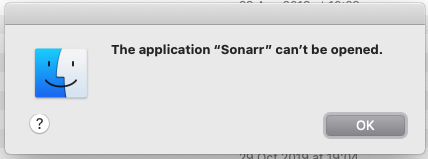
I just get a "The application "SONARR" can't be opened" dialogue,
 jchhenderson
on 4 Nov 2019
jchhenderson
on 4 Nov 2019
I just get a "
The application "SONARR" can't be opened" dialogue,
Me too. You don't want to run the app from the applications folder for it to work, instead set things up using the Terminal app as detailed here https://github.com/Sonarr/Sonarr/issues/3168#issuecomment-544201112
Jafalex
on 4 Nov 2019
Me too. You don't want to run the app from the applications folder for it to work, instead set things up using the Terminal app as detailed here #3168 (comment)
Thanks! ...but that also didn't work when I tried it - I'll give it another shot.
jchhenderson
on 4 Nov 2019
Thanks! ...but that also didn't work when I tried it - I'll give it another shot.
If you are using version 3 instead of 2 like in comment #3168, the path to the executable should be;
/Applications/Sonarr.app/Contents/MacOS/Sonarr.exe
Test this command from Terminal, it should start Sonarr;
/Library/Frameworks/Mono.framework/Versions/Current/Commands/mono --debug /Applications/Sonarr.app/Contents/MacOS/Sonarr.exe
 omikron
on 4 Nov 2019
omikron
on 4 Nov 2019
If you are using version 3 instead of 2 like in comment #3168, the path to the executable should be;
I'm going to include this disclaimer above, thanks!
Test this command from Terminal, it should start Sonarr
This is a great example for testing before you write the launch script.
Updated original comment. Thanks!
jef
on 4 Nov 2019
Thanks! ...but that also didn't work when I tried it - I'll give it another shot.
If you are using version 3 instead of 2 like in comment #3168, the path to the executable should be;
/Applications/Sonarr.app/Contents/MacOS/Sonarr.exeTest this command from Terminal, it should start Sonarr;
/Library/Frameworks/Mono.framework/Versions/Current/Commands/mono --debug /Applications/Sonarr.app/Contents/MacOS/Sonarr.exe
Thanks!
Interestingly, this worked (Sonarr started after requesting permission)
/Library/Frameworks/Mono.framework/Versions/Current/Commands/mono --debug /Applications/Sonarr.app/Contents/MacOS/Sonarr.exe
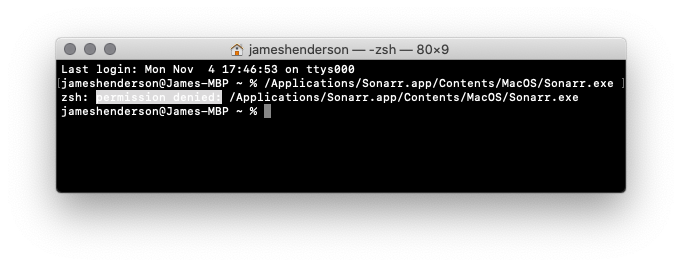
but this gave me "permission denied" (no permission requested)
/Applications/Sonarr.app/Contents/MacOS/Sonarr.exe
I wonder why.
jchhenderson
on 4 Nov 2019
but this gave me "permission denied" (no permission requested)
/Applications/Sonarr.app/Contents/MacOS/Sonarr.exeI wonder why.
Where is the permission denied part? If this is your first time running Sonarr, you will need to open Sonarr.app by right-clicking it and "Open" then "Alllow"
jef
on 4 Nov 2019
where is the permission denied part? If this is your first time running Sonarr, you will need to open Sonarr.app by right-clicking it and "Open" then "Alllow"
It's not my first time with the app (is was running fine before Catalina). There simply is no option to right-click and "allow"
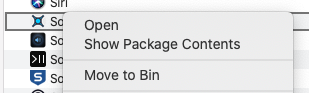
After opening, I get this:
Through terminal, I get this:
jchhenderson
on 4 Nov 2019
I was just gonna say... right click + open doesn't work in this case. All other times with unverified developers, yep that's the way to do it. But in this case, it doesn't work and still displays the "Can't be opened" alert. The only way for me to make things work was exactly as described in #3168.
Edit: I've actually had to stick with v2, because v3 won't work with either "right click + Open" nor Terminal. Looks like I'm stuck with v2 forever ffs...
Jafalex
on 4 Nov 2019
@Jafalex that sounds like the issue I just reported where the Sonarr script doesn’t have the executable bit set. Look at my recent issues for a workaround (I’m on my mobile at the moment).
formerandroider
on 4 Nov 2019
You need to run this whole line:
/Library/Frameworks/Mono.framework/Versions/Current/Commands/mono --debug /Applications/Sonarr.app/Contents/MacOS/Sonarr.exe
Let me know your results after that.
jef
on 4 Nov 2019
line : chmod +x /Applications/Sonarr.app/Contents/MacOS/Sonarr
worked for me to fix 'Sonarr can't be opened' issue.
Also, thanks @hijxf fix provided worked without giving sh full disk access. Files downloaded to local are moving to nas folders by Sonarr . One niggling issue I have is Sonarr's 'Organize and rename' is not working.
 viksandhu
on 4 Nov 2019
viksandhu
on 4 Nov 2019
@hijxf
Thanks for reply and apologies for delay
Can you also make sure you have your user and group permissions for that folder group? Even though there is Full Disk Access, it may be wonky depending on the troubleshooting steps you took.
I invested an evening brushing up on Unix file permissions / access modes and threw everything I could at this - including your kind suggestion before you suggested it - but no luck
Trying to clear a path for that reinstall...
Glad your solution is working for some folks
Regards
ldexterldesign
on 5 Nov 2019
You need to run this whole line:
/Library/Frameworks/Mono.framework/Versions/Current/Commands/mono --debug /Applications/Sonarr.app/Contents/MacOS/Sonarr.exeLet me know your results after that.
Hi - I have already stated (above) that the whole line works fine., My comment was based on why does the whole line work but the "shorter" line does not work.
thanks,
James.
jchhenderson
on 5 Nov 2019
My comment was based on why does the whole line work but the "shorter" line does not work.
Sorry, must have missed that part. That part won't work 🙁 It's a binary that's suppose to be ran with mono.
jef
on 5 Nov 2019
Sorry, must have missed that part.
It’s all good :)
...thanks for the explanation!
jchhenderson
on 5 Nov 2019
Duplicati was dealing with the same issue and recently landed a PR that addresses it
https://github.com/duplicati/duplicati/pull/3969
Their solution is to drop the bash script to start the app and instead do it through an Objective C wrapper.
This aligns with what I thought we would need to do, but we'll need to look into how we can do it, as we don't currently develop on macOS or have build agents for macOS.
markus101
on 6 Nov 2019
Been trying to find a workaround for ages that avoids having terminal open while running Sonarr, and I finally found one! Granting full disk access to sh (/bin/sh) has completely fixed it for me.
@narmbrister This is a kind of "sledgehammer to crack an egg" approach. The whole point of of the macOS FS restrictions is so that there is granular control of what has access to your files. What you've done here is allowed anything that runs through /bin/sh access to your entire filesystem. Anything that now runs on your system can call a script - whether you knowingly want it to or not - and access and modify anything on your system (although Gatekeeper should keep your core OS files safe unless you've disabled that too).
EDIT (2): I see someone else addressed this concern earlier but GitHub hid it from me for some reason (too lengthy a thread, perhaps?).
Since we know that the command mentioned by @jef earlier (and apologies if I've misattributed that to someone but there's a lot to scroll through :P ) works without any other interventions (I'm ignoring the fact that one's terminal application will request access to files for the moment), I've come up with the safest workaround (at least as far as I can tell) I can think of that will survive Sonarr updates, doesn't require a terminal to be running all the time, and doesn't require granting Full Disk Access to things unnecessarily: an Automator app (some credit to @dberlin for the idea 😁).
If you want to build your own:
- Open Automator
- Choose "Application" as the automator document type
- Type "shell" in the search context (it should already have focus) or find "Run Shell Script" within the automation library, under "Utilities"
- Drag the "Run Shell Script" action to the Workflow pane on the right
- Paste the following in to the text field
/Library/Frameworks/Mono.framework/Versions/Current/Commands/mono --debug /Applications/Sonarr.app/Contents/MacOS/Sonarr.exe(the--debugflag is optional but probably helpful) - Save the application to a location of your choice, ensuring that the "File Format" option is set to "Applciation"
- Open
System Preferences > Security & Privacy > Privacy > Full Disk Accessand drag the newly created app in to the application list on the right to grant it access.
And that's it. You can run this application now to boot Sonarr and set it to be the application that loads at system startup instead of the normal one, if that's how you have things configured. If you do, just make sure that Sonarr isn't already running or set to load at boot otherwise it will fail to start (for the usual reasons that you can't run Sonarr twice).
With this, only the Sonarr Automator app has access to your filesystem, not anything invoked through /bin/sh/ or mono.
If you don't feel like going through all the hassle of creating an Automator application yourself, you can skip steps 1-6 and download the one I've created and uploaded here (although if your Sonarr install is not at the location above and/or you're not using v3 and/or you don't trust me then you'll have to build your own anyway).
Hope this helps!
(SHA1 Checksum: d5e15e0235342bf62cb7f71254c751c455f5f5c8)
(MD5 Checksum: 75ca5d689932ed86aa858364c9de7ffe)
EDIT: If you'd prefer finer control over the FS access, skip step 7 and, instead, after launching the app, navigate through the UI and attempt to add a few new root folder mappings at locations you know Sonarr uses (for me these are removable drives and ~/Downloads, for example). The UI will appear to hang as it opens up the access request dialog on macOS (which may or may not be on a remote machine, depending on your setup). Once you permit access, the folder tree will load and you can cancel the root folder add.
 h0bd0b1in
on 29 Dec 2019
h0bd0b1in
on 29 Dec 2019
Hi h0bd0b1in,
Glad to see a workaround. Just did it. Running Sonarr fine, but the upgrade is failing. Am on 3.0.3.671 and am trying to go to 3.0.3.677. Here's the error I'm seeing:
19-12-29 07:41:16.2|Info|InstallUpdateService|Deleting old update files
19-12-29 07:41:16.3|Info|InstallUpdateService|Downloading update 3.0.3.677
19-12-29 07:41:16.6|Info|InstallUpdateService|Verifying update package
19-12-29 07:41:16.9|Info|InstallUpdateService|Update package verified successfully
19-12-29 07:41:16.9|Info|InstallUpdateService|Extracting Update package
19-12-29 07:41:17.7|Info|InstallUpdateService|Update package extracted successfully
19-12-29 07:41:17.7|Info|BackupService|Starting Backup
19-12-29 07:41:20.2|Info|InstallUpdateService|Preparing client
19-12-29 07:41:20.3|Info|InstallUpdateService|Starting update client /var/folders/4c/spydd3_n21qb2ww6fcmq0pdr0000gn/T/sonarr_update/Sonarr.Update.exe
19-12-29 07:41:20.3|Info|InstallUpdateService|Sonarr will restart shortly.
19-12-29 07:41:20.3|Error|CommandExecutor|Error occurred while executing task ApplicationUpdate
[v3.0.3.671] System.ComponentModel.Win32Exception (0x80004005): ApplicationName='mono', CommandLine='--debug /var/folders/4c/spydd3_n21qb2ww6fcmq0pdr0000gn/T/sonarr_update/Sonarr.Update.exe 16430 /var/folders/4c/spydd3_n21qb2ww6fcmq0pdr0000gn/T/sonarr_update /Applications/Sonarr.app/Contents/MacOS/Sonarr.exe ', CurrentDirectory='', Native error= Cannot find the specified file
at System.Diagnostics.Process.StartWithCreateProcess (System.Diagnostics.ProcessStartInfo startInfo) [0x0029f] in /Users/builder/jenkins/workspace/build-package-osx-mono/2018-10/external/bockbuild/builds/mono-x64/mcs/class/System/System.Diagnostics/Process.cs:768
at System.Diagnostics.Process.Start () [0x0003a] in /Users/builder/jenkins/workspace/build-package-osx-mono/2018-10/external/bockbuild/builds/mono-x64/mcs/class/referencesource/System/services/monitoring/system/diagnosticts/Process.cs:2005
at (wrapper remoting-invoke-with-check) System.Diagnostics.Process.Start()
at NzbDrone.Common.Processes.ProcessProvider.Start (System.String path, System.String args, System.Collections.Specialized.StringDictionary environmentVariables, System.Action1[T] onOutputDataReceived, System.Action1[T] onErrorDataReceived) [0x00187] in M:BuildAgentwork63739567f01dbcc2srcNzbDrone.CommonProcessesProcessProvider.cs:181
at NzbDrone.Core.Update.InstallUpdateService.InstallUpdate (NzbDrone.Core.Update.UpdatePackage updatePackage) [0x00257] in M:BuildAgentwork63739567f01dbcc2srcNzbDrone.CoreUpdateInstallUpdateService.cs:143
at NzbDrone.Core.Update.InstallUpdateService.Execute (NzbDrone.Core.Update.Commands.ApplicationUpdateCommand message) [0x000f7] in M:BuildAgentwork63739567f01dbcc2srcNzbDrone.CoreUpdateInstallUpdateService.cs:236
at NzbDrone.Core.Messaging.Commands.CommandExecutor.ExecuteCommand[TCommand] (TCommand command, NzbDrone.Core.Messaging.Commands.CommandModel commandModel) [0x000f6] in M:BuildAgentwork63739567f01dbcc2srcNzbDrone.CoreMessagingCommandsCommandExecutor.cs:95
at (wrapper dynamic-method) System.Object.CallSite.Target(System.Runtime.CompilerServices.Closure,System.Runtime.CompilerServices.CallSite,NzbDrone.Core.Messaging.Commands.CommandExecutor,object,NzbDrone.Core.Messaging.Commands.CommandModel)
at System.Dynamic.UpdateDelegates.UpdateAndExecuteVoid3[T0,T1,T2] (System.Runtime.CompilerServices.CallSite site, T0 arg0, T1 arg1, T2 arg2) [0x00035] in /Users/builder/jenkins/workspace/build-package-osx-mono/2018-10/external/bockbuild/builds/mono-x64/external/corefx/src/System.Linq.Expressions/src/System/Dynamic/UpdateDelegates.Generated.cs:1795
at (wrapper dynamic-method) System.Object.CallSite.Target(System.Runtime.CompilerServices.Closure,System.Runtime.CompilerServices.CallSite,NzbDrone.Core.Messaging.Commands.CommandExecutor,object,NzbDrone.Core.Messaging.Commands.CommandModel)
at NzbDrone.Core.Messaging.Commands.CommandExecutor.ExecuteCommands () [0x00027] in M:BuildAgentwork63739567f01dbcc2srcNzbDrone.CoreMessagingCommandsCommandExecutor.cs:41
Any thoughts?
- Jon
jonlbauer
on 29 Dec 2019
Also, "restart Sonarr" gives me this:
The action “Run Shell Script” encountered an error: “open: unrecognized option `--debug'
Usage: open [-e] [-t] [-f] [-W] [-R] [-n] [-g] [-h] [-s
Help: Open opens files from a shell.
By default, opens each file using the default application for that file.
If the file is in the form of a URL, the file will be opened as a URL.
Options:
-a Opens with the specified application.
-b Opens with the specified application bundle identifier.
-e Opens with TextEdit.
-t Opens with default text editor.
-f Reads input from standard input and opens with TextEdit.
-F --fresh Launches the app fresh, that is, without restoring windows. Saved persistent state is lost, excluding Untitled documents.
-R, --reveal Selects in the Finder instead of opening.
-W, --wait-apps Blocks until the used applications are closed (even if they were already running).
--args All remaining arguments are passed in argv to the application's main() function instead of opened.
-n, --new Open a new instance of the application even if one is already running.
-j, --hide Launches the app hidden.
-g, --background Does not bring the application to the foreground.
-h, --header Searches header file locations for headers matching the given filenames, and opens them.
-s For -h, the SDK to use; if supplied, only SDKs whose names contain the argument value are searched.
Otherwise the highest versioned SDK in each platform is used.”
- Jon
jonlbauer
on 29 Dec 2019
Hm. Maybe I need the latest version of Mono. I'm on 5.20.1.19. Trying to upgrade and re-try it.
Edit: Ok, am on Mono 6.6.0.161 and getting the same issues...
It looks like it's choking on the --debug argument, but not sure why.
- Jon
jonlbauer
on 29 Dec 2019
I get the same error whether I download your version or do it myself.
It bombs out with the message : _The action "Run Shell Script" encountered an error ""_
...it works fine if I type the script directly into terminal (which is what I have being doing until now).
jchhenderson
on 29 Dec 2019
I understand the main issue is that Sonarr have no macOS build machines, but I was able to create a native launcher (based on the Duplicati one linked in a past comment). The only issue I now have is that the native launcher creates a Sonarr process, which means Sonarr proper tells me to bugger off as it thinks it's already running 🤦♂️
formerandroider
on 29 Dec 2019
And I've worked around that issue by renaming the executable. It's a bit of a bad workaround, as it breaks upgrades (the app bundle has to be signed for it to work properly).
I'll push my launch script to GH if someone wants to use it.
formerandroider
on 29 Dec 2019
I gave up on all of this and just run it in docker on Mac (using
linuxserver/sonarr container)
Zero issues, and if I ever feel like moving it to a Linux box it will be
trivial.
On Sun, Dec 29, 2019, 1:19 PM Liam Williams notifications@github.com
wrote:
And I've worked around that issue by renaming the executable. It's a bit
of a bad workaround, as it breaks upgrades (the app bundle has to be signed
for it to work properly).I'll push my launch script to GH if someone wants to use it.
—
You are receiving this because you were mentioned.
Reply to this email directly, view it on GitHub
https://github.com/Sonarr/Sonarr/issues/3168?email_source=notifications&email_token=AACPI27B6WOVB4SFM3EKSMDQ3DZ53A5CNFSM4HYNBST2YY3PNVWWK3TUL52HS4DFVREXG43VMVBW63LNMVXHJKTDN5WW2ZLOORPWSZGOEHZGNEQ#issuecomment-569534098,
or unsubscribe
https://github.com/notifications/unsubscribe-auth/AACPI24Z3FKJAZA3QT2IUJ3Q3DZ53ANCNFSM4HYNBSTQ
.
dberlin
on 29 Dec 2019
@jonlbauer and @jchhenderson - Hmm, not sure why you’re getting the restart issue as essentially it should function the same whether you run the command at the command line or in Automator. I’ll be honest, I never thought to test whether restarting worked as it’s not something I’ve had to do often with Sonarr.
By the looks of things, open gets called during the restart but as to why it gets passed the original arguments from mono is beyond me. I can hazard a guess that when you run the command, mono takes all of its arguments and stores them as a single unit. Then, when restart is invoked, that unit gets passed as is to the open command. Maybe when you launch natively, there’s some additional context set that has the app name so instead of being passed the mono arguments it instead knows to call open /Applications/Sonarr.app.
Taking out --debug will likely solve the restart issue but not the update issue. That has me stumped. I don’t understand enough about the way all the bits and pieces work to determine why the update process can’t access the downloaded update files.
Out of interest, what shell did you tell Automator to use when you set up the application? Mine defaulted to /bin/zsh because that’s how I've got my system configured. I’m wondering if setting it to /bin/sh might make a difference since we know that Mono uses that itself? I’ve been caught out before by nuances in the different shells that have made stuff fail.
h0bd0b1in
on 30 Dec 2019
Hmm, not sure why you’re getting the restart issue as essentially it should function the same whether you run the command at the command line or in Automator.
...not sure what you mean by restart. I am trying to start it for the first time.
I tried both zsh and then bash - both worked when typing the command directly into terminal. I just tried sh and that also failed with the same error.
jchhenderson
on 30 Dec 2019
OK, I got this working after a little googling etc by appending an & to the end within automator.
/Library/Frameworks/Mono.framework/Versions/Current/Commands/mono --debug /Applications/Sonarr.app/Contents/MacOS/Sonarr.exe &
jchhenderson
on 8 Jan 2020
@jchhenderson That's really odd that it would work when the process is backgrounded but not when run in the foreground. Glad you sorted things though! Does it survive a restart or throw an error?
h0bd0b1in
on 13 Jan 2020
no errors. ...not sure what you mean by a restart though.
jchhenderson
on 14 Jan 2020
I solved this by running in my terminal /Applications/Sonarr.app/Contents/MacOS/Sonarr then later a pop up will ask authorization to access the disk from the terminal (Sonarr is running there).
Additionally
Open System Preferences > Security & Privacy > Privacy > Full Disk Access
and add Sonarr to those apps with FullDiskAccess
This seems to have solved it, probably Sonarr does not even need to have full disk access, It just needed me to confirm to the pop up that Sonarr had access to the external ssd drive where it move the movies
and I was able to get that pop up by running sonarr in the terminal
Actually the terminal was granted permission
 fabriziobertoglio1987
on 16 Jan 2020
fabriziobertoglio1987
on 16 Jan 2020
no errors. ...not sure what you mean by a restart though.
@jchhenderson If Sonarr updates or if you use the Restart button in the System page, it restarts the Sonarr binary/exe (I think) and that seems to throw issues when using my solution. I'm intrigued to know if backgrounding the process like you are doing also has issues or not.
h0bd0b1in
on 20 Jan 2020
I can't update Sonarr within the app - it fails. Having said that, it's on 3.0.3.668 (which is latest) yet it says there is an update available.
Sonarr process survives the restart, but mono doesn't (so it doesn't work).
jchhenderson
on 20 Jan 2020
Hm. I'm running it within terminal just by going to the /Applications/Sonarr.app/Contents/MacOS folder and running "./Sonarr" and EVERYTHING works perfectly...
- Jon
jonlbauer
on 20 Jan 2020
Nothing I do seems to get it fully working. The disk space always shows as 0B free and it's unable to chmod/chown on newly created episodes. It also seems to put everything in the root Show dir instead of the correct Show/Season format. I've tried the automator trick referenced above and a few other way references previously. Thoughts? The automator script (app) that I created is owned by my username:staff and my Media is downloaded to /Users/myaccount/Downloads/complete/Shows/. Should I change the owner/group on the app?
 cg636
on 23 Jan 2020
cg636
on 23 Jan 2020
MacOS wants to use LaunchAgents to load programs. So in the LaunchAgents directory I put a plist file for Sonarr (and Jackett and Radarr and so on):
cat /Users/kids/Library/LaunchAgents/com.github.sonarr.plist
To launch this for the first time, you do: "launchctl load /Users/kids/Library/LaunchAgents/com.github.sonarr.plist" from the terminal
I have slight trouble with upgrades because Apple checks for the app being "signed" with an official Apple developer account.
How it works for me:
"launchctl unload /Users/kids/Library/LaunchAgents/com.github.sonarr.plist" in the terminal
using Finder, copy new Sonarr on top of old Sonarr in the /Applications directory
sudo xattr -rd com.apple.quarantine /Applications/Sonarr.app
"launchctl load /Users/kids/Library/LaunchAgents/com.github.sonarr.plist" in the terminal
If a message pops up about moving the program to the trash, press the cancel button. That's what happens if the system tries to reload Sonarr before I do the xattr command.
If you don't want the system loading Sonarr for you, you can remove the part about "KeepAlive". I want Sonarr, Radarr, Jackett, etc. loading every time I restart.
dkids
on 9 Feb 2020
does your plist look something like this?
<?xml version="1.0" encoding="UTF-8"?>
<!DOCTYPE plist PUBLIC "-//Apple Computer//DTD PLIST 1.0//EN" "http://www.apple.com/DTDs/PropertyList-1.0.dtd">
<plist version="1.0">
<dict>
    <key>Label</key>
    <string>Sonarr</string>
    <key>ProgramArguments</key>
    <array>
        <string>/Library/Frameworks/Mono.framework/Versions/Current/Commands/mono</string>
        <string>--debug</string>
        <string>/Applications/Sonarr.app/Contents/MacOS/NzbDrone.exe</string>
    </array>
    <key>RunAtLoad</key>
    <true/>
    <key>KeepAlive</key>
    <true/>
</dict>
</plist>
Yes, exactly that.
Sorry, trying to do all of my Sonarr maintenance at the same time and forgot to copy it in.
I don't know if you could make the three strings one line (probably) but it's more clear having it broken up in 3 for readability.
Thanks!
dkids
on 9 Feb 2020
I was having trouble with Sonarr and Radarr updating when I had them in /Applications. I'm assuming there should be a box popping up for permission that I never see.
I've moved them to $HOME/Applications and things are running much better. Sonarr is on the phantom-develop channel and it updated itself today without issue. Radarr is on the nightly and it's also running fine.
Nothing - not Sonarr, Radarr, Terminal, mono - has Full Disk Access.
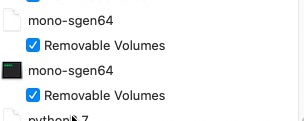
It feels a little weird because I run Sonarr and Radarr and other programs under a non-Administrator account. But so far, so good. And I'm much more comfortable not having anything running with Full Disk Access that doesn't absolutely need it.
dkids
on 22 Feb 2020
Hi @dkids , I know its just over a month since you've last updated us on your method of getting Sonarr/Radarr working but I'm wondering if you're able to to a step by step guide to mimic your setup.
I've tried copying your instructions but I'm not the most literate and don't want to mess anything up. Specifically the 9th Feb instructions?
Thanks
 ParDanMe87
on 29 Mar 2020
ParDanMe87
on 29 Mar 2020
Hi @ParDanMe87,
Use [Docker]
If you need help then create a [forum thread], ping me and I'll post my docker-compose.yml
I believe Sonarr is developed on Linux and it shows - IMO Sonarr is far more stable running on Linux than macOS (assume it's a [Mono] thing)
Regards
ldexterldesign
on 30 Mar 2020
This has completely stopped working for me as of the last update (3.0.73, I think)- absolutely no clue why.
I'm back to the “Sonarr” cannot be opened because the developer cannot be verified error and I cannot fix it anymore.
[edit]
scratch that. @dkids' solution fixed it completely! Thanks!
jchhenderson
on 2 May 2020
Add me to the list. Same error, Sonarr via Docker on Mac. Details below.
--
Environment: MacOS 10.15.4 (Catalina)
Docker Version: 2.2.0.5 (43884)
Sonarr: 2.0.0.5344
Mono: 5.20.1.34 (per sonarr panel)
Jackett: 0.16.127.0
Command Line Experience: Novice/Noob
[bullet to maintain below formatting]
.
EXPECTED BEHAVIOR
Ability for Sonarr/Radarr to run their magic & moving a downloaded file to its designated location
Keep Sonarr/Radarr connected to Jackett ~ use http://jacket:9117 in the related URLs.
.
.
CURRENT BEHAVIOR
Sonarr/Radarr will not import downloaded files.
Sonarr/Radarr will not accept http://jacket:9117 in the URL.
.
.
ATTEMPTS TO FIX
Grant Full Disk Access & Folders to bash, sh, smbd,sshd,Terminal, Docker (temporary to find a fix.)
Full Read/Write permissions to MacOS target folders (applied to enclosed directories)
Redirected URLS and downloads to less secured public shared space
• Create new directory structures
Use the same directories for sonarr/radarr/jackett
sudo chown -R $(whoami) for paths
Failed attempts at command line fixes from others w/this problem
Reboots
Rebuilds of Sonarr/Jacket/Radarr containers
Delete and reinstall images & containers for Sonarr/Jackett/Radarr
Delete and reinstall Docker
.
.
DATA POINTS
Substituting (hxxp://jacket:9117•••) for Jacket IP (172.17.0.2:9117/•••) works until Jacket IP changes
This only applies to the breaking jacket IP and does not address Sonarr/Radarr import issues.
Directories at the macOS level were self created through finder. Permissions opened.
.
.
ERROR MESSAGES
Error messages are from Sonarr/Radarr, Indexer Name Error: Connect Failure (not route to host): IP.
When Jackett IP changes:
“All indexers are unavailable due to failures”
"All search-capable indexers are temporarily unavailable due to recent indexer errors.
"All rss-capable indexers are temporarily unavailable due to recent indexer errors.
.
.
_[Edit: formatting & removal of double post.]_
 pixelrogue1
on 4 May 2020
pixelrogue1
on 4 May 2020
Hi @pixelrogue1,
Confident your issue a is Docker one not a macOS one, and not directly related to this issue
Please [do this] if you need help - this thread is busy enough already so I'd invite you to remove your comment(s)
Kind regards
ldexterldesign
on 4 May 2020
Hi @dkids , I know its just over a month since you've last updated us on your method of getting Sonarr/Radarr working but I'm wondering if you're able to to a step by step guide to mimic your setup.
I've tried copying your instructions but I'm not the most literate and don't want to mess anything up. Specifically the 9th Feb instructions?
Thanks
Hi, his _22-Feb_ instructions fixed it for me.
There are two _Applications_ folders on your Mac (assuming 1 account).
Normally, when you drag an app to ### _Applications_ , it goes into the "for everyone" folder which is located
`_
This is the one you see when you click on "_Applications_" in the Finder Sidebar
However, there is another Applications folder for each user located at:
`_
If you drag Sonarr there instead, it will work. You won't see the app in "Applications" in there sidebar, but it will show up in LaunchPad.
[edited for typos and formatting]
jchhenderson
on 4 May 2020
Hi @pixelrogue1,
Confident your issue a is Docker one not a macOS one, and not directly related to this issue
Please do this if you need help - this thread is busy enough already so I'd invite you to remove your comment(s)
Kind regards
@ldexterldesign
Glad to hear this would specific to Docker and not macOS, as here I am thinking the issue resided somehow between the two. Also thank you for for mentioning as I accidentally posted twice, so deleted the one post.
If I understood the post correctly, I mentioned you in a post already there on the Sonarr thread and added additional data points that may help discover a solution.
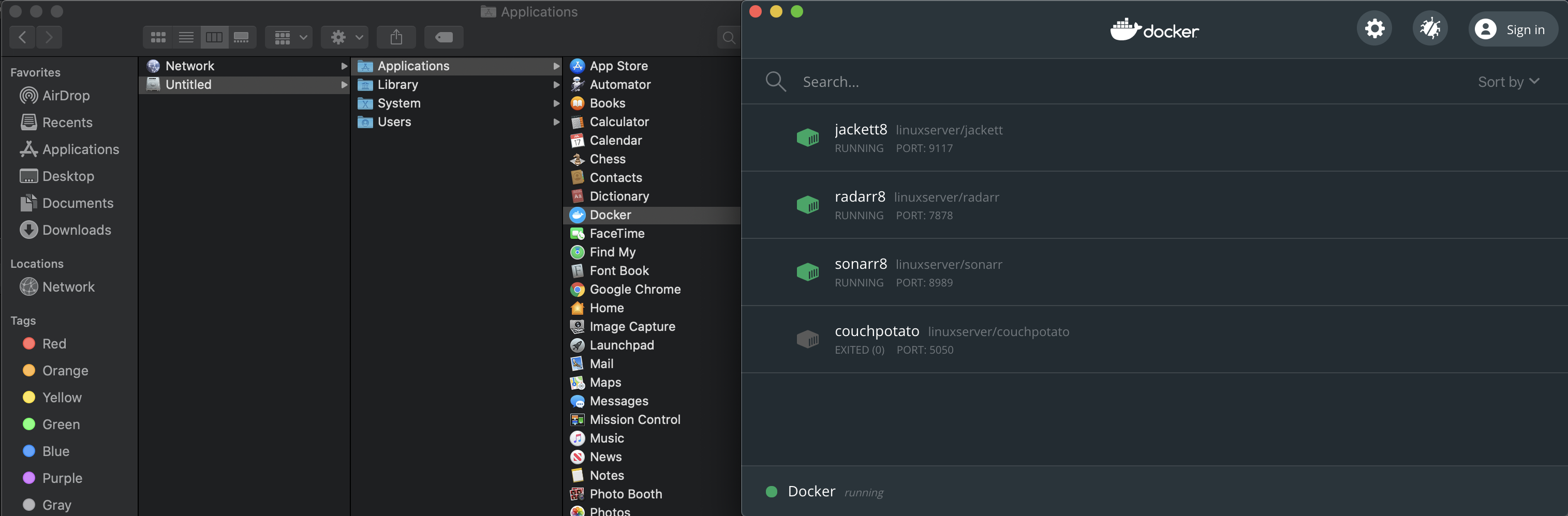
For clarity to this thread, Sonarr is running in Docker so there is no traditional application to move to the higher level Applications directory. That said, Docker happens to already be installed and running in that higher directory (not Users > User Name > Applications.)
pixelrogue1
on 4 May 2020
ldexterldesign
on 4 May 2020
ldexterldesign suggested setting up Docker w/Compose.
Compose is much better all around, AND it fixed the Jackett issue w/the changing IPs. 😀
We still can not yet get past the import error:
Import failed, path does not exist or is not accessible by Sonarr: /Users/xxxxx/media3/-data/filename.mkv. Ensure the path exists and the user running Sonarr has the correct permissions to access this file/folder 🥴
pixelrogue1
on 5 May 2020
Hi @pixelrogue1,
Please stop posting here
Your issue is not related to sonarr/macos as you're using docker
Regards
ldexterldesign
on 5 May 2020
@ldexterldesign
We have not yet determined the cause as being specific to Docker. Errors are being generated by Sonarr. _All the same I don't want to cause any issues by posting here if you remain confident the issue has nothing to do w/Sonarr._
pixelrogue1
on 5 May 2020
@pixelrogue1,
This thread is for _a quite specific and identified disk-access issue_ for Sonarr installed _directly_ on macOS.
Your issues of:
- Sonarr/Radarr will not import downloaded files.
- Sonarr/Radarr will not accept http://jacket:9117 in the URL.
...are _completely different_ to this thread.
Even if you had installed Sonarr directly on Catalina, your issues would still not be relevant to this thread. Basically, you are describing _a whole different set of problems_ and therefore causing confusion here.
Please, and with sincerest intent, please remove your posts from this thread. You are absolutely welcome to start a new thread that is relevant to your issue :-)
jchhenderson
on 5 May 2020
_I've hidden the unrelated (docker) comments, including legitimate responses to it. Hiding em instead of removing ensures that they remain accessible since moving them elsewhere isn't possible on github._
I've largely stayed away from the Catalina discussion simply because I lack the expertise to work on it. I wish we had an mac osx maintainer for Sonarr that could assist us in keeping up support.
During Catalina Alpha/Beta we were aware of some issues but in a later beta they disappeared only to finally reappear in RTM. We know there's an issue but the dev that had osx expertise isn't active anymore.
My Air is so old that I'm like 2 OS versions behind, so I can't even test stuff myself.
I believe there are two separate concerns:
- Catalina blocking the app due to being unsigned/unverified. With the user having to follow certain steps exactly in order to add an exception in Security & Privacy to allow it to run. Proper install instructions could help here.
- Sonarr unable to access the disk. With the nasty workaround being to give full access to sh. This is the problematic one.
From my understanding, most of these problems are caused by the fact that Sonarr has a bootstrap shell script that checks for mono and starts Sonarr using it. from the OS perspective the shell script is the app, being run by sh, and lacks the appropriate permissions.
I recall seeing threads about various approached:
- Compiled OSX bootstrap application to replace the shell script
- Different startup method to make OS put the bootstrap script, mono and Sonarr in the same 'sandbox'
- Bundling Sonarr with mkbundle
I have no idea how feasible any of these options really are, or whether they're just another workaround that happens to work.
The one thing we absolutely do not want to do is submit every Sonarr version to Apple for notarization. If notarizing a one-time compiled bootstrap application improves the situation then that's something that we can discuss, but only if it offers notable benefit over the alternatives.
However, a mechanism to have the user add an exception somewhere that applies specifically to Sonarr is totally acceptable too.
My biggest concern with most solutions that I've seen so far is that they smell like workarounds.
Ultimately what I'd like to see is a solution that 1) Allows the user to run the application by approving an exception. 2) Allows to the user to give disk permissions specifically to Sonarr.
Anything that bypasses the security mechanisms are likely to be patched out somewhere in the future. We've seen that during the beta.
So what approach would ensure that the OS sees the running executable as 'Sonarr' and what steps are necessary to give the user an easy method of applying those exceptions?
TL;DR: We need a mac osx maintainer. If you know a thing or two about osx development and security and you're interested in helping out, then let us know.
 Taloth
on 5 May 2020
Taloth
on 5 May 2020
Thanks @Taloth,
Devil's advocate: would it be so bad to simply drop macOS support and invest that resource in improving the docker (install) documentation. Honestly, since moving from macOS to docker it's saved me so much babysitting and performance is better IMO.
Thumbs 👍 up / 👎 down if you agree/disagree poll
Sincerely
ldexterldesign
on 5 May 2020
I thumbed down, because I don't use Docker and don't want to add yet another system to my system (hope that makes sense).
jchhenderson
on 5 May 2020
Thanks @Taloth.
However, I think you hid my first comment by accident as it was referring to the right topic :-)
https://github.com/Sonarr/Sonarr/issues/3168#issuecomment-623298538
cheers,
James.
jchhenderson
on 5 May 2020
Thanks @Taloth,
Devil's advocate: would it be so bad to simply drop macOS support and invest that resource in improving the docker (install) documentation. Honestly, since moving from macOS to docker it's saved me so much babysitting and performance is better IMO.
Thumbs 👍 up / 👎 down if you agree/disagree poll
Sincerely
I know your poll isn’t official but the problem with it is github is mainly going to attract people who are well versed in tinkering with code/docker/terminal etc.
Plenty of people who don’t have that knowledge or confidence will have workarounds through reddit, or who have stumbled upon this thread trying to simply to get their Sonarr/Radarr MacOS instance running reliably.
I’ve looked at docker and can’t get it to work, it’s above my level of expertise. I’m currently have it working by running some terminal commands which I found and each time my Mac restarts then have to manually apply those terminal commands which whilst works isn’t ideal.
It seems @dkids has some kind of workaround but I couldn’t figure out his explanation.
Hopefully @Taloth will find the person they require to help develop the MacOS applications.
ParDanMe87
on 5 May 2020
@pixelrogue1 You're using Docker, and thus your issues are not the same as the ones discussed here. Others have told you this several times. If you have support questions please post on our forums instead.
Don't reply here further, I'll remove any post you make.
Taloth
on 5 May 2020
@Taloth
Speaking as a person who has done this role for other open source projects, you should drop MacOS support at this point.
I've played the game of building shims and update mechanisms for mono apps that work for the current OS version.
But the truth is this is a losing game. Apple, release on release, is making it harder and harder to make any of this work. What you are seeing now is just the latest round of that.
In the future, they will make it even worse (requiring signing keys for everything).
The direction this goes is obvious, and Apple is not even hiding it - they have made clear they don't want user-made updating mechanisms, etc. They really don't want apps outside the app store, in fact.
Signing up amounts to playing whack-a-mole since the OS manufacturer does not want this to work.
IMHO, users would be better served with people spending time making things like Sonarr-in-docker frictionless on MacOS than playing the game of whack-a-mole. - you will end up having to do it anyway as Apple makes the current model impossible, might as well figure out how to get users there now rather than in a rush.
It is, as someone pointed out, not there now on the setup side, but once set up, it works fine.
I run sabnzbd, sonarr, etc all in docker containers on macos.
The added benefit is that when apple makes this stuff stop working (or i get bored enough), i'll just move the config files and volume data over to a linux or windows server and it will just work (i've tried it).
So while I totally understand why people would prefer a solution of not dropping MacOS explicitly, IMHO it's your best bet.
@pixelrogue1 Your issues are unfortunately[ 100% user error, almost certainly related to either an older non-edge version of docker that has issues with bind mounts, or not having umask set properly.
It is unfortunately tricky ATM.
dberlin
on 5 May 2020
Speaking as a person who has done this role for other open source projects, you should drop MacOS support at this point.
This is one of the reasons why I absolutely don't want to go the notarization route.
I get what you're saying and ultimately in the next OSX version that might be exactly what we need to do, but I'm not convinced we need to do so _now_. What we could do is notify the user of that trend and suggest they consider docker as an alternative more future proof approach.
It does mean that we should make no effort to satisfy the gatekeeper unverified developer stuff. It's something the user can easily bypass safely, for the current OS version anyway.
Can you comment on the sh full permissions vs shim vs bundle part?
It's my understanding that it's the app sandbox that gets the permissions/entitlements.
Is there something we can do to allow the user to assign the filesystem permissions to Sonarr specifically? Like mkbundle or any other approach.
I'm not looking for something that'll work automatically, I'm just hoping for something that we can do to ensure Sonarr is seen as a separate app instead of sh/mono. So that exceptions apply specifically to Sonarr.
On the subject of docker, It's a lovely tool but please understand that a significant portion of support are related to docker volumes and permission because ppl have no clue what docker really is and how to configure it. The support hours we spend on that crap is insane.
I love docker, but I absolutely hate that clueless Sonarr users use it. It's another layer of complexity that 99% of the users don't need and don't understand. It's a bit like ppl installing linux and on the first permission issue they try chmod 777.
But ignore my rant, for a ton of users it is the best tool for the job.
Taloth
on 5 May 2020
Yeah, i hear you.
I don't think docker is great by any means, I'm just trying to think about with the starting point of "okay, assume someone is not going to want to invest the time to build out a real macos app out of all of this and keep it up to date in an otherwise cross-platform codebase. What do you do?".
Beyond that, there are a variety of ugly and not ugly methods, some mentioned here, some not (for example, making a privileged helper tool for Sonarr).
To directly answer your question: entitlements are assigned to apps/binaries. You can get inheritance going between parent-child apps, but it only inherits static rights, not ones granted afterwards. Anything that involves entitlements like that requires signing the binary. Full disk access does not.
If you ignore the "update itself" issue, mkbundle pretty easily solves the "sonarr needs full disk access" issue for that executable. It works fine to drag the bundle for full disk access (for now).
However, then you have to recreate the bundle on update :)
Shims that load and invoke the compiled sonarr binary entry point directly (IE without forking) enable you to avoid having to do this, since then you just replace that binary and declare victory.
These are all temporarily viable answers.
There is no official way to request full disk access outside of asking the user, and none of the sandbox entitlements are enough for Sonarr.
Another possibly viable answer would to be to have all privileged access on macos happen through a helper tool. I haven't delved too far into sonarr to determine if this is a great model, but in general it works okay as long as the main app is mostly asking about directory listings, existence/non-existence of various files, and renaming/moving files, etc.
(IE as long as the helper can be handed tasks to do and report on their status).
The privileged tool would still have to be added to full disk access, and macos requires that privileged tools (at least those done through smjobbless) be signed.
However, once done, everything else about sonarr should not need changing for macos at least until Apple decides all apps must go through app store.
These are basically the poisons you can pick at the moment.
As mentioned, right now full disk access does not require signed apps, so the former might be easier than the latter.
I would not expect that to last.
dberlin
on 5 May 2020
Ok, so if I read that correctly 'entitlements' are beyond scope since it's only relevant for the process of notarization and approval for execution. It deals with how the app will be behave, not what it can or cannot access.
The only relevant entitlement could be com.apple.security.cs.allow-jit. Is that relevant here given that the user will have to apply an exception for Sonarr regardless to bypass signing requirements?
afaik this is not a problem right now for the user, so presumably that particular entitlement isn't required.
However, then you have to recreate the bundle on update :)
We already produce mac osx specific releases, Sonarr isn't compiled specifically for osx, but it is bundled and the built-in updater grabs an osx download. So that should not be a huge concern.
It's a bit more concerning that we'd be bundling mono with no way for the user to pick a version, but maybe that's for the better. though it's more work for us to keep that updated.
I think that once .Net 5 comes out we might start moving in that direction, which would likely require a similar bundled approach. Perhaps that's a topic team Sonarr should put our focus on.
Shims that load and invoke the compiled sonarr binary entry point directly (IE without forking) enable you to avoid having to do this, since then you just replace that binary and declare victory.
Is that a viable approach? Can it actually test for mono, then load the mono binary into memory and execute the entrypoint in such a way that it essentially replaces the shell script we have now?
I'm just considering which of the two approaches would be easiest to implement and maintain.
These are all temporarily viable answers.
I would think this is only true for the 'can this execute' part of gatekeeper. Once apple demands signing of every application then we're done. Or is there something else that I'm overlooking?
There is no official way to request full disk access outside of asking the user.
I thought that the dialog that asks for permission must be shown each restart. But if it's a one time dialog then is it possible for the shim to do that? Or is it something that we simply have to tell the user in the installation instructions?
Finally, most users run Sonarr on startup. I'm actually unsure how the Sonarr installation is configured for that. But I'm curious how that would interact with the popup that the user should get for the disk access.
Or is the only viable option here to have the user give sonarr full access using the same method they give it to sh now?
Taloth
on 5 May 2020
Ok, so if I read that correctly 'entitlements' are beyond scope since it's only relevant for the process of notarization and approval for execution. It deals with how the app will be behave, not what it can or cannot access.
This isn't quite right, as the entitlements also control, for example, ability to access various folders like downloads.
See, e.g, https://developer.apple.com/documentation/bundleresources/entitlements/com_apple_security_files_downloads_read-write
For our purposes it doesn't matter since none of the entitlements help you
(trimming a bit)
Shims that load and invoke the compiled sonarr binary entry point directly (IE without forking) enable you to avoid having to do this, since then you just replace that binary and declare victory.
Is that a viable approach? Can it actually test for mono, then load the mono binary into memory and execute the entrypoint in such a way that it essentially replaces the shell script we have now?
Actually, yes, and you can write it either in C# or C.
The "easiest' way in C# looks like this:
- The "updater" is really the main executable
- It uses AssemblyLoadContext.Load method to load the "main" sonarr assembly, executes an entry point in it. This part works fine. See the plugin loading/using examples here: https://docs.microsoft.com/en-us/dotnet/core/tutorials/creating-app-with-plugin-support
- When an update happens, you can either restart yourself or try to use AssemblyLoadContext.Unload and reload it locally (Unloading works, restarting yourself is much more foolproof)
In this scenario the updater exe is mkbundle'd, the main sonarr binary is not.
You can also write this all in C using the mono embedding API.
I'm just considering which of the two approaches would be easiest to implement and maintain.
I've seen the assemblyloadcontext (and appdomains) used a lot to make long running C# server apps.
If you are already compiling macosx specific updates and releases, i'd expect the bundling approach is easier.
These are all temporarily viable answers.
I would think this is only true for the 'can this execute' part of gatekeeper. Once apple demands signing of every application then we're done. Or is there something else that I'm overlooking?
Nope, that's what i meant :)
There is no official way to request full disk access outside of asking the user.
I thought that the dialog that asks for permission must be shown each restart.
I mean that the full disk access permission is super special, and has to be granted through the security and privacy tab only.
With the other entitlements, you can get runtime dialog boxes to pop up and ask the user to okay it.
You cannot do this with full disk access in any supported way.
Finally, most users run Sonarr on startup. I'm actually unsure how the Sonarr installation is configured for that.
The typical mechanism is just adding it to the start-at-login apps for the user.
But I'm curious how that would interact with the popup that the user should get for the disk access.
Or is the only viable option here to have the user give sonarr full access using the same method they give it to sh now?
The latter is correct, there is no other option.
Because the typical mechanism is start-at-login, you don't hit any issues here since you have a user to ask.
I'm haven't explored, outside of privileged helper tools, whether you can make full disk access happen for launch daemons/other auto-starting background processes not associated with user+login.
I do not believe it will work in any easy/obvious manner (or if it does, it's luck)
dberlin
on 6 May 2020
In this scenario the updater exe is mkbundle'd, the main sonarr binary is not.
'bootstrapper' would be a more appropriate term, so I'm not confusing it with the sonarr updater application.
If the bootstrapper is mkbundled, then there's little reason not to mkbundle the entire app.
If the bootstrapper is written in C instead then we could still allow the user to install whatever mono version they desire and means I don't have invest time into setting up mkbundle.
So that leaves mkbundle sonarr or C bootstrapper. I'm a bit torn between them coz the bootstrapper is more magic to locate mono, load it etc.
The latter is correct, there is no other option.
Okay, so we need an instruction 'Give sonarr full disk access', that's fine. Combine that with the bundle/shim and the user will be able to do so granularity rather than blanket permission to sh.
I'm haven't explored, outside of privileged helper tools, whether you can make full disk access happen for launch daemons/other auto-starting background processes not associated with user+login.
I do recall one user setting up his own helper. I should look for the post.... (20 minutes later)
I think it was this one from last year: https://github.com/Sonarr/Sonarr/issues/3168#issuecomment-569500558
But reading it again, it's kinda a wrapper so mkbundle/shim should behave the exact same way.
I do wonder what separates Automator from a shell script. Kinda new to me.
Edit: Ah, remember now, the other one was the approach Duplicati has taken by replacing the shell script with an C wrapper. But rather than loading the binary they simply start mono.
Taloth
on 6 May 2020
Yes, the duplicati approach will work because nstask children inherit the sandbox/rights of their parent.
In fact, posix_spawn should work for that if you don't feel like making an objective C app.
dberlin
on 6 May 2020
Ok guys, I need someone with catalina to help me test stuff and put together some step by step guide.
I threw together something on my old 2011 Air (yes, stuck on Sierra). That seems to do what I want, but impossible to test properly.
I still have to package it, but that's fairly trivial.
Tester needed:
- With MacOS Catalina system (dûh)
- Preferably already on Sonarr v3 beta
- Not afraid to uninstall Sonarr & mono, etc to start the process from scratch
- Willing to make screenshots and maybe some text to improve the installation guide because the user still needs to add exceptions.
- sry, Needs to be said: Someone that doesn't disappear 1 post in, I need someone able to test stuff on and off for a few weeks if problems arise.
On Discord is probably the most effective.
Steps needed (reminder for self):
- [x] Replace Sonarr shell script with executable and test it
- [x] Update packaging script
- [ ] Check libsqlite environment (shell script does something funky with it)
- [x] Set proper mono framework environment in new executable (done in shell script)
- [x] Check and handle the Sonarr Updater, which may or may not need it's own shim depending on the above.
- [x] Make sure built-in updater remains compatible with old shell script
- [ ] See if we can detect and warn about the Translocation folder on startup
- [x] Add Retry button next to the the mono Download button for UX
@dberlin So I pulled the duplicati code and modified the heck out of it. Gonna try with execv first, presumably that'll carry over the permissions just like spawn (fork+exec) but that's something that needs to be tested. But if it works then we don't need stream redirection or two processes running.
Thank you for your detailed replies and advice so far.
Taloth
on 7 May 2020
Hey @Taloth ,
Let's get to work.
I have my laptop and never had mono nor Sonarr installed in it, only in my macOS server.
I can start from scratch using the laptop.
 mribeiro
on 7 May 2020
mribeiro
on 7 May 2020
Awesome, but I do have to step out to the dentist first. (didn't expect a reply that quickly :D)
Can you hop on Discord and ping me there, then we can pick it up when were both online. Either later today or tomorrow. https://discord.gg/M6BvZn5
If you prefer here then I'm ok with it, but Discord is more convenient.
Thanks
Taloth
on 7 May 2020
Yeah... I've been following the thread but didn't step in until I had something useful to say :)
Let's meet in discord. I might have some constraints in terms of availability but if I have a list of tasks to run and tests don't worry that I'll do them, report and make wtv docs are needed ;)
mribeiro
on 7 May 2020
@taloth holla at me if things fall through with @mribeiro or you need/want >1 tester
Good luck!
ldexterldesign
on 7 May 2020
@ldexterldesign It's going fairly well. Beter than anticipated, coz we got a regular prompt whether sonarr could access a network drive... without full disk access. Just by switching from shell script to the shim.
mribeiro tested a few variations of permissions and launch via login after restart, stuff like that. (_Insert random 'It's Alive' gif_)
Meanwhile I was getting the updater working properly.
One odd thing is that he never got the 'unverified developer' warning when copying over the Sonarr.app or trying to run it. So we never got to make screenshots of that to put on the site.
However, it's probably better to wait till I have a good version ppl can test with.
Never coded stuff in Objective-C before, so some stuff takes a bit more effort.
Anyway, I'm at a point now where it's entirely functional.
That leaves a fairly big decision:
The new package obviously uses the shim. Anyone installing it would not require full disk access on sh (actually I think they don't need full disk access anymore at all)
Currently I made the built-in updater preserve the existing shell script 'Sonarr'. Meaning that anyone with full disk access on sh would keep working the same way.
What I can also do is have the built-in updater simply replace the shell script with the shim. On Catalina this will likely cause an unannounced popup to the user requesting access.
So the decision is: Do I force everyone to use the shim, even existing installs? Or only if they download the App again from the website?
Edit: Yes, this means that if someone runs sonarr on a mac mini in a corner and never looks at it. then that popup will stop sonarr till the user does something. I'm probably ok with that for a beta version. Not like I haven't said a dozen times that we reserve the right to make breaking changes.... hm did I just made the argument for me? :smile:
Taloth
on 8 May 2020
So the decision is: Do I force everyone to use the shim, even existing installs? Or only if they download the App again from the website?
Catalina users are also beta users. I think they (and I) understand if you wanted us all to use the shim. I am happy to test if you want.
jchhenderson
on 8 May 2020
@Taloth , wouldn't be better overall if all users are migrated to shim? You could put some warning about it. It really is just a one time thing right? So I'd say it's a mild inconvenience to put everybody using the shim and manage only one way of making things work. Makes sense what I wrote?
mribeiro
on 8 May 2020
Yes, it would be better to only have the shim, and the only inconvenience is when ppl use Sonarr on their 'home server' and don't notice the dialog. As jchhenderson also convincingly said: It's a beta version.
So yes, I think I should throw away the shell script entirely.
Taloth
on 8 May 2020
A bit late to the party (busy week) but I agree with all of the above. In terms of the permissions dialog, a mention in the Release Notes should help, perhaps pointing to a new FAQ along the lines of “Help! Sonarr doesn’t seem to be moving my downloads!”
~Stupid question (potentially): has backwards compat been checked? Don’t want to force all users to shim then realize it breaks < 10.15.~
Edit: Never mind, I see it was tested on Sierra.
h0bd0b1in
on 9 May 2020
@mribeiro I could use your advice on one thing:
I moved the binaries from Contents/MacOS to Contents/Resources/bin. While keeping the launcher/shim in Contents/MacOS.
Duplicati used Contents/Resources and it kinda made sense because the .exe/.dll itself aren't executable.
However, in the future if we ever go to dotnet core, which has it's own binary. One might argue it's executable again.
Is this a good change, or should I go for Contents/MacOS/bin instead?
Ultimately it doesn't really matter, but I wonder what the 'correct' way would be.
PS: I want to introduce the bin subdirectory either way, since it's part of a plan to make the built-in updater cleaner.
Taloth
on 17 May 2020
How has Radarr fixed this issue with their new builds (Aphrodite)? Can’t the same fix be implemented with Sonarr?
 Artic0din
on 22 May 2020
Artic0din
on 22 May 2020
Time for a final smoke test.
It's already verified that it should all work fine, but let's be sure that someone doesn't have a weird setup that breaks it all.
Can some of you switch to the phantom-osx-catalina branch in Settings->General and install the update. (only Sonarr v3)
And a few others uninstall Sonarr, and install it using http://download.sonarr.tv/v3/phantom-osx-catalina/3.0.3.850/Sonarr.phantom-osx-catalina.3.0.3.850.macos.zip. Install it however you like, if you run it in the downloads dir, it should offer to move it to Applications. or you can move it to Applications yourself and run it there.
That covers both the automatic update and new install scenarios.
Note that one known 'concern' is that the logged in user is a standard user, then /Volumes/ might appear in the Sonarr webui file browser, if the user then types in the path directly it attempts to access that folder and OSX should show a popup asking for permissions. We haven't been able to test all those combinations, but if you encounter that, then that's why.
Taloth
on 5 Jun 2020
I cannot see any option to switch to another branch. I am on Sonarr v3.0.3.803 and Mono v6.4.0.198
jchhenderson
on 5 Jun 2020
enable Advanced Options.
Taloth
on 5 Jun 2020
You have to turn on advanced options under Settings/General...
I just did it. Trying to test.
- Jon
On Fri, Jun 5, 2020 at 7:42 AM JCHH notifications@github.com wrote:
I cannot see any option to switch to another branch. I am on Sonarr
v3.0.3.803 and Mono v6.4.0.198—
You are receiving this because you were mentioned.
Reply to this email directly, view it on GitHub
https://github.com/Sonarr/Sonarr/issues/3168#issuecomment-639538607, or
unsubscribe
https://github.com/notifications/unsubscribe-auth/ABSHYQIAF22SC5B5YOK4K5TRVD74HANCNFSM4HYNBSTQ
.
jonlbauer
on 5 Jun 2020
yes, sorry - just worked that out.
In the meantime, I downloaded directly the latest version which put me on v3.0.3.849 immediately. I did not uninstall first.
jchhenderson
on 5 Jun 2020
I had to use
jchhenderson
on 5 Jun 2020
Hm. I'm on 3.0.3.850 - updated through the app.
- Jon
On Fri, Jun 5, 2020 at 7:49 AM JCHH notifications@github.com wrote:
yes, sorry - just worked that out.
In the meantime, I downloaded directly the latest version which put me on
v3.0.3.849 immediately. I did not uninstall first.—
You are receiving this because you were mentioned.
Reply to this email directly, view it on GitHub
https://github.com/Sonarr/Sonarr/issues/3168#issuecomment-639542716, or
unsubscribe
https://github.com/notifications/unsubscribe-auth/ABSHYQKKJ55WB4FD2H5XHG3RVEAYLANCNFSM4HYNBSTQ
.
jonlbauer
on 5 Jun 2020
I downloaded directly the latest version which put me on v3.0.3.849 immediately.
849 is the current phantom-develop not the osx fix. If you install normally you have to download the zip I linked, not from via sonarr.tv website.
Taloth
on 5 Jun 2020
OK, will try that now...
jchhenderson
on 5 Jun 2020
I assume you are hoping that simply running from the app (no mono script) is going to work?
I'm getting nothing that way (using the download link but did not uninstall first (do I have to uninstall?).
jchhenderson
on 5 Jun 2020
OK, it's working now.
Uninstalling only removed the .app itself, but I did it anyway.
The first time to run, I had to use the
I uninstalled and reinstalled. This time, when I used Killing the process and restarting "normally" (2nd time on) was fine. It's just that first-run which is tricky.
jchhenderson
on 5 Jun 2020
Should've checked ps aux in the console to see if mono was running or not.
The steps you've taken sound convoluted but I can't discern exactly what you did.
tbh. Sounds like you deleted the app prior to actually stopping sonarr, but can't be sure without more information.
No matter how you start it, you start Sonarr and will show in the activity monitor as such. After the bootstrap does it things it switches to mono in-process. This is the whole point of the exercise so that OSX still knows it's Sonarr and associates the permissions correctly.
PS: Yes, you have to 'uninstall'/stop+remove the existing App because normal users won't have it installed. I'm honestly not sure what normally happens if you run Sonarr twice like that.
Taloth
on 5 Jun 2020
Taloth,
I can confirm that after upgrading to the phantom-osx-catalina branch and upgrading to it in app - I'm running Sonarr without terminal and for the first time since I've been running Catalina, Sonarr CAN see my NAS attached directories. YAY!
THANKS to all of the people that made this finally happen!!!
- Jon
jonlbauer
on 5 Jun 2020
What would you like for us to check after we have 3.0.3.850 running?
Sonarr CAN see my NAS attached directories.
That. 😄
I assume you got a popup to give it permission and that it shows up in Security & Privacy? Where you should be able to withdraw permission again.
PS: this particular test we already did ourselves, I just want to verify it with some random people in case someone has a setup that's different than what we tested with. We tested it with both admin and standard users, and some other odd combos but I felt like it was useful to do a final test before throwing it over the wall. especially since we don't have a separate phantom-master yet.
Taloth
on 5 Jun 2020
I didn't get any popups, but I can see that Sonarr IS listed in my Security
& Privacy section of Settings, in the Files and Folders section and says
"Sonarr.app Full Disk Access"
Maybe that's what's allowing it to do what it's doing?
- Jon
On Fri, Jun 5, 2020 at 8:49 AM Taloth notifications@github.com wrote:
What would you like for us to check after we have 3.0.3.850 running?
Sonarr CAN see my NAS attached directories.
That. 😄
I assume you got a popup to give it permission and that it shows up in
Security & Privacy? Where you should be able to withdraw permission again.—
You are receiving this because you were mentioned.
Reply to this email directly, view it on GitHub
https://github.com/Sonarr/Sonarr/issues/3168#issuecomment-639585443, or
unsubscribe
https://github.com/notifications/unsubscribe-auth/ABSHYQOZRZJK6JTXSFLOQ73RVEH2BANCNFSM4HYNBSTQ
.
jonlbauer
on 5 Jun 2020
You probably did that a long time ago when fiddling with scripts and options and discovering where to do Full Disk Access.
Remove the permission. (maybe need to restart sonarr afterwards)
Taloth
on 5 Jun 2020
Hm. Apple doesn't allow you to delete anything in that list. I ALSO see
Sonarr listed with a check mark under the "Full Disk Access" area. I THINK
that the "Files and Folders" area must be populated with the apps that are
given permission in the "Full Disk Access" setting. Not sure...
- Jon
On Fri, Jun 5, 2020 at 9:05 AM Taloth notifications@github.com wrote:
You probably did that a long time ago when fiddling with scripts and
options and discovering where to do Full Disk Access.
Remove the permission. (maybe need to restart sonarr afterwards)—
You are receiving this because you were mentioned.
Reply to this email directly, view it on GitHub
https://github.com/Sonarr/Sonarr/issues/3168#issuecomment-639597938, or
unsubscribe
https://github.com/notifications/unsubscribe-auth/ABSHYQMA4K4U77HLMUQUNBLRVEJUBANCNFSM4HYNBSTQ
.
jonlbauer
on 5 Jun 2020
What would you like for us to check after we have 3.0.3.850 running?
Sonarr CAN see my NAS attached directories.
That. 😄
I assume you got a popup to give it permission and that it shows up in Security & Privacy?
I can see my NAS shares too. I did not get a pop-up , it just worked.
I deleted Sonarr from "full disk access". Note that Mono has permission for network volumes and removable volumes. Should they also be removed for this test?
When I restarted, Sonarr asked for Network access (I gave it) and it can see my NAS OK :-)
jchhenderson
on 5 Jun 2020
Awesome! thanks for the help guys. the catalina branch just works.
is there an equivalent branch for Radarr? I can't seem to find one other than develop.
cheers
 brechtdebaene
on 5 Jun 2020
brechtdebaene
on 5 Jun 2020
I feel like the ppl that got full disk access on Sonarr already had that due to an earlier attempt.
fyi with tccutil reset All com.osx.sonarr.tv you can reset the permissions.
Taloth
on 5 Jun 2020
Ok, I used that tccutil command, restarted Sonarr, and when I tried to
access a network share with Sonarr, got a pop up for disk access. Once
granted, I now see Sonarr listed under "Files and Folders" with "Network
Volumes" and it seems to be working fine. So no "Full Disk Access" now...
- Jon
On Fri, Jun 5, 2020 at 10:01 AM Taloth notifications@github.com wrote:
I feel like the ppl that got full disk access on Sonarr already had that
due to an earlier attempt.fyi with tccutil reset All com.osx.sonarr.tv you can reset the
permissions.—
You are receiving this because you were mentioned.
Reply to this email directly, view it on GitHub
https://github.com/Sonarr/Sonarr/issues/3168#issuecomment-639632941, or
unsubscribe
https://github.com/notifications/unsubscribe-auth/ABSHYQIO3MDVK4RAN7LW5NDRVEQHBANCNFSM4HYNBSTQ
.
jonlbauer
on 5 Jun 2020
@brechtdebaene -> I believe that the developers for Radarr are a different group. Hope they see this progress and quickly adopt it too! I'm on the "nightly" build for Radarr - v0.2.0.1494 and I have to manually copy movies that are downloaded.
- Jon
jonlbauer
on 5 Jun 2020
Radarr aphrodite is using dotnet core iirc which has it's own binary loader. I don't see them porting it to the existing v2 version (same like I'm not gonna support it for Sonarr v2)
Taloth
on 5 Jun 2020
Ah right. I read something about Aphrodite. I need to figure out how to get onto that one. Thanks for the reminder.
jonlbauer
on 5 Jun 2020
Am on Aphrodite now - worked perfectly following this guide: https://www.reddit.com/r/radarr/comments/gnrvlk/how_to_install_radarr_v3_aphrodite_on_macos/
- Jon
jonlbauer
on 5 Jun 2020
The original request still stands https://github.com/Sonarr/Sonarr/issues/3168#issuecomment-639535353
If anyone else runs into issues let me know asap. Otherwise I'll ship it to phantom-develop tomorrow.
Taloth
on 5 Jun 2020
Just a note that if anyone is using the Automator approach that I mentioned above, the update will most likely fail (can't write to temp folders I think). If that's the case for you, shut down Sonarr and launch the regular app instead, then initiate the update.
h0bd0b1in
on 6 Jun 2020
If anyone else runs into issues let me know asap. Otherwise I'll ship it to phantom-develop tomorrow.
No issues detected (after upgrade from Automator approach), but I'm sure you're still going to get people who have Sonarr running on an unmonitored machine freaking out that Sonarr has "stopped working" (because they haven't seen the Permissions dialogs). I'm willing to draft a short little how-to for the wiki if it's needed/wanted that can explain how to trigger the dialog manually instead of waiting for a refresh or move attempt.
h0bd0b1in
on 6 Jun 2020
I'm willing to draft a short little how-to for the wiki if it's needed/wanted.
I'd appreciate that. But please also include the normal install steps (such as Ctrl+Open) and the install approval dialogs users will normally encounter.
We should also update the install steps on the website https://sonarr.tv/#downloads-v3-macos
I'll see if I can make the wiki article linkable from the changelog.
We discussed the 'suddenly stopped working' scenario earlier in this thread and concluded that, since Sonarr v3 is beta, a potentially breaking change like this is acceptable.
Taloth
on 6 Jun 2020
Closed via https://github.com/Sonarr/Sonarr/pull/3738/commits/396caa52cf9899721a864d8ae1ca26b273a73429
Add wiki page here https://github.com/Sonarr/Sonarr/wiki/MacOS-Permissions
Feel free to flesh it out a bit.
TODO: Update install instructions for on the site.
Taloth
on 7 Jun 2020
@ewancluckie @narmbrister's solution of permitting full disk access to
/bin/shworks consistently for me, otherwise there's nothing I can suggest. Really, changes need to be made to allow for Sonarr to show the relevant permission request modals.
Just upgraded to Catalina and this fixes it for me as well. Thank you for sharing.
Edit: using version 2.0.0.5344 - 13 Mar 2020
 khuysmans
on 1 Sep 2020
khuysmans
on 1 Sep 2020
If you want it to work without Full Access then you need Sonarr v3.
Taloth
on 1 Sep 2020
Related issues
markus101
·
3Comments
 RaphaelJenni
·
4Comments
RaphaelJenni
·
4Comments
 cjamesdesigner
·
3Comments
cjamesdesigner
·
3Comments
 PiscisSwimeatus
·
3Comments
PiscisSwimeatus
·
3Comments
 mommalongnips
·
3Comments
mommalongnips
·
3Comments
Most helpful comment
Overview
To what @formerandroider and @cmbv suggested, I found a working path for their solutions. @formerandroider solution is spot on for giving mono access and @cmbv is close to how mono is called and given permissions within launchctl and macOS' point of view. Thanks for @omikron for mentioning some good testing and notes on v3 alternatives.
Instructions
If you are currently running macOS Catalina (full release) and not using the auto start with the Users' Login Items, this should work for you:
/Library/Frameworks/Mono.framework/Versions/Current/Commands/monoFull Disk Access/Library/Frameworks/Mono.framework/Versions/Current/Commands/mono --debug /Applications/Sonarr.app/Contents/MacOS/NzbDrone.exein the Terminal and see if Sonarr runs correctly. from: @omikron_~/Library/LaunchAgents/com.github.sonarr.plist(name it whatever you want, I named mine this).launchctl start ~/Library/LaunchAgents/com.github.sonarr.plistto start it up.Hopefully this helps.
In addition, if you're using Radarr and are having similar problems with permissions, the solution is the same. You will switch this line:
<string>/Applications/Sonarr.app/Contents/MacOS/NzbDrone.exe</string>with this line:
<string>/Applications/Radarr.app/Contents/MacOS/Radarr.exe</string>You should also change the Label to Radarr; as well as the file name (e.g. com.github.radarr).