Bug Report
System Information/Logs
Sonarr Version: 2.0.0.5085
Operating System: Linux diskstation 4.4.15+ #15217 SMP PREEMPT Wed Dec 20 18:19:46 CST 2017 x86_64 GNU/Linux synology_apollolake_918+
.net Framework (Windows) or mono (macOS/Linux) Version: Mono 5.4.1.6
Link to Log Files (debug or trace):
Additional Information
I am using the following docker image: https://hub.docker.com/r/linuxserver/sonarr/
When Sonarr is running, it's constantly accessing the disk every few seconds. Since Sonarr is simply idling right now, I would not expect disk access. I have confirmed that no task is running when the disk is being accessed. My log level is at info so it cannot be logs being written to disk.
When I shutdown Sonarr, all activity completely stops on the disks. I can also see using htop that it is NzbDrone.exe accessing the disk.
 rochdev
All 34 comments
all logs are writen to the disk, this include also info log level.
 M0UL
on 16 Jan 2018
M0UL
on 16 Jan 2018
What I meant is that I only have a single info log entry every 15 minutes for the RSS sync so that cannot be the cause of the constant disk access.
rochdev
on 16 Jan 2018
I'm experiencing the same. I can't check exact stats since my WD NAS is quite limited and does not have pretty much any of the tools required to see which process uses the HDD.
It's especially annoying because mainly due to this, my HDDs never spin down, and it slowly but surely forces the NAS itself to ramp up the cooling system and make an awful lot of noise.
 fonix232
on 17 Jan 2018
fonix232
on 17 Jan 2018
We can't say more without seeing which files are being accessed.
But you'll want the AppData dir (database and log files) on a separate drive, ssd for example, and not on the same drive as the media. Since that directory is going to be accessed frequently.
 Taloth
on 18 Jan 2018
Taloth
on 18 Jan 2018
Logging is indeed one of the main culprits. The other one seems to be the scanning of the filesystem.
Former could be solved by logging info stuff only to an in-RAM log location, and writing only critical information to disk (errors, crashes). Warnings could be written during tasks that already access the disk.
Latter can only be solved by either writing modules for various file systems that support change notification (e.g. ext4), so that the scan only happens if a filesystem change occurs; or by providing profiles for task repetition, for systems where continuous disk access is not preferred.
fonix232
on 25 Jan 2018
I will try to move the AppData dir to an SSD drive and see if that helps.
For reference I am using btrfs as the filesystem on the NAS.
rochdev
on 25 Jan 2018
logging info stuff only to an in-RAM log location, and writing only critical information to disk (errors, crashes). Warnings could be written during tasks that already access the disk.
With info logging enabled (the default), Sonarr would access the disk a few times every 15 minutes:
18-1-27 08:50:17.7|Info|RssSyncService|Starting RSS Sync
18-1-27 08:50:17.8|Warn|FetchAndParseRssService|No available indexers. check your configuration.
18-1-27 08:50:17.8|Info|DownloadDecisionMaker|No results found
18-1-27 08:50:17.8|Info|RssSyncService|RSS Sync Completed. Reports found: 0, Reports grabbed: 0
Obviously the warning is not likely to be there in a production system, but the other 3 (or Processing {some number} releases is logged instead of No results found. Beyond that disk access for logging at the info level is minimal. I don't see value in writing debug/trace logs to RAM instead of disk, if you don't want them, set the log level to info.
The other one seems to be the scanning of the filesystem.
Sonarr checks the disk during the series refresh/scan disk cycle, every 12 hours and when importing files. Checking for finished downloads would only hit the disk if a blackhole client is used or there is something to import.
Perhaps logging the RSS Sync messages to debug would be of some use to reduce disk access, @Taloth what are your thoughts on that? Beyond that unless there is something concrete showing constant disk access I don't think there is anything actionable here.
 markus101
on 1 Feb 2018
markus101
on 1 Feb 2018
I can clearly see the NzbDrone.exe process writing to disk every few seconds, even at info log level. According to the tasks page nothing is going on. How would I check to see exactly what it's doing?
There seems to be journaling going on too on the filesystem right after NzbDrone.exe stops using the disk which makes this even worse.
I have installed an SSD on the NAS and will try to move Sonarr's data on it later on and report back.
rochdev
on 1 Feb 2018
Also, it seems Mono is running with the --debug flag in the linuxserver/sonarr Docker image. I am unfamiliar with Mono and don't know if that could cause it to write to disk.
rochdev
on 1 Feb 2018
@markus101 No, it's going to save the rss sync state & indexerstatus to the db anyway. There's no point in doing anything for RssSync. The only thing you can do is change how it deals with the CheckForCompletedDownload Scheduled Task, since that task and it's associated commands are volatile and don't need to be saved to the db.
@rochdev There are linux commands for that, I don't know what tooling is available for a syno.
Taloth
on 1 Feb 2018
Yeah, realized it was pointless after I posted, but you responded before I had a chance to correct myself.
Not writing the CheckForCompletedDownload command to the DB would help there and solves writes every 60-90 seconds, but that's a far cry from constant/every few seconds.
markus101
on 2 Feb 2018
I know this is a rather old issue, since it's still open and I'm seeing the same thing happening with Sonarr here's what I found.
Sonarr is accessing nzbdrone.db every few seconds. It's writing something to the database. When on a NAS with the nzbdrone.db on a raid array, this obviously creates permanent disk activity. I'm seeing this on a QNAP nas with a docker image.
How can I find out what Sonarr is doing here? Trace log doesn't show database writes. It does check a LOT for finished downloads, even though there's nothing queued/no activity.
 lennyg1
on 1 Nov 2018
lennyg1
on 1 Nov 2018
@lennyg1 try to disable logging. For me that was the main culprit.
fonix232
on 2 Nov 2018
I have already disabled logging and by tracking all disk writes on the NAS, it's clear that there's constant writing to nzbdrone.db. Logs are in separate files, not nzbdrone.db. Most likely the completed download check where something's being written to the sqlite database.
lennyg1
on 2 Nov 2018
All tasks are written to the DB when they are queued, checking for completed downloads happens every minute, regardless of there being something in the queue or not because that's how Sonarr learns what is there, whether Sonarr queued it or something else did.
Scheduled tasks are queued every 30 seconds (if one needs to be queued), outside of a task executing and that there shouldn't be much activity, but any time any thing is logged there is the potential that had to access the DB to read or write to it.
markus101
on 4 Nov 2018
@markus101 my sonarr is installed on raspberry pi 3, dietpi devs moved sonarr appdata folder to my media hdd, because of sd card lifetime..but now my external hdd never spindown because of nzbdrone.db-shm and nzbdrone.db-shm, they are updating every minute.. is there a way i can put those few files in ram if i cannot disable logging?
Whats the process of doing this?
 Dr0bac
on 17 Nov 2018
Dr0bac
on 17 Nov 2018
No, those files live beside the database file and need to live on disk for consistency, otherwise the DB could corrupt on shutdown.
The -data Switch exists to move the directory where Sonarr stores it’s data, I assume that’s what they used to move it.
markus101
on 17 Nov 2018
@markus101 yes they moved with that option..whats the default sonarr appdata location to move that folder back before removing that switch in options..
I understand that after raspberry pi restart ram will be cleared, but somekind of script can be made to generate these files before sonarr service start? Is it possible?
One time i deleted radarr log.db file after i stoped radarr and after i started radarr again nothing happened..log.db created again
Dr0bac
on 17 Nov 2018
The default is within the home directory, it carries, but the wiki has common locations listed.
It’s not about them being there, it’s about what they are, they are files to keep the DB consistent (you can research more if you want to know more). If the DBs are missing when Sonarr starts then they’ll be created, but you can’t mix and match the different files and expect to have a reliable DB and the the data in the DB.
What you’re trying to do isn’t something we’re going to invest time in attempting or supporting.
markus101
on 17 Nov 2018
The workaround being discussed is just because of the too often disk writes. If that writing to the database every minute (or faster) doesn't happen, there's no issue right? Then the nzbdrone.db-shm files don't get changed when there's no sqlite database activity.
Think about how annoying this is when also running Radarr and Lidarr. If none of those write the download checks to database anymore (unless it actually finds something), the whole NAS/Raspberry PI/etc. could sleep for a while there.
To me the whole writing to database of a download check doesn't seem to have any real purpose at all? And removing that every minute write to the database would make life a whole lot easier for NAS users.
lennyg1
on 17 Nov 2018
Not hitting the database during Check for Completed downloads isn't solving your problems. I've said so before in this thread. Coz then you get the Rss Sync every 15 min, which stores the last seen rss releases in the database, as well as tracking other info. You'd have to configure your disks to spin down after 5min, and end up spinning back up 10 min later... not so good for hdd wear.
And that's just talking about the two obvious ones.
Your real problem appears to be the chosen media. usually you store static OS files (/boot /usr) on the sdcard, more transient data on something like an ssd (or skip sdcard altogether and go straight ssd) and finally store the bulk media files on hdd (or hdd arrays).
markus already mentioned us considering not tracking the Check for Completed task in the db. Which would at best save write cycles, but won't help you with spinning disks down.
PS: the .db-shm isn't the database, it's the shared memory file used to control access to the .db and .db-wal files, those later two are the ones with the actual db data. You can read about it in the sqlite documentation.
Taloth
on 17 Nov 2018
@Taloth my sonarr log files will be on main sd card.. it's better for sd card to be written every 15-20 minutes than every 1 minute..
Dr0bac
on 17 Nov 2018
log files and the nzbdrone database are two entirely different things though. And I never suggested you put sonarr's db on an sdcard.
Taloth
on 17 Nov 2018
@Taloth my bad, i was thinking about appdata folder..
Is there a way to sonarr not logging every minute about finished downloads? Or to put these nzbdrone.db files t var/log (ram)?
Dr0bac
on 17 Nov 2018
nzbdrone.db is Sonarr's primary database, you don't want that in volatile memory.
logs.db is what populates the System->Logs table, and isn't otherwise used for anything important. But afaik it's written to during Rss Sync, not Check for Completed.
The Logs dir contains the text log files in System->Logs->Files, again, we don't care about logs. Map it to volatile storage if you like.
It's not 'logging' in the literal sense of the word, I'm going to assume you meant writing to the db. It's about keeping track of the progress/status of various inner tasks.
There's no way for you to configure Sonarr to not write it's status of commands and scheduled tasks in the nzbdrone.db.
Refactoring both the Scheduled Tasks and the Command subsystems to store some commands in memory instead of in the database would take quite a bit of effort, time we're not going to invest at this time.
Taloth
on 17 Nov 2018
@Taloth ok thanks..
If i understand problem with var/log is that when raspberry pi restart we will lose these files if they are located there.. so in theory is there a way to create a script to copy nzbdrone files every few hours to sd card location..and when raspberry pi power on to put in cron job script to bring back these files back to var/log before sonarr service start
I hope you understand me
Dr0bac
on 18 Nov 2018
I do understand you, but you're trying to do the wrong thing. You're not 'bringing back these files', you're bringing back an old version of those files that are totally out of sync with your media library and the state of your download clients.
Imagine that in those few hours Sonarr downloaded new episodes, it'd lose track of those. Sonarr is not designed to operate in that kind of environment.
So, Yes, you can write a script that does that. But it's totally inadvisable.
Please understand that I don't wish to continue explaining a situation that in my eyes is far outside of the normal use of Sonarr. It takes me quite a bit of time to formulate an appropriate response since I try to avoid blunt answers.
I think I've been clear about the importance of nzbdrone.db, and that it's advisable to use an ssd for storing that kind of data if you wish to avoid hitting an hdd. Furthermore we've already mentioned that we're considering to reduce the impact of Check for Completed by keeping some stuff in memory, but the effort involved is not trivial, and it isn't an priority at this time.
I'd like to leave it at that.
Taloth
on 18 Nov 2018
@Taloth ok thank you for your time..i understand..
Dr0bac
on 18 Nov 2018
Hey guys, jep indeed all this database vs logging vs disk I/O is always a question about how you set priorities and the perfect solution highly depends on used disk(s) (SDcard vs SSD vs HDD), personal needs and required data consistency.
But let me do two suggestions:
- Currently logs are always done to txt files and to the database. Both has its benefits, txt files can be easily read manually and on external systems (in case of crash), while from database it can be better/faster accessed/handled by Sonarr, I guess. But according to disk I/O it is suboptimal and in most cases I would assume to do txt file logging only. Especially in case of SQLite a tiny change in the database always needs the whole db file to be rewritten to disk. txt log on the other hand can be easily kept in RAM and/or logrotated or handled in different ways to match disk and personal needs. So it would be great to allow choosing between
txt-only,db-onlyordb+txt. - Generally when using SQLite, I suggest to reduce database access to the possible minimum, according to the above. If it's about background jobs/checks/sync, the schedule also depends on personal needs, so it would be great to allow end users change how often this and that background job is done.
- _Long-term: A larger task but with many benefits would be to allow other kind of database servers, e.g. MariaDB, which does not rely on single database files, but single table files, which reduces disk I/O and has it's internal caching system to further improve I/O + performance. Of course it is way more complex and not easy to implement, I guess, although I have absolutely no knowledge/experience with this 😅._
 MichaIng
on 18 Nov 2018
MichaIng
on 18 Nov 2018
I'm having a problem with similar symptoms (constant disk usage) but I'm not entirely certain that it's actually the same issue. Would anyone mind taking a look at my console output to give me some pointers? (at least if it's the same issue, I can work towards the known workaround of utilizing an SSD)
 Zer0t3ch
on 13 Dec 2018
Zer0t3ch
on 13 Dec 2018
I believe I am having the same problem as people here.
I think it has something to do with System>Tasks. A couple of things in here are scanning my library multiple times a day, I think Refresh Series is a culprit here, _often_ causing all my disks to spin up just to check if there are new files in every folder, there never is. so it just seems a waste of time.
I said '_often_' because I closed all dockers but sonarr, and spun every disk down and ran refresh series and they spun up immediately, but the next time I did it they didnt spin up ... but I think the file structure is kept in unRaid cache/memory for a time?
| ExistingExtraFileService | Found 0 extra files | 10:16am
| ExistingOtherExtraImporter | Found 0 existing other extra files | 10:16am
| ExistingSubtitleImporter | Found 0 existing subtitle files | 10:16am
| ExistingMetadataImporter | Found 0 existing metadata files | 10:16am
| DiskScanService | Completed scanning disk for The XXXX| 10:16am
| DiskScanService | Scanning disk for The XXXX | 10:16am
| RefreshEpisodeService | Finished episode refresh for series: [000000][The XXXX]. | 10:16am
| RefreshEpisodeService | Starting episode info refresh for: [000000][The XXXX] | 10:16am
| RefreshSeriesService | Updating Info for The XXXX | 10:16am
I run 2 instances (for easier 4k management) both of Sonarr and Radarr, so I feel like the issue is amplified somewhat and i always notice ALL my disks spun up, I have a decently large ssd cache, so IMO the array should hardly ever spin up unless im directly reading or writing a file.
I wish these 'Tasks' were configurable, I dont think refresh series needs to be done any more than say, weekly.
 samtrois
on 12 Jan 2019
samtrois
on 12 Jan 2019
I believe that too.
I currently have two setups, one VPS with Docker + linuxserver/sonarr linuxserver/radarr, which works ok, and a local NAS with Debian (Open media vault) and Docker + linuxserver/sonarr linuxserver/radarr. Both are up-to-date to the latest image.
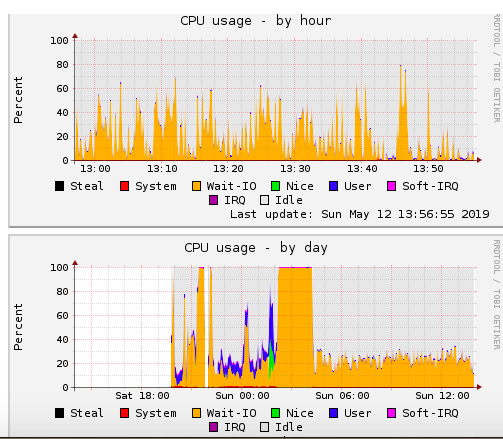
The issue that I'm having is Wait I/O locks. CPU hangs at 100% wait I/O and for example all my crons stop working. I have a cron which alerts me if the NAS is offline, and it's really annoying it keeps missing the deadline every time even when the NAS is working fine.
After using iotop, htop and iostat +x 2 5 to detect the offending process (with no luck I must say), I saw that mono was spiking up to 30% CPU usage even when my sonarr and radarr instances are not even set up (they are just started but not configured). There was no reason for such a high CPU usage, so I turned off sonarr and radarr. I/O Wait now returned to normal (below 20% average) and crond didn't miss a deadline.
Just to clarify the attached images, if you look at the "daily graph" you will see that CPU usage was at 100% on I/O Wait. Once I disabled sonarr and radarr, IO Wait went down.
 dantebarba
on 12 May 2019
dantebarba
on 12 May 2019
One workaround is to link logs and database files to tmpfs. For the logs this can be simply done by static symlinks, as usually one doesn't require them to be boot persistent.
For the database they need to be restored to disk on shutdown to not loose changed download/media states and settings.
For the DietPi OS we wrote a script that does this and allows to enable a systemd unit that does linking to RAM on boot and restoring to disk on shutdown: https://github.com/MichaIng/DietPi/blob/dev/dietpi/misc/dietpi-arr_to_RAM
- It is made for DietPi and the way it installs Sonarr (Radarr or Lidarr) on the system but with slight adjustment it can run on any Debian/systemd based distro.
- Of course having things in RAM does not reduce the I/O requests but they finish faster (reducing avg load) and the overall size (additional RAM usage) at least is negligible small.
- But the main reason for us to offer it is to reduce disk writes on vulnerable SDcards.
- Just keep in mind that a system crash leads to data loss with this. A cron job or systemd timer that updates the on-disk backups once in a while makes sense.
Feel free to test/use it or the idea for your needs.
MichaIng
on 12 May 2019
This bug/issue seems stale. Please check and see if it is still an issue on the recent v3 builds. If it is an issue please open a new GHI with logs and full detail.
 bakerboy448
on 18 Nov 2020
bakerboy448
on 18 Nov 2020
Related issues
 WildOrangutan
·
4Comments
WildOrangutan
·
4Comments
 RaphaelJenni
·
4Comments
RaphaelJenni
·
4Comments
 pimlie
·
4Comments
pimlie
·
4Comments
 mommalongnips
·
3Comments
mommalongnips
·
3Comments
 leftl
·
3Comments
leftl
·
3Comments
Most helpful comment
One workaround is to link logs and database files to tmpfs. For the logs this can be simply done by static symlinks, as usually one doesn't require them to be boot persistent.
For the database they need to be restored to disk on shutdown to not loose changed download/media states and settings.
For the DietPi OS we wrote a script that does this and allows to enable a systemd unit that does linking to RAM on boot and restoring to disk on shutdown: https://github.com/MichaIng/DietPi/blob/dev/dietpi/misc/dietpi-arr_to_RAM
Feel free to test/use it or the idea for your needs.