Solvespace: Is extruding a linked sketch broken?
System information
SolveSpace version: edge
Operating system: macOS
Expected behavior
I am trying to replicate the ex-case example from over here: https://solvespace.com/examples.pl
But I somehow cannot re-create it, I wonder if this functionality got removed, if I am doing something wrong, or if this is a bug?
Actual behavior
I cannot extrude a linked sketch
Additional information
I created a sketch, saved it (the sketch layer was active and shown)
Created a new sketch, linked the other sketch and try to extude it, It complains that I need a active workplane first.
I am probably missing some important step here...
 vespakoen
All 8 comments
Just found out that that ex-case example's linked sketch has an activeWorkplane (in the .slvs file) which I don't seem to get when linking something, browsing around the source code to see what's up now.
vespakoen
on 7 Dec 2020
Ok, figured out how to do it, basically importing the other drawing, then selecting "Sketch in Workplane" before doing the Extrude, that all makes sense looking at it now, the error even clearly states what to do.
I feel stupid now... =)
vespakoen
on 7 Dec 2020
I had that problem recently. I don't like the extra step needed. It might be a regression but I dont know.
 phkahler
on 7 Dec 2020
phkahler
on 7 Dec 2020
Ok, figured out how to do it, basically importing the other drawing, then selecting "Sketch in Workplane" before doing the Extrude, that all makes sense looking at it now, the error even clearly states what to do.
I had that problem recently. I don't like the extra step needed. It might be a regression but I dont know.
To me it makes sense - most imported objects are (presumably) 3D ones that are used for assemblies. Thus SolveSpace defaults to Sketch | Anywhere in 3d.
When a sketch is imported it also defaults to Anywhere in 3d and this seems perfectly logical to me - while the sketch was made in a workplane in its original file, when imported it is the "whole" imported file - not just a sketch in a workplane. Thus one needs to select a wokplane (or even create a new one in the same group) and then extrude.
By the way this allows the slanted extrusions that I described here:
https://github.com/solvespace/solvespace/issues/453#issuecomment-642508274
https://github.com/solvespace/solvespace/issues/453#issuecomment-642574190
https://github.com/solvespace/solvespace/issues/628#issuecomment-641756301
https://github.com/solvespace/solvespace/issues/628#issuecomment-641768927
https://github.com/solvespace/solvespace/issues/777#issuecomment-716222105
This is the (updated by @phkahler) reference manual section on this feature:
https://github.com/solvespace/solvespace-web/blob/5627e2628756280ee8a12f43e2d05a3307b1a18b/ref.pl#L1316
Here is one more such example for future readers.
ImportedSketchSlantedExtrusion.zip
P.S. Version 2.0, which is the oldest version I have now, does the same.
 ruevs
on 9 Dec 2020
ruevs
on 9 Dec 2020
Yes, it also makes sense to me now, I guess (for the far future) there could be a check if the imported thing is a 2d sketch and then assign it to the correct workplane already or something like that.
Anyways, the error message was clear enough, I guess I just ignored it or something.
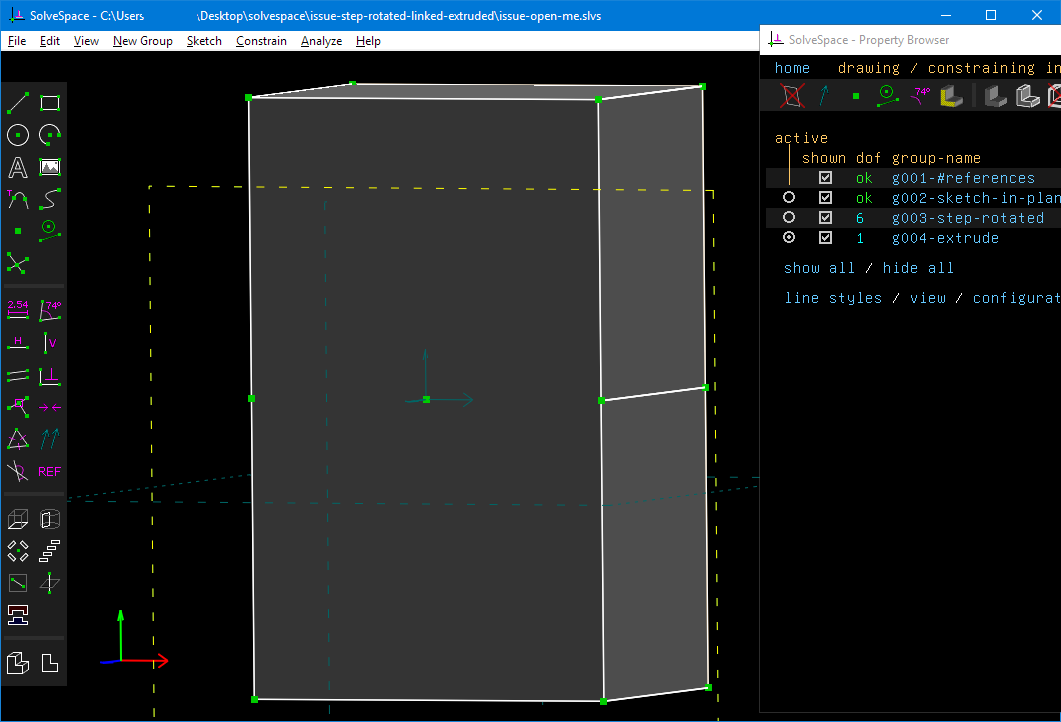
Here is the example of what I mean when extruding a linked "Step rotated" thingy.
vespakoen
on 9 Dec 2020
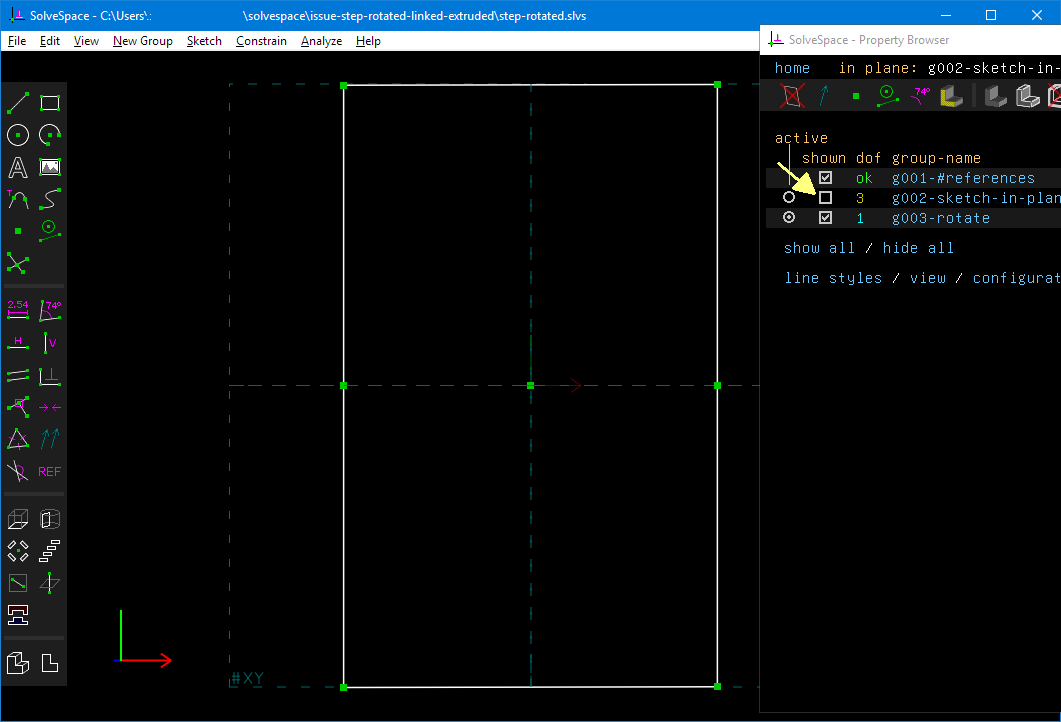
Your problem is that when files are linked in, all entities from all of their active groups are present as geometry. This is documented here https://github.com/solvespace/solvespace-web/blob/5627e2628756280ee8a12f43e2d05a3307b1a18b/ref.pl#L299
In step-rotated.slvs g002 is active and thus the "П" shaped non-closed contour is part of g003 in issue-open-me.slvs. Therefore it does not form a solid when extruded.
If you uncheck g002 in step-rotated.slvs then the extrude immediately becomes a solid.
ruevs
on 9 Dec 2020
Thanks again for explaining this.
I just tried to do the same with your updated 8040 drawing.
I removed the extrude and hid the sketch.
Now trying to extrude it in another sketch it doesn't work.
I guess this is because it uses 2 step rotates / groups to complete the drawing.
vespakoen
on 10 Dec 2020
It works. Leave only g004 (the second rotate group) enabled - it is the only group with a closed contour. See here https://github.com/solvespace/solvespace/issues/841#issuecomment-742518861
ruevs
on 10 Dec 2020
Related issues
 probonopd
·
5Comments
probonopd
·
5Comments
 giannissc
·
9Comments
giannissc
·
9Comments
 prototype99
·
9Comments
prototype99
·
9Comments
 andres-erbsen
·
7Comments
andres-erbsen
·
7Comments
 jockbert
·
6Comments
jockbert
·
6Comments