Hi,
I finally received a solo USB A and a solo tab USB C
They both work when plugged in and pressing the key on my laptop. But now I want to test nfc on my Android phone but I can't seem to get it working.
Nfc works on the phone because I pay with nfc at shops.
How can I test nfc on my Android with for example GitHub or Gmail.
I also installed a nfc app that can read nfc chips. So when I scan my bank card it read the chip. But with to solo, nothing happens.
Any advise?
 Zjemm
Zjemm
All 123 comments
I have the same trouble : NFC doesn't work on solo tap USB-C
OnePlus 6T A6013_41-190528 build (latest)
 gillesw
on 27 Jun 2019
gillesw
on 27 Jun 2019
For me it's the OnePlus 3T Android 9.0.3
Zjemm
on 27 Jun 2019
I get 6f00 (generic exception) with tap version on the u2f coffe test site with android. It also is “looping” so seems to sort of crash the connection repeatedly.
 martinpaljak
on 27 Jun 2019
martinpaljak
on 27 Jun 2019
Not working on the OnePlus 5, although it works with YubiKeys and my Solo Tap passes the FIDO test suite with an external NFC reader.
 fmeum
on 27 Jun 2019
fmeum
on 27 Jun 2019
Alright so at least im not the only one. So this must be something. Or maybe a combination with OnePlus
Zjemm
on 27 Jun 2019
Similar problems here on my OnePlus 3. I am able to read the solo tap using the NXP taginfo app, but only without the sleeve on.
I've tried using the keys with https://u2f.bin.coffee, but I was unable to register it via NFC
 mrvantage
on 28 Jun 2019
mrvantage
on 28 Jun 2019
@mrvantage what was the error on the test website?
martinpaljak
on 28 Jun 2019
I also thought that my Solo Tap's are broken, because no react with Oneplus 3. They already know that problem, because I contact them to directly.
tl:dr Solo Tap NFC doesn't work with my Oneplus 3
 Tumeez
on 30 Jun 2019
Tumeez
on 30 Jun 2019
Well now there is also a GitHub issue, so more people can see
Zjemm
on 30 Jun 2019
Same thing here, I contacted Solo on Twitter but no more answers...
Got response: { "errorCode": 1, "errorMessage": "Low level error 0x6f00" } on https://u2f.bin.coffee/
Not working on https://webauthn.io/ neither (with or without rubber protection).
Looks ok on NXP TagInfo.
Tested on Samsung Galaxy A8 (SM-A530F) with Android 9 / One UI 1.0 up-to-date.
Same issue with multiple keys (Type-A or Type-C).
Also tested on Samsung A5 2016 after NFC read, same error.
No NFC field activation at all on Honor 8 and Samsung Galaxy S9.
Powered by a USB-C port from a laptop: same error in the JavaScript response on the mobile.
The key is said to be "up-to-date" on update.solokeys.com but I also tried to force reflash it.
Tried multiple times, with multiple keys, everywhere on the back. 🙁
They work as expected when plugged to a USB port, but the NFC is not.
 Mincka
on 1 Jul 2019
Mincka
on 1 Jul 2019
So until now there were only reports regarding "OnePlus" branded smartphones.
If this affects more manufacturers (or Solo Tap's), I guess there is a bigger issue,Hopefully they can fix it it the firmware.
Are there any smartphones where it is confirmed working? I have a Tap, but no other NFC-capable device (yet). But maybe I can get hands on some colleague's phones...
 manuel-domke
on 1 Jul 2019
manuel-domke
on 1 Jul 2019
A colleague told me that he paired his Solo Tap USB-A, plugged on his laptop, to his Google account (nothing new at this stage).
Then, he told me that he managed to authenticate on Google, on his phone (A5 2017), using NFC (on the second try).
Still, he has the same error message (Low level error 0x6f00) on https://u2f.bin.coffee/.
Mincka
on 1 Jul 2019
Oh, some progress here... I was unable to test the same scenario since I cannot pair my Solo Tap USB-C on my laptop because I have no USB-C or adapter.
However, it made me think that I did not try to combine a U2F registering through USB and an authentication through NFC on https://u2f.bin.coffee/... And it worked, on the third try... 🎉
I tried again and it never works on the first time, but still, the sign in is working at some point. However, the registering over NFC never work. Hope it helps...
I guess it could be related to the maximum delay authorized for the operations on Android. Conor was taking about that during the campaign.
Tap is particularly challenging to make because it needs to operate passively. This means it must harvest the power solely from the NFC field. [...] To be able to efficiently harvest enough power, using this external NFC chip isn’t enough. There also needs to be an antenna. [...]
But even with a good antenna, there were still some issues. The design couldn’t harvest enough power to run at 100% speed, so I had to run it at about 50% speed. Consequently the register and authenticate would take longer to compute (about 1.0s, and 0.5s). These seems fine but Android NFC FIDO requests timeout after about 0.5s. So register wouldn’t work and authenticate worked sometimes.
I was stuck at this for a while. I kept running through these steps.
- Try to improvement antenna to get more power.
- Make code faster.
- Experiment with different settings on microcontroller.
Eventually I improved it enough and now it works quite well :D.
Mincka
on 1 Jul 2019
But only on the Galaxy A8?
The A5, G9 and "Honor 8" (whatever this is) don't react at all, like described for the OnePlus's ?
manuel-domke
on 1 Jul 2019
Don't think it's a OnePlus issue then
Zjemm
on 1 Jul 2019
I received my Solo Tap (+USB-C) and it works in Chrome with Pixel 2XL on https://u2f.hwsecurity.dev and https://webauthn.hwsecurity.dev .
We implemented workarounds for https://github.com/solokeys/solo/issues/214 and https://github.com/solokeys/solo/issues/213 and now it also works with our native SDK from https://hwsecurity.dev
 dschuermann
on 1 Jul 2019
dschuermann
on 1 Jul 2019
Exactly same behaviour on u2f.hwsecurity.dev and webauthn.hwsecurity.dev: registration only possible with USB (however error code 1 or NotReadableError) and authentication works about 1 time over 3...
I could accept (tolerate) the need to plug for registration but the authentication rate failure is too high.
At least, the NFC field is activated for my phone, on others, there is no detection at all (these phones work perfectly fine for other NFC devices or badges).
@dschuermann : Do you confirm that you can register and authenticate via NFC without failure? Can you tell which phone(s) you are using?
Mincka
on 1 Jul 2019
I've just done some testing on Pixel, Nexus, Samsung S9, and LG phones. I haven't tried OnePlus.
It seems that a lot of LG phones simply don't support ISO 14443A, which is the NFC protocol used by Tap. The LG phone I used wasn't able to read the NDEF data even while Tap was USB powered. I suspect some OnePlus models have a similar problem.
For Samsung S9, it took me a while to get it to work with a U2F test site via NFC, around 60-120s before a registration succeeded. I couldn't figure out a consistent method for improving that. I think the RF coupling is too poor. I suspect this issue extends to most Samsung devices. NFC-Registering while USB powered I found a firmware bug, but fixing that, it works fine; but no improvement in passive operation. Will push bug fix soon.
Pixel and Nexus 6 devices worked fine. I think recent Motorola and Google devices give the best performance.
I believe most issues stem are stemming from poor RF coupling with some phone models. Using only authentication instead of registering should help since it takes less time and power. If I can find any potential firmware improvements, I'll work on them. In any event, we/@solokeys/team-solokeys are planning a new HW revision, and one of the improvements will be significantly reducing power and timing for passive operation.
 conorpp
on 2 Jul 2019
conorpp
on 2 Jul 2019
Will new HW rev be free to us who have a problem at the moment?
Tumeez
on 2 Jul 2019
Personally, I think we have opportunities to fix via firmware upgrade -- if not we'll certainly explore a hw rev. But I'm positive we can optimize the boot, or play with advanced uses of the AMS chip. It'll just require some time to test and explore options.
It's good to collect feedback about non-working devices.
 0x0ece
on 2 Jul 2019
0x0ece
on 2 Jul 2019
I've just done some testing on Pixel, Nexus, Samsung S9, and LG phones. I haven't tried OnePlus.
It seems that a lot of LG phones simply don't support ISO 14443A, which is the NFC protocol used by Tap. The LG phone I used wasn't able to read the NDEF data even while Tap was USB powered. I suspect some OnePlus models have a similar problem.
For Samsung S9, it took me a while to get it to work with a U2F test site via NFC, around 60-120s before a registration succeeded. I couldn't figure out a consistent method for improving that. I think the RF coupling is too poor. I suspect this issue extends to most Samsung devices. NFC-Registering while USB powered I found a firmware bug, but fixing that, it works fine; but no improvement in passive operation. Will push bug fix soon.
Pixel and Nexus 6 devices worked fine. I think recent Motorola and Google devices give the best performance.
I believe most issues stem are stemming from poor RF coupling with some phone models. Using only authentication instead of registering _should_ help since it takes less time and power. If I can find any potential firmware improvements, I'll work on them. In any event, we/@solokeys/team-solokeys are planning a new HW revision, and one of the improvements will be significantly reducing power and timing for passive operation.
i have registered the solo USB-C Tab via usb-c (laptop) on my github account, but still then authentication on the android via NFC (oneplus3t chrome) does not work.
when plugged in to a laptop for power and then trying NFC, it does read the key but auth fails.
seems indeed like a power issue. I hope you guys can fix it via firmware, otherwise NFC is completely useless in my situation
another thing i noticed that when plugging in the tab on my usb-c on my laptop, the led lights up. but when plugging in on my phone it does not.
I plugged it into an LG phone and there it did light up
and the USB settings popup from android showed as: Power supply (translated from dutch)
my oneplus3t asks me what to to when plugging in a usb-c cable connected to my laptop (charging only, or file transfer e.t.c.) but it does not ask me when plugging in the solokey in the phone.
also there is no "power supply" option. so the oneplus does not power the key
so it also seems that the tab via usb-c does not work on the oneplus
Zjemm
on 2 Jul 2019
So, some information how Android does FIDO: Chrome is using Google's proprietary FIDO implementation that is shipped in their Google Play Services. I think, we can do a lot better regarding UX and NFC/USB backend. That's why we implemented our own native FIDO stack on Android. Also, this allows us to support special use cases based on customer requirements (such as PDF signing).
Long story short, I just pushed an update to our FIDO Sample (now version 1.6) on Google Play (could take up to 4 hours until you get it): https://play.google.com/store/apps/details?id=de.cotech.hw.fido.example
You can try our implementation with your phone and report if it works better than Chrome. I would be interested in your results.
Also, for some devices, we show where the best NFC spot is located on the back of your device, this may help:

dschuermann
on 3 Jul 2019
Nice but first we need an nfc fix, because right now nfc does not work on several Android devices
Also can more people confirm when plugged the usbc in a OnePlus, that it does not receive power?
Zjemm
on 3 Jul 2019
@dschuermann:
After about 100 NFC registering attempts on Galaxy S9: 3 times: "INS_NOT_SUPPORTED", 96 times: vibration but nothing, 1 time: successful registration (really unexpected, first time happening with NFC).
Same results when powered from another phone with USB-C.
However, the authentication works better with your app than Chrome, I'd say authentication succeeds about 8 out of 10 attempts.
Side note regarding the app: the key has to be plugged BEFORE taping on buttons (register / authenticate). It does not work if the help message is displayed. It can be a bit confusing. I was expecting to be prompted to plug the key after taping the buttons, not before.
Is there a way to prevent the Android pop-up "Do you allow the app to access Solo 2.3.0?" each time we need to authenticate through USB?
Mincka
on 3 Jul 2019
@Mincka thanks for your testing, very interesting. I tested the SoloKey Tap successfully on Pixel 2 XL over NFC. I will do a more detailed testing with our different devices next week.
Is there a way to prevent the Android pop-up "Do you allow the app to access Solo 2.3.0?" each time we need to authenticate through USB?
Unfortunately, there is no good way to prevent that pop up. If you would use a single FIDO app, we could register this app on USB Intents using the Intent Filter. Then you could choose "always" and it will no longer ask for permissions later. But already if you use two FIDO apps, the other will need to ask for permission again using the pop up. So we decided against registering on Intent filters to not pollute this list with each FIDO app.
dschuermann
on 4 Jul 2019
I notified the Solo team on Twitter on June 18th and still no official message about this specific issue. I bought 5 Solo Tap keys for my teammates and I. Nobody is able to use them with Chrome / Google and NFC, on different phone models. This is the most basic scenario that you expect to work smoothly. The comments on this thread and Twitter show that it's not an isolated issue.
We already waited a lot more than it was usually planned. I was expecting a final product properly tested on a few major phone models by the time. In the end, I would have prefer to wait even more than being sent a non-working product.
I am quite disappointed by the feedback at this stage: "we think that we can improve by flashing firmware" / "we may review the hardware". When? At which cost? Can we expect new hardware revision sent for free if it's not possible to make them work in standard scenarios, even after an hypothetical firmware update?
Mincka
on 4 Jul 2019
@Mincka test #217 please if you have hacker one
 merlokk
on 4 Jul 2019
merlokk
on 4 Jul 2019
Don't have one but I'll be happy to test if you can provide a signed release.
Mincka
on 4 Jul 2019
unfortunately i cant. but it will be available in several days
merlokk
on 4 Jul 2019
Another problem phone: ZTE Axon 7
Cannot read Tap with NFC Tools normally, but can when using USB power.
When trying to register with the FIDO Example app and USB power, the Tap's led turns briefly orange but nothing happens on the phone.
 ioanrogers
on 5 Jul 2019
ioanrogers
on 5 Jul 2019
@Mincka yes many phones were tested during prototyping, but only one particular type of Android phone was used for QA for manufacturing. Plus we discovered a whopping 25%-30% yield issue with the AS3956, the chip we use for NFC. Unfortunately pretty difficult to foresee issues like this.
There are a couple issues we can fix with firmware, like when trying to register when USB powered @ioanrogers. That way at least authenticating passively can work more reliably.
The best we/@solokeys can do at this point is make a new HW revision, with a different microcontroller than was planned for the KS campaign. We can send free replacements to those who can't get Tap to work. I've just started work on this and hope to start a manufacturing run by the end of this year. Will try to get official announcement out soon.
conorpp
on 6 Jul 2019
@conorpp
That would be great, let's wait for that announcement
Zjemm
on 6 Jul 2019
@conorpp
Great news!
 likarum
on 11 Jul 2019
likarum
on 11 Jul 2019
Can't have my keys working over NFC.
It's a good news if you can find a replacement soon :-)
Waiting for the anoucement too.
 guillaumedc
on 17 Jul 2019
guillaumedc
on 17 Jul 2019
Trying again today on OnePlus 6t with FIDO Example : it works... Both register and authenticate.
gillesw
on 22 Jul 2019
Trying again today on OnePlus 6t with FIDO Example : it works... Both register and authenticate.
Great to hear. Does it also work for you with Google Authenticator (when you open Chrome with https://u2f.hwsecurity.dev) ?
dschuermann
on 22 Jul 2019
Trying again today on OnePlus 6t with FIDO Example : it works... Both register and authenticate.
Great to hear. Does it also work for you with Google Authenticator (when you open Chrome with https://u2f.hwsecurity.dev) ?
On OnePlus 6T + Chrome, it works with NFC.
Did someone achieve to have NFC work on Surface GO ?
gillesw
on 22 Jul 2019
@gillesw awesome, what did you change?
conorpp
on 22 Jul 2019
Nothing... Except software update on the phone.
That's strange.
I was making tests between surface go and phone with NFC, I accidentally
put the phone on the key and bazinga...
Le lun. 22 juil. 2019 à 19:39, Conor Patrick notifications@github.com a
écrit :
@gillesw https://github.com/gillesw awesome, what did you change?
—
You are receiving this because you were mentioned.
Reply to this email directly, view it on GitHub
https://github.com/solokeys/solo/issues/209?email_source=notifications&email_token=ABG226YL5QPMINWYLARBMOLQAXWGLA5CNFSM4H3VTOCKYY3PNVWWK3TUL52HS4DFVREXG43VMVBW63LNMVXHJKTDN5WW2ZLOORPWSZGOD2QTRUQ#issuecomment-513882322,
or mute the thread
https://github.com/notifications/unsubscribe-auth/ABG2265NOZ6D3VPF4AXSXU3QAXWGLANCNFSM4H3VTOCA
.
gillesw
on 22 Jul 2019
Can you report which version you're on now, and which you were on previously?
conorpp
on 22 Jul 2019
Previously, don't know.
Currently :
Build : ONEPLUS A6013_41_190625
Oxygen OS 9.0.15
Kernel 4.9.106-perf+
Chrome 75.0.3770.143
FIDO Example 1.7
gillesw
on 22 Jul 2019
USB-C and USB-A NFC doesn't work with Oneplus 3, Not even FIDO Example. When I put my Solokey to USB-C and try FIDO Example, it work, but not NFC.
Also when I open Chrome with https://u2f.hwsecurity.dev doesn't work. Not even USB-powered.
RR-O-v6.2.1-20190201-oneplus3-Unofficial-LuisROM
Kernel 3.18.124-FrancoKernel
Chrome: Newest
FIDO Example 1.7
Tumeez
on 25 Jul 2019
One month for this issue and still no official announcement. Very disappointed by the lack of support. 😞 I am thinking about asking a refund and just buy a YubiKey 5 NFC.
Mincka
on 27 Jul 2019
@Mincka sorry for delay, expect official announcement this week. In mean time, here is sign up page for customers unable to get Tap working with current phone after many attempts:
https://solokeys.us19.list-manage.com/subscribe?u=cc0c298fb99cd136bdec8294b&id=153ce13dc1
Also, can you try updating to the latest firmware? Version 2.4.0 fixes the issues that @dschuermann found. Hopefully it was these issues causing Samsung issues and not power.
# if you haven't already
pip3 install solo-python

solo key update <--secure | --hacker> --yes
Also with this update, you should be able to register via NFC while the key is USB-powered.
conorpp
on 27 Jul 2019
My test was used newest 2.4.0 firmware.
Tumeez
on 27 Jul 2019
Hey, I have a OnePlus 6 and initially had issues but worked out what was going on in the end. The antenna on the solokey is not large and the field around the phone is quite small, so you have to place the solokey precisely into the field. So on the oneplus 6, that's behind the camera. When the prompt in android asks you to insert your key or other OTP options, you should be able to press NFC as an option, at which point just briefly tap where the camera is and it will be picked up.
The difference between NFC on payment terminals and a solokey is that the radio on a payment terminal is much larger. Perhaps that's something that can be improved upon in future versions of solokey NFC
 GTB3NW
on 28 Jul 2019
GTB3NW
on 28 Jul 2019
Using the FIDO Example application, its work for Register and Authenticate flows using the NFC mode:
- SoloTap Secure USB-C+NFC with firmware 2.4.0
- Android 9.0 on Samsung Galaxy J7
 righettod
on 29 Jul 2019
righettod
on 29 Jul 2019
Upgraded firmware to 2.4.0, I can now register and authenticate over NFC on my Axon 7.
Thanks!
ioanrogers
on 30 Jul 2019
Using Oneplus 3 (Android 9) plus SoloKey USB-A NFC at firmware v2.4.2. I can register and auth via NFC while Solokey is USB powered. Without USB power neither registration nor auth work via NFC.
 balert
on 1 Aug 2019
balert
on 1 Aug 2019
I am unable to update anymore with the web version. The current firmware is not detected ("unknown") and the update itself does not do anything. So I need to wait a USB-C / USB-A adapter to attempt to upgrade on a computer.
Today, I discover that Google is now selling their Feitan keys in France and I also received a Yubikey 5 NFC. I wanted to be sure that the issue was not related to my phone. It works perfectly every time and without even touching the back of my phone in NFC (Galaxy A8).
If the Solo update does not fix the issue, I will apply for a replacement with a revised hardware version. Hopefully it will work better.
Mincka
on 1 Aug 2019
I updated my Solo Tap (hacker) firmware top version 2.4.2 but I'm still unable to register/auth through NFC.
I doesn't work either with the USB key plugged and power supplied.
My phone is able to find the device but I get an error telling me that the communication was interrupted and I can't see the details of the NDEF tags (using NXP TagInfo).
I registered for the replacement with the revised hardware version.
guillaumedc
on 2 Aug 2019
Same here, no improvement with 2.4.2.
Mincka
on 6 Aug 2019
I'll re-iterate, the field in which you can receive NFC is not large, slowly move the device round your phone until you find the sweet spot. I believe other devices have a larger antenna, and improvement for next time perhaps. I really had to move it slowly and it was behind my camera where it worked.
GTB3NW
on 7 Aug 2019
Updated my keys to new 2.4.2 firmware. Now I am able to use the NFC while the key is USB powered, almost every attempt works. This was not the case with the 2.3.0 firmware. I tested both the app and website from hwsecurity.dev.
However when the key is not powered, registering / authenticating only works in about 1% of the attempts., without my phone case and the key's sleeve installed. I'm feeling this might be a power related issue, like my OnePlus 3 doesn't provide enough power via NFC for the Solo Tap?
The NFC antenna in the phone is located around the camera, so identifying the sweet spot is pretty easy on my phone.
mrvantage
on 7 Aug 2019
Same thing here, testing at u2f.bin.coffee in Samsung Galaxy S9 the Solo USB A Tap with firmware 2.4.2 can't seem to register through NFC. I get "Low level error 0x6f00" every time I try.
If I register by plugging in the usb with a usb-c adapter, then the NFC seems to work most of the time to verify.
Using the app provided by @dschuermann I can both register and verify using NFC, although to register I have to take the protecting sleeve from my phone.
 ror3d
on 15 Aug 2019
ror3d
on 15 Aug 2019
223 is closed, so I try to follow up here:
My USB C Security Tap NFC arrived with 2.3 was upgraded to 2.4.2, and exhibited the following NFC behavior: on TagInfo/NXP (4.24.4):
- Taginfo goes into a loop with the Solo USB C NFC key and never finishes readout. It crashes finally or provides error slightly varying error messages depending on when the key is pulled off. It does so on both an LG G5 (on official Oreo 8.0) and a Galaxy Alpha (on official 5.0.2).
- Taginfo reads a yubikey 5 NFC on both phones without issue.
- The key reads ok with USB C connected.
Given: - NFC works on both phones
- The Solo key reads incompletely. Yubikeys read fine.
- This does in my case not appear to be as conorpp commented on Jul 2 an issue with the antenna coupling.
- Would the ongoing NFC issues in this thread still cover what I encounter, or would I need to classify my key as defective? Posting here for feedback, if this could still be firmware related, before opening a new issue for replacement.
Thanks.
 datarimlens
on 16 Aug 2019
datarimlens
on 16 Aug 2019
@dschuermann I have a Nokia 8.1 running Android 9, and when I try to register my Solo Tap over NFC in FIDO Example I get an error saying: "Internal error: UNKNOWN". This happens both when the key is powered and unpowered. If I keep holding the key against the back of the phone the app will keep trying to read the key and the error will loop. Sometimes the app crashes after many loops. Do note that I have been able to successfully use my key to sign in to Google on this phone.
I also have an old Nexus 6P running Android 8.1 that I've given a try; I am able to register and authenticate my Solo Tap both when it's powered and unpowered. However, in unpowered mode the Nexus 6P is very picky with where you place the key, and nothing happens until you find the perfect spot.
Have you guys tested the app with the Nokia 8.1?
EDIT: I'm running the latest firmware on my Solo Tap (2.4.3).
 huaracheguarache
on 19 Aug 2019
huaracheguarache
on 19 Aug 2019
@huaracheguarache very interesting. Thanks for the report. We haven't tested it on Nokia 8.1, but on Nokia 7+. Looks like there are still enough differences. We'll look into this.
dschuermann
on 19 Aug 2019
So until now there were only reports regarding "OnePlus" branded smartphones.
I have the same troubles on two Galaxy S9's with two Solo Keys. No oyher problems with NFC like paying or tags etc, only with the Solo Keys
 wboevink
on 31 Aug 2019
wboevink
on 31 Aug 2019
So until now there were only reports regarding "OnePlus" branded smartphones.
I have the same troubles on two Galaxy S9's with two Solo Keys. No oyher problems with NFC like paying or tags etc, only with the Solo Keys
also got the same issue on a Razer Phone, Sony Xperia ZX2 and occasionally on an LG G5.
 IMPULSE-255
on 31 Aug 2019
IMPULSE-255
on 31 Aug 2019
I think it is fair to say that the NFC hardware model was a flop, that will require a new revision of hardware to be usable. We will have to wait for a new revision, be it hardware design (enough juice from the antenna coupling) or manufacturing process QA that is the cause. Would be cool if this was somehow articulated clearly by the team.
martinpaljak
on 31 Aug 2019
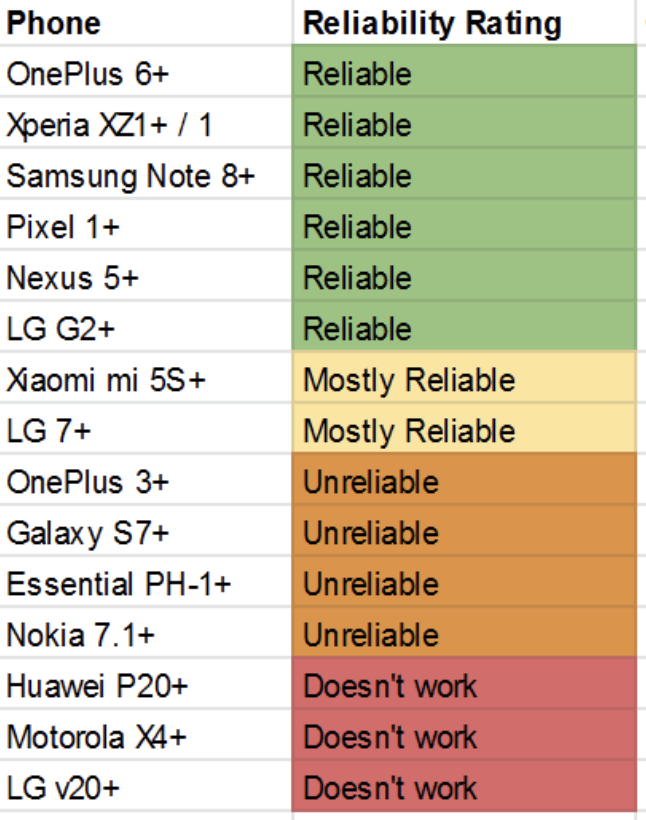
For initial QA issues we ran into Kickstarter, we are replacing Taps for those that have phones we know work reliably. Typically the lower cost phones do not provide a strong NFC field and do not work as well. This isn't just an issue with SoloKeys, but also with other FIDO keys (Feitian, Yubico).
If NFC works with payments or other tags, this doesn't mean a FIDO key will work. NFC payments do not use passive operation, and NFC tags simply read a memory. FIDO keys need to compute ECC signatures which is computationally intense and requires a stronger NFC field. It would be interesting to hear performance against Yubico or Feitian keys.
Using our feedback survey results (~250 responses), I compiled ratings for different phones. If phones were nearly all reported working, I labeled as reliable, etc. I don't think other vendors publish such a list hehe.
https://docs.google.com/spreadsheets/d/1kO8Kavu75AbpWQGNbWbBaHOmLlq-NtH9h2Et8KbP564/edit#gid=0
If you have a "reliable" phone and it doesn't work, please reach out to [email protected], and we'll work to solve it as soon as we can. Note we don't have much funding at SoloKeys and we aren't working full-time currently. And we're working on a new revision to get out as soon as we can which will improve NFC among other things. Appreciate everyone's patience.
Note for those interested in using with NFC reader (like with Windows Hello), all the readers we've tested with work fine. Though we've had to release some firmware updates to fix some bugs.
For those interested, new design is going to be based on NXP's _LPC55S69_ microcontroller. It is a new & lower power transistor technology, and provides acceleration for ECC. So we can achieve a more efficient transaction. Additionally, if we're lucky, we can use NXP's new _NTA5332_ coming out in November, which will likely be much better than the current _AMS 3956_.
conorpp
on 1 Sep 2019
And if you haven't read our last blog post...
conorpp
on 1 Sep 2019
To set expectations: The new hardware revision will not only have a completely new microcontroller and hopefully this new NFC chip, but will also likely switch to a firmware implementation in Rust. In other words, it's an ambitious project, that we want to get right. As a corollary, we're not setting any explicit estimate when it will be out - it will be ready when it's ready.
It would be great for everyone if we can increase participation in our ongoing survey (https://solo.re/nfc-survey), to make the results (https://solo.re/nfc-results) more representative, whether or not you have a phone with which your Solo Tap works, as those with a compatible phone/tap pair are not likely to be vocal. Feel free to skip the non-NFC related questions, and please encourage others to participate!
The current results (https://solo.re/i/nfc-results.png):
For easier reference, I setup two shortlinks and QR codes regarding the NFC survey and its results:
 nickray
on 1 Sep 2019
nickray
on 1 Sep 2019
I get Page Not Found for both links
On Sun, 1 Sep 2019, at 15:33, Nicolas Stalder wrote:
To set expectations: The new hardware revision will not only have a completely new microcontroller and hopefully this new NFC chip, but will also likely switch to a firmware implementation in Rust. In other words, it's an ambitious project, that we want to get right. As a corollary, we're not setting any explicit estimate when it will be out - it will be ready when it's ready.
For easier reference, I setup two shortlinks regarding the NFC survey and its results:
- https://solo.re/survey
- https://solo.re/results
It would be great for everyone if we can increase participation in the survey, to make the results more representative, whether or not you have a phone with which your Solo Tap works, as those with a compatible phone/tap pair are not likely to be vocal. Feel free to skip the non-NFC related questions, and please encourage others to participate!
—
You are receiving this because you are subscribed to this thread.
Reply to this email directly, view it on GitHub https://github.com/solokeys/solo/issues/209?email_source=notifications&email_token=ADLHVOQQUVE7BO7WUKDT2C3QHPADHA5CNFSM4H3VTOCKYY3PNVWWK3TUL52HS4DFVREXG43VMVBW63LNMVXHJKTDN5WW2ZLOORPWSZGOD5UCPLI#issuecomment-526919597, or mute the thread https://github.com/notifications/unsubscribe-auth/ADLHVORXMPS6FJGWRZ5GPLLQHPADHANCNFSM4H3VTOCA.
 returntrip
on 2 Sep 2019
returntrip
on 2 Sep 2019
Oh? The long versions are:
- survey: https://docs.google.com/forms/d/1qla-kPtI9WTtSq7WhCyayT7h0_sC5clhPn6ho34ufyc/
- results: https://docs.google.com/spreadsheets/d/1kO8Kavu75AbpWQGNbWbBaHOmLlq-NtH9h2Et8KbP564/
Do those work for you?
nickray
on 2 Sep 2019
Oh? The long versions are:
* survey: https://docs.google.com/forms/d/1qla-kPtI9WTtSq7WhCyayT7h0_sC5clhPn6ho34ufyc/

* results: https://docs.google.com/spreadsheets/d/1kO8Kavu75AbpWQGNbWbBaHOmLlq-NtH9h2Et8KbP564/
Do those work for you?
They do work, thanks!
returntrip
on 2 Sep 2019
Just recived Solokey USB + NFC. My feeling firstime is not good. Settingup on solo key in windows is very quick but linux must be install some package ( not like Yubikey, dont need anything).
And now i'm trying with NFC on my phone. I'm using Samsung Note 8. But it dont work. I download FIDO example continue testing and nothing happen.
 tatdatpham
on 23 Sep 2019
tatdatpham
on 23 Sep 2019
Suggestions from own experience: 1. Try reading the key with NFC software on the Note and find the best spot for the antenna (assuming NFC is on). 2. My own experience with tokens is that the software, even on Yubikey is unrefined, and that the token craze is not well thought through (we have PSD2 in Europe vor banks driving customers nuts). The users are left out completely, not at all security in the sense of "availability, integrity, confidentiality". Let's give solo their chance to refine their first NFC attempt. Good luck.
datarimlens
on 23 Sep 2019
Not working with my (old) Xiaomi Mi 5s and the Solokey Tap. It doesn't recognize it at all, I fear it's a power issue.
 patoberli
on 27 Sep 2019
patoberli
on 27 Sep 2019
Detecting a Solo Tap works very unreliably (1/10 times approx) with the FIDO Example or Tag Reader apps on my Pixel 3. Never got it to work as NFC Token using one of the WebAuthn testing apps (via the Android provided integration).
 0x4d4e
on 30 Sep 2019
0x4d4e
on 30 Sep 2019
For initial QA issues we ran into Kickstarter, we are replacing Taps for those that have phones we know work reliably. Typically the lower cost phones do not provide a strong NFC field and do not work as well. This isn't just an issue with SoloKeys, but also with other FIDO keys (Feitian, Yubico).
If NFC works with payments or other tags, this doesn't mean a FIDO key will work. NFC payments do not use passive operation, and NFC tags simply read a memory. FIDO keys need to compute ECC signatures which is computationally intense and requires a stronger NFC field. It would be interesting to hear performance against Yubico or Feitian keys.
Using our feedback survey results (~250 responses), I compiled ratings for different phones. If phones were nearly all reported working, I labeled as reliable, etc. I don't think other vendors publish such a list hehe.
https://docs.google.com/spreadsheets/d/1kO8Kavu75AbpWQGNbWbBaHOmLlq-NtH9h2Et8KbP564/edit#gid=0
If you have a "reliable" phone and it doesn't work, please reach out to [email protected], and we'll work to solve it as soon as we can. Note we don't have much funding at SoloKeys and we aren't working full-time currently. And we're working on a new revision to get out as soon as we can which will improve NFC among other things. Appreciate everyone's patience.
Note for those interested in using with NFC reader (like with Windows Hello), all the readers we've tested with work fine. Though we've had to release some firmware updates to fix some bugs.
For those interested, new design is going to be based on NXP's LPC55S69 microcontroller. It is a new & lower power transistor technology, and provides acceleration for ECC. So we can achieve a more efficient transaction. Additionally, if we're lucky, we can use NXP's new NTA5332 coming out in November, which will likely be much better than the current AMS 3956.
NXP's new NTA5332 is not ISO14443 or did I not understand something?
 dmazzella
on 30 Sep 2019
dmazzella
on 30 Sep 2019
I setup my Solo Tap (USB-A+NFC Hacker) today and was able to get NFC to work with GitHub on my Samsung Galaxy S9+ through Firefox. I registered it through NFC and was also able to auth on my laptop via USB. On my phone, the NFC is roughly an inch under the fingerprint sensor. It was actually pretty easy to setup and seems to work reliably. I've tested it about a dozen times this morning.
 vwbusguy
on 4 Oct 2019
vwbusguy
on 4 Oct 2019
If you are still searching for your NFC sweetspot: We have set up a new website to help with that:
We are still gathering NFC sweetspots and verifying our collected data using an NFC field strength probe on all devices we can get a hand on. Hope this helps.
dschuermann
on 5 Oct 2019
Using Oneplus 3 (Android 9) plus SoloKey USB-A NFC at firmware v2.4.2. I can register and auth via NFC while Solokey is USB powered. Without USB power neither registration nor auth work via NFC.
Oneplus 3 and Android 9 doesn't work NFC at all even firmware 3.0.0, just for information :)
Tumeez
on 29 Oct 2019
Can't seem to get it working on iPhone 7 running iOS 13.3 beta 2 with firmware 3.0.0.
 lodev
on 13 Nov 2019
lodev
on 13 Nov 2019
Hello,
Any updates about the revised hardware that should properly working with NFC?
For those interested, new design is going to be based on NXP's LPC55S69 microcontroller. It is a new & lower power transistor technology, and provides acceleration for ECC. So we can achieve a more efficient transaction. Additionally, if we're lucky, we can use NXP's new NTA5332 coming out in November, which will likely be much better than the current AMS 3956.
Mincka
on 20 Nov 2019
@conorpp could you please give us an update on what will happen with the Solo Tap that do not work with some phones (OnePlus 5T) in my case.
I have 3 Tap devices and they are useless when it comes to using them with my phone. It is also not clear if this issue is sorted in the new HW revision?!?!
Are we going to get new devices for free when the NFC issue is sorted?
I want to see Solo succeed. I understand you are a small company and you have been very transparent in the past but I think you have dropped the ball a little in recent times.
We would appreciate if you guys can set the right expectation around this issue. Thanks.
returntrip
on 27 Nov 2019
I am working on new prototypes based on the LPC55Sxx chipset now. In this revision, it is using a new micro-controller, has a physically more-robust construction, and can be more efficient over NFC which should make it more reliable with more phones. It will be difficult to get working with all phones, since some NFC readers on phones are just bad, and are problematic with any ISO14443-4 keys. I don't yet have new metrics to share.
If you are an early backer or buyer, you can send your details to [email protected] and we'll add you to our list of future free replacements. Also check out the phone reliability table on the Tap product page. For recent orders, generally we will not offer free replacements since we have the phone reliability listed in product page. For specific support issues please use [email protected].
My goal is to start production in Q1 2019. We are a small company and still have a number of other things to bootstrap, but we are working on it.
conorpp
on 27 Nov 2019
@conorpp thanks for the update! It is good to know that this is progressing, Q1 is just around the corner! Is there an up to date roadmap around what improvements we might expect for the coming year?
returntrip
on 27 Nov 2019
I recently swapped my not working Xiaomi Mi 5s with the new Mi 9T Pro. Here the SoloTap works perfectly. The Mi 5s did work with credit cards and similar, but not with the Tap. Now with the new mobile it's perfect.
So I think, for many users, it will be solved once they get a new mobile phone.
patoberli
on 27 Nov 2019
My goal is to start production in Q1 2019. We are a small company and still have a number of other things to bootstrap, but we are working on it.
Where those new keys can be expected at Amazon and how can i be sure its new revision? I was considering to purchase Solokey, but not interested in getting faulty hardware, since my phone is not on list (needless to say this list is too short to be any use).
 Vednier
on 28 Nov 2019
Vednier
on 28 Nov 2019
@Vednier Hopefully sometime Q1-Q2. The keys will be completely different models and have a re-done form factor. Some concepts here: https://twitter.com/_conorpp/status/1199536381078495232
conorpp
on 29 Nov 2019
Finally had the chance to try the NFC key with my iPhone X and it is not working :(
My yubikey NEO seems to work fine. The same NFX key seems to work fine in my iPad pro via usb-c. Did I get a lemon?
 simonedamico
on 11 Dec 2019
simonedamico
on 11 Dec 2019
@conorpp You mentioned that you want to replace new designs with the NXP's NTA5332, when it will be released. However, as @dmazzella pointed out: NTA5332 is ISO-15693 (or NFC Forum Type 5 Tag) compliant, not ISO-14443-4. Is this gonna work? Does FIDO/U2F support NFC Forum Type 5 Tags also?
 piotr-kleins
on 20 Dec 2019
piotr-kleins
on 20 Dec 2019
pip3 install solo-python
(hold button and insert key into laptop will blink yellow)
solo key update
plug the key into a powerbank or laptop for power (lame but works usually)
 gregpalaci
on 3 Jan 2020
gregpalaci
on 3 Jan 2020
Hi,
on my Xiaomi Mi Mix 3 the solo tap nfc does not work, even after I updated the stick to v4.0.0.
Any chance I can provide you further information?
 mscheffel
on 8 May 2020
mscheffel
on 8 May 2020
Do the Solo keys not work with iOS at all?
 j18ter
on 13 May 2020
j18ter
on 13 May 2020
They do! I’ve been using mine on iOS both via NFC on my iPhone and USB-C on my iPad Pro 👌🏼
 lumaxis
on 13 May 2020
lumaxis
on 13 May 2020
mine doesn't on android and IOS.
still waiting on the hardware renewal for a replacement
Zjemm
on 13 May 2020
Update on the Honor 8:
After finding the sweetspot on my phone (searching through internet forums) I was able to successuly use the solokeys for authentification and registering.
@Mincka The sweetspot is in the very top left corner when looking head-on to the phone.
 Nuc1eoN
on 27 May 2020
Nuc1eoN
on 27 May 2020
iPhone 11 13.5.1, SoloKey USB-C/NFC does not work
 emx0r
on 17 Jun 2020
emx0r
on 17 Jun 2020
Tried today with my iPhone XS and Solo Key Tab + NFC (USB A).
The phone does not recognize or interact with the key at all once I'm prompted for it.
Is it possible that my seller shipped me a normal solo key without an NFC chip?
How would I verify if my key actually is the correct model?
 Jaffex
on 11 Aug 2020
Jaffex
on 11 Aug 2020
What does the package say? Send a picture of the package and the button side of the PCB.
THanks!
Haden
On Aug 11, 2020, at 10:13 AM, Jan notifications@github.com wrote:
Tried today with my iPhone XS and Solo Key Tab + NFC (USB A).
The phone does not recognize or interact with the key at all once I'm prompted for it.
Is it possible that my seller shipped me a normal solo key without an NFC chip?
How would I verify if my key actually is the correct model?—
You are receiving this because you commented.
Reply to this email directly, view it on GitHub https://github.com/solokeys/solo/issues/209#issuecomment-671971690, or unsubscribe https://github.com/notifications/unsubscribe-auth/AM5HBTCO2Q3FLV7JPCMJFHLSAFGXLANCNFSM4H3VTOCA.
 hoos97
on 11 Aug 2020
hoos97
on 11 Aug 2020
Unfortunately I couldn‘t find the package anymore, but here‘s an image of the pcb on the button side 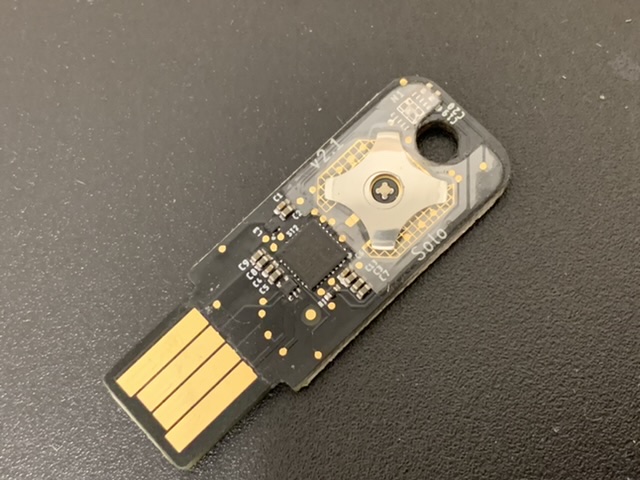
Jaffex
on 11 Aug 2020
That is a Solo USB-A, not a Tap. The Tap would have a small chip in the top left side by the key hole.
On Aug 11, 2020, at 10:27 AM, Jan notifications@github.com wrote:
Unfortunately I couldn‘t find the package anymore, but here‘s an image of the pcb on the button side https://user-images.githubusercontent.com/31133207/89909393-4fc1f780-dbef-11ea-9fd2-3a775b744e23.jpeg
—
You are receiving this because you commented.
Reply to this email directly, view it on GitHub https://github.com/solokeys/solo/issues/209#issuecomment-671979565, or unsubscribe https://github.com/notifications/unsubscribe-auth/AM5HBTGFXVBVRBM42KBTG2DSAFILLANCNFSM4H3VTOCA.
hoos97
on 11 Aug 2020
Thought N1 should be populated to have NFC function 🤔
 jolo1581
on 11 Aug 2020
jolo1581
on 11 Aug 2020
For potential future buyers with a OnePlus 5T phone:
NFC on the (current) Solo Tap USB-C (with 4.0.0 firmware) does not work with this phone (for me) without USB power. When powering the key with USB (via my laptop), I was able to get NFC to work with WebAuthN & https://hwsecurity.dev/.
Other important note: ~The USB-C connection does not work for this phone either, as it seems the key does not get power (No light). If I had to guess OnePlus might have done something weird with their USB-C implementation.~
Edit: I've found that OnePlus phones have a settings item in the System settings menu: OTG Storage. When you enable this, the SoloKey magically turns on & works flawlessly over USB-C.
 Raqbit
on 11 Aug 2020
Raqbit
on 11 Aug 2020
One year later, I have a new phone: Samsung S20+. So I took the Solo Tap out of the drawer where it sits, useless, since NFC never worked. 😐 I can confirm it also does not work with the S20+ (no NFC detection at all) and that the YubiKey 5 NFC works flawlessly at the same time with NFC. I saw that Patrick is still working on NFC optimization these days so hopefully there will be a more reliable version in the coming months. I am still waiting for the perfect key (USB-C, FIDO2 and reliable NFC). Feitan K35 looks like a vaporware.
Mincka
on 11 Aug 2020
@Mincka I also have a Samsung Galaxy S20+ and I was just able to sign into GitHUb with Google Chrome with my SoloTap using NFC. The NFC spot appears to be right in the middle, about 3/4" below the camera.
vwbusguy
on 11 Aug 2020
when will the new hardware version be available? when will there be a replacement procedure?
Zjemm
on 13 Aug 2020
for nfc energy harvesting, how about try the ambiq apollo3 chip. and they have apollo4 with usb peripheral supporting in plan.
feitian has their fingerpint card (battery-less) with this chip, source from CUP cert image.
 dotnfc
on 31 Aug 2020
dotnfc
on 31 Aug 2020
I just received my tap solo usb-c. NFC is not detected (tried with NFC TagInfo by NXP) on OnePlus 7 and an old LG Nexus 4 hanging around. The NFC is not detected at all (I also tried with other nfc card to confirm nfc is on).
No issue when using usb-c on linux or android.
Are we saying this is a known issue? Firmware is 4.0.0.
 D4nte
on 24 Nov 2020
D4nte
on 24 Nov 2020
Yes, it's a know bug.
It last since the product launch, and the replacement option is still not available, more than a year after...
guillaumedc
on 24 Nov 2020
I just received my tap solo usb-c. NFC is not detected (tried with NFC TagInfo by NXP) on OnePlus 7 and an old LG Nexus 4 hanging around. The NFC is not detected at all (I also tried with other nfc card to confirm nfc is on).
No issue when using usb-c on linux or android.
Are we saying this is a known issue? Firmware is 4.0.0.
The workaround is to power the Solokey via USB when using its NFC functionality. The power gathered from the phone via NFC is often not enough to start the Solokey, sadly.
Raqbit
on 24 Nov 2020
I just received my tap solo usb-c. NFC is not detected (tried with NFC TagInfo by NXP) on OnePlus 7 and an old LG Nexus 4 hanging around. The NFC is not detected at all (I also tried with other nfc card to confirm nfc is on).
No issue when using usb-c on linux or android.
Are we saying this is a known issue? Firmware is 4.0.0.The workaround is to power the Solokey via USB when using its NFC functionality. The power gathered from the phone via NFC is often not enough to start the Solokey, sadly.
Yes I did that yesterday and it helped.
Today however, I had no issue using the key on NFC with my phone. Not sure what changed so the issue is fixed for me.
D4nte
on 25 Nov 2020
Quick update, I've been working a ton on the NFC performance for the next hardware revision of Solo (Solo "B" or Solo "v2"). Can't provide specific dates yet, but are hopefully launching within the next couple of months. Planning to provide replacements for everyone here, and others from our original Kickstarter that had a sour NFC experience.
While there are a lot of improvements we've been working on, the specific improvements for NFC I've completed:
- Very extensive custom antenna surveys and measurements with multiple phone models to further optimize matching across various phones.
- Improved NFC chip with custom binning process to take only the most efficient chips.
- Dynamic clock control on micro-controller to avoid consuming too much power.
- More optimized & interrupt driven ISO14443 implementation.
I can report both USB-A and USB-C work well with my Samsung S7 device.
conorpp
on 1 Dec 2020
I just bought a "Solo Tab - NFC Security Key" but NFC does not work. The packing says "Solo USB-A" on the big sticker and an additional sticker with "Solo Tap - NFC Security Key". The key itself looks exactly like the one on the picture of this comment here https://github.com/solokeys/solo/issues/209#issuecomment-671979565 (so with no on the left side of the hole) does this mean that the packing went wrong and I got the wrong product?
 tndev
on 3 Dec 2020
tndev
on 3 Dec 2020
Did you order from Amazon? If so, they mislabel some products. Recommend you return to Amazon and request replacement.
Haden Patrick
On Dec 3, 2020, at 7:15 AM, Till Niese notifications@github.com wrote:
I just bought a "Solo Tab - NFC Security Key" but NFC does not work. The packing says "Solo USB-A" on the big sticker and an additional sticker with "Solo Tap - NFC Security Key". The key itself looks exactly like the one on the picture of this comment here #209 (comment) (so with no on the left side of the hole) does this mean that the packing went wrong and I got the wrong product?—
You are receiving this because you commented.
Reply to this email directly, view it on GitHub, or unsubscribe.
hoos97
on 3 Dec 2020
@hoos97 Yes I did and they already said I can send it back to get a replacement. I just wanted to verify that the missing chip (even if the sticker on the package says NFC) is still the definitive proof that it isn't the NFC version.
tndev
on 3 Dec 2020
Missing chip is proof.
Haden Patrick
On Dec 3, 2020, at 8:41 AM, Till Niese notifications@github.com wrote:
@hoos97 Yes I did and they already said I can send it back to get a replacement. I just wanted to verify that the missing chip (even if the sticker on the package says NFC) is still the definitive proof that it isn't the NFC version.—
You are receiving this because you were mentioned.
Reply to this email directly, view it on GitHub, or unsubscribe.
hoos97
on 3 Dec 2020
so will the replacements for the defective v1 hardware also be launched soon with the new v2 hardware?
Zjemm
on 26 Jan 2021
We will give you a new v2 as a replacement.
On Jan 26, 2021, at 10:12 AM, Zjemm notifications@github.com wrote:
so will the replacements for the defective v1 hardware also be launched soon with the new v2 hardware?
—
You are receiving this because you were mentioned.
Reply to this email directly, view it on GitHub https://github.com/solokeys/solo/issues/209#issuecomment-767608956, or unsubscribe https://github.com/notifications/unsubscribe-auth/AM5HBTCX2BEYRMJJOFPUUDTS33LUFANCNFSM4H3VTOCA.
hoos97
on 26 Jan 2021
Damn, I chucked mine away after the usb-c connector bent. Is my kickstarter receipt good enough proof?
simonedamico
on 26 Jan 2021
Replacements were for NFC that did not perform as expected.
On Jan 26, 2021, at 12:28 PM, simonedamico notifications@github.com wrote:
Damn, I chucked mine away after the usb-c connector bent. Is my kickstarter receipt good enough proof?
—
You are receiving this because you were mentioned.
Reply to this email directly, view it on GitHub https://github.com/solokeys/solo/issues/209#issuecomment-767701050, or unsubscribe https://github.com/notifications/unsubscribe-auth/AM5HBTEFNVIOFHTNM3LVQADS333UBANCNFSM4H3VTOCA.
hoos97
on 26 Jan 2021
Replacements were for NFC that did not perform as expected.
On Jan 26, 2021, at 12:28 PM, simonedamico notifications@github.com wrote:
Damn, I chucked mine away after the usb-c connector bent. Is my kickstarter receipt good enough proof?
—
You are receiving this because you were mentioned.
Reply to this email directly, view it on GitHub https://github.com/solokeys/solo/issues/209#issuecomment-767701050, or unsubscribe https://github.com/notifications/unsubscribe-auth/AM5HBTEFNVIOFHTNM3LVQADS333UBANCNFSM4H3VTOCA.
It didn't. You can see my comment in this thread
simonedamico
on 26 Jan 2021
What will be the procedure for this? I bought 15 USB C Solos and 5 USB C Solo Taps as part of the original Kickstarter - never got NFC on the taps to work with iPhone 8 or 11.
We will give you a new v2 as a replacement.
…
On Jan 26, 2021, at 10:12 AM, Zjemm @.*> wrote: so will the replacements for the defective v1 hardware also be launched soon with the new v2 hardware? — You are receiving this because you were mentioned. Reply to this email directly, view it on GitHub <#209 (comment)>, or unsubscribe https://github.com/notifications/unsubscribe-auth/AM5HBTCX2BEYRMJJOFPUUDTS33LUFANCNFSM4H3VTOCA.
lodev
on 26 Jan 2021
I need to elaborate to provide an understanding that is both fair to original Kickstarter supporters and SoloKeys.
Following delivery of solo tap, there were supporters that received product that did not work well with most phone models. As supporters made notice of the deficiencies, they were offered replacements. Some opted to wait for an improved design of the NFC function...which we ultimately rolled up into Solo v2. We have a list of those supporters, and they will be provided with Solo v2 as a result.
This is not an open call for others. The reasonable expectation from delivery 18 months ago, is that if product was received and not functional, it would have been brought to our attention...and therefore we would already be tracking the performance issue.
Please reach out to us at [email protected] if their are mitigating concerns.
Thank you,
Haden Patrick
On Jan 26, 2021, at 1:41 PM, Lode Vermeiren notifications@github.com wrote:
What will be the procedure for this? I bought 15 USB C Solos and 5 USB C Solo Taps as part of the original Kickstarter - never got NFC on the taps to work with iPhone 8 or 11.We will give you a new v2 as a replacement.
…
On Jan 26, 2021, at 10:12 AM, Zjemm @.*> wrote: so will the replacements for the defective v1 hardware also be launched soon with the new v2 hardware? — You are receiving this because you were mentioned. Reply to this email directly, view it on GitHub <#209 (comment)>, or unsubscribe https://github.com/notifications/unsubscribe-auth/AM5HBTCX2BEYRMJJOFPUUDTS33LUFANCNFSM4H3VTOCA.—
You are receiving this because you were mentioned.
Reply to this email directly, view it on GitHub, or unsubscribe.
hoos97
on 26 Jan 2021
I bought the Solo Tap on 29 January 2021 from Amazon UK. The circuit board is marked v2.1 and I updated the firmware to 4.1.1. But Solo Tap NFC does not work on my OnePlus 6T, OnePlus 5, OnePlus 3, OnePlus One or the NFC reader built into my HP 1020-G1 laptop. I can make Solo Tap NFC work on all these devices if I plug the Solo Tap key into a battery bank during NFC use. I note that the Yubico NFC and Feitian NFC keys work with all these devices without needing the battery bank workaround. Any other solution?
 msiqx9
on 12 Feb 2021
msiqx9
on 12 Feb 2021
I got my solokey hacker version today. Tried using NFC tag but it failed 99% of time. Actually it worked only once for authentication and didn't work at all later on. Am I missing something? Also i have latest firmware installed via solo update command.
 luckycreationsindia
on 28 Apr 2021
luckycreationsindia
on 28 Apr 2021
For me it's working perfectly fine now.
I did reset and upgraded the firmware. Maybe it was timing issue or firmware issue I don't know but it's working perfectly now.
luckycreationsindia
on 28 Apr 2021
Any timescale on the replacements? As I've still got a Solo Tap that I'm having to use only via USB for the time being.
IMPULSE-255
on 20 Jun 2021
Looking like mid to late July.
Haden Patrick
On Jun 20, 2021, at 5:32 PM, IMPULSE-255 @.*> wrote:
Any timescale on the replacements? As I've still got a Solo Tap that I'm having to use only via USB for the time being.—
You are receiving this because you were mentioned.
Reply to this email directly, view it on GitHub, or unsubscribe.
hoos97
on 20 Jun 2021
Related issues
 ghost
·
7Comments
ghost
·
7Comments
 max-wittig
·
3Comments
max-wittig
·
3Comments
 parided
·
6Comments
nickray
·
9Comments
parided
·
6Comments
nickray
·
9Comments
 craftyguy
·
10Comments
craftyguy
·
10Comments
Most helpful comment
Quick update, I've been working a ton on the NFC performance for the next hardware revision of Solo (Solo "B" or Solo "v2"). Can't provide specific dates yet, but are hopefully launching within the next couple of months. Planning to provide replacements for everyone here, and others from our original Kickstarter that had a sour NFC experience.
While there are a lot of improvements we've been working on, the specific improvements for NFC I've completed:
I can report both USB-A and USB-C work well with my Samsung S7 device.