In the README I tried the linked Playground:
https://playground.solidjs.com/
In Chrome on desktop it stops at "Loading..."
In Safari on desktop it loads the environment (code editor etc.) but the "Result" tab there stops at "Loading the Playground..."
 redbar0n
All 13 comments
Is it possible to provide any more info? Are there any errors in console? Browser version? OS?
I can't reproduce in Chrome or Firefox. I use a Windows 10 desktop, and laptop, a Macbook Pro, and an android phone in Chrome.
However I am seeing the same thing in Safari.
 ryansolid
on 7 Jan 2021
ryansolid
on 7 Jan 2021
Yeah, sure. I didn't know what kind of info would be needed, so I just thought I'd open up the thread as a start.
I'll DM you my specs, as I don't want them lying around the web.
Safari console doesn't say anything as far as I can see.
Chrome console says:
Uncaught (in promise) DOMException: Failed to read the 'localStorage' property from 'Window': Access is denied for this document.
    at state (https://playground.solidjs.com/index.c277b71c.js:1:29721)
    at https://playground.solidjs.com/index.c277b71c.js:1:28969
    at https://playground.solidjs.com/index.c277b71c.js:1:29022
    at https://playground.solidjs.com/index.c277b71c.js:1:8338
    at A (https://playground.solidjs.com/index.c277b71c.js:1:1390)
    at ce (https://playground.solidjs.com/index.c277b71c.js:1:8331)
    at https://playground.solidjs.com/index.c277b71c.js:1:60343
    at Array.reduceRight (<anonymous>)
    at https://playground.solidjs.com/index.c277b71c.js:1:60305
    at Object.mount (https://playground.solidjs.com/index.c277b71c.js:1:60385)
Thank you. I wonder what could be preventing access to localStorage. Security setting.. extension...hmm...
@amoutonbrady that gives us something to work with although not having access to localStorage in Chrome seems unusual.
ryansolid
on 7 Jan 2021
Hey! @redbar0n thanks for the heads up. So far I've been the main maintainer of the playground.
It's been brought to my attention a couple of days ago that something wasn't quite working in the playground on safari and Firefox. I did fix the issue in Firefox and since I don't have a mac, I couldn't try the safari one... I might have a browser stack laying around I could use to investigate though.
Would you mind sharing the config with me as well just in case?
For what it's worth, the playground has its own repository (which is public I think) over here: https://github.com/ryansolid/solid-playground. I think it'd be easier to track the issue over there, what do you think @ryansolid?
edit: since you posted at the same time lol, I think I can get around localeStorage. I pushed something related to an upcoming dark theme that uses localStorage. Might have better luck with sessionStorage or index DB. As to what could cause it, I'm not sure. I've seen this in some Sentry logs at work but usually on mobile devices with strict security or legacy / uncommon browsers.
 amoutonbrady
on 7 Jan 2021
amoutonbrady
on 7 Jan 2021
@ryansolid @redbar0n
I did a bit of debugging via Browserstack and found the root of the issue Ryan was encountering most likely. Probably a race condition in the onMount handler. I switched to listening to the onLoad of the iframe as well as adding a couple of attributes to the iframe (that I picked from svelte repl) and it seemed to have fixed to issue:
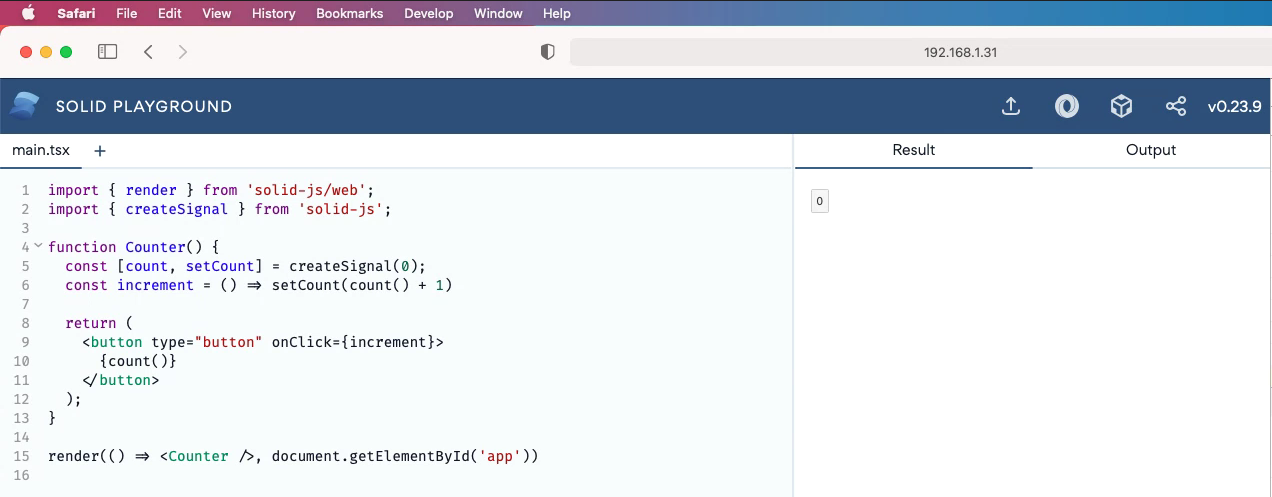
Keep in mind this is done through browser stack and might not be as accurate as a real device. That's the best tooling I got for mac testing though..
I also removed localeStorage calls for now as I won't be releasing the dark theme that soon.
Can you guys let me know if that fixed it for you?
amoutonbrady
on 7 Jan 2021
That fixed Safari for me. Thank you. @redbar0n will have to verify Chrome as I was never able to reproduce that.
ryansolid
on 7 Jan 2021
Works here too!
redbar0n
on 7 Jan 2021
Eh, actually, that was a bit premature.
It works smoothly in Safari.
It worked in Chrome. Then started working intermittently, and now it's back to not working at all again.
Funny thing is I don't get an error in the console now, just Compilation took: 355.609...ms.
I've tried switching back and forth between the Result and Output tab, since that reloaded it in Safari. But to no avail.
PS: https://solid-template-explorer.netlify.app/ also doesn't work. Gives: Not found - Request ID: 117c4906-c2a5-4e81-862e-2d0ee3085b60-102379758
redbar0n
on 7 Jan 2021
Ah, found it. It was the default blocking of cookies in Chrome that did it. When I "Continue allowing cookies" then the Playground works smoothly in Chrome.
redbar0n
on 7 Jan 2021
Actually, I do reproduce... Looks like I broke something else... I'll investigate
amoutonbrady
on 7 Jan 2021
Just pushed an update that should fix it once and for all :)
amoutonbrady
on 7 Jan 2021
Awesome! Still works here. Feel free to close the issue.
redbar0n
on 7 Jan 2021
Awesome thanks for the quick turn around on testing this stuff.
ryansolid
on 7 Jan 2021
Related issues
 trueadm
·
4Comments
trueadm
·
4Comments
 Yakulu
·
4Comments
Yakulu
·
4Comments
 Ziriax
·
4Comments
Ziriax
·
4Comments
 shybyte
·
4Comments
shybyte
·
4Comments
 kavsingh
·
4Comments
kavsingh
·
4Comments