Solaar: Enabling HID++ Scrolling toogle disables scrolling - is this expected behaviour?
Information
- Version: 1.02 (installed from PPA)
- Distribution: Ubuntu 18.04.3 LTS
- Kernel version (ex.
uname -srmo):Linux 5.3.0-7648-generic x86_64 GNU/Linux - Output of
solaar show:
$ solaar show
Nano Receiver
  Device path  : /dev/hidraw1
  USB id       : 046d:c534
  Serial       : None
    Firmware   : 29.01.B0016
  Has 1 paired device(s) out of a maximum of 2.
  Has 19 successful pairing(s) remaining.
  Notifications: wireless, software present (0x000900)

  2: Wireless Mouse M185 new
     Codename     : M185n
     Kind         : mouse
     Wireless PID : 4054
     Protocol     : HID++ 4.5
     Polling rate : 8 ms (125Hz)
     Serial number: 00000000
          Firmware: RQM 64.00.B0008
     The power switch is located on the base.
     Supports 20 HID++ 2.0 features:
         0: ROOT                   {0000}
         1: FEATURE SET            {0001}
         2: DEVICE FW VERSION      {0003}
         3: DEVICE NAME            {0005}
         4: RESET                  {0020}
         5: REPROG CONTROLS V4     {1B04}
            Actions: {'80': 80, '81': 81, '82': 82}
         6: WIRELESS DEVICE STATUS {1D4B}
         7: LOWRES WHEEL           {2130}
            HID++ Scrolling: False
         8: POINTER SPEED          {2205}
            Pointer Speed: 1.0
         9: DEVICE RESET           {1802}   internal, hidden
        10: unknown:1810           {1810}   internal, hidden
        11: unknown:1830           {1830}   internal, hidden
        12: unknown:1850           {1850}   internal, hidden
        13: unknown:1869           {1869}   internal, hidden
        14: unknown:1890           {1890}   internal, hidden
        15: unknown:18B1           {18B1}   internal, hidden
        16: unknown:1DF3           {1DF3}   internal, hidden
        17: unknown:1E00           {1E00}   hidden
        18: unknown:1F03           {1F03}   internal, hidden
        19: unknown:1E80           {1E80}   internal, hidden
     Has 3 reprogrammable keys:
         0: LEFT CLICK                , default: LeftClick                   => LEFT CLICK
             mse, reprogrammable, pos:0, group:1, gmask:1
         1: RIGHT CLICK               , default: RightClick                  => RIGHT CLICK
             mse, reprogrammable, pos:0, group:1, gmask:1
         2: Middle Button             , default: Mouse Middle Button         => Middle Button
             mse, reprogrammable, divertable, pos:0, group:2, gmask:3
     Battery status unavailable.
Describe the bug
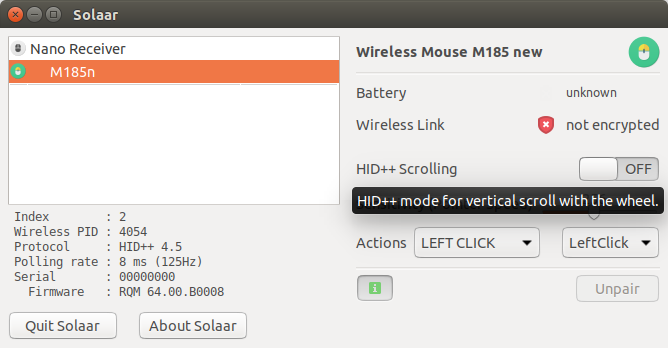
Choosing the HID++ Scrolling button (from OFF -> ON) disables all scrolling. Is this the expected bug?
To Reproduce
Steps to reproduce the behavior:
- Go to 'SOLAAR GUI Dialogue'
- Click on 'M185n>HID++ Scrolling (OFF->ON)'
- Scrolling with the wheel becomes disabled. Switching HID++ Scrolling (ON->OFF) restores scrolling.
Screenshots
If applicable, add screenshots to help explain your problem.
 cement-head
All 5 comments
@cement-head Yes, it was expected. Linux mouse drivers not aware of HID++ scrolling events and this feature only useful to disable HID++ scrolling if it was enabled.
It noted in documentation, in https://pwr-solaar.github.io/Solaar/devices
"(note): Currently, smooth scrolling events are not processed in xfce and this setting is useful only to disable smooth scrolling."
 doctor64
on 22 Jun 2020
doctor64
on 22 Jun 2020
@cement-head I was thinking of removing this setting, precisely because all it does is effectively turning off scrolling. Or at least the description should be changed.
 pfps
on 22 Jun 2020
pfps
on 22 Jun 2020
@pfps At least in my tests this setting in mouse survive after host was rebooted from Windows to Linux. So, it is needed to be able turn it off in Linux.
doctor64
on 22 Jun 2020
I think that if you turn the mouse off and then on again the setting will revert to the default (regular scrolling). At least that is what happens with my M510v2 mouse.
pfps
on 22 Jun 2020
@pfps Yes, of course, but if we remove this setting from Solaar, it will be not automatically applied at solaar start. I hope that adding info in description will be enough?
doctor64
on 23 Jun 2020
Related issues
 positron96
·
16Comments
positron96
·
16Comments
 notaduck
·
15Comments
notaduck
·
15Comments
 hoemon
·
14Comments
hoemon
·
14Comments
 yifita
·
5Comments
yifita
·
5Comments
 ABotond
·
17Comments
ABotond
·
17Comments
Most helpful comment
@cement-head I was thinking of removing this setting, precisely because all it does is effectively turning off scrolling. Or at least the description should be changed.