Solaar: Please support Battery levels of the G903 (feature BATTERY_VOLTAGE)
Information
- Solaar version (
git describe --tagsif cloned from Solaar repository): 1.0.2_rc1 (which still reports as 1.0.1 btw. ) - Distribution: Gentoo Linux
- Kernel version (ex.
uname -srmo):Linux 5.4.27-Eiko x86_64 GNU/Linux - Output of
solaar show:
Lightspeed Receiver
  Device path  : /dev/hidraw4
  USB id       : 046d:c539
  Serial       : D5D09DA6
    Firmware   : 39.06.B0040
    Bootloader : 02.09
    Other      : AA.BE
  Has 1 paired device(s) out of a maximum of 1.
  Notifications: wireless, software present (0x000900)
  Device activity counters: (empty)

  1: Logitech G903 Wired/Wireless Gaming Mouse
     Codename     : G903
     Kind         : mouse
     Wireless PID : 4067
     Protocol     : HID++ 4.2
     Polling rate : 8 ms (125Hz)
     Serial number: 47FF66EF
          Firmware: MPM 07.00.B0009
        Bootloader: BOT 55.00.B0009
             Other:
     The power switch is located on the base.
     Supports 29 HID++ 2.0 features:
         0: ROOT                   {0000}
         1: FEATURE SET            {0001}
         2: DEVICE FW VERSION      {0003}
         3: DEVICE NAME            {0005}
         4: BATTERY VOLTAGE        {1001}
         5: unknown:1863           {1863}   internal, hidden
         6: unknown:18A1           {18A1}   internal, hidden
         7: unknown:1E00           {1E00}   hidden
         8: unknown:1E20           {1E20}
         9: unknown:1EB0           {1EB0}   internal, hidden
        10: ADJUSTABLE DPI         {2201}
        11: ANGLE SNAPPING         {2230}
        12: SURFACE TUNING         {2240}
        13: REPORT RATE            {8060}
        14: ONBOARD PROFILES       {8100}
        15: MOUSE BUTTON SPY       {8110}
        16: unknown:1850           {1850}   internal, hidden
        17: DFUCONTROL SIGNED      {00C2}
        18: unknown:1801           {1801}   internal, hidden
        19: DEVICE RESET           {1802}   internal, hidden
        20: unknown:1803           {1803}   internal, hidden
        21: OOBSTATE               {1805}   internal, hidden
        22: unknown:1809           {1809}
        23: unknown:1890           {1890}   internal, hidden
        24: unknown:1811           {1811}   internal, hidden
        25: LATENCY MONITORING     {8111}
        26: COLOR LED EFFECTS      {8070}
        27: LED CONTROL            {1300}
        28: unknown:1830           {1830}   internal, hidden
     Battery: 4164mV, Discharging.
Describe the bug
Battery status should be shown instead on "Unknown"
Additional context
refs #466
 Dessa
Dessa
All 28 comments
Well, I think we have the permission from Logitech to use the battery curve, so I guess this should be possible.
 FFY00
on 24 Mar 2020
FFY00
on 24 Mar 2020
This requires implementing the BATTERY VOLTAGE feature so I'm changing this from a bug to an enhancement request.
 pfps
on 11 Apr 2020
pfps
on 11 Apr 2020
would this also support, G-Pro Wireless? or should I open a different thread with some of the solaar show output?
Right now my G-Pro wireless reports battery as unavailable
Thank you :)
 mbinns
on 10 May 2020
mbinns
on 10 May 2020
Yes.
FFY00
on 10 May 2020
After recent update Solaar still doesn't show battery level of my G900, but also doesn't start automatically with OS.
 Linux-Fan
on 24 May 2020
Linux-Fan
on 24 May 2020
Battery voltage isn't implemented.
Diagnosing the startup problem will probably have to be done with whoever created the distribution for your Linux variant, but you should at least check to see that /etc/xdg/autostart/solaar.desktop exists and looks reasonable.
Hmm. Now that I look at it, it seems that sudo pip install solaar does not install the autostart file in the right place. That may be your problem, if you are installing that way.
pfps
on 25 May 2020
Yes, the PyPI package isn't installing the autostart and udev files correctly. There appears to be some very silly handling of data files that are supposed to go to absolute file names in binary distributions.
I updated Solaar on PyPI so that sudo pip install solaar does the right thing. Please check it out if that is how you installed Solaar.
pfps
on 25 May 2020
I have some code that shows battery voltage status in the main window but I need someone with a suitable device to test it out.
To do so, first kill solaar. Then clone solaar from my repository, checkout the voltage branch, and run solaar from there via
git clone https://github.com/pfps/Solaar
cd Solaar
git checkout voltage
bin/solaar
The main window should show your battery voltage and provide a reasonable battery icon.
Reply with your experiences.
There is more that should be done, but I don't have the documentation for this feature.
@FFY00 Is there documentation for BATTERY_VOLTAGE somewhere?
pfps
on 5 Jun 2020
It is implemented in the kernel, you can check the implementation there.
Here's also some documentation: https://patchwork.kernel.org/patch/11124945/#22872017
FFY00
on 5 Jun 2020
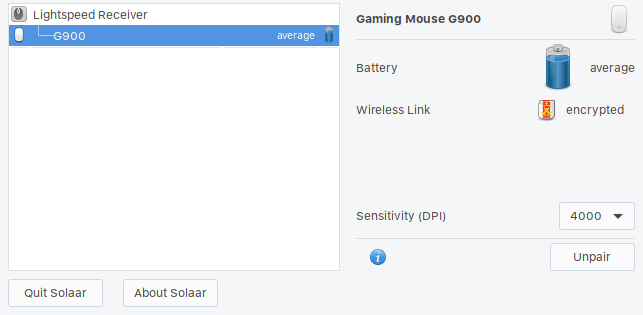
@pfps awesome job! Works and looks great.
 nick-s-b
on 5 Jun 2020
nick-s-b
on 5 Jun 2020
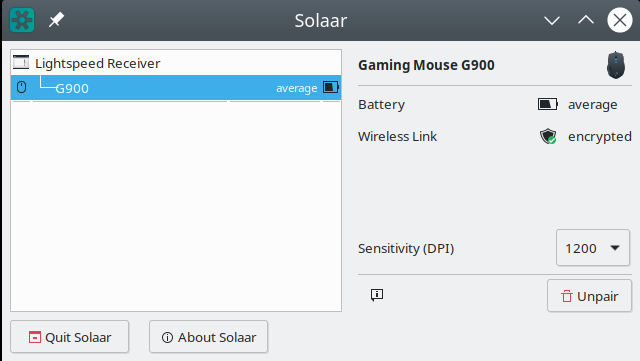
@pfps I can confirm it works! Great job! Now, would it be implemented?
Linux-Fan
on 5 Jun 2020
@FFY00 That's useful.
The last missing bit, I think, is whether there are notifications for battery voltage changes and what they look like.
pfps
on 5 Jun 2020
OK, that part of the change worked, now for the next bit. :-)
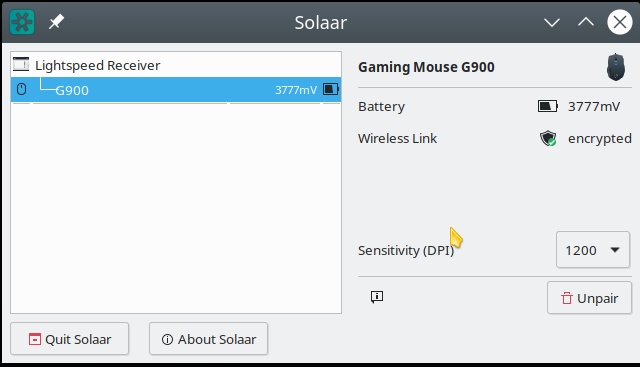
What you have doesn't show the actual voltage. I added some code to show that (instead of "average"). The battery icon will still tell you that your battery is not full and not near empty (i.e., "average"). This is in keeping with batteries that report numeric values.
So please try it out again by cloning, etc., as above.
pfps
on 5 Jun 2020
The one remaining issue here is that your device probably emits a notification when its battery status changes and Solaar will not do anything with the notification. So if you keep Solaar running for a long time - long enough for your battery to drain - Solaar won't notice that the battery status has changed. If I get information on the form of the notification I can add that.
pfps
on 5 Jun 2020
@pfps New code doesn't seem to work in my case.

Linux-Fan
on 5 Jun 2020
OK, I'll try to see what is going wrong.
pfps
on 5 Jun 2020
Grr. I forgot to add a format specifier in one place (after I fixed it in another).
Please try again.
pfps
on 5 Jun 2020
@pfps Much better. Is it possible to get the percentage left?
Linux-Fan
on 5 Jun 2020
Getting the percentage left probably requires external information about the battery, as I don't think that the device itself reports that.
@FFY00 Is this information available somewhere?
pfps
on 5 Jun 2020
@pfps I'm not sure about other mice but G900 and G903 have identical batteries. They're 750mAh 3.7V or 2.775Wh. Based on that, we could get a percentage.
nick-s-b
on 6 Jun 2020
Yes, but what is the relationship between voltage and percentage? It is not nearly linear, as far as I know.
pfps
on 6 Jun 2020
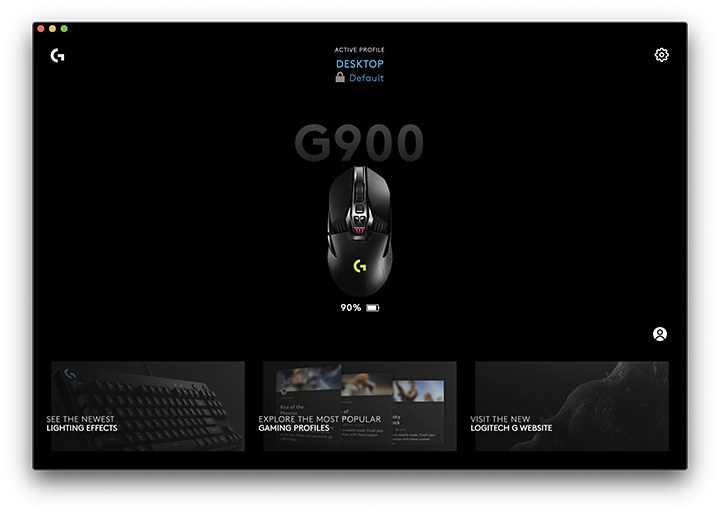
@pfps I wonder how Logitech does it... I'm guessing they have some kind of a LUT for voltages.
I wonder if there are any open source drivers that already do this kind of thing...
nick-s-b
on 6 Jun 2020
i mean there are also additional data points to it in the software (shown in the settings) so that's gotta be a factor too.
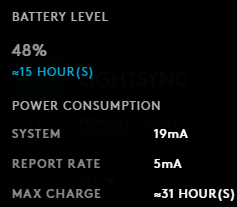
Dessa
on 6 Jun 2020
It looks as if there is other information that can be obtained from the device, and other information about the device that could be used to compute percentages and time remaining, but obtaining and deciphering this information requires documentation about it. I took a look at what appears to be the relevant Liinux driver - https://github.com/torvalds/linux/blob/master/drivers/hid/hid-logitech-hidpp.c - but the only extra information there is that notifications look just like query results. So I expect that Logitech has some quite detailed voltage vs power level information and is estimating power consumption from them.
pfps
on 6 Jun 2020
I implemented battery voltage notification processing, but you will have to test the code by doing the four steps in one of my earlier comments - clone, cd, checkout, run.
Please leave it running as I'm not sure whether you will see changes in battery voltage or lots and lots of desktop notifications as the battery voltage changes.
Also, please run bin/solaar show and provide output, as I changed this code a little bit.
pfps
on 6 Jun 2020
There is some kind of error and it doesn't work.
$ bin/solaar show
Lightspeed Receiver
  Device path  : /dev/hidraw2
  USB id       : 046d:c539
  Serial       : 636C9EDD
    Firmware   : 39.03.B0035
    Bootloader : 01.08
    Other      : AA.BE
  Has 1 paired device(s) out of a maximum of 1.
  Notifications: wireless, software present (0x000900)
  Device activity counters: (empty)

  1: Gaming Mouse G900
     Codename     : G900
     Kind         : mouse
     Wireless PID : 4053
     Protocol     : HID++ 4.2
     Polling rate : 8 ms (125Hz)
     Serial number: 82ECFF9E
          Firmware: MPM 01.05.B0023
        Bootloader: BOT 20.02.B0020
             Other:
     The power switch is located on the base.
     Supports 25 HID++ 2.0 features:
         0: ROOT                   {0000}
         1: FEATURE SET            {0001}
         2: DEVICE FW VERSION      {0003}
         3: DEVICE NAME            {0005}
         4: BATTERY VOLTAGE        {1001}
         5: unknown:1863           {1863}   internal, hidden
         6: unknown:18A1           {18A1}   internal, hidden
         7: unknown:1E00           {1E00}   hidden
         8: unknown:1E20           {1E20}
         9: unknown:1EB0           {1EB0}   internal, hidden
        10: ADJUSTABLE DPI         {2201}
        11: ANGLE SNAPPING         {2230}
        12: SURFACE TUNING         {2240}
        13: REPORT RATE            {8060}
        14: ONBOARD PROFILES       {8100}
        15: MOUSE BUTTON SPY       {8110}
        16: unknown:1850           {1850}   internal, hidden
        17: DFUCONTROL SIGNED      {00C2}
        18: unknown:1801           {1801}   internal, hidden
        19: DEVICE RESET           {1802}   internal, hidden
        20: unknown:1890           {1890}   internal, hidden
        21: unknown:1811           {1811}   internal, hidden
        22: LATENCY MONITORING     {8111}
        23: COLOR LED EFFECTS      {8070}
        24: LED CONTROL            {1300}
solaar: error: name 'battery_voltage' is not defined
Grr, I forgot to change a variable name when I cut-and-pasted. Please try again.
pfps
on 6 Jun 2020
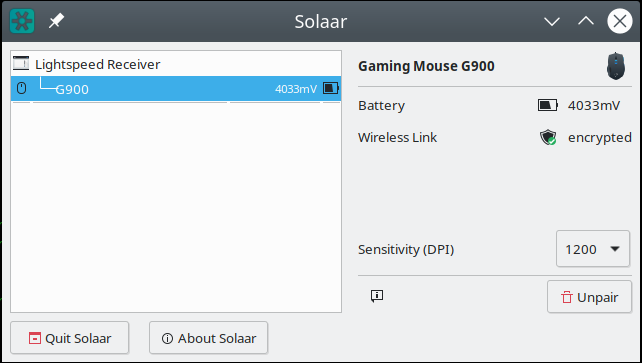
$ bin/solaar show
Lightspeed Receiver
  Device path  : /dev/hidraw2
  USB id       : 046d:c539
  Serial       : 636C9EDD
    Firmware   : 39.03.B0035
    Bootloader : 01.08
    Other      : AA.BE
  Has 1 paired device(s) out of a maximum of 1.
  Notifications: wireless, software present (0x000900)
  Device activity counters: (empty)

  1: Gaming Mouse G900
     Codename     : G900
     Kind         : mouse
     Wireless PID : 4053
     Protocol     : HID++ 4.2
     Polling rate : 8 ms (125Hz)
     Serial number: 82ECFF9E
          Firmware: MPM 01.05.B0023
        Bootloader: BOT 20.02.B0020
             Other:
     The power switch is located on the base.
     Supports 25 HID++ 2.0 features:
         0: ROOT                   {0000}
         1: FEATURE SET            {0001}
         2: DEVICE FW VERSION      {0003}
         3: DEVICE NAME            {0005}
         4: BATTERY VOLTAGE        {1001}
         5: unknown:1863           {1863}   internal, hidden
         6: unknown:18A1           {18A1}   internal, hidden
         7: unknown:1E00           {1E00}   hidden
         8: unknown:1E20           {1E20}
         9: unknown:1EB0           {1EB0}   internal, hidden
        10: ADJUSTABLE DPI         {2201}
        11: ANGLE SNAPPING         {2230}
        12: SURFACE TUNING         {2240}
        13: REPORT RATE            {8060}
        14: ONBOARD PROFILES       {8100}
        15: MOUSE BUTTON SPY       {8110}
        16: unknown:1850           {1850}   internal, hidden
        17: DFUCONTROL SIGNED      {00C2}
        18: unknown:1801           {1801}   internal, hidden
        19: DEVICE RESET           {1802}   internal, hidden
        20: unknown:1890           {1890}   internal, hidden
        21: unknown:1811           {1811}   internal, hidden
        22: LATENCY MONITORING     {8111}
        23: COLOR LED EFFECTS      {8070}
        24: LED CONTROL            {1300}
     Battery: 4033mV, discharging, average.
Related issues
 electriceccentric
·
4Comments
electriceccentric
·
4Comments
 meson11
·
5Comments
meson11
·
5Comments
 Mezzle
·
17Comments
Mezzle
·
17Comments
 witheld9
·
13Comments
witheld9
·
13Comments
 jinmingjian
·
12Comments
jinmingjian
·
12Comments
Most helpful comment
I have some code that shows battery voltage status in the main window but I need someone with a suitable device to test it out.
To do so, first kill solaar. Then clone solaar from my repository, checkout the voltage branch, and run solaar from there via
The main window should show your battery voltage and provide a reasonable battery icon.
Reply with your experiences.
There is more that should be done, but I don't have the documentation for this feature.
@FFY00 Is there documentation for BATTERY_VOLTAGE somewhere?