Adwaita (full default):


It was light-gray, as others.
I think it's not theme issue because it's black with any theme, even default.
After upgrade from r961.59b7285 to r985.b852903.
 AlexWayfer
All 21 comments
This is probably caused by b5d43cd (via #295 by @cschreib).
All icons seem however present with the Adwaita theme. Do you get any errors? If you strace Solaar, can you figure out which files it tried? If you revert that commit, how will it look like?
 Lekensteyn
on 16 Aug 2018
Lekensteyn
on 16 Aug 2018
This is probably caused by b5d43cd (via #295 by @cschreib).
Yep, looks like this.
Do you get any errors?
No.
If you strace Solaar, can you figure out which files it tried?
I don't know how to strace, sorry. Do you have any guide for this?
But I saw in this repo how to enable debug logs:
19:07:06,605    DEBUG [MainThread] solaar.ui.icons: sys.path[0] = /usr/bin
19:07:06,606    DEBUG [MainThread] solaar.ui.icons: looking for icons in /usr/icons
19:07:06,606    DEBUG [MainThread] solaar.ui.icons: looking for icons in /usr/share/solaar/icons
19:07:06,606    DEBUG [MainThread] solaar.ui.icons: looking for icons in /home/alex/.local/share/solaar/icons
19:07:06,606    DEBUG [MainThread] solaar.ui.icons: looking for icons in /usr/local/share/solaar/icons
19:07:06,606    DEBUG [MainThread] solaar.ui.icons: looking for icons in /usr/share/solaar/icons
19:07:06,606    DEBUG [MainThread] solaar.ui.icons: icon theme paths: ['/usr/share/solaar/icons', '/usr/share/solaar/icons', '/home/alex/.local/share/icons', '/home/alex/.icons', '/usr/local/share/icons', '/usr/share/icons', '/usr/local/share/pixmaps', '/usr/share/pixmaps']
19:07:06,617    DEBUG [MainThread] solaar.ui.icons: detected icon sets: Mint True, gpm True, oxygen False, gnome True, elementary True
So, yes, it finds Mint icons. I don't know how — I don't have installed anything with mint.
If you revert that commit, how will it look like?
It looks OK, light-gray. Debug log:
19:12:26,279    DEBUG [MainThread] solaar.ui.icons: sys.path[0] = /home/alex/Projects/Solaar/lib
19:12:26,279    DEBUG [MainThread] solaar.ui.icons: looking for icons in /home/alex/Projects/Solaar/icons
19:12:26,279    DEBUG [MainThread] solaar.ui.icons: looking for icons in /home/alex/Projects/Solaar/share/solaar/icons
19:12:26,279    DEBUG [MainThread] solaar.ui.icons: looking for icons in /home/alex/.local/share/solaar/icons
19:12:26,279    DEBUG [MainThread] solaar.ui.icons: looking for icons in /usr/local/share/solaar/icons
19:12:26,279    DEBUG [MainThread] solaar.ui.icons: looking for icons in /usr/share/solaar/icons
19:12:26,279    DEBUG [MainThread] solaar.ui.icons: icon theme paths: ['/usr/share/solaar/icons', '/home/alex/Projects/Solaar/share/solaar/icons', '/home/alex/.local/share/icons', '/home/alex/.icons', '/usr/local/share/icons', '/usr/share/icons', '/usr/local/share/pixmaps', '/usr/share/pixmaps']
19:12:26,290    DEBUG [MainThread] solaar.ui.icons: detected icon sets: gpm True, oxygen False, gnome True, elementary True
So, yes, it finds Mint icons.
It is a misnomer, it actually looks for names that are part of the Adwaita theme in GNOME. As for strace, close existing solaar instances and run:
strace -e file -o strace.txt solaar
Then inspect the (large) strace.txt file for paths containing battery-good-symbolic.
Lekensteyn
on 17 Aug 2018
Then inspect the (large) strace.txt file for paths containing battery-good-symbolic.
Not found, only battery-full-symbolic: strace.txt
AlexWayfer
on 17 Aug 2018
Can you post a strace with the faulty commit reverted?
Lekensteyn
on 18 Aug 2018
Yes, I can on Monday (this computer at work 😬 ).
AlexWayfer
on 18 Aug 2018
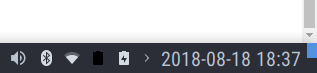
same problem on xfce. Icon theme Papirus with hardcode-tray in use. Before upgrade papirus icons was used.
 hxss
on 18 Aug 2018
hxss
on 18 Aug 2018
@Lekensteyn my strace also contain only battery-full-symbolic.
strace.txt
hxss
on 18 Aug 2018
after downgrade to r961.59b7285 I receive error
Traceback (most recent call last):
  File "/usr/bin/solaar", line 56, in <module>
    import solaar.gtk
ModuleNotFoundError: No module named 'solaar'
Can you post a strace with the faulty commit reverted?
Here it's:
strace.txt
AlexWayfer
on 21 Aug 2018
Also, for 50% icon. How it was (or how it's with reverted commit):

How it's now:

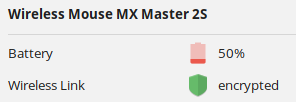
It doesn't look like a half.
AlexWayfer
on 30 Aug 2018
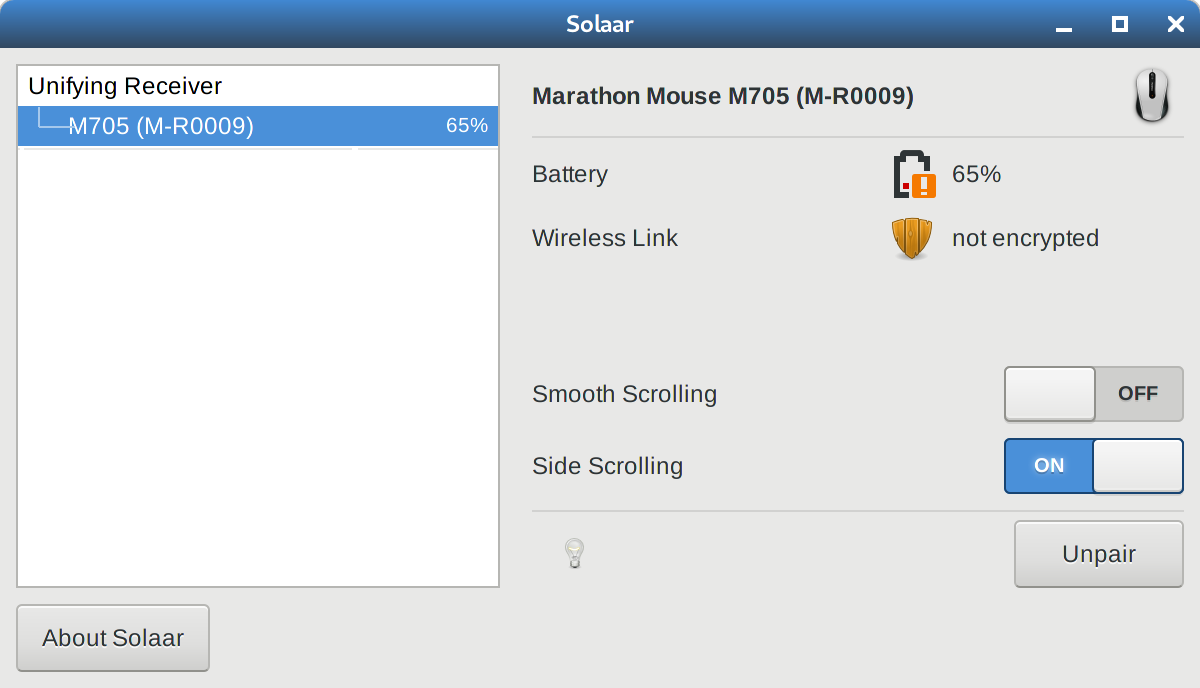
Seeing incorrect icons in Fedora 29 also. When I query the status either from the command line or using the GUI my battery is at 70%.

 dmradcilff
on 6 Nov 2018
dmradcilff
on 6 Nov 2018
Same here… Fedora 29 using solaar-0.9.2-10.20180813gitf0fc63e.fc29.noarch
 philfry
on 10 Dec 2018
philfry
on 10 Dec 2018
543 fixes using the wrong icons for battery levels >20 and <90
 ZachCook
on 29 Jul 2019
ZachCook
on 29 Jul 2019
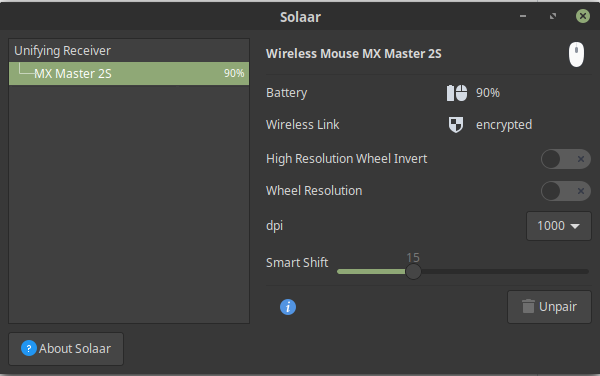
548 Fixes this by checking the current loaded theme
This way you can use Mint Icons if available or use the regular ones available in all themes and distros
Mint Example:
Window:
Taskbar:

Mouse Icons:


 rgarcia7
on 3 Aug 2019
rgarcia7
on 3 Aug 2019
548 should have solved the problem. If not, you can reopen this issue.
 pfps
on 17 Jan 2020
pfps
on 17 Jan 2020
548 should have solved the problem.
Not merged PR should have solved the problem… how?
AlexWayfer
on 17 Jan 2020
Oops, my bad. I looked at CLOSED and didn't notice that it had not been merged. My apologies. I'm reopening.
pfps
on 17 Jan 2020
Solaar is trying to adapt its battery icon names to the current theme. Unfortunately, the debugging logging that would show just what name is being used has been commented out. strace shows which files have been accessed but not why they were accessed.
If you can run solaar from this repository then you can turn this debugging back on. Just uncomment the two commented lines in the battery function in lib/solaar/ui/icons.py
Then run solaar -dd
This will produce a lot of output. What is of interest are the lines from this logging output, i.e., lines containing "battery icon for".
This will show what solar thinks of the battery and which icon name it will use.
For example, what I see are
19:46:34,188 DEBUG [MainThread] solaar.ui.icons: battery icon for None:None = battery-missing-symbolic
19:46:35,205 DEBUG [MainThread] solaar.ui.icons: battery icon for good:False = battery-good-symbolic
which look appropriate to me.
pfps
on 17 Jan 2020
If anyone is still experiencing the problem with black-on-black icons in the system tray please try out the proposed solution in #746
pfps
on 20 Apr 2020
@AlexWayfer @philfry @dmradcilff I installed 1.0.1 on a different machine and noticed the problem with icons that do not reflect the actual battery level. This has since been fixed. If you are still experiencing the problem, please clone and try out Solaar from this repository.
pfps
on 21 Apr 2020
Related issues
 jinmingjian
·
12Comments
jinmingjian
·
12Comments
 mfraser
·
9Comments
mfraser
·
9Comments
 asgrim
·
5Comments
asgrim
·
5Comments
 witheld9
·
13Comments
witheld9
·
13Comments
 fdev31
·
9Comments
fdev31
·
9Comments
Most helpful comment
543 fixes using the wrong icons for battery levels >20 and <90