I just want to know battery level under linux :)
I am willing to test:
latest solaar from git doesnt recognize it.
lsusb -v -d 046d:c539

Bus 001 Device 013: ID 046d:c539 Logitech, Inc.
Device Descriptor:
  bLength                18
  bDescriptorType         1
  bcdUSB               2.00
  bDeviceClass            0
  bDeviceSubClass         0
  bDeviceProtocol         0
  bMaxPacketSize0        32
  idVendor           0x046d Logitech, Inc.
  idProduct          0xc539
  bcdDevice           39.03
  iManufacturer           1 Logitech
  iProduct                2 USB Receiver
  iSerial                 0
  bNumConfigurations      1
  Configuration Descriptor:
    bLength                 9
    bDescriptorType         2
    wTotalLength           84
    bNumInterfaces          3
    bConfigurationValue     1
    iConfiguration          4 RQR39.03_B0035
    bmAttributes         0xa0
      (Bus Powered)
      Remote Wakeup
    MaxPower               98mA
    Interface Descriptor:
      bLength                 9
      bDescriptorType         4
      bInterfaceNumber        0
      bAlternateSetting       0
      bNumEndpoints           1
      bInterfaceClass         3 Human Interface Device
      bInterfaceSubClass      1 Boot Interface Subclass
      bInterfaceProtocol      1 Keyboard
      iInterface              0
        HID Device Descriptor:
          bLength                 9
          bDescriptorType        33
          bcdHID               1.11
          bCountryCode            0 Not supported
          bNumDescriptors         1
          bDescriptorType        34 Report
          wDescriptorLength      59
         Report Descriptors:
           ** UNAVAILABLE **
      Endpoint Descriptor:
        bLength                 7
        bDescriptorType         5
        bEndpointAddress     0x81  EP 1 IN
        bmAttributes            3
          Transfer Type            Interrupt
          Synch Type               None
          Usage Type               Data
        wMaxPacketSize     0x0008  1x 8 bytes
        bInterval               1
    Interface Descriptor:
      bLength                 9
      bDescriptorType         4
      bInterfaceNumber        1
      bAlternateSetting       0
      bNumEndpoints           1
      bInterfaceClass         3 Human Interface Device
      bInterfaceSubClass      1 Boot Interface Subclass
      bInterfaceProtocol      2 Mouse
      iInterface              0
        HID Device Descriptor:
          bLength                 9
          bDescriptorType        33
          bcdHID               1.11
          bCountryCode            0 Not supported
          bNumDescriptors         1
          bDescriptorType        34 Report
          wDescriptorLength     148
         Report Descriptors:
           ** UNAVAILABLE **
      Endpoint Descriptor:
        bLength                 7
        bDescriptorType         5
        bEndpointAddress     0x82  EP 2 IN
        bmAttributes            3
          Transfer Type            Interrupt
          Synch Type               None
          Usage Type               Data
        wMaxPacketSize     0x0010  1x 16 bytes
        bInterval               1
    Interface Descriptor:
      bLength                 9
      bDescriptorType         4
      bInterfaceNumber        2
      bAlternateSetting       0
      bNumEndpoints           1
      bInterfaceClass         3 Human Interface Device
      bInterfaceSubClass      0
      bInterfaceProtocol      0
      iInterface              0
        HID Device Descriptor:
          bLength                 9
          bDescriptorType        33
          bcdHID               1.11
          bCountryCode            0 Not supported
          bNumDescriptors         1
          bDescriptorType        34 Report
          wDescriptorLength      98
         Report Descriptors:
           ** UNAVAILABLE **
      Endpoint Descriptor:
        bLength                 7
        bDescriptorType         5
        bEndpointAddress     0x83  EP 3 IN
        bmAttributes            3
          Transfer Type            Interrupt
          Synch Type               None
          Usage Type               Data
        wMaxPacketSize     0x0020  1x 32 bytes
        bInterval               1
can't get device qualifier: Resource temporarily unavailable
can't get debug descriptor: Resource temporarily unavailable
Device Status:     0x0000
  (Bus Powered)
 pauledd
All 16 comments
Can you follow instructions from #362 and provide output of solaar -dd show?
Logitech list with device as "Wireless technology: Custom 2.4GHz", so may be it does not support Unifying/QUAD protocol. Quick search on internet forums confirm that G900 incompatible with Unifyed receiver, but I don't have this device and can't confirm.
 doctor64
on 28 Jul 2017
doctor64
on 28 Jul 2017
solaar -dd show gives:
solaar: error: Logitech receiver not found
When I plug the reciever in I get those lines in syslog:
Jul 29 08:14:08 Gummi kernel: hid-generic 0003:046D:C539.0019: input,hidraw0: USB HID v1.11 Keyboard [Logitech USB Receiver] on usb-0000:00:14.0-2.2/input0
Jul 29 08:14:08 Gummi kernel: input: Logitech USB Receiver as /devices/pci0000:00/0000:00:14.0/usb1/1-2/1-2.2/1-2.2:1.1/0003:046D:C539.001A/input/input28
Jul 29 08:14:08 Gummi kernel: hid-generic 0003:046D:C539.001A: input,hiddev0,hidraw1: USB HID v1.11 Mouse [Logitech USB Receiver] on usb-0000:00:14.0-2.2/input1
Jul 29 08:14:08 Gummi mtp-probe[25880]: checking bus 1, device 11: "/sys/devices/pci0000:00/0000:00:14.0/usb1/1-2/1-2.2"
Jul 29 08:14:08 Gummi mtp-probe[25880]: bus: 1, device: 11 was not an MTP device
Jul 29 08:14:08 Gummi kernel: hid-generic 0003:046D:C539.001B: hiddev0,hidraw2: USB HID v1.11 Device [Logitech USB Receiver] on usb-0000:00:14.0-2.2/input2
Ok, I read your post a second time and I followed now https://github.com/pwr/Solaar/issues/362 .
I added my receiver in base_usb.py
NANO_RECEIVER_C539        = _nano_receiver(0xc539)
...
ALL = (
...
NANO_RECEIVER_C539,
...
and installed the modified udev rule with added
ATTRS{idVendor}=="046d", ATTRS{idProduct}=="c539", GOTO="solaar_apply"
rebuild/installed solaar and re-plugged the receiver.
Then I got permission errors on /dev/hidraw1 for normal user:
solaar -dd show
08:31:47,976    ERROR [MainThread] logitech_receiver.receiver: open DeviceInfo(path=u'/dev/hidraw1', vendor_id=u'046d', product_id=u'c539', serial=None, release='3903', manufacturer='Logitech', product='USB Receiver', interface=1, driver=u'hid-generic')
Traceback (most recent call last):
  File "/usr/lib64/python2.7/site-packages/logitech_receiver/receiver.py", line 527, in open
    handle = _base.open_path(device_info.path)
  File "/usr/lib64/python2.7/site-packages/logitech_receiver/base.py", line 111, in open_path
    return _hid.open_path(path)
  File "/usr/lib64/python2.7/site-packages/hidapi/udev.py", line 227, in open_path
    return _os.open(device_path, _os.O_RDWR | _os.O_SYNC)
OSError: [Errno 13] Keine Berechtigung: '/dev/hidraw1'
08:31:47,977    ERROR [MainThread] solaar.cli: opening DeviceInfo(path=u'/dev/hidraw1', vendor_id=u'046d', product_id=u'c539', serial=None, release='3903', manufacturer='Logitech', product='USB Receiver', interface=1, driver=u'hid-generic')
Traceback (most recent call last):
  File "/usr/lib64/python2.7/site-packages/solaar/cli/__init__.py", line 86, in _receivers
    r = Receiver.open(dev_info)
  File "/usr/lib64/python2.7/site-packages/logitech_receiver/receiver.py", line 527, in open
    handle = _base.open_path(device_info.path)
  File "/usr/lib64/python2.7/site-packages/logitech_receiver/base.py", line 111, in open_path
    return _hid.open_path(path)
  File "/usr/lib64/python2.7/site-packages/hidapi/udev.py", line 227, in open_path
    return _os.open(device_path, _os.O_RDWR | _os.O_SYNC)
OSError: [Errno 13] Keine Berechtigung: '/dev/hidraw1'
Solaar: error: [Errno 13] Keine Berechtigung: '/dev/hidraw1'
Then I added this udev rule, I thought it might help:
KERNEL=="hidraw*", SUBSYSTEM=="hidraw", MODE="0664", GROUP="plugdev"
Still same error.
Then I tried to run "solaar -dd show" as root and it gave me this output:
08:32:48,492    DEBUG [MainThread] logitech_receiver.base: (3) <= w[10 FF 83B5 030000]
08:32:48,493    ERROR [MainThread] logitech_receiver.base: write failed, assuming handle 3 no longer available
08:32:48,493    ERROR [MainThread] logitech_receiver.receiver: open DeviceInfo(path=u'/dev/hidraw1', vendor_id=u'046d', product_id=u'c539', serial=None, release='3903', manufacturer='Logitech', product='USB Receiver', interface=1, driver=u'hid-generic')
Traceback (most recent call last):
  File "/usr/lib64/python2.7/site-packages/logitech_receiver/receiver.py", line 529, in open
    return Receiver(handle, device_info)
  File "/usr/lib64/python2.7/site-packages/logitech_receiver/receiver.py", line 340, in __init__
    serial_reply = self.read_register(_R.receiver_info, 0x03)
  File "/usr/lib64/python2.7/site-packages/logitech_receiver/hidpp10.py", line 142, in read_register
    return device.request(request_id, *params)
  File "/usr/lib64/python2.7/site-packages/logitech_receiver/receiver.py", line 442, in request
    return _base.request(self.handle, 0xFF, request_id, *params)
  File "/usr/lib64/python2.7/site-packages/logitech_receiver/base.py", line 340, in request
    write(ihandle, devnumber, request_data)
  File "/usr/lib64/python2.7/site-packages/logitech_receiver/base.py", line 171, in write
    raise NoReceiver(reason=reason)
NoReceiver: {'reason': OSError(32, 'Daten\xc3\xbcbergabe unterbrochen (broken pipe)')}
Exception AttributeError: "'Receiver' object has no attribute '_devices'" in <object repr() failed> ignored
08:32:48,494    DEBUG [MainThread] solaar.cli: [/dev/hidraw1] => None
When I run solaar normaly as normal user and I plug the receiver in it says:
"Found a Logitech Receiver /dev/hidraw1, but did not have permission to open it..."
pauledd
on 29 Jul 2017
Hmm, looks like this device does not support logitech Unifying/Quad protocol. Unfortunately, i can't confirm this
doctor64
on 24 Aug 2017
I did some research myself and G900 (and I presume other G-class Logitech devices that use Logitech Gaming Software) uses a completely different receiver from other consumer-class devices. These G-devices have way more options. I don't have much free time right now but I hope to get some free time in the next few months and I'll help decode the protocol.
 nick-s-b
on 7 Sep 2017
nick-s-b
on 7 Sep 2017
great! let me know if I can help somehow.
pauledd
on 7 Sep 2017
There's actually a project dedicated to gaming mice configuration named libratbag here: https://github.com/libratbag/libratbag/
 SonicFrog
on 16 Jan 2018
SonicFrog
on 16 Jan 2018
Is there any interest in this? I have reverse-engineered the battery feature for the G900 (and similar devices like the G903, G700 etc) and implemented it on libratbag. I could port that to Solaar if the maintainers agree to having the feature.
 pedrovanzella
on 30 Jul 2019
pedrovanzella
on 30 Jul 2019
my interest is still "active" :)
pauledd
on 31 Jul 2019
@pedrovanzella that would be awesome! Thank you.
nick-s-b
on 31 Jul 2019
@pedrovanzella that would be great.
@pauledd the G900 should be supported in CLI in the lastest version and gui/tray in master.
 FFY00
on 21 Oct 2019
FFY00
on 21 Oct 2019
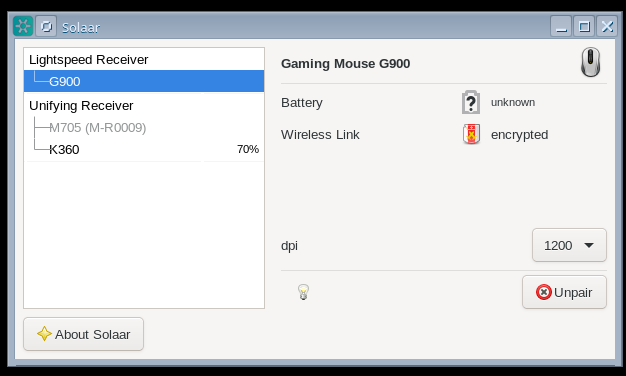
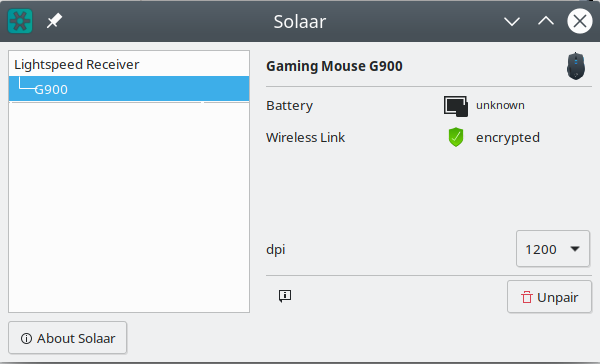
Thank you, my G900 is now recognized, dpi setting works, but without battery status.
pauledd
on 22 Oct 2019
Thank you, my G900 is now recognized, dpi setting works, but without battery status.
Same here
 Linux-Fan
on 23 Dec 2019
Linux-Fan
on 23 Dec 2019
Still nothing?
$ solaar show
Unifying Receiver
  Device path  : /dev/hidraw2
  USB id       : 046d:c539
  Serial       : 636C9EDD
    Firmware   : 39.03.B0035
    Bootloader : 01.08
    Other      : AA.BE
  Has 1 paired device(s) out of a maximum of 1.
  Notifications: wireless, software present (0x000900)
  Device activity counters: (empty)

  1: G900
     Codename     : G900
     Kind         : mouse
     Wireless PID : 4053
     Protocol     : HID++ 4.2
     Polling rate : 8 ms (125Hz)
     Serial number: 82ECFF9E
          Firmware: MPM 01.05.B0023
        Bootloader: BOT 20.02.B0020
             Other:
     The power switch is located on the base.
     Supports 25 HID++ 2.0 features:
         0: ROOT                   {0000}
         1: FEATURE SET            {0001}
         2: DEVICE FW VERSION      {0003}
         3: DEVICE NAME            {0005}
         4: unknown:1001           {1001}
         5: unknown:1863           {1863}   internal, hidden
         6: unknown:18A1           {18A1}   internal, hidden
         7: unknown:1E00           {1E00}   hidden
         8: unknown:1E20           {1E20}
         9: unknown:1EB0           {1EB0}   internal, hidden
        10: ADJUSTABLE DPI         {2201}
        11: ANGLE SNAPPING         {2230}
        12: SURFACE TUNING         {2240}
        13: REPORT RATE            {8060}
        14: ONBOARD PROFILES       {8100}
        15: MOUSE BUTTON SPY       {8110}
        16: unknown:1850           {1850}   internal, hidden
        17: unknown:00C2           {00C2}
        18: unknown:1801           {1801}   internal, hidden
        19: unknown:1802           {1802}   internal, hidden
        20: unknown:1890           {1890}   internal, hidden
        21: unknown:1811           {1811}   internal, hidden
        22: unknown:8111           {8111}
        23: COLOR LED EFECTS       {8070}
        24: LED CONTROL            {1300}
     **Battery status unavailable.**
You appear to be running an old version of Solaar. But going to a newer version won't help as 1001---BATTERY_VOLTAGE---is not yet implemented.
@FFY00 Do you have the needed information for this feature?
 pfps
on 15 May 2020
pfps
on 15 May 2020
See #724 for a recent issue on this.
pfps
on 15 May 2020
Related issues
 jinmingjian
·
12Comments
jinmingjian
·
12Comments
 yifita
·
5Comments
yifita
·
5Comments
 hoemon
·
14Comments
hoemon
·
14Comments
 notaduck
·
15Comments
notaduck
·
15Comments
 digulla
·
10Comments
digulla
·
10Comments
Most helpful comment
@pedrovanzella that would be great.
@pauledd the G900 should be supported in CLI in the lastest version and gui/tray in master.