Softethervpn: SSTP broken in master?
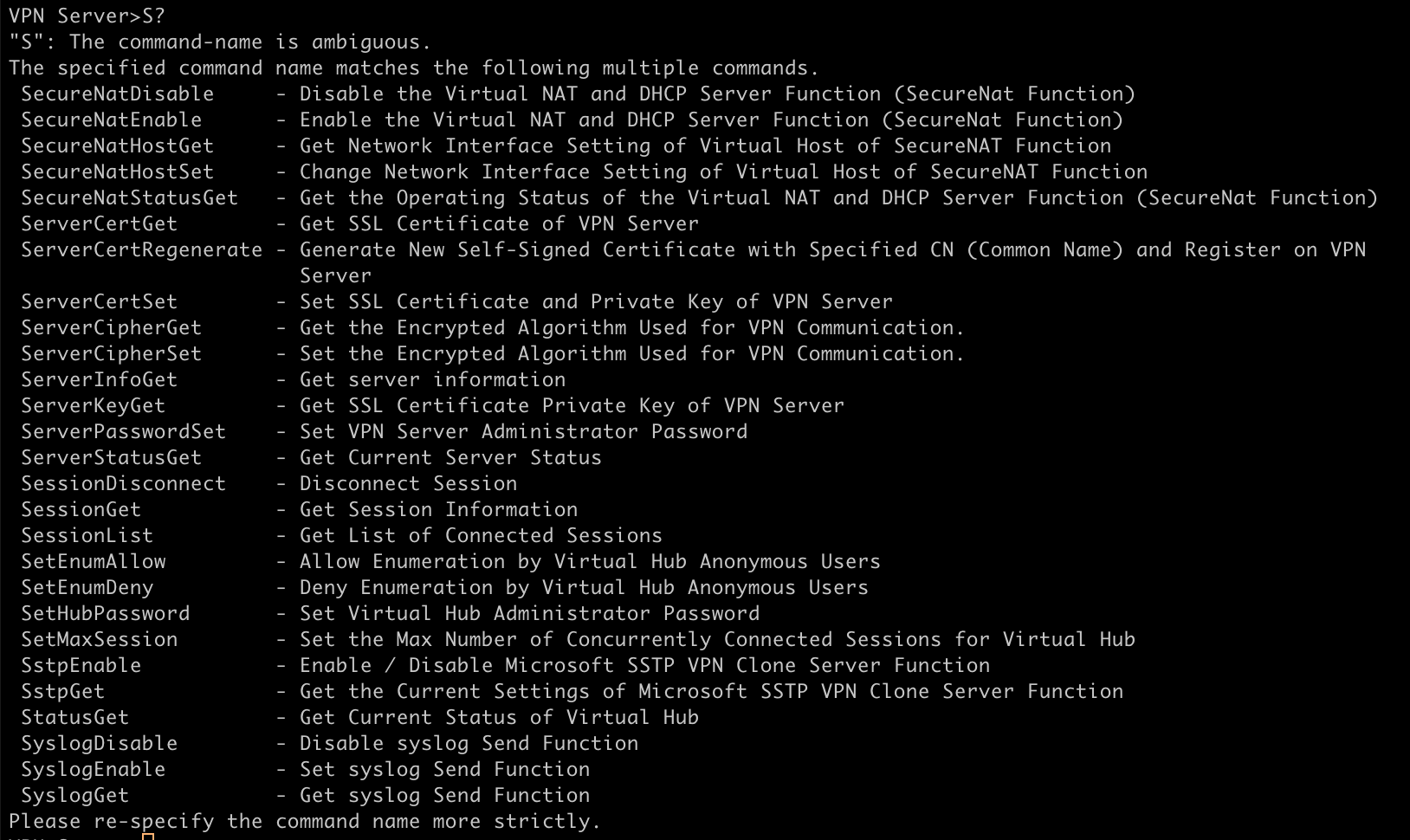
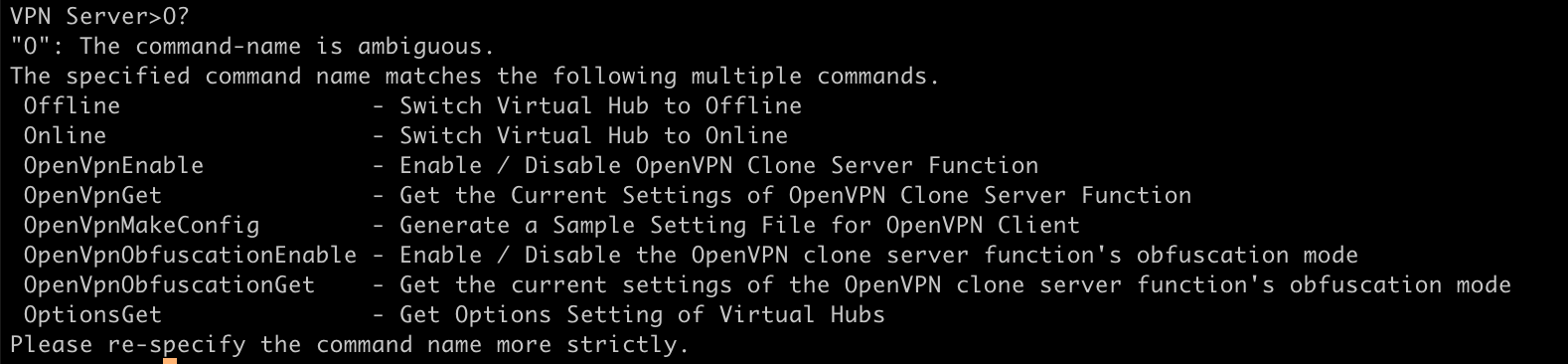
SSTP Enable and OpenVPN Enable are not in the vpncmd commands list when I compiled the latest version from this repo from source (Following the BUILD_UNIX instructions). I am assuming they were just moved into another command and if so what command?
To reproduce follow the BUILD_UNIX instructions on Ubuntu 20.04 and start the vpn server as root. Use vpncmd as root as well. For now I went back to using the PPA but I would love to try the new things recently merged.
 andrewfer000
All 26 comments
When you're talking about latest version, specify the commit hash or tag.
It doesn't reproduce to me. Mine is 5.01.9674
 metalefty
on 17 Nov 2020
metalefty
on 17 Nov 2020
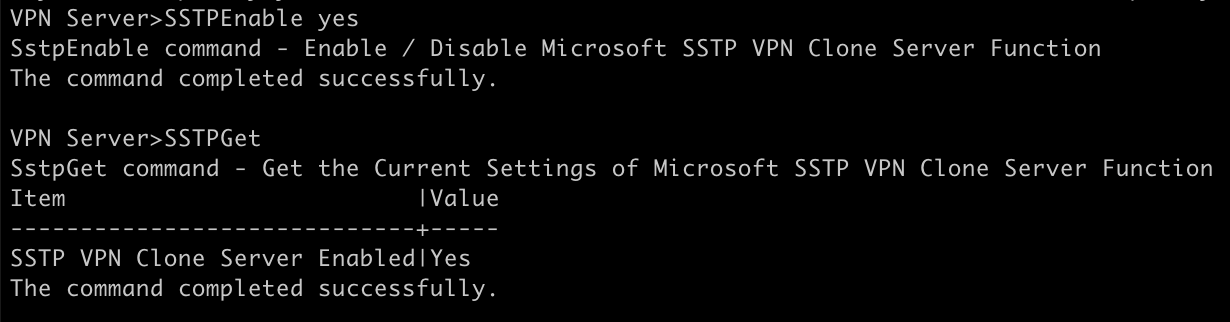
Also show me the output of the commands. It is certainly working for me.
metalefty
on 17 Nov 2020
They were replaced in #1177.
 davidebeatrici
on 17 Nov 2020
davidebeatrici
on 17 Nov 2020
Yeah I notice that command and tried to use it but when I ran
ProtoOptionsGet SSTP
Nothing showed up and then I ran
ProtoOptionsSet
For the protocol I entered SSTP, for the option I put in enabled, and for the value I put true and I was told the command completed successfully. But even though it says it was completed successfully it did not work.
andrewfer000
on 17 Nov 2020
I think you're using an up-to-date vpncmd, but vpnserver is not updated.
davidebeatrici
on 17 Nov 2020
I literally cloned the source code from master yesterday and compiled it so I would assume the client, server, vpncmd, and vpnbridge that ended up in the build directory would all be the correct version. Also when I use the older GUI and vpncmd it does not work. Also, While I did not test the set command for OpenVPN, the options for OpenVPN do get listed when I run ProtocolOptionsGet OpenVpn
andrewfer000
on 17 Nov 2020
UPDATE: After looking in my client logs (VPN Client Pro, Android) it seems that SSL socket closed by remote side seems to be the real error. So I guess my version of the enable command wasn't the real issue since it does establish a TLS connection.
andrewfer000
on 17 Nov 2020
Based on my testing, it seems to be an error with the SSL or TLS. I am now using Davide's WireGuard branch and I am having no problems with SSTP. There must of been some change with SSL or TLS in between Davide's WireGuard branch and SoftEther's Master branch that caused this issue. Perhaps we should change the title of issue to something that reflects the real problem?
Edit: I was not using his WireGuard branch
andrewfer000
on 17 Nov 2020
@davidebeatrici
Here is the server log related to the issue.
2020-11-20 04:41:49.546 On the TCP Listener (Port 443), a Client (IP address 172.x.x.3, Host name "ue.tmodns.net", Port number 61946) has connected.
2020-11-20 04:41:49.546 For the client (IP address: 172.x.x.3, host name: "ue.tmodns.net", port number: 61946), connection "CID-29" has been created.
2020-11-20 04:41:49.626 SSL communication for connection "CID-29" has been started. The encryption algorithm name is "TLS_AES_256_GCM_SHA384".
2020-11-20 04:42:08.534 Connection "CID-29" terminated by the cause "Connection has been disconnected." (code 3).
2020-11-20 04:42:08.534 Connection "CID-29" has been terminated.
2020-11-20 04:42:08.534 The connection with the client (IP address 172.x.x.3, Port number 61946) has been disconnected.
andrewfer000
on 20 Nov 2020
After doing some digging, I have a feeling this has to do with the changes merged in #1235 I'm not even close to an experienced developer so you might want to investigate deeper yourself. The reason I think this is the problem is because of changes to the OpenSSL security.
I did some further investigation and found that this might have to do with the MS-CHAPv2 authentication not working. But that's the only thing I can think of besides the openSSL thing
andrewfer000
on 20 Nov 2020
Had the same problem, so I compiled SE-VPN with debugging enabled and attached gdb to it (server is a Debian stable amd64).
While trying to connect via SSTP (with Windows 10 Enterprise) it crashed on line 513 of Cedar/Proto.c:
impl = container->Impl;
Changing that line to what I guess it should be makes SSTP work for me again. But I'm not a programmer and this is sensitive code, so I really don't want to provide my possibly broken "fix" here :)
Could someone with insight to the code please have a look at this?
 sl077
on 7 Dec 2020
sl077
on 7 Dec 2020
@sl077 please provide your "fix" so I can test it. If it works well then we can talk to @davidebeatrici and see if it can be made into a PR.
andrewfer000
on 7 Dec 2020
@andrewfer000 sure, I just replaced that line at Cedar/Proto.c:513 by
container = tmp;
sl077
on 7 Dec 2020
@sl077 Seems like this fixes the SSTP error. I can confirm it works on Android (VPN Client Pro) and Windows 10 but it seems that this breaks L2TP/IPsec (and likley the other PPP based protocols) but the other protocols such as OpenVPN and SoftEther are working fine. This leads me to believe that a change in the PPP stack may have caused this. (btw, I am using Davide's proto-wireguard branch) so let me know if IPSec works for you in the up-to-date Master.
andrewfer000
on 7 Dec 2020
@andrewfer000 are you sure about L2TP/IPsec? I'm currently connected (on Windows Server 2019) via L2TP/IPsec+PSK to my Test-SE-VPN (running on Debian Buster amd64) patched like this (and actually a few unrelated IPv6 related patches I'm currently testing) and for me it seems to work fine?!?
Edit: Ah, just saw your edit, then your problems might be related to differences in that branch. Did you double check that MS-CHAP v2 is activated in your L2TP/IPsec security settings? For some reason I always have to do this for my VPN connections...
sl077
on 7 Dec 2020
It might just be Davide's proto-wireguard branch. I guess I'll just have to wait for Wireguard and use Master. I am assuming if Davide updates his branch with the latest commits it might fix this.
andrewfer000
on 7 Dec 2020
Nope, Still have the same issue in Master
andrewfer000
on 7 Dec 2020
I think it would be really strange if this patch breaks L2TP/IPsec, as the affected code seems to switch between different possible protocols on shared ports like 443. But afaik L2TP/IPsec is working with a completely different set of protocols unrelated to this?
Edit: Is your VPN server reachable via IPv6 and are you using the FQDN for the connection setup? At least Windows doesn't seem to like this, for L2TP/IPsec clients we had to create an additional DNS entry without AAAA because of this. You could try using the IPv4 address instead of the FQDN in that case.
sl077
on 7 Dec 2020
Looks like that was the issue. I was using my Domain and it failed. I will re-test on Davide's Wireguard branch and see if it works. Thanks.
I seem to be having problems on Windows 10 and Linux with L2TP/IPsec but Android works fine. Strange.
SoftEther's Log-
2020-12-07 23:43:29.327 IPsec Client 1 (73...214:500 -> 0.0.0.0:500): A new IPsec client is created.
2020-12-07 23:43:29.327 IPsec IKE Session (IKE SA) 1 (Client: 1) (73...214:500 -> 0.0.0.0:500): A new IKE SA (Main Mode) is created. Initiator Cookie: 0x217F83FCB6DA5BF1, Responder Cookie: 0x15CAC2459EA386C0, DH Group: MODP 2048 (Group 14), Hash Algorithm: SHA-2-256, Cipher Algorithm: AES-CBC, Cipher Key Size: 256 bits, Lifetime: 4294967295 Kbytes or 10800 seconds
2020-12-07 23:43:29.437 IPsec Client 1 (73...214:1100 -> 0.0.0.0:4500): The port number information of this client is updated.
2020-12-07 23:43:29.437 IPsec Client 1 (73...214:1100 -> 0.0.0.0:4500):
2020-12-07 23:43:29.437 IPsec IKE Session (IKE SA) 1 (Client: 1) (73...214:1100 -> 0.0.0.0:4500): This IKE SA is established between the server and the client.
2020-12-07 23:43:29.478 IPsec IKE Session (IKE SA) 1 (Client: 1) (73...214:1100 -> 0.0.0.0:4500): The client initiates a QuickMode negotiation.
2020-12-07 23:43:29.478 IPsec ESP Session (IPsec SA) 1 (Client: 1) (73...214:1100 -> 0.0.0.0:4500): A new IPsec SA (Direction: Client -> Server) is created. SPI: 0x9CB47287, DH Group: (null), Hash Algorithm: SHA-1, Cipher Algorithm: AES-CBC, Cipher Key Size: 256 bits, Lifetime: 4294967295 Kbytes or 3600 seconds
2020-12-07 23:43:29.478 IPsec ESP Session (IPsec SA) 1 (Client: 1) (73...214:1100 -> 0.0.0.0:4500): A new IPsec SA (Direction: Server -> Client) is created. SPI: 0xC126BEF2, DH Group: (null), Hash Algorithm: SHA-1, Cipher Algorithm: AES-CBC, Cipher Key Size: 256 bits, Lifetime: 4294967295 Kbytes or 3600 seconds
2020-12-07 23:43:29.518 IPsec ESP Session (IPsec SA) 1 (Client: 1) (73...214:1100 -> 0.0.0.0:4500): This IPsec SA is established between the server and the client.
2020-12-07 23:43:29.568 IPsec Client 1 (73...214:1100 -> 0.0.0.0:4500): The L2TP Server Module is started.
2020-12-07 23:43:29.639 L2TP PPP Session [73...214:1701]: A new PPP session (Upper protocol: L2TP) is started. IP Address of PPP Client: 73...214 (Hostname: "owner-Zephyrus-G"), Port Number of PPP Client: 1701, IP Address of PPP Server: 0.0.0.0, Port Number of PPP Server: 1701, Client Software Name: "L2TP VPN Client - xelerance.com", IPv4 TCP MSS (Max Segment Size): 1314 bytes
2020-12-07 23:43:30.674 IPsec ESP Session (IPsec SA) 1 (Client: 1) (73...214:1100 -> 0.0.0.0:4500): This IPsec SA is deleted.
2020-12-07 23:43:30.674 IPsec IKE Session (IKE SA) 1 (Client: 1) (73...214:1100 -> 0.0.0.0:4500): This IKE SA is deleted.
2020-12-07 23:43:30.674 IPsec ESP Session (IPsec SA) 1 (Client: 1) (73...214:1100 -> 0.0.0.0:4500): This IPsec SA is deleted.
2020-12-07 23:43:31.036 L2TP PPP Session [73...214:1701]: The PPP session is disconnected because the upper-layer protocol "L2TP" has been disconnected.
2020-12-07 23:43:31.036 L2TP PPP Session [73...214:1701]: The PPP session is disconnected.
andrewfer000
on 8 Dec 2020
I get logs like this, if my PPP authentication/security settings aren't valid. Did you check, that MS-CHAP v2 is available for this?
After creating a new VPN connection on Windows, I usually have to go to the network adapter settings in the control center and select that checkbox manually in the security tab of the VPN network adapter. On the other hand, I have to do this for SSTP connections as well, don't know why...
(Note that the given labels are guesswork by me, since I have a german Windows and I am basically only using it for gaming).
sl077
on 8 Dec 2020
@sl077 Thank you very much! That's indeed the proper fix, feel free to create a pull request.
I apologize for the bug, it was introduced in 8685fe0da1a24aeed27b728e4a4f3e0393672951.
The reason why I didn't catch it is because I generally test changes with the native protocol, WireGuard and OpenVPN.
SSTP is the only protocol that requires direct specification, because the session is initiated through the HTTPS server.
As for L2TP/IPsec: it's handled separately right now. The objective is to handle all protocols in Proto, in the future.
davidebeatrici
on 8 Dec 2020
@sl077 Yes I do have MS-CHAPv2 checked off on Linux and Windows (they are default for me at least) and I think it's strange that Android has no issue but Linux and Windows does. For all I know this is caused because I am using the same config file from an older version of SoftEther. Also, great job on fixing the bug I look forward to seeing your PR.
Edit: I just tested this on a Windows XP and Windows 7 Virtual machine (L2TP/IPsec obviously) and it works fine. This is so weird!
Okay so I fixed the issue, It turns out on this version of SoftEther if you have EAP enabled the L2TP/IPsec connection will fail. Disabling EAP fixed the issue on both Windows 10 and Linux
andrewfer000
on 8 Dec 2020
Glad if I could help. But can any of you guys please create that PR or just include that line in some other patch roundup? I'm not using git for more than "clone" and guess you wouldn't see this fixed in 2020 otherwise...
sl077
on 8 Dec 2020
Could you send me your email address?
I would like to set you as author for the commit.
davidebeatrici
on 8 Dec 2020
@davidebeatrici it's my user name (at)gmx.de. But this is really not necessary, it was a single edited line and I'm already happy, if it solves someones problems here.
sl077
on 8 Dec 2020
You're the one who tracked down the issue, you deserve credit.
davidebeatrici
on 9 Dec 2020
Related issues
 ghost
·
4Comments
ghost
·
4Comments
 dimzon
·
3Comments
davidebeatrici
·
14Comments
dimzon
·
3Comments
davidebeatrici
·
14Comments
 forever8938
·
8Comments
forever8938
·
8Comments
 AdroitAdorKhan
·
13Comments
AdroitAdorKhan
·
13Comments
Most helpful comment
They were replaced in #1177.