Snipe-it: v5+ - Assets by status dashboard pie chart is blank
Please confirm you have done the following before posting your bug report:
- [ ] I have enabled debug mode
- [x ] I have read checked the Common Issues page
Describe the bug
In the dashboard the assets by status cake is blank after updating to v5.0.6 from v4.9.5
To Reproduce
Steps to reproduce the behavior:
- Go to 'Dashboard'
- See error
Expected behavior
See the cake dashboard

Screenshots
If applicable, add screenshots to help explain your problem.
Server (please complete the following information):
- Snipe-IT Version - v5.0.6
- OS: [e.g. Ubuntu, CentOS] CentOS 7
- Web Server: [e.g. Apache, IIS] - Apache
- PHP Version - PHP 7.3.6 (cli) (built: May 28 2019 09:32:59) ( NTS )
Desktop (please complete the following information):
- OS: [e.g. iOS]
- Browser [e.g. chrome, safari]
- Version [e.g. 22]
Smartphone (please complete the following information):
- Device: [e.g. iPhone6]
- OS: [e.g. iOS8.1]
- Browser [e.g. stock browser, safari]
- Version [e.g. 22]
Error Messages
- WITH DEBUG TURNED ON, if you're getting an error in your browser, include that error
- If a stacktrace is provided in the error, include that too.
- Any errors that appear in your browser's error console.
- Confirm whether the error is reproducible on the demo: https://snipeitapp.com/demo. - NO - Include any additional information you can find in
storage/logsand your webserver's logs. - Include the output from
php -m(this should display what modules you have enabled.)
Additional context
- Is this a fresh install or an upgrade? - UPGRADE
- What OS and web server you're running Snipe-IT on - CENTOS7 + APACHE
- What method you used to install Snipe-IT (install.sh, manual installation, docker, etc) - MANUAL (GIT)
- Include what you've done so far in the installation, and if you got any error messages along the way. - N/A
- Indicate whether or not you've manually edited any data directly in the database - NO
Add any other context about the problem here.
Please do not post an issue without answering the related questions above. If you have opened a different issue and already answered these questions, answer them again, once for every ticket. It will be next to impossible for us to help you.
 samotelf
All 19 comments
We are on v5.0.7 and have the same issue. With debug enabled I can see the following error:
`#0 /var/www/html/app/Http/Controllers/Api/StatuslabelsController.php(186): Illuminate\Foundation\Bootstrap\HandleExceptions->handleError(8, 'Undefined offse...', '/var/www/html/a...', 186, Array)`

`#1 [internal function]: App\Http\Controllers\Api\StatuslabelsController->getAssetCountByStatuslabel()`

`#2 /var/www/html/vendor/laravel/framework/src/Illuminate/Routing/Controller.php(54): call_user_func_array(Array, Array)`

`#3 /var/www/html/vendor/laravel/framework/src/Illuminate/Routing/ControllerDispatcher.php(45): Illuminate\Routing\Controller->callAction('getAssetCountBy...', Array)`

#4 /var/www/html/vendor/laravel/framework/src/Illuminate/Routing/Route.php(219): Illuminate\Routing\ControllerDispatcher->dispatch(Object(Illuminate\Routing\Route), Object(App\Http\Controllers\Api\StatuslabelsController), 'getAssetCountBy...')

#5 /var/www/html/vendor/laravel/framework/src/Illuminate/Routing/Route.php(176): Illuminate\Routing\Route->runController()

#6 /var/www/html/vendor/laravel/framework/src/Illuminate/Routing/Router.php(681): Illuminate\Routing\Route->run()

#7 /var/www/html/vendor/laravel/framework/src/Illuminate/Pipeline/Pipeline.php(130): Illuminate\Routing\Router->Illuminate\Routing\{closure}(Object(Illuminate\Http\Request))

#8 /var/www/html/vendor/laravel/framework/src/Illuminate/Auth/Middleware/Authenticate.php(43): Illuminate\Pipeline\Pipeline->Illuminate\Pipeline\{closure}(Object(Illuminate\Http\Request))

#9 /var/www/html/vendor/laravel/framework/src/Illuminate/Pipeline/Pipeline.php(171): Illuminate\Auth\Middleware\Authenticate->handle(Object(Illuminate\Http\Request), Object(Closure), 'api')

#10 /var/www/html/vendor/laravel/framework/src/Illuminate/Pipeline/Pipeline.php(105): Illuminate\Pipeline\Pipeline->Illuminate\Pipeline\{closure}(Object(Illuminate\Http\Request))

#11 /var/www/html/vendor/laravel/framework/src/Illuminate/Routing/Router.php(683): Illuminate\Pipeline\Pipeline->then(Object(Closure))

#12 /var/www/html/vendor/laravel/framework/src/Illuminate/Routing/Router.php(658): Illuminate\Routing\Router->runRouteWithinStack(Object(Illuminate\Routing\Route), Object(Illuminate\Http\Request))

#13 /var/www/html/vendor/laravel/framework/src/Illuminate/Routing/Router.php(624): Illuminate\Routing\Router->runRoute(Object(Illuminate\Http\Request), Object(Illuminate\Routing\Route))

#14 /var/www/html/vendor/laravel/framework/src/Illuminate/Routing/Router.php(613): Illuminate\Routing\Router->dispatchToRoute(Object(Illuminate\Http\Request))

#15 /var/www/html/vendor/laravel/framework/src/Illuminate/Foundation/Http/Kernel.php(170): Illuminate\Routing\Router->dispatch(Object(Illuminate\Http\Request))

#16 /var/www/html/vendor/laravel/framework/src/Illuminate/Pipeline/Pipeline.php(130): Illuminate\Foundation\Http\Kernel->Illuminate\Foundation\Http\{closure}(Object(Illuminate\Http\Request))

#17 /var/www/html/vendor/barryvdh/laravel-debugbar/src/Middleware/InjectDebugbar.php(65): Illuminate\Pipeline\Pipeline->Illuminate\Pipeline\{closure}(Object(Illuminate\Http\Request))

#18 /var/www/html/vendor/laravel/framework/src/Illuminate/Pipeline/Pipeline.php(171): Barryvdh\Debugbar\Middleware\InjectDebugbar->handle(Object(Illuminate\Http\Request), Object(Closure))

#19 /var/www/html/app/Http/Middleware/SecurityHeaders.php(26): Illuminate\Pipeline\Pipeline->Illuminate\Pipeline\{closure}(Object(Illuminate\Http\Request))

#20 /var/www/html/vendor/laravel/framework/src/Illuminate/Pipeline/Pipeline.php(171): App\Http\Middleware\SecurityHeaders->handle(Object(Illuminate\Http\Request), Object(Closure))

#21 /var/www/html/vendor/laravel/framework/src/Illuminate/Foundation/Http/Middleware/TransformsRequest.php(21): Illuminate\Pipeline\Pipeline->Illuminate\Pipeline\{closure}(Object(Illuminate\Http\Request))

#22 /var/www/html/vendor/laravel/framework/src/Illuminate/Pipeline/Pipeline.php(171): Illuminate\Foundation\Http\Middleware\TransformsRequest->handle(Object(Illuminate\Http\Request), Object(Closure))

#23 /var/www/html/app/Http/Middleware/CheckForDebug.php(25): Illuminate\Pipeline\Pipeline->Illuminate\Pipeline\{closure}(Object(Illuminate\Http\Request))

#24 /var/www/html/vendor/laravel/framework/src/Illuminate/Pipeline/Pipeline.php(171): App\Http\Middleware\CheckForDebug->handle(Object(Illuminate\Http\Request), Object(Closure))

#25 /var/www/html/app/Http/Middleware/CheckForSetup.php(26): Illuminate\Pipeline\Pipeline->Illuminate\Pipeline\{closure}(Object(Illuminate\Http\Request))

#26 /var/www/html/vendor/laravel/framework/src/Illuminate/Pipeline/Pipeline.php(171): App\Http\Middleware\CheckForSetup->handle(Object(Illuminate\Http\Request), Object(Closure))

#27 /var/www/html/vendor/fideloper/proxy/src/TrustProxies.php(57): Illuminate\Pipeline\Pipeline->Illuminate\Pipeline\{closure}(Object(Illuminate\Http\Request))

#28 /var/www/html/vendor/laravel/framework/src/Illuminate/Pipeline/Pipeline.php(171): Fideloper\Proxy\TrustProxies->handle(Object(Illuminate\Http\Request), Object(Closure))

#29 /var/www/html/vendor/laravel/framework/src/Illuminate/View/Middleware/ShareErrorsFromSession.php(49): Illuminate\Pipeline\Pipeline->Illuminate\Pipeline\{closure}(Object(Illuminate\Http\Request))

#30 /var/www/html/vendor/laravel/framework/src/Illuminate/Pipeline/Pipeline.php(171): Illuminate\View\Middleware\ShareErrorsFromSession->handle(Object(Illuminate\Http\Request), Object(Closure))

#31 /var/www/html/vendor/laravel/framework/src/Illuminate/Session/Middleware/StartSession.php(56): Illuminate\Pipeline\Pipeline->Illuminate\Pipeline\{closure}(Object(Illuminate\Http\Request))

#32 /var/www/html/vendor/laravel/framework/src/Illuminate/Pipeline/Pipeline.php(171): Illuminate\Session\Middleware\StartSession->handle(Object(Illuminate\Http\Request), Object(Closure))

#33 /var/www/html/vendor/laravel/framework/src/Illuminate/Foundation/Http/Middleware/CheckForMaintenanceMode.php(63): Illuminate\Pipeline\Pipeline->Illuminate\Pipeline\{closure}(Object(Illuminate\Http\Request))

#34 /var/www/html/vendor/laravel/framework/src/Illuminate/Pipeline/Pipeline.php(171): Illuminate\Foundation\Http\Middleware\CheckForMaintenanceMode->handle(Object(Illuminate\Http\Request), Object(Closure))

#35 /var/www/html/vendor/barryvdh/laravel-cors/src/HandlePreflight.php(29): Illuminate\Pipeline\Pipeline->Illuminate\Pipeline\{closure}(Object(Illuminate\Http\Request))

#36 /var/www/html/vendor/laravel/framework/src/Illuminate/Pipeline/Pipeline.php(171): Barryvdh\Cors\HandlePreflight->handle(Object(Illuminate\Http\Request), Object(Closure))

#37 /var/www/html/vendor/laravel/framework/src/Illuminate/Pipeline/Pipeline.php(105): Illuminate\Pipeline\Pipeline->Illuminate\Pipeline\{closure}(Object(Illuminate\Http\Request))

#38 /var/www/html/vendor/laravel/framework/src/Illuminate/Foundation/Http/Kernel.php(145): Illuminate\Pipeline\Pipeline->then(Object(Closure))

#39 /var/www/html/vendor/laravel/framework/src/Illuminate/Foundation/Http/Kernel.php(110): Illuminate\Foundation\Http\Kernel->sendRequestThroughRouter(Object(Illuminate\Http\Request))

#40 /var/www/html/public/index.php(58): Illuminate\Foundation\Http\Kernel->handle(Object(Illuminate\Http\Request))

#41 {main}  `
and
[2020-11-18 12:17:07] production.ERROR: ErrorException: Undefined offset: 9 in /var/www/html/app/Http/Controllers/Api/StatuslabelsController.php:186
 beatkind
on 18 Nov 2020
beatkind
on 18 Nov 2020
@beatkind oooof glad I’m not the only one.
I should have posted the debug.
Thank you.
samotelf
on 18 Nov 2020
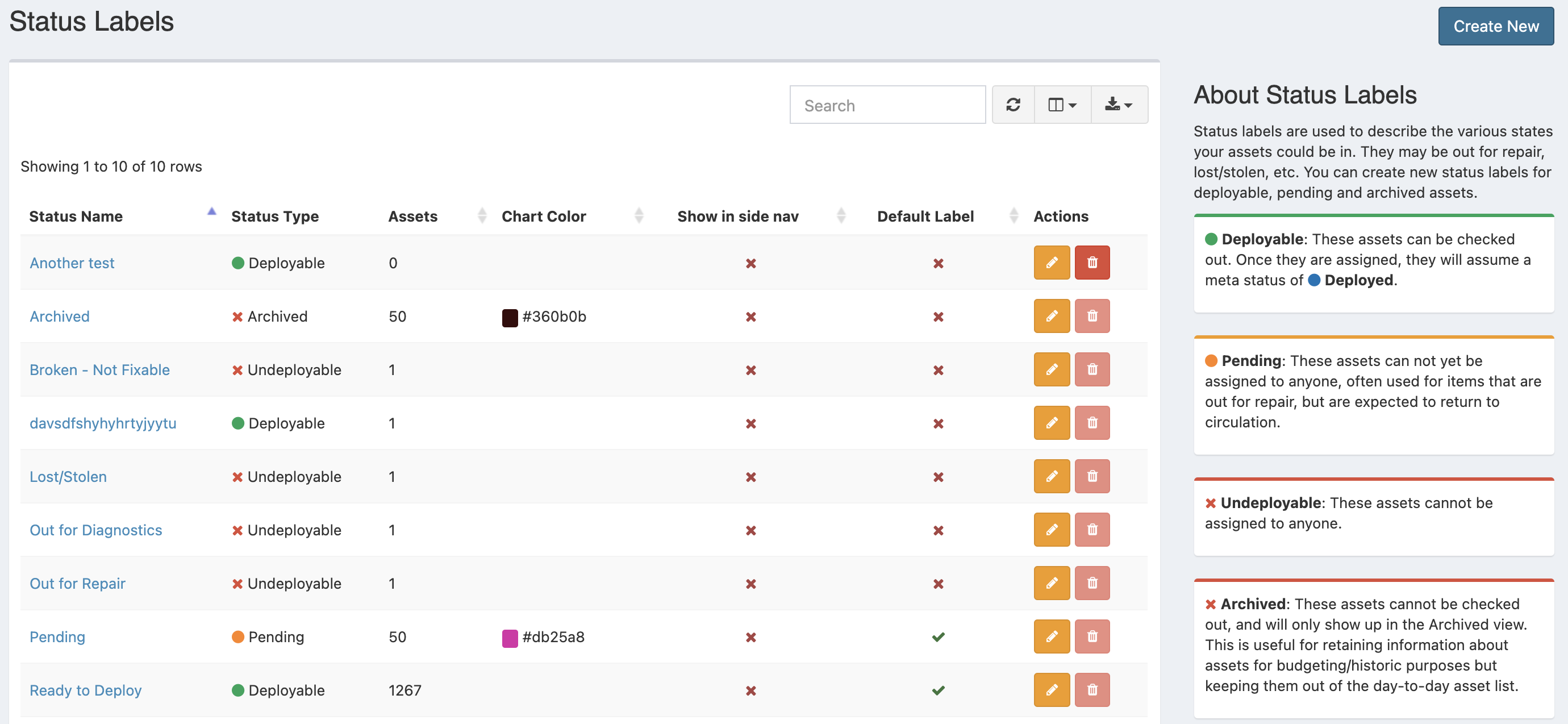
Can I see screenshots of your status label listings page? Like this page?
 snipe
on 18 Nov 2020
snipe
on 18 Nov 2020
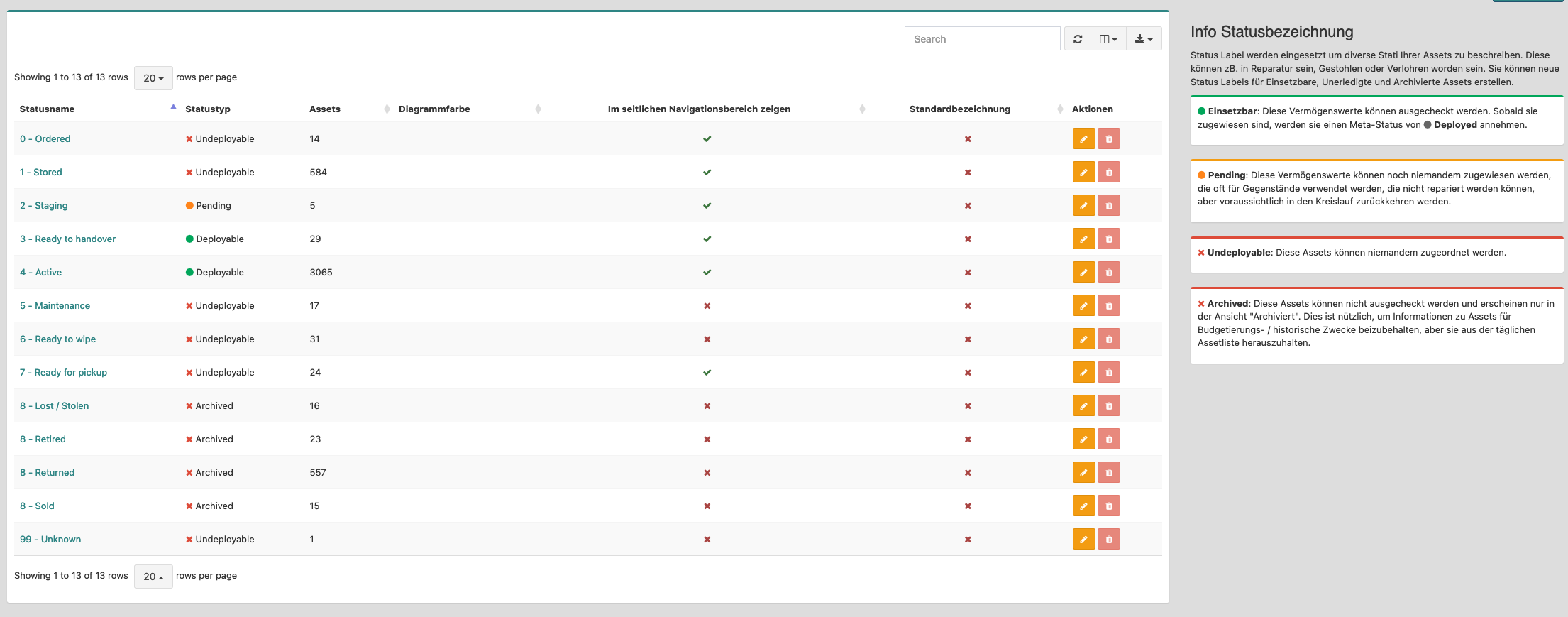
(I'm specifically looking to see how many status labels you have with assets in them, and whether or not you've got custom colors set for them.)
snipe
on 18 Nov 2020
You mean like that?
beatkind
on 18 Nov 2020
@beatkind perfect, TYSM. I'm trying to reproduce the kinds of numbers you both have so I can reproduce the issue locally.
snipe
on 18 Nov 2020
@snipe if you need any other informations, just let me know
beatkind
on 18 Nov 2020
@samotelf can you give me a screenshot as well?
snipe
on 18 Nov 2020
Aha - I can reproduce it locally now. Fix should be out shortly.
snipe
on 18 Nov 2020
Thank you very much!
beatkind
on 18 Nov 2020
The issue here is that our array of default colors is finite - 9 to be exact - so if you have 10 or more status labels and no default color set for them, we run out of colors and the index on the array breaks (array starts at 0).
This is unfortunately trickier than it looks, as generating random colors that don't look like ass together is pretty tricky, and if we just hardcode a bunch of them in, we always run the risk of running out of the default colors. I need to think about the least awful way to do this.
snipe
on 18 Nov 2020
Maybe a solution would be to define colors for the default status labels and for custom labels make the color mandatory? For process of creating a new label it then is maybe a solution to generate a color as a suggestion?
But than I am unsure how to apply this to upgrades and already existing labels. For this I am to much an ops guy.
beatkind
on 18 Nov 2020
@beatkind yeah, therein lies the rub. Existing status labels won't have a value for those, so we could still run into the "running out of default colors" issue.
(In the meantime, if either of you want to fix your pie problem, you should just be able to go into your status labels and assign them some colors.)
snipe
on 18 Nov 2020
Can I see screenshots of your status label listings page? Like this page?
Hello @snipe
I would love to but unfortunately I reversed the snapshot to v4.9.5.
Here's my screenshot of v4.9.5.
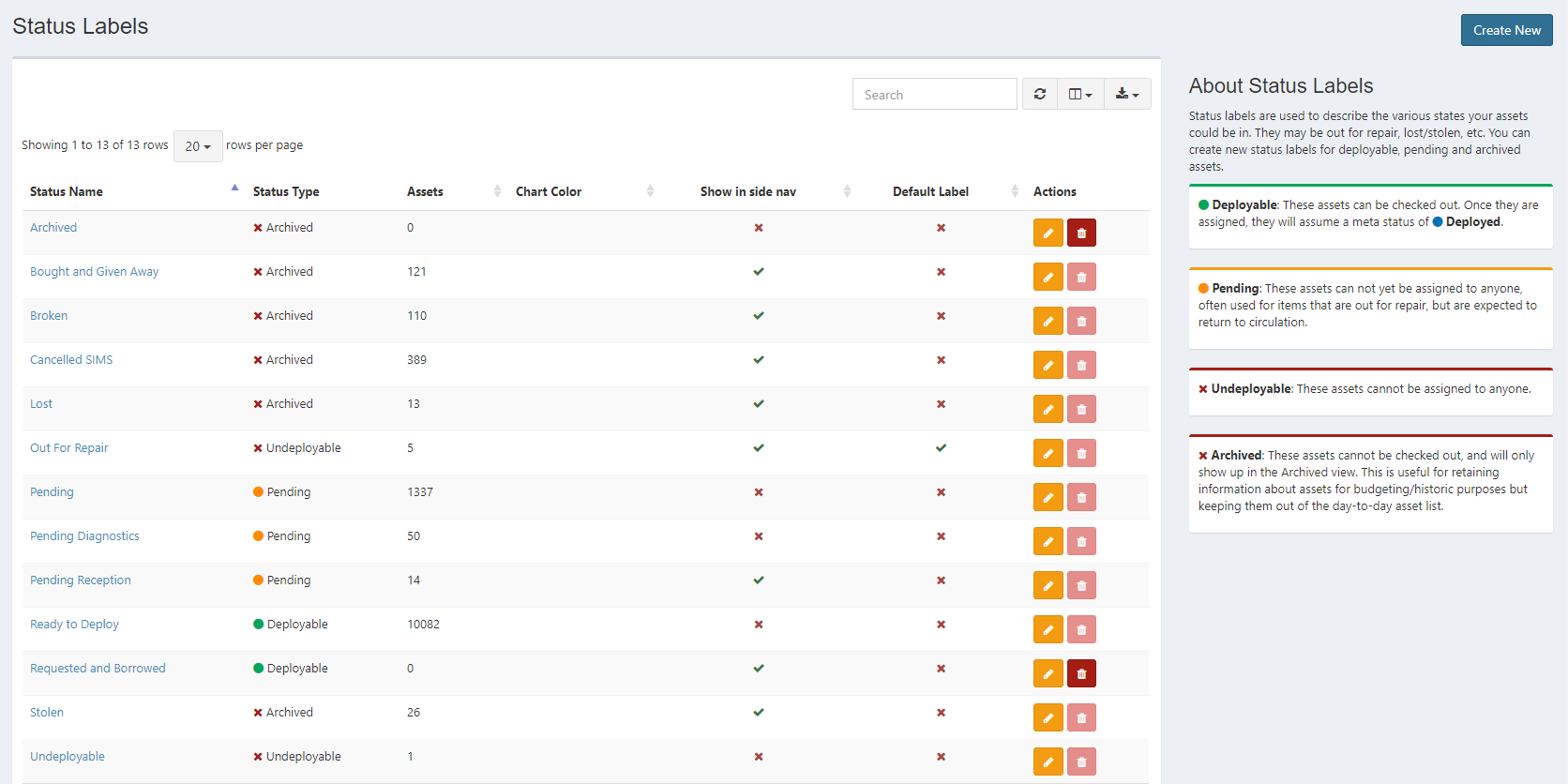
If you would like I can try to update again, and upload the screenshot of the current master release v5.0.7?
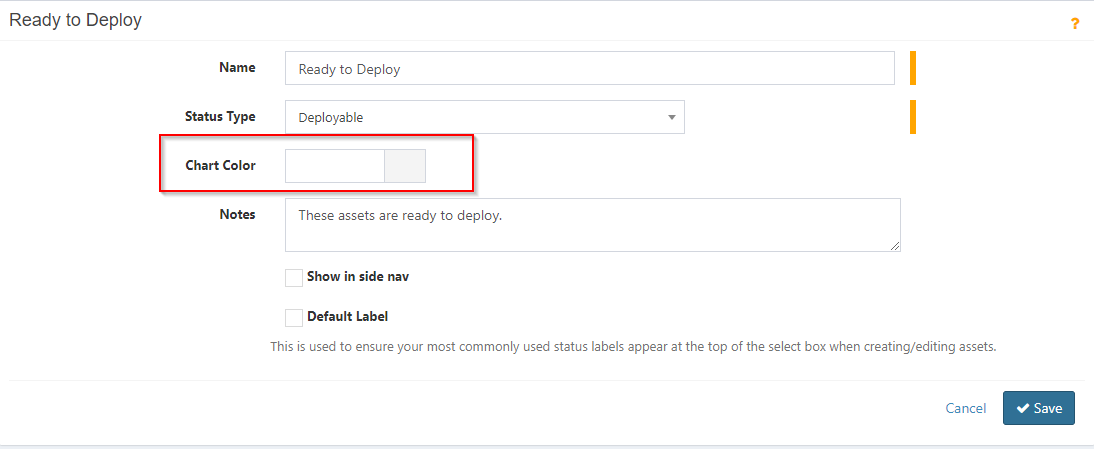
Anyway, heres another screenshot:
And another:
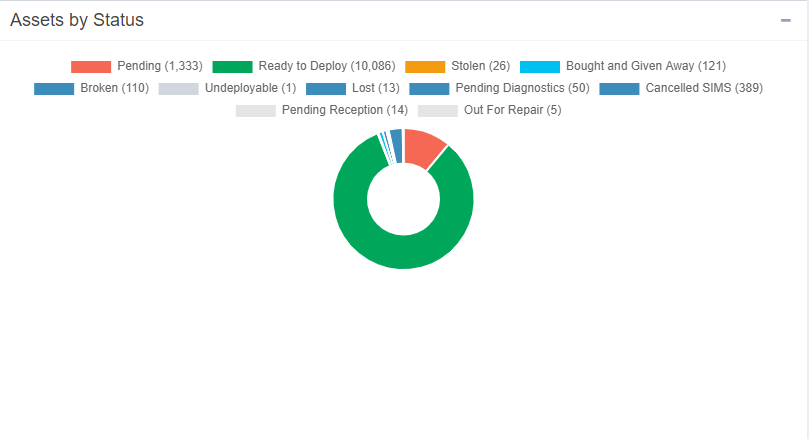
[The cake is small, I was waiting for a new release to also fix this :) ]
So, there's no color assigned to the ready to deploy assets, however it still appears green.
samotelf
on 18 Nov 2020
@samotelf yeah, your issue is the same one. More than 9 status labels without a color assigned to them, hence the offset error.
Up to you if you want to bring it back up to v5. If you do, just set some colors for the different status labels and the pie chart should come back. I can reproduce it here now, so I can test locally.
snipe
on 18 Nov 2020
@samotelf yeah, your issue is the same one. More than 9 status labels without a color assigned to them, hence the offset error.
Up to you if you want to bring it back up to v5. If you do, just set some colors for the different status labels and the pie chart should come back. I can reproduce it here now, so I can test locally.
Yes, I want to. I'll try soon to update again, maybe in the weekend.
Cool.
Thank you very much.
samotelf
on 18 Nov 2020
Sounds good - I'm sure I'll have a fix out by then anyway. I haven't slept all night so my attempts at a fix so far are not going well lol. Math is... surprisingly hard when you're running on 4 hours of sleep over 48 hours. :P
snipe
on 18 Nov 2020
Fix is on master now. Not my best work and could use refactoring, but should do the trick for the time being.
snipe
on 18 Nov 2020
Sounds good - I'm sure I'll have a fix out by then anyway. I haven't slept all night so my attempts at a fix so far are not going well lol. Math is... surprisingly hard when you're running on 4 hours of sleep over 48 hours. :P
Thank you so much.
I hope you get a well deserved rest soon.
Have a lovely day.
samotelf
on 18 Nov 2020
Related issues
 ericdude101
·
5Comments
ericdude101
·
5Comments
 memtech3
·
4Comments
memtech3
·
4Comments
 alextheberge
·
4Comments
snipe
·
3Comments
alextheberge
·
4Comments
snipe
·
3Comments
 sopheaouk
·
3Comments
sopheaouk
·
3Comments
Most helpful comment
Aha - I can reproduce it locally now. Fix should be out shortly.