Snipe-it: Reset Two-Factor Secret broken in v5?
Please confirm you have done the following before posting your bug report:
- [X] I have enabled debug mode
- [X] I have read checked the Common Issues page
Describe the bug
Reset Two-Factor Secret doesn't work
To Reproduce
Steps to reproduce the behavior:
Enable Two-Factor Auth and scan the QR.
Reset that Users Two-Factor Secret
No new QR generate on next login.
Expected behavior
New QR code on login page to setup 2FA (on new / additional device etc).
Screenshots
If applicable, add screenshots to help explain your problem.
Server (please complete the following information):
- Snipe-IT Version 5.04
- OS: [Ubuntu 20.04.1]
- Web Server: [Apache]
- PHP Version 7.4.3
Desktop (please complete the following information):
- OS: [macOS 10.13.6]
- Browser [Safari]
- Version [13.1.2]
Smartphone (please complete the following information):
- Device: [e.g. iPhone6]
- OS: [e.g. iOS8.1]
- Browser [e.g. stock browser, safari]
- Version [e.g. 22]
Error Messages
- WITH DEBUG TURNED ON, if you're getting an error in your browser, include that error
- If a stacktrace is provided in the error, include that too.
- Any errors that appear in your browser's error console.
- Confirm whether the error is reproducible on the demo: https://snipeitapp.com/demo.
- Include any additional information you can find in
storage/logsand your webserver's logs.
Additional context
- Is this a fresh install or an upgrade? Upgrade.
- What OS and web server you're running Snipe-IT on
- What method you used to install Snipe-IT (install.sh, manual installation, docker, etc)
- Include what you've done so far in the installation, and if you got any error messages along the way.
- Indicate whether or not you've manually edited any data directly in the database
Add any other context about the problem here.
Please do not post an issue without answering the related questions above. If you have opened a different issue and already answered these questions, answer them again, once for every ticket. It will be next to impossible for us to help you.
 jovibroz
All 14 comments
Is there anything in your app logs? I don't believe we've changed anything with 2FA reset.
 snipe
on 10 Nov 2020
snipe
on 10 Nov 2020
Seems to be working for us...

snipe
on 13 Nov 2020
Weird.. or semi weird, or not weird at all maybe. Even though the reset screen you pictured above looks the same on my iMac / Safari I never get presented with a new QR upon next login on my Mac. But should I? Or is this only for non PC browsers? Not sure why this computer is so trustworthy :) Anyway, I got a new QR when I accessed the snipe installation from my iPad. So I just had to take a picture of the QR with my iPhone and show it to the iPad camera haha
10 PRINT "FRESH! THANKS!"
20 GOTO 10
RUN
jovibroz
on 13 Nov 2020
I never get presented with a new QR upon next login on my Mac. But should I?
Welp. Server's haunted. Maybe a cookie/session issue? I can't think of any reason why you'd see the QR on your iPad and not on your desktop. We don't treat the browsing devices any differently there.
Does it just skip you right to the "enter your 2FA code" part on your PC?
snipe
on 13 Nov 2020
I just get logged in as normal, username / pwd and into the dashboard. Sounds like a cookie / session thing.
jovibroz
on 13 Nov 2020
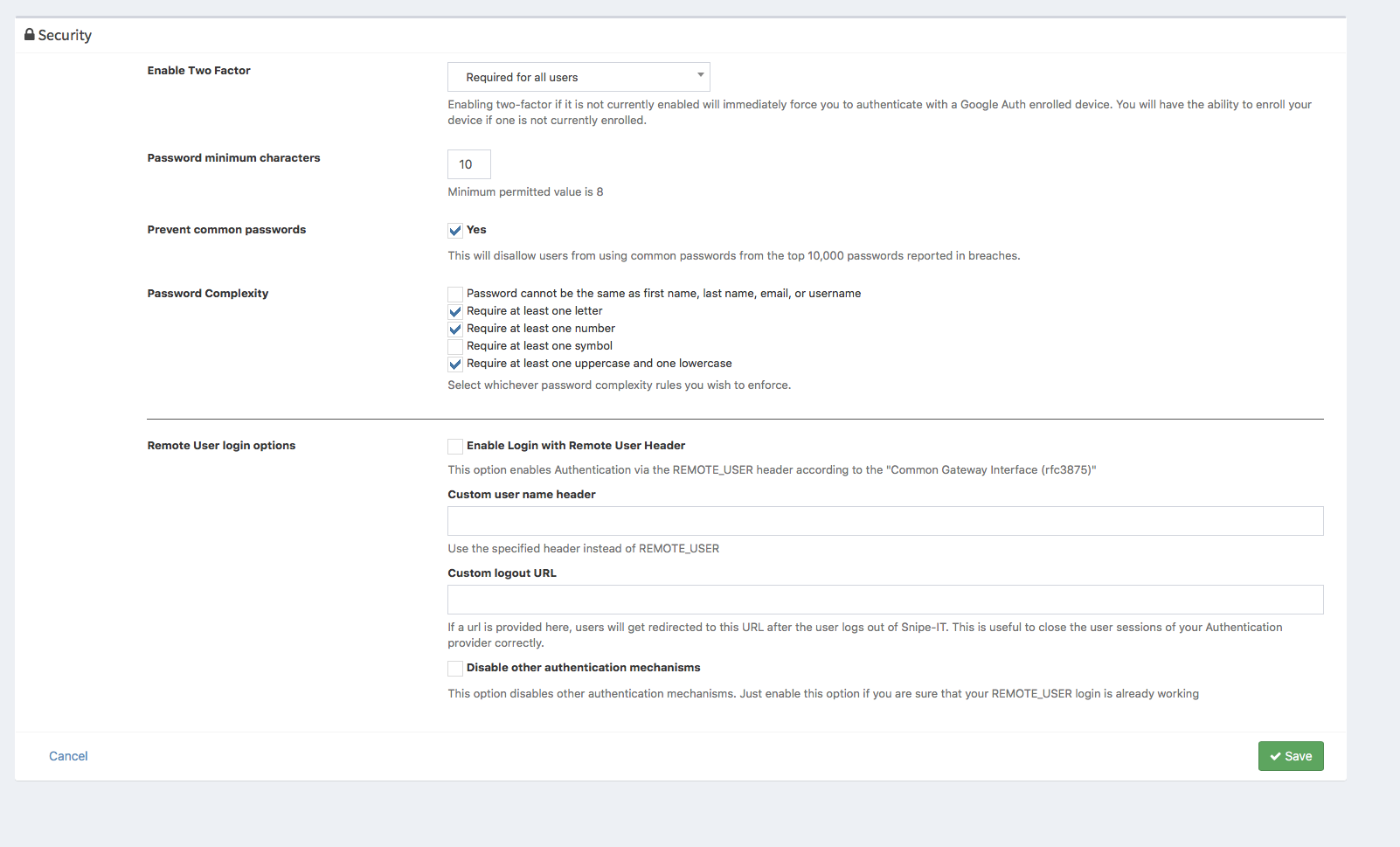
Hm, that seems amiss though. Do you have mandatory 2FA for everyone set up, or optional for each user?
snipe
on 13 Nov 2020
Required all. :O
jovibroz
on 13 Nov 2020
jovibroz
on 13 Nov 2020
The middleware that handles that process is this:
public function handle($request, Closure $next)
    {
        // Skip the logic if the user is on the two factor pages or the setup pages
        if (in_array($request->route()->getName(), self::IGNORE_ROUTES)) {
            return $next($request);
        }

        // Two-factor is enabled (either optional or required)
        if ($settings = Setting::getSettings()) {
            if (Auth::check() && ($settings->two_factor_enabled != '')) {
                // This user is already 2fa-authed
                if ($request->session()->get('2fa_authed')) {
                    return $next($request);
                }

                // Two-factor is optional and the user has NOT opted in, let them through
                if (($settings->two_factor_enabled == '1') && (Auth::user()->two_factor_optin != '1')) {
                    return $next($request);
                }

                // Otherwise make sure they're enrolled and show them the 2FA code screen
                if ((Auth::user()->two_factor_secret != '') && (Auth::user()->two_factor_enrolled == '1')) {
                    return redirect()->route('two-factor')->with('info', 'Please enter your two-factor authentication code.');
                }

                return redirect()->route('two-factor-enroll')->with('success', 'Please enroll a device in two-factor authentication.');
            }
        }

        return $next($request);
My guess would be it's coming from:
if ($request->session()->get('2fa_authed')) {
But I don't think we changed anything there in quite some time.
snipe
on 13 Nov 2020
I don't really remember either. What I do know is that I enabled 2FA before V5. And that I've seen QR on my Mac. And even reset It once before. Maybe a change in Safari or something.. or my bllleeeeding edge ubuntu 20.04.1 :)
10 PRINT "SUDO APT UPDATE"
20 INPUT A$
30 PRINT "EXECUTE SUDO APT UPGRADE /Y"
40 IF A$ = HELLS YES GOTO 50
50 GOTO 10
RUN
jovibroz
on 13 Nov 2020
Heh... Well, I was going to add session tracking to the user table anyway as a way to enhance security on a password change, so maybe that solution can work here as well. Hold tight and let's see if I can kill two birds with one stone.
snipe
on 13 Nov 2020
(Also, no more BASIC for you.)
snipe
on 13 Nov 2020
(Also, no more BASIC for you.)
Haha thanks for shutting me up :)
jovibroz
on 13 Nov 2020
What's baffling me here is why this would have just shown up. We did upgrade the underlying framework that Snipe-IT is built on, and my guess is something changed in the way they handle manually created sessions.
I'm still going to be working on manually destroying sessions, but it's a little complicated since:
1) A user could have multiple sessions open so we need to know all of them
2) We need to find a way to manage that garbage collection in a sane way, so we don't end up with a table with hundreds of thousands of records in it. We could potentially tie this into the login_attempts table, since we're tracking that stuff anyway, AND we already have a garbage collection artisan command for that - though we'd probably want to add a date range default in there so it doesn't just nuke all of the records every so often.
snipe
on 13 Nov 2020
Related issues
 Rungea96
·
4Comments
Rungea96
·
4Comments
 mauroaltamura
·
5Comments
mauroaltamura
·
5Comments
 Neor5804
·
3Comments
Neor5804
·
3Comments
 ericdude101
·
5Comments
ericdude101
·
5Comments
 Supsuop
·
4Comments
Supsuop
·
4Comments