Snipe-it: cant see branding logo and signatures after upgrade from 4.9.5 to latest 5.0.1
Please confirm you have done the following before posting your bug report:
- [YES ] I have enabled debug mode
- [ YES] I have read checked the Common Issues page
Describe the bug
after upgrading from latest version of 4 to latest build 5.0.1 i cant see any branding, signatures etc.
Also i had to swap php version from 7.3.22 to 7.4.3, otherwise app wasnt working at all, throw unspecified error 500 and on logs there was this:
production.ERROR: Erroneous data format for unserializing 'Symfony\Component\Routing\CompiledRoute' {"exception":"[object] (ErrorException(code: 0): Erroneous data format for unserializing 'Symfony\Component\Routing\CompiledRoute' at C:\inetpub\wwwroot\snipe-it\bootstrap\cache\
outes.php:15)
Figgured out, that problem is in routes.php somewhere. So i followed some laravel helps on stackoverflow and tried to delete (rename) routes.php, which helped, but branding and signatures wasnt still loading in app. But i had app working on same php version it was runnning smoothly with 4.9.5.
To Reproduce
Steps to reproduce the behavior:
- upgrade app from 4.9.5 to 5.0.0 then to 5.0.1
Expected behavior
branding logos and signatures should be seen in app
Screenshots
can provide, if needed
Server (please complete the following information):
- Snipe-IT Version 5.0.1
- OS: Windows Server 2012
- Web Server: IIS
- PHP Version 7.3.22 or later 7.4.3
Desktop (please complete the following information):
- OS: Windows 10 Pro 2004
- Browser Chrome
- Version latest
Smartphone (please complete the following information):
- Device: [e.g. iPhone6]
- OS: [e.g. iOS8.1]
- Browser [e.g. stock browser, safari]
- Version [e.g. 22]
Error Messages
[2020-10-22 08:52:07] production.ERROR: Erroneous data format for unserializing 'Symfony\Component\Routing\CompiledRoute' {"exception":"[object] (ErrorException(code: 0): Erroneous data format for unserializing 'Symfony\Component\Routing\CompiledRoute' at C:\inetpub\wwwroot\snipe-it\bootstrap\cache\
outes.php:15)
Stack trace:
0 [internal function]: Illuminate\Foundation\Bootstrap\HandleExceptions->handleError(2, 'Erroneous data ...', 'C:\inetpub\wwwr...', 15, Array)
1 C:\inetpub\wwwroot\snipe-it\bootstrap\cache\routes.php(15): unserialize('O:34:"Illuminat...')
2 C:\inetpub\wwwroot\snipe-it\vendor\laravel\frameworksrc\Illuminate\Foundation\Support\Providers\RouteServiceProvider.php(75): require('C:\inetpub\wwwr...')
3 C:\inetpub\wwwroot\snipe-it\vendor\laravel\frameworksrc\Illuminate\Foundation\Application.php(895): Illuminate\Foundation\Support\Providers\RouteServiceProvider->Illuminate\Foundation\Support\Providers{closure}(Object(Illuminate\Foundation\Application))
4 C:\inetpub\wwwroot\snipe-it\vendor\laravel\frameworksrc\Illuminate\Foundation\Application.php(844): Illuminate\Foundation\Application->fireAppCallbacks(Array)
5 C:\inetpub\wwwroot\snipe-it\vendor\laravel\frameworksrc\Illuminate\Foundation\Bootstrap\BootProviders.php(17): Illuminate\Foundation\Application->boot()
6 C:\inetpub\wwwroot\snipe-it\vendor\laravel\frameworksrc\Illuminate\Foundation\Application.php(219): Illuminate\Foundation\Bootstrap\BootProviders->bootstrap(Object(Illuminate\Foundation\Application))
7 C:\inetpub\wwwroot\snipe-it\vendor\laravel\frameworksrc\Illuminate\Foundation\Http\Kernel.php(156): Illuminate\Foundation\Application->bootstrapWith(Array)
8 C:\inetpub\wwwroot\snipe-it\vendor\laravel\frameworksrc\Illuminate\Foundation\Http\Kernel.php(140): Illuminate\Foundation\Http\Kernel->bootstrap()
9 C:\inetpub\wwwroot\snipe-it\vendor\laravel\frameworksrc\Illuminate\Foundation\Http\Kernel.php(110): Illuminate\Foundation\Http\Kernel->sendRequestThroughRouter(Object(Illuminate\Http\Request))
10 C:\inetpub\wwwroot\snipe-it\public\index.php(58): Illuminate\Foundation\Http\Kernel->handle(Object(Illuminate\Http\Request))
11 {main}
but currently it shows no errors. This one is last logged.
Additional context
- Is this a fresh install or an upgrade? Upgrade from php upgrade.php
- What OS and web server you're running Snipe-IT on
- What method you used to install Snipe-IT (install.sh, manual installation, docker, etc)
- Include what you've done so far in the installation, and if you got any error messages along the way.
- Indicate whether or not you've manually edited any data directly in the database
Add any other context about the problem here.
Please do not post an issue without answering the related questions above. If you have opened a different issue and already answered these questions, answer them again, once for every ticket. It will be next to impossible for us to help you.
 helloweenx
All 40 comments
👋 Thanks for opening your first issue here! If you're reporting a 🐞 bug, please make sure you include steps to reproduce it. We get a lot of issues on this repo, so please be patient and we will get back to you as soon as we can.
![welcome[bot] picture](https://avatars0.githubusercontent.com/in/4141?v=4&s=40) welcome[bot]
on 22 Oct 2020
welcome[bot]
on 22 Oct 2020
Thanks so much for this report! If you copy the files that were (inadvertently) moved from storage/private_uploads to app/storage/public back to storage/private_uploads does that help?
 snipe
on 22 Oct 2020
snipe
on 22 Oct 2020
I have the same issue. and all signatures sitll in signatures but can not show in asset history
 maodahua
on 22 Oct 2020
maodahua
on 22 Oct 2020
+1
 Mikey84
on 22 Oct 2020
Mikey84
on 22 Oct 2020
Thanks so much for this report! If you copy the files that were (inadvertently) moved from storage/private_uploads to app/storage/public back to storage/private_uploads does that help?
hey, nothing have been actually moved from storage/private_uploads. All signatures remains there and folder app/storage isnt event present.
Not really sure how to proceed now.
Thanks!
helloweenx
on 22 Oct 2020
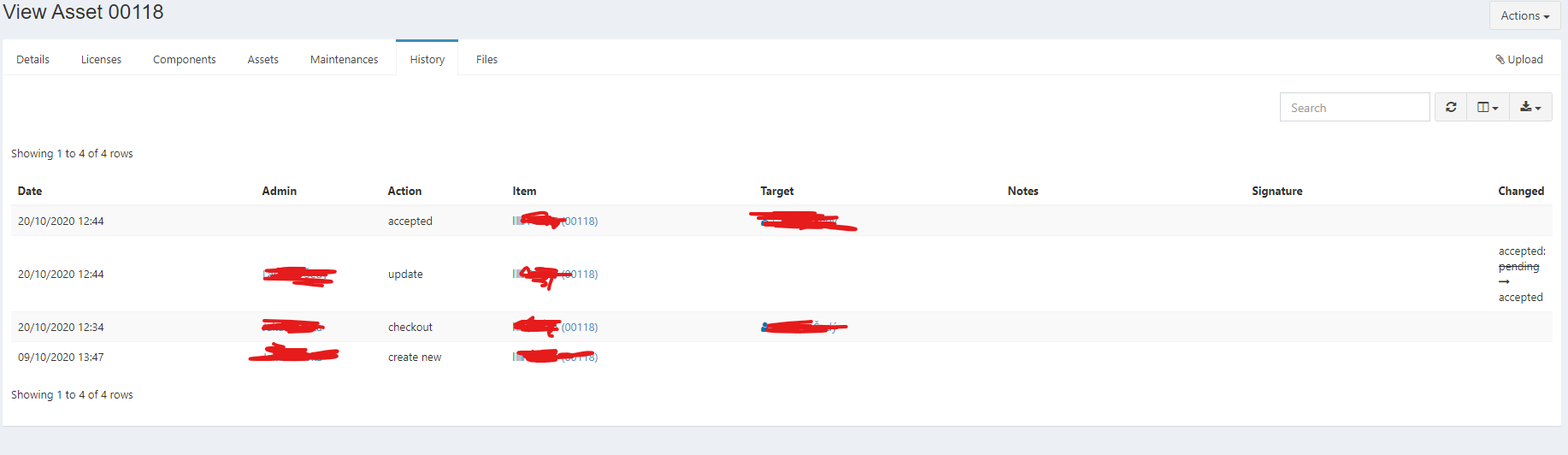
btw there is not even link to missing image (signature).
had this problem few months ago and i was able to solve it (not remember how, but its not important). Just saying, that this is probably somewhere deeper.
But there is link to missing image at where logo should be.
Thanks
helloweenx
on 22 Oct 2020
Hey guys!
I think it may also be related to the following problem:
https://github.com/snipe/snipe-it/issues/8574
Because the error occurs at the same time.
Mikey84
on 22 Oct 2020
Is there any fix or methord can load images? or How to restore data in a lower version instance.
maodahua
on 23 Oct 2020
For me, after upgrade from v4.9.3 to v5.0.0, images where not showing because of the way v5 interacts with my LAMP server. Check the URL of an image. In my case it was duplicating the IP and it looked like this - http://192.168.XX.XX:5555/192.168.XX.XX:5555/uploads/logo.png. I changed app_url to null in .env file and everything works fine now.
 swift2512
on 23 Oct 2020
swift2512
on 23 Oct 2020
images where not showing because of the way v5 interacts with my LAMP server.
That seems unlikely. There's nothing special about v5 that would affect how your LAMP server works.
I changed app_url to null in .env file and everything works fine now.
That should never be the answer though, as it will undoubtedly cause other issues down the line.
When you had the APP_URL, did you have a protocol specified (http://192.168.XX.XX:5555 versus 192.168.XX.XX:5555)? The protocol is always required for APP_URL.
snipe
on 23 Oct 2020
well for me there is just blank space instead of broken URL. If it would be just broken link, i should be able to fix it, but this is just next level :(
helloweenx
on 23 Oct 2020
well for me there is just blank space instead of broken URL
What's the URL of the broken logo?
snipe
on 23 Oct 2020
well for me there is just blank space instead of broken URL
What's the URL of the broken logo?
since i tried to change logo there is now broken URL:
servername/uploads/setting-logo-Uu6sbXE1c4.jpg --> which means \public\uploads
logo that worked on 4.9.5 was (and physicaly still is) here --> \storage\app\public
cant tell you URL of signatures, since there is none atm
helloweenx
on 23 Oct 2020
@helloweenx
Logo that worked on 4.9.5 was (and physicaly still is) here --> \storage\app\public
That's never been the place where we keep public uploads though. Public uploads have always been in public/uploads
snipe
on 23 Oct 2020
I just pushed out a fix for signatures on develop
snipe
on 23 Oct 2020
Our directory structure has always been:
- Publicly viewable uploads (logo, asset models, locations, etc) are in
public/uploads - Private uploads (ones that we need to check your auth to see whether you're allowed to view it, such as license uploads) live in
storage/private_uploads
snipe
on 23 Oct 2020
images where not showing because of the way v5 interacts with my LAMP server.
That seems unlikely. There's nothing special about v5 that would affect how your LAMP server works.
I changed app_url to null in .env file and everything works fine now.
That should never be the answer though, as it will undoubtedly cause other issues down the line.
When you had the APP_URL, did you have a protocol specified (
http://192.168.XX.XX:5555versus192.168.XX.XX:5555)? The protocol is always required for APP_URL.
Protocol was specified as http://
swift2512
on 23 Oct 2020
With the Release 5.0.2 I am still seeing now Server 500 errors while uploading any kind of pictures to assets or even the branding logo.
Anyone an idea why?
 hiimmazl
on 23 Oct 2020
hiimmazl
on 23 Oct 2020
I'd need a specific error message to work with.
snipe
on 23 Oct 2020
(Also try adding PUBLIC_FILESYSTEM_DISK=local_public to your .env file and clear your config cache by running php artisan config:cache)
snipe
on 23 Oct 2020
These are the only messages that I am getting. I also tried editing the .env file like you stated and run the php artisan config:cache

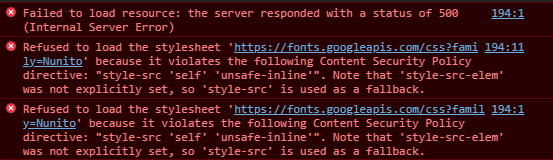
hiimmazl
on 23 Oct 2020
I need a stack trace to be able to see what's happening here though.
https://snipe-it.readme.io/docs/whoops
Snipe-IT Documentation500 error
snipe
on 23 Oct 2020
Thanks for the tip @snipe ! Totally forgot the laravel.log file.
Somehow the permissions for the IUSR user disappeared.
My fault as it seems and now it is working again!
Thanks for the handsome support!
hiimmazl
on 23 Oct 2020
I just pushed out a fix for signatures on develop
i can confirm that with 5.0.2 signatures are back and are working without any issue now. thanks!
but cant bring back branding logo - which is minor issue, but its just nice to have it there you know :-D if i try to change it, i get this URL to image servername/uploads/setting-logo-rsPN84xf7v.jpg and image is not shown:

Btw for others, you should probably start your own thread ;-)
helloweenx
on 23 Oct 2020
I just pushed out a fix for signatures on develop
i can confirm that with 5.0.2 signatures are back and are working without any issue now. thanks!
but cant bring back branding logo - which is minor issue, but its just nice to have it there you know :-D if i try to change it, i get this URL to image servername/uploads/setting-logo-rsPN84xf7v.jpg and image is not shown:
Btw for others, you should probably start your own thread ;-)
Can you verify that the logo is at the place where the URL mentions it "/snipe-it/public/uploads/setting-logo-rsPN84xf7v.jpg"?
hiimmazl
on 23 Oct 2020
I just pushed out a fix for signatures on develop
i can confirm that with 5.0.2 signatures are back and are working without any issue now. thanks!
but cant bring back branding logo - which is minor issue, but its just nice to have it there you know :-D if i try to change it, i get this URL to image servername/uploads/setting-logo-rsPN84xf7v.jpg and image is not shown:
Btw for others, you should probably start your own thread ;-)Can you verify that the logo is at the place where the URL mentions it "/snipe-it/public/uploads/setting-logo-rsPN84xf7v.jpg"?
already verified. its there indeed with right properties

helloweenx
on 23 Oct 2020
Thank! @snipe 5.0.2 is useful and signatures are back!
maodahua
on 23 Oct 2020
I just pushed out a fix for signatures on develop
i can confirm that with 5.0.2 signatures are back and are working without any issue now. thanks!
but cant bring back branding logo - which is minor issue, but its just nice to have it there you know :-D if i try to change it, i get this URL to image servername/uploads/setting-logo-rsPN84xf7v.jpg and image is not shown:
Btw for others, you should probably start your own thread ;-)Can you verify that the logo is at the place where the URL mentions it "/snipe-it/public/uploads/setting-logo-rsPN84xf7v.jpg"?
already verified. its there indeed with right properties
Are other pictures from asset models or in general pictures are shown?
I had a similar issue yesterday with the picture not showing up, but for me it was just the browser cache. Needed ti completly delete cache and restart the browser.
hiimmazl
on 23 Oct 2020
I just pushed out a fix for signatures on develop
i can confirm that with 5.0.2 signatures are back and are working without any issue now. thanks!
but cant bring back branding logo - which is minor issue, but its just nice to have it there you know :-D if i try to change it, i get this URL to image servername/uploads/setting-logo-rsPN84xf7v.jpg and image is not shown:
Btw for others, you should probably start your own thread ;-)Can you verify that the logo is at the place where the URL mentions it "/snipe-it/public/uploads/setting-logo-rsPN84xf7v.jpg"?
already verified. its there indeed with right properties
Are other pictures from asset models or in general pictures are shown?
I had a similar issue yesterday with the picture not showing up, but for me it was just the browser cache. Needed ti completly delete cache and restart the browser.
tried different browser and even clearing cache, logo still not showing up. Dont have asset pictures, only other pictures are those signatures and they are showing just fine after update to 5.0.2.
Also there is no new error logged in laravel.log atm
helloweenx
on 23 Oct 2020
@helloweenx What's your APP_URL set to in your .env, http://servername or just servername?
snipe
on 23 Oct 2020
@helloweenx What's your APP_URL set to,
http://servernameor justservername?
its actually set to just "servername"
helloweenx
on 23 Oct 2020
You always need the protocol in the APP_URL. Try changing it to http://servername (or https://servername, if you're running it over TLS/SSL) and clearing your config cache: php artisan config:clear
snipe
on 23 Oct 2020
You always need the protocol in the
APP_URL. Try changing it tohttp://servername(orhttps://servername, if you're running it over TLS/SSL) and clearing your config cache:php artisan config:clear
tried. Doesnt seems like it changed anything. BUT: i saw this in browser dev console:
Refused to load the image 'https://servername/uploads/setting-logo-RFUt8PKND1.jpg' because it violates the following Content Security Policy directive: "img-src 'self' data: gravatar.com maps.google.com maps.gstatic.com *.googleapis.com".
o.O
helloweenx
on 23 Oct 2020
That's progress maybe. (Also if you go directly to that image url, does it load in a browser?)
Sort of doesn't make sense that the CSP would be giving you problems there (the "self" part in that statement should permit your browser to load things from the same origin), but try adding/updating ENABLE_CSP=false in your .env and clearing your config cache again.
snipe
on 23 Oct 2020
That's progress maybe. (Also if you go directly to that image url, does it load in a browser?)
Sort of doesn't make sense that the CSP would be giving you problems there (the "self" part in that statement should permit your browser to load things from the same origin), but try adding/updating
ENABLE_CSP=falsein your .env and clearing your config cache again.
not loading even if i go directly on URL.
Actually had ENABLE_CSP already on false, so tried to turn it on without any success and again back off with same results
helloweenx
on 23 Oct 2020
not loading even if i go directly on URL.
Can you explain what you mean by that? What do you see when you go to that url?
snipe
on 23 Oct 2020
not loading even if i go directly on URL.
Can you explain what you mean by that? What do you see when you go to that url?
oh wait.. i can see where problem is now :-)
there is wrong APP_URL in .env
update had to mess it up and change it from proper DNS name to name of server, where IIS is running.
So i now changed it to proper APP_URL and everything is back to normal.
Thank you to pointing me into this pretty obvious thing.
But it would be probably good idea to check upgrade script ;-)
Thanks once again for great support!
helloweenx
on 23 Oct 2020
The upgrade script doesn't try to modify the .env in any way. (I feel oogy about making that part of our system in general.)
Closing this for now, since it appears your problem is resolved.
snipe
on 23 Oct 2020
FYI - just checked shadow copy of .env and there was always wrong APP_URL, but in earlier versions of SnipeIT it probably didnt matter. So if anyone comes across this, check out APP_URL first ;-)
Enjoy
helloweenx
on 23 Oct 2020
Yeah, the framework upgrade resulted in settings in the .env being a little stricter. It technically shouldn't have worked in v4 with a bad APP_URL, but... ¯_(ツ)_/¯
snipe
on 23 Oct 2020
Related issues
 bricelabelle
·
3Comments
bricelabelle
·
3Comments
 tbradsha
·
4Comments
tbradsha
·
4Comments
 ArchdukeNavaron
·
4Comments
snipe
·
3Comments
ArchdukeNavaron
·
4Comments
snipe
·
3Comments
 Neor5804
·
3Comments
Neor5804
·
3Comments