Snipe-it: User with permissions from group cannot edit a manufacturer
Please confirm you have done the following before posting your bug report:
- [x] I have enabled debug mode
- [x] I have read checked the Common Issues page
Describe the bug
I have a group set up in my snipe-it instances, which has full rights on manufacturers (view/create/edit/delete). But when one such user tries to edit a manufacturer, the Sad Panda and a 403 error appears.
To Reproduce
Steps to reproduce the behavior:
- Create a group with the following permissions: Reports, Assets (View, Checkin, Checkout, Audit, View requestable), Accessories (View, Edit, Checkin, Checkout), Consumables (View, Checkout), Components (View), Users (View, Edit), Categories/Departments/Status Labels/Custom Fields/Suppliers/Locations/Companies (View), Manufacturers (All), Self (2FA)
- Login as a user which is a member of that group
- Open Settings -> Manufacturers
- Click Edit on any manufacturer
- 403 error appears
Expected behavior
The edit form should open.
Server (please complete the following information):
- Snipe-IT Version: v4.6.6
- OS: Ubuntu 16.04
- Web Server: nginx
- PHP Version 7.0.32
Desktop (please complete the following information):
- OS: Ubuntu 18.04
- Browser Firefox and Chromium
- Version 63/71
Error Messages
The Gate tab in the debug bar shows one entry which is an error:
array:4 [
  "ability" => "edit"
  "result" => false
  "user" => 6831
  "arguments" => "[0 => App\Models\Manufacturer]"
]
The Auth tab shows the following:
web    array:2 [ "name" => "myusername" "user" => array:34 [ "id" => 6831 ...
api      array:2 [ "name" => "Guest" "user" => array:1 [ "guest" => true ] ]
- WITH DEBUG TURNED ON, if you're getting an error in your browser, include that error
- If a stacktrace is provided in the error, include that too: None
- Any errors that appear in your browser's error console: None
- Confirm whether the error is reproducible on the demo: https://snipeitapp.com/demo: cannot alter group membership in the demo
- Include any additional information you can find in
storage/logsand your webserver's logs: None
Additional context
- Is this a fresh install or an upgrade?: Upgraded from v4.5.0
- What method you used to install Snipe-IT (install.sh, manual installation, docker, etc): git
- Indicate whether or not you've manually edited any data directly in the database: no
 mtausig
All 24 comments
I'm also seeing this on a fresh v4.6.7 install. Here's the group settings:
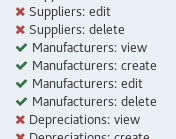
But the user in that group (with all permissions set to Inherit) gets a 403 when attempting to access /manufacturers/2/edit.
 JonathonReinhart
on 15 Jan 2019
JonathonReinhart
on 15 Jan 2019
Hi! Same with categories over here! All rights granted via group but 403 when trying to edit an existing categorie. Same user with same group can add categories nevertheless
 stbc
on 23 Jan 2019
stbc
on 23 Jan 2019
I'm also seeing this as well on 4.6.6. If I make the group a blanket admin, it'll inherit properly, but if I remove admin access and try to define custom permissions in their group, the users in that group don't seem to pick up the custom permissions I give them.
Will try to update to 4.6.13 and see if this is still occurring.
 DeusMaximus
on 26 Feb 2019
DeusMaximus
on 26 Feb 2019
Is this still relevant? We haven't heard from anyone in a bit. If so, please comment with any updates or additional detail.
This issue has been automatically marked as stale because it has not had recent activity. It will be closed if no further activity occurs. Don't take it personally, we just need to keep a handle on things. Thank you for your contributions!
![stale[bot] picture](https://avatars3.githubusercontent.com/in/1724?v=4&s=40) stale[bot]
on 27 Apr 2019
stale[bot]
on 27 Apr 2019
Yes, not fixed but present.
stbc
on 27 Apr 2019
Okay, it looks like this issue or feature request might still be important. We'll re-open it for now. Thank you for letting us know!
stale[bot]
on 27 Apr 2019
Seeing this issue too. 4.7.4
 Sxderp
on 17 Jun 2019
Sxderp
on 17 Jun 2019
Is this still relevant? We haven't heard from anyone in a bit. If so, please comment with any updates or additional detail.
This issue has been automatically marked as stale because it has not had recent activity. It will be closed if no further activity occurs. Don't take it personally, we just need to keep a handle on things. Thank you for your contributions!
stale[bot]
on 16 Aug 2019
Still relevant.
mtausig
on 19 Aug 2019
Okay, it looks like this issue or feature request might still be important. We'll re-open it for now. Thank you for letting us know!
stale[bot]
on 19 Aug 2019
Seeing this issue too. v4.7.6 build 4143. Hope it can be fixed!
 telecosrv
on 6 Sep 2019
telecosrv
on 6 Sep 2019
Seeing this issue too with categories. Version v4.7.6 - build 4143 (master)
 boldperrotta
on 11 Sep 2019
boldperrotta
on 11 Sep 2019
问题影响supplier,categories,Manufacturers.找到apphttpcontrollers 对应的3个文件,把edit 修改为 update 可以解决。
$this->authorize('edit',supplier::class) change to
$this->authorize('update',supplier::class)
do the same operation as the other 2 files.
 neilcxy
on 15 Sep 2019
neilcxy
on 15 Sep 2019
Anyone got a line on which files were being edited here? I'm experiencing the same issue as well.
 AngelusDulcis
on 30 Sep 2019
AngelusDulcis
on 30 Sep 2019
Translate puts out the following
The problem affects suppliers, categories, Manufacturers. Find the 3 files corresponding to apphttpcontrollers, and modify edit to update to solve.
I'll give it a try the next days and maybe it'll work out.
stbc
on 30 Sep 2019
seeing to on Version v4.7.7 - build 4160 (master)
问题影响supplier,categories,Manufacturers.找到apphttpcontrollers 对应的3个文件,把edit 修改为 update 可以解决。
$this->authorize('edit',supplier::class) change to
$this->authorize('update',supplier::class)do the same operation as the other 2 files.
problem solved for that but an error when clicking "save" update (category, manufacturer & suppliers)
 dhiart92
on 3 Nov 2019
dhiart92
on 3 Nov 2019
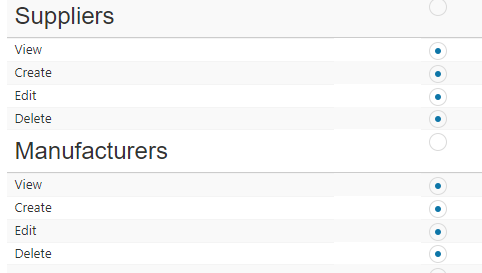
I think the problem is with this form of permissions, does anyone know the location of the script for that?
dhiart92
on 3 Nov 2019
This will be fixed with #7493 .
 hapm
on 12 Nov 2019
hapm
on 12 Nov 2019
This will be fixed with #7493 .
ok solved
thanks @hapm
dhiart92
on 15 Nov 2019
Is this still relevant? We haven't heard from anyone in a bit. If so, please comment with any updates or additional detail.
This issue has been automatically marked as stale because it has not had recent activity. It will be closed if no further activity occurs. Don't take it personally, we just need to keep a handle on things. Thank you for your contributions!
stale[bot]
on 14 Jan 2020
This issue has been automatically closed because it has not had recent activity. If you believe this is still an issue, please confirm that this issue is still happening in the most recent version of Snipe-IT and reply to this thread to re-open it.
stale[bot]
on 21 Jan 2020
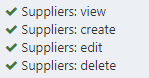
Same issue is still present in v4.9.2 with Suppliers when corresponding group permissions are:
In which Snipe-IT version mentioned fix (#7493) is applied ?
I failed to find it on:
https://github.com/snipe/snipe-it/releases
 nenad-sladojevic
on 1 Sep 2020
nenad-sladojevic
on 1 Sep 2020
Sorry for my deleted comment, I missread yours @nenad-sladojevic . The permissions for suppliers should have been fixed in 48bbbe0f40f2f619ec459bacb3e7bd42df0f259f and should be on master. The pull request was #5807 and didn't reference this issue. It has been fixed in milestone v4.6.0. Sure your issue is related? Do you get the sad panda when trying to edit a supplier? Probably best option is to create a new issue and reference this one if you think these are related.
hapm
on 1 Sep 2020
@hapm Looks like it was merged into the develop branch but never made it's way into master.
 tberanek
on 5 Sep 2020
tberanek
on 5 Sep 2020
Related issues
 ArchdukeNavaron
·
4Comments
ArchdukeNavaron
·
4Comments
 sbenoit89
·
5Comments
sbenoit89
·
5Comments
 sopheaouk
·
3Comments
sopheaouk
·
3Comments
 mauroaltamura
·
5Comments
mauroaltamura
·
5Comments
 Supsuop
·
4Comments
Supsuop
·
4Comments
Most helpful comment
I'm also seeing this on a fresh v4.6.7 install. Here's the group settings:
But the user in that group (with all permissions set to Inherit) gets a 403 when attempting to access
/manufacturers/2/edit.