Snipe-it: APP_URL not respected by Snipe-IT docker image
Please confirm you have done the following before posting your bug report:
- [X] I have enabled debug mode
- [X] I have read checked the Common Issues page
Describe the bug
- I have set
APP_URLtohttps://subdomain.domain.tld:443but Snipe-IT still generates asset-URLs with the server-IP (e.g. 172.1.1.10:5050).
To Reproduce
Steps to reproduce the behavior:
- Use given
docker-compose.ymlto bring up the services - Configure nginx as reverse proxy
Expected behavior
The full webapp is loaded from the given APP_URL
Server (please complete the following information):
- Snipe-IT Version: snipe/snipe-it:v4.6.3 Docker Image
- OS: Docker on Ubuntu 16.04 LTS
- Web Server: NGINX reverse-proxy
- PHP Version: N/A
Desktop (please complete the following information):
- OS: macOS 10.13.06
- Browser: Firefox
- Version: 61.0.2 (64-Bit)
Error Messages
- There is no direct error message from Snipe-IT but the browser can not load the assets with the URL to a private IP address.
Additional context
- official docker image
- set up with mysql in docker-compose
- I use nginx as a reverse proxy and I have it configured with other applications working fine
- I have tried to place the SSL certificate and key in the
sslfolder, that enabled HTTP but the asset URLs are still wrong - Snipe-IT says "That URL looks right! Good job!" both on the broken site via the APP_URL and on the raw SERVER-IP:PORT
docker-compose.yml
version: "3"
services:
  mysql:
    image: mysql:5.7
    restart: always
    volumes:
      - mysql-data:/var/lib/mysql
    environment:
        MYSQL_DATABASE: snipeit
        MYSQL_USER: snipeit
        MYSQL_RANDOM_ROOT_PASSWORD: "yes"
    env_file:
      - mysql.env
  snipeit:
    image: snipe/snipe-it:v4.6.3
    restart: always
    depends_on:
      - mysql
    volumes:
      - snipeit-data:/var/lib/snipeit
    ports:
      - "5050:80"
      - "5051:443"
    env_file:
      - snipeit.env
volumes:
  snipeit-data:
  mysql-data:
snipeit.env
# Mysql Parameters
MYSQL_PORT_3306_TCP_ADDR=mysql
MYSQL_PORT_3306_TCP_PORT=3306
MYSQL_DATABASE=snipeit
MYSQL_USER=snipeit
MYSQL_PASSWORD=[REDACTED]

# Email Parameters
# - the hostname/IP address of your mailserver
MAIL_PORT_587_TCP_ADDR=[REDACTED]
#the port for the mailserver (probably 587, could be another)
MAIL_PORT_587_TCP_PORT=465
# the default from address, and from name for emails
MAIL_ENV_FROM_ADDR=[REDACTED]
MAIL_ENV_PASSWORD=[REDACTED]
MAIL_ENV_FROM_NAME=Snipe-IT
# - pick 'tls' for SMTP-over-SSL, 'tcp' for unencrypted
MAIL_ENV_ENCRYPTION=tcp
# SMTP username and password
MAIL_ENV_USERNAME=[REDACTED]

# Snipe-IT Settings
APP_KEY=[REDACTED]
APP_URL=https://[REDACTED]:443
APP_TRUSTED_PROXIES=[REAL-PROXY-IP],[DOCKER-GATEWAY-IP]
APP_ENV=production
APP_DEBUG=false
APP_TIMEZONE=Europe/Berlin
APP_LOCALE=de
nginx.conf
# https://www.nginx.com/resources/wiki/start/topics/examples/forwarded/
map $remote_addr $proxy_forwarded_elem {
    # IPv4 addresses can be sent as-is
    ~^[0-9.]+$          "for=$remote_addr";

    # IPv6 addresses need to be bracketed and quoted
    ~^[0-9A-Fa-f:.]+$   "for=\"[$remote_addr]\"";

    # Unix domain socket names cannot be represented in RFC 7239 syntax
    default             "for=unknown";
}

map $http_forwarded $proxy_add_forwarded {
    # If the incoming Forwarded header is syntactically valid, append to it
    "~^(,[ \\t]*)*([!#$%&'*+.^_`|~0-9A-Za-z-]+=([!#$%&'*+.^_`|~0-9A-Za-z-]+|\"([\\t \\x21\\x23-\\x5B\\x5D-\\x7E\\x80-\\xFF]|\\\\[\\t \\x21-\\x7E\\x80-\\xFF])*\"))?(;([!#$%&'*+.^_`|~0-9A-Za-z-]+=([!#$%&'*+.^_`|~0-9A-Za-z-]+|\"([\\t \\x21\\x23-\\x5B\\x5D-\\x7E\\x80-\\xFF]|\\\\[\\t \\x21-\\x7E\\x80-\\xFF])*\"))?)*([ \\t]*,([ \\t]*([!#$%&'*+.^_`|~0-9A-Za-z-]+=([!#$%&'*+.^_`|~0-9A-Za-z-]+|\"([\\t \\x21\\x23-\\x5B\\x5D-\\x7E\\x80-\\xFF]|\\\\[\\t \\x21-\\x7E\\x80-\\xFF])*\"))?(;([!#$%&'*+.^_`|~0-9A-Za-z-]+=([!#$%&'*+.^_`|~0-9A-Za-z-]+|\"([\\t \\x21\\x23-\\x5B\\x5D-\\x7E\\x80-\\xFF]|\\\\[\\t \\x21-\\x7E\\x80-\\xFF])*\"))?)*)?)*$" "$http_forwarded, $proxy_forwarded_elem";

    # Otherwise, replace it
    default "$proxy_forwarded_elem";
}

server {
  listen 443;
  server_name subdomain.domain.tld;

  keepalive_timeout 5;

  ssl_certificate     /etc/letsencrypt/live/.../fullchain.pem;
  ssl_certificate_key /etc/letsencrypt/live/.../privkey.pem;

  location / {
    proxy_set_header Forwarded $proxy_add_forwarded;
    proxy_pass https://[DOCKER-HOST-IP]:5051;
  }

}
 iwittkau
All 16 comments
I'm can reproduce this on my desktop machine aswell. It does not matter which APP_URL I put into the .env file. Snipe-IT always uses the host IP address (127.0.0.1:5050 now in this case). All other settings seem to be respected: mysql settings, debug setting, etc.
Also I ran this script inside my container:
<?php echo getenv('APP_URL'); ?>
Which echos the APP_URL from my .env file.
iwittkau
on 16 Aug 2018
I am also having a simular issue. When it comes to setting the APP_URL to an https url vs the http url snipe-it demands, APP_URL seems to have no effect.
I'm not sure where else to modify these settings before snipe-it is created, in my case I deploy snipe-it to a Kubernetes cluster so modifying the environment variables after deployment is moot since a pod can be killed off and remade at anytime.
I don't understand why the default snipe-it settings want a http url over the secure https. I want to use snipe-it so bad but the http settings just can't be deployed to a production environment without it.
 jnprogrammer
on 23 Aug 2018
jnprogrammer
on 23 Aug 2018
Is this still relevant? We haven't heard from anyone in a bit. If so, please comment with any updates or additional detail.
This issue has been automatically marked as stale because it has not had recent activity. It will be closed if no further activity occurs. Don't take it personally, we just need to keep a handle on things. Thank you for your contributions!
![stale[bot] picture](https://avatars3.githubusercontent.com/in/1724?v=4&s=40) stale[bot]
on 22 Oct 2018
stale[bot]
on 22 Oct 2018
Yes, this is still an issue. The problem still exists in the current version 4.6.5. No matter what APP_URL I set, snipe-it still serves assets with IP-addresses instead of domain names. I am unable to deploy snipe-it with docker. I would try to fix this myself in the image or snipe-it but I don't know where to start.
iwittkau
on 23 Oct 2018
Okay, it looks like this issue or feature request might still be important. We'll re-open it for now. Thank you for letting us know!
stale[bot]
on 23 Oct 2018
Any update? Getting this error too with 4.6.6
 hameno
on 15 Dec 2018
hameno
on 15 Dec 2018
Thank you everyone for bringing this to our attention! We are currently reviewing a more "flexible" approach to containerizing the application. @iwittkau and
@hameno and @jnprogrammer, taking the time to notify us of your issues and how you snipe-it in the wild is very much appreciated.
That being said, we are turning our guns on our docker strategy at this time.
The issue at hand:
If this issue is still presenting a problem, please check docker inspect [snipe-it container-id]. For example, here's mine for a quick test container:
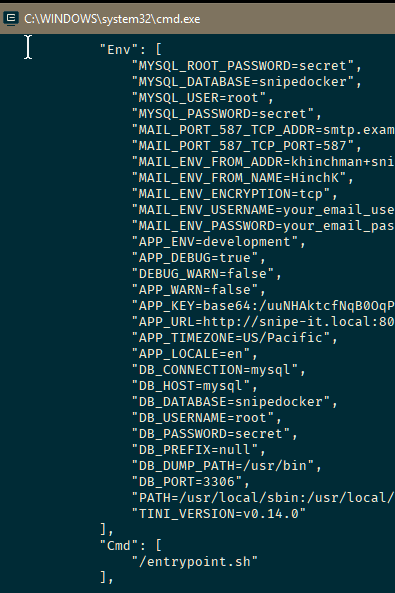
Here I am seeing the APP_URL is what I want it to be (snipe-it.local:8080) - are you seeing the URL you expect to be seing (i.e. the one from your .env file that was passed in), or is it that IP address?
Last, with the reverse-proxing of nginx, in front of apache, right away I noticed this "SERVER_NAME" error from the apache server as I was provisioning the container. I will have to walk through and test for myself, but I'm wondering if there is an apache setting that might be causing the issue here WRT your server's FQDN.

 HinchK
on 16 Dec 2018
HinchK
on 16 Dec 2018
@HinchK glad to hear that!
I am also getting this error on startup:
AH00558: apache2: Could not reliably determine the server's fully qualified domain name, using 172.XXX.XXX.XXX. Set the 'ServerName' directive globally to suppress this message
I looked into the whole thing again and got it working out of the box with the Error present.
Still encountered this error message during setup, which can be ignored IMHO:
Uh oh! Snipe-IT thinks your URL is https://domain.tld, but your real URL is http://domain.tld/setup Please update your APP_URL settings in your .env file
My current NGINX config looks something like this:
server {
  listen 443;
  server_name domain.tld;

  keepalive_timeout 5;

  ssl_certificate     /etc/letsencrypt/live/domain.tld/fullchain.pem;
  ssl_certificate_key /etc/letsencrypt/live/domain.tld/privkey.pem;

  location / {
    proxy_set_header Host $host;
    proxy_set_header Forwarded $proxy_add_forwarded;
    proxy_set_header X-Forwarded-Proto $scheme;
    proxy_pass http://DOCKER_HOST_IP:SNIPEIT_HTTP_PORT;
  }

}
Notice that SSL is only enabled in NGINX not Snipe-IT.
iwittkau
on 17 Dec 2018
This servername directive error, IIRC, is pretty benign for a brand new
Apache Server.
I can’t seem to replicate the issue at this time - I will keep my eyes on
this issue.
Thanks again for your submission and assistance.
Stay tuned for Snipe-IT v5; hoping to release snipe-it:develop test images
in the next week or so. Thank goodness for build chunking!
Thanks for the confirmation.
On Sun, Dec 16, 2018 at 11:54 PM iwittkau notifications@github.com wrote:
@HinchK https://github.com/HinchK glad to hear that!
I am also getting this error on startup:
AH00558: apache2: Could not reliably determine the server's fully qualified domain name, using 172.XXX.XXX.XXX. Set the 'ServerName' directive globally to suppress this message
—
You are receiving this because you were mentioned.
Reply to this email directly, view it on GitHub
https://github.com/snipe/snipe-it/issues/6089#issuecomment-447752954,
or mute the thread
https://github.com/notifications/unsubscribe-auth/ABcIUC7lQwBalSFCZ0p8hy_XotjuAa3Xks5u502hgaJpZM4V-G6O
.
HinchK
on 17 Dec 2018
I can still reproduce this issue with development branch of snipeit under docker and nginx reverse proxy.
Is there any workaround for this, did anyone come up with any potential fix?
 czen
on 8 Feb 2019
czen
on 8 Feb 2019
same problem here: i can write in _.env_ in APP_URL= what ever i want. It does not interesset snipe-it. Always the old domain. And yes, i also did php artisan config:clear and php artisan config:cache
 mschwagerbln
on 22 Mar 2019
mschwagerbln
on 22 Mar 2019
Update: The issue no longer occurs with me. I had an issue with my DNS
 ahmadsocrat
on 2 Apr 2019
ahmadsocrat
on 2 Apr 2019
Is this still relevant? We haven't heard from anyone in a bit. If so, please comment with any updates or additional detail.
This issue has been automatically marked as stale because it has not had recent activity. It will be closed if no further activity occurs. Don't take it personally, we just need to keep a handle on things. Thank you for your contributions!
stale[bot]
on 2 Jun 2019
Any updates on this? I'm also having issues, APP_URL=http://ip-address/snipeit is just ignored.
@HinchK docker inspect returns the expected APP_URL, but snipe-it seems to just ignore it. Html page loads, but no js or css is loaded because it tries to load it from http://ip-address/ instead of http://ip-address/snipeit/
Here is the config I'm using for nginx reverse proxy:
location ~ ^/snipeit(.*)$ {
    proxy_set_header    Host                $http_host;
    proxy_set_header    X-Forwarded-Proto   $scheme;

    set $upstream_snipeit http://snipeit-web:80;
    proxy_pass $upstream_snipeit$1$is_args$args;
}
Snipe-it env file:
APP_URL=http://ip-address/snipeit/
APP_TRUSTED_PROXIES=ip-address
Using version 4.7.5, also tried with the freshly released 4.7.6.
 mori170
on 29 Jul 2019
mori170
on 29 Jul 2019
@mori170 my update is that I have given up on snipe-it via docker. I'll give it another try when 5.0 is released (#6287).
iwittkau
on 30 Jul 2019
Related issues
 ericdude101
·
5Comments
ericdude101
·
5Comments
 Supsuop
·
4Comments
Supsuop
·
4Comments
 anilp78
·
4Comments
anilp78
·
4Comments
 memtech3
·
4Comments
memtech3
·
4Comments
 Rungea96
·
4Comments
Rungea96
·
4Comments
Most helpful comment
Thank you everyone for bringing this to our attention! We are currently reviewing a more "flexible" approach to containerizing the application. @iwittkau and
@hameno and @jnprogrammer, taking the time to notify us of your issues and how you snipe-it in the wild is very much appreciated.
That being said, we are turning our guns on our docker strategy at this time.
The issue at hand:
If this issue is still presenting a problem, please check
docker inspect [snipe-it container-id]. For example, here's mine for a quick test container:Here I am seeing the APP_URL is what I want it to be (snipe-it.local:8080) - are you seeing the URL you expect to be seing (i.e. the one from your
.envfile that was passed in), or is it that IP address?Last, with the reverse-proxing of nginx, in front of apache, right away I noticed this "SERVER_NAME" error from the apache server as I was provisioning the container. I will have to walk through and test for myself, but I'm wondering if there is an apache setting that might be causing the issue here WRT your server's FQDN.