Snipe-it: Custom "Print All Assigned" page
Is it possible to customize my "Print All Assigned" page to include a header with company logo and name, and additional place for supervisor signature and inventory keeper signature?
Thanks for such a great software!
 ppestime
All 6 comments
Yes would like this as well and perhaps if possible to use a template file perhaps a Word document set by the admin?
And follow the rules set by Snipe-IT like <
[Logo]
[Text]
[Text]
<
[Text]
<
[Text]
<
Thank you always for the great software.
 smksar
on 21 Apr 2018
smksar
on 21 Apr 2018
This issue has been automatically marked as stale because it has not had recent activity. It will be closed if no further activity occurs. Thank you for your contributions!
![stale[bot] picture](https://avatars3.githubusercontent.com/in/1724?v=4&s=40) stale[bot]
on 20 Jun 2018
stale[bot]
on 20 Jun 2018
I would love to open this feature request back up. Would be a huge help to implement Snipe at my company, as we don't use individual Asset Names and want to display the asset cost (and possibly a total user cost) on this page. Having the ability to customize what the page looks like would cover a ton of use cases and give more customization.
Please let me know if you'd like any extra info!
 sk33z3r
on 31 Oct 2018
sk33z3r
on 31 Oct 2018
perhaps if possible to use a template file perhaps a Word document set by the admin
That's unlikely to happen to be honest. It would require additional libraries to import the Word template, and that road is fraught with peril.
 snipe
on 1 Nov 2018
snipe
on 1 Nov 2018
For anyone else looking to customize their page, it can be done right now with a couple of caveats:
- You have to understand a bit of PHP, and edit this file directly:
./resources/views/users/print.blade.php - If you don't keep track of it, updating your instance will _revert your changes_
I can't give any tutorials or examples for what your situation may be, but if you know HTML and PHP, then you can dig in and add/remove variables and columns as you need until a decision is made on this feature. To avoid it getting overwritten on future releases, since I run Docker, I have bind mounted the individual file so it is persistent on container upgrades.
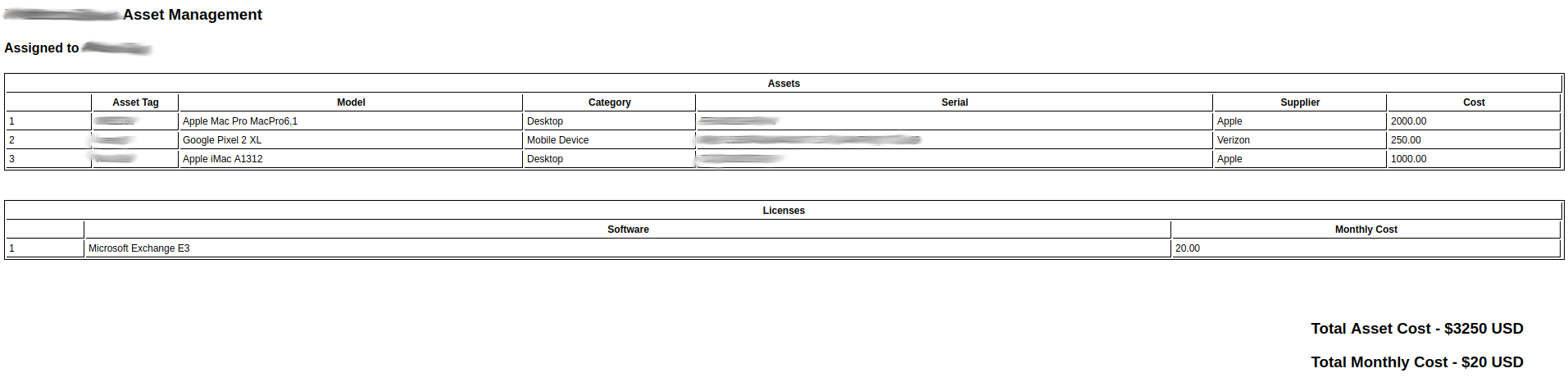
Here's an example of what I have put together, including a cost print out for assets, and a monthly cost for licenses.
Added this to the top to define 0 for each cost variable:
@php
    $cost = 0;
    $monthly = 0;
@endphp
I adjusted my assets table like this (note the cost variable in front of the counter):
@if ($snipeSettings->logo_print_assets=='1')
    @if ($snipeSettings->brand == '3')

        <h3>
        @if ($snipeSettings->logo!='')
            <img class="print-logo" src="{{ url('/') }}/uploads/{{ $snipeSettings->logo }}">
        @endif
        {{ $snipeSettings->site_name }}
        </h3>
    @elseif ($snipeSettings->brand == '2')
        @if ($snipeSettings->logo!='')
            <img class="print-logo" src="{{ url('/') }}/uploads/{{ $snipeSettings->logo }}">
        @endif
    @else
      <h3>{{ $snipeSettings->site_name }}</h3>
    @endif
@endif

<h4>Assigned to {{ $show_user->present()->fullName() }}</h4>

@if ($assets->count() > 0)
    @php
        $counter = 1;
    @endphp
    <table class="inventory">
        <thead>
        <tr>
            <th colspan="8">{{ trans('general.assets') }}</th>
        </tr>
        </thead>
        <thead>
            <tr>
                <th style="width: 5%;"></th>
                <th style="width: 5%;">Asset Tag</th>
                <th style="width: 20%;">Model</th>
                <th style="width: 10%;">Category</th>
                <th style="width: 30%;">Serial</th>
                <th style="width: 10%;">Supplier</th>
                <th style="width: 10%;">Cost</th>
                <!-- <th style="width: 10%;">Checked Out</th> -->
            </tr>
        </thead>

    @foreach ($assets as $asset)

        <tr>
            <td>{{ $counter }}</td>
            <td>{{ $asset->asset_tag }}</td>
            <td>{{ $asset->model->manufacturer->name }} {{ $asset->model->name }} {{ $asset->model->model_number }}</td>
            <td>{{ $asset->model->category->name }}</td>
            <td>{{ $asset->serial }}</td>
            <td>{{ $asset->supplier->name }}</td>
            <td>{{ $asset->purchase_cost }}</td>
            <!-- <td>{{ $asset->last_checkout }}</td> -->
        </tr>
            @php
                $cost = $cost + $asset->purchase_cost;
                $counter++
            @endphp
    @endforeach
    </table>
@endif
And adjusted my license table like this (note the monthly variable before the lcounter):
@if ($licenses->count() > 0)
    <br><br>
    <table class="inventory">
        <thead>
        <tr>
            <th colspan="4">{{ trans('general.licenses') }}</th>
        </tr>
        </thead>
        <thead>
            <tr>
                <th style="width: 5%;"></th>
                <th style="width: 70%;">Software</th>
                <th style="width: 25%;">Monthly Cost</th>
                <!-- <th style="width: 10%;">Checked Out</th> -->
            </tr>
        </thead>
        @php
        $lcounter = 1;
        @endphp

        @foreach ($licenses as $license)

            <tr>
                <td>{{ $lcounter }}</td>
                <td>{{ $license->name }}</td>
                <td>{{ $license->purchase_cost }}</td>
                <!-- <td>{{  $license->assetlog->first()->created_at }}</td> -->
            </tr>
            @php
                $monthly = $monthly + $license->purchase_cost;
                $lcounter++
            @endphp
        @endforeach
    </table>
@endif
Then I removed the signed off portion (my company doesn't care, we like the email system as a confirmation) and added the cost calculations:
<h3 style="text-align: right; margin-right: 50px;">Total Asset Cost - ${{ $cost }} USD</h3>
<h3 style="text-align: right; margin-right: 50px;">Total Monthly Cost - ${{ $monthly }} USD</h3>
Here's what it looks like when I use the button, now:
sk33z3r
on 2 Nov 2018
@snipe using blade shouldn't this be possible using childs and sections?
 CoMPaTech
on 7 May 2019
CoMPaTech
on 7 May 2019
Related issues
 ss-dsheets
·
91Comments
ss-dsheets
·
91Comments
 dubs3c
·
82Comments
dubs3c
·
82Comments
 dahiya81
·
61Comments
dahiya81
·
61Comments
 alden-david
·
58Comments
snipe
·
60Comments
alden-david
·
58Comments
snipe
·
60Comments
Most helpful comment
For anyone else looking to customize their page, it can be done right now with a couple of caveats:
./resources/views/users/print.blade.phpI can't give any tutorials or examples for what your situation may be, but if you know HTML and PHP, then you can dig in and add/remove variables and columns as you need until a decision is made on this feature. To avoid it getting overwritten on future releases, since I run Docker, I have bind mounted the individual file so it is persistent on container upgrades.
Here's an example of what I have put together, including a cost print out for assets, and a monthly cost for licenses.
Added this to the top to define 0 for each cost variable:
I adjusted my assets table like this (note the cost variable in front of the counter):
And adjusted my license table like this (note the monthly variable before the lcounter):
Then I removed the signed off portion (my company doesn't care, we like the email system as a confirmation) and added the cost calculations:
Here's what it looks like when I use the button, now: