Snipe-it: Show dashboard for non-admins
There seems to be a permissions hole in 4.1.4. My support users group that is setup for asset management only now basically have super admin access.
They are given "Admin" rights through group membership solely so they can view the dashboard. In 3.6.6 this worked totally fine but now that i've upgraded to 4.1.4 they now have a ton more access such as creating, modifying, or deleting users which is set to deny via the users group but they have access to do anyway.
They also have access to some of the backend function such as creating and editing status labels, categories, models, departments, suppliers, and locations which are also set to deny in the users group.
Please confirm you have done the following before posting your bug report:
- [X] I have enabled debug mode
- [X] I have read checked the Common Issues page
Provide answers to these questions:
- Is this a fresh install or an upgrade? Upgrade
- Version of Snipe-IT you're running 4.1.4
- Version of PHP you're running 7.1.9
- Version of MySQL/MariaDB you're running MariaDB 10.2
- What OS and web server you're running Snipe-IT on Windows Server 2012 IIS 8.5
What method you used to install Snipe-IT (install.sh, manual installation, docker, etc) Manual
Confirm whether the error is reproduceable on the demo: https://snipeitapp.com/demo. Lack permissions to test
 ericdude101
All 16 comments
Can you show me the permission JSON for a user that is affected and the permissions JSON for the group?
 snipe
on 20 Nov 2017
snipe
on 20 Nov 2017
I rolled the production back to 3.6.6, but here is the JSON from pre-upgrade. ill pull another from my DEV enviorment
User has
{
    "superuser": "0",
    "admin": "0",
    "reports.view": "0",
    "assets.view": "0",
    "assets.create": "0",
    "assets.edit": "0",
    "assets.delete": "0",
    "assets.checkin": "0",
    "assets.checkout": "0",
    "assets.view.requestable": "0",
    "accessories.view": "0",
    "accessories.create": "0",
    "accessories.edit": "0",
    "accessories.delete": "0",
    "accessories.checkout": "0",
    "accessories.checkin": "0",
    "consumables.view": "0",
    "consumables.create": "0",
    "consumables.edit": "0",
    "consumables.delete": "0",
    "consumables.checkout": "0",
    "licenses.view": "0",
    "licenses.create": "0",
    "licenses.edit": "0",
    "licenses.delete": "0",
    "licenses.checkout": "0",
    "licenses.keys": "0",
    "components.view": "0",
    "components.create": "0",
    "components.edit": "0",
    "components.delete": "0",
    "components.checkout": "0",
    "components.checkin": "0",
    "users.view": "0",
    "users.create": "0",
    "users.edit": "0",
    "users.delete": "0",
    "self.two_factor": "0"
}
and the JSON for his primary group is:
{
    "superuser": "0",
    "admin": "1",
    "reports.view": "1",
    "assets.view": "1",
    "assets.create": "1",
    "assets.edit": "1",
    "assets.delete": "0",
    "assets.checkin": "1",
    "assets.checkout": "1",
    "assets.view.requestable": "1",
    "accessories.view": "1",
    "accessories.create": "1",
    "accessories.edit": "0",
    "accessories.delete": "0",
    "accessories.checkout": "1",
    "accessories.checkin": "1",
    "consumables.view": "1",
    "consumables.create": "1",
    "consumables.edit": "0",
    "consumables.delete": "0",
    "consumables.checkout": "1",
    "licenses.view": "1",
    "licenses.create": "1",
    "licenses.edit": "0",
    "licenses.delete": "0",
    "licenses.checkout": "1",
    "licenses.keys": "1",
    "components.view": "1",
    "components.create": "1",
    "components.edit": "0",
    "components.delete": "0",
    "components.checkout": "1",
    "components.checkin": "1",
    "users.view": "1",
    "users.create": "0",
    "users.edit": "0",
    "users.delete": "0",
    "self.two_factor": "1"
}
My DEV environment doesn't have groups setup, but here is a user with same permissions setup I would have in a group and I validated just now that while logged in as this specific user I was able to create, edit, and delete Users, Status Labels, Models, Categories, Suppliers, Departments, and Locations.
{
    "superuser": "0",
    "admin": "1",
    "reports.view": "-1",
    "assets.view": "0",
    "assets.create": "0",
    "assets.edit": "0",
    "assets.delete": "-1",
    "assets.checkin": "0",
    "assets.checkout": "0",
    "assets.audit": "-1",
    "assets.view.requestable": "-1",
    "accessories.view": "0",
    "accessories.create": "0",
    "accessories.edit": "0",
    "accessories.delete": "-1",
    "accessories.checkout": "0",
    "accessories.checkin": "0",
    "consumables.view": "0",
    "consumables.create": "0",
    "consumables.edit": "0",
    "consumables.delete": "-1",
    "consumables.checkout": "0",
    "licenses.view": "-1",
    "licenses.create": "-1",
    "licenses.edit": "-1",
    "licenses.delete": "-1",
    "licenses.checkout": "-1",
    "licenses.keys": "-1",
    "components.view": "-1",
    "components.create": "-1",
    "components.edit": "-1",
    "components.delete": "-1",
    "components.checkout": "-1",
    "components.checkin": "-1",
    "users.view": "1",
    "users.create": "-1",
    "users.edit": "-1",
    "users.delete": "-1",
    "models.view": "-1",
    "models.create": "-1",
    "models.edit": "-1",
    "models.delete": "-1",
    "categories.view": "1",
    "categories.create": "-1",
    "categories.edit": "-1",
    "categories.delete": "-1",
    "departments.view": "-1",
    "departments.create": "-1",
    "departments.edit": "-1",
    "departments.delete": "-1",
    "statuslabels.view": "1",
    "statuslabels.create": "-1",
    "statuslabels.edit": "-1",
    "statuslabels.delete": "-1",
    "customfields.view": "-1",
    "customfields.create": "-1",
    "customfields.edit": "-1",
    "customfields.delete": "-1",
    "suppliers.view": "-1",
    "suppliers.create": "-1",
    "suppliers.edit": "-1",
    "suppliers.delete": "-1",
    "manufacturers.view": "-1",
    "manufacturers.create": "-1",
    "manufacturers.edit": "-1",
    "manufacturers.delete": "-1",
    "depreciations.view": "-1",
    "depreciations.create": "-1",
    "depreciations.edit": "-1",
    "depreciations.delete": "-1",
    "locations.view": "-1",
    "locations.create": "-1",
    "locations.edit": "-1",
    "locations.delete": "-1",
    "self.two_factor": "0",
    "self.api": "-1"
}
Any updates on validating this issue?
ericdude101
on 6 Dec 2017
I haven't been able to reproduce this.
snipe
on 6 Dec 2017
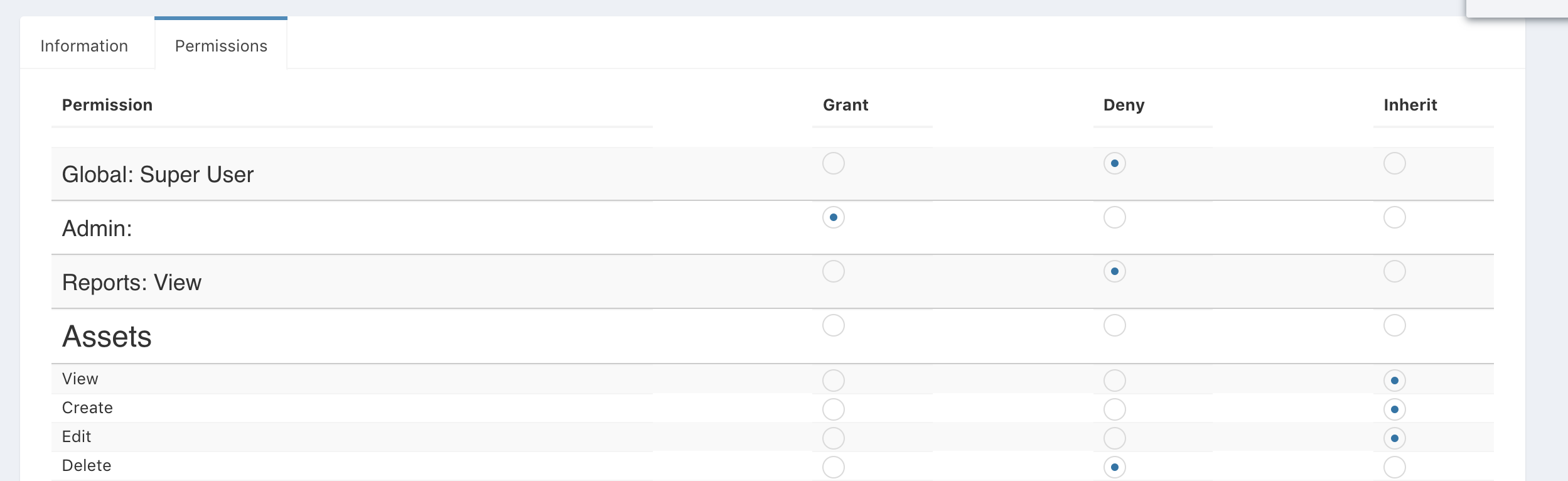
I just created a new user on demo.snipeitapp.com, username jdoeboy with no group membership, and set users direct permissions including a hard deny for everything in the model category. I then logged in as this user, proceeded to the models page, and created a new model without any issue.
ericdude101
on 6 Dec 2017
The user you created is an admin, so it's expected that it would be able to do those things.
snipe
on 6 Dec 2017
- Superusers: Can do everything, are not limited by full company support company constraints, and can edit app settings
- Admins: Can do almost everything (no app settings), but are restricted by company constraints
- Everybody else: Whatever permissions you grant them, constrained by company
snipe
on 6 Dec 2017
Okay, so I was under the assumption that that would only be true if the inherent option was selected but explicitly selecting deny would override it and block it.
My issue here is I make use of the dashboard for my techs, and the only way for them to see that is if they are admin or higher.
ericdude101
on 6 Dec 2017
That's normally true for how groups work, but superadmin/admin override those.
snipe
on 6 Dec 2017
So would it be feasable to request that you build the ability to show the dashboard view to a user or group as a standalone permision? Thats really all I need
ericdude101
on 6 Dec 2017
That request already exists. #2419
snipe
on 6 Dec 2017
The problem is that all of that gets pretty convoluted with non-admins. Things are linked automatically (assets, etc) from the dashboard, so if non-admins can access it, all of the links are going to end in 403s unless the user has access to see whatever that thing is.
snipe
on 6 Dec 2017
I think thats somewhat feasable, and personally I wouldnt be providing dashboard access without read access to users and assets anyways, maybe the read only access right can be imposed as part of dashboard access? Theres already certain things that error in 403 due to insufficient privileges. Do you possibly have some sort of a timeline on that? I notice its over a year old.
ericdude101
on 6 Dec 2017
Just realized this is a duplicate of #2419
snipe
on 12 Dec 2017
@snipe Just came across this ticket from a google search. I was wondering if this is currently possible to do with version 4.8.0. Because I believe having the dashboard option would be great to assign to auditors and accounting personnel but they should not have admin access. Hope this makes sense.
 Knightrain0
on 12 Dec 2019
Knightrain0
on 12 Dec 2019
Related issues
 MattMencel
·
56Comments
MattMencel
·
56Comments
 PixelDJ
·
94Comments
PixelDJ
·
94Comments
 grimstoner
·
65Comments
grimstoner
·
65Comments
 Puddl36lum
·
67Comments
snipe
·
103Comments
Puddl36lum
·
67Comments
snipe
·
103Comments
Most helpful comment
@snipe Just came across this ticket from a google search. I was wondering if this is currently possible to do with version 4.8.0. Because I believe having the dashboard option would be great to assign to auditors and accounting personnel but they should not have admin access. Hope this makes sense.