Snipe-it: Advanced Search Returns No Results
Expected Behavior (or desired behavior if a feature request)
Expecting results when using advanced search on assets page.
Actual Behavior
No results returned when using most searches, or in some cases search is not filtering properly.
Please confirm you have done the following before posting your bug report:
- [x] I have enabled debug mode
- [x] I have read checked the Common Issues page
Provide answers to these questions:
- Is this a fresh install or an upgrade? Fresh
- Version of Snipe-IT you're running v4.0.13 build 273 (gab3f5f4)
- Version of PHP you're running 7.0.22-0ubuntu0.16.04.1
- Version of MySQL/MariaDB you're running 10.1.28-MariaDB
- What OS and web server you're running Snipe-IT on Ubuntu 16.04.3/apache2
- What method you used to install Snipe-IT (install.sh, manual installation, docker, etc) install.sh
- WITH DEBUG TURNED ON, if you're getting an error in your browser, include that error
- What specific Snipe-IT page you're on, and what specific element you're interacting with to trigger the error: /hardware
- If a stacktrace is provided in the error, include that too.
- Any errors that appear in your browser's error console.
- Confirm whether the error is reproduceable on the demo: https://snipeitapp.com/demo. Yes
- Include any additional information you can find in
app/storage/logsand your webserver's logs. - Include what you've done so far in the installation, and if you got any error messages along the way. Installed fresh and imported database from same version.
- Indicate whether or not you've manually edited any data directly in the database
Please do not post an issue without answering the related questions above. If you have opened a different issue and already answered these questions, answer them again, once for every ticket. It will be next to impossible for us to help you.
https://snipe-it.readme.io/docs/getting-help
Want to back this issue? Post a bounty on it! We accept bounties via Bountysource.
 PixelDJ
All 94 comments
Please do a fresh pull and see if this resolves your issue
 snipe
on 21 Oct 2017
snipe
on 21 Oct 2017
Updated to latest commit (59c0b63) and I'm still having the issue. If I enter text into an advanced search field I get no results. If I refresh the page afterwards, the text from the advanced search goes into the regular search box and it shows some results, but it doesn't search within a specific column.


PixelDJ
on 23 Oct 2017
Here it's not working either. This is what happens when searching for models/categories:
Next exception 'Illuminate\Database\QueryException' with message 'SQLSTATE[42S22]: Column not found: 1054 Unknown column 'assets.model' in 'where clause' (SQL: select count(*) as aggregate from assets inner join status_labels as status_alias on status_alias.id = assets.status_id and status_alias.archived = 0 where ((exists (select * from models where assets.model_id = models.id and models.name LIKE %P700%)) or assets.model LIKE %P700%) and assets.deleted_at is null)' in D:\SYSTEM\WPN-XM\www\snipe-it_v4\vendor\laravelframework\src\Illuminate\Database\Connection.php:647
Next exception 'Illuminate\Database\QueryException' with message 'SQLSTATE[42S22]: Column not found: 1054 Unknown column 'assets.category' in 'where clause' (SQL: select count(*) as aggregate from assets inner join status_labels as status_alias on status_alias.id = assets.status_id and status_alias.archived = 0 where (exists (select * from models where assets.model_id = models.id and exists (select * from categories where models.category_id = categories.id and (categories.name LIKE %Monitors% or models.name LIKE %Monitors% or models.model_number LIKE %Monitors%) and categories.deleted_at is null)) or assets.category LIKE %Monitors%) and assets.deleted_at is null)' in D:\SYSTEM\WPN-XM\www\snipe-it_v4\vendor\laravelframework\src\Illuminate\Database\Connection.php:647
Custom field search results in "No matching records found". But no exception/error message is logged here.
 diekmanu
on 24 Oct 2017
diekmanu
on 24 Oct 2017
Can you inspect the API call via browser network and tell me what the URL (with params) is that it's trying to fetch from the API? (I don't need the domain name, just need the params to reproduce it locally.)
Also the advanced search is listed as experimental, so some issues are to be expected. We'll try to resolve them as quickly as we can.
snipe
on 24 Oct 2017
Model:
GET /api/v1/hardware?status=&order_number=&company_id=&status_id=&search=P910&order=asc&limit=200&offset=0&filter=%7B%22model%22%3A%22P910%22%7D HTTP/1.1
Category:
GET /api/v1/hardware?status=&order_number=&company_id=&status_id=&search=Monitors&order=asc&limit=200&offset=0&filter=%7B%22category%22%3A%22Monitors%22%7D HTTP/1.1
Combined search:
GET /api/v1/hardware?status=&order_number=&company_id=&status_id=&search=P910&order=asc&limit=200&offset=0&filter=%7B%22category%22%3A%22Monitors%22%2C%22model%22%3A%22P910%22%7D HTTP/1.1
Response code
HTTP/1.1 500 Internal Server Error
Server: nginx
diekmanu
on 24 Oct 2017
/api/v1/hardware?status=&order_number=&company_id=&status_id=&search=32&sort=name&order=asc&limit=200&offset=0&filter=%7B%22custom_fields._snipeit_ram_gb_3%22%3A%2232%22%7D
It looks like it's actually returning rows, though. They just are not showing up on the page.

PixelDJ
on 24 Oct 2017
Can confirm this. I'm on Version v4.0.15 build 384 (g4f80eac)
 faxesystem
on 27 Oct 2017
faxesystem
on 3 Nov 2017
faxesystem
on 27 Oct 2017
faxesystem
on 3 Nov 2017
Can you try the latest off of master?
snipe
on 3 Nov 2017
Hi there - We haven't heard back in a bit, so I'm going to close this ticket for now, but will re-open it if you're still having issues.

snipe
on 6 Nov 2017
Can confirm that the latest version fixed it. 🥇
faxesystem
on 8 Nov 2017
Develop?
diekmanu
on 8 Nov 2017
@diekmanu ?
snipe
on 8 Nov 2017
Is it fixed in the develop branch?
Because it's not working for me in v4.1.3
diekmanu
on 8 Nov 2017
@diekmanu it's fixed on master and develop. Please give us the latest from your app log.
snipe
on 8 Nov 2017
Next exception 'Illuminate\Database\QueryException' with message 'SQLSTATE[42S22]: Column not found: 1054 Unknown column 'assets.location' in 'where clause' (SQL: select count(*) as aggregate from assets inner join status_labels as status_alias on status_alias.id = assets.status_id and status_alias.archived = 0 where (exists (select * from locations where assets.location_id = locations.id and locations.name LIKE %City% and locations.deleted_at is null) or assets.location LIKE %City%) and assets.deleted_at is null)' in D:\SYSTEM\WPN-XM\www\snipe-it_v4\vendor\laravel\framework\src\Illuminate\Database\Connection.php:647
So for me everything location based + custom_field searches are not working.
diekmanu
on 8 Nov 2017
I can't reproduce that at all. :( This line should have fixed it.
snipe
on 8 Nov 2017
It seems that I was still using the master version from Nov 4th. Git on Windows is just crap...
I guess I will just copy/paste the zip archives once again.
Is the aws-sdk required now? Migration fails for me, without the dev packages.
diekmanu
on 8 Nov 2017
I removed the AWS SDK from composer. We don't use it anywhere. (The hope was to allow S3 uploads, but the way Laravel does it currently requires a symlink, and I just can't currently bear having to support users not knowing how to do that.)
snipe
on 8 Nov 2017
Um...
D:\SYSTEM\WPN-XM\www\snipe-it_v4>php artisan migrate
Fatal error: Class 'Aws\Laravel\AwsServiceProvider' not found in D:\SYSTEM\WPN-X
M\www\snipe-it_v4\config\aws.php on line 23
Call Stack:
0.0000 232856 1. {main}() D:\SYSTEM\WPN-XM\www\snipe-it_v4\artisan:0
0.0300 3971408 2. Illuminate\Foundation\Console\Kernel->handle() D:\SYS
TEM\WPN-XM\www\snipe-it_v4\artisan:36
0.0300 3971536 3. Illuminate\Foundation\Console\Kernel->bootstrap() D:\
SYSTEM\WPN-XM\www\snipe-it_v4\vendor\laravelframework\src\Illuminate\Foundation
\Console\Kernel.php:114
0.0300 3971704 4. Illuminate\Foundation\Application->bootstrapWith() D:
\SYSTEM\WPN-XM\www\snipe-it_v4\vendor\laravelframework\src\Illuminate\Foundatio
n\Console\Kernel.php:267
0.0400 4116552 5. Illuminate\Foundation\Bootstrap\LoadConfiguration->bo
otstrap() D:\SYSTEM\WPN-XM\www\snipe-it_v4\vendor\laravelframework\src\Illumina
te\Foundation\Application.php:208
0.0400 4143992 6. Illuminate\Foundation\Bootstrap\LoadConfiguration->lo
adConfigurationFiles() D:\SYSTEM\WPN-XM\www\snipe-it_v4\vendor\laravelframework
\src\Illuminate\Foundation\Bootstrap\LoadConfiguration.php:39
0.0490 4570912 7. require('D:\SYSTEM\WPN-XM\www\snipe-it_v4\config\aws.
php') D:\SYSTEM\WPN-XM\www\snipe-it_v4\vendor\laravelframework\src\Illuminate\F
oundation\Bootstrap\LoadConfiguration.php:71
So I have to install it manually / put it in composer.json?
diekmanu
on 8 Nov 2017
So I have to install it manually / put it in composer.json?
No. You must still have some leftover files or something. If you look on master, the aws.php config file doesn't even exist anymore.
snipe
on 8 Nov 2017
Just deleted it and migration won't throw an error anymore.
Perhaps I really should run this on a Linux machine in the future, where Git actually works 😄
Location search is working now. 👍
When I try to add custom fields the query result is still blank...but no error in laravel.log
diekmanu
on 8 Nov 2017
Can you tell me what query it's trying to run using the debugbar?
snipe
on 8 Nov 2017
GET /api/v1/hardware?status=&order_number=&company_id=&status_id=&search=DEL-R1&order=asc&limit=20&offset=0&filter=%7B%22name%22%3A%22display%40gll-del%22%2C%22custom_fields._snipeit_raum_6%22%3A%22DEL-R1%22%7D HTTP/1.1
Host: webservices:8103
Connection: keep-alive
Accept: application/json, text/javascript, /; q=0.01
X-CSRF-TOKEN: jP1QrlQdy2OcWEgpanSs7v6WLxbmq7t7FYMhUCZj
X-Requested-With: XMLHttpRequest
User-Agent: Mozilla/5.0 (Windows NT 6.1; Win64; x64) AppleWebKit/537.36 (KHTML, like Gecko) Chrome/51.0.2704.103 Safari/537.36
Content-Type: application/json
Referer: http://webservices:8103/hardware
Accept-Encoding: gzip, deflate, sdch
Accept-Language: de-DE,de;q=0.8,en-US;q=0.6,en;q=0.4
Cookie: assetTable-gb6a14d2.bs.table.searchText=; laravel_token=eyJpdiI6IlVcL2ZoOUtxNjVcL2JlRjgrYWtaM3Judz09IiwidmFsdWUiOiJzekxGUGZvZkJxemVpXC9qbXlDQjhjRkUzN0V2eGRmVWE5cjV5b3d2SjZWdnFRcmdEdEorYlM1eDU2czFORFM1NFlPc0xISDJTUGE5bnEyUFNHNUl4bjNsaGI0UzV2TlF5RmtjNmRFdXhFZUxJVTlOelNsXC9SN3c0YnlodzZOaEVFcEowT0p6ZEJ4WmpaVnlnaksxUE5JQkFrSXhsV3E1dGowZHZFOWtLTFpNSDRseERzdnRJamlYWXc4ZjZtYjZHMzZtVlwvNU9aNlMreTBcL2Y5SE42S01WQjVsS01EZjlZMHZyVHpQOERpSFpPVUpHNHZUbzBaQ2Z6K3ZWQW1cL2gwdytkN2E3T2NCcjJqdklxeWxmYkl1N2V3PT0iLCJtYWMiOiIzZWZlNzAxZmMzZDU3ZDVlNDFmM2Y1OGVlYWE0Y2M1MWZmNTBmYjgxOWIzYTFiOTY2YTc0MjFjOWIzZDIwNTFhIn0%3D; XSRF-TOKEN=eyJpdiI6InNRS2RmWTlcLzNMV1BWRUwzY1V4M0h3PT0iLCJ2YWx1ZSI6IkQ1M2l6UDBrdzFkeGptV1psb005T3VWazNoK3lJblAxRThPanI1TTh4enNhcjd4ZkhKbjZsYWlxNUZqSjRxenhjQzRIOTlwSmpEbzZNSFJ3bVoxVHNBPT0iLCJtYWMiOiIyNzMyZDY0MjhkMmM0ZWY5MThiMWQ4NDM3YWNhNmJjODBiYjllOTYzODBhOGIxOTVlMjViODAzZTEyZDYyZTQxIn0%3D; snipeit_session=jvv3U9yEsANbnbBtphqk4p5FPbypKXMqQz7p0inD; assetTable-g74aa562.bs.table.searchText=DEL-R1
So the custom field is called "Raum" with the value "DEL-R1"
diekmanu
on 8 Nov 2017
Is this enough? Debugbar is just full of internal stuff. Paths, environment variables, etc. I would need to alter this first.
diekmanu
on 8 Nov 2017
Custom field queries actually return the right rows, when looking at the developer tools. Just like in the example above. The results just don't show up.
Search by manufacturer generates an error:
GET /api/v1/hardware?status=&order_number=&company_id=&status_id=&search=Fujitsu&order=asc&limit=20&offset=0&filter=%7B%22manufacturer%22%3A%22Fujitsu%22%7D HTTP/1.1
Host: webservices:8103
Connection: keep-alive
Accept: application/json, text/javascript, /; q=0.01
X-CSRF-TOKEN: jP1QrlQdy2OcWEgpanSs7v6WLxbmq7t7FYMhUCZj
X-Requested-With: XMLHttpRequest
User-Agent: Mozilla/5.0 (Windows NT 6.1; Win64; x64) AppleWebKit/537.36 (KHTML, like Gecko) Chrome/51.0.2704.103 Safari/537.36
Content-Type: application/json
Referer: http://webservices:8103/hardware
Accept-Encoding: gzip, deflate, sdch
Accept-Language: de-DE,de;q=0.8,en-US;q=0.6,en;q=0.4
Cookie: assetTable-gb6a14d2.bs.table.searchText=; assetTable-g74aa562.bs.table.columns=%5B%22checkbox%22%2C%22name%22%2C%22image%22%2C%22asset_tag%22%2C%22serial%22%2C%22model%22%2C%22category%22%2C%22status_label%22%2C%22assigned_to%22%2C%22location%22%2C%22manufacturer%22%2C%22purchase_cost%22%2C%22custom_fields._snipeit_mac_address_1%22%2C%22custom_fields._snipeit_ip_adresse_2%22%2C%22custom_fields._snipeit_lan_port_3%22%2C%22custom_fields._snipeit_raum_6%22%2C%22custom_fields._snipeit_dsm_rc_viewer_7%22%2C%22checkincheckout%22%2C%22actions%22%5D; DeployedassetTable-g74aa562.bs.table.columns=%5B%22checkbox%22%2C%22name%22%2C%22image%22%2C%22asset_tag%22%2C%22serial%22%2C%22model%22%2C%22category%22%2C%22status_label%22%2C%22assigned_to%22%2C%22location%22%2C%22manufacturer%22%2C%22purchase_cost%22%2C%22custom_fields._snipeit_mac_address_1%22%2C%22custom_fields._snipeit_ip_adresse_2%22%2C%22custom_fields._snipeit_lan_port_3%22%2C%22custom_fields._snipeit_raum_6%22%2C%22custom_fields._snipeit_dsm_rc_viewer_7%22%2C%22checkincheckout%22%2C%22actions%22%5D; laravel_token=eyJpdiI6IjZRejFLcmhUWG5cL0FWTkpDUmhLSHRBPT0iLCJ2YWx1ZSI6Im1ld3REd2dFaldKMXBHUVAxOEVZYkFrckFGMEduc05RS1o3YWRoeExtNDBnNzhzK3M3TDNSSklSN1M5Zjg4VmxseThGNEkyNmU2R0pCVklvTGhQNGZVN3JYdzVlOU51UXpWV1QwNHNlOHlVeVgxZmZJd281U0ZsbUUzdWxHSWtEd1lpR01Pc3B0a1Brc280WCs4WWhMRVJyTVMzWk90alhqXC9pamZLUEozZm1aeDU3cExYd2I0M0kzXC9paWFLQXRNSHYrSzk0ZnNpd1FcLzFRVURKMnRteVJIQmlpbzE3aGEwVGxNQW00dkdjZlZjSzVmcnU1RDFEOVd5RXpNNEJDNDBvWk5yaURMQUxFRENrWUJkUFF4dHdBPT0iLCJtYWMiOiIyMTkwMDE5YjE2ZmU2YmY0NDg3NjM2Y2E5YTYxODRhYWFkOWRiMWFiNWJhYTdmZmQwYTA2MjQ2MmZiN2E0NTQ3In0%3D; XSRF-TOKEN=eyJpdiI6InMxT3RQUk9iTVwvUU0wV0RTXC9UbG1Wdz09IiwidmFsdWUiOiJVUG8xRklwR0NnT1dNMm50NEZ6bGZaQTBaNWNcLzJOd3BQQ2F5ZmpPSDhTT0ZcLzdyc1V0MlV2VDB1TW91XC82XC8wTng0RVwvT1wvWWdaVzl6dXBsRE5POTFrQT09IiwibWFjIjoiMzM3OWU3MDU5NTkwZDEwOTJhMzU5MDM2ZmM1MTg0Mzk0N2ViMDI1MjYxY2M4MWRiMTEwNTIwYjc5NzljNmExZiJ9; snipeit_session=jvv3U9yEsANbnbBtphqk4p5FPbypKXMqQz7p0inD; assetTable-g74aa562.bs.table.searchText=Fujitsu
Whoops, looks like something went wrong.
HTTP/1.1 500 Internal Server Error
Server: nginx
Content-Type: text/html; charset=UTF-8
Transfer-Encoding: chunked
Connection: keep-alive
X-Powered-By: PHP/5.6.29
Cache-Control: no-cache, private
date: Wed, 08 Nov 2017 15:42:06 GMT
X-Content-Type-Options: nosniff
Referrer-Policy: same-origin
X-XSS-Protection: 1;mode=block
X-Frame-Options: SAMEORIGIN
Set-Cookie: snipeit_session=jvv3U9yEsANbnbBtphqk4p5FPbypKXMqQz7p0inD; expires=Thu, 16-Nov-2017 23:42:06 GMT; Max-Age=720000; path=/; httponly
diekmanu
on 8 Nov 2017
I'm looking specifically for the asset related DB queries in the Query section of the debugbar.
snipe
on 8 Nov 2017
(Also, if there's a whoops error, there's got to be something in the logs)
snipe
on 8 Nov 2017
This is the exception I'm getting when searching for manufacturers:
Next exception 'Illuminate\Database\QueryException' with message 'SQLSTATE[42S22]: Column not found: 1054 Unknown column 'assets.manufacturer' in 'where clause' (SQL: select count(*) as aggregate from assets inner join status_labels as status_alias on status_alias.id = assets.status_id and status_alias.archived = 0 where (exists (select * from models where assets.model_id = models.id and exists (select * from manufacturers where models.manufacturer_id = manufacturers.id and (manufacturers.name LIKE %Fujitsu%) and manufacturers.deleted_at is null)) or assets.manufacturer LIKE %Fujitsu%) and assets.deleted_at is null)' in D:\SYSTEM\WPN-XM\www\snipe-it_v4\vendor\laravelframework\src\Illuminate\Database\Connection.php:647
diekmanu
on 9 Nov 2017
Okay, I can fix that. I know where to do it, but am AFK right now. Will have a fix out for you tomorrow.
snipe
on 9 Nov 2017
Thanks again @snipe
I hope this is the right location in the debugbar log regarding the custom field issues:
"connection":"abcd_snipeit-v4"},
{"sql":"select count(*) as aggregate from assets inner join status_labels as status_alias on status_alias.id = assets.status_id and status_alias.archived = '0' where (assets.name LIKE '%display@gll-del%' or assets._snipeit_raum_6 LIKE '%DEL-R1%') and assets.deleted_at is null",
"type":"query",
"params":[],
"bindings":["0",
"%display@gll-del%",
"%DEL-R1%"],
"hints":[],
"backtrace":[{"index":13,
"namespace":null,
"name":"\app\Http\Controllers\Api\AssetsController.php",
"line":244},
{"index":14,
"namespace":null,
"name":"\app\Http\Controllers\Api\AssetsController.php",
"line":244},
{"index":34,
"namespace":null,
"name":"\app\Http\Middleware\CheckForDebug.php",
"line":25},
{"index":37,
"namespace":null,
"name":"\vendor\fideloper\proxy\src\TrustProxies.php",
"line":56},
{"index":40,
"namespace":null,
"name":"\app\Http\Middleware\CheckForSetup.php",
"line":27},
{"index":43,
"namespace":null,
"name":"\app\Http\Middleware\NosniffGuard.php",
"line":17},
{"index":46,
"namespace":null,
"name":"\app\Http\Middleware\ContentSecurityPolicyHeader.php",
"line":18},
{"index":49,
"namespace":null,
"name":"\app\Http\Middleware\ReferrerPolicyHeader.php",
"line":17},
{"index":52,
"namespace":null,
"name":"\app\Http\Middleware\XssProtectHeader.php",
"line":18},
{"index":55,
"namespace":null,
"name":"\app\Http\Middleware\FrameGuard.php",
"line":17},
{"index":70,
"namespace":null,
"name":"\public\index.php",
"line":59}],
"duration":0,
"duration_str":"0\u03bcs",
"stmt_id":"\app\Http\Controllers\Api\AssetsController.php:244",
diekmanu
on 9 Nov 2017
Manufacturer issue should be sorted now
If you run that query on the db: "select count(*) as aggregate from assets inner join status_labels as status_alias on status_alias.id = assets.status_id and status_alias.archived = '0' where (assets.name LIKE '%display@gll-del%' or assets._snipeit_raum_6 LIKE '%DEL-R1%') and assets.deleted_at is null"
Do you get results? If it's not producing an error I'm not sure what to do here.
snipe
on 9 Nov 2017
Still not working for me on the latest pull on Nov 9th (578da128e9e009fb658bc6a9d60054ea21e203e5)
PixelDJ
on 13 Nov 2017

The query seems to be okay. But still no results on v4.1.4 build 173 (gba38b84)
Manufacturer search works now 👍
diekmanu
on 16 Nov 2017
What's the current status of this issue?
snipe
on 2 Dec 2017
For me...everything works except custom field searches. Here the right results are only displayed in the developer tools (Chrome) . These are not showing up on the page.
diekmanu
on 4 Dec 2017
For me, asset tag searches work in advanced search, but asset name, status, location, checked out user all return everything. Custom field searches in advanced search return nothing at all.
EDIT (4/9/18): It appears that regular fields work in advanced search now, but custom fields still return nothing.
PixelDJ
on 5 Dec 2017
For me , everything works except custom field searches. and also I upgrade to the v4.1.9-pre - build 3117(master), still get the same problem ~
 yoshiesk
on 19 Dec 2017
yoshiesk
on 19 Dec 2017
I can confirm this with version v4.1.10-pre - build 3160 (master)
 migaspar
on 11 Jan 2018
migaspar
on 11 Jan 2018
@migaspar what's in your error logs?
snipe
on 11 Jan 2018
problem persists with Version v4.1.10 - build 3249 (master). there is no corresponding error in storage/logs/laravel.log. btw, the search in the general search window works as expected.
migaspar
on 22 Jan 2018
i have the same problem with 4.1.14 doesn't search in custom fields, php 7.0.25 Ubuntu 16.04.01
Laravel Version 5.4.35
 israeljacobsen
on 12 Mar 2018
israeljacobsen
on 12 Mar 2018
debugger
log.txt
file
israeljacobsen
on 13 Mar 2018
i had upgraded to 4.2 still custom filed have result from server but doesn't display on screen
israeljacobsen
on 25 Mar 2018
Just tried on the live demo and it appears custom field searches still return no results.
I added IPv4 custom field to 13" Macbook Pro model, edited an asset and added the IP "10.0.0.10". When I use regular search it comes up, but when searching in the "IPv4" field with custom search, nothing is returned.
PixelDJ
on 9 Apr 2018
We're about to switch from a simple Excel sheet to SnipeIT now. We have v4.2.0 - build 3479 (master) running on premise. The only dealbreaker is the bug in the advanced search right now as Excel searches work so much better. Are there any quick fixes I could apply to make the search results appear?
I suppose the AJAX request is not done right. When I compare the console output of my Chrome, the standard and the advanced search are quite different (see attached pictures).
Standard filter:

Advanced filter:

 vogtmh
on 16 Apr 2018
vogtmh
on 16 Apr 2018
I'm also experiencing issues with the advanced search. It appears to work for standard fields but whenever I search on a custom field no results appear.
v4.2.0 build 3497 (g590938f)
 kevinbarbour
on 18 Apr 2018
kevinbarbour
on 18 Apr 2018
@uberbrady can you take a look at this? The file you want to eyeball is public/js/extensions/bootstrap-table-toolbar.js. Custom field searching doesn't work, though the query that's generated is correct (in other words, this looks like a BS tables issue or the table toolbar issue.)
It also looks like the API is being hit twice when you use the advanced search, the first time erroring, the second time loading as expected. This happens whether you're searching on custom fields or not, but when you search on custom fields, the table loads no results, ever, whereas the advanced search on normal fields returns expected results.

snipe
on 24 Apr 2018
We have a new premise-based installation and the advanced search features clearly do not work properly. Running version 4.20 build 3479.
If I filter the results in the "search" box, the results are consistent with my expectations (although it's quirky and sometimes i have to clear the box and reload the the full asset list). When i put that same criteria into the advanced search using non-custom fields, i get totally different results that are clearly wrong. A simple Location search ignores most assets in that location. All category searches return no records. Doing a combination of filters almost always yields no records. As it stands, the advanced search is not usable.
 skifanatech
on 2 May 2018
skifanatech
on 2 May 2018
Unfortunately this is still an issue in 4.4.1 :-/
vogtmh
on 8 Jun 2018
Unfortunately this is still an issue in 4.4.2
 romannazarenko
on 29 Jun 2018
romannazarenko
on 29 Jun 2018
I was reading this as I was having the same issue and another thing I was doing the other day popped into my head. It may be completely irrelavent but here it goes:
Regarding Incorrect Search Results:
Try searching for the ID number instead of the text in the field. I would try myself but am not able to do so at this time. I have logic behind this but no time to lay it out. It was something I ran across when attempting to import a whole bunch of data.
Search Cache
As another user stated if you run a search, that search stays until you physically remove the search text and refresh. I could see something like this causing some issue behind the scenes.
Sorry when I get a chance I will see if I can provide more.
Gary
 gtorgersen
on 3 Jul 2018
gtorgersen
on 3 Jul 2018
Unfortunately, this is still an issue in 4.6.4
yoshiesk
on 13 Sep 2018
Just update bootstrap-table and bootstrap-table-toolbar to latest versions.
 kittos
on 15 Oct 2018
kittos
on 15 Oct 2018
Can you check https://develop.snipeitapp.com and see if this is still happening?
snipe
on 6 Dec 2018
This is still an issue in 4.6.6
 ReignSol
on 13 Dec 2018
ReignSol
on 13 Dec 2018
@ReignSol The fix is on the develop branch, not master.
snipe
on 13 Dec 2018
Is there any chance of the advanced search being fixed in 5.0?
romannazarenko
on 10 Jan 2019
This does still seem to be an issue on the demo site https://develop.snipeitapp.com

 cspauldingb
on 6 Mar 2019
cspauldingb
on 6 Mar 2019
@cspauldingb can you be more specific? Screenshots, search terms, etc?
snipe
on 6 Mar 2019
@snipe This is the exact same issue this thread has described from the beginning. I was updating this with an answer to your previous request. https://github.com/snipe/snipe-it/issues/4275#issuecomment-444720513
Refer to the comment up on near the top of the thread from PixelDJ. https://github.com/snipe/snipe-it/issues/4275#issuecomment-338696487
cspauldingb
on 6 Mar 2019
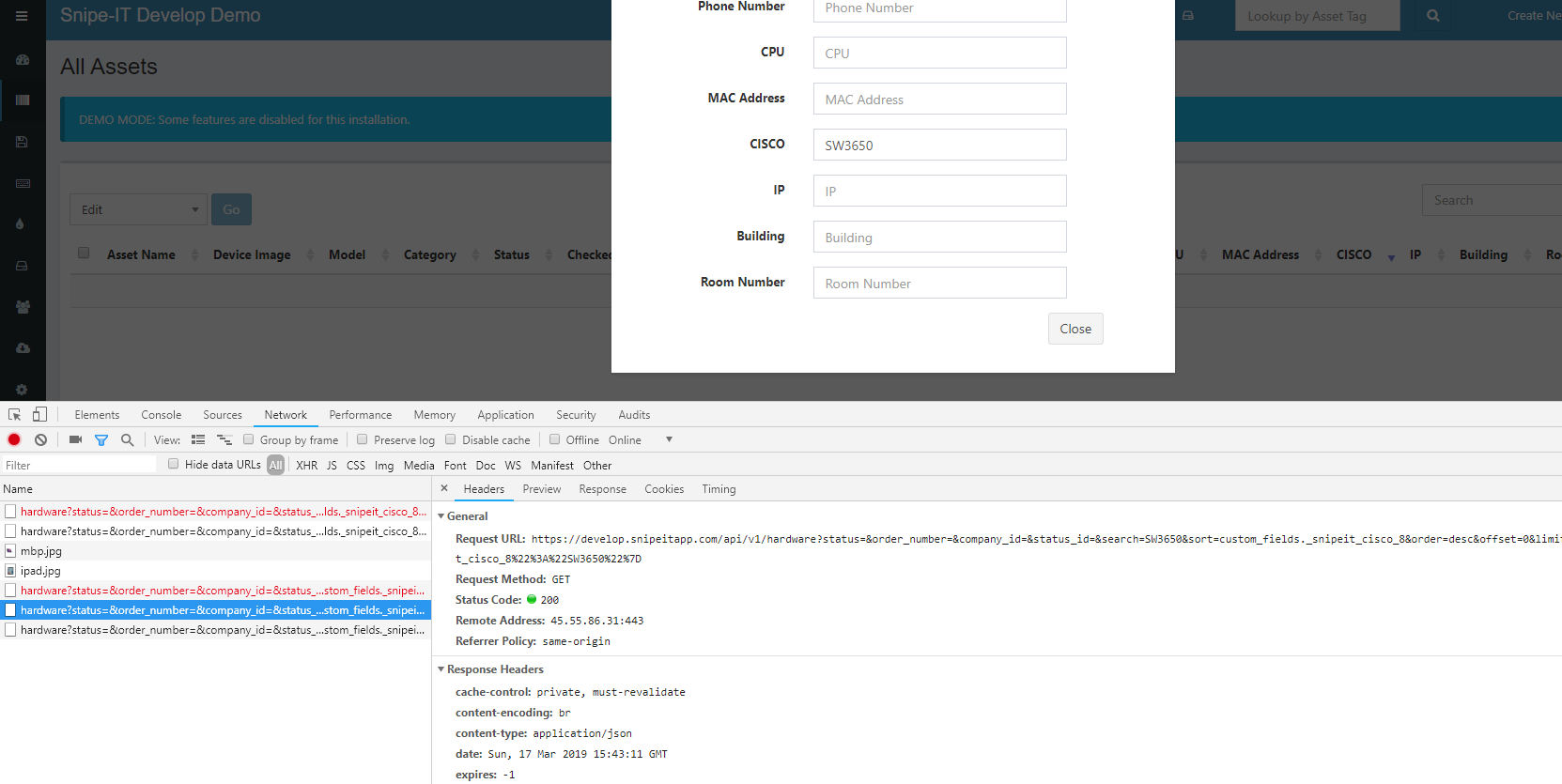
still happens, also at https://develop.snipeitapp.com
 achitofel
on 17 Mar 2019
achitofel
on 17 Mar 2019
@snipe can we re-open this?
achitofel
on 25 Mar 2019
I am also seeing this issue
 pvnick
on 28 Mar 2019
pvnick
on 28 Mar 2019
+1, notably anything with a space in it is broken for us.
 gastamper
on 4 Apr 2019
gastamper
on 4 Apr 2019
I've just upgraded to latest release,
still seeing same issue with v4.7.5 - build 4137 (master)
achitofel
on 22 Jul 2019
Version 4.7.7, bug exists. Advanced search does not work
 UserGoodtm
on 9 Sep 2019
UserGoodtm
on 9 Sep 2019
The meaning of Custom Fields is lost by 90% due to non-working advanced search. Why add information to Custom Fields if the data in Custom Fields can't be found later?
UserGoodtm
on 9 Sep 2019
@snipe will this ever be fixed?
this bug is open for 2 years now.. :)
achitofel
on 6 Oct 2019
It works when I update https://github.com/wenzhixin/bootstrap-table to the latest version and replace the use of bootstrap-table-simple-view.js with bootstrap-table-toolbar.js on my case.
GitHub
An extended table to integration with some of the most widely used CSS frameworks. (Supports Bootstrap, Semantic UI, Bulma, Material Design, Foundation, Vue.js) - wenzhixin/bootstrap-table

 chay22
on 9 Oct 2019
chay22
on 9 Oct 2019
It works when I update https://github.com/wenzhixin/bootstrap-table to the latest version and replace the use of
bootstrap-table-simple-view.jswith bootstrap-table-toolbar.js on my case.
GitHubwenzhixin/bootstrap-tableAn extended table to integration with some of the most widely used CSS frameworks. (Supports Bootstrap, Semantic UI, Bulma, Material Design, Foundation, Vue.js) - wenzhixin/bootstrap-table
Can you be more specific please?
what you have done?
An extended table to integration with some of the most widely used CSS frameworks. (Supports Bootstrap, Semantic UI, Bulma, Material Design, Foundation, Vue.js) - wenzhixin/bootstrap-table
romannazarenko
on 9 Oct 2019
It works when I update https://github.com/wenzhixin/bootstrap-table to the latest version and replace the use of
bootstrap-table-simple-view.jswith bootstrap-table-toolbar.js on my case.
Can you be more specific please?
what you have done?
Sorry, I meant to quote this comment but I didn't https://github.com/snipe/snipe-it/issues/4275#issuecomment-529588587
I'm using the develop branch. The advanced search for custom field is working fine when I upgrade the bootstrap-table.js and replace the source script below it: bootstrap-table-simple-view.js with needed extensions.
I'm done figuring the cause of the error on why this load method does not properly render the table when custom field is being searched. I mean, I have no idea on why doing an upgrade of [email protected] to the latest version does give me a desired result.
I haven't try any other extensions other than bootstrap-table/extensions/toolbar yet. So, the difference that come through my eyes as I first seeing it are
- The table has outer border
- Fields inside advanced search modal box are lesser
- The
Closeadvanced search modal button has to be clicked to perform search
Here's a video. The first tab is the current develop branch while the second is the updated one.
https://imgur.com/a/QSpihvI
An extended table to integration with some of the most widely used CSS frameworks. (Supports Bootstrap, Semantic UI, Bulma, Material Design, Foundation, Vue.js) - wenzhixin/bootstrap-table
Imgur
Post with 1 views.

 Imgur
chay22
on 10 Oct 2019
Imgur
chay22
on 10 Oct 2019
@chay22 Thanks for your work on this! Could you add a bit more detail about how you fixed this? I'd rather not upgrade to the develop branch and lose stability.
Could one modify bower.json to read "bootstrap-table": "^1.11.0", or was your fix more in depth?
@snipe this bug very seriously hampers the utility of Snipe-IT :(
 haircut
on 11 Oct 2019
haircut
on 11 Oct 2019
@chay22 Thanks for your work on this! Could you add a bit more detail about how you fixed this? I'd rather not upgrade to the
developbranch and lose stability.Could one modify
bower.jsonto read"bootstrap-table": "^1.11.0",or was your fix more in depth?@snipe this bug very seriously hampers the utility of Snipe-IT :(
Nothing fancy. Just an upgrade. I don't even touch any build process rather than wildly pasted the whole sources to public/js files. I just found that the advanced search also work on Version v4.7.7 - build 4160 (master).
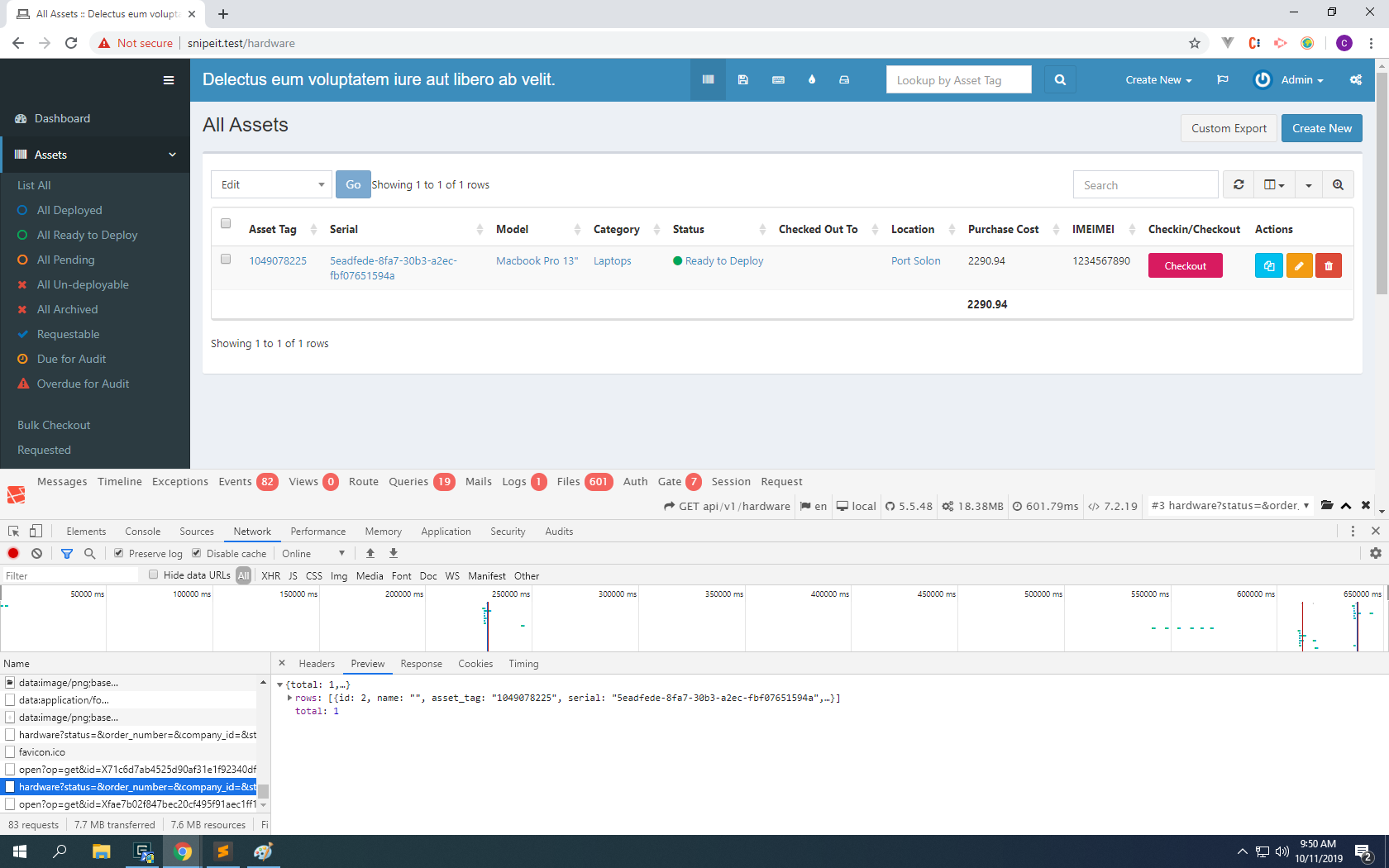
I've changed, respectively
public/js/bootstrap-table.min.js
public/js/extensions/toolbar/bootstrap-table-toolbar.js
public/js/extensions/export/bootstrap-table-export.js
with
bootstrap-table.min.js
extensions/toolbar/bootstrap-table-toolbar.js
extensions/export/bootstrap-table-export.js
Seems like there is price that needed to pay (like, missing export icon; incorrectly positioned pagination info). I mean, someone should properly test it.
chay22
on 11 Oct 2019
Confirm
advanced search now working
@chay22 life saver!)
romannazarenko
on 11 Oct 2019
@chay22
You are a rockstar dude. Working fine now.
 arslanbyte
on 15 Oct 2019
arslanbyte
on 15 Oct 2019
@chay22 @snipe - confirmed working, but if you combine multiple fields for search, it still doesn't work all the time. not sure why.
achitofel
on 15 Oct 2019
Unfortunately replacing the files listed in 540880902 did not get Advanced Search working, and also made the Advanced Search button disappear entirely. I observed this across multiple browsers.
I'm running 4.7.7 4160 via IIS.
haircut
on 15 Oct 2019
Unfortunately replacing the files listed in 540880902 did not get Advanced Search working, and also made the Advanced Search button disappear entirely. I observed this across multiple browsers.
I'm running 4.7.7 4160 via IIS.
I'm sorry if that's make a lot of confusion. Copy-pasta thing is always not recommended way to solve things here. I purposely hint that to another developer whom able to make a PR and a better and testable code to later released publicly.
The main reason caught in mind about why it's not entirely working is because I only modified some of the plugins (rather than all bootstrap-table and its extensions). And also, because I never tested it properly rather than just to make the custom field search should actually show something.
Here's my another try to upgrade bootstrap-table
resources/views/partials/bootstrap-table.blade.php Take a look at script sources that I've changed.
resources/views/partials/bootstrap-table.blade.php#71.
resources/views/layouts/default.blade.php#26
resources/views/layouts/default.blade.php#27
app/Models/Asset.php#1057
There are some other works to do. I'm sure.
chay22
on 16 Oct 2019
Unfortunately replacing the files listed in 540880902 did not get Advanced Search working, and also made the Advanced Search button disappear entirely. I observed this across multiple browsers.
I'm running 4.7.7 4160 via IIS.
@haircut that happened with me too but I had pasted and replaced the files in incorrect location. Fixed by pasting it on their correct location.
I m running 4.7.7 4160 via WAMP.
arslanbyte
on 16 Oct 2019
@chay22 @snipe - confirmed working, but if you combine multiple fields for search, it still doesn't work all the time. not sure why.
I have this issue too after the fix by chay22 on 4.7.7 4160 via WAMP when searching for multiple fields.
Searching one field is working fine.
arslanbyte
on 16 Oct 2019
@chay22 @snipe - confirmed working, but if you combine multiple fields for search, it still doesn't work all the time. not sure why.
I have this issue too after the fix by chay22 on 4.7.7 4160 via WAMP when searching for multiple fields.
Searching one field is working fine.
Are you able to show about what's not working in your case? For me it was when I type something in my custom field IMEI and it found the exact single data. But when I type another thing on asset_tag it does not only show the field that has the IMEI value.
Search 1 Field
| Search for | Value |
|---------------|-------|
| IMEI (custom field) | 123 |
Result:
| Asset Tag | Purchase Cost | IMEI |
|----------------|------------------|----------------------------|
|1224769854 |2153.98 |1234-4321-5678-8765 |
Search 2 Fields
| Search for | Value |
|---------------|-------|
| Asset tag | 122 |
| IMEI (custom field) | 123 |
Result:
| Asset Tag | Purchase Cost | IMEI |
|----------------|------------------|----------------------------|
|1224769854 |2153.98 |1234-4321-5678-8765 |
|1221829792 |2053.44 | |
|895091220 |2315.90 | |
|...and so on | | |
Search 3 Fields
| Search for | Value |
|---------------|-------|
| Asset tag | 122 |
| Purchase Cost | 215 |
| IMEI (custom field) | 123 |
Result:
| Asset Tag | Purchase Cost | IMEI |
|----------------|------------------|----------------------------|
|1224769854 |2153.98 |1234-4321-5678-8765 |
|189034870 |1215.08 | |
|729416178 |2150.80 | |
|...and so on | | |
My desired result is no matter fields I typed in, it should show the result as of the first example. A strict one. Then so, I made a very small change to one function inside Asset.php model (replacing the position of one curly brace }, use where instead of orWhere). And it's all in this comment.
I also noticed that bootstrap-table generated browser stored value (like cookie) could sometimes throwing an error. But, doing re-login fortunately purged those values.
chay22
on 17 Oct 2019
@snipe can we have a fix for this one? :) its been ages..
achitofel
on 13 Jan 2020
There still appears to be a problem with this. I can also recreate this in the online demo (v4.8.0 4186). Replacing various bootstrap files as suggested does partially fix this, but tends to introduce new faults. @Snipe I would be interested to know what the status of this is? Thanks
 daisoigow
on 4 Mar 2020
daisoigow
on 4 Mar 2020
The file replace method only works with one filter.
 nunoxyz
on 9 Mar 2020
nunoxyz
on 9 Mar 2020
Hi
I got this email , but as far as I can see the advance search still doesn’t work
From: Nuno Aparicio notifications@github.com
Sent: Monday, March 9, 2020 10:43 PM
To: snipe/snipe-it snipe-it@noreply.github.com
Cc: Israel Jacobsen Israelj@hyperlync.com; Comment comment@noreply.github.com
Subject: Re: [snipe/snipe-it] Advanced Search Returns No Results (#4275)
The file replace method only works with one filter.
—
You are receiving this because you commented.
Reply to this email directly, view it on GitHubhttps://github.com/snipe/snipe-it/issues/4275?email_source=notifications&email_token=AGWABCGLVDJ2HPV5BQR4JT3RGVIGDA5CNFSM4EAEVUQKYY3PNVWWK3TUL52HS4DFVREXG43VMVBW63LNMVXHJKTDN5WW2ZLOORPWSZGOEOI7USA#issuecomment-596769352, or unsubscribehttps://github.com/notifications/unsubscribe-auth/AGWABCDLDSQ3DHGIVTMCEJDRGVIGDANCNFSM4EAEVUQA.
israeljacobsen
on 10 Mar 2020
Hi @nunoxyz
I'm not sure what you mean about file replace and that it only works with one filter. I can understand if the advanced search only works with one filter. From the testing I have completed, advanced search takes the first value it finds and applies that to the search.
This still doesn't explain why advanced search doesn't work at all on custom fields. I have been led to believe that this should work?
daisoigow
on 10 Mar 2020
Hi @daisoigow
Yes, I was led to believe that it was "fixed". Let's wait for a proper fix.
Hi All,
Any update on this issue ??
 charithra7
on 1 Apr 2020
charithra7
on 1 Apr 2020
Almost 3 years later, version 4.9.3 - bug still exists.
I guess we'll see a cure to the corona virus before this bug will be resolved :D
achitofel
on 22 Jun 2020
Just mentioning that I've noticed the advanced search seems to work for some fields. Unfortunately I would like to filter assets based on 'Checked Out To' and this is one of the fields that fails to filter :-(
 Jaspotn0612
on 2 Jul 2020
Jaspotn0612
on 2 Jul 2020
I have the same problem with advanced search in custom fields, im running on:
Snipe-IT versionv4.9.4 build 4437 (g799a93c46)
PHP Version7.1.33-16+ubuntu16.04.1+deb.sury.org+1Laravel Version5.5.49
 carlosarmentac
on 26 Aug 2020
carlosarmentac
on 26 Aug 2020
I have just checked the online demo of Snipe-IT (v4.9.5 build 4482). Even in the demo, the problem still exists when using custom fields for searching. I can see the browser is receiving a data response with correct results, but the result set is not being displayed. Has this ever worked?
daisoigow
on 30 Sep 2020
@daisoigow I've tried some scripts (https://github.com/snipe/snipe-it/pull/8363) in bootstrap-table-toolbar.js fixed by anarute and worked.
Thanks to @anarute.
I have just checked the online demo of Snipe-IT (v4.9.5 build 4482). Even in the demo, the problem still exists when using custom fields for searching. I can see the browser is receiving a data response with correct results, but the result set is not being displayed. Has this ever worked?
 119155012
on 7 Oct 2020
119155012
on 7 Oct 2020
Related issues
 Supsuop
·
4Comments
snipe
·
3Comments
Supsuop
·
4Comments
snipe
·
3Comments
 comisso
·
4Comments
comisso
·
4Comments
 WELLBOREIS
·
3Comments
WELLBOREIS
·
3Comments
 Neor5804
·
3Comments
Neor5804
·
3Comments
Most helpful comment
Nothing fancy. Just an upgrade. I don't even touch any build process rather than wildly pasted the whole sources to
public/jsfiles. I just found that the advanced search also work onVersion v4.7.7 - build 4160 (master).I've changed, respectively
public/js/bootstrap-table.min.js
public/js/extensions/toolbar/bootstrap-table-toolbar.js
public/js/extensions/export/bootstrap-table-export.js
with
bootstrap-table.min.js
extensions/toolbar/bootstrap-table-toolbar.js
extensions/export/bootstrap-table-export.js
Seems like there is price that needed to pay (like, missing export icon; incorrectly positioned pagination info). I mean, someone should properly test it.