Snipe-it: Licenses: Checkin Permission by Groups
Hey,
i think i found a little issue. In the group view for permssions admin/groups/X/edit it didn't find the License: Checkin permission, all other permissions are working.
Version: 3.5.beta2
Thanks for the great work and system!
 cgresser
All 14 comments
We rolled checkin into checkout, so if you enable them to checkout, they should be able to checkin.
 snipe
on 28 Oct 2016
snipe
on 28 Oct 2016
(We could make that clearer in the UI though)
snipe
on 28 Oct 2016
To add to this, I created a test user as Admin with full permissions down the line, that person can check out a license, but cannot check it back in.
Snipe-IT version v4.1.8-pre build 3068 (gceca76b)
PHP Version 7.0.23
Laravel Version 5.4.29
{
    "superuser": "-1",
    "admin": "1",
    "reports.view": "1",
    "assets.view": "1",
    "assets.create": "1",
    "assets.edit": "1",
    "assets.delete": "1",
    "assets.checkin": "1",
    "assets.checkout": "1",
    "assets.audit": "1",
    "assets.view.requestable": "1",
    "accessories.view": "1",
    "accessories.create": "1",
    "accessories.edit": "1",
    "accessories.delete": "1",
    "accessories.checkout": "1",
    "accessories.checkin": "1",
    "consumables.view": "1",
    "consumables.create": "1",
    "consumables.edit": "1",
    "consumables.delete": "1",
    "consumables.checkout": "1",
    "licenses.view": "1",
    "licenses.create": "1",
    "licenses.edit": "1",
    "licenses.delete": "1",
    "licenses.checkout": "1",
    "licenses.keys": "1",
    "components.view": "1",
    "components.create": "1",
    "components.edit": "1",
    "components.delete": "1",
    "components.checkout": "1",
    "components.checkin": "1",
    "users.view": "1",
    "users.create": "1",
    "users.edit": "1",
    "users.delete": "1",
    "models.view": "1",
    "models.create": "1",
    "models.edit": "1",
    "models.delete": "1",
    "categories.view": "1",
    "categories.create": "1",
    "categories.edit": "1",
    "categories.delete": "1",
    "departments.view": "1",
    "departments.create": "1",
    "departments.edit": "1",
    "departments.delete": "1",
    "statuslabels.view": "1",
    "statuslabels.create": "1",
    "statuslabels.edit": "1",
    "statuslabels.delete": "1",
    "customfields.view": "1",
    "customfields.create": "1",
    "customfields.edit": "1",
    "customfields.delete": "1",
    "suppliers.view": "1",
    "suppliers.create": "1",
    "suppliers.edit": "1",
    "suppliers.delete": "1",
    "manufacturers.view": "1",
    "manufacturers.create": "1",
    "manufacturers.edit": "1",
    "manufacturers.delete": "1",
    "depreciations.view": "1",
    "depreciations.create": "1",
    "depreciations.edit": "1",
    "depreciations.delete": "1",
    "locations.view": "1",
    "locations.create": "1",
    "locations.edit": "1",
    "locations.delete": "1",
    "self.two_factor": "-1",
    "self.api": "-1"
}
 blackout1231
on 8 Dec 2017
blackout1231
on 8 Dec 2017
Fixed on develop now
snipe
on 8 Dec 2017
I can verify that without changing this users permissions, I now have the Check-In option after applying the updated from the Develop branch, however when I attempt to do so, I get the below error:
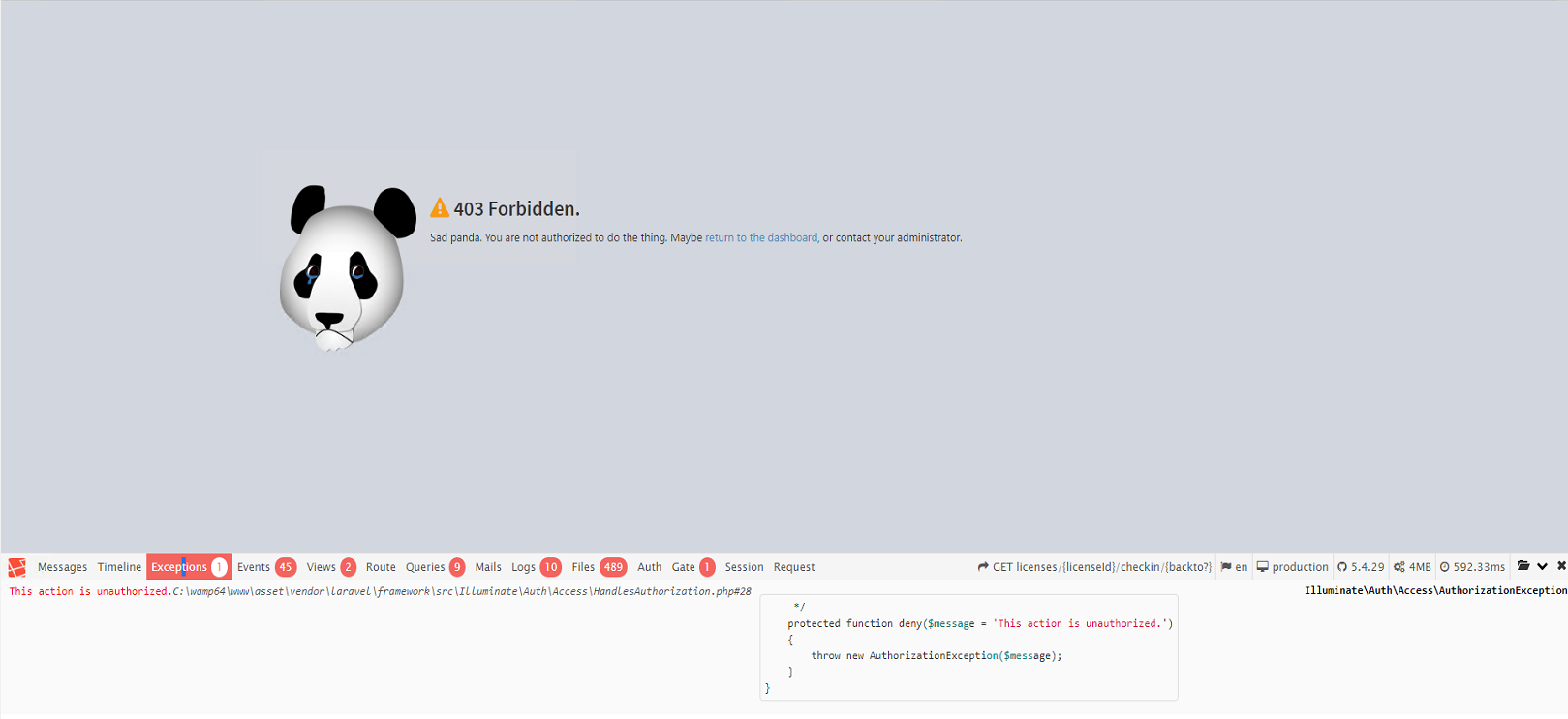

Is there anything I need to do on my end to resolve? Apologies in advance, I am new to this type of thing, and am learning as I go. I am doing my best to do my due diligence prior to posting as I learn the etiquette for posting here =)
blackout1231
on 8 Dec 2017
I am doing my best to do my due diligence prior to posting as I learn the etiquette for posting here =)

Seriously, you're doing fine. I do appreciate being concerned about that though - it's more than we often get ;)
Give it a go now please?
snipe
on 8 Dec 2017
Same issue unfortunately =(
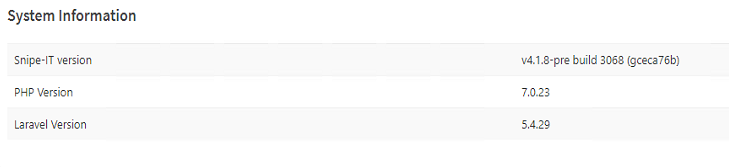
Maybe I didn't apply the update correctly..
blackout1231
on 8 Dec 2017
Are you on the develop branch or master? It was only pushed to develop.
snipe
on 8 Dec 2017
Try one more time - I missed a gate on the GET request. (This is on develop.)
snipe
on 8 Dec 2017
Develop, https://github.com/snipe/snipe-it/tree/develop
The below command is how I am updating:
php upgrade.php
Or is downloading the code and copying it over my existing installation is sufficient?
blackout1231
on 8 Dec 2017
Your upgrade process is fine - I had missed a line - can you grab develop one more time. The change I just pushed through fixed it for me.
snipe
on 8 Dec 2017
Rrroger
blackout1231
on 8 Dec 2017
Pay dirt!!!
You madam, are awesome. Have a good weekend!
blackout1231
on 8 Dec 2017
Awesome - glad that fixed it!
snipe
on 8 Dec 2017
Related issues
 sbenoit89
·
5Comments
sbenoit89
·
5Comments
 anilp78
·
4Comments
anilp78
·
4Comments
 ericdude101
·
5Comments
ericdude101
·
5Comments
 alextheberge
·
4Comments
alextheberge
·
4Comments
 memtech3
·
4Comments
memtech3
·
4Comments
Most helpful comment
Pay dirt!!!
You madam, are awesome. Have a good weekend!