Snapcast: UTF-8 device names don't write to console correctly
Describe the bug
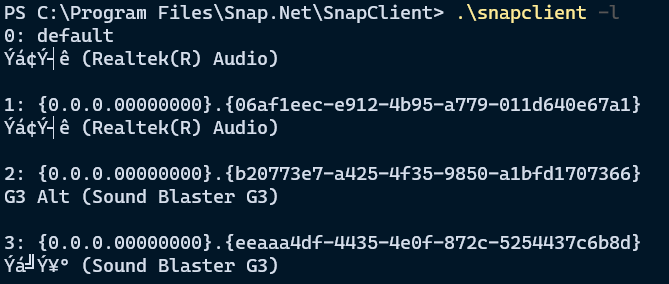
On Windows when the audio device name includes UTF-8 characters then snapclient -l prints a corrupt version of the device name.
Steps to Reproduce
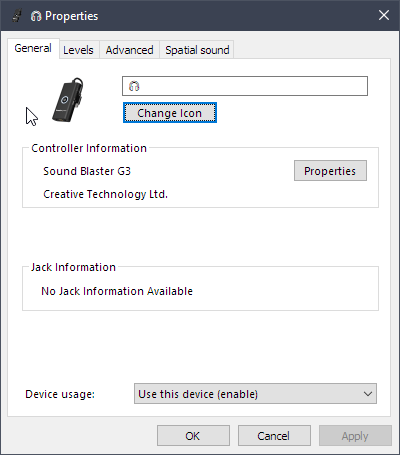
- On Windows open "Additional device properties" for an audio device.
- Change the name of the device to a UTF-8 character for example 🎧
- Run
snapclient -l - The 🎧 character in the device name gets output as
Ýá╝Ý¥º
Environment details
- OS: Windows 10
- Snapcast version 0.22.0
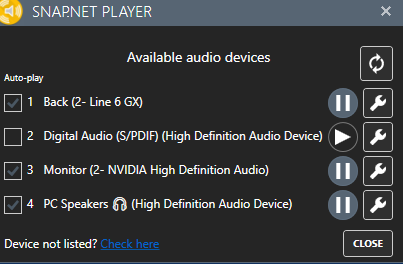
This affects the player list in Snap.Net as described here.
 vjdw
vjdw
All 22 comments
I think using setlocale(LC_ALL, ".UTF8") as described in this issue might solve this. I've been trying to test this but have given up trying to get snapcast to build on Windows :-(
vjdw
on 1 Dec 2020
Could be fixed 55f7d05
Please try with the development snapshot in actions
 badaix
on 1 Dec 2020
badaix
on 1 Dec 2020
Looks like we were reading the same StackOverflow article @badaix ! :D I tried this the other day but it caused some weird behaviour - tried again now from develop branch and it seems the same. The "weird behaviour" being that snapclient -l appears to print nothing in Windows command prompt now (PowerShell too), though if you pipe the output to a file it does show up. Still with the wrong encoding, though...
@vjdw could you tell us which part of the build process you're having trouble with? I wrote some notes here a while back but it sounds like those may need some updating :)
 stijnvdb88
on 1 Dec 2020
stijnvdb88
on 1 Dec 2020
Had a second look now, removing the setvbuf() call fixes that weird behaviour I mentioned, and I was wrong about the encoding. Greek characters come out fine, even without SetConsoleOutputCP(CP_UTF8); - but the character OP is using doesn't.
Just to confirm that this is possible, with https://github.com/frgnca/AudioDeviceCmdlets, the character comes out fine after being piped to a file (not in PowerShell itself because the default font doesn't have that character)
Edit: forgot to mention that setLocale didn't do the trick either :)
stijnvdb88
on 2 Dec 2020
@stijnvdb88 I don't know how important the setbuf is regarding "chopping up UTF-8 byte sequences". Maybe a std::flush would also fix the weird behavior?
Agree, the build process issue it the more interesting one :)
I was following the Windows compile how-to when I've added the Windows workflow file. There is a difference in the call to cmake:
cmake -S . -B build -G "Visual Studio 16 2019" -DCMAKE_TOOLCHAIN_FILE="$env:VCPKG_INSTALLATION_ROOT/scripts/buildsystems/vcpkg.cmake" -DVCPKG_TARGET_TRIPLET="x64-windows" -DCMAKE_BUILD_TYPE="Release"don
vs
cmake .. -DCMAKE_TOOLCHAIN_FILE=<vcpkg_dir>/scripts/buildsystems/vcpkg.cmake
I don't know if the DVCPKG_TARGET_TRIPLET and -G parameters are needed or not (don't remember where it is coming from, maybe I've copied it from stijnvdb88's travis.yml file)
badaix
on 2 Dec 2020
@vjdw could you tell us which part of the build process you're having trouble with? I wrote some notes here a while back but it sounds like those may need some updating :)
@stijnvdb88 Yes thanks, those are the notes I've been using. I haven't used vcpkg or cmake before so I'm probably doing something obviously wrong. When I run
vcpkg.exe install libflac libvorbis soxr opus boost-asio --triplet x64-windows
There are no warning or errors, it says, for example
[...]
Package libflac:x64-windows is already installed
[...]
The package libflac:x64-windows provides CMake targets:
[...]
When I run
cmake.exe .. -DCMAKE_TOOLCHAIN_FILE=../../vcpkg/scripts/buildsystems/vcpkg.cmake
I get this output, which tells me dependencies are missing (and then the build fails in the next step because of that)
-- Selecting Windows SDK version 10.0.18362.0 to target Windows 10.0.19042.
-- REQUIRED (missing: FLAC_INCLUDE_DIRS FLAC_LIBRARIES)
-- REQUIRED (missing: OGG_INCLUDE_DIRS OGG_LIBRARIES)
-- REQUIRED (missing: VORBIS_INCLUDE_DIRS VORBIS_LIBRARIES)
-- REQUIRED (missing: OPUS_INCLUDE_DIRS OPUS_LIBRARIES)
-- REQUIRED (missing: SOXR_INCLUDE_DIRS SOXR_LIBRARIES)
-- Configuring done
-- Generating done
-- Build files have been written to: C:/Users/vince/source/snapcast/build
vcpkg is downloading the packages, so why can't cmake can't find them?
vjdw
on 2 Dec 2020
@vjdw oh, cmake might be defaulting those libraries to x86...and obviously not finding them since we're explicitly downloading just the x64 ones :D that would also explain why we have -DVCPKG_TARGET_TRIPLET="x64-windows" in the build routines as badaix mentioned - definitely needs updating in the documentation! Does it work if you set -DVCPKG_TARGET_TRIPLET="x64-windows" in the cmake command?
stijnvdb88
on 2 Dec 2020
Does it work if you set
-DVCPKG_TARGET_TRIPLET="x64-windows"in the cmake command?
@stijnvdb88 That gives
CMake Warning:
Manually-specified variables were not used by the project:
VCPKG_TARGET_TRIPLET
and just to see what happens I put set(VCPKG_TARGET_TRIPLET "x64-windows") in both CMakeLists.txt and vcpkg.cmake but it had no effect, I still get the missing package errors.
vjdw
on 2 Dec 2020
@stijnvdb88 I have the build working! I inserted the following on line 12 in CMakeLists.txt
include("C:/Users/vince/source/vcpkg/scripts/buildsystems/vcpkg.cmake")
Now I can exeriement with setlocale, but it sounds like you guys have already shown it's not that simple.
vjdw
on 2 Dec 2020
great!! not sure why that line would be required, -DCMAKE_TOOLCHAIN_FILE= should've taken care of that...unless it didn't like the relative path?
an extra set of eyes will be more than useful! I'm starting to think the issue might not be the output, but the way we read it from wasapi.
in wasapi_player.cpp, we use wstring_convert like this:
hr = properties->GetValue(PKEY_Device_FriendlyName, &deviceName);
desc.description = wstring_convert<codecvt_utf8<wchar_t>, wchar_t>().to_bytes(deviceName.pwszVal);
tried changing that to codecvt_utf8_utf16 earlier today in case the api is actually giving us utf16 there, but still no joy. Either way I think you're onto something with the setlocale, I keep running into that when trying to find more info about how to deal with emojis
Edit: just out of curiosity @vjdw , could you try -DCMAKE_TOOLCHAIN_FILE=../vcpkg/scripts/buildsystems/vcpkg.cmake ? (going up one less dir from the working directory than before). it just occurred to me now that cmake is probably not using the current working directory (/build) as a starting point, but rather the directory we pass to cmake (/..) 😄
stijnvdb88
on 2 Dec 2020
Think I've got it.
In wasapi_player.cpp:
using converter = wstring_convert<codecvt_utf8_utf16<wchar_t>, wchar_t>;
desc.description = converter{}.to_bytes(deviceName.pwszVal);
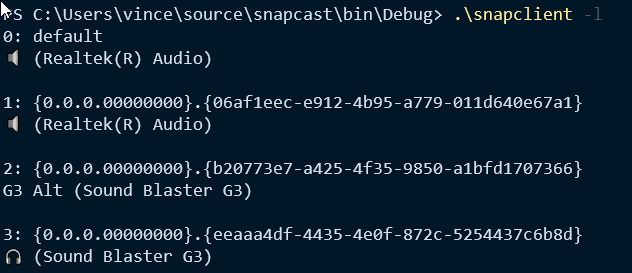
Plus the call to SetConsoleOutputCP(CP_UTF8) in snapclient.cpp.
You also need to use something like Windows Terminal because a standard Powershell console doesn't know how to display the glyphs.
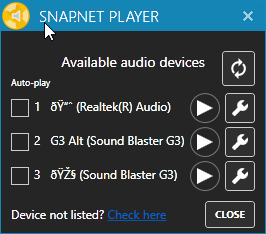
Snap.Net Player still isn't right, but at least it's now displaying an ASCII representation of the UTF-8 which is something to work with.
vjdw
on 2 Dec 2020
haha well done! seems I had the solution without realizing it, good idea to use something other than Powershell!
As for Snap.Net, try the development branch - that part got fixed this morning :)
stijnvdb88
on 3 Dec 2020
@vjdw will you make a PR for this?
badaix
on 3 Dec 2020
@vjdw will you make a PR for this?
Yes, I'll put something together.
vjdw
on 3 Dec 2020
thanks, it's merged :+1:
What about snapclient.cpp:
            // Set console code page to UTF-8 so console known how to interpret string data
            SetConsoleOutputCP(CP_UTF8);
            // Enable buffering to prevent VS from chopping up UTF-8 byte sequences
            setvbuf(stdout, nullptr, _IOFBF, 1000);
Can this get removed? The second line or both?
badaix
on 3 Dec 2020
No, I found that the first line is required so that the console knows that it's dealing with UTF-8. Remember that you also need to be using a modern console to see the unicode characters, e.g. Microsoft Terminal with Powershell Core.
From what I've read the second line is also recommended as per the comment. Also frequent flushes are recommended to avoid the buffer filling and then one unicode character's bytes can become split over 2 flushes, if that makes sense? In this case I think we're ok because we don't write very much to stdout and then exit which flushes buffers anyway.
vjdw
on 3 Dec 2020
I'm just afraid of the weird behavior that stijnvdb88 observed, so I tend to remove it, but I'm not sure.
badaix
on 3 Dec 2020
You could remove setvbuf and I doubt it will cause any problems. As long as you think we can keep SetConsoleOutputCP?
vjdw
on 3 Dec 2020
Yes, from my understanding SetConsoleOutputCP is required, so we will keep it. Then I will remove the second line (the setvbuf). I don't think that the "chopping" will affect us, since there are only very few utf-8 characters logged in Snapclient.
Sorry for asking what's necessary and what not, I don't have a Windows machine (just one in the office without development environment).
badaix
on 3 Dec 2020
@badaix I think it's fine now actually - I had a quick look at the build after @vjdw 's PR here https://github.com/badaix/snapcast/actions/runs/399079795 and snapclient --list works okay :) it seems somehow the setvbuf call by itself caused that weird behaviour, but in combination with the PR it's alright again.
could you confirm this @vjdw?
stijnvdb88
on 3 Dec 2020
ok, great, I will leave it in
badaix
on 3 Dec 2020
I can confirm I've tested it and I don't see any weirdness!
vjdw
on 3 Dec 2020
Related issues
 tgurr
·
7Comments
tgurr
·
7Comments
 herrwusel
·
4Comments
herrwusel
·
4Comments
 qhello
·
3Comments
qhello
·
3Comments
 markbeekhuis
·
3Comments
markbeekhuis
·
3Comments
 fallenicarus
·
3Comments
fallenicarus
·
3Comments
Most helpful comment
Think I've got it.
In wasapi_player.cpp:
Plus the call to
SetConsoleOutputCP(CP_UTF8)in snapclient.cpp.You also need to use something like Windows Terminal because a standard Powershell console doesn't know how to display the glyphs.
Snap.Net Player still isn't right, but at least it's now displaying an ASCII representation of the UTF-8 which is something to work with.