I would really like a Windows Client too, first as I don't need another device when I work on my PC and secondly with the Raspberry Pi supporting Windows 10 IoT it might be a good alternative for a music player.
We discussed this a bit in #22, and I just wanted to add a issue for this so it's not forgotten.
I will try to provide information for this, maybe I even find the time to start on it myself. But I unfortunately am pretty much occupied with Greenshot so there are no guarantees.
Here is some information which might help:
Yesterday someone from Microsoft added example documentation for writing a Background audio app for the Universal Windows Platform (UWP):
https://blogs.windows.com/buildingapps/2016/01/13/the-basics-of-background-audio/
This might be a nice way to integrate SnapCast into Windows 10, having a standard volume/play/pause control.
There is also sample code available for an AdaptiveStreaming application:
https://github.com/Microsoft/Windows-universal-samples/tree/master/Samples/AdaptiveStreaming
Maybe this, combined with the information on how SnapCast works, can result in an Rapsberry Pi music "box". :)
 Lakritzator
All 154 comments
It "should" be possible to use C++ in a native Windows application (Desktop or UWP), but this might be slightly more complex. I would not be able to help there much..
For me it would be a native client, which might have more overhead in maintaining the code when SnapCast hast changes, but we can use platform API's which can get better performance.
Probably it would be wise to implement the audio processing of the client with XAudio2.
XAudio2 is available on the Desktop and for UWP via SharpDX
Lakritzator
on 14 Jan 2016
I'd like to take this on (or at least take a shot at it). I haven't developed for windows since XP, but I'm sure I can get back up to speed
The application seems very light on dependencies, so I would favour cross compiling and adding a new back end for windows. Alternatively, alsa/opensl could be swapped out for a cross platform library such as OpenAl
 Outurnate
on 1 Jun 2016
Outurnate
on 1 Jun 2016
No worries, Visual Studio and the Windows API didn't change too much since Windows XP (at least for non-GUI stuff). I also think that it shouldn't be too hard to compile the client for Windows. There is not too much Linux specific stuff (like pthreads), except
- the player
- the Daemon stuff (can be removed with a define, as in Android)
- the Syslog stuff
- the unforeseen :wink:
 badaix
on 2 Jun 2016
badaix
on 2 Jun 2016
Is there any opposition to using CMake? Speaking from experience, it makes compiling on windows bearable
Outurnate
on 2 Jun 2016
CMake sounds good!
It was actually a roadmap item. I removed it (e9d84607c00742296f8f6fd6536d54b975bb7aa9: "CMake or another build system") simply to concentrate on "functional features" and not on "code features" in the roadmap :)
badaix
on 3 Jun 2016
c43406a on my fork adds CMake build for linux native only. It's still missing
- [ ] CPack (.deb package)
- [ ] OpenWRT build
- [ ] Android build
I'll look at these once the windows port is done, but for now there's enough to build it natively under linux
Outurnate
on 4 Jun 2016
Good news! The windows version is "working". It still needs some polish, and it drifts out of sync (though that is because waitForChunk is not being called - testing reasons).
CMake still needs a good chunk of polish. Once I got it cross-compiling, I stopped improving it. I'll get back on that as soon as I'm done with the code
Outurnate
on 23 Jul 2016
The one thing worth discussing is Avahi. As it stands, the only proper implementation of Bonjour is Apple's. That's released under Apache 2.0, which means we _probably_ can't link it against GPLv3 code. That leaves windows without zeroconf, which is disappointing
In other news, drifting is fixed, and I'm just working on getting silence to play when the server is not sending data
Outurnate
on 25 Jul 2016
Hey, Outurnate. Have you published the Windows version of the client anywhere? I am looking for this exact solution at the moment.
 Xeyk
on 3 Aug 2016
Xeyk
on 3 Aug 2016
It's not published at the moment, but I'm not far off. I'm finishing off Bonjour compatibility at the moment. I can upload a test build if you'd like to play with it
Outurnate
on 4 Aug 2016
There's a prerelease on my fork. Please let me know how it performs for you
Outurnate
on 5 Aug 2016
Good news is it looks like while running snapclient in command line, it runs well and stays running. I am confused as to how to pull this information out so that I can actually hear the music being played. Do I use a media player of my choice and access it somehow?
Edit: After posting this message, the running instance of snapclient threw an error: Debug Assertion Failed. Program minkernel\crts\ucrt\src\appcrt\heap\debug_heap.cpp
Line: 888
Expression: _CrtlsValidHeapPointer(block)
Xeyk
on 6 Aug 2016
You'll need snapserver, which is only on linux at the moment. Point the client at the server with the -h option
I haven't come across that exception in my testing. What steps can I take to reproduce it?
Outurnate
on 9 Aug 2016
I downloaded snapclient, extracted the contents within my downloads folder, navigated to it in command line, and ran "snapclient -h 192.168.1.13 > nul'' . I am currently on Windows 10, so I am not sure if that's the issue.
Aslo, I have snapserver running on my desktop, which this does seem to connect to flawlessly, my only misunderstanding here is that, when connected, I don't hear any playback on the snapclient, and I wouldn't expect to through command line. I have various snapclients running throughout the house on Android and Linux boxes, but since there is a GUI available with those the playback is expected.
Xeyk
on 9 Aug 2016
Windows 10 will work just fine. Haven't tested the anniversary update yet, but I see no reason why it should be any different. Check what devices are listed with -l, use -s to force the correct one if necessary. Under sound properties in windows, make sure that devices are allowed to take exclusive control. Are you using HDMI output?
Outurnate
on 9 Aug 2016
I am actually using HDMI output for sound. Looks like the correct device is listed. Forced it with -s just in case, but no change.
Xeyk
on 9 Aug 2016
I don't have an HDMI device handy to test with, but you'll want to ensure the following in control panel:
- Audio format matches snapserver inbound format
- Event driven audio is enabled
- Exclusive mode is allowed
- Output channels match the source audio stream channels (usually stereo)
Outurnate
on 9 Aug 2016
I will have the code ready to merge this weekend. While I am preparing it, the issue of Bonjour licensing must be addressed. Since I am not the final distributor, I cannot agree to the terms of the Bonjour redistributable. Before a download can be offered, the license must be agreed to at https://developer.apple.com/softwarelicensing/agreements/bonjour.php
I will handle the logo placement in the windows installer, as well as EULA agreement. One other option is to require the end user to install iTunes before using snapcast (since iTunes bundles it). Another option is to raise the minimum windows version requirement from Vista to 8, and use the service discovery system provided by WinRT
On the code side, I still have a few concerns. They can be addressed in a later release. Firstly, the logging system I implemented is a stopgap. It degrades performance considerably, but not enough to impact operation. I'd like to evaluate g3log and spdlog as a cross platform replacement. A future release should also register snapclient as a windows service. I will test & submit a PR for both
Outurnate
on 3 Sep 2016
Very much looking forward to this.
 happyleavesaoc
on 4 Sep 2016
happyleavesaoc
on 4 Sep 2016
Not sure this will happen today. Had a work emergency that ate up a chunk of my time. Android and OpenWRT builds aren't even started yet, and I've discovered a show-stopping bug for windows
Outurnate
on 5 Sep 2016
Any progress with the windows app?
I downloaded the zip-file from Outurnates GIT fork, but I got the following problem. The Client starts, but when I start playing music on the server, it shows the following error and crashes. I can't hear any sound.
> snapclient -h 192.168.178.95
2016-09-13 14-18-02 [out] Latency: 0
2016-09-13 14-18-02 [out] Connecting
2016-09-13 14-18-02 [Notice] Connected to 192.168.178.95
2016-09-13 14-18-02 [out] My MAC: "xx:xx:xx:xx:xx:xx", socket: 380
2016-09-13 14-18-02 [out] ServerSettings - buffer: 1000, latency: 0, volume: 100, muted: 0
2016-09-13 14-18-02 [out] Codec: flac
2016-09-13 14-18-02 [state] sampleformat: 44100:16:2
2016-09-13 14-18-03 [out] no chunks available
2016-09-13 14-18-03 [out] Failed to get chunk
2016-09-13 14-18-03 [out] diff to server [ms]: 748.683
2016-09-13 14-18-03 [Debug] r chunk
2016-09-13 14-18-08 [out] time sync main loop
2016-09-13 14-18-13 [out] time sync main loop
2016-09-13 14-18-15 [out] age > 200: -1472822213557
2016-09-13 14-18-15 [out] sleep < -bufferDuration/2: -1472822213557 < -1, sleep: -1472822213552
2016-09-13 14-18-15 [out] sleep < -bufferDuration/2: -1472822213552 < -1, sleep: -1472822213539
2016-09-13 14-18-15 [out] sleep < -bufferDuration/2: -1472822213539 < -1, sleep: -1472822213517
2016-09-13 14-18-15 [out] sleep < -bufferDuration/2: -1472822213517 < -1, sleep: -1472822213507
2016-09-13 14-18-15 [out] sleep < -bufferDuration/2: -1472822213507 < -1, sleep: -1472822213499
2016-09-13 14-18-15 [out] sleep < -bufferDuration/2: -1472822213499 < -1, sleep: -1472822213488
2016-09-13 14-18-15 [out] sleep < -bufferDuration/2: -1472822213488 < -1, sleep: -1472822213478
2016-09-13 14-18-15 [out] sleep < -bufferDuration/2: -1472822213478 < -1, sleep: -1472822213474
2016-09-13 14-18-15 [out] sleep < -bufferDuration/2: -1472822213474 < -1, sleep: -1472822213467
2016-09-13 14-18-15 [out] sleep < -bufferDuration/2: -1472822213467 < -1, sleep: -1472822213456
2016-09-13 14-18-15 [out] sleep < -bufferDuration/2: -1472822213456 < -1, sleep: -1472822213449
2016-09-13 14-18-15 [out] sleep < -bufferDuration/2: -1472822213449 < -1, sleep: -1472822213441
2016-09-13 14-18-15 [out] sleep < -bufferDuration/2: -1472822213441 < -1, sleep: -1472822213430
2016-09-13 14-18-15 [out] sleep < -bufferDuration/2: -1472822213430 < -1, sleep: -1472822213427
...
 niklasdoerfler
on 13 Sep 2016
niklasdoerfler
on 13 Sep 2016
@niklasdoerfler
I had the same problem yesterday on Mac OS X.
This can be fixed by changing the high_resolution_clock to a system_clock in timeDefs.h, line 27:
this has to be changed:
typedef std::chrono::high_resolution_clock hrc;
to:
typedef std::chrono::system_clock hrc;
Explanation: the absolute time base for the high_resolution_clock must per C++ standard not be the same between different machines. Linux seems to use an absolute time (like 1/1/1970), while Mac OS X (and maybe Windows) are using the boot time as reference.
@Outurnate
Regarding Bonjour: Since the GPL is more strict than Apache, I think linking Apache in GPL software is ok. The other way round might be more problematic (because of the GPL's copyleft).
I'm not a lawyer, but I think it's ok to link and to bundle it.
The copyrights of third party libs should be mentioned somewhere. Actually, this is an open issue. Currently only the Android App lists 3rd party libs. I have create some copyright section in the readme for all libs (e.g. FLAC, ogg, Avahi, ...).
I think we will need Bonjour also for the Mac OS X port.
badaix
on 13 Sep 2016
Thanks! I tried it and compiled the app with this change. Now I can here some sound, but it is very distorted. The console log shows the following and after some seconds the program crashes.
2016-09-17 02-24-11 [out] Found server 192.168.178.95:1704
2016-09-17 02-24-11 [out] Latency: 0
2016-09-17 02-24-11 [out] Connecting
2016-09-17 02-24-11 [Notice] Connected to 192.168.178.95
2016-09-17 02-24-11 [out] My MAC: "xx:xx:xx:xx:xx:xx", socket: 524
2016-09-17 02-24-11 [out] ServerSettings - buffer: 1000, latency: 0, volume: 100, muted: 0
2016-09-17 02-24-12 [out] Codec: flac
2016-09-17 02-24-12 [state] sampleformat: 44100:16:2
2016-09-17 02-24-12 [out] age > 200: -983
2016-09-17 02-24-12 [out] sleep < -bufferDuration/2: -983 < -1, sleep: -983
2016-09-17 02-24-12 [out] sleep < -bufferDuration/2: -983 < -1, sleep: -983
2016-09-17 02-24-12 [out] sleep < -bufferDuration/2: -983 < -1, sleep: -979
2016-09-17 02-24-12 [out] sleep < -bufferDuration/2: -979 < -1, sleep: -978
2016-09-17 02-24-12 [out] sleep < -bufferDuration/2: -978 < -1, sleep: -978
2016-09-17 02-24-12 [out] sleep < -bufferDuration/2: -978 < -1, sleep: -978
2016-09-17 02-24-12 [out] sleep < -bufferDuration/2: -978 < -1, sleep: -979
2016-09-17 02-24-12 [out] sleep < -bufferDuration/2: -979 < -1, sleep: -978
2016-09-17 02-24-12 [out] sleep < -bufferDuration/2: -978 < -1, sleep: -979
2016-09-17 02-24-12 [out] sleep < -bufferDuration/2: -979 < -1, sleep: -975
2016-09-17 02-24-12 [out] sleep < -bufferDuration/2: -975 < -1, sleep: -974
2016-09-17 02-24-12 [out] sleep < -bufferDuration/2: -974 < -1, sleep: -974
2016-09-17 02-24-12 [out] sleep < -bufferDuration/2: -974 < -1, sleep: -975
2016-09-17 02-24-12 [out] sleep < -bufferDuration/2: -975 < -1, sleep: -975
2016-09-17 02-24-12 [out] sleep < -bufferDuration/2: -975 < -1, sleep: -975
2016-09-17 02-24-12 [out] sleep < -bufferDuration/2: -975 < -1, sleep: -975
2016-09-17 02-24-12 [out] sleep < -bufferDuration/2: -975 < -1, sleep: -974
2016-09-17 02-24-12 [out] sleep < -bufferDuration/2: -974 < -1, sleep: -974
2016-09-17 02-24-12 [out] sleep < -bufferDuration/2: -974 < -1, sleep: -975
2016-09-17 02-24-12 [out] sleep < -bufferDuration/2: -975 < -1, sleep: -975
2016-09-17 02-24-12 [out] sleep < -bufferDuration/2: -975 < -1, sleep: -974
...
I've been tearing my hair out on this same issue. I've tried changing that clock, however, the only functional client had severe distortion
Oddly, at some point the client worked without changing the clock. I've been trying to reproduce that case all week. I've reimaged my test PC and I'll be taking another crack at it tonight
In regards to the Bonjour lib:
A careful reading of the GPL FAQ shows that it should be OK. As for the installer, I've worked out a solution. By default, the "package" target generates an MSI which expects to find Bonjour installed on the target machine. This way, anyone who clones the project can build without needing the SDK. An additional target ("bundle") will be generated to combine the MSI with the Bonjour redist. I'm still working on integrating that into CMake's WiX generator
Outurnate
on 17 Sep 2016
@niklasdoerfler I've seen that exact issue. If I can't work out why my first few builds did not work, we will need to find another solution. I've already tried shifting the HRC to work in the system timeframe (which works on linux), however, it won't compile on windows, because a conversion to time_t is not defined for the HRC. This is because the underlying performance clock does not expose a reference epoch. The only other solution would be to sample the HRC and system clock nearly simultaneously and periodically sync them
This is all provided I can't work out why the clock worked in the past
Outurnate
on 17 Sep 2016
@badaix linking with Bonjour on OSX won't be an issue, since it's an OS component. On windows 8+, mDNS is an OS component as well.
Outurnate
on 17 Sep 2016
I've worked out a solution. On linux, the timer will be std::chrono::system_clock (high_resolution_clock is an alias for it on linux). On windows, a custom clock that queries GetSystemTimePreciseAsFileTime will be used. This will limit support to Windows 8+ desktop only
It's unfortunate, because I know it can work the way it is, but I can't figure out how
Edit: I've discovered the bug was introduced when changing from SDK 8.1 to 10, but I can't find a changelog anywhere. I'm totally lost as to what might have changed
Outurnate
on 21 Sep 2016
Latest commit fixes this on Windows. It breaks win7 compat and windows mobile compat though. Since I have broken win7 compat, I'm going to go ahead and replace bonjour with the native windows 8 mDNS implementation
Outurnate
on 24 Sep 2016
@Outurnate dropping Win7 support sounds reasonable. The effort you spent into Bonjour was no waste. I've already merged it into the develop branch 68d73321e0fc1b3069d6237bb16b237e0a85ec99 for the MacOS support. It was working straight away :smiley:
badaix
on 27 Sep 2016
@badaix Awesome! Did some digging into the native windows api. Seems it's 10+, and only really stable in the preview builds. I think it is best if we hold off on implementing it
https://msdn.microsoft.com/en-us/library/windows/apps/windows.networking.servicediscovery.dnssd.aspx
Outurnate
on 27 Sep 2016
Anything new here? Windows client would really be amazing.
happyleavesaoc
on 12 Jan 2017
I'm piecing away at it. Mostly build system changes
Outurnate
on 13 Jan 2017
Cant wait, thanks for your hard work
 celevra
on 3 Mar 2017
celevra
on 3 Mar 2017
I'm still alive...real life keeping me busy. Expect PR in the next month :(
Outurnate
on 15 Mar 2017
Good things take time and time is rare :)
badaix
on 15 Mar 2017
@Outurnate would it be possible to build another test version of your Windows fork ?
I tried building your latest git version but got lost in dependencies which weren't documented in the instructions.
 marcelveldt
on 10 Apr 2017
marcelveldt
on 10 Apr 2017
Any updates on this? :/
 fronbasal
on 9 Oct 2017
fronbasal
on 9 Oct 2017
I'm back. I've got to rebuild my dev environment but I am back!
Outurnate
on 27 Nov 2017
Awesome! Would be great if you could build this :)
fronbasal
on 28 Nov 2017
I have managed to get snapserver running on Windows 10 1709 with WSL running Ubuntu 16.04.
These were the steps I had to do:
- Install pulseaudio on Windows as described here.
- After that you can test that audio is available under WSL by playing a .wav file via aplay
- Install the packages dbus, avahi-daemon and snapclient on Ubuntu/WSL
- Start the dbus, avahi-daemon services:
sudo service dbus start
sudo service avahi-daemon start - Start snapclient (Note: starting via
service snapclient startdid not work for me):
snapclient -h 192.168.xxx.xxx --latency xxx >/dev/null & - So far everything is working perfectly stable. In my setup I am running a snapserver on a Ubuntu machine and three snapclients on a Raspi3, a Windows PC and on the Ubuntu machine itself.
 hanoba
on 4 Dec 2017
hanoba
on 4 Dec 2017
I'm surprised that works, given that you are installing pulseaudio 1.1 in Windows and you're installing version 9.0 in WSL. Hooray backwards compatibility?
 nogweii
on 5 Dec 2017
nogweii
on 5 Dec 2017
Yes, it works! I will double check the installed pulseaudio versions during the weekend.
hanoba
on 5 Dec 2017
@hanoba that is quite impressive really - props to MS for implementing WSL so well!
@fronbasal let's wait for the merge - I split back in 0.9. Once it's merged I'll generate some installers
Outurnate
on 6 Dec 2017
@Outurnate Thank you for coming back to this! I have been watching this project for over a year!
Xeyk
on 6 Dec 2017
@Outurnate awesome! Thanks for the great work!
fronbasal
on 6 Dec 2017
More info how to install pulseaudio on Ubuntu/WSL (Windows 10, Version: 1709):
Install on Windows: See "Install pulse audio on Windows"
Install on Ubuntu/WSL:
   sudo service dbus start
   sudo add-apt-repository ppa:aseering/wsl-pulseaudio
   sudo sed -i s/xenial/trusty/ /etc/apt/sources.list.d/aseering-ubuntu-wsl-pulseaudio-xenial.list
   sudo apt-get update
   sudo apt-get install libpulse0
   sudo apt-get install pulseaudio
   echo export PULSE_SERVER=tcp:localhost  >>~/.bashrc
- Check version of installed packages:
   $ dpkg -l | grep pulse
   ii  libpulse0:amd64          1:9.0-1.1ubuntu1-wsl4   amd64   PulseAudio client libraries
   ii  libpulsedsp:amd64        1:9.0-1.1ubuntu1-wsl4   amd64   PulseAudio OSS pre-load library
   ii  pulseaudio               1:9.0-1.1ubuntu1-wsl4   amd64   PulseAudio sound server
   ii  pulseaudio-module-udev   1:9.0-1.1ubuntu1-wsl4   amd64   Udev module for PulseAudio sound server
   ii  pulseaudio-module-x11    1:9.0-1.1ubuntu1-wsl4   amd64   X11 module for PulseAudio sound server
   ii  pulseaudio-utils         1:9.0-1.1ubuntu1-wsl4   amd64   Command line tools for the PulseAudio sound server
- Test:
aplay /mnt/c/Windows/media/Ring08.wav
hanoba
on 9 Dec 2017
With the newest Win10 (10.0.16299 Build 16299) and Ubuntu 16.04.4 pulseaudio in WSL does not work anymore.
 l3d00m
on 2 May 2018
l3d00m
on 2 May 2018
It still works for me (Build 16299.371, Ubuntu 16.04.3).
I had such problems in past which I could fix by uninstalling patch KB4058043:
wusa.exe /uninstall /kb:4058043
hanoba
on 9 May 2018
Sorry for asking but what's the status on the Windows Client? That's what this thread was started for right?
A SnapCast client for Windows, like https://github.com/badaix/snapdroid for android
 ThaDaVos
on 15 Oct 2018
ThaDaVos
on 15 Oct 2018
Nope, this thread is for a Windows port of the Snapcast client, the audio player, not the controller.
There's been some work on it, mainly from @Outurnate. There's been some work merged #317 here, and a forked 0.9 release there: https://github.com/Outurnate/snapcast/releases .
 A----
on 21 Oct 2018
A----
on 21 Oct 2018
@A---- that's what I said 😂
ThaDaVos
on 21 Oct 2018
Got around to try @Outurnate release (0.9.0-test), unfortunatly, it's built in debug mode, and I'm missing DLLs. Plus, it's pretty old I guess.
Anyone succeeded in building it?
A----
on 26 Dec 2018
The BlueStacks Windows Android Emulator can be used to run snapclient under Windows. Simply run the Android Snapclient on BlueStacks. The delay parameter of snapclient needs be set to ~500ms.
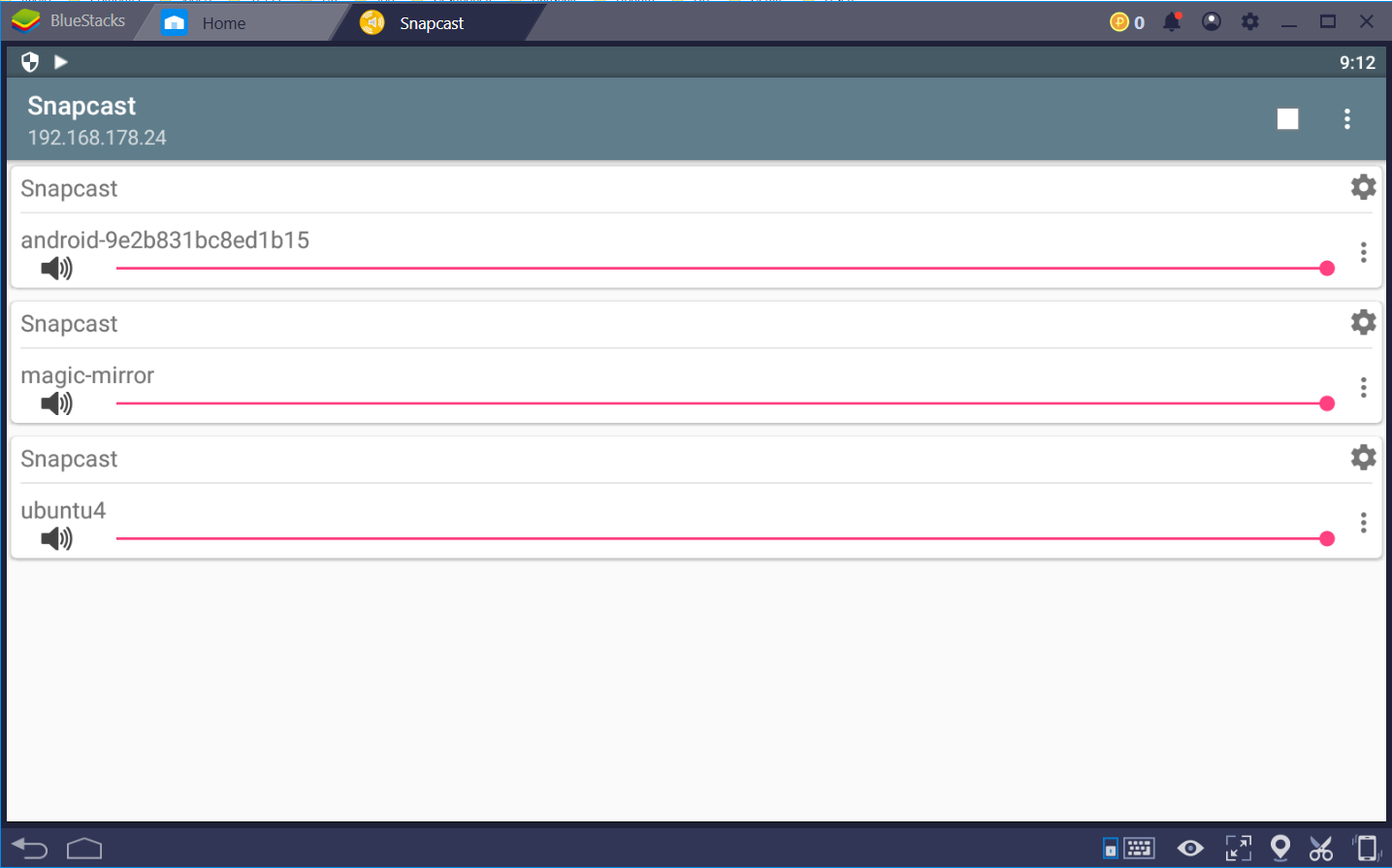
I noticed a potential bug in the Android SnapClient: I have to re-enter the delay parameter after every restart of BlueStacks. It seems that the stored delay parameter shown in the GUI is not taken into account after a system restart.
hanoba
on 30 Dec 2018
Hahaha, so practical resolution. :D
 xabolcs
on 30 Dec 2018
xabolcs
on 30 Dec 2018
@A---- what DLL is missing?
Outurnate
on 1 Jan 2019
@A---- what DLL is missing?
Visual Studio Redistribuables, but a debug one apparently:
MSVCP140D.dll(notice the d)ucrtbased.dllVCRUNTIME140D.dll
From what I could grasps (I know nothing about windows development), that happens when you set the release type to Debug and not Release or something like that in Visual Studio. 🤷♂️
A----
on 1 Jan 2019
No, you're correct. When the build dynamically links to the C/C++ runtime and the build is set to debug, those links would be generated
Unfortunately I no longer have a handy windows device to recompile :/
Outurnate
on 5 Jan 2019
For someone like me in need for _streaming_ from Windows who stumbled upon here: WSL makes this easy providing you have a player that outputs samples to the standard output. You just start the snapserver in WSL with -s "process:///path/to/your/windows/exe/ and it works just like it would on Linux.
 twoz
on 27 Jan 2019
twoz
on 27 Jan 2019
Did someone get it to run? Snapcast client for Windows (10)?
after trying Outurnates binary ( https://github.com/Outurnate/snapcast/releases/tag/v0.9.0-test )
by running with cmd.exe via "snapclient -h my snapcastserverIP" i get missing .dll errors.
MSVCP140D.dll
ucrtbased.dll
VCRUNTIME140D.dll
how to fix?
edit: after getting those .dlls off the internet (don't ask for sources... :)) and copying them into the snapcast folder, there are new errors: appcrt140.dll is missing, and then "cannot find jump in point [...]".
i guess someone with windows developement experience has to recompile..
 petershaw23
on 12 Jul 2019
petershaw23
on 12 Jul 2019
I tried to recompile, but to no avail. One of 14 errors: _undeclared identifier_ for function in using com_handle = unique_ptr<void, function<BOOL(HANDLE)> >; in wasapiPlayer.cpp on line 36.
I'm lost.
 miLORD1337
on 3 Nov 2019
miLORD1337
on 3 Nov 2019
Okay, I switched to using an implementation similar to the reference implementation.
Now it plays - but not synced and not staying in sync if it ever has been.
@Outurnate did your release play in sync? To me it seems that that problem was only taken on in later commits.
miLORD1337
on 5 Nov 2019
@miLORD1337 my release did keep in sync with another client on android
Can you post the entire error log? Sounds like whatever STL implementation you're using doesn't have std::function
Outurnate
on 5 Nov 2019
@Outurnate thanks for getting back. Indeed that was the case. I added #include <functional> and all went well from thereon. So the problem was caused by my environment (VS2019).
The player still doesn't play though. Debug log:
2019-11-06 20-56-03 [out] Latency: 0
2019-11-06 20-56-03 [out] Connecting
2019-11-06 20-56-03 [Notice] Connected to 192.168.2.105
2019-11-06 20-56-03 [out] My MAC: "01:23:45:67:89:ab", socket: 176
2019-11-06 20-56-03 [out] ServerSettings - buffer: 1000, latency: 0, volume: 100, muted: 0
2019-11-06 20-56-03 [out] Codec: flac
2019-11-06 20-56-03 [state] sampleformat: 48000:16:2
2019-11-06 20-56-03 [out] diff to server [ms]: -4145.36
2019-11-06 20-56-03 [out] age > 200: -1572302899072
2019-11-06 20-56-03 [out] sleep < -bufferDuration/2: -1572302899072 < -1, sleep: -1572302899072
2019-11-06 20-56-03 [out] sleep < -bufferDuration/2: -1572302899072 < -1, sleep: -1572302899071
2019-11-06 20-56-03 [out] sleep < -bufferDuration/2: -1572302899071 < -1, sleep: -1572302899064
2019-11-06 20-56-03 [out] sleep < -bufferDuration/2: -1572302899064 < -1, sleep: -1572302899060
--- snip ---
Maybe again something to do with the environment switching? Time stuff different now? Or some overflow?
If I omit the checks for sync it plays (at least).
miLORD1337
on 6 Nov 2019
Looks like some overflow
badaix
on 7 Nov 2019
Okay, I think I got it working now. I applied the fix you mentioned earlier (Comment). Switching to typedef std::chrono::system_clock hrc; did it.
I published a new release for those who are interested. I hope doing it that way was okay, if not please let me know. After all, you did the hard work.
miLORD1337
on 7 Nov 2019
I'm ok with that. Unfortunately, I never managed to merge @Outurnate Windows port, would be great to have the current version also available for Windows, but (fortunately ;)) I don't have a Windows machine available to get this done.
badaix
on 7 Nov 2019
I am unfortunately in the same boat. No windows machine in my household anymore
Using system_clock as the time source may cause some trouble. It's not guaranteed monotonic, so things like NTP updates or daylight savings may cause audio glitches
Outurnate
on 30 Nov 2019
I just downloaded the latest release and it is working on my Win10 machine. Is there anything I can help with to merge this windows client?
 akloeckner
on 27 Mar 2020
akloeckner
on 27 Mar 2020
PS: I was working once. It is now show lots of sleep messages only. :-/
akloeckner
on 27 Mar 2020
There is a lot to do on the windows client side. You could definitely dive in, @akloeckner ;) The original pull request was issued long ago, so most of the stuff got reconstructed in the meantime (i guess). As I am not a c++ programmer, I won't be of much help, unfortunately.
Regarding your problem with it only working once: I tried it on my systems here and it works like a charm for several minutes as well as several times after exiting and restarting the program. What did you do exactly? For best listening experience you should consider writing the output to null, otherwise the playback loop isn't tight enough. Maybe that's all that was?
miLORD1337
on 28 Mar 2020
I'll see what I can do. But I also haven't even setup a compiler on Windows... Probably, I won't come far...
I just downloaded and tested on another machine and it gives:
>snapclient -h xxxxxxxxxxxxxxxx
2020-03-28 23-04-49 [out] Latency: 0
2020-03-28 23-04-49 [out] Connecting
2020-03-28 23-04-49 [Notice] Connected to 172.18.xxxxxxxxxxxxxxxx
2020-03-28 23-04-49 [out] My MAC: "xxxxxxxxxxxxxxxx", socket: 652
2020-03-28 23-04-49 [out] ServerSettings - buffer: 5000, latency: 0, volume: 100, muted: 0
2020-03-28 23-04-49 [out] Codec: pcm
2020-03-28 23-04-49 [state] sampleformat: 32000:16:2
and then dies without further notice. :-/ I'll try the output redirection on the first machine soon...
akloeckner
on 28 Mar 2020
Seeing this thread revived again got the best of my curiosity :) no luck so far though, as far as I can tell I'm running into a similar clock issue. Here's the output:
2020-03-29 18-26-08 [out] Latency: 0
2020-03-29 18-26-08 [out] Connecting
2020-03-29 18-26-08 [Notice] Connected to 192.168.1.72
2020-03-29 18-26-08 [out] My MAC: "xx:xx:xx:xx:xx:xx", socket: 544
2020-03-29 18-26-08 [out] ServerSettings - buffer: 1000, latency: 0, volume: 81, muted: 0
2020-03-29 18-26-08 [out] Codec: flac
2020-03-29 18-26-08 [state] sampleformat: 48000:16:2
2020-03-29 18-26-08 [out] age > 200: 2147483647066
2020-03-29 18-26-08 [out] sleep > bufferDuration/2: 2147483647066 > 1
2020-03-29 18-26-08 [out] sleep > chunkDuration: 2147483647066 > 24, chunks: 1, out: 0, needed: 2
2020-03-29 18-26-08 [out] sleep > chunkDuration: 2147483647067 > 24, chunks: 0, out: 0, needed: 2
2020-03-29 18-26-08 [out] no chunks available
2020-03-29 18-26-08 [out] Failed to get chunk
2020-03-29 18-26-08 [out] age > 200: 2147483647028
2020-03-29 18-26-08 [out] sleep > bufferDuration/2: 2147483647028 > 1
2020-03-29 18-26-08 [out] sleep > chunkDuration: 2147483647028 > 24, chunks: 0, out: 0, needed: 2
2020-03-29 18-26-08 [out] no chunks available
2020-03-29 18-26-08 [out] Failed to get chunk
(etc...)
I tried changing the hrc typedef back to high_resolution_clock, which just changes that age value to ~561996212589.
Forcing sleep_ to 0 "works", but sounds terribly distorted...
Anything else I can try?
 stijnvdb88
on 29 Mar 2020
stijnvdb88
on 29 Mar 2020
My first attempt to make it run was by switching off the timing related stuff entirely... But that's not what we're here for, are we? ;)
At first I wanted to point out the difference in codec and sample format, but now that you also have this problem, but with the same settings as me... Which server version are you both on?
miLORD1337
on 29 Mar 2020
Thanks, that was it :) server is on 19 (latest), I just tried 10 (version we were on when @Outurnate started working his magic) and that does work perfectly.
I'm probably way out of my depth, but I'll take a shot at getting the Windows client working on master anyway.
stijnvdb88
on 30 Mar 2020
Ah ok. I'm on v0.15. So, probably also version issues...
akloeckner
on 30 Mar 2020
I can confirm 12 to be working. Glad, this could be at least worked around.
miLORD1337
on 30 Mar 2020
Success! It's building fine again with master branch, and the clock issues I had with latest server version are gone.
I did the best I could to make it easily mergable: https://github.com/badaix/snapcast/pull/576
Test release is here: https://github.com/stijnvdb88/snapcast/releases/tag/v0.19.0-win64
Thanks again @Outurnate - 90% of this was pretty much just copy/pasting your work!
I'm probably working on a simple Windows control client next (pretty much what snapdroid does but for Windows)
stijnvdb88
on 30 Mar 2020
Wow, that was fast! Still works with my setup. Great work!
As @Outurnate pointed out, the clock I added will lead to problems down the line. I think that's the reason another (now stale) branch of a not working version was in the pipeline.
miLORD1337
on 30 Mar 2020
I tried out the test release snapclient_0.19.0-1_win64.zip. It does not work in my setup (snapserver on an ubuntu machine). It outputs the following messages and then it terminates:
E:\win64-snapclient>snapclient.exe -h ubuntu4
%Y-%m-%d %H-%M-%S [Info] (log) Latency: 0
2020-03-31 07-27-26 [Notice] (start) Connected to 192.168.178.24
%Y-%m-%d %H-%M-%S [Info] (log) My MAC: "a0:63:91:77:14:58", socket: 636
%Y-%m-%d %H-%M-%S [Info] (log) ServerSettings - buffer: 1000, latency: 0, volume: 100, muted: 0
%Y-%m-%d %H-%M-%S [Info] (log) Codec: flac
%Y-%m-%d %H-%M-%S [Notice] (state) sampleformat: 48000:16:2
Is there a simple fix?
hanoba
on 31 Mar 2020
No way to tell from these logs - I'll do a build with more output enabled today. What's your snapserver version though? Do the previous releases work for you?
stijnvdb88
on 31 Mar 2020
This is the first time I tried the windows snapclient. I am using snapserver v0.12.0.
hanoba
on 31 Mar 2020
Oh in that case, try this release: https://github.com/miLORD1337/snapcast/releases/tag/v0.9.0.1-test
That's built for around the same snapserver version as yours - and also has also the sync logs enabled :) if it doesn't work straightaway, at the very least we should get more useful output from it.
Edit: just tested 0.19 client with 0.12 server (debian), which worked fine. What's your Windows version by the way?
stijnvdb88
on 31 Mar 2020
It outputs the following messages and then it terminates:
@hanoba Does it work when you redirect it's output to a file?
snapclient.exe -h ubuntu4 > snapclient-log.txt
It works for me: Windows 10 (1909) with SnapServer v0.15 on OpenWrt.
xabolcs
on 31 Mar 2020
@hanoba and please consider updating your server. Who knows what changed from 0.12 to 0.15 to 0.19. Also please enable debug logging with --debug
badaix
on 31 Mar 2020
I meanwhile installed snapserver v0.19.0 on ubuntu. The Windows client is still not working.
I am using windows 10 pro version 1909.
Redirection to >nul did also not work.
I will try the --debug option.
hanoba
on 31 Mar 2020
Server log with --debug:
2020-03-31 11-44-45 [Info] (onStateChanged) onStateChanged (default): 2
2020-03-31 11-45-10 [Notice] (handleAccept) StreamServer::NewConnection: 192.168.178.42
2020-03-31 11-45-10 [Info] (onMessageReceived) Hello from a0:63:91:77:14:58, host: HBA004, v0.19.0, ClientName: Snapclient, OS: Windows 8, Arch: amd64, Protocol version: 2
2020-03-31 11-45-11 [Error] (StreamSession) Error reading message header of length 0: Connection reset by peer
2020-03-31 11-45-11 [Info] (onDisconnect) onDisconnect: a0:63:91:77:14:58
2020-03-31 11-45-11 [Error] (StreamSession) Error in socket shutdown: Transport endpoint is not connected
Server log with --debug:
And the client log with that --debug?
xabolcs
on 31 Mar 2020
Also worth noting the > nul output redirection is only useful when playback works, but is a bit choppy / lagging behind (if there's a lot of output it slows things down). And obviously, we don't want to redirect the output away when using --debug :)
Need to focus on my day job now but will be back tonight! Will also be adding build instructions for Windows so people can jump in easily
stijnvdb88
on 31 Mar 2020
Client log with --debug:
E:\win64-snapclient>snapclient.exe -h ubuntu4 --debug
%Y-%m-%d %H-%M-%S.#ms [Info] (log) Latency: 0
%Y-%m-%d %H-%M-%S.#ms [Debug] (log) Connecting
2020-03-31 11-33-23.072 [Notice] (start) Connected to 192.168.178.24
%Y-%m-%d %H-%M-%S.#ms [Info] (log) My MAC: "a0:63:91:77:14:58", socket: 620
%Y-%m-%d %H-%M-%S.#ms [Info] (log) ServerSettings - buffer: 1000, latency: 0, volume: 100, muted: 0
metadata:{"STREAM":"default"}
%Y-%m-%d %H-%M-%S.#ms [Info] (log) Codec: flac
%Y-%m-%d %H-%M-%S.#ms [Notice] (state) sampleformat: 48000:16:2
%Y-%m-%d %H-%M-%S.#ms [Debug] (log) setVolume exp: 1 => 1
Just remembered there's a few settings we need to confirm, too :) At the moment I think it just craps out when it has issues with the audio device, I'll add logs for those cases tonight.
In the meantime, make sure you have these enabled for your audio device:
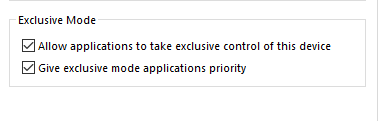
Also, try using a secondary sound device if you have one (your screen for example, if it has HDMI audio)
"snapclient.exe -l" lists the devices, "snapclient.exe --debug -s 4 -h ..." for selecting one
stijnvdb88
on 31 Mar 2020
Well, as I wrote earlier, the new version still works with my server 0.12 setup, so that's not it.
But I'll now update too, anyways.
miLORD1337
on 31 Mar 2020
I was using a BOSE USB Audio. After switching to the built-in analog audio snapclient works!!
I have the exclusive mode options enabled both for USB audio and for analog audio.
hanoba
on 31 Mar 2020
I've got a Line6 one lying around here somewhere, if I can reproduce your case with it I'll see if there's anything we can do to make it work :)
stijnvdb88
on 31 Mar 2020
Great! Meanwhile I tested HDMI audio output. It is also not working.
hanoba
on 31 Mar 2020
That's odd, HDMI output has been working fine here... Do you have any software running that might have those audio devices locked? 3rd party mixing software or anything like that?
stijnvdb88
on 31 Mar 2020
Wooohooo, @stijnvdb88, your test compilation works for me!
akloeckner
on 31 Mar 2020
@stijnvdb88 : To my knowledge there is no SW running that might lock those audio devices.
hanoba
on 31 Mar 2020
First: huge thanks for giving it try!
It works fine when outputing sound to my screen (HDMI), but I have distorted sound when using Xonar Essence STX audio card. I guess that it may have something to do with sampling?
Tried a few knobs here and there, no dice:
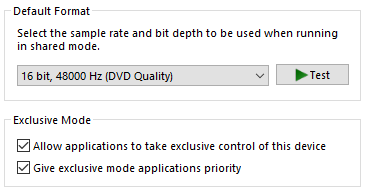
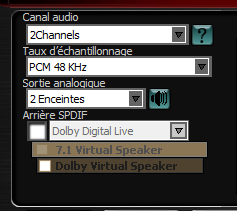
Here's the output from the client:
D:\Temp\snapclient_0.19.0-1_win64>snapclient.exe -h 192.168.0.51 --debug
%Y-%m-%d %H-%M-%S.#ms [Info] (log) Latency: 0
%Y-%m-%d %H-%M-%S.#ms [Debug] (log) Connecting
2020-03-31 18-37-16.793 [Notice] (start) Connected to 192.168.0.51
%Y-%m-%d %H-%M-%S.#ms [Info] (log) My MAC: "00:d8:61:0e:6e:01", socket: 532
%Y-%m-%d %H-%M-%S.#ms [Info] (log) ServerSettings - buffer: 1000, latency: 0, volume: 100, muted: 0
metadata:{"STREAM":"default"}
%Y-%m-%d %H-%M-%S.#ms [Info] (log) Codec: flac
%Y-%m-%d %H-%M-%S.#ms [Notice] (state) sampleformat: 48000:16:2
%Y-%m-%d %H-%M-%S.#ms [Debug] (log) setVolume exp: 1 => 1
%Y-%m-%d %H-%M-%S.#ms [Info] (log) diff to server [ms]: -1124.79
%Y-%m-%d %H-%M-%S.#ms [Debug] (Stream) Silent frames: 134, frames: 144, age: -2.792
%Y-%m-%d %H-%M-%S.#ms [Info] (Stream) Chunk: 29 29      29      29      1       0       0
%Y-%m-%d %H-%M-%S.#ms [Debug] (log) time sync main loop
%Y-%m-%d %H-%M-%S.#ms [Info] (Stream) pMiniBuffer->full() && (abs(pMiniBuffer->mean()) > 50): 50707
%Y-%m-%d %H-%M-%S.#ms [Debug] (Stream) age > 0: 76ms
%Y-%m-%d %H-%M-%S.#ms [Debug] (Stream) age: 52, requested chunk_duration: 3, duration: 24
%Y-%m-%d %H-%M-%S.#ms [Debug] (Stream) age: 29, requested chunk_duration: 3, duration: 24
%Y-%m-%d %H-%M-%S.#ms [Debug] (Stream) age: 5, requested chunk_duration: 3, duration: 24
%Y-%m-%d %H-%M-%S.#ms [Debug] (Stream) age: -17, requested chunk_duration: 3, duration: 24
%Y-%m-%d %H-%M-%S.#ms [Debug] (Stream) Silent frames: 144, frames: 144, age: -17.755
%Y-%m-%d %H-%M-%S.#ms [Debug] (Stream) age > 0: 1ms
%Y-%m-%d %H-%M-%S.#ms [Debug] (Stream) age: -21, requested chunk_duration: 3, duration: 24
%Y-%m-%d %H-%M-%S.#ms [Debug] (Stream) Silent frames: 144, frames: 144, age: -21.822
%Y-%m-%d %H-%M-%S.#ms [Debug] (Stream) age > 0: 1ms
%Y-%m-%d %H-%M-%S.#ms [Debug] (Stream) age: -21, requested chunk_duration: 3, duration: 24
%Y-%m-%d %H-%M-%S.#ms [Debug] (Stream) Silent frames: 144, frames: 144, age: -21.881
%Y-%m-%d %H-%M-%S.#ms [Debug] (Stream) Silent frames: 12, frames: 144, age: -0.269
%Y-%m-%d %H-%M-%S.#ms [Info] (Stream) Chunk: 31 31      31      31      1       0       0
%Y-%m-%d %H-%M-%S.#ms [Info] (Stream) pMiniBuffer->full() && (abs(pMiniBuffer->mean()) > 50): 53013
[…]
2020-03-31 18-37-18.993 [Info] (operator ()) Received signal 2: SIGINT
2020-03-31 18-37-18.993 [Info] (operator ()) Stopping controller
%Y-%m-%d %H-%M-%S.#ms [Debug] (log) Stopping Controller
Also, and this is no critism:
- no OPUS support yet
- changing the volume for the app "does not work" (I guess that's the "exclusive mode" thing?)
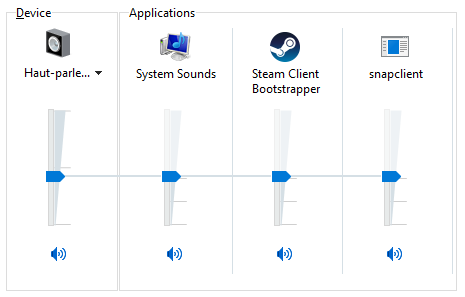
To reiterate: thanks!
A----
on 31 Mar 2020
This sixth number (0) is the time in milliseconds when the requested sample will be played out, as reported by the DAC:
Chunk: 29 29 29 29 1 0 0
This number is usually around 100, maybe 50 or on low latency DACs I've seen 20. But 0 cannot be handled properly.
badaix
on 31 Mar 2020
changing the volume for the app "does not work" (I guess that's the "exclusive mode" thing?)
Not necessarily. Probably it just doesn't listen for the IAudioSessionEvents::OnSimpleVolumeChanged events sent by Sndvol (see Session Volume Control).
Edit: Exclusive mode streams can be controlled via IAudioEndpointVolumeCallback::OnNotify, see this.
miLORD1337
on 31 Mar 2020
Hi! The missing OPUS support is probably just an oversight on my part, looks like I forgot to add that to the Windows build configuration :) Will also take a look at the volume thing (thanks @miLORD1337 !)
stijnvdb88
on 31 Mar 2020
Just published a new release with some quick fixes:
- missing opus
- missing timestamps in logs
stijnvdb88
on 31 Mar 2020
Another update for the windows client published here!
@hanoba : I think I was able to repro your issue with the device I had lying around here :) I haven't been able to fix it yet, but would like to at least confirm it's the same problem. could you test this release please and let me know what happens? (including logs please)
@A---- : It also adds support for Windows volume control. It's scaled to whatever is set on the server though: so a volume set to 50% on the server and 50% in Windows results in 25% (aka, you can only go lower, not higher). To go higher we'd need to notify the server through the json-rpc api, which is outside of the scope of snapclient anyway (I think)
stijnvdb88
on 1 Apr 2020
Thanks a lot, Stijn!
Here is the client log for the new release:
2020-04-01 22-19-06.717 [Info] (main) Latency: 400
2020-04-01 22-19-06.733 [Debug] (start) Connecting
2020-04-01 22-19-06.734 [Notice] (start) Connected to 192.168.178.24
2020-04-01 22-19-06.738 [Info] (getMacAddress) My MAC: "a0:63:91:77:14:58", socket: 640
2020-04-01 22-19-06.743 [Info] (onMessageReceived) ServerSettings - buffer: 1000, latency: 0, volume: 100, muted: 0
metadata:{"STREAM":"default"}
2020-04-01 22-19-06.744 [Info] (onMessageReceived) Codec: flac
2020-04-01 22-19-06.744 [Notice] (state) sampleformat: 48000:16:2
2020-04-01 22-19-06.744 [Debug] (setVolume_exp) setVolume exp: 1 => 1
It is pretty much the same as the log for the previous version.
hanoba
on 1 Apr 2020
Hi, from me as well, thanks for working on this windows port! Long time ago I had Outurnate's build working, then it didn't work anymore and now I'm trying yours. I only managed once to hear some distorted sound from your previous build this morning, then all attempts failed due to some crash I presume, just like this latest version as well. It prints this output and exists, I can also briefly see it in snapdroid on my mobile phone:
snapclient -h nas-omv.fritz.box --debug
2020-04-01 22-39-28.849 [Info] (main) Latency: 0
2020-04-01 22-39-28.856 [Debug] (start) Connecting
2020-04-01 22-39-28.859 [Notice] (start) Connected to 192.168.177.32
2020-04-01 22-39-28.864 [Info] (getMacAddress) My MAC: "b0:0c:d1:cc:d6:7c", socket: 540
2020-04-01 22-39-28.871 [Info] (onMessageReceived) ServerSettings - buffer: 1000, latency: 0, volume: 100, muted: 0
metadata:{"STREAM":"mopidy1"}
2020-04-01 22-39-28.871 [Info] (onMessageReceived) Codec: flac
2020-04-01 22-39-28.872 [Notice] (state) sampleformat: 48000:16:2
2020-04-01 22-39-28.872 [Debug] (setVolume_exp) setVolume exp: 1 => 1
How to check for even more debugging I could try tomorrow? Other than that, keep up this awesome work, waiting for upstream adoption by badaix ;-)
 lucianm
on 1 Apr 2020
lucianm
on 1 Apr 2020
Hi! Unfortunately I'm having trouble reproducing these last cases - the last build I did "fixed" the crash I could reproduce (and would have outputted a debug log to confirm the issue). It's not showing up in your output though, must be something else.
If you don't mind getting your hands dirty, I could use some help! Finally got around to doing a quick write-up of the build instructions for Windows. If one (or both of you) could dive in and let me know where it crashes, we can hopefully figure out the issue :)
Also, @lucianm : what sound device are you using? (snapclient.exe -l)
stijnvdb88
on 2 Apr 2020
OK, I will try to build it on my PC ...
hanoba
on 2 Apr 2020
It also adds support for Windows volume control
Works great!
A small flaw I noticed: The volume control is only respected when changed during runtime. My level was set to something low already, when I started the client. But the volume was only reduced, when I re-clicked the volume handle...
PS: Mute button in Windows volume control also does not work. But these are more feature-request-like remarks. :-) Having a fully working version should be the priority...
akloeckner
on 2 Apr 2020
If you don't mind getting your hands dirty, I could use some help! Finally got around to doing a quick write-up of the build instructions for Windows. If one (or both of you) could dive in and let me know where it crashes, we can hopefully figure out the issue :)
Ok, I will get my hands dirty, have a VS2009 installed anyway ;)
Also, @lucianm : what sound device are you using? (snapclient.exe -l)
Well, I noticed that it does not crash, but sounds awfully like some high pitched chord when it uses the laptop's builtin Speakers (Conexant ISST Audio), and crashes when it picks up (or I explicitely pass the argument) my BT headset, either on stereo audio or on hands-free profile, it's an old Sony Ericsson MW600.
lucianm
on 2 Apr 2020
Perfect! You'll want to put a breakpoint in WASAPIPlayer::worker() - the crash is most likely happening somewhere along the device setup. Haven't tried BT yet but I can imagine that might fail on the IsFormatSupported line :)
Edit: after work I'll just add logs when it crashes in wasapi_player as well, should've done that way sooner
stijnvdb88
on 2 Apr 2020
@lucianm
Ok, I will get my hands dirty, have a VS2009 installed anyway ;)
I really hope you mean VS2019...
Lakritzator
on 2 Apr 2020
I really hope you mean VS2019...
Oh yes :))
lucianm
on 2 Apr 2020
quick update: use this release if snapclient has been crashing for you. And let us know what the "FATAL" line says please :) The error code in there will be a WASAPI one, should give you a few hits on google
stijnvdb88
on 2 Apr 2020
Thanks for the update! Here is the output:
E:\mist\snapclient_0.19.0-3_win64>snapclient.exe -h ubuntu4  --debug
2020-04-02 21-15-15.163 [Info] (main) Latency: 0
2020-04-02 21-15-15.179 [Debug] (start) Connecting
2020-04-02 21-15-15.181 [Notice] (start) Connected to 192.168.178.24
2020-04-02 21-15-15.185 [Info] (getMacAddress) My MAC: "a0:63:91:77:14:58", socket: 628
2020-04-02 21-15-15.191 [Info] (onMessageReceived) ServerSettings - buffer: 1000, latency: 0, volume: 100, muted: 0
metadata:{"STREAM":"default"}
2020-04-02 21-15-15.191 [Info] (onMessageReceived) Codec: flac
2020-04-02 21-15-15.191 [Notice] (state) sampleformat: 48000:16:2
2020-04-02 21-15-15.192 [Debug] (setVolume_exp) setVolume exp: 1 => 1
2020-04-02 21-15-15.198 [Fatal] (WASAPI) HRESULT fault status: 88890008 line 216
Thanks - that's useful! Could you tell us what the exact audio device is again? If I search "bose usb audio" I'm getting pretty generic results :) Also, in the same settings window where exclusive mode is set for that device, what's "default format" set to at the moment?
Edit: scratch that last part - it doesn't matter
stijnvdb88
on 3 Apr 2020
quick update: use this release if snapclient has been crashing for you. And let us know what the "FATAL" line says please :) The error code in there will be a WASAPI one, should give you a few hits on google
2020-04-02 19-12-27 [Info] (main) Latency: 0
2020-04-02 19-12-27 [Notice] (start) Connected to $ipAddr
2020-04-02 19-12-27 [Info] (getMacAddress) My MAC: "$MAC_ADDRESS", socket: 520
2020-04-02 19-12-27 [Info] (onMessageReceived) ServerSettings - buffer: 1000, latency: 0, volume: 100, muted: 0
metadata:{"STREAM":"stream"}
2020-04-02 19-12-27 [Info] (onMessageReceived) Codec: flac
2020-04-02 19-12-27 [Notice] (state) sampleformat: 48000:24:2
2020-04-02 19-12-27 [Fatal] (WASAPI) HRESULT fault status: 88890008 line 216
Just in case you are still trying to track down this bug, I am getting the same FATAL error.
 ChrisIossa
on 3 Apr 2020
ChrisIossa
on 3 Apr 2020
@ChrisIossa could you try running with this command please?
snapclient.exe -h ip --sampleformat 48000:16:*
It looks like the crash you're all having is related to the sound device not accepting the sample format we try to feed it :) hopefully we can get around that by asking the sound device what format it does accept, then use that instead (or at least print it to the output for now)
stijnvdb88
on 3 Apr 2020
another test release - I think we're close :)
Please run it and take note of the line that says "Device accepts format: ..."
Next, run snapclient again with --sampleformat set to whatever that line says (except for the last character, that has to be a '0' or '*'). Let us know how it goes!
Sorry for spamming releases like this btw - I'm unable to reproduce the crash with my sound card so can only test these things through you guys!
stijnvdb88
on 3 Apr 2020
Output of your latest release:
E:\snapclient_0.19.0-4-win64>snapclient.exe -h ubuntu4
2020-04-03 07-49-52 [Info] (main) Latency: 0
2020-04-03 07-49-52 [Notice] (start) Connected to 192.168.178.24
2020-04-03 07-49-52 [Info] (getMacAddress) My MAC: "a0:63:91:77:14:58", socket: 644
2020-04-03 07-49-52 [Info] (onMessageReceived) ServerSettings - buffer: 1000, latency: 0, volume: 100, muted: 0
2020-04-03 07-49-52 [Info] (onMessageReceived) Codec: flac
2020-04-03 07-49-52 [Notice] (state) sampleformat: 48000:16:2
2020-04-03 07-49-52 [Info] (WASAPI) Device accepts format: 48000:16:6
2020-04-03 07-49-52 [Fatal] (WASAPI) HRESULT fault status: 88890008 line 228

E:\snapclient_0.19.0-4-win64>snapclient.exe -h ubuntu4 --sampleformat 48000:16:*
2020-04-03 07-52-52 [Info] (main) Latency: 0
2020-04-03 07-52-52 [Notice] (start) Connected to 192.168.178.24
2020-04-03 07-52-52 [Info] (getMacAddress) My MAC: "a0:63:91:77:14:58", socket: 632
2020-04-03 07-52-52 [Info] (onMessageReceived) ServerSettings - buffer: 1000, latency: 0, volume: 100, muted: 0
2020-04-03 07-52-52 [Info] (onMessageReceived) Codec: flac
2020-04-03 07-52-52 [Notice] (state) sampleformat: 48000:16:2
2020-04-03 07-52-52 [Info] (WASAPI) Device accepts format: 48000:16:6
2020-04-03 07-52-52 [Fatal] (WASAPI) HRESULT fault status: 88890008 line 228
My output device is a "BOSE COMPANION® 5 MULTIMEDIA SPEAKER SYSTEM".
hanoba
on 3 Apr 2020
supplying the accepted sampling format works for me 👍
lucianm
on 3 Apr 2020
Disclaimer: I've never worked with audio like this before so everything below is coming mostly from Google :) Correct me if you see any mistakes please! Writing everything down here so everyone fully understands what's happening, and can help figure out a solution.
I think the problem is this:
in Windows, a sound device can be talked to either in "shared" or "exclusive" mode. Shared is the default, and means the software goes through Windows' audio engine and lets it handle (among other things) the complicated process of talking to the driver and negotiating a format. It's also slower. We're using exclusive mode, which means our output goes directly to the driver to get the lowest latency possible (I think this is glorious, by the way).
In shared mode, you send the device pretty much any supported format and Windows will handle the conversion for you. In exclusive mode, it has to be the device's native format.
To figure out the native format:
- You can "ask" the device for it using PKEY_AudioEngine_DeviceFormat (https://github.com/stijnvdb88/snapcast/commit/3427899daec997edd5d3debb4fe2d97c996e09da)
- You can go back and forth with proposed formats, basically asking the device "how about this one?" each time. This is the one Microsoft recommends as it's more accurate than querying PKEY_AudioEngine_DeviceFormat.
The people having issues with snapclient, have a device which needs a different format. Snapclient supports resampling using soxr, so some of you who are having issues can fix it simply passing --sampleformat with whatever format the device wants. Changing the number of channels is a different beast though, I have no idea how we'd go about that (trying to find out...). In @hanoba's case, the device needs 48000:16:6.
@badaix how can @hanoba change the input stream's format to 6 channels? Is that something we can do server side using audioresample? Would this cause issues for other clients he might have?
Also worth noting is that we probably should (eventually) use Microsoft's recommended way of figuring out the format, PKEY_AudioEngine_DeviceFormat may still be unreliable in some cases.
stijnvdb88
on 3 Apr 2020
A thought on the exclusive vs shared mode: Wouldn't it be better to use the shared mode (for reasons of usability) accepting the longer latency (which can be corrected for, if I understand correctly)?
akloeckner
on 3 Apr 2020
@akloeckner that is one of the options! we could let the user choose via a flag passed to snapclient, for example
stijnvdb88
on 3 Apr 2020
The client sided resampling option has been is introduced in the client mainly because of Android which is quite picky: it only accepts 16 bit audio and has a device dependent low latency samplerate. When feeding in a non-low-latency samplerate, the latency is higher (and before Android Oreo the latency is even unknown, so it's better to resample in software (using soxr, with a known latency) and thus to have a constant (still unknown, but constant) latency that can be tweaked by the user).
On Android Oreo and later I saw on one device that the low latency delay is ~20ms and ~80ms at any other sample rate.
The most important thing is that the audio engine reliably reports the latency of the currently requested PCM chunk.
Long story short: I would try out the shared mode (less users will complain about a blocked audio device) and compare the latency (sixth column in the chunk logs) and the reliability of the latency (are the other numbers "smooth" and close to zero).
From my point of view only the client should change the audio format to his very own special needs, as it is done now with soxr. I don't even know if Snapcast would work end to end with six channel audio (I doubt that the codecs will accept it, so PCM must be used to transmit 4 channels of silence).
Thinking further, I think there is no way around the shared mode where the driver takes care to transform the signal to the DAC's native format. You don't know what will come next: a Dolby Atmos capable device or some mono bluetooth transmitter, ...
badaix
on 3 Apr 2020
Perfect, thanks! I'll take a look at shared mode after work today :)
stijnvdb88
on 3 Apr 2020
@ChrisIossa could you try running with this command please?
snapclient.exe -h ip --sampleformat 48000:16:*
It looks like the crash you're all having is related to the sound device not accepting the sample format we try to feed it :) hopefully we can get around that by asking the sound device what format it does accept, then use that instead (or at least print it to the output for now)
In the end this worked, but I find that odd, since Windows says the sound card supports 24bit 48000kHz and even 24bit 96000kHz.
Good news is that it's working and hasn't crashed yet.
ChrisIossa
on 3 Apr 2020
One more release, this time using WASAPI shared mode instead of exclusive :)
Try it please @hanoba and let us know if this one works for you!
stijnvdb88
on 3 Apr 2020
SUCCESS! It works now! Great! Thanks a lot!
hanoba
on 3 Apr 2020
The last release coming from me, hopefully! :)
This one adds a --wasapimode option for setting shared/exclusive.
@badaix I pushed that last change (https://github.com/stijnvdb88/snapcast/commit/aa29b69c1194b181b630de78dc429f1bc992b21b) to a new branch in case you want to review it separately (this change also touches some shared code). Otherwise just let me know and I'll merge it into stijnvdb88/master now :)
stijnvdb88
on 4 Apr 2020
Dope! Using sharemode, it now works with my Xonar Essence.
Also, Opus support works too.
You, sir, are a champ!
A----
on 4 Apr 2020
You, sir, are a champ!
I copy that. Things work smoothly here as well. Mute and volume work. Restarting works. Other sounds still play. Great work!!
akloeckner
on 4 Apr 2020
Awesome! Sounds like the Windows port got solid and matured in very short time! Will try to merge it during this weekend into master!
Regarding the volume: up to now there is/was only the software mixer available and there is currently no back channel telling the server about volume changes on the client. There are two related open issues about a hardware mixer and a dummy mixer.
It's one of the next planned features to streamline this and add a mixer command line option.
badaix
on 4 Apr 2020
Something for the release notes maybe: The VC++ 2019 runtimes have to be installed. (If not, some dll is missing.) And the new shared/exclusive flag should be mentioned probably.
akloeckner
on 4 Apr 2020
To say it in the words of professor Farnsworth: good news everyone, PR #576 (adding client support for Windows) has been finally merged into master.
Lots of kudos to @Outurnate and @stijnvdb88 and to all of you who tested with different sound equipment to enable quick feedback and bug fixing iteration loops.
Edit: in extraordinary challenging times like this, among the best things you can do while staying@home is to listen to music and of course to contribute to open source software :smiley:
badaix
on 8 Apr 2020
Thanks @badaix!!
I'm working on a Windows version of snapdroid now - since we now have snapclient it will include the player as well :) You'll be able to start a player instance for each sound device you have (useful if you're like me and have 3 snapclient instances running at all times :D )
Still very much WIP, but the idea is this:
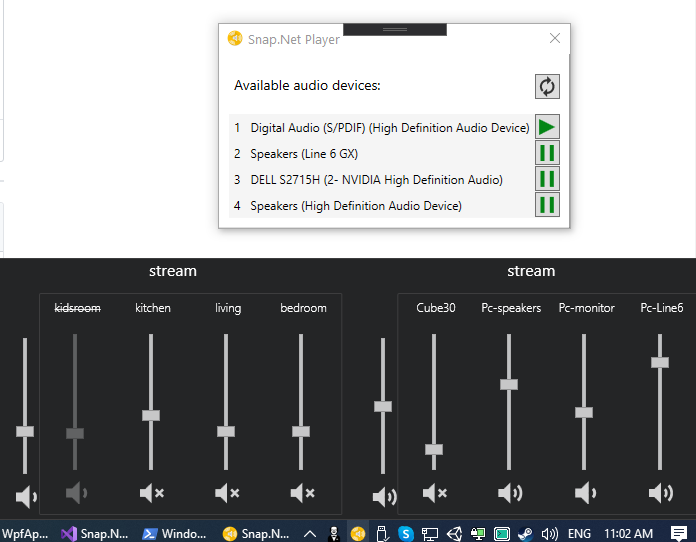
Code will be made public once it's solid enough - hopefully soon!
stijnvdb88
on 8 Apr 2020
I've made a pre-release of a Windows control client / player available here: https://github.com/stijnvdb88/Snap.Net/releases/tag/v0.19.0
Please try it and let me know if there's any issues! 😃
stijnvdb88
on 13 Apr 2020
Win10 19.09 works for me the UI, the play not, it shows no audio devices (i have 2 hdmi screens from which 1 use 1 for sound output)
On the first use, the coursor slows down and suddenly the snapui disappears (crashed it seemed) after that there was a "missing dll (vccredist40.dll or so)" when i started the player, repair fixed it for now. The slowdown and crash happend as a played on 1 snapcast channel und changed the volume quickly from 100 -> 0 and back, but could not replicate it till now ^^
So far, good work !
 rcmcronny
on 13 Apr 2020
rcmcronny
on 13 Apr 2020
thanks @rcmcronny ! you can go ahead and open an issue for that crash please: https://github.com/stijnvdb88/snap.net/issues :)
Regarding the audio devices, that might be an issue in snapclient's Windows port itself unfortunately. Do they show up when you run snapclient.exe -l manually? (you can find snapclient in Program Files/Snap.Net/SnapClient)
I have seen a similar problem with my HDMI audio device: it goes missing when the screen goes to sleep and needs to be "woken up". So far the only thing that works for me is heading to Windows' sound control panel (click the "device not listed?" link in the player window, or run "mmsys.cpl"), then try again. The sound control panel is doing something to wake up the device, but I haven't figured out what yet. Whatever the sound control panel is doing, doing the same in WASAPI's init routine would fix the issue.
Edit: made a quick gif showing the "fix"
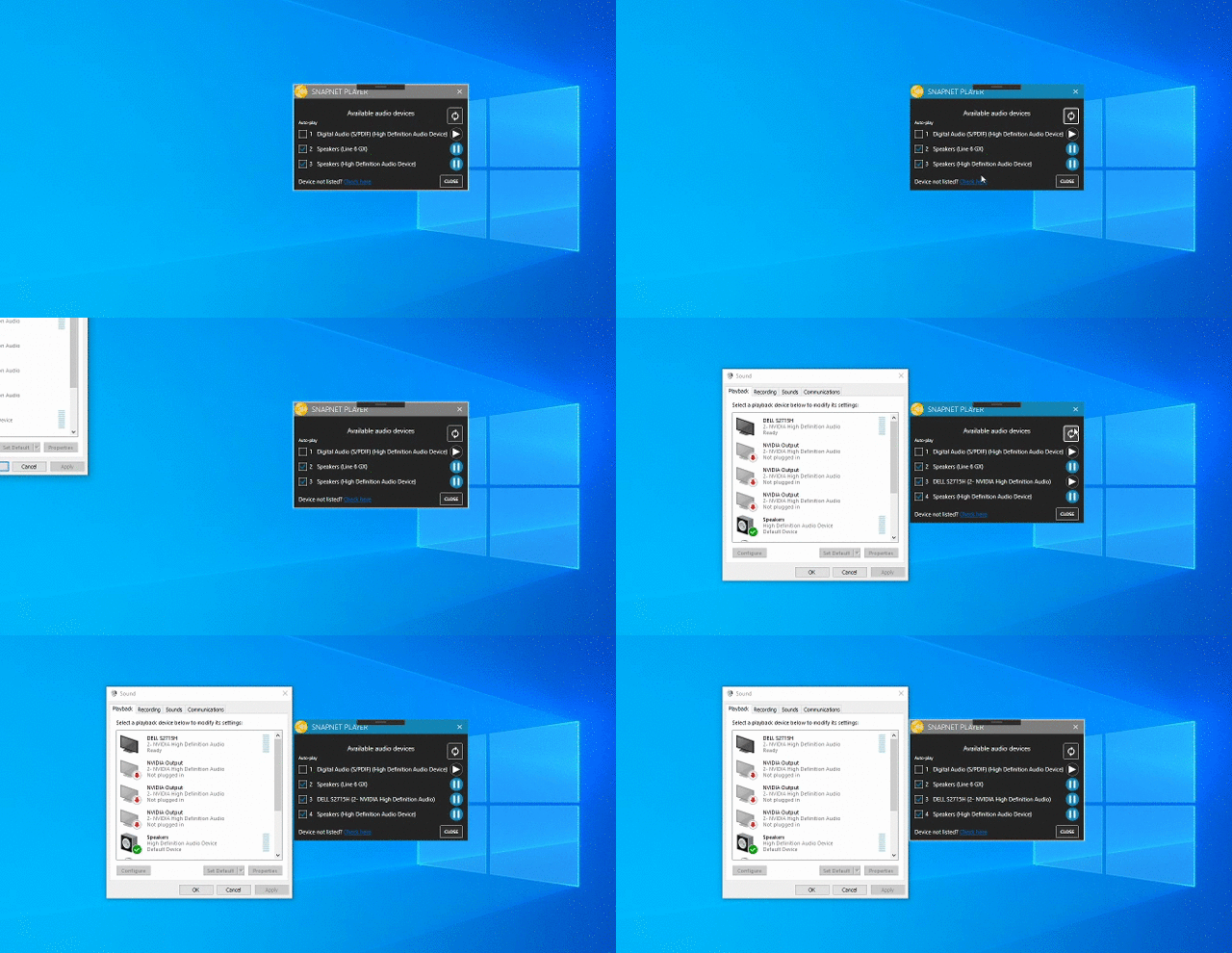
stijnvdb88
on 13 Apr 2020
Thansk, I created an issue. Also the snapclient not working, is caused by the missing dll :) (see issue for details)
rcmcronny
on 13 Apr 2020
@stijnvdb88 I'm preparing the v0.20, which will introduce a hardware volume mixer, and I was wondering how the Wasapi player handles the volume. For the software mixer you usually don't have to care about the system's volume.
I just stumbled upon this line:
volCorrection_ = audioEventListener_->getVolume();
Will the client get notified about system volume changes? I think this will cause some "squared" volume change: the system's volume level is lowered, plus the snapclient will lower it's volume.
The volCorrection_ should be only some constant, device dependent factor (it's used e.g. in alsa for 24 bit audio to raise the dynamic range to 32 bit).
If this audioEventListener_->getVolume(); is actually reporting the system's volume changes, than this is already half of the work that would have to be done to support the hardware mixer:
- system volume changes must be propagated to the server using the new player method
notifyVolumeChange(volume, muted); - Volume changes received by the server are not applied to the
volume_variable, but must be applied to the hardware volume mixer.
badaix
on 9 May 2020
@badaix it's not system volume exactly: audioEventListener_->getVolume(); gives us snapclient's volume level as set in the Windows volume mixer.
Without us applying that value ourselves in snapclient, the Windows volume mixer value for snapclient.exe is ignored. That issue was first reported here: https://github.com/badaix/snapcast/issues/24#issuecomment-606740725
I just realized that this is only the case in exclusive mode (in shared mode the Windows audio stack scales the volume for us - just confirmed this locally).
We are missing an if (mode_ == ClientSettings::SharingMode::exclusive) check around that line :)
Edit: and should be applying that scaling within the WasapiPlayer class only, if using volCorrection_ is an issue
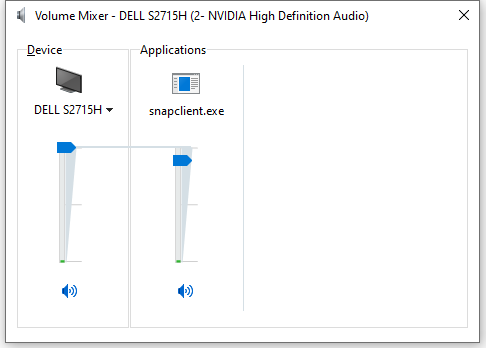
Note: audioEventListener_->getVolume(); = the one on the right. Changing the sound device's global volume (the left slider) is not reported at all to snapclient - though I'm sure there's a way to detect it if we want to - that would be the system volume you're talking about.
stijnvdb88
on 9 May 2020
@stijnvdb88 Understood, thanks for the explanation. In this case the volCorrection_ is in fact the right one to apply the volume changes to. I will add the if - statement
        // update our volume from IAudioControl
        if (mode_ == ClientSettings::SharingMode::exclusive)
            volCorrection_ = audioEventListener_->getVolume();
Please could the documentation be updated on how to install the Windows client?
 vjdw
on 14 Jun 2020
vjdw
on 14 Jun 2020
Please could the documentation be updated on how to install the Windows client?
I am trying the instructions here:
https://github.com/badaix/snapcast/blob/master/doc/build.md#windows-vcpkg
I guess I will report back if I'm successful with these instructions.
Edit:
This command failed:
vcpkg.exe install soxr --triplet x64-windows
But the build of snapclient still worked. I guess I will not have soxr support. Probably not the end of the world on a good network.
 noelhibbard
on 23 Jun 2020
noelhibbard
on 23 Jun 2020
I am trying the instructions here:
https://github.com/badaix/snapcast/blob/master/doc/build.md#windows-vcpkg
Thanks, those instructions worked for me. No errors, but did need to use absolute paths in places e.g. cmake wasn't found.
I've put my build here if anyone wants to test it out.
On Linux I just run snapclient with no args but with this I had to specify the server like:
.\snapclient -h <servername>
vjdw
on 24 Jun 2020
I am trying the instructions here:
https://github.com/badaix/snapcast/blob/master/doc/build.md#windows-vcpkgThanks, those instructions worked for me. No errors, but did need to use absolute paths in places e.g. cmake wasn't found.
I've put my build here if anyone wants to test it out.
On Linux I just run
snapclientwith no args but with this I had to specify the server like:
.\snapclient -h <servername>
It's working well for me so far. I created a windows service for it using nssm.
My args look like this:
--host somehost --hostID "Office" --logsink null
@noelhibbard @vjdw I tried running that build on a Windows 7 machine and got a segfault almost immediately:
$ ./snapclient.exe -h 192.168.1.6 --hostID djmattyg007-Win7
2020-07-12 00-19-34.452 [Info] (Connection) Resolving host IP for: 192.168.1.6
2020-07-12 00-19-34.470 [Info] (Connection) Connecting
2020-07-12 00-19-34.471 [Notice] (Connection) Connected to 192.168.1.6
2020-07-12 00-19-34.472 [Info] (Connection) My MAC: "18:2c:5a:cb:e2:d6", socket: 396
2020-07-12 00-19-34.492 [Info] (Controller) ServerSettings - buffer: 1000, latency: 0, volume: 100, muted: 0
metadata:{"STREAM":"default"}
2020-07-12 00-19-34.492 [Info] (Controller) Codec: flac, sampleformat: 44100:16:2
2020-07-12 00-19-34.492 [Info] (Player) Player name: wasapi, device: default, description: CABLE Input (VB-Audio Virtual Cable), id x: 0, sharing mode: shared
2020-07-12 00-19-34.492 [Info] (Player) Mixer mode: software, parameters:
2020-07-12 00-19-34.492 [Info] (Player) Sampleformat: 44100:16:2, stream: 44100:16:2
2020-07-12 00-19-34.494 [Info] (WASAPI) Device accepts format: 48000:24:2
2020-07-12 00-19-34.512 [Info] (WASAPI) Initializing WASAPI in shared mode
Segmentation fault
Could this be because the server is streaming at a different sample rate to what the audio device is expecting to receive? Or is it simply not compatible with Windows 7?
I tried setting --sampleformat 48000:24:* but it didn't seem to make a difference.
 djmattyg007
on 11 Jul 2020
djmattyg007
on 11 Jul 2020
@djmattyg007 One of the first things to happen after that "Initializing WASAPI" message is this call to Initialize the audio client.
The documentation for that method is here. There are definitely documented differences in how to use audioclient in different versions of Windows.
Microsoft support for Windows 7 ended at the beginning of the year so I'm not sure you'll be able to get anyone interested in fixing this :-)
vjdw
on 14 Jul 2020
Microsoft support for Windows 7 ended at the beginning of the year so I'm not sure you'll be able to get anyone interested in fixing this :-)
Yeah I totally understand :) I was planning on building a new computer soon, but with everything going on prices are a bit crap :(
djmattyg007
on 15 Jul 2020
I've setup a GitHub workflow for Windows that compiles the snapclient and uploads the executable as artifact. Could someone who as access to a Windows machine please test if the executable is working?
If it's running, I will attach the exe to the upcoming releases (there is no installer, but just the exe), I think it will require a recent vcredist.
The list of Windows builds can be found in Actions (this might change as I'm planning to merge all actions into one). For every Windows build an artifact develop_snapshot_win64 is created, which is a zip archive, containing the snapclient.exe, e.g. here. If snapclient complains about missing dlls (soxr, opus, ...), it should be possible to install them using vcpkg.exe install libflac libvorbis soxr opus --triplet x64-windows, as described in the build how-to for Windows. It would be nice to bundle the dependencies in an installer, but this is a different topic.
badaix
on 3 Aug 2020
@badaix I've picked the snapclient.exe out of Actions/Windows build #35 and used it with my existing soxr.dll etc, and it is all sounding good here. Windows snapclient running on Windows 10 version 1909 against snapserver v0.20 on Ubuntu.
vjdw
on 3 Aug 2020
@badaix Perhaps I spoke too soon, after a few minutes the snapclient on Windows exited. Possibly a temporary network problem, I'll keep running it.
vjdw
on 3 Aug 2020
ok, maybe it helps to start snapclient with "--logfilter *:debug"
badaix
on 3 Aug 2020
Don't know what happened before. I've been running it for several hours now and the problem hasn't happened again (running with and without --logfilter). I'm quite a long way from my wifi access point so perhaps it was just network weirdness?
vjdw
on 4 Aug 2020
Related issues
 fuchsmich
·
3Comments
fuchsmich
·
3Comments
 herrwusel
·
4Comments
herrwusel
·
4Comments
 fallenicarus
·
3Comments
fallenicarus
·
3Comments
 klundry
·
7Comments
klundry
·
7Comments
 jameyg
·
5Comments
jameyg
·
5Comments
Most helpful comment
I have managed to get snapserver running on Windows 10 1709 with WSL running Ubuntu 16.04.
These were the steps I had to do:
sudo service dbus startsudo service avahi-daemon startservice snapclient startdid not work for me):snapclient -h 192.168.xxx.xxx --latency xxx >/dev/null &