Smf2.1: Searching online manual results in error
Description
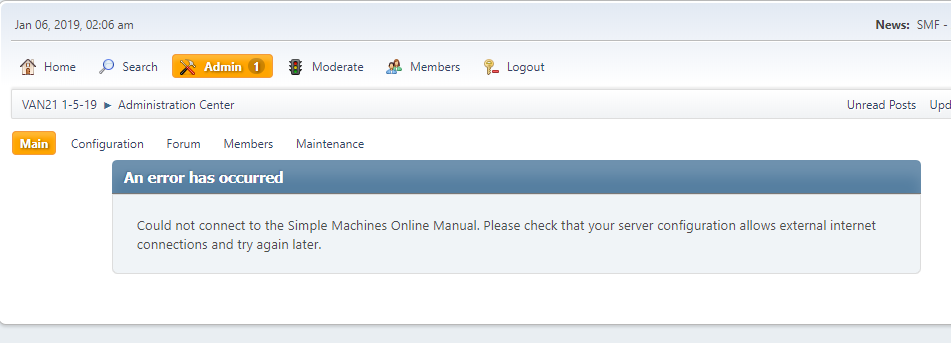
Searching the 'Online Manual' causes an error: "Could not connect to the Simple Machines Online Manual. "
Steps to reproduce
- In the ACP, do a search. Use the dropdown & select

... and you will get:
Environment (complete as necessary)
- Version/Git revision: Today's
- Database Type: MySQL
- Database Version: 5.7
- PHP Version: 5.4 & 5.6
Additional information/references
 sbulen
All 6 comments
The problem is with this line...
https://github.com/SimpleMachines/SMF2.1/blob/4a751c639634055c63dc8440b4963331577024b1/Sources/Admin.php#L858
Testing out the API search directly, it returns XML starting as follows:
<?xml version="1.0"?><api batchcomplete="">
The regex there isn't accounting for the "batchcomplete" parameter on the API tag.
 Oldiesmann
on 6 Jan 2019
Oldiesmann
on 6 Jan 2019
You got this one Oldiesmann? If not, I'll take a look at it.
sbulen
on 6 Jan 2019
Should just need to insert \b[^>]* between <api and >.
 Sesquipedalian
on 6 Jan 2019
Sesquipedalian
on 6 Jan 2019
Yep, it's simple. Although I'm not sure we can assume there would always be a (edit:) boundary there, so I'd insert .*? there which means nothing or something (but as little as possible) up until the >
sbulen
on 6 Jan 2019
Testing... Both work... If you like I'll sub a PR with your string.
sbulen
on 6 Jan 2019
Thanks, @sublen. In case you are curious, I suggested <api\b[^>]*>rather than <api.*?> for two reasons:
Because
[^>]*>is more efficient than.*?>. With lazy repetition, the regex engine has to backtrack at every step to check different possibilities. By explicitly negating the character we know we don't want to include (i.e., our terminating>), we can use simple greedy repetition and avoid any backtracking.Because the
\bwill ensure that our regex will match only against<api>and<api {some attributes}>, and not against, say,<apis>,<apintofbeer>, or<apirate-is-using-a-man-in-the-middle-attack-to-feed-you-a-malicious-XML-file>.
Sesquipedalian
on 7 Jan 2019
Related issues
 NegativeIQ
·
11Comments
NegativeIQ
·
11Comments
 VBGAMER45
·
4Comments
VBGAMER45
·
4Comments
 realdigger
·
8Comments
realdigger
·
8Comments
 KarelWintersky
·
5Comments
KarelWintersky
·
5Comments
 jdarwood007
·
5Comments
jdarwood007
·
5Comments
Most helpful comment
Thanks, @sublen. In case you are curious, I suggested
<api\b[^>]*>rather than<api.*?>for two reasons:Because
[^>]*>is more efficient than.*?>. With lazy repetition, the regex engine has to backtrack at every step to check different possibilities. By explicitly negating the character we know we don't want to include (i.e., our terminating>), we can use simple greedy repetition and avoid any backtracking.Because the
\bwill ensure that our regex will match only against<api>and<api {some attributes}>, and not against, say,<apis>,<apintofbeer>, or<apirate-is-using-a-man-in-the-middle-attack-to-feed-you-a-malicious-XML-file>.