Smf2.1: Last post link Browser position problem
Hi,
Many just me forum users reported the same problem
Different browsers different versions have the same problem
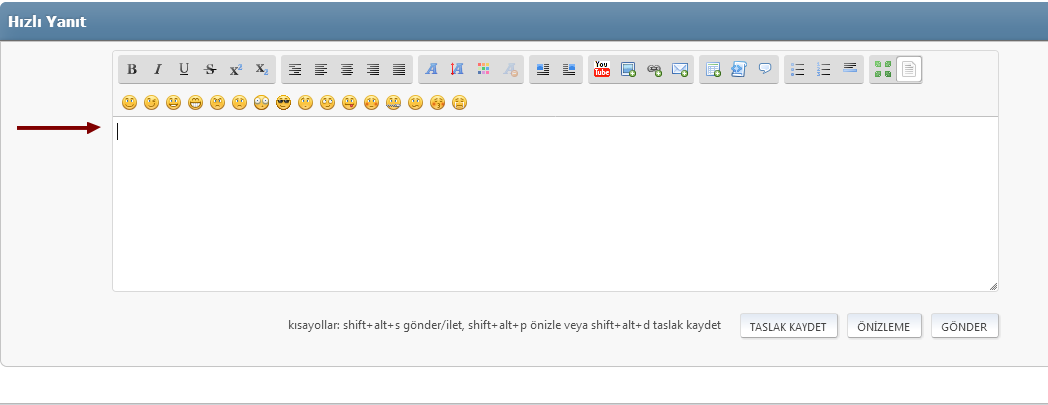
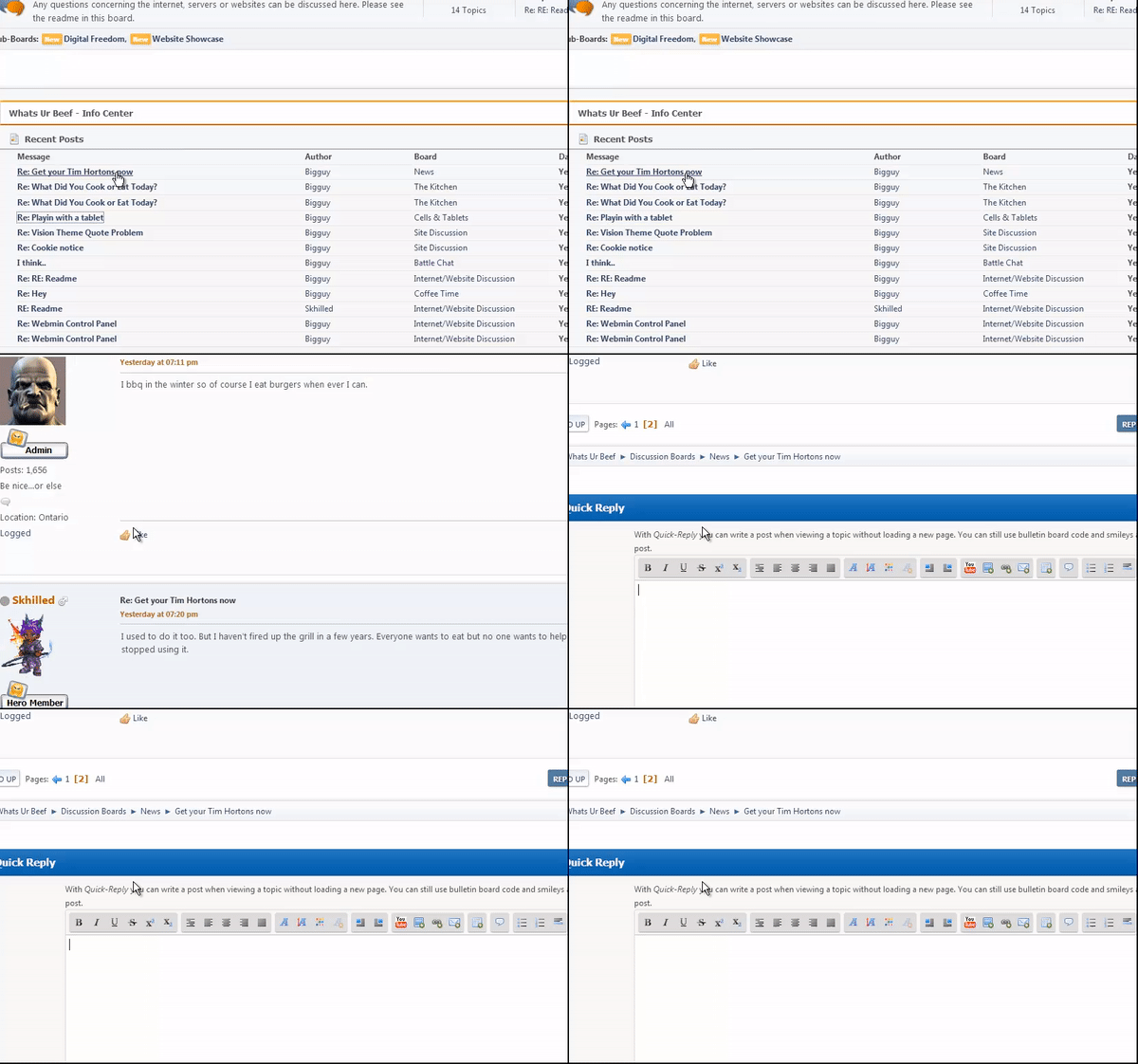
Click last post link the browser position does not go to the last message section
Does go to the quick replay text writing area
I have the same problem I tested on different smf 2.1 sites
 gevv
gevv
All 61 comments
In your video,
the link show direct to the first unread message i guess (since the video is bad on information i had to guess this)
 albertlast
on 7 May 2018
albertlast
on 7 May 2018
animated gif
gevv
on 7 May 2018
like i said before,
the url information are not shown,
without this we cant follow you.
albertlast
on 7 May 2018
Same thing I already posted here https://github.com/SimpleMachines/SMF2.1/issues/4657. In Google Chrome Browser the bug still exists
 wintstar
on 7 May 2018
wintstar
on 7 May 2018
like i mention in your cmment i'm not able to reproduce this with chrome
albertlast
on 7 May 2018
I can only detect it in Chrome. I reinstalled the browser, addons disabled. The bug didn't go away. Maybe it has something to do with the PC settings, processor or something else. I'm not the only one who has the bug.
But it's weird that it's only in chrome for me. That's why I switched to Firefox. What I noticed with Chrome was very negative, that although the browser cache was emptied several times, changes are not visible. Until much later. It's very strange about this bug.
wintstar
on 7 May 2018
The url is my site. This is a bug. If you click any link that is supposed to get you to the last post in a thread it does not. It sends you to the quick reply box instead of the last post in that thread. I use FF and it happens with that browser.
 smfbigguy
on 8 May 2018
smfbigguy
on 8 May 2018
What i asking for was the options which are sendet,
the domaine i don't care.
albertlast
on 8 May 2018
@albertlast, my testboard.
/index.php/topic,4.msg103/topicseen.html#msg103
/index.php/topic,4.msg104.html#new
It seems to be browser independent. I have problems with Chrome and everything is fine with Firefox. smfbigguy writes Firefox causes problems. I think Javascript is the cause of this problem on some PC / server configurations.
wintstar
on 8 May 2018
Like i mention in your issue i tested (today again) with chrome on your test server and
the issue didn't appeared.
is the url which you shown me,
the same after the "jump" to quickedit or did the url changed?
albertlast
on 8 May 2018
No url noch changed. I have the impression that we are jumping to this point #quickreplybox oder to other #
id="quickreplybox"
wintstar
on 8 May 2018
Than for the purpose of testing,
please change this
https://github.com/SimpleMachines/SMF2.1/blob/efe294d9cef1f4eab2f311742f4f57cefb4f9011/Themes/default/Display.template.php#L1138
to quickreply1
and this
https://github.com/SimpleMachines/SMF2.1/blob/efe294d9cef1f4eab2f311742f4f57cefb4f9011/Themes/default/Display.template.php#L1143
to quickreply2
after changing try again to make the issue and
notice us which kind of quickreply standing in the url bar.
albertlast
on 8 May 2018
        <script>
            var oQuickReply = new QuickReply({
                bDefaultCollapsed: false,
                iTopicId: ', $context['current_topic'], ',
                iStart: ', $context['start'], ',
                sScriptUrl: smf_scripturl,
                sImagesUrl: smf_images_url,
                sContainerId: "quickReplyOptions",
                sImageId: "quickReplyExpand",
                sClassCollapsed: "toggle_up",
                sClassExpanded: "toggle_down",
                sJumpAnchor: "quickreply1",
                bIsFull: true
            });
            var oEditorID = "', $context['post_box_name'], '";
            var oEditorObject = oEditorHandle_', $context['post_box_name'], ';
            var oJumpAnchor = "quickreply2";
        </script>';
Changed im testboard. You can test it yourself with the Theme Editor, you have admin rights. Nothing # is appended in the url.
I forgot to mention here again:
With the smartphone Android Chrome Browser the problem is not present
wintstar
on 8 May 2018
well than i hat to wait until you back on desktop and
give me feedback about the test result.
albertlast
on 8 May 2018
I'm not at home. I checked in the evening.
wintstar
on 8 May 2018
There was no improvement on desktop. Everything as before.
wintstar
on 8 May 2018
We are in the analytic phase of the bug,
reason why i ask you that you give me the information which kind of url you get when the issue happen.
albertlast
on 8 May 2018
I suspect this change:
https://github.com/SimpleMachines/SMF2.1/pull/4555/files
wintstar
on 8 May 2018
can you please awnser my question?
what kind of name standing in after # ?
quickreply
quickreply1
quickreply2
albertlast
on 8 May 2018
msg103
new
wintstar
on 8 May 2018
the #new and #msg103 did get not changed after the jump to quickreplay?
albertlast
on 8 May 2018
No. Also searched the cache files. Nothing found quickreplay, quickreplay1, quickreplay2.
wintstar
on 8 May 2018
Okay than discard the changes which i mention above.
Could you tell me if the cursor binking in quickreply like in the gif from gvv,
when he jump to quickreply? (without click your self in the input box)
albertlast
on 8 May 2018
Yes, like in the picture above. Flashing normally. Changes I have undone again.
wintstar
on 8 May 2018
Well somehow i think,
that this is the issue,
the cursor how get active and because he get active the browser jump to the place.
albertlast
on 8 May 2018
Yes, i think too. Believe for 4 or 5 Pull Requests the problem did not exist yet
wintstar
on 8 May 2018
I suspect that there is something in your browser settings that is automatically putting the focus on the quick reply box. It is not something SMF is telling the browser to do. But I will look to see if there is anything we can do to discourage the browser from doing this.
 Sesquipedalian
on 13 May 2018
Sesquipedalian
on 13 May 2018
the problem continues https://github.com/SimpleMachines/SMF2.1/pull/4555/files 22/5000
I got back change code problem not solved
many users are having the same problem (my forum)
some browser and versions experiencing problems
Chrome 66.0.3359.139 , mobile 66.0.3359.126
Opera 53.0.2907.31
Firefox 59.0.2, 52.9.0
other versions and latest version...
gevv
on 9 Aug 2018
From my side i didn't get the issue -> can't fix it.
albertlast
on 9 Aug 2018
the problem continues https://github.com/SimpleMachines/SMF2.1/pull/4555/files 22/5000
I got back change code problem not solvedmany users are having the same problem (my forum)
some browser and versions experiencing problems
Chrome 66.0.3359.139 , mobile 66.0.3359.126
Opera 53.0.2907.31
Firefox 59.0.2, 52.9.0other versions and latest version...
Can I confirm, except for Firefox. With this browser Firefox I do not have the problem. This problem came with a pull request. Haven't figured out which one yet.
wintstar
on 9 Aug 2018
java script could be a problem
firefox web developer addon I use the disable java script
problem solved
gevv
on 9 Aug 2018
For me is that clear that the js is the issue,
but like i said from my side i didn't got the issue...
albertlast
on 9 Aug 2018
So I got today a lucky "punch" and was able to see the issue too.
(but not able to fixed)
Here some notes from my side,
my way work on 50% chance in my env.
First you need quickedit enabled (should be clear by this issue),
secondly js need to be enable (because the issue in somewhere in the js)
third you need a url look like this http://localhost/SMF2.1/index.php/topic,123403.msg1108842.html#msg1108842
four only works on empty browser/tab
when you call ther this/simliar url you see the topc is called and
the browser jump down to the quickedit and the cursor is blinking.
Like i said before it's in my env a chance around ~50% that the issue get than triggered.
A refresh or press enter with the url let the browser jump to the position where the browser was before,
feel not right the behavior but could be a different issue.
And the issue was wachted in ff and chrome.
Also the bug happen when i you choose any message in a post and
when you got no url#msg
albertlast
on 10 Aug 2018
I think i located the issue "root",
for $reason we call this:
https://github.com/samclarke/SCEditor/blob/b218296cd8dc9556e41b2009aa72d06a93245c0e/src/lib/SCEditor.js#L435-L437
you find this code in our files: https://github.com/SimpleMachines/SMF2.1/blob/release-2.1/Themes/default/scripts/jquery.sceditor.bbcode.min.js#L3
when you search for ye.autofocus
albertlast
on 10 Aug 2018
when you search for ye.autofocus
can not found:
https://github.com/SimpleMachines/SMF2.1/search?q=ye.autofocus&unscoped_q=ye.autofocus
wintstar
on 10 Aug 2018
Use the browser search function,
Than you see this.
Von: wintstar notifications@github.com
Gesendet: Freitag, 10. August 2018 13:22
An: SimpleMachines/SMF2.1
Cc: albertlast; Mention
Betreff: Re: [SimpleMachines/SMF2.1] Last post link Browser position problem (#4749)
when you search for ye.autofocus
can not found:
https://github.com/SimpleMachines/SMF2.1/search?q=ye.autofocus&unscoped_q=ye.autofocus
—
You are receiving this because you were mentioned.
Reply to this email directly, view it on GitHubhttps://github.com/SimpleMachines/SMF2.1/issues/4749#issuecomment-412054534, or mute the threadhttps://github.com/notifications/unsubscribe-auth/ABs0em-H7Ou7bPecqLg2LWKgPrkyzYrSks5uPWzjgaJpZM4Tzhxi.
albertlast
on 10 Aug 2018
Thank you. Now I've found it too.
wintstar
on 10 Aug 2018
what should I do? to delete the code ye.autofocus?
gevv
on 10 Aug 2018
Possible workaround is to delete ye.autofocus&&ne(),
but @gevv open this issue again,
maybe @MissAllSunday or @Sesquipedalian could look into.
My guess is that the minified did something wrong and
so the if part (line 435 in orginal) got lost (or different meaning).
albertlast
on 11 Aug 2018
delete ye.autofocus&&ne(), the problem continues
jquery.sceditor.bbcode.min.js unminify (https://unminify.com/) again test the problem continues
gevv
on 11 Aug 2018
Please had in mind that you browser cache js,
so you had to wait or clear your cache (ctrl + f5) manuely.
albertlast
on 11 Aug 2018
yes cleaned the browser and forum cache
note: _open the topics to the browser new tab looks a lot problem_
gevv
on 11 Aug 2018
Just a reminder message for myself.
 MissAllSunday
on 21 Aug 2018
MissAllSunday
on 21 Aug 2018
I got the bug after the pull requests #4641, #4644 and #4651.
The only change to the editor was this one here:
GenericControls.template.php
sceditor.instance(textarea).createPermanentDropDown();', empty($editor_context['rich_active']) ? '' : '
to
sceditor.instance(textarea).createPermanentDropDown();', !empty($editor_context['rich_active']) ? '' : '
I don't know if it is actually the cause, but it is the period in which the bug occurred.
4657
wintstar
on 8 Sep 2018
Please replace the content of jquery.sceditor.bbcode.min.js with the content of this JavaScript file and then test again.
jquery.sceditor.bbcode.js.zip
Sesquipedalian
on 10 Sep 2018
jquery.sceditor.bbcode.js.zip
Works for me in Chrome. But no display of BBCode Buttons and Smileys.
wintstar
on 10 Sep 2018
the problem continues
sometimes it's not a problem
gevv
on 11 Sep 2018
Since replacing the content of jquery.sceditor.bbcode.min.js with the unminimized content did not solve the issue, the problem is not due to the minimization of the relevant JavaScript. I also do not believe that the issue is due to a flaw in jquery.sceditor.bbcode.min.js (or any of the other JavaScript used in SMF), or else we would see this happening consistently for many users on many browsers.
The only logical explanation I can see is that the issue is due to a bad interaction between SMF's JavaScript and some browser setting or extension. For example, if an extension loaded some JavaScript that contained a variable name that conflicted with one of the variables that SMF uses, that could cause unexpected and erratic behaviour like this.
Unfortunately, the only way to test for this is to remove any browser extensions you have installed and reset your browser's settings to the default, and then add them back one at a time and test each one until you discover which introduces the problem. It won't be much fun, but until you do this in order to figure out where the problem is, there is nothing I can do to address the issue.
Sesquipedalian
on 20 Sep 2018
I uninstalled all browser extensions in Chrome and cleared the browser cache several times. And as I have already written, the problem occurred after these pull requests #4641, #4644 and #4651. At the same time, updates from Chrome were also added. Yeah, it's weird that only a few people report it. The problem with me is only in Chrome.
wintstar
on 20 Sep 2018
I don't believe this is an extension problem, I've been having this issue for a long time, the SCE editor's textarea just auto focuses, both in Chrome, Firefox and Edge, I'll try to look into it, but it's hard to figure out why the auto focus is happening.
 SychO9
on 20 Sep 2018
SychO9
on 20 Sep 2018
I couldn't find where in js this is triggered, but I did find somewhat of a fix / workaround, if you make the quick reply box collapsible again like in 2.0, then naturally it can't autofocus anymore because the box would not be displayed by default
SychO9
on 20 Sep 2018
If not logged in, the quick reply is hidden. And then everything works as it should. But if logged in, whether only user or admin, the problem exists.
wintstar
on 20 Sep 2018
It's hard to imagine how #4641 or #4644 could cause this, but just in case, please test with the "Minimize CSS and JavaScript files" admin setting turned on, and then again with it turned off, in order to see if that makes any difference. If not, then there is no possibility that those pull requests could be causing this.
As for #4651, please test using each possible value of the "Show quick-moderation as" option in the "Look and layout" section of your profile. If changing that setting makes any difference, then #4651 might be causing it. If not, then it isn't.
Sesquipedalian
on 20 Sep 2018
No differences. What I noticed is that the cursor focuses directly on the element textarea.
https://github.com/samclarke/SCEditor/blob/7fd14aecc6f0c68f1e8bb98b12f6f0da769c671a/CHANGELOG.txt#L187
Fixed bug with IE placing cursor at the start of the editor when a dropdown
contains a textarea or input.
That's what happens in Chrome. The cursor is placed at the beginning of the editor => textarea <=.
Look at first message screenshot:
https://user-images.githubusercontent.com/5096676/39660645-5697e168-504c-11e8-8953-54318fb6867c.png
wintstar
on 20 Sep 2018
I don't think it has anything to do with those PRs, they're unrelated
another workaround Is to set the textarea disabled by default and have a hover event enable it.
other than that, we can't really tell which changes caused it.
SychO9
on 20 Sep 2018
I didn't realize this was not intended. It has been doing this for a while for me.
I can try to take a look at it when I get a chance. Shouldn't be hard to find this since it is happening on load type event with a delay.
 jdarwood007
on 21 Sep 2018
jdarwood007
on 21 Sep 2018
This happens here (using regular sceditor files, not minimized):
at SCEditor.base.sourceEditorCaret (jquery.sceditor.bbcode.js?beta21:5751)
at SCEditor.base.signalReady (undo.js?beta21:138)
at callHandlers (jquery.sceditor.bbcode.js?beta21:2874)
at PluginManager.base.call (jquery.sceditor.bbcode.js?beta21:2893)
at loaded (jquery.sceditor.bbcode.js?beta21:4399)
Removing the undo sceditor plugin seems to fix it. Seems to be caused because of this:
'caret': this.sourceEditorCaret(),
Which happens to do this:
        base.sourceEditorCaret = function (position) {
            sourceEditor.focus();
Not sure of a fix yet.
jdarwood007
on 21 Sep 2018
Than disable this plug in and
try to fix this in the dev time?
albertlast
on 21 Sep 2018
Yes, we should remove the undo plugin and file a bug report with SCEditor.
Sesquipedalian
on 28 Sep 2018
@jdarwood007 will you open a issue on sce repo side?
albertlast
on 29 Sep 2018
Fixed the problem.
wintstar
on 29 Sep 2018
Related issues
 KarelWintersky
·
5Comments
KarelWintersky
·
5Comments
 Gwenwyfar
·
4Comments
Gwenwyfar
·
4Comments
 replikacep
·
4Comments
wintstar
·
11Comments
Sesquipedalian
·
6Comments
replikacep
·
4Comments
wintstar
·
11Comments
Sesquipedalian
·
6Comments