Smarthome: VS Code - editing .rules-files: The type RulefilenameRule is already defines in Rulefilename.rules
ive noticed following problems since upgrade to oh 2.2.0 rel:
every first statement of each rule-file is marked as a problem with this strange hint of a “type is already defined in…” ive never defined. no matter whether the first statement is a var or an import.
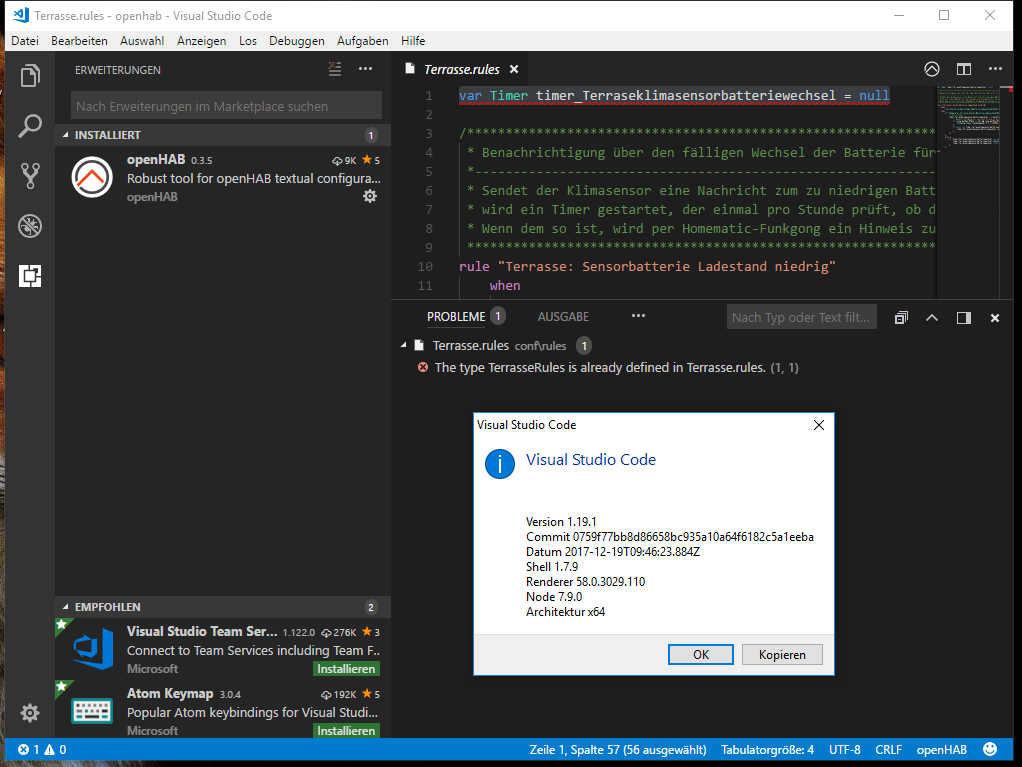
c&p of the problem line:
file: 'file://*/openhab/conf/rules/Terrasse.rules' severity: 'Fehler' message: 'The type TerrasseRules is already defined in Terrasse.rules.' at: '1,1' source: '' code: 'org.eclipse.xtext.xbase.validation.IssueCodes.duplicate_type'
system:
synology dsm 6.1.4-15217-3
openhab as docker container based on latest “2.2.0-arm64-debian image” from 21.12.17
 rikkyrik
All 13 comments
I can confirm this
OH2.2.0 stable on Ubuntu 16.04
 hannibal85
on 22 Dec 2017
hannibal85
on 22 Dec 2017
Same here - OH 2.2.0 stable on macOS 10.7.5, VS Code 1.20.0 (running on macOS 10.13.3) with openHAB plug-in 0.3.5
Observation (not sure, if this is related to this issue): These "problems" in VS Code only started popping up after updating to JDK 8.161. I was running on 8.15x before, and there I never noticed these errors.
 dirkmacke
on 12 Feb 2018
dirkmacke
on 12 Feb 2018
same here with any .rules file
OH 2.2.0 on Synology DSM 6.1.5-15254 Update 1,
VS Code 1.20.1 running on Windows PC with OH plug in 0.3.5
running JDK 8.0.151
Issue seems to start after upgrading the DSM to latest version yesterday
 madi59
on 1 Mar 2018
madi59
on 1 Mar 2018
Same here - clearly a bug.
Any progress?
 bulletprooffool
on 9 Mar 2018
bulletprooffool
on 9 Mar 2018
I assume you do not see any similar issue in your log file when the file is parsed?
@sjka Any idea where this could come from?
 kaikreuzer
on 9 Mar 2018
kaikreuzer
on 9 Mar 2018
Initially I thought there was knock on effects, but it’s just ugly red text in VSCode.
Logs show warnings then success on file save.
When I’m home I’ll get some screen grabs.
On 9 Mar 2018, 13:24 +0000, Kai Kreuzer notifications@github.com, wrote:
I assume you do not see any similar issue in your log file when the file is parsed?
@sjka Any idea where this could come from?
—
You are receiving this because you commented.
Reply to this email directly, view it on GitHub, or mute the thread.
bulletprooffool
on 9 Mar 2018
I had this problem and resolved it, the cause was that when I selected 'Add Folder to Workspace' I selected the root OH folder. When I removed this folder from the Workspace and then added the 'conf' sub-folder only the problem went away. @bulletprooffool @rikkyrik - Can you check your setup and confirm which folder you have added to the workspace.
 theRealMCQwerty
on 12 May 2018
theRealMCQwerty
on 12 May 2018
the cause was that when I selected 'Add Folder to Workspace' I selected the root OH folder. When I removed this folder from the Workspace and then added the 'conf' sub-folder only the problem went away.
@rikkyrik , @theRealMCQwerty - I can confirm above behavior.
Plus - if the rules file has the same name as the binding (like fritzboxtr064.rules) the problem occurs, when I rename the file (for example to fritte.rules), the error disappears.
Environment:
VS Code 1.23.1, Windows 10
Docker openHAB-2.3.0-snapshot-arm-debian
 gittyhub2
on 14 May 2018
gittyhub2
on 14 May 2018
I can confirm that the workaround from theRealMCQwerty solves the problem. If I only add the conf folder than it works.
 mrtwiste
on 1 Jun 2018
mrtwiste
on 1 Jun 2018
+1 - apologies, should have fed back sooner
On 1 Jun 2018, 21:10 +0100, mrtwiste notifications@github.com, wrote:
I can confirm that the workaround from theRealMCQwerty solves the problem. If I only add the conf folder than it works.
—
You are receiving this because you were mentioned.
Reply to this email directly, view it on GitHub, or mute the thread.
bulletprooffool
on 1 Jun 2018
thx for your work and invested time.
rikkyrik
on 8 Aug 2018
Helped for me:
just renamed xx.rules file for more unic (probably name is mathcing some core code types)
 Vonuki
on 12 Jan 2019
Vonuki
on 12 Jan 2019
@rikkyrik sorry, but should this issue really be closed? I mean it's nice that we now have two workarounds (conf folder as root workspace folder & renaming every rule to start unique) - but I would think that the underlying problem is still unsolved?!
@sjka since Kai mentioned you earlier on - what do you think? Shouldn't the problem behind the issue still be fixed?
 fex01
on 10 Feb 2020
fex01
on 10 Feb 2020
Related issues
 doandzhi
·
6Comments
doandzhi
·
6Comments
 kssimova
·
5Comments
kssimova
·
5Comments
 bodiroga
·
10Comments
bodiroga
·
10Comments
 afuechsel
·
9Comments
afuechsel
·
9Comments
 kubawolanin
·
3Comments
kubawolanin
·
3Comments
Most helpful comment
Helped for me:
just renamed xx.rules file for more unic (probably name is mathcing some core code types)