Smarthome: [BasicUI] Allow switching between sitemaps
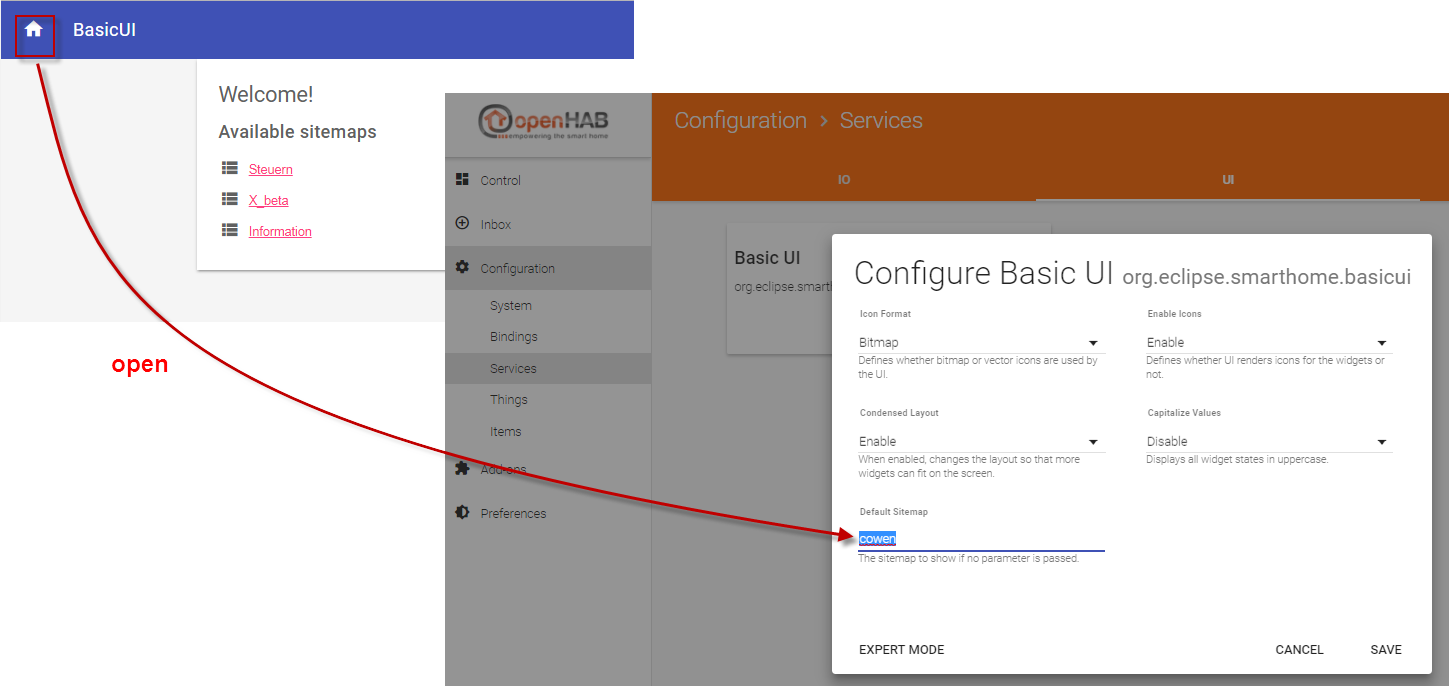
With a click on the home button in the basic ui, the ui should open the default sitemap, which is entered in the paper ui:
 demsot
All 34 comments
 ThomDietrich
on 19 Jul 2017
ThomDietrich
on 19 Jul 2017
Isn't that completely confusing? I'd expect a "home" button to lead to the "home page", not to the configuration page where is set what "home" is.
 sjsf
on 19 Jul 2017
sjsf
on 19 Jul 2017
I agree with @sjka - after all, IF a default sitemap is set, its "home" is the expected result. If no default is set, the selection list makes sense and this is imho already the case.
 kaikreuzer
on 20 Jul 2017
kaikreuzer
on 20 Jul 2017
I just tried out what the "home button" is doing: Independent of which sitemap is configured as the default one, this button brings you back to the main page of the current sitemap. And I think that is the expected behavior.
Imagine a user being on a secondary sitemap deep in a nested frame and wants to go back to the main page, so intuitively he clicks on that button. He will expect to land on the first page of that secondary sitemap, otherwise he will probably be confused that the sitemap has been changed.
I would consider this not as a bug but working as expected.
The only addition I could imagine is a second button, maybe containing a "1" which the user can click to land not on the main page of the current sitemap but on the one which he has configured to be his default one.
EDIT: Maybe instead of the "1" button we could have an additional "menu button" which shows the list of available sitemaps?
 triller-telekom
on 20 Jul 2017
triller-telekom
on 20 Jul 2017
I disagree to close this issue. We should discuss the details though.
Problem 1: In the main view of a sitemap, the home button doesn't have a functionality -> not intuitive
Problem 2: It should be possible to navigate to the list of (other) sitemaps via a UI button -> not available
The home button should open up the list of available sitemaps.
ThomDietrich
on 20 Jul 2017
- The Home Button should be a "Home" button. Nothing else.
- The Basic UI must not link to the PaperUI
When inside the main view of a sitemap, the home button doesn't have a functionality -> not intuitive
Oh, it has. It provides a visual clue that you _are_ on the main view.
It should be possible to navigate to the list of (other) sitemaps via a UI button -> not available
That's something completely different. So far this issue was about adding some functionality to the Home button. Not about selecting another sitemap.
sjsf
on 20 Jul 2017
The home button should open up the list of available sitemaps.
I fully disagree. The home button, as on any webpage, should go to the homepage. If you are already there, so be it.
Furthermore, the different sitemaps are not intended for the user as a level of structuring his UI. The sitemap ITSELF is the feature for defining the structure. Different sitemaps might be there for different users or different UIs, but all navigation should stay within this sitemap.
Note that the list of sitemaps was only introduced in the Basic UI to avoid a 404, if the user didn't have defined a default and did not specify an id in the url.
kaikreuzer
on 21 Jul 2017
Hi, ok that make sense.
But is it than possible to have a separate button to open the list of sitemaps? Like the "hamburger" button in habdroid. I think the functionality to select "user specific sitemap"should be also available in basic ui. Or is the user specific sitemap already integrated? I assume the configured sitemap in paperui is a system configuration and not user specific (myopenhab)..?
 demesot
on 21 Jul 2017
demesot
on 21 Jul 2017
The home button is only present when you are on the home page. It is replaced by a left arrow button when you are in a sub-page to return to the parent page. I think it should be always present to return to the home page of the current sitemap. Are we all ok with that ?
Additionally, having another way to access the list of sitemaps like in the Android app would be interesting in my opinion.
 lolodomo
on 26 Sep 2017
lolodomo
on 26 Sep 2017
I agree, having a way to access the list of sitemaps I miss in the basic ui.
Either with additional button, or with the home button like I described before...
demesot
on 26 Sep 2017
Looking at the code, we have technically two buttons, the "home" and the "back" buttons. The "home" button is only displayed when we are on the main page of the sitemap and there is no action behind this button. So as it was mentioned previpously, this button is only a visual indication that we are on the main page of the sitemap.
I would suggest to keep this button visible even when we are in a sub-page and to add an action behind this button to load the main page of the sitemap. I should be able to propose a PR for that.
@resetnow : is my analysis correct and wdyt about my change suggestion ?
Regarding the access to the list of sitemaps, it looks very controversed (see @kaikreuzer message before). By the way, I agree that it should not be triggered by a click on the "home" button.
lolodomo
on 26 Sep 2017
I feel like there are two different things people want — being able to return to home page and having a way to switch sitemaps.
Back button is essentially a duplicate of existing control on desktop and Android. On iOS, though, it's the only way to go back in a webapp. I would prefer back button to stay where it is. I'll think about a way to make two buttons look good.
 resetnow
on 26 Sep 2017
resetnow
on 26 Sep 2017
Yes, in my idea, I don't modify the behaviour of the "back" button and of course keep it.
Regarding the access to the list of sitemaps, we could use the "back" button when on the main page of a sitemap (rather than masking it) to trigger the display of the list of sitemaps. But I know that @kaikreuzer rejected the idea of having a top level with the list of sitemaps.
lolodomo
on 26 Sep 2017
so we would have two buttons, one is the home/return button like the
current button, and a additional one which will open the list of sitemaps??
Am 26.09.2017 11:18 schrieb "Vlad Ivanov" notifications@github.com:
I feel like there are two different things people want — being able to
return to home page and having a way to switch sitemaps.Back button is essentially a duplicate of existing control on desktop and
Android. On iOS, though, it's the only way to go back in a webapp. I would
prefer back button to stay where it is. I'll think about a way to make two
buttons look good.—
You are receiving this because you commented.
Reply to this email directly, view it on GitHub
https://github.com/eclipse/smarthome/issues/3859#issuecomment-332138519,
or mute the thread
https://github.com/notifications/unsubscribe-auth/AWNxrcSHbLdOqTGfuZlnVSaWLmwbykUcks5smMFYgaJpZM4Ocure
.
demesot
on 26 Sep 2017
and a additional one which will open the list of sitemaps??
No, the selection of the sitemap is either done as a default value in the Paper UI or by having different bookmarks. As stated above, I am fully against the idea of making sitemaps a navigational element, because that's not their purpose and it will lead users to misuse them.
kaikreuzer
on 26 Sep 2017
I really do not see any action here and would suggest to close the issue.
kaikreuzer
on 26 Sep 2017
The only action is to fix the home button.
What I propose is to have two buttons:
- the home button always displayed to return to the main page of the current sitemap
- (unchanged) the back button only displayed when in a sub-page to return to the previous page (parent page in the sitemap)
lolodomo
on 26 Sep 2017
But I agree that my proposal has no direct link with the initial feature request. So you can close this issue if you like. I will propose a PR for the "home" button fix later.
lolodomo
on 26 Sep 2017
How many navigation layers do you have that you would require the shortcut to go directly home instead of navigating back? I think it is quite elegant as it is as it does not waste any space in the header (which can be pretty small on phones).
kaikreuzer
on 26 Sep 2017
I think 3 or even 4 levels of deepth is probably something common.
lolodomo
on 26 Sep 2017
This is an interesting discussion. Seems like everyone focuses on another aspect. I for one have to disagree with @kaikreuzer, I believe a way to access the Sitemap list should be available. The function is not available now and that confuses users. Especially as that function is available in the smartphone apps. Creation of bookmarks is a hack at best (where does a new user even get it from?). How this list is made accessible is another question (the button/link could be placed in a less prominent place) and I agree, the Sitemap list should NOT be used as navigational element. That doesn't change the fact, that the list needs to be accessible somehow.
ThomDietrich
on 26 Sep 2017
Maybe it could be covered by a long press on the "back" button?
kaikreuzer
on 26 Sep 2017
Is a long press something doable with a touch screen ? I tried it in Paper UI to display the description of a channel and I was not able to get it with an Android tablet. Of course, it is ok with a PC and a mouse.
lolodomo
on 26 Sep 2017
For the record, I agree with https://github.com/eclipse/smarthome/issues/3859#issuecomment-332145133 — there usually aren't that many levels in the sitemap. Unless you live in a 30-bedroom mansion :)
Long press should be doable via touch events. Probably depends on the browser.
resetnow
on 26 Sep 2017
I agree as well and have to add a question: Did you ever experience a long press action on a webpage? Feels highly unusual.
ThomDietrich
on 26 Sep 2017
Not intuitive at all. We already have this strange feature in Paper UI. My test was with Google Chrome.
lolodomo
on 26 Sep 2017
Did you ever experience a long press action on a webpage?
People use it to open stuff in the background, personally I have never seen it handled by javascript. Probably because it's unintuitive, yes.
By the way, force touch would probably fit good here, too bad it only exists on iPhone.
resetnow
on 26 Sep 2017
This ticket discusses two imho unrelated issues:
1 - Home and Back button:
For me those feel natural in their usage. Back navigates up one level, the home icon indicates the main page of the sitemap. I agree with those of you who believe that the main page should be the "home" and the home icon shouldn't trigger any further navigation. @resetnow the emphasize lies on icon here. The element is currently defined as a button with cursor: pointer; and hence wrongly understood as a button triggering an action (See one of my first comments here). Do you think that could be changed? @lolodomo I'm not sure about the importance of the extra option to navigate to home from every sublevel.
2 - Sitemaps list:
The sitemap list can currently only be accessed if a user didn't define his/her default sitemap. Apart from that a user needs to access other sitemaps by direct link (memory, browser history, bookmark). That is not acceptable and creates usability issues. This problem can and should be solved, we've already collected a few good ideas in the comments above. An additional hamburger menu button to the right (as in the smartphone apps) sounds okay to me.
ThomDietrich
on 26 Sep 2017
As we are discussing about sitemap list, I think we could include in the page displaying the sitemaps a link to the "_default" sitemap, maybe separated from other sitemaps with an introducing text explaining what is this sitemap ?
lolodomo
on 26 Sep 2017
An additional hamburger menu button to the right (as in the smartphone apps) sounds okay to me.
I like this idea because the web application and the Android app would behave the same way. I don't know how it works in IPhone app works but it would be desirable if all UI variants would behave similarly here.
 MHerbst
on 26 Sep 2017
MHerbst
on 26 Sep 2017
In Android app, the button that triggers the opening of a "frame menu" with all sitemaps is at LEFT. At right, there is another button to open another menu to set preferences for example.
lolodomo
on 26 Sep 2017
Can the wontfix tag ne suppressed ?
lolodomo
on 28 Sep 2017
@lolodomo I'm not sure about the importance of the extra option to navigate to home from every sublevel.
Me neither - and if we really want to add it, I would only add it if there is enough space in the header, e.g. in landscape more or on tablets/browsers, but definitely hide it on the phone.
The function is not available now and that confuses users. Especially as that function is available in the smartphone apps.
Good point, I have created https://github.com/openhab/openhab.android/issues/392 to have that removed.
the Sitemap list should NOT be used as navigational element.
Ok, so to get that straight (and I think this is the point most people are missing here in the discussion): Changing the sitemap for a UI is a task for an ADMINISTRATOR, it is NOT supposed to be done by the user during "daily operation".
That doesn't change the fact, that the list needs to be accessible somehow.
It is - all configuration (i.e. the admin-related tasks) are done in the Paper UI. Note that the Basic UI does not have ANY possibility to change configurations in the UI itself - and this is good.
If we one day have role based access in place, this all will make more sense to all of you: Your kids have only access to a single sitemap and thus a menu to select another one is only confusing (as it won't work).
So please let us keep user and admin tasks clearly sorted - I am aware that it is difficult as everyone discussing here usually has both roles at the same time.
Can the wontfix tag ne suppressed ?
I hope that the above explains why this feature request does not fit well into the architecture, so I would stick to this decision. (Also note that the original request at the top is anyhow a feature that does not make sense).
kaikreuzer
on 2 Oct 2017
@kaikreuzer your arguments are clear and by themselves logical.
I believe that most of the other suggestions and arguments, by me and others, are based on different expectations (see another example). If we can take anything out of this thread, then that it is important to define a commonly known goal. You know that I am a stickler for the "roadmap" idea and clarifying the usage of sitemaps on all fronts could be one of the points on that list. I'd be happy to discuss this at the Smart Home Day :)
Back to the issue: "Fixing" the Android app is only part of the solution. Do you agree that this also has to be tackled in the iOS and Windows apps and should be mentioned in the sitemaps article on docs.openhab.org?
Best! Thomas
@resetnow do you want me to open a new ticket regarding the home button/icon issue?
ThomDietrich
on 4 Oct 2017
Related issues
kaikreuzer
·
9Comments
 maggu2810
·
4Comments
maggu2810
·
4Comments
 mhilbush
·
3Comments
mhilbush
·
3Comments
 PiscisSwimeatus
·
6Comments
PiscisSwimeatus
·
6Comments
 Josar
·
7Comments
Josar
·
7Comments
Most helpful comment
This ticket discusses two imho unrelated issues:
1 - Home and Back button:
For me those feel natural in their usage. Back navigates up one level, the home icon indicates the main page of the sitemap. I agree with those of you who believe that the main page should be the "home" and the home icon shouldn't trigger any further navigation. @resetnow the emphasize lies on icon here. The element is currently defined as a button with
cursor: pointer;and hence wrongly understood as a button triggering an action (See one of my first comments here). Do you think that could be changed? @lolodomo I'm not sure about the importance of the extra option to navigate to home from every sublevel.2 - Sitemaps list:
The sitemap list can currently only be accessed if a user didn't define his/her default sitemap. Apart from that a user needs to access other sitemaps by direct link (memory, browser history, bookmark). That is not acceptable and creates usability issues. This problem can and should be solved, we've already collected a few good ideas in the comments above. An additional hamburger menu button to the right (as in the smartphone apps) sounds okay to me.