Smart_open: Gzip uploaded to s3 broken
I'm trying to upload gzip to s3, but when unpacking the file, the data cannot be decoded.
So, I tried to upload file via boto3 https://pastebin.com/3FbLRa6h and it works
but the same method with smart open not working https://pastebin.com/Xn9CRVH3
I inspected archives in hex editor and saw that smart open added some string at start
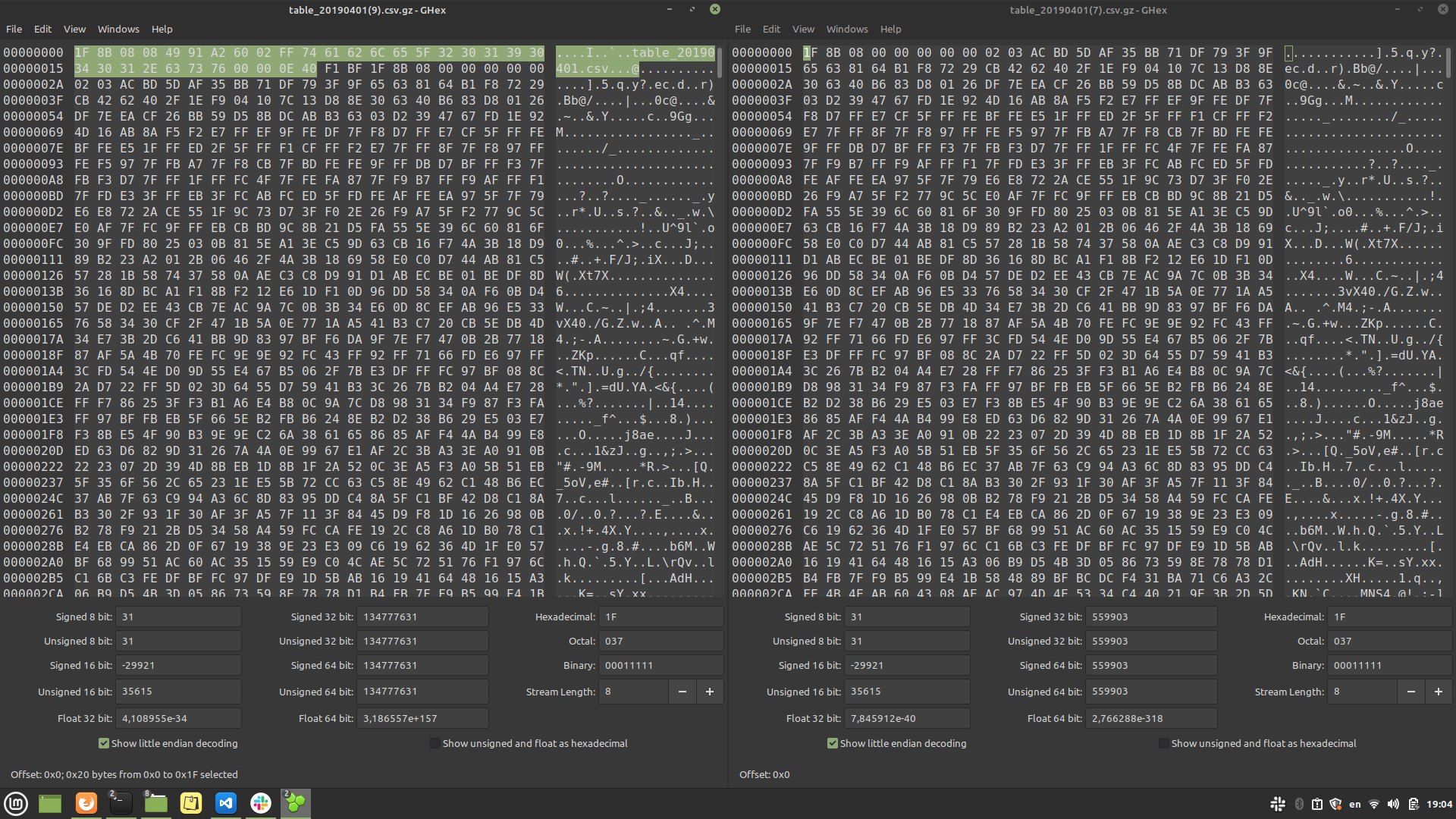
on a left side broken archive uploaded with smart open, on right side normal archive
Also when I upload file without gzip extension with smart open and then rename it to gzip it works too.
 ivan-yankovyi
All 4 comments
Thank you for reporting this. Can you please post a single script that reproduces the problem, along with the exception and the full stack trace, if any? The scripts you posted don't actually reproduce the problem: it's unclear how to use them, and you don't include any parameters.
Stuff that matters:
- What is the name of the file you're trying to upload?
- Is the file already compressed?
when unpacking the file, the data cannot be decoded.
What are you using to decode the data? What error are you getting?
 mpenkov
on 18 May 2021
mpenkov
on 18 May 2021
import requests
import boto3
from smart_open import open
BUCKET = "PUT_YOUR_BUCKET_HERE"
def load_file():
    r = requests.get('https://datasets.tardis.dev/v1/deribit/trades/2019/11/01/BTC-PERPETUAL.csv.gz', stream=True)
    fpath = 'tardis_test/btc-perpetual.csv.gz'
    with open(f"s3://{BUCKET}/{fpath}", 'wb', transport_params=dict(buffer_size=8192)) as fout:
        for chunk in r.iter_content(chunk_size=8192):
            fout.write(chunk)
if __name__ == "__main__":
load_file()
Here is an example. As you see, file is already compressed and there is 'gz' extension in name of file that I upload.
Also it works if I open stream via smart open
import requests
import boto3
from smart_open import open
BUCKET = "PUT_YOUR_BUCKET_HERE"
def load_file():
fpath = 'tardis_test/btc-perpetual.csv.gz'
with open('https://datasets.tardis.dev/v1/deribit/trades/2019/11/01/BTC-PERPETUAL.csv.gz', 'rb') as fin:
with open(f"s3://{BUCKET}/{fpath}", 'wb') as fout:
for line in fin:
fout.write(line)
if __name__ == "__main__":
load_file()
Thank you for providing the reproducible example.
By default, smart_open uses the file extension to transparently compress and decompress data. So, with your example:
r = requests.get('https://datasets.tardis.dev/v1/deribit/trades/2019/11/01/BTC-PERPETUAL.csv.gz', stream=True)
fpath = 'tardis_test/btc-perpetual.csv.gz'
with open(f"s3://{BUCKET}/{fpath}", 'wb', transport_params=dict(buffer_size=8192)) as fout:
for chunk in r.iter_content(chunk_size=8192):
fout.write(chunk)
In this case, smart_open sees that the url ends with .gz, and attempts to gzip compress the data when writing. Of course, your data is already gzip-compressed, but smart_open has no way of knowing this. So, you end up with a doubly-compressed file.
If your data is already compressed, and you want to prevent the above behavior, use the ignore_ext keyword parameter:
    r = requests.get('https://datasets.tardis.dev/v1/deribit/trades/2019/11/01/BTC-PERPETUAL.csv.gz', stream=True)
    fpath = 'tardis_test/btc-perpetual.csv.gz'
    with open(f"s3://{BUCKET}/{fpath}", 'wb', ignore_ext=True, transport_params=dict(buffer_size=8192)) as fout:
        for chunk in r.iter_content(chunk_size=8192):
            fout.write(chunk)
Let me know if that helps.
mpenkov
on 18 May 2021
This appears resolved, closing.
mpenkov
on 25 May 2021
Related issues
 bolkedebruin
·
4Comments
bolkedebruin
·
4Comments
 gelioz
·
5Comments
gelioz
·
5Comments
 cosmoschen94
·
6Comments
cosmoschen94
·
6Comments
 eschwartz
·
5Comments
eschwartz
·
5Comments
 ziky90
·
3Comments
ziky90
·
3Comments
Most helpful comment
Thank you for providing the reproducible example.
By default, smart_open uses the file extension to transparently compress and decompress data. So, with your example:
In this case, smart_open sees that the url ends with .gz, and attempts to gzip compress the data when writing. Of course, your data is already gzip-compressed, but smart_open has no way of knowing this. So, you end up with a doubly-compressed file.
If your data is already compressed, and you want to prevent the above behavior, use the ignore_ext keyword parameter:
Let me know if that helps.