Slider: Slider gets stuck to mouse
Hi, Sometimes the slider gets stuck to mouse and the slider just follows the movement of the cursor.
Its hard to reproduce the issue and only way to resolve is to reload the page.
 badaljain
All 23 comments
Please provide a re-producible demo: http://codepen.io/benjycui/pen/aJooRE?editors=0011
And steps to re-produce it..
 benjycui
on 27 Mar 2017
benjycui
on 27 Mar 2017
Can confirm it's happening to me as well. Hard to reproduce. It seems it happens at random.
 TheImpressionist
on 3 Apr 2017
TheImpressionist
on 3 Apr 2017
@benjycui Steps to reproduce on your codepen link - http://codepen.io/benjycui/pen/aJooRE?editors=0011:
- Click on handle
- While holding click, move cursor over codepen JS panel
- Keep holding click, move cursor to opposite side of page
- Release click and return to slider window
- Cursor will be stuck.
- Click on handle, if it becomes unstuck - repeat step 1 - 5
 eddyerburgh
on 4 Apr 2017
eddyerburgh
on 4 Apr 2017
@eddyerburgh thx, but I can re-produce it after trying 3 times.
benjycui
on 6 Apr 2017

I'm on OSX Sierra 10.12.3, chrome 57.0.2987.
Reproducible every time.
eddyerburgh
on 6 Apr 2017
I get the same thing
 rmammina
on 9 Apr 2017
rmammina
on 9 Apr 2017
Looks like the issue is related to the page losing the mouseup event to cancel the dragging feature on the page. Might be fixed by setting up the mousemove listener to check for the left mouse button being down every event. If any mousemove event during a dragging does not have the left mouse button active, cancel the drag immediately.
 dwighthouse
on 12 Apr 2017
dwighthouse
on 12 Apr 2017
Sorry.. I don't understand even I look at your GIF for a long time.
If someone can re-produce this with a unit test, it will be better.
So, PR is welcomed, and please add a unit test for this. Thanks.
benjycui
on 19 Apr 2017
Anyone found a solution for that issue?
 ContiGabriel
on 10 Jul 2017
ContiGabriel
on 10 Jul 2017
Video of issue: https://streamable.com/1u6k5
When dragging cursor and lifting mouse button up when NOT on the white-backgrounded area of your codepen (https://codepen.io/benjycui/pen/aJooRE?editors=0011) (i.e. the Start Menu bar or on the desktop or the console within the browser), the slider doesn't register that you've moused-up and let go of it, so it will continue to follow your cursor around.
Even when clicking on the slider and dragging, it doesn't reset it - only fix is refresh
 Abcmsaj
on 10 Jul 2017
Abcmsaj
on 10 Jul 2017
@Abcmsaj I watched your demo, seems there do have a problem. But none of out team have windows computer, and i test this demo on osx, it works fine.
So, would you like to give us a PR to fix it?
 paranoidjk
on 10 Jul 2017
paranoidjk
on 10 Jul 2017
@paranoidjk this is an issue on OSX too.
eddyerburgh
on 10 Jul 2017
@eddyerburgh Sorry, i haven't figure out how to reproduce this problem on osx, could you give me a screenshot?
paranoidjk
on 10 Jul 2017
@paranoidjk Have you tried the steps in my earlier comment? I just tried again and after 3 repeats of steps 1-5 I reproduced the bug.
I added a GIF as well, although I'm not sure how useful it is.
eddyerburgh
on 10 Jul 2017
@eddyerburgh Could record a video with Quicktime Player's screen recording, if that would help? Essentially though, you're just grabbing the slider, moving the cursor over the js panel and then letting go.
Abcmsaj
on 10 Jul 2017
@Abcmsaj yeah, basically dragging over the js panel and off the side of the screen then letting go
I'll try and record a video later 👍
eddyerburgh
on 10 Jul 2017
Same issue here, on OSX.
Is there any way of "dropping" the handle by a slider API property ? We could fire this on a mouseup event listening to the document.
 monsieurnebo
on 21 Jul 2017
monsieurnebo
on 21 Jul 2017
It's easy to re-produce with iframe.
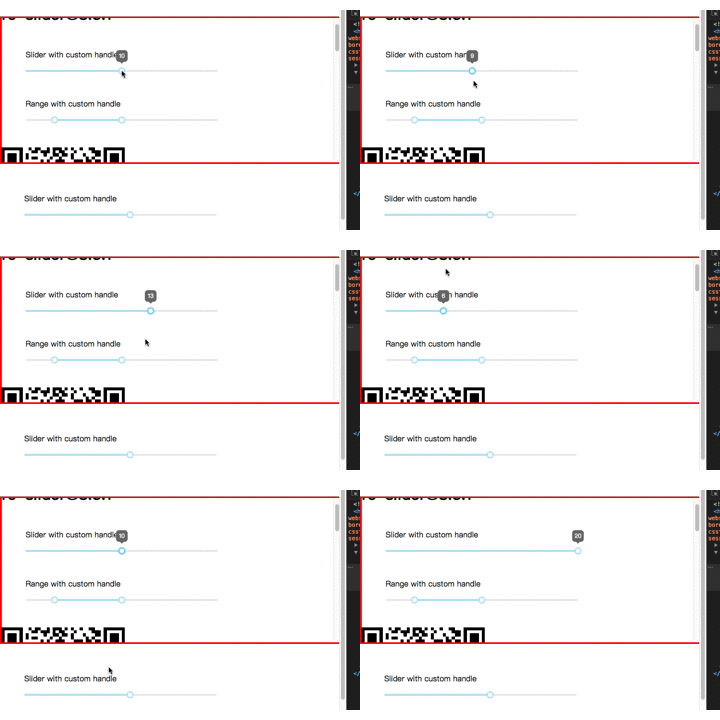
as @monsieurnebo said. We could removeEventListener on mouseup. but I think also before addEventListener. Since when your mouse leave iframe, mouseup won't be trigger, and then came back iframe to click again, another event will be add. cause the bug event always there.
Another resolvent is collect the event with array, and remove them all when mouseup.
 Robin-front
on 11 Aug 2017
Robin-front
on 11 Aug 2017
Is this problem solved now?
Can you tell me the solution?
 jitao13
on 24 Oct 2017
jitao13
on 24 Oct 2017
@jitao13 Nop... We are waiting for this pull request since August.
monsieurnebo
on 24 Oct 2017
Sorry for the late.
Thanks for @Robin-front , #306 already got merged. Released [email protected], please give it a try.
paranoidjk
on 25 Oct 2017
The problem will be repeated on the PC. And in the Chrome.
Press the mouse to move the button, move the mouse over the iframe area, release the mouse, move back inside the iframe, and the button will still move with the mouse.
https://user-images.githubusercontent.com/6723674/29201185-a73d6a4c-7e8e-11e7-9d9c-8dd21af29014.gif
jitao13
on 25 Oct 2017
Yes, this problem wasn't resolved completely.
But, the result of this discussion is
@monsieurnebo find a way of "dropping" the handle
By now, you can click the handle or anywhere of document to drop off the handle without refresh.
Robin-front
on 26 Oct 2017
Related issues
 teggno
·
3Comments
teggno
·
3Comments
 ql
·
5Comments
ql
·
5Comments
 sonovice
·
7Comments
sonovice
·
7Comments
 nitroamos
·
4Comments
nitroamos
·
4Comments
 wzup
·
6Comments
wzup
·
6Comments
Most helpful comment
Same issue here, on OSX.
Is there any way of "dropping" the handle by a slider API property ? We could fire this on a
mouseupevent listening to thedocument.