My project team is considering adopting this component. After a brief review I noticed that the component isn't accessible at all: For example, there are no focusable elements, and accordingly, no way to interact with the keyboard. It apparently handles both mouse and touch events, but ignores pointer events.
Making the handle focusable is rather trivial, by adding tabindex=0 (see jQuery UI slider widget). Handling keyboard events isn't terrible either (see jQuery UI slider widget, _handleEvents). Switching from mouse+touch events to pointer events would require a polyfill like PEP but should actually simplify the code inside the component. There's probably more that I'm missing.
That said, is there interest addressing this?
 jzaefferer
All 18 comments
Yep, you are right. I am not sure whether you are interested in creating a PR, or I will do it when I have time..
 benjycui
on 8 Aug 2016
benjycui
on 8 Aug 2016
Sorry, can't help with the implementation currently.
jzaefferer
on 12 Aug 2016
+1
 slavikdenis
on 18 Oct 2016
slavikdenis
on 18 Oct 2016
@jzaefferer I encountered the same issue. My use case was that I wanted to use a custom thumb handle and apply styles like a border highlight and z-index to handles that were being dragged. The ":active" and ":focus" CSS selectors were not working (except in Chrome). However, I was able to apply styles by checking the props of the handle class. There is a boolean "dragging" prop which is only true when a handle is currently being dragged. Here's an example:
<Slider
  {...sliderProps}
  handle={<CustomHandle />}
/>
...
class CustomHandle extends React.Component {
  render() {
    const {
      value,
      dragging,
    } = this.props;

    const activeClass = dragging ? "active" : "inactive";
    const style = { left: `${this.props.offset}%` };
    return (
      <div style={style} className={"drag-handle " + activeClass}>
          value
      </div>
    );
  }
}
Hope that helps.
 jbccollins
on 31 Oct 2016
jbccollins
on 31 Oct 2016
I'd be interested in helping to make this component accessible. Currently, the API does not allow for passing callbacks to custom Handle components (from what I can tell) meaning that CustomHandle implementations can't do much aside from modify style.
It would be great if we could provide a handleChange prop to the handle, allowing a developer to create a function to handle things like keyboard arrow up and keyboard arrow down when the user is focused on the button element.
Something like this is what I have in mind, would this be possible?
class Handle extends React.Component { // eslint-disable-line react/prefer-stateless-function
  constructor() {
    super();
    this.button = null;
  }

  componentDidMount() {
    if (canUseDOM && canUseEventListeners) {
      document.addEventListener('keydown', this.handleKeydown);
    }
  }

  componentWillUnmount() {
    if (canUseDOM && canUseEventListeners) {
      document.removeEventListener('keydown', this.handleKeydown);
    }
  }

  handleKeydown = ({ keyCode } : { keyCode: number }) => {
    if (document.activeElement === this.button && keyCode === 38) {
      // Keyboard-Arrow-Up Increment
      this.props.handleChange(this.props.index, 'increment');
    } else if (document.activeElement === this.button && keyCode === 40) {
      // Keyboard-Arrow-Down Decrement
      this.props.handleChange(this.props.index, 'decrement');
    }
  }

  props: HandleProps;

  render() {
    const { className, offset } = this.props;

    return (
      <button
        className={classNames(className, styles.button)}
        style={{ left: `${offset}%` }}
        ref={(button) => { this.button = button; }}
      />
    );
  }
}
cc @benjycui
 kylecesmat
on 30 Jan 2017
kylecesmat
on 30 Jan 2017
Are you suggesting users of react-slider should implement keyboard event handling themselves? If so, wouldn't it make more sense to build the keyboard handling into the component?
jzaefferer
on 31 Jan 2017
No, the keyboard events should be built into rc-slider, and ideally it
would use the same onChange prop to handle the event.
The issue right now is, the example I shared is my own customHandle, but
there is no way to handle these events from what I can tell, as there isn't
a way to pass the onChange prop to a customHandle. CustomHandles currently
only have specific props handed to them from the HandleProvider component.
Two things would need to happen here:
- Pass the onChange prop to handles via the HandleProvider
- Add keyboard listeners & call onChange with an increment or decrement
when a handle is focused
I can submit a PR, I just wanted to make sure this was an okay strategy
before I started development.
On January 31, 2017 at 6:46:20 AM, Jörn Zaefferer ([email protected])
wrote:
Are you suggesting users of react-slider should implement keyboard event
handling themselves? If so, wouldn't it make more sense to build the
keyboard handling into the component?—
You are receiving this because you commented.
Reply to this email directly, view it on GitHub
https://github.com/react-component/slider/issues/131#issuecomment-276382263,
or mute the thread
https://github.com/notifications/unsubscribe-auth/ABjuLWvqwqB6NsomTrcSK06PX77f6ffWks5rX0k8gaJpZM4JdrI_
.
kylecesmat
on 31 Jan 2017
@kylecesmat maybe [email protected] can satisfied your requirement? To attach events to handles.
benjycui
on 7 Feb 2017
@benjycui I was unaware I can attach events to handles, I don't see this documented anywhere, could you provide an example?
Specifically, I need a way to trigger some sort of callback function when the handle component has focus, and the only props I see provided by the generator are value, dragging, and offset.
kylecesmat
on 7 Feb 2017
You can add more props to handle through handleGenerator https://github.com/react-component/slider/blob/master/src/Slider.jsx#L114-L121
benjycui
on 7 Feb 2017
So basically its now possible by creating a new handler and provide some event handling? Personally I would love if this was an out-of-the-box feature. Btw, great job on the aria attributes already!
I can try to write something for this and create a PR if that's appreciated. If it is, maybe its best to discuss the behaviours since I encountered some differences at e.g. OAA Accessibility and Polymer.
What are others doing?
Basically the only thing what others are doing is making the handler _focusable_ and provide some keyboard events.
key | Polymer | OAA Accessibility
--- | --- | ---
left | value - 1 step | _same_
right | value + 1 step | _same_
up | value + 1 step | value - 1 step
down | value - 1 step | value + 1 step
home | value = minimum | _same_
end | value = maximum | _same_
page-up | value + 1 step | value - 1 "jump step"
page-down | value - 1 step | value + 1 "jump step"
These are things that happens with _left to right_ languages, for _right to left_ languages everything is mirrored.
I dont know if it's possible to create an inverted range. E.g. _max to min_ instead of _min to max_. But if this is possible I think it should be handled like _right to left_ languages.
- Value is the current value of the handle.
- Step is every value from the range you can select.
- Jump step is a custom definable value, at OAA Accessibility it's 2 * step.
Some random thoughts
Both Polymer and the OAA Accessibility looks like great organisations that does a great job. They probably have thought about it for a while and still there are some differences. Lets try to reason and explain them.
Since both organisations have the same behaviour on the _left_ and _right_ keys, I think its best to just copy that too.
For the _up_ and _down_ behaviours I tend to follow the Polymer approach. Mainly because you are "upping" or "downing" the current value. E.g. if I have 8 as current, and I "up" it with a step of 1, I expect it to be 9 and not 7.
OAA Accessibility has a point about the _page up_ and _page down_ behaviours. I mean, _left_/_down_ and _up_/_right_ only go by 1 step. For small sliders this is fine, but for large ones not. Also if an user actually uses the _page up_/_page down_ key, they probably expect something more then just a mimick of _left_ and _right_.
So what do you guys think? Or do you guys dont want to support this feature or think it should not be implemented in this repository?
 byCedric
on 14 Jun 2017
byCedric
on 14 Jun 2017
@byCedric thanks, you can try to PR to make Slider support keyboard first.
And what is your advice with Range? As you know, there are more than on handle on Range.
benjycui
on 15 Jun 2017
@benjycui Sure, will start on the Slider first!
Well, as far as I can tell and I'm not really an expert in accessibility, you simply select/focus 1 handle at the time. So when you have multiple handles within a single slider, you should be able to select them after each other I think. Just like how multiple inputs can be selected after using the tab key.
But let me start on the slider, maybe afterwards I can give you some examples!
byCedric
on 15 Jun 2017
Ok, so I have been busy and I got further than I hoped to be. In this pull request I did the following things.
What I did
Added basic keyboard interaction
I did this by adding a tabindex="0" to the handle. With that the browser allows to focus non-focusable elements. So this change is actually perfect to implement accessibility without rewriting everything.
Also I added basic keyboard event binding such as onFocus, onBlur and onKeyDown. Both the focus and blur are defined to trigger onStart and onEnd events. I figured it would calculate some stuff that is necessary. I'm not sure if thats 100% right, so correct me if I'm wrong.
Added the onKeyboard handler to both Slider and Range
At first I thought I could fit all calculations within the createSlider method itself. Well, when I took a look at the Range I saw that the "current value" was handled differently. Therefore I figured both Slider and Range should have different calculations when the keyboard event was invoked.
Added keyboard value mutators
I added the concept of "keyboard value mutator" after I got stuck in defining the outcome of all key events. With this you will get a "value mutating method" that accepts the current, or old, value and the props of the slider component. With this it should be capable of all, possible future, keyboard events.
Some issues
As mentioned in the pull request this is a WIP. I currently encountered some issues of which I think its best to discuss them.
When no step is defined (step=null) the mutators that uses step won't work.
I'm not sure what the meaning of step=null is and/or should be. Unfortunately this scenario breaks all keyboard behaviour, except for the home and end keys. This is because they don't use step to calculate the next value. We could however provide a simple "best guess" to work around this issue.
When I implement the onKeyboard for the Range, everything works until the handles "cross".
Well, I guess this is best explained with a short video.

What happens here is that when I "cross" with the other handle, the focus is still at the old one. But it looks like I'm actually changing the value of the other handle... I'm not sure if this is a bug from the keyboard events, or that this is a bug in general. It happens with the mouse pointer too... I think it's best to open another issue for this, or do you think differently?
I also tested it with the multi range and that seems to work perfectly!
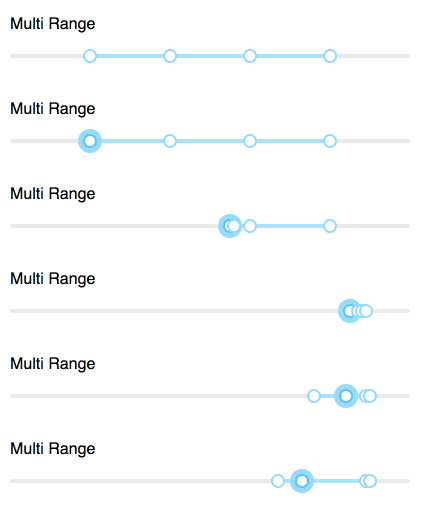
So what do you think @benjycui?
byCedric
on 15 Jun 2017
Thanks for merging guys @benjycui @paranoidjk ! I haven't updated the docs yet, since I was a little bit unfamiliar with the existing (public) api and how it works on the background. Maybe that's something that still needs to be done in a separate PR.
I think the next thing to do is make it work on a Range component. In the message earlier here I described an issue I encountered that involves a wrong handle being focused. I will make a separate issue for that tonight, and then create a new PR for the Range component support 😄
We are getting the accessibility there! 🎉
byCedric
on 28 Jul 2017
Thanks for @byCedric great job! https://github.com/react-component/slider/pull/282
We have released [email protected].
 paranoidjk
on 28 Jul 2017
paranoidjk
on 28 Jul 2017
@byCedric Welcome to open another pr to help us make it better 😄
paranoidjk
on 28 Jul 2017
@byCedric Great work!
One question (I can open a separate issue on this if needed): onMouseDown() in createSlider.jsx effectively swallows the mouse event causing the handle not to be focusable by clicking on it. I'm unsure what the correct way of solving this is, but I validated it by simply remove that function and the handles become click-focusable
 kintel
on 9 Aug 2017
kintel
on 9 Aug 2017
Related issues
 nitroamos
·
4Comments
nitroamos
·
4Comments
 dvshur
·
3Comments
dvshur
·
3Comments
 teggno
·
3Comments
teggno
·
3Comments
 koenvo
·
5Comments
koenvo
·
5Comments
 nmccrea-db
·
5Comments
nmccrea-db
·
5Comments
Most helpful comment
@byCedric Great work!
One question (I can open a separate issue on this if needed):
onMouseDown()in createSlider.jsx effectively swallows the mouse event causing the handle not to be focusable by clicking on it. I'm unsure what the correct way of solving this is, but I validated it by simply remove that function and the handles become click-focusable