Slick: Chrome v.66: Invalid regular expression: /(^|\.)slick\.(?:.*\.|)slick-0(\.|$)/: Stack overflow
General Info
In Google Chrome v.66 independent from JQuery version I face next error:
Uncaught SyntaxError: Invalid regular expression: /(^|.)slick.(?:.*.|)slick-0(.|$)/: Stack overflow>
at RegExp.test ()
at Object.remove (jquery.min.js:3)
at jquery.min.js:3
at Function.each (jquery.min.js:2)
at r.fn.init.each (jquery.min.js:2)
at r.fn.init.off (jquery.min.js:3)
at c.b.cleanUpEvents (slick.min.js:17)
at c.b.destroy (slick.min.js:17)
at c.b.refresh (slick.min.js:17)
at c.b.checkResponsive (slick.min.js:17)
More Details
Jquery/Browser | Chrome50 | Chrome66 | Firefox
----------------|------------|-------------|-------
jquery 1 | n.a. | no | yes
jquery 2 | n.a. | no | n.a.
jquery 3 | yes | no | yes
I used Slick 1.6.0 and also last version from npm.
I also tryed on two different PCs with Win7 and Win10 in two different networks and places.
 LevShipulin
All 9 comments
I forgot one important detail - the problem occures only in mobile mode of DevTools or on mobile phone.
LevShipulin
on 24 May 2018
Has someone found a solution to this?
 coasterka
on 5 Jun 2018
coasterka
on 5 Jun 2018
Hey @LevShipulin, can you reproduce this in all browsers?
I experience it only in Chrome (v. 67). However, the exception is not thrown in incognito tabs, which leads me to thinking this is caused by some of the Chrome Extensions.
Hope this helps.
coasterka
on 6 Jun 2018
Hi @coasterka, no, only in Chrome (v. 66 and above) and unfortunately in inconito tabs also.
I also tryed it on real mobile phone and fresh intalled Chrome - same issue.
At the same time in Firefox works everywhere. In Safari browser with some style issues.
In old Chrome version (v. 50) also issue dooes not occures.
One more interesting detail I found: it works great if you just resize the browser window.
LevShipulin
on 7 Jun 2018
@LevShipulin I don't know the specific details of your situation, but here is my workaround for this issue, maybe it will work for you too. It worked like a charm for me.
I have multiple slick carousels on a single page (around 40). Each of them is initialized in the same way - with multiple responsive breakpoints.
Since the issue was appearing on window resize, my solution is to 'unslick' every carousel while resizing, and then, when the resizing has stopped, slick it again with the same settings. I've had no worries since then.
More info on the 'resizing stopped' event here
coasterka
on 8 Jun 2018
Any news on this?
 oliverschloebe
on 5 Jul 2018
oliverschloebe
on 5 Jul 2018
Yes this issue is happening with me too. Very annoying.
 aslamdoctor
on 1 Sep 2018
aslamdoctor
on 1 Sep 2018
I figured this out.
Just add "overflow:hidden" style to the parent element that wraps the carousel and it should be fixed.
I struggled to fix this for almost 2 days and it was just this small mistake 👍
aslamdoctor
on 1 Sep 2018
Also i had this weird issue and i added the "overflow:hidden" style to the parent element that contains slider and error is gone.
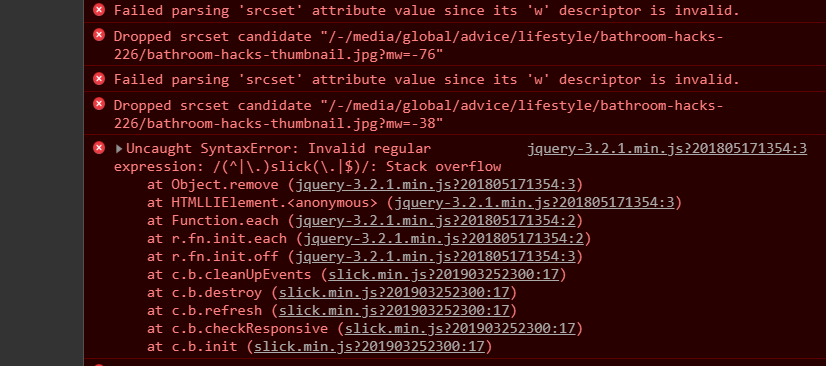
 JetmirAhmati
on 1 Apr 2019
JetmirAhmati
on 1 Apr 2019
Related issues
 xitongzou
·
3Comments
xitongzou
·
3Comments
 xtatanx
·
3Comments
xtatanx
·
3Comments
 eirikrlee
·
3Comments
eirikrlee
·
3Comments
 hoghamburg
·
3Comments
hoghamburg
·
3Comments
 msavov
·
3Comments
msavov
·
3Comments
Most helpful comment
I figured this out.
Just add "overflow:hidden" style to the parent element that wraps the carousel and it should be fixed.
I struggled to fix this for almost 2 days and it was just this small mistake 👍