Slate: Select all then delete leaves empty blocks
Do you want to request a _feature_ or report a _bug_?
Bug
What's the current behavior?
Using the plaintext example
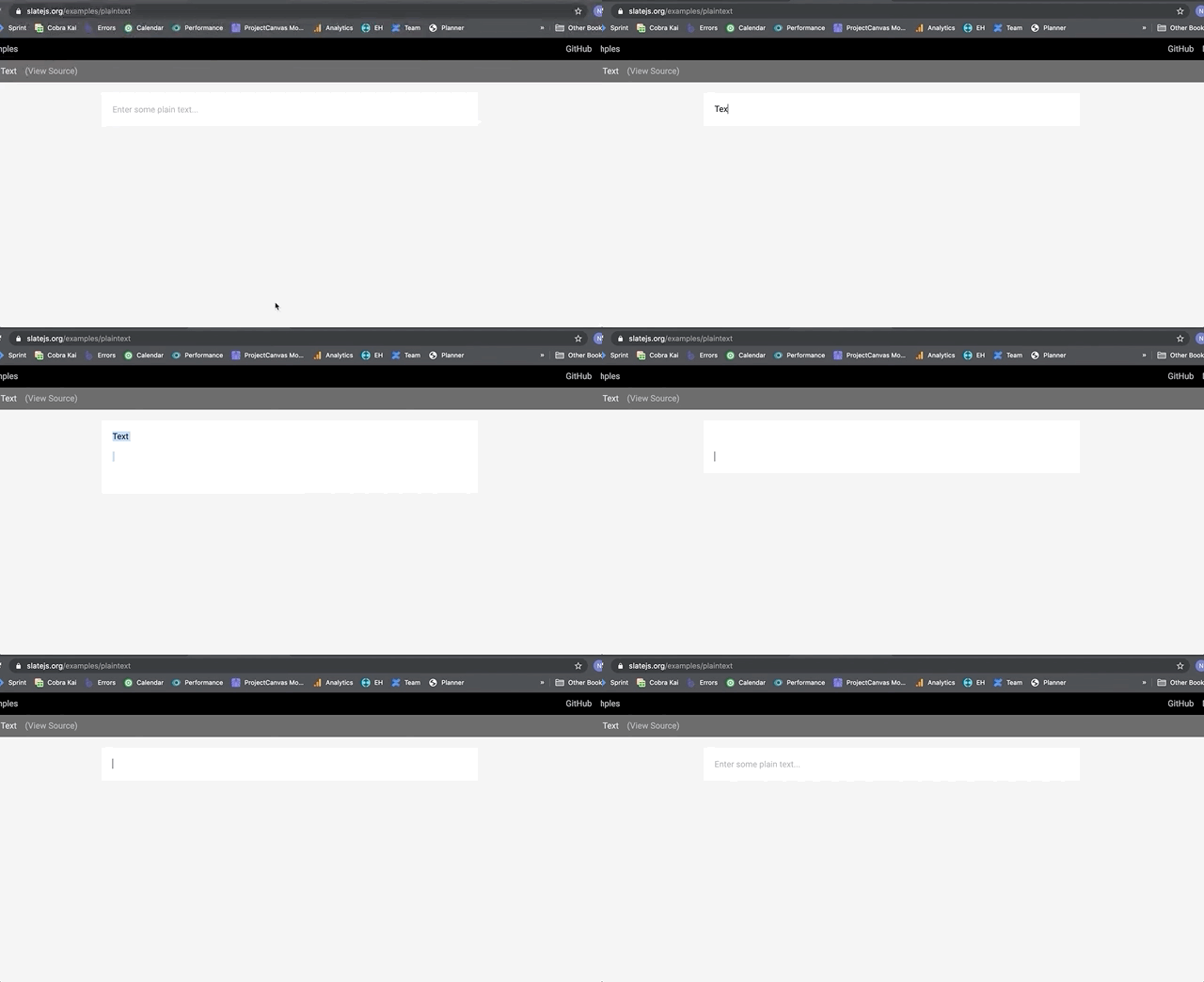
- Enter a line of text
- Press return 3 or 4 times
- Ctrl + A (select all), delete
Observe that the placeholder is not displayed and there are empty blocks still in the editor. To get the placeholder to display again you must press delete a few times (equal to the number of empty blocks) then type a character and press delete again (only removes the last empty not when a character has been removed).
Slate: 0.XX.X (Production demo)
Browser: Chrome
OS: Mac
What's the expected behavior?
Select all + delete removes all nodes returning the editor to the placeholder.
 nikglavin
All 6 comments
Hi @nikglavin , I went to go check this out (on my windows box so not full OS parity here) and I couldn't reproduce the behavior. Instead, I saw that the delete worked but it left the selection expanded over the placeholder.
If you have a couple of moments, it'd help if you could double check that the bug is still there (or not) on the examples.
Thanks!
 CameronAckermanSEL
on 7 May 2020
CameronAckermanSEL
on 7 May 2020
Hi @CameronAckermanSEL the issue still exists. I think what you experienced is the issue. When there are empty blocks in the editor they are not being removed with: select all -> delete
nikglavin
on 13 May 2020
I can also reproduce this issue on the latest richtext demo.
I've attached a video.
The leftover second block can probably be normalized away, but the placeholder still doesn't show up even with only one block remaining.
As far as I can tell, the conditions for adding the placeholder seem to be satisfied in the broken state, but for some reason the placeholder is still not showing up.
 ktrieu
on 12 Aug 2020
ktrieu
on 12 Aug 2020
I can also easily reproduce it on the demo.
If it helps: the same issue also occurs when a void node is the last item. This item will not be selected and thus will not be deleted when pressing mod+a.
Could the reason be that the anchor and focus of the last item are the same and so it will not get selected?
 pkeuter
on 12 Aug 2020
pkeuter
on 12 Aug 2020
This is because editor.deleteFragment unhangs the selection before deletion. The last line is blank, so the block is excluded from the range and can't be deleted.
You can override deleteFragment to specify {hanging: true} in the transform:
// import {Range} from 'slate';

const fixDeleteFragment = (editor) => {
  // Fixes https://github.com/ianstormtaylor/slate/issues/3605
  editor.deleteFragment = () => {
    const { selection } = editor

    if (selection && Range.isExpanded(selection)) {
      Transforms.delete(editor, {hanging: true})
    }
  }
  return editor;
}

// Which is a decorator you can use along with e.g. `withReact()`:
// const editor = useMemo(() => fixDeleteFragment(withHistory(withReact(createEditor()))), [])
 emcmanus
on 17 Aug 2020
emcmanus
on 17 Aug 2020
This is because
editor.deleteFragmentunhangs the selection before deletion. The last line is blank, so the block is excluded from the range and can't be deleted.You can override
deleteFragmentto specify{hanging: true}in the transform:// import {Range} from 'slate'; const fixDeleteFragment = (editor) => { // Fixes https://github.com/ianstormtaylor/slate/issues/3605 editor.deleteFragment = () => { const { selection } = editor if (selection && Range.isExpanded(selection)) { Transforms.delete(editor, {hanging: true}) } } return editor; } // Which is a decorator you can use along with e.g. `withReact()`: // const editor = useMemo(() => fixDeleteFragment(withHistory(withReact(createEditor()))), [])I tried this solution, but doesn't seem to work.
There's a difference in behavior:
- Type some text and hit enter a few times, then select all and delete. This doesn't show the placeholder.
- Type some text and hit enter a few times, type some text, select all and delete. This shows a 'selected' placeholder.
 rsdrsd
on 29 Oct 2020
rsdrsd
on 29 Oct 2020
Related issues
 markolofsen
·
3Comments
markolofsen
·
3Comments
 vdms
·
3Comments
vdms
·
3Comments
 gorillatron
·
3Comments
gorillatron
·
3Comments
 Slapbox
·
3Comments
Slapbox
·
3Comments
 ianstormtaylor
·
3Comments
ianstormtaylor
·
3Comments
Most helpful comment
This is because
editor.deleteFragmentunhangs the selection before deletion. The last line is blank, so the block is excluded from the range and can't be deleted.You can override
deleteFragmentto specify{hanging: true}in the transform: