Slate: Pasted HTML content from Google Docs in wrong order and cursor is not at end
Do you want to request a _feature_ or report a _bug_?
Report a bug.
What's the current behavior?
I have a very basic Google doc: https://docs.google.com/document/d/161uHSpY9kLytIf_izWSeTvVQ5xL5zAZo9D5HbQAxehY/edit?usp=sharing
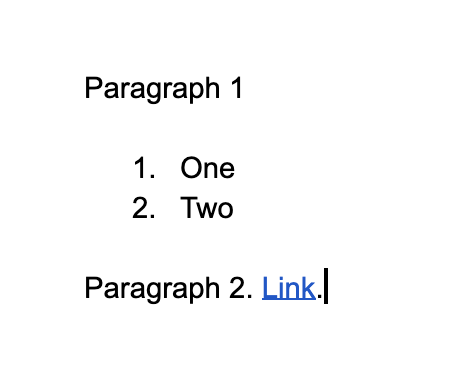
When I select the text in the google doc there is a little bit of selectable whitespace at the end of the last sentence:
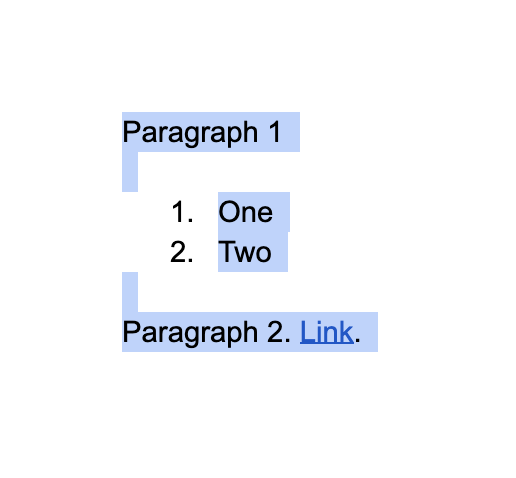
If I copy that and then paste it into the slate paste HTML example (https://www.slatejs.org/examples/paste-html), this is the result:
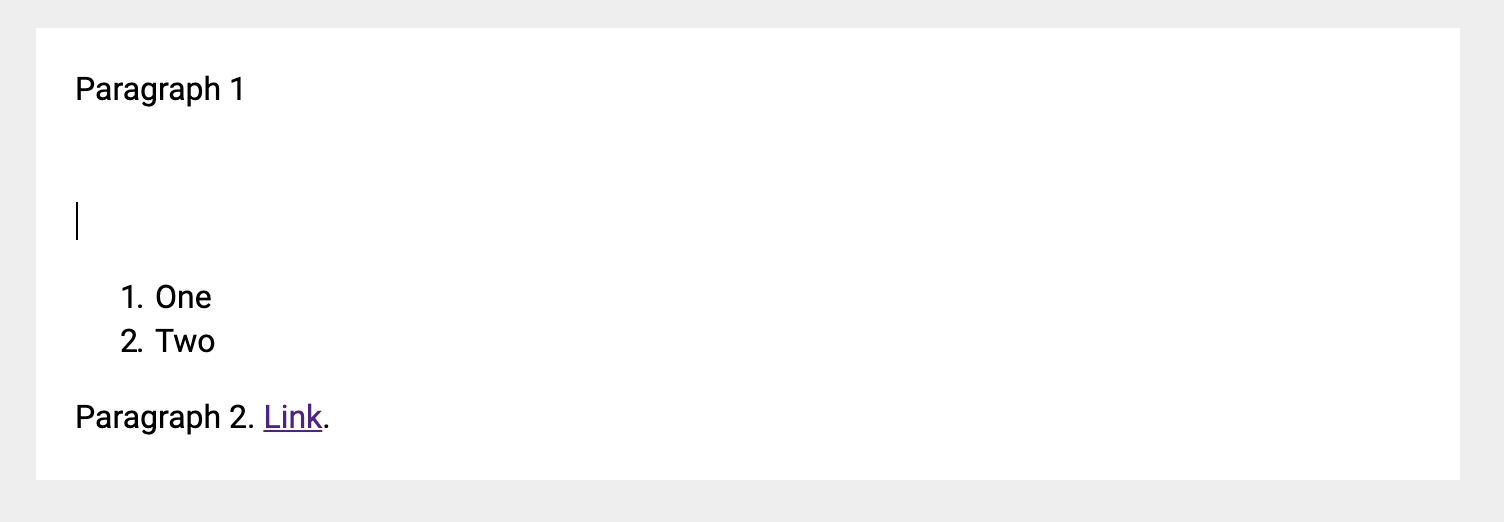
Note the extra space after the first paragraph and how the cursor ends up after the first paragraph after pasting instead of at the end of the entire pasted content.
If I exclude the extra whitespace at the end of the Google doc:
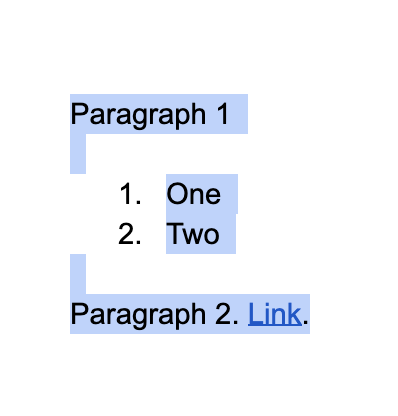
And paste that in the example, even stranger things happen:
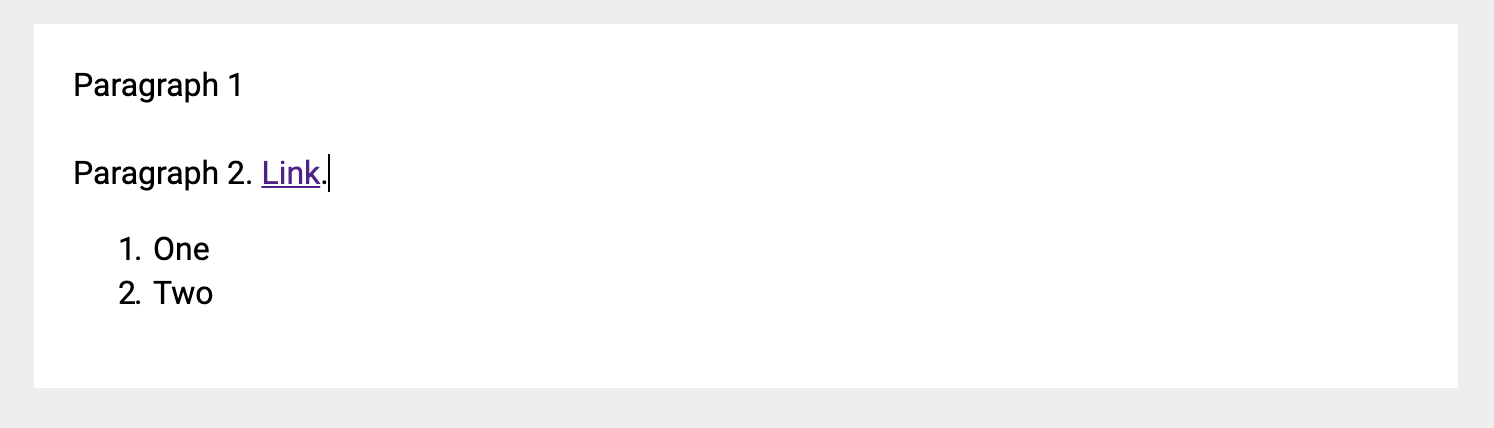
The document was pasted out of order. Now the last paragraph is above the ordered list.
For that last example, the link seems to be an important. If I remove the link, pasting with or without the the extra whitespace leaves the paragraphs in the correct order but with the extra newlines and the cursor in the wrong place:
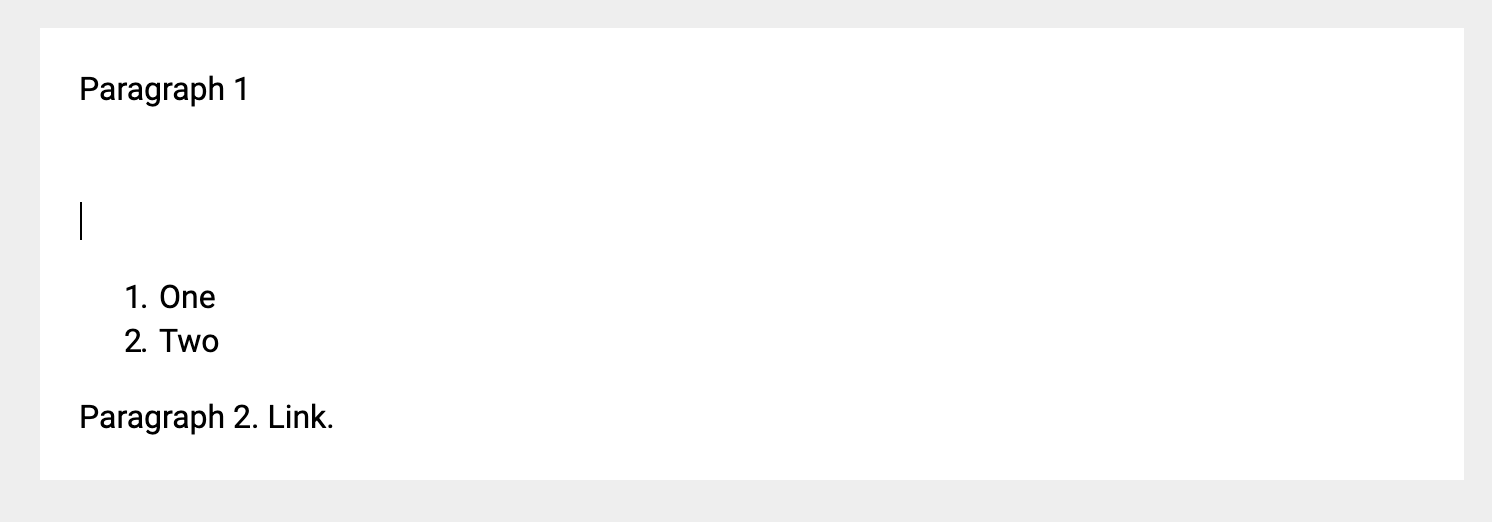
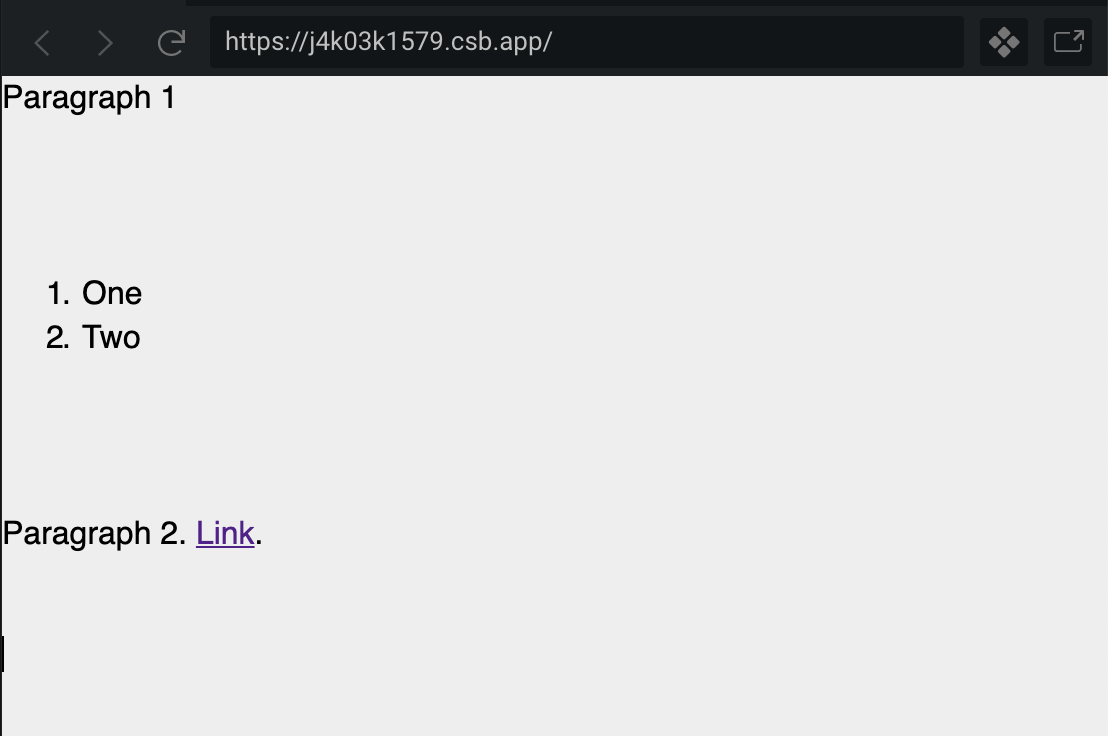
I found this code sandbox of Slate 0.44.9 with copy-and-paste html implemented with the old slate-html-serializer plugin: https://codesandbox.io/s/j4k03k1579
If I paste with or without the extra whitespace, the document is not re-ordered and the cursor always ends up at the end of the pasted content. So, it seems like this issue only started happening in the 0.5X.X rewrite.
Debug Info
To try to debug this, I made a minimal code sandbox for Slate 0.57.1 with just the PasteHtmlExample component: https://codesandbox.io/s/slate-minimal-paste-html-example-gojyi
I added some console.logs to get the HTML content of the paste and the resulting fragment that is passed to Transforms.insertFragment. Here are the results for pasting the two cases I mentioned above.
This is the HTML content of the paste with the extra whitespace at the end:
whitespace.html
<meta charset="utf-8" /><meta charset="utf-8" /><b
  style="font-weight:normal;"
  id="docs-internal-guid-d1a1747d-7fff-f3f1-4e2c-6a97f2f0102c"
  ><p dir="ltr" style="line-height:1.38;margin-top:0pt;margin-bottom:0pt;">
    <span
      style="font-size:11pt;font-family:Arial;color:#000000;background-color:transparent;font-weight:400;font-style:normal;font-variant:normal;text-decoration:none;vertical-align:baseline;white-space:pre;white-space:pre-wrap;"
      >Paragraph 1</span
    >
  </p>
  <br />
  <ol style="margin-top:0;margin-bottom:0;">
    <li
      dir="ltr"
      style="list-style-type:decimal;font-size:11pt;font-family:Arial;color:#000000;background-color:transparent;font-weight:400;font-style:normal;font-variant:normal;text-decoration:none;vertical-align:baseline;white-space:pre;"
    >
      <p
        dir="ltr"
        style="line-height:1.38;margin-top:0pt;margin-bottom:0pt;"
        role="presentation"
      >
        <span
          style="font-size:11pt;font-family:Arial;color:#000000;background-color:transparent;font-weight:400;font-style:normal;font-variant:normal;text-decoration:none;vertical-align:baseline;white-space:pre;white-space:pre-wrap;"
          >One</span
        >
      </p>
    </li>
    <li
      dir="ltr"
      style="list-style-type:decimal;font-size:11pt;font-family:Arial;color:#000000;background-color:transparent;font-weight:400;font-style:normal;font-variant:normal;text-decoration:none;vertical-align:baseline;white-space:pre;"
    >
      <p
        dir="ltr"
        style="line-height:1.38;margin-top:0pt;margin-bottom:0pt;"
        role="presentation"
      >
        <span
          style="font-size:11pt;font-family:Arial;color:#000000;background-color:transparent;font-weight:400;font-style:normal;font-variant:normal;text-decoration:none;vertical-align:baseline;white-space:pre;white-space:pre-wrap;"
          >Two</span
        >
      </p>
    </li>
  </ol>
  <br />
  <p dir="ltr" style="line-height:1.38;margin-top:0pt;margin-bottom:0pt;">
    <span
      style="font-size:11pt;font-family:Arial;color:#000000;background-color:transparent;font-weight:400;font-style:normal;font-variant:normal;text-decoration:none;vertical-align:baseline;white-space:pre;white-space:pre-wrap;"
      >Paragraph 2. </span
    ><a href="https://www.google.com/" style="text-decoration:none;"
      ><span
        style="font-size:11pt;font-family:Arial;color:#1155cc;background-color:transparent;font-weight:400;font-style:normal;font-variant:normal;text-decoration:underline;-webkit-text-decoration-skip:none;text-decoration-skip-ink:none;vertical-align:baseline;white-space:pre;white-space:pre-wrap;"
        >Link</span
      ></a
    ><span
      style="font-size:11pt;font-family:Arial;color:#000000;background-color:transparent;font-weight:400;font-style:normal;font-variant:normal;text-decoration:none;vertical-align:baseline;white-space:pre;white-space:pre-wrap;"
      >.</span
    >
  </p></b
><br class="Apple-interchange-newline" />
And, this is the HTML without the extra whitespace:
no_whitespace.html
<meta charset="utf-8" /><meta charset="utf-8" /><b
  style="font-weight:normal;"
  id="docs-internal-guid-d045a6c5-7fff-0621-9d25-64383cd41038"
  ><p dir="ltr" style="line-height:1.38;margin-top:0pt;margin-bottom:0pt;">
    <span
      style="font-size:11pt;font-family:Arial;color:#000000;background-color:transparent;font-weight:400;font-style:normal;font-variant:normal;text-decoration:none;vertical-align:baseline;white-space:pre;white-space:pre-wrap;"
      >Paragraph 1</span
    >
  </p>
  <br />
  <ol style="margin-top:0;margin-bottom:0;">
    <li
      dir="ltr"
      style="list-style-type:decimal;font-size:11pt;font-family:Arial;color:#000000;background-color:transparent;font-weight:400;font-style:normal;font-variant:normal;text-decoration:none;vertical-align:baseline;white-space:pre;"
    >
      <p
        dir="ltr"
        style="line-height:1.38;margin-top:0pt;margin-bottom:0pt;"
        role="presentation"
      >
        <span
          style="font-size:11pt;font-family:Arial;color:#000000;background-color:transparent;font-weight:400;font-style:normal;font-variant:normal;text-decoration:none;vertical-align:baseline;white-space:pre;white-space:pre-wrap;"
          >One</span
        >
      </p>
    </li>
    <li
      dir="ltr"
      style="list-style-type:decimal;font-size:11pt;font-family:Arial;color:#000000;background-color:transparent;font-weight:400;font-style:normal;font-variant:normal;text-decoration:none;vertical-align:baseline;white-space:pre;"
    >
      <p
        dir="ltr"
        style="line-height:1.38;margin-top:0pt;margin-bottom:0pt;"
        role="presentation"
      >
        <span
          style="font-size:11pt;font-family:Arial;color:#000000;background-color:transparent;font-weight:400;font-style:normal;font-variant:normal;text-decoration:none;vertical-align:baseline;white-space:pre;white-space:pre-wrap;"
          >Two</span
        >
      </p>
    </li>
  </ol>
  <br /><span
    style="font-size:11pt;font-family:Arial;color:#000000;background-color:transparent;font-weight:400;font-style:normal;font-variant:normal;text-decoration:none;vertical-align:baseline;white-space:pre;white-space:pre-wrap;"
    >Paragraph 2. </span
  ><a href="https://www.google.com/" style="text-decoration:none;"
    ><span
      style="font-size:11pt;font-family:Arial;color:#1155cc;background-color:transparent;font-weight:400;font-style:normal;font-variant:normal;text-decoration:underline;-webkit-text-decoration-skip:none;text-decoration-skip-ink:none;vertical-align:baseline;white-space:pre;white-space:pre-wrap;"
      >Link</span
    ></a
  ><span
    style="font-size:11pt;font-family:Arial;color:#000000;background-color:transparent;font-weight:400;font-style:normal;font-variant:normal;text-decoration:none;vertical-align:baseline;white-space:pre;white-space:pre-wrap;"
    >.</span
  ></b
>
This is the diff between the two: http://www.mergely.com/Hy4rKwpT/
The fragment passed to insertFragment with the extra whitespace:
whitespace.json
[
  {
    "type": "paragraph",
    "children": [
      {
        "text": "Paragraph 1"
      }
    ]
  },
  {
    "text": "\n"
  },
  {
    "type": "numbered-list",
    "children": [
      {
        "type": "list-item",
        "children": [
          {
            "type": "paragraph",
            "children": [
              {
                "text": "One"
              }
            ]
          }
        ]
      },
      {
        "type": "list-item",
        "children": [
          {
            "type": "paragraph",
            "children": [
              {
                "text": "Two"
              }
            ]
          }
        ]
      }
    ]
  },
  {
    "text": "\n"
  },
  {
    "type": "paragraph",
    "children": [
      {
        "text": "Paragraph 2. "
      },
      {
        "type": "link",
        "url": "https://www.google.com/",
        "children": [
          {
            "text": "Link"
          }
        ]
      },
      {
        "text": "."
      }
    ]
  },
  {
    "text": "\n"
  }
]
The fragment passed to insertFragment with no extra whitespace:
no_whitespace.json
[
  {
    "type": "paragraph",
    "children": [
      {
        "text": "Paragraph 1"
      }
    ]
  },
  {
    "text": "\n"
  },
  {
    "type": "numbered-list",
    "children": [
      {
        "type": "list-item",
        "children": [
          {
            "type": "paragraph",
            "children": [
              {
                "text": "One"
              }
            ]
          }
        ]
      },
      {
        "type": "list-item",
        "children": [
          {
            "type": "paragraph",
            "children": [
              {
                "text": "Two"
              }
            ]
          }
        ]
      }
    ]
  },
  {
    "text": "\nParagraph 2. "
  },
  {
    "type": "link",
    "url": "https://www.google.com/",
    "children": [
      {
        "text": "Link"
      }
    ]
  },
  {
    "text": "."
  }
]
And, diff between the two: http://www.mergely.com/mbMQgV4P/
Slate: 0.57.1
Browser: Chrome
OS: Mac
What's the expected behavior?
I expect the pasted content to look like it did in the old version of Slate, and that the cursor is at the end of the content after pasting:
 thallada
>All comments
I tried to reproduce the structure of the Google doc completely within the Slate editor and then printed out editor.children:
editor.children
[
  {
    "type": "paragraph",
    "children": [
      {
        "text": "Paragraph 1"
      }
    ]
  },
  {
    "type": "paragraph",
    "children": [
      {
        "text": ""
      }
    ]
  },
  {
    "type": "numbered-list",
    "children": [
      {
        "type": "list-item",
        "children": [
          {
            "type": "paragraph",
            "children": [
              {
                "text": "One"
              }
            ]
          }
        ]
      },
      {
        "type": "list-item",
        "children": [
          {
            "type": "paragraph",
            "children": [
              {
                "text": "Two"
              }
            ]
          }
        ]
      }
    ]
  },
  {
    "type": "paragraph",
    "children": [
      {
        "text": ""
      }
    ]
  },
  {
    "type": "paragraph",
     "children": [
       {
          "text": "Paragraph 2. "
       },
       {
         "type": "link",
         "url": "https://www.google.com/",
         "children": [
           {
             "text": "Link"
           }
         ]
       },
       {
         "text": "."
       }
     ]
  }
]
I notice 3 things about this structure that was different from what is pasted:
- There is no
\nin thetextvalues. - Where there is a
{ "text": "\n" }in the pasted fragment, Slate instead has an empty paragraph:{ "type": "paragraph", "children": [{ "text": "" }] }. - Top-level text and link nodes in the pasted fragment are wrapped in a top-level paragraph node in Slate.
It seems like Slate does not like to have inline-type nodes in the top-level editor.children array.
It looks like deserializer was outputting \ns because that's how it deserializes the <br> tag:
To fix that, I deleted that else block and changed it to deserialize into an empty paragraph instead:
if (el.nodeName === 'BR') {
  return jsx('element', { type: 'paragraph' }, [{ text: '' }])
}
This fixed the extra whitespace and the cursor positioning after paste.
I also wrote a small band-aid patch in the withHtml editor.insertData override that attempts to wrap any top-level text or inline nodes in paragraphs:
const wrapTopLevelInlineNodesInParagraphs = (editor, fragment) => {
  let inlineNodes = []
  const newFragments = []

  const maybePushInlineNodeParagraph = () => {
    if (inlineNodes.length > 0) {
      newFragments.push(jsx("element", { type: "paragraph" }, inlineNodes))
      inlineNodes = []
    }
  }

  fragment.forEach(node => {
    if (Text.isText(node) || Editor.isInline(editor, node)) {
      inlineNodes.push(node)
    } else {
      maybePushInlineNodeParagraph()
      newFragments.push(node)
    }
  })
  maybePushInlineNodeParagraph()

  return newFragments
}
Which I use in the withHtml plugin like this:
editor.insertData = data => {
  const html = data.getData("text/html")

  if (html) {
    const parsed = new DOMParser().parseFromString(html, "text/html")
    const fragment = deserialize(parsed.body)
    let fragmentWithOnlyBlocks = fragment
    if (Array.isArray(fragment)) {
      fragmentWithOnlyBlocks = wrapTopLevelInlineNodesInParagraphs(
        editor,
        fragment
      )
    }
    Transforms.insertFragment(editor, fragmentWithOnlyBlocks)
    return
  }

  insertData(data)
}

return editor
This fixed the paragraphs out of order issue.
Not sure how to integrate these fixes into Slate as a proper PR. I'm also not confident that this patch will not corrupt other valid paste cases that I'm not thinking of.
Here's a code sandbox of the minimal PasteHTMLExample with these fixes: https://codesandbox.io/s/slate-minimal-paste-html-example-with-fixes-p3nxd
thallada
on 22 Jan 2020
Related issues
 gorillatron
·
3Comments
gorillatron
·
3Comments
 ianstormtaylor
·
3Comments
ianstormtaylor
·
3Comments
 ezakto
·
3Comments
ezakto
·
3Comments
 vdms
·
3Comments
vdms
·
3Comments
 markolofsen
·
3Comments
markolofsen
·
3Comments
Most helpful comment
I tried to reproduce the structure of the Google doc completely within the Slate editor and then printed out
editor.children:editor.children
I notice 3 things about this structure that was different from what is pasted:
\nin thetextvalues.{ "text": "\n" }in the pasted fragment, Slate instead has an empty paragraph:{ "type": "paragraph", "children": [{ "text": "" }] }.It seems like Slate does not like to have inline-type nodes in the top-level
editor.childrenarray.It looks like
deserializerwas outputting\ns because that's how it deserializes the<br>tag:https://github.com/ianstormtaylor/slate/blob/8cd9b793528eb76a4a76940e022854cf33419bc4/site/examples/paste-html.js#L47-L49
To fix that, I deleted that else block and changed it to deserialize into an empty paragraph instead:
This fixed the extra whitespace and the cursor positioning after paste.
I also wrote a small band-aid patch in the
withHtmleditor.insertDataoverride that attempts to wrap any top-level text or inline nodes in paragraphs:Which I use in the
withHtmlplugin like this:This fixed the paragraphs out of order issue.
Not sure how to integrate these fixes into Slate as a proper PR. I'm also not confident that this patch will not corrupt other valid paste cases that I'm not thinking of.
Here's a code sandbox of the minimal
PasteHTMLExamplewith these fixes: https://codesandbox.io/s/slate-minimal-paste-html-example-with-fixes-p3nxd