Slate: Inline void elements cannot be deleted when selected
Do you want to request a _feature_ or report a _bug_?
This is a bug report
What's the current behavior?
You can reproduce this easily on the Slate mentions example. Go here: https://www.slatejs.org/examples/mentions
Click one of the mentions so that it's highlighted with the custom rounded blue border. Now press backspace or delete. You can't delete it when it is selected. If you press right arrow and then backspace it will work fine.

It seems that block voids work, since examples/images works fine.
Slate: 0.57.1
Browser: Version 79.0.3945.117 (Official Build) (64-bit)
OS: macOS 10.15.1 (19B88)
What's the expected behavior?
I would expect that pressing delete would delete the mention.
 laverdet
All 13 comments
Another issue with void elements, again reproducible in the examples. To reproduce:
- Visit the image example: https://www.slatejs.org/examples/images
- Click the image icon and paste an image URL (try https://source.unsplash.com/kFrdX5IeQzI)
- Cmd+A
- Delete
This will delete all text up to the first image, leaving the rest untouched. It seems to only happen when an image is the last element in the editor.

laverdet
on 22 Jan 2020
This will delete all text up to the first image, leaving the rest untouched. It seems to only happen when an image is the last element in the editor.
This also happens if there is an empty paragraph as last block.
 skogsmaskin
on 18 Feb 2020
skogsmaskin
on 18 Feb 2020
I think it happens whenever a void element is at the start or end of the document.
if you put a checkbox at the top of the doc, it does the same to the actual checkbox.
 abhishekbhardwaj
on 4 Mar 2020
abhishekbhardwaj
on 4 Mar 2020
@laverdet @skogsmaskin I was able to fix this last image issue by doing the following in my withImages plugin:
editor.deleteFragment = () => {
    const { selection } = editor;

    if (selection && Range.isExpanded(selection)) {
      const images = Array.from(
        Editor.nodes(editor, {
          match: n => n.type === TYPES.IMAGE
        })
      );

      if (!!images.length) {
        // We're only deleting the last image as that's what is always left behind.
        // Slate is handling the rest easily.
        const [, cellPath] = images[images.length - 1];
        Transforms.delete(editor, {
          at: cellPath,
          voids: true
        });
      }
    }

    deleteFragment();
  };
We just delete the last image in the selection and leave the rest to Slate
abhishekbhardwaj
on 7 Mar 2020
Has anyone figured out a workaround for the first issue (i.e., unable to delete selected inline void elements)? I'm running into the same issue right now.
 calvinwyoung
on 16 May 2020
calvinwyoung
on 16 May 2020
I'd also be interested in a solid solution to this.
Here's my current approach, trying to add delete support in the mentions example when you click on a specific inline mention.
// onKeyDown

if (event.key === 'Backspace') {
  const { selection } = editor;
  if (selection && Range.isCollapsed(selection)) {
    const currentNode = Node.parent(editor, selection.anchor.path);
    if (Element.isElement(currentNode)) {
      if (editor.isVoid(currentNode as Element)) {
        event.preventDefault();
        editor.deleteBackward('block');
      }
    }
  }
}
It works but feels a bit messy (I've only been developing on Slate for a day).
Problems I see with this:
- getting the current element is a little weird, because when the void element is selected the path actually points to its text leaf, whereas I actually need that leaf's parent. is there a better way to do this?
deleteBackward('block')seems to work and only deletes the mention element, but I'm unsure if it's the right thing to call
 idevelop
on 29 May 2020
idevelop
on 29 May 2020
seems to be a browser specific issue, it's working in Firefox for Mac.
 vujevits
on 29 May 2020
vujevits
on 29 May 2020
So we have 3 cases:
- All browsers – select all and delete where the last element is void, or a void element followed by one (it's working with two) element with empty text – it's deleting everything except these last elements. Note that without using the history (undo), it's working. Sandbox. Refresh the sandbox and delete to see it working, undo and delete to see the bug.
- Chrome – select a specific void element and delete – it's not deleting. Sandbox.
- Chrome – select all and delete where the first element is void – it's not deleting anything. Sandbox.
 zbeyens
on 29 May 2020
zbeyens
on 29 May 2020
I think I have a fix for case #1. The problem is that Editor.unhangRange() is too aggressively trimming the end of selections that contain inline voids.
Initially, my solution was to overwrite Editor.unhangRange() to handle inline voids. However, I discovered that unhangRange() caused other small UX problems, and I couldn't find of a single situation in which it actually improved UX. So, I decided to overwrite Editor.unhangRange() like this:
Editor.unhangRange(
  editor: Editor,
  range: Range,
  options: {
    voids?: boolean
  } = {}
): Range => {
  return range;
}
It simply returns the range unmodified. All of the bugs and other UX issues seem to have gone away, and I have yet to discover any negative consequence of this change.
What was the original purpose of Editor.unhangRange() anyway? Is it meant to fix a bug? Improve UX in some way?
 camjosen
on 22 Jun 2020
camjosen
on 22 Jun 2020
Also experiencing the issue with images (Chrome, macOS - current demo). Apart from the problem mentioned by @laverdet, when an image is the only element in the editor, nothing can be inserted after it. So basically, when an image is inserted first, it's impossible to add any text. Also, adding an image element keeps placeholder text in place...
 pch
on 2 Jul 2020
pch
on 2 Jul 2020
@pch This issue can be overcome by normalizing your editor after every Transform, appending an empty paragraph below the last node if it is a void type. Maybe there is a better solution though.
Here is a possibly related void deletion issue:
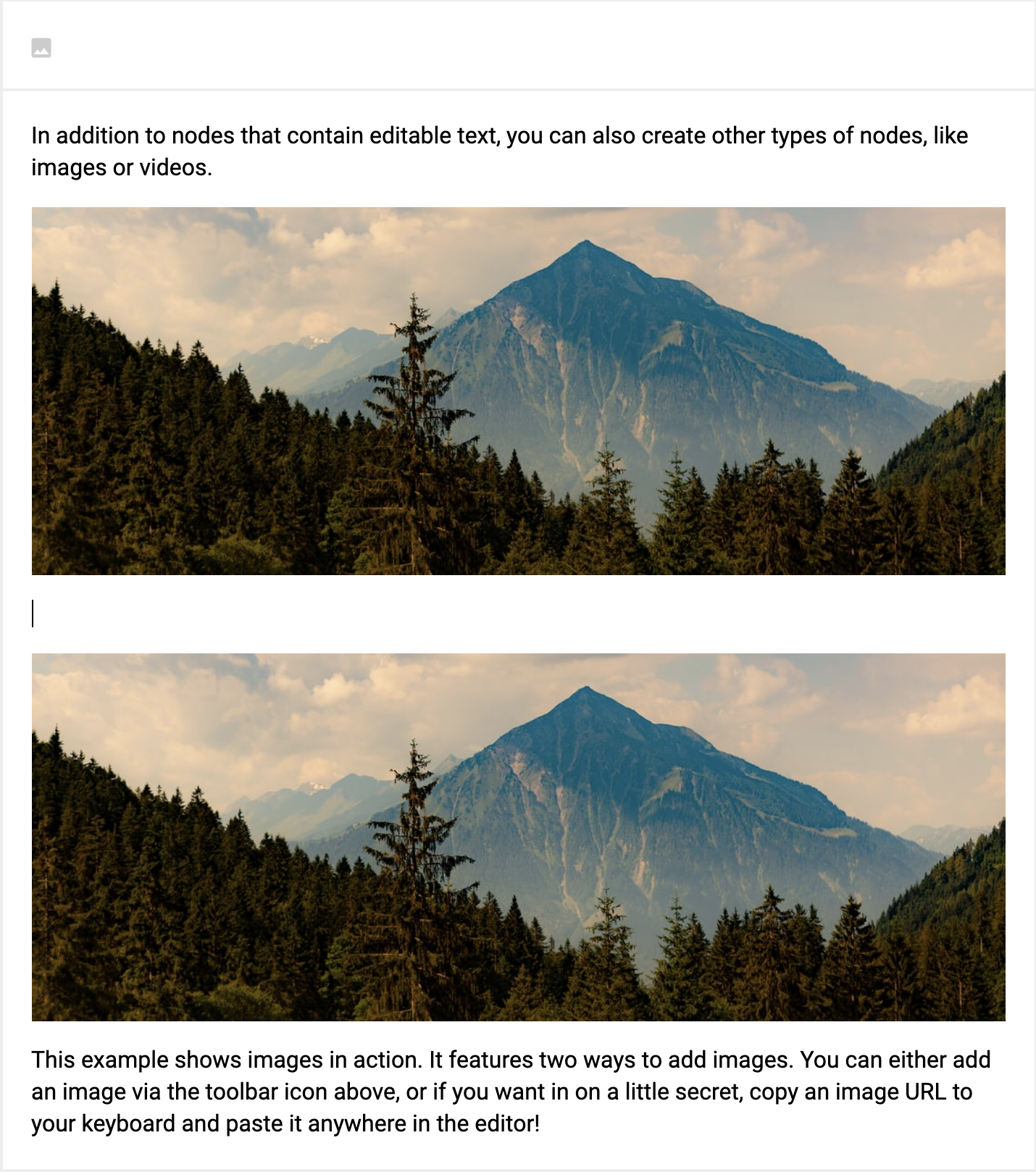
It is not possible to delete the empty paragraph in between these two images. I'm experiencing this with any two void blocks with a non-void between them. I have been trying to override deleteForward and deleteBackward for editable nodes without success.
Is this a completely separate issue I should open?
 calliday
on 6 Jul 2020
calliday
on 6 Jul 2020
@calliday I made an issue for what you describe: https://github.com/ianstormtaylor/slate/issues/3991
 bryanph
on 23 Nov 2020
bryanph
on 23 Nov 2020
Thank you!
On Mon, Nov 23, 2020 at 4:55 AM Bryan Haakman notifications@github.com
wrote:
@calliday https://github.com/calliday I made an issue for what you
describe: #3991 https://github.com/ianstormtaylor/slate/issues/3991—
You are receiving this because you were mentioned.
Reply to this email directly, view it on GitHub
https://github.com/ianstormtaylor/slate/issues/3456#issuecomment-732115877,
or unsubscribe
https://github.com/notifications/unsubscribe-auth/AKMKXPKAPVIDXS2C6EEGESTSRJET5ANCNFSM4KKAB4RQ
.
calliday
on 23 Nov 2020
Related issues
 AlexeiAndreev
·
3Comments
AlexeiAndreev
·
3Comments
 ianstormtaylor
·
3Comments
ianstormtaylor
·
3Comments
 yalu
·
3Comments
yalu
·
3Comments
 bunterWolf
·
3Comments
bunterWolf
·
3Comments
 vdms
·
3Comments
vdms
·
3Comments
Most helpful comment
seems to be a browser specific issue, it's working in Firefox for Mac.