Slate: [docs] Explain the hovering-menu example
Can someone please explain the hovering-menu example? I am primarily interested in how a new selection is detected in order to show/hide the menu. I am not seeing any mouse handling code, so wondering what is triggering the updateMenu() function.
Also why does HoveringMenu capture the initialValue in state? Is the state being continuously updated as the user type into the editor?
My goal is to use Material-UI's Popper component to create the hover-menu. They have a similar example here. I just need to know how to hook it up to Slate.
Thanks in advance.
 nareshbhatia
All 7 comments
@nareshbhatia Line 96 explains the (dis)appearance of the hovering menu. Selection is detected from value.selection object. When the selection is collapsed, style attribute is being removed which is responsible for setting the element's opacity to 1. With this removed, the element is hidden again.
Yes, the value changes not only while typing but also with cursor movement. That's how we detect the selection, inlineBlocks, marks, etc. Keep above example in mind, the style is changed again when value/component changes.
 moinism
on 29 Aug 2019
moinism
on 29 Aug 2019
@moinism, thank you so much. Your explanation has helped my understanding a lot.
I have committed an initial implementation of the HoveringMenu in my repo here. Note that I have converted the example code to use React Hooks. This simplifies the implementation a lot. I am also using TypeScript to demonstrate its use with Slate (I don't recollect seeing any TypeScript examples).
I would love for you and the members of this community to give me feedback on my Slate editor and contribute to make it better. I am aiming to create a simple medium-like editor using Slate + TypeScript + React Hooks.
nareshbhatia
on 31 Aug 2019
One follow-up question: in the Slate example, when I click on any button in the hovering menu, the menu stays on - it does not disappear. I am able to click on other buttons to add more styles.
In my example, as soon as I click on a button, the menu disappears. The reason is that selection.isBlurred becomes true. How does the slate example prevent this?
nareshbhatia
on 31 Aug 2019
Can anyone please help on this issue? I have the code setup just like the hover example, however as soon as I click on the hover menu, selection.isBlurred becomes true and the entire menu disappears. In the real hover example, selection.isBlurred remains false and hence the menu remains visible - and that's the behavior I want.
Here's the relavant code in my repo: https://github.com/nareshbhatia/slate-editor/blob/master/src/SlateEditor/HoverMenu.tsx#L61-L79
Here's a small screenshot showing the hover menu:
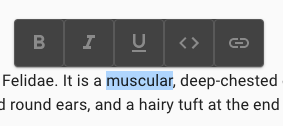
Thanks in advance.
nareshbhatia
on 5 Sep 2019
Hi @nareshbhatia , this issue tracker is not ideal for asking for support on the examples or slate usage. If you have a question, please drop by the slack channel.
Thanks!
 CameronAckermanSEL
on 6 Sep 2019
CameronAckermanSEL
on 6 Sep 2019
Thanks, @CameronAckermanSEL. Will do.
nareshbhatia
on 7 Sep 2019
For anyone coming through who can't jump into the Slack for any reason, be sure the buttons in your toolbar are bound to onMouseDown rather than onClick and to call preventDefault on the event so that the button itself doesn't end up grabbing focus.
 randallagordon
on 16 Oct 2019
randallagordon
on 16 Oct 2019
Related issues
 AlexeiAndreev
·
3Comments
AlexeiAndreev
·
3Comments
 bengotow
·
3Comments
bengotow
·
3Comments
 vdms
·
3Comments
vdms
·
3Comments
 chrpeter
·
3Comments
chrpeter
·
3Comments
 Slapbox
·
3Comments
Slapbox
·
3Comments
Most helpful comment
For anyone coming through who can't jump into the Slack for any reason, be sure the buttons in your toolbar are bound to
onMouseDownrather thanonClickand to callpreventDefaulton the event so that the button itself doesn't end up grabbing focus.