Slate: [bug] The cursor position is wrong when the editor first gets focus
Do you want to request a _feature_ or report a _bug_?
bug
What's the current behavior?
There are multiple lines of text in the editor.
Let's first let the editor lose focus. Then, we simply click on the second line in the editor to get the editor to focus.
But the current cursor is not in the second line which we clicked just now.
However, the current cursor is always at the beginning of the first line when the edit get focus first.
What's the expected behavior?
When the editor gets focus for the first time, we hope the cursor staying where the mouse actually clicked.
 CodePlayer
All 10 comments
There is a workaround as follows:
const plugin = {
  onFocus: (event, editor, next) => {
      editor.focus();
      return;
  }
};
Apply this plugin to the editor.
-----------------20190116 Updated-------------------------
Practice has found that doing so may cause some other problems, please try it carefully.
So, who has a better workaround ?
CodePlayer
on 11 Jan 2019
onMouseDown = event => {
    const {focusBlock} = this.editor.value
    const focusElement = focusBlock ? findDOMNode(focusBlock) : null
    const selection = this.editor.value.selection
    const windowSelection = window.getSelection()
    //火狐浏览器在没有聚焦编辑器的时候点击,只会聚焦到文档最开始的位置
    if(windowSelection && focusElement && windowSelection.focusNode !== focusElement && !selection.isFocused){
        const range = document.createRange()
        range.setStart(focusElement, 0)
        range.setEnd(focusElement, 0)
        windowSelection.removeAllRanges()
        windowSelection.addRange(range)
    }
  }

  render() {
    return (
      <div style={{width:'900px',margin:'20px auto'}}>
        <Toolbar getEditor={this.getEditor} />
        <div className='rich-text' ref={element => this.container = element} onMouseDown={this.onMouseDown}>
          <Editor
            plugins={this.state.plugins}
            value={this.state.value}
            onChange={this.onChange}
            ref={this.setEditor}
          />
        </div>
      </div>
    )
  }
I have this problem in firefox, and here's how I fix it. See onMouseDown
Please understand the translation software for English
 136170746
on 16 Jan 2019
136170746
on 16 Jan 2019
Thanks for your contribution @136170746 .
哈哈……我也是中国人。建议你直接向官方提交 pull request 吧,这应该是个通病,都应该会用得到的。
CodePlayer
on 17 Jan 2019
呵呵,搞不来那个,GitHub没那么会用
136170746
on 17 Jan 2019
@136170746 你有在IE 10上使用富文本编辑器的需求么?
CodePlayer
on 18 Jan 2019
@136170746 我在IE上试了下,发现即使使用了polyfill,在IE11上连官方的demo都没法运行,更别提IE10了。
CodePlayer
on 21 Jan 2019
I'm seeing something similar.
You need to have autofocus set to false and use the editor as a controlled input. Here is a code sandbox example of the bug.
Open the console to notice that the onChange handler is logging a selection with null values for both anchor and focus offsets.
This is causing my app to crash... If this is expected behavior, then I'll just wrap the offending logic in a try/catch. But since the next render has a properly formed selection object, I'm guessing this is a bug.
 bkilrain
on 26 Jan 2019
bkilrain
on 26 Jan 2019
@ianstormtaylor Is this a known issue? Instead of having the Selection object with null values for anchor and focus offsets, is it possible to set them to 0 at least?
bkilrain
on 14 Feb 2019
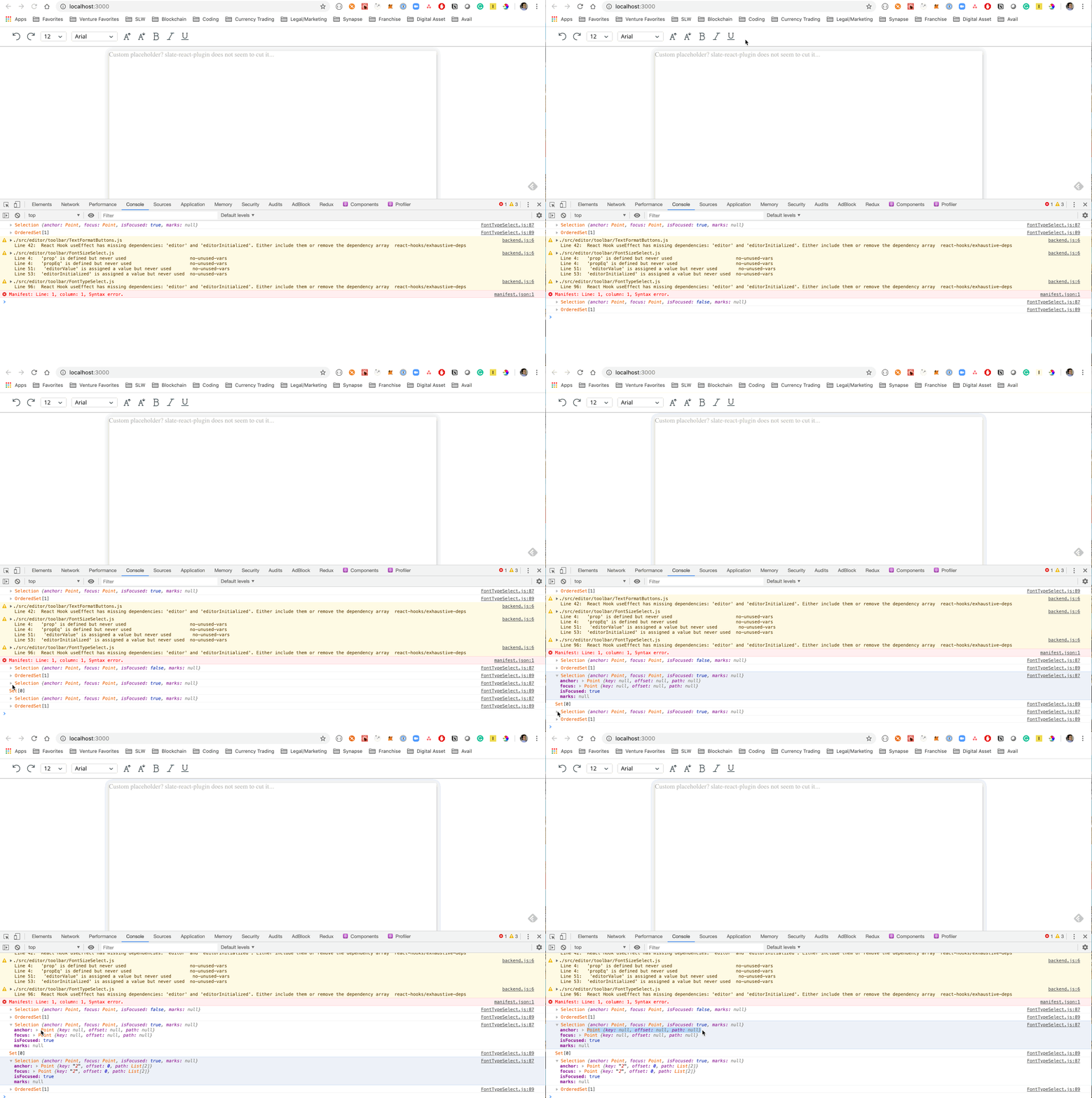
I am experiencing this same bug. I implemented font types using Slate, but when the editor is blurred and then regains focus, the current selection initially is null and then it corrects itself to the correct current selection. This is causing bugs with displaying my font type in a toolbar. See below screen recording.
 BrentFarese
on 22 Aug 2019
BrentFarese
on 22 Aug 2019
I believe that this may be fixed by https://github.com/ianstormtaylor/slate/pull/3093, which has changed a lot of the logic in Slate and slate-react especially. I'm going to close this out, but as always, feel free to open a new issue if it persists for you. Thanks for understanding.
 ianstormtaylor
on 28 Nov 2019
ianstormtaylor
on 28 Nov 2019
Related issues
 adrianclay
·
3Comments
adrianclay
·
3Comments
 bunterWolf
·
3Comments
bunterWolf
·
3Comments
 varoot
·
3Comments
varoot
·
3Comments
 gorillatron
·
3Comments
ianstormtaylor
·
3Comments
gorillatron
·
3Comments
ianstormtaylor
·
3Comments
Most helpful comment
I'm seeing something similar.
You need to have autofocus set to false and use the editor as a controlled input. Here is a code sandbox example of the bug.
Open the console to notice that the
onChangehandler is logging a selection with null values for both anchor and focus offsets.This is causing my app to crash... If this is expected behavior, then I'll just wrap the offending logic in a try/catch. But since the next render has a properly formed selection object, I'm guessing this is a bug.