Slate: Spellcheck removes entire line when used with bold
Go here http://slatejs.org/#/rich-text
Type a line in the editor, intentionally misspelling something "Paraggraphs are cool"
Make that line bold
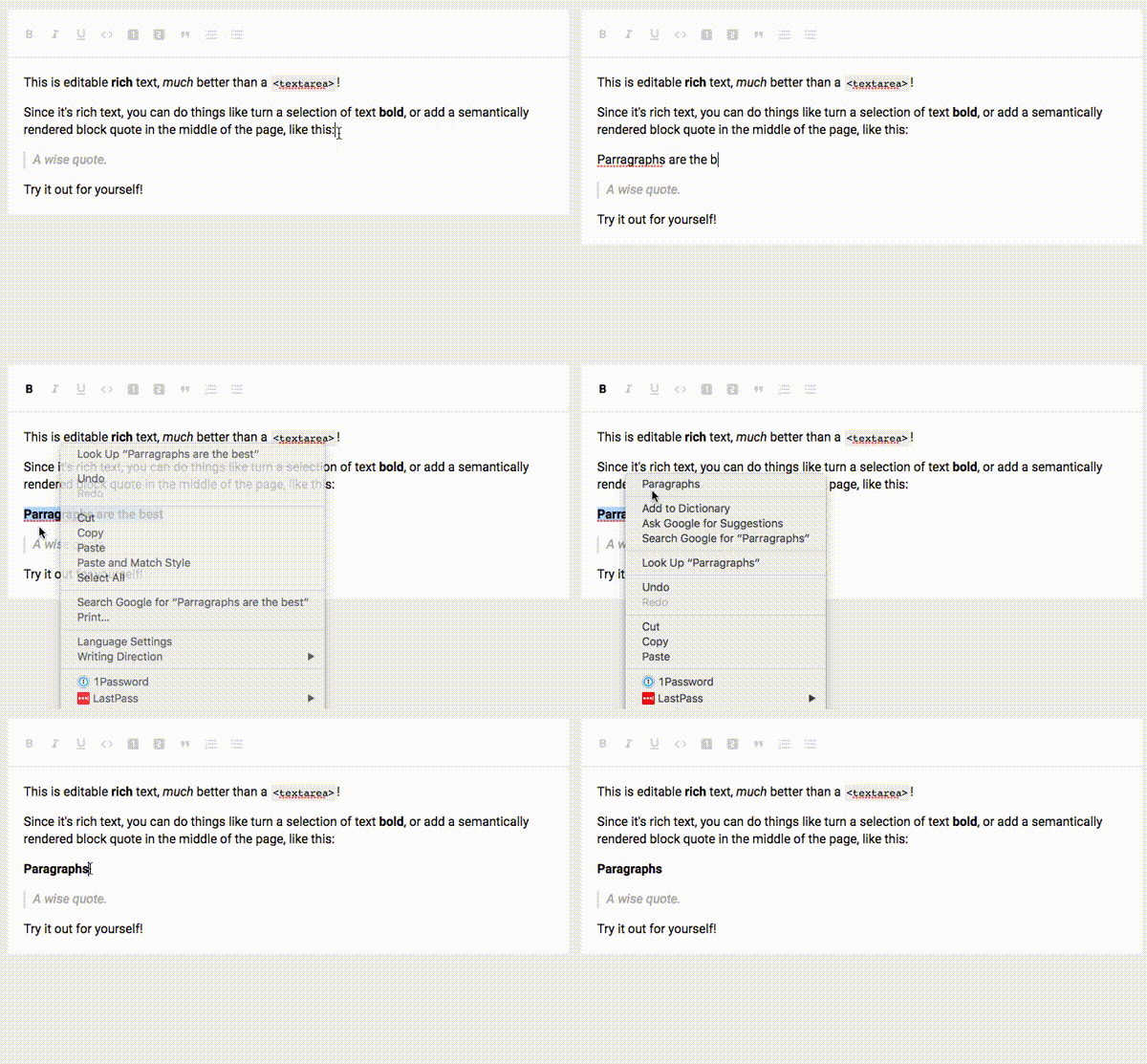
Right click the misspelled word, correct it, and the entire line is removed except that one word.
It shouldn't be removing the entire line..
 Soletiq
All 5 comments
Hey @Soletiq can you add a video showing the issue? Thanks!
 ianstormtaylor
on 11 Jul 2017
ianstormtaylor
on 11 Jul 2017
@ianstormtaylor I've experience this too, so have created a gif of the issue @Soletiq describes:
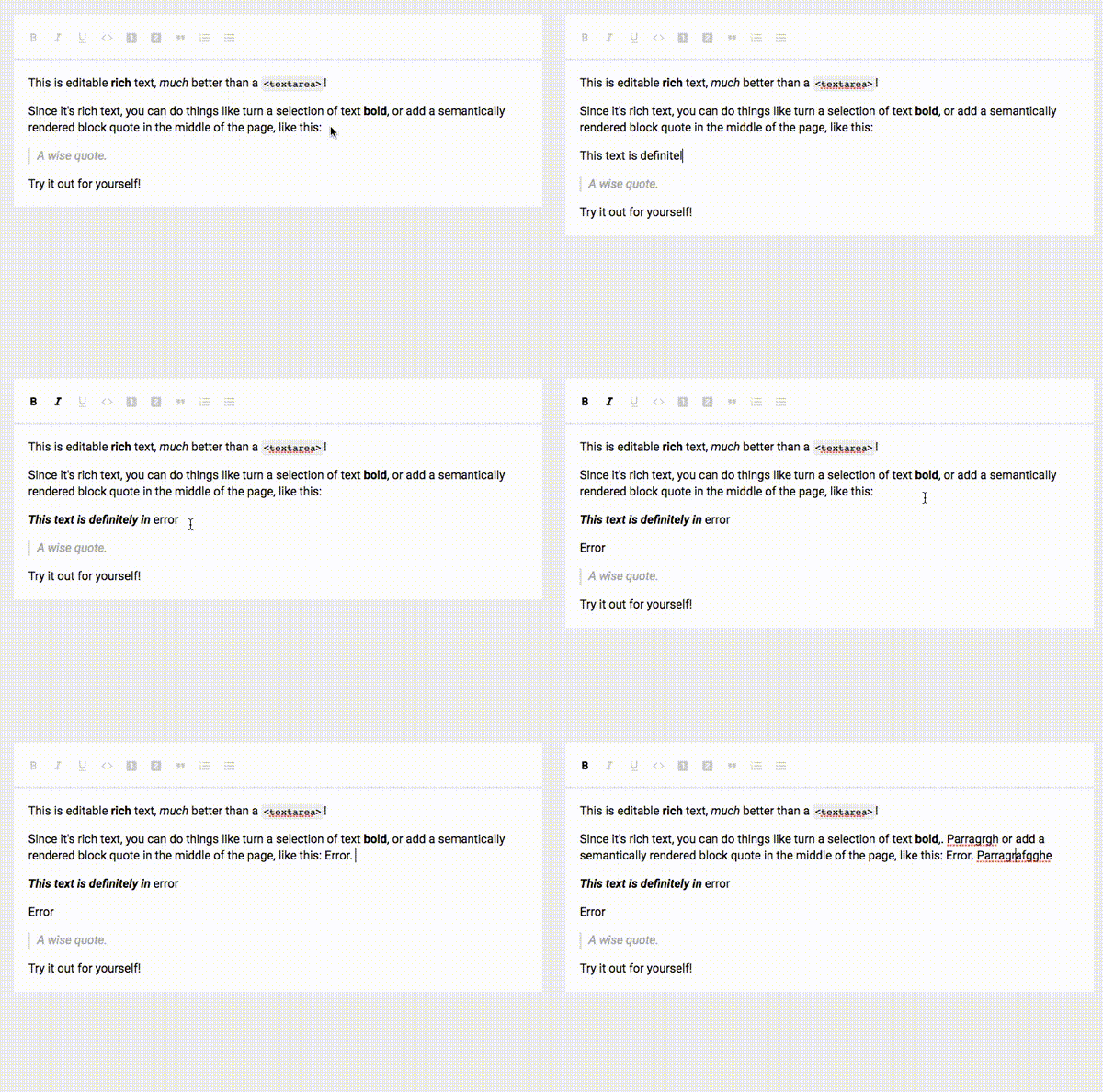
While trying to reproduce the error I also experienced an issue whereby the cursor was writing to two places in the document after a spell check:
 SebAshton
on 7 Aug 2017
SebAshton
on 7 Aug 2017
More generally, in Chrome/macOS, correcting the spelling of a marked word:
- Makes the corrected word lose its marks
- Introduces a state inconsistency that breaks in all sorts of ways.
Some steps to repro:
- Open the editor http://slatejs.org/#/rich-text
- Misspell a word, then __bold it__
- Right-click on the word and correct it — notice how it's introduced as plain text
- Press Cmd + Z to undo
When correcting the first word in the paragraph:

When correcting a word in the middle of the paragraph:

 danburzo
on 17 Aug 2017
danburzo
on 17 Aug 2017
Hmm I'm seeing this too... In Chrome, the browser inserts the correction by running document.execCommand('insertText', false, correction) so we might be able to identify / test the issue using the behavior of insertText.
I'm fixing this in Mailspring (an Electron app) by implementing my own contextmenu event handler on the Editor component and then displaying a custom menu that performs Slate changes rather than native DOM changes, but I'm not sure if there's a general purpose fix.
 bengotow
on 11 Jan 2018
bengotow
on 11 Jan 2018
I think this is fixed in the latest versions of Slate.
ianstormtaylor
on 8 Aug 2018
Related issues
 chrpeter
·
3Comments
bengotow
·
3Comments
chrpeter
·
3Comments
bengotow
·
3Comments
 JSH3R0
·
3Comments
JSH3R0
·
3Comments
 AlexeiAndreev
·
3Comments
ianstormtaylor
·
3Comments
AlexeiAndreev
·
3Comments
ianstormtaylor
·
3Comments
Most helpful comment
@ianstormtaylor I've experience this too, so have created a gif of the issue @Soletiq describes:
While trying to reproduce the error I also experienced an issue whereby the cursor was writing to two places in the document after a spell check: