Slate: Internal copy paste is broken
Version 0.19.16 was the last version where copy and pasting internally in the document worked as expected (keeping the formatting intact). The .fragment document is now null, and there is only a .html part, thus it falls back to onPasteText by the default core plugin. I suspect it has something to do with #716.
If you try copying and pasting the contents of http://slatejs.org/#/rich-text?_k=952y37, you see what I mean.
 skogsmaskin
All 19 comments
Confirmed it happened with 3e573453a8c5d92963d3f290fb7266f66e2a6b78.
skogsmaskin
on 20 Apr 2017
What is happening is that the span with the encoded data is no longer present on the clipboard html data, thus getTransferData don´t recognize it as a fragment when it is pasted.
We definitely should add some tests covering copy/paste (especially the onCutOrCopy / onPaste / getTransferData connection).
skogsmaskin
on 20 Apr 2017
Temporarily fixed by #736 (revert patch 3e573453a8c5d92963d3f290fb7266f66e2a6b78).
skogsmaskin
on 20 Apr 2017
Regretted closing it. Should be some tests in place.
skogsmaskin
on 20 Apr 2017
Seems like this is fixed now.
 ianstormtaylor
on 1 May 2017
ianstormtaylor
on 1 May 2017
@ianstormtaylor I think this may have regressed. Confirmed on http://slatejs.org/#/rich-text.

Neither the marks, or blocks are correctly copied/pasted.
Browser Chrome - Version 58.0.3029.110 (64-bit)
 SebAshton
on 25 May 2017
SebAshton
on 25 May 2017
I can reproduce it too with the official example the same way as @SebAshton
Browser: Chrome, Version 59.0.3071.109 (Official Build) (64-bit)
Slate version: 0.20.4
 illesg
on 26 Jun 2017
illesg
on 26 Jun 2017
There are a hosts of problems relating to copy/paste in Chrome and Safari and they stem from a single problem:
Doing
    const r = window.document.createRange()
    r.selectNodeContents(div)
    native.removeAllRanges()
    native.addRange(r)
when the div has a single child node, on copy the _content_ of the child node is copied instead of the _entire_ child node (as it happens in Firefox), i.e. Webkit will copy the "inner HTML" while Firefox will copy the "outer HTML". What this means in practice is that the fragment data, which resides on the outer HTML, will be lost to Webkit in a host of situations, and it has to fall back to the HTML content, which is a single, unstyled span.
A secondary problem is that any trailing whitespace is also lost in the process, but this can be fixed with a white-space: pre-wrap on the temporary div that gets created to hold the copy data.
I'm not sure if this behavior is intended (or what spec governs it), but I have not found a way yet to make the selection take the "outer html" in this situation. Selection.selectAllChildren() is different from Range.selectNodeContents in subtle ways but exhibits the same essential problems.
There is of course the possibility of always ensuring we have at least two child nodes by inserting a dummy node, but it needs to have non-empty content (a zero width space perhaps), and pasting into external apps will introduce these unwelcome artifacts.
Alternatively, we can theoretically use clipboardData.setData('text/plain') and clipboardData.setData('text/html') on the copy event and eschew the div thing entirely.
 danburzo
on 24 Aug 2017
danburzo
on 24 Aug 2017
Hey @danburzo could you screencast the issue to show how the problems manifest themselves? I'm just wondering because I'm not able to reproduce whatever the issue is, which I'm assuming is because I'm trying to reproduce it wrong.
In the rich text example, I can copy/paste internally inside a single paragraph maintaining bold text:

And I can copy/paste externally when only copying inside a single node:

ianstormtaylor
on 24 Aug 2017
Ah I'm dumb, I didn't watch @SebAshton's GIF carefully enough, it's only a problem when the selection is completely inside a mark like a bold mark:

ianstormtaylor
on 24 Aug 2017
Does anyone know how Draft.js solves this?
ianstormtaylor
on 24 Aug 2017
I can confirm that copy-paste for HTML worked well on 0.20.6 and stopped working once I upgraded to 0.21.3 - for everything (right now all HTML formatting gets purged, no matter where I paste from). I've been testing with Chrome 60 macOS 10.12
I'm using the exact code as in the example (but implemented in a different project).
Can the changes that caused the breakage be rolled back in the next version?
I obviously don't understand most of the details with this issue, just a casual user's perspective: "it worked before but now it doesn't."
 dmitrizzle
on 25 Aug 2017
dmitrizzle
on 25 Aug 2017
Still getting instances where onCutOrCopy handler creates the fake div properly, but the browser (Chrome) does not copy that. Hence the getEventTransfer() does not get the slate fragment.
Is there any reason the onCutOrCopy does not use
    event.clipboardData.setData('application/x-slate-fragment', encoded)
    event.preventDefault()
With this the getEventTransfer helper is always able to recognise the copied fragment. I am assuming this causes Compatibility issues.
 ashutoshrishi
on 30 Oct 2017
ashutoshrishi
on 30 Oct 2017
Seconding @ashutoshrishi that this is broken in Chrome and we end up with a null fragment and only html. For me this causes a weird issue with background color:

Would love to know if this an easy fix with @ashutoshrishi's solution.
 jennaplusplus
on 29 Nov 2017
jennaplusplus
on 29 Nov 2017
@ashutoshrishi @jennaplusplus I assume that it causes compatibility issues, but I'm not sure. I'd be open to a PR that investigates this and fixes it for all browsers though.
ianstormtaylor
on 2 Dec 2017
I'm not sure if this is a separate issue or not but when copy/pasting paragraph with inlines from a "hanging selection", the inlines don't make it through:

 czechdave
on 15 Dec 2017
czechdave
on 15 Dec 2017
Pasting links work if you select to the beginning of the line but not if you select just above the line which transforms the selection into a text only multiline selection (I am guessing)?
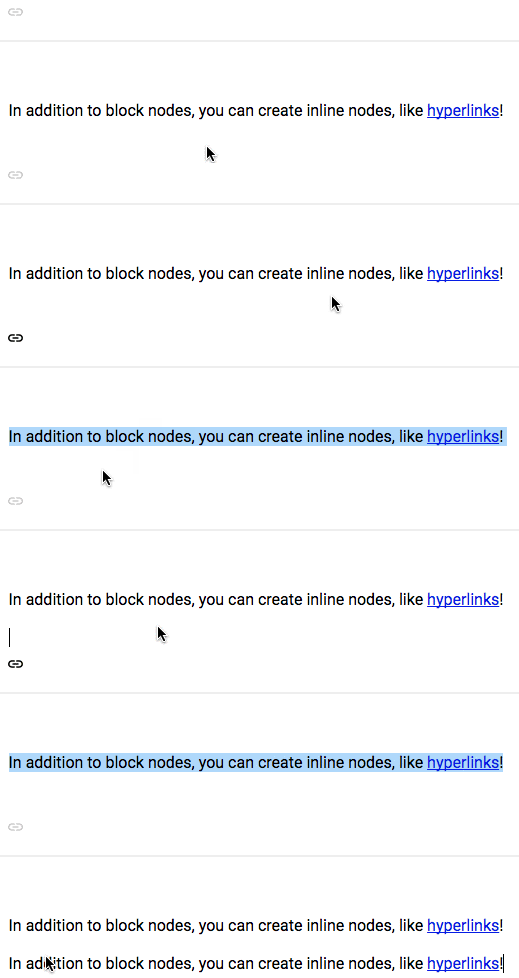
Similar issue with pasting images. How does the paste selection change for multi line selections?
 mfbx9da4
on 18 Dec 2017
mfbx9da4
on 18 Dec 2017
The state of this issue is not clear. Most of the issues initially mentioned seem to be resolved.
Should we close this issue and invite people to open new issues for the unresolved bugs? Or could someone sum up the state of this issue ?
 Soreine
on 14 Mar 2018
Soreine
on 14 Mar 2018
@Soreine sounds good to me!
If anyone is experiencing something from this issue, please open a new one with a specific description and reproduction case. Thanks!
ianstormtaylor
on 21 Mar 2018
Related issues
 JSH3R0
·
3Comments
JSH3R0
·
3Comments
 adrianclay
·
3Comments
adrianclay
·
3Comments
 yalu
·
3Comments
yalu
·
3Comments
 bengotow
·
3Comments
bengotow
·
3Comments
 AlexeiAndreev
·
3Comments
AlexeiAndreev
·
3Comments
Most helpful comment
There are a hosts of problems relating to copy/paste in Chrome and Safari and they stem from a single problem:
Doing
when the
divhas a single child node, on copy the _content_ of the child node is copied instead of the _entire_ child node (as it happens in Firefox), i.e. Webkit will copy the "inner HTML" while Firefox will copy the "outer HTML". What this means in practice is that the fragment data, which resides on the outer HTML, will be lost to Webkit in a host of situations, and it has to fall back to the HTML content, which is a single, unstyled span.A secondary problem is that any trailing whitespace is also lost in the process, but this can be fixed with a
white-space: pre-wrapon the temporary div that gets created to hold the copy data.I'm not sure if this behavior is intended (or what spec governs it), but I have not found a way yet to make the selection take the "outer html" in this situation.
Selection.selectAllChildren()is different fromRange.selectNodeContentsin subtle ways but exhibits the same essential problems.There is of course the possibility of always ensuring we have at least two child nodes by inserting a dummy node, but it needs to have non-empty content (a zero width space perhaps), and pasting into external apps will introduce these unwelcome artifacts.
Alternatively, we can theoretically use
clipboardData.setData('text/plain')andclipboardData.setData('text/html')on the copy event and eschew the div thing entirely.