Slack: Buttons do not work in "Do you want to show a rich preview?" message
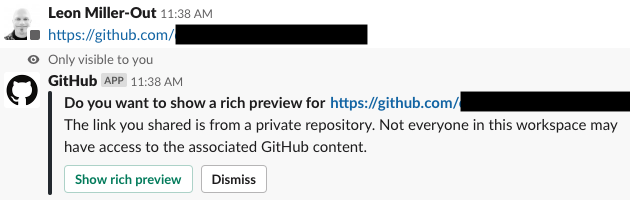
When I post a GH URL in a subscribed channel, the message above pops up. However, neither of the buttons works. When I click either button, they both flash briefly, as if being momentarily disabled. If I'm using Slack in my browser, I can see the following in the console:
Oct-2 13:41:11.606 [API-Q] (T03MW33L4) afd3ad0f-1570038071.605 chat.attachmentAction is ENQUEUED gantry-shared.59dd12e.min.js?cacheKey=gantry-1570034160:1
Oct-2 13:41:11.608 [API-Q] (T03MW33L4) afd3ad0f-1570038071.605 chat.attachmentAction is ACTIVE gantry-shared.59dd12e.min.js?cacheKey=gantry-1570034160:1
Oct-2 13:41:11.746 [API-Q] (T03MW33L4) afd3ad0f-1570038071.605 chat.attachmentAction is REJECTED: API not ok user_not_visible backend.js:6
I've seen a recommendation to use /github signin to integrate my Slack profile with Github, but that doesn't work either. Slackbot responds with: /github failed with the error "user_not_visible"
 sbleon
All 8 comments
Thanks for opening this issue! If you would like to help implement an improvement, read more about contributing and consider submitting a pull request.
![welcome[bot] picture](https://avatars.githubusercontent.com/in/4141?v=4&s=40) welcome[bot]
on 2 Oct 2019
welcome[bot]
on 2 Oct 2019
I have observed the same issue when using the Slack app.
Slack Version 4.1.0 (Production)
macOS Mojave Version 10.14.5
 stuartsierra
on 24 Oct 2019
stuartsierra
on 24 Oct 2019
I'm having a slightly different issue related to this prompt. I can hit "Dismiss" and the prompt disappears, but the next time I post a Github url it will prompt me again.
 rossisdead
on 13 Feb 2020
rossisdead
on 13 Feb 2020
I have same issue in a private repo and get that same error /github failed with the error "user_not_visible". Don't understand what is going on.
 ElijahLynn
on 2 Apr 2020
ElijahLynn
on 2 Apr 2020
ElijahLynn
on 2 Apr 2020
ElijahLynn
on 2 Apr 2020
This appears to be because we may be restricted Slack single or multi-channel guests accounts), which I am. Can you all confirm your account types?
"user_not_visible" : "The calling user is restricted from seeing the requested user.",
ElijahLynn
on 2 Apr 2020
I believe mine is a multi-channel guest account.
On Thu, Apr 2, 2020 at 1:50 PM Elijah Lynn notifications@github.com wrote:
This appears to be because we may be restricted Slack single or
multi-channel guests accounts), which I am. Can you all confirm your
account types?—
You are receiving this because you authored the thread.
Reply to this email directly, view it on GitHub
https://github.com/integrations/slack/issues/948#issuecomment-608009027,
or unsubscribe
https://github.com/notifications/unsubscribe-auth/AABQQNZQUUCIA53UB3WJXKLRKTF7TANCNFSM4I4ZMY7A
.
sbleon
on 2 Apr 2020
Yes, I observed this in Slack accounts where I was a multi-channel guest.
stuartsierra
on 3 Apr 2020
Related issues
 lbussy
·
4Comments
lbussy
·
4Comments
 ronjouch
·
4Comments
ronjouch
·
4Comments
 EyeCandyEyewear
·
5Comments
EyeCandyEyewear
·
5Comments
 bkeepers
·
5Comments
bkeepers
·
5Comments
 campbellssource
·
3Comments
campbellssource
·
3Comments
Most helpful comment
Yes, I observed this in Slack accounts where I was a multi-channel guest.