Skywalking: The webapp shows no graph.
Please answer these questions before submitting your issue.
Why do you submit this issue?
[√ ] Bug
Bug
- Which version of SkyWalking, OS and JRE?
6.2.0、windows 10 1903、build 1.8.0_171-b11 Which company or project?
What happen?
If possible, provide a way for reproducing the error. e.g. demo application, component version.
I ran _C:\xxx\apache-skywalking-apm-binbin\startup.bat_ then ran my project with vm args with _-javaagent:C:\xxx\apache-skywalking-apm-bin\agent\skywalking-agent.jar=agent.service_name=service-a_ in sts4.3. Then I visited http://localhost:8080/, none of graphs were shown, chrome network showed that two responses with the body
{
    "errors": [{
        "message": "Invalid Syntax"
    }]
}
which request payload is
{
    "query": "query queryData() {}",
    "variables": {
        "serviceId": "3",
        "endpointId": "",
        "endpointName": "",
        "instanceId": "3",
        "databaseId": "",
        "duration": {
            "start": "2019-07-05 1047",
            "end": "2019-07-05 1102",
            "step": "MINUTE"
        }
    }
}
and the skywalking-oap-server.log recorded that
2019-07-05 11:32:57,661 - graphql.GraphQL - 507 [qtp1502668485-54] WARN  [] - Query failed to parse : 'query queryData() {}'
2019-07-05 11:32:57,730 - graphql.GraphQL - 507 [qtp1502668485-54] WARN  [] - Query failed to parse : 'query queryData() {}'
 tedinGH
All 21 comments
You need to check oap log.
 wu-sheng
on 5 Jul 2019
wu-sheng
on 5 Jul 2019
Set up the env at local with h2 by following quick start. Then dive into more complex way.
wu-sheng
on 5 Jul 2019
First, check service and endpoint numbers on UI.
wu-sheng
on 5 Jul 2019
@wu-sheng
Set up the env at local with h2 by following quick start. Then dive into more complex way.
Do I have to configure anything before running startup.bat ?
Quick start says that
Storage, use H2 by default, in order to make sure, don't need further deployment.
And version 6.1.0 is fine as what I did in 6.2.0
First, check service and endpoint numbers on UI.
The dashboard bar shows right info including optional services, endpoints and instances.
The trace page is able to show requests as well.
tedinGH
on 5 Jul 2019
I used the 6.2.0 webapp and the 6.2.0 oap , I'm got the same result, but I used 6.1.0 webapp, 6.2.0 oap, it's working for me.
 ycrxun
on 5 Jul 2019
ycrxun
on 5 Jul 2019
You need to delete all indexes when uograde to 6.2.0. We indicate it clearly in changlog.
wu-sheng
on 5 Jul 2019
For UI 6.1.0, I don't believe it is working for 6.2.0. We changed the topology query API, how is possible it still working?
wu-sheng
on 5 Jul 2019
You need to delete all indexes when uograde to 6.2.0. We indicate it clearly in changlog.
I did't use ES, the storage implement is h2 by default.
tedinGH
on 8 Jul 2019
hello, guys, when I use docker image apache/skywalking-oap-server:6.2.0 and the same version skywalking-ui, Storage, use H2 by default, it's also no any graph and /grahql result is:
- message: "Invalid Syntax".
how did you resolve this problem?
thanks.
 zengxiaowengit
on 8 Jul 2019
zengxiaowengit
on 8 Jul 2019
Are you using OLD UI?
wu-sheng
on 8 Jul 2019
I'm using these docker version:
apache/skywalking-oap-server:6.2.0
apache/skywalking-ui:6.2.0
, is this wrong?
zengxiaowengit
on 9 Jul 2019
Are you using OLD UI?
No.I tried it on rhel, the same package was working fine although it seems like a little bit delayed for minutes on registration.
tedinGH
on 9 Jul 2019
Register is async mode.
wu-sheng
on 9 Jul 2019
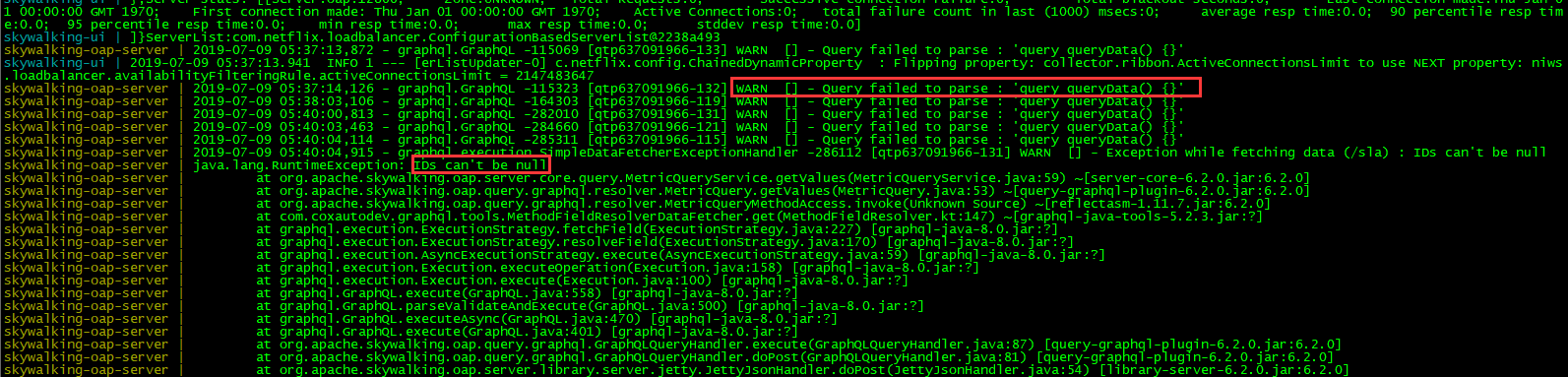
@wu-sheng I have tested serveral times with 6.2.0, but this problem didn't change at all.
I meet this 2 problems in oap server. one warning and an runtimeException.
thanks.
zengxiaowengit
on 9 Jul 2019
ID can't be NULL is not related to any feature. We explain a lot of times.
wu-sheng
on 9 Jul 2019
@wu-sheng
may be It's because I use spring cloud gateway in my project. although I just directly test the service api, gateway also post the trace data into oap server. when I add the optional-plugins/apm-spring-cloud-gateway-2.x-plugin-6.2.0.jar into my microservice agent plugin directory, now I can see chart in Topology and Trace menu, but can't see chart in Dashboard.
- What I can do with this situation?
Thanks.
zengxiaowengit
on 9 Jul 2019
If you can see in topo, there should have been in dashboard. From my understanding.
wu-sheng
on 9 Jul 2019
Me too, both topology and track have chart, only the dashboard has no chart,graphql response is
{"errors":[{"message":"Invalid Syntax"}]}
 MoDann
on 9 Jul 2019
MoDann
on 9 Jul 2019
Me too, both topology and track have chart, only the dashboard has no chart,graphql response is
{"errors":[{"message":"Invalid Syntax"}]}
Yes. I also meet the same questions. what frameworks do you use? springboot OR spring cloud webflux?
we can check it together.
zengxiaowengit
on 9 Jul 2019
I am using SpringBoot. The previous local and personal server testing is no problem, the test environment on the emergence of such problems.
MoDann
on 9 Jul 2019
Check time and time zone settings. Many users miss that reminder at the first line of setup document.
wu-sheng
on 9 Jul 2019
Related issues
 wuxingye
·
4Comments
ycrxun
·
4Comments
wuxingye
·
4Comments
ycrxun
·
4Comments
 cyejing
·
5Comments
cyejing
·
5Comments
 liyongxin
·
5Comments
liyongxin
·
5Comments
 cookiejoo
·
4Comments
cookiejoo
·
4Comments