Skin.arctic.horizon: [Matrix] Kodi crashes when stopping a video from Netflix or Disney+
When I start a video from Netflix or Disney+, Kodi crashes when I stop the video. To try and make sure this isn't something weird with my development setup, I created a separate user account and did a completely fresh install of Kodi then installed only Netflix (from the CastagnaIT Repo for Kodi 19.x) and Arctic Horizon (from the jurialmunkey Alpha repo). This is on MacOSX Big Sur. I don't have an easy way to test on another platform, but I can try to do a portable install of Matrix on my Windows 10 machine if needed. Attached is a log from the pristine install.
Here's a log of that pristine setup test.
 pkscout
All 27 comments
@jurialmunkey, I do see a handful of Skin Variables errors in that log 🤔
 drinfernoo
on 25 Feb 2021
drinfernoo
on 25 Feb 2021
Hi. I’ve noticed the same issue on a Windows PC, running the latest version of AH on Kodi 19 release, so it’s not specific to MacOS
 berkhornet
on 25 Feb 2021
berkhornet
on 25 Feb 2021
Happens to me too when stopping a video played from FEN addon.
Kodi 18.9 on Windows 10.
 avsha114
on 26 Feb 2021
avsha114
on 26 Feb 2021
I've tried to replicate this in as bare of an environment as possible: I've got AH (and its dependencies) and Netflix (and its dependencies) installed, on Windows 10.
Just as everyone else said, stopping playback crashes out of Kodi. Netflix working fine on stock skin.
EDIT: Can confirm this same behavior with "third-party" add-ons as well. They work fine on stock skin, but stopping playback crashes Kodi.
drinfernoo
on 26 Feb 2021
I've tried to replicate this in as bare of an environment as possible: I've got AH (and its dependencies) and Netflix (and its dependencies) installed, on Windows 10.
Just as everyone else said, stopping playback crashes out of Kodi. Netflix working fine on stock skin.
EDIT: Can confirm this same behavior with "third-party" add-ons as well. They work fine on stock skin, but stopping playback crashes Kodi.
Yep, I'm gonna have to drop down to Estuary for the meantime until Jurial finds a way to fix this issue. Gonna keep the skin installed so that way I know when new updates are released, etc. to try out again.
 Nuklear92
on 26 Feb 2021
Nuklear92
on 26 Feb 2021
You all have the wrong version of skin variables installed. You all only have 0.0.3 when the latest version is 0.2.5
 jurialmunkey
on 27 Feb 2021
jurialmunkey
on 27 Feb 2021
Ah, I thought I had 0.2.5 😆 I went and checked my log, and you were correct. It does seem that it is fixed in 0.2.5, and no longer crashes after updating that module... but it isn't installed by default as a dependency (as 0.0.3 exists in the official repo), and the "Versions" dialog in AH is not functional yet, so it takes a minute to figure out exactly how to actually update it. This is actually also the case with TMDbHelper, in which it needs to be updated manually from 2.4.36 to 4.2.19.
Perhaps these issues: https://github.com/jurialmunkey/script.skinvariables/issues/8, https://github.com/jurialmunkey/plugin.video.themoviedb.helper/issues/447 being resolved could help? 😉
drinfernoo
on 27 Feb 2021
Yeah it looks like there is a bug in Matrix where installs from 3rd party repos are ignoring versioning dependencies if the required addon also exists on the official repo but doesn't meet the version requirement. For e.g. you can see here on a fresh install it is allowing me to install AH even though clearly the versions aren't being met:

EDIT: Raised issue on xbmc github - https://github.com/xbmc/xbmc/issues/19297
jurialmunkey
on 27 Feb 2021
My "clean test" apparently grabbed the skinvariables from the main repo. Odd that the install didn't fail because of the dependency not being met (since 0.0.3 doesn't meet the minimum requirement). Stranger, my actual test setup where I first saw the problem had 0.2.5. I finally disabled AH, uninstalled skin variables from Estuary, reinstalled 0.2.5 from the Alpha repo, and then re-enabled AH. The first time I tried Netflix after this, it stopped fine. The I tried again and it crashed Kodi. So I disabled AH again, uninstalled skinvariables, installed from a zip from the Github repo, re-enabled AH, and it still crashes. Here's another log of the crash with skinvaraibles 0.2.5.
https://paste.kodi.tv/bimapejaqu.kodi
P.S. I'm going to try a clean install again, but this time make sure skinvariables is the correct version. Maybe there's an add-on interaction here causing things. Based on the log it feels like something is opening a busy dialog and not closing it. And a second busy dialog crashes in Matrix, whereas it didn't in Leia.
pkscout
on 27 Feb 2021
@pkscout - Yeah it might be unrelated to the skin variables issue (or just exacerbated by it) but best to knock out the obvious errors first. I'll try to see if I can recreate the issue.
Does the problem only occur when playing from inside Netflix i.e. only when playing from MyVideoNav? Or does it happen when playing from a Home screen widget too? (Trying to narrow down whether it is code specific to a particular window or if it is something global).
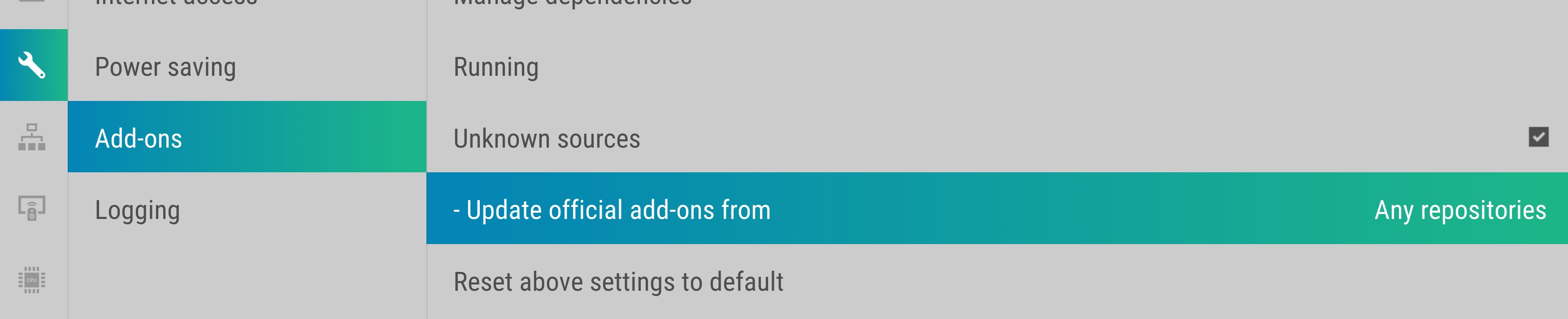
Also FYI if you're installing from my repo you should have the following setting enabled:
System Settings > Addons > Update official add-ons from > Any repositories
jurialmunkey
on 27 Feb 2021
@pkscout - Yeah it might be unrelated to the skin variables issue (or just exacerbated by it) but best to knock out the obvious errors first. I'll try to see if I can recreate the issue.
Does the problem only occur when playing from inside Netflix i.e. only when playing from MyVideoNav? Or does it happen when playing from a Home screen widget too? (Trying to narrow down whether it is code specific to a particular window or if it is something global).
Also FYI if you're installing from my repo you should have the following setting enabled:
System Settings > Addons > Update official add-ons from > Any repositories
I have the same setting on my end and it does happens inside the Netflix Addon, from widgets and from inside other third-party streaming add-ons as well.
Nuklear92
on 27 Feb 2021
@jurialmunkey I only use the Netflix add-on one way. I launch it and then navigate through to find the thing I want to watch. I don't use any of the library integration functions. I just did another clean install, this time making sure to install skinvariables and the TMDb helper first from the Alpha repo. Then AH and the Netflix addon. After that:
1- Switch to AH (enable all the fancy online options in the setup screen)
2- Scroll down to the video area and enter the Netflix addon.
3- go to my profile in Netflix and select an episode of a show to watch.
4- after video starts, wait like 30 seconds, then stop video (same result whether I use 'x' on the keyboard or use the stop button in the OSD).
5- crash
pkscout
on 27 Feb 2021
@pkscout I found that this still happens until after a reboot. Is yours the same?
drinfernoo
on 27 Feb 2021
I have found a work around that may or may not tell us something about what's going on. If I start a Netflix video and then back out to the menu (using the DELETE key on my keyboard), it doesn't crash. The video continues to play in the background (or at least the sound if you have disabled the "play video in background" option), and if I then stop the video (using the 'x' key on my keyboard), there is no crash. Oddly, this work around does not help with Disney+. Disney+ still crashes Kodi either way.
pkscout
on 27 Feb 2021
@drinfernoo no difference in behavior after a full system reboot. Crash when stopping video. And now the work around doesn't work anymore either.
pkscout
on 27 Feb 2021
@pkscout - Does the crash happen every time? I have managed to get Netflix to crash but not every time (generally need to start/stop a few items before it happens).
jurialmunkey
on 27 Feb 2021
@jurialmunkey, Yup. Every time. In all my time programming, it is one of the most consistent failures I have ever seen.
'-)
pkscout
on 27 Feb 2021
@pkscout - Can you try replacing MyVideoNav.xml with this code and see if it stops the crash. Obviously not a fix but will help me narrow things down -- with this simplified list view I can't make the crash happen anymore but I'm also not certain if I'm experiencing the same issue as you since it only happens intermittently for me.
<?xml version="1.0" encoding="UTF-8"?>
<window id="6">
    <defaultcontrol always="true">50</defaultcontrol>
    <menucontrol>9000</menucontrol>
    <views>50</views>
    <controls>
        <include content="Viewtype_FileList">
            <param name="id" value="50" />
            <param name="itemlayout-width" value="1920" />
            <param name="viewtype-label" value="$LOCALIZE[31288]" />
            <param name="control-type" value="list" />
            <width>1920</width>
            <height>1080</height>
        </include>
    </controls>
</window>
@jurialmunkey I can't get it to crash anymore with that simplified MyVideoNav.xml. Out of curiosity, I re-enabled the old myVideoNav but changed every Netflix screen I went through to Landscape List (they were a combination of Landscape Row/Square and the Integrated one with Seasons). When I did that, I got a couple of times it didn't crash and then one that did. So it seems slightly more stable with the Landscape List option.
edit: and now back to crashing consistently, so that "slightly more stable" was very slightly.
pkscout
on 27 Feb 2021
Okay I think we're getting close to narrowing down the issue.
In Includes_Viewtype.xml can you replace this block (L154-167)
<include condition="$EXP[Exp_View_50_Include]">View_50_Tags</include>
<include condition="$EXP[Exp_View_51_Include]">View_51_Addons</include>
<include condition="$EXP[Exp_View_52_Include]">View_52_Posters</include>
<include condition="$EXP[Exp_View_53_Include]">View_53_Seasons</include>
<include condition="$EXP[Exp_View_54_Include]">View_54_Episodes</include>
<include condition="$EXP[Exp_View_55_Include]">View_55_FileList</include>
<include condition="$EXP[Exp_View_56_Include]">View_56_Banners</include>
<include condition="$EXP[Exp_View_57_Include]">View_57_BigBanner</include>
<include condition="$EXP[Exp_View_58_Include]">View_58_Artists</include>
<include condition="$EXP[Exp_View_59_Include]">View_59_Sets</include>
<include condition="$EXP[Exp_View_500_Include]">View_500_SongList</include>
<include condition="$EXP[Exp_View_501_Include]">View_501_AddonsWall</include>
<include condition="$EXP[Exp_View_502_Include]">View_502_PosterWall</include>
<include condition="$EXP[Exp_View_504_Include]">View_504_EpisodeWall</include>
With the simplified list
<include content="Viewtype_FileList">
    <param name="id" value="50" />
    <param name="itemlayout-width" value="1920" />
    <param name="viewtype-label" value="$LOCALIZE[31288]" />
    <param name="control-type" value="list" />
    <width>1920</width>
    <height>1080</height>
</include>
This seems to be working fine for me - I just want to make sure it is definitely an issue with one of the viewtypes and not some other element on screen like the buttons/info/topbar etc.
jurialmunkey
on 27 Feb 2021
@jurialmunkey, no crashes with the change in Includes_Viewtype. So that's good news I guess. At least we've narrowed it down to only 14 views. '-)
pkscout
on 27 Feb 2021
Well at least I'm confident now that I'm reproducing the same crash as you! Also, I've found a reliable way to reproduce it, so I should be able to test some things out from here and hopefully find the culprit.
I have a suspicion it is something to do with expressions used in visibility conditions for views.
jurialmunkey
on 27 Feb 2021
Okay I've narrowed it down to Integrated Seasons view.
Pretty sure it is specifically this piece of code in Includes_View_53_Seasons.xml (L78-83). When I comment out this chunk I can no longer reproduce the crash.
<include content="View_53_Episodes">
    <param name="id" value="$PARAM[id]0" />
    <param name="include" value="$PARAM[include]" />
    <param name="parentid" value="$PARAM[id]" />
    <param name="wallid" value="$PARAM[id]$PARAM[id]" />
</include>
@pkscout - Can you test the version from the matrix-netflix-fix branch and see if it solves the issue?
https://github.com/jurialmunkey/skin.arctic.horizon/tree/matrix-netflix-fix
jurialmunkey
on 27 Feb 2021
That seems to have fixed it. I tried a half dozen Netflix titles and a couple on Disney+. No problems. I've never gone that long stopping Netflix/Disney+ videos without a crash.
pkscout
on 27 Feb 2021
Excellent. I'll merge the fix into master. Seems to be some issue with using Container(ID).FolderPath as dynamic <content>. I think maybe there is some delay where it is empty due to Kodi updating containers after playback ends which causes a crash.
jurialmunkey
on 27 Feb 2021
@pkscout - Can you test the version from the
matrix-netflix-fixbranch and see if it solves the issue?https://github.com/jurialmunkey/skin.arctic.horizon/tree/matrix-netflix-fix
Thank you will update this as soon as I wake up later ☺️
 nammminn2
on 27 Feb 2021
nammminn2
on 27 Feb 2021
Related issues
 juanma-cvega
·
6Comments
jurialmunkey
·
3Comments
juanma-cvega
·
6Comments
jurialmunkey
·
3Comments
 sammy2142
·
6Comments
sammy2142
·
6Comments
 onlytanmoy
·
3Comments
onlytanmoy
·
3Comments
 Blurayx
·
5Comments
Blurayx
·
5Comments
Most helpful comment
That seems to have fixed it. I tried a half dozen Netflix titles and a couple on Disney+. No problems. I've never gone that long stopping Netflix/Disney+ videos without a crash.