Skiasharp: [QUESTION] Is there a way to set the font height in pixels?
I've been given a picture to recreate and the font height is specified in pixels. Is there a way to set up an SKPaint object to draw text to a pixel height instead of a point height?
 Drise13
All 7 comments
You could use the ratio... formula:
points = pixels * 72 / 96
where 96 is the pixels per inch on a 100% DPI
 mattleibow
on 14 Feb 2020
mattleibow
on 14 Feb 2020
I actually think the API documentation is wrong, at least that's the information I got from the Skia mailing list
The SkPaint.textSize is actually the height, in pixels, that a glyph with height 1 em would get when rendered on the canvas (length #13 in this image) 
_The documentation incorrectly states SkPaint.TextSize is the height in points._
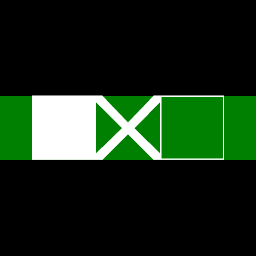
To verify this, I made a test program that uses this font from the Google Skia repo that has glyphs designed to have a height of 1 em units.
Here's the output of the program, the SkPaint.TextSize is 64 pixels, as is the height of the rectangle.
 Ziriax
on 18 Feb 2020
Ziriax
on 18 Feb 2020
Good to know. Is this our docs that are wrong? I was not able to find any references to points with regards to text.
mattleibow
on 19 Feb 2020
The pleasure is all mine, SkiaSharp rocks!
Only the Skia docs are wrong it seems, but the SkiaSharp doc is so brief that it is hard to understand the meaning :-)
Gets or sets the text size is not that useful for most users I guess? IMHO size could refer to width, height, line height, em height, etc...
Ziriax
on 19 Feb 2020
Ah, yes. Heh, we need to improve that...
Would you like to open a PR ;)
mattleibow
on 21 Feb 2020
Sure!
Ziriax
on 21 Feb 2020
Fixed the docs.
mattleibow
on 11 Jun 2020
Related issues
 alanricker
·
3Comments
alanricker
·
3Comments
 corliss
·
4Comments
corliss
·
4Comments
 parthipanr
·
4Comments
Ziriax
·
3Comments
parthipanr
·
4Comments
Ziriax
·
3Comments
 dsadlowski
·
3Comments
dsadlowski
·
3Comments
Most helpful comment
I actually think the API documentation is wrong, at least that's the information I got from the Skia mailing list
The
SkPaint.textSizeis actually the height, in pixels, that a glyph with height1 emwould get when rendered on the canvas (length #13 in this image)_The documentation incorrectly states
SkPaint.TextSizeis the height in points._To verify this, I made a test program that uses this font from the Google Skia repo that has glyphs designed to have a height of 1 em units.
Here's the output of the program, the
SkPaint.TextSizeis 64 pixels, as is the height of the rectangle.