Skeletonview: Only see grey background on UITableView
What did you do?
I have a UITableView that has cells that are defined in XIBs. I am calling showSkeletonView on the table view, but all I see is the grey background of the cells.

If I inspect the view with Xcode, I can see that the other views are there (and appear to be on top but I can't see them in simulator?), but they are not skeletons.
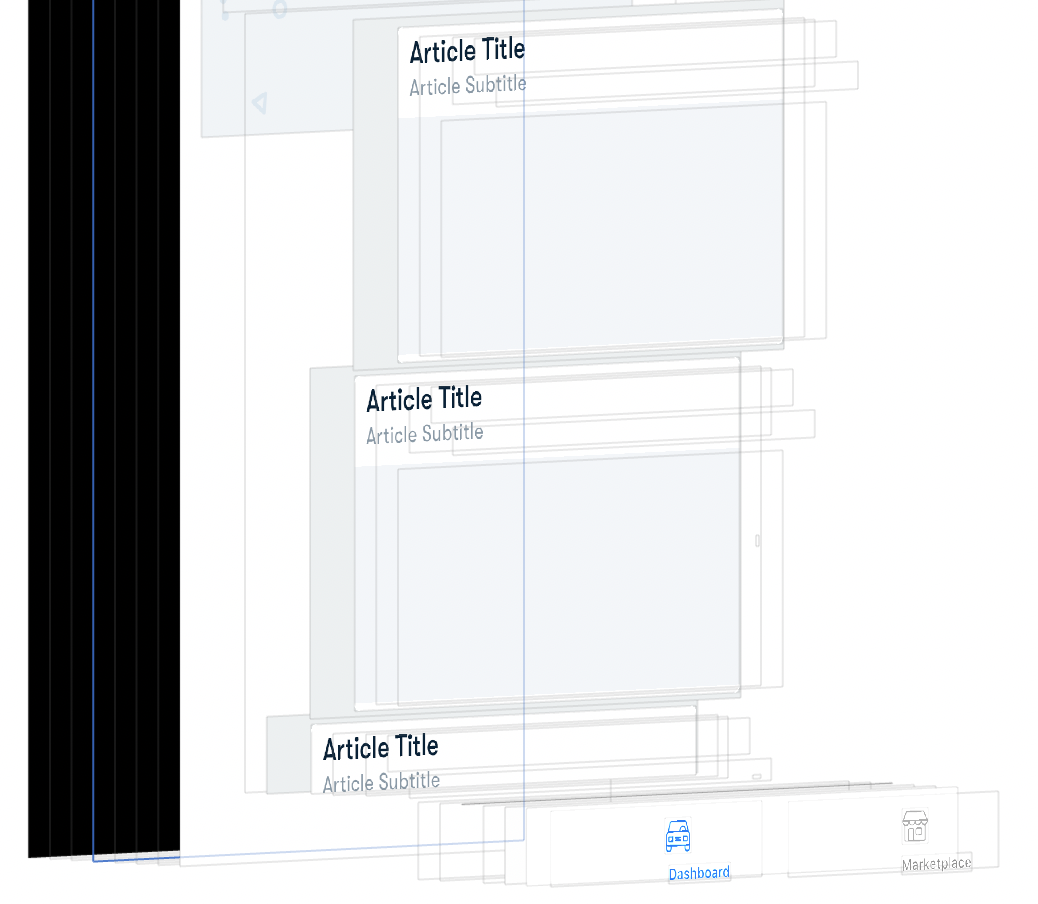
My hierarchy for the table goes like this:
View Controller
+--View (Skeletonable: Default)
      +--Table View (Skeletonable: Yes)
            +-- Cell
And for the cell:
Cell
+--Cell Container (Skeletonable: Yes)
    +--Empty View (Skeletonable: No)
    +--View (Skeletonable: Yes)
       +--Stack View (Skeletonable: No)
          +--Stack View (Skeletonable: No)
          |  +--Label (Skeletonable: Yes)
          |  +--Label (Skeletonable: Yes)
          +--Image View (Skeletonable: Yes)
I have tried setting everything to skeletonable without any luck. Hopefully these hierarchies make sense...
What did you expect to happen?
I don't want my cells to set that grey background, It should be white. The labels and the image view should be skeletons. I don't want the grey (hopefully white) cell background to obscure the skeleton views.
What happened instead?
The table is white, the cell containers are grey, the cell subviews do not get skeletoned, even though the cells appear to be on top I can't see them, just the grey block.
SkeletonView Environment
SkeletonView version: 1.4
Xcode version: 9.4.1
Swift version: 4.1
 Fawxy
Fawxy
All 11 comments
Hey @Fawxy , to work as expected, your whole view hierarchy must have the isSkeletonable property set to true.
 arn00s
on 20 Aug 2018
arn00s
on 20 Aug 2018
As I said I tried changing everything to skeletonable - if I understand it it's everything from the top down needs to be skeletonable? So, if I do this:
View Controller
+--View (Skeletonable: Default)
      +--Table View (Skeletonable: Yes)
            +-- Cell
Cell
+--Cell Container (Skeletonable: Yes)
    +--Empty View (Skeletonable: Yes)
    +--View (Skeletonable: Yes)
       +--Stack View (Skeletonable: Yes)
          +--Stack View (Skeletonable: Yes)
          |  +--Label (Skeletonable: Yes)
          |  +--Label (Skeletonable: Yes)
          +--Image View (Skeletonable: Yes)
I get the same result.
Fawxy
on 20 Aug 2018
Hey @Fawxy ,
What about the Cell ? It should also be skeletonable.
Maybe by enabling the new debug mode it will be easier for you to identify the issue ?
arn00s
on 20 Aug 2018
@Fawxy hey, are you calling showSkeletonView() on viewDidAppear?
 Skornos
on 21 Aug 2018
Skornos
on 21 Aug 2018
@Skornos actually on viewWillAppear
Fawxy
on 21 Aug 2018
Hi @Fawxy, as @arn00s said, could you active debug mode in order to see which hierarchy is using SkeletonView?
 Juanpe
on 21 Aug 2018
Juanpe
on 21 Aug 2018
⬇⬇ ☠️ Root view hierarchy with Skeletons ⬇⬇

 <UITableView: 0x00007fc9d701de00 | (3) subSkeletons | ☠️ >
      <ArticleContentView: 0x00007fc9d9832600 | ☠️ >
      <ArticleContentView: 0x00007fc9d9864a00 | ☠️ >
      <ArticleContentView: 0x00007fc9da015e00 | ☠️ >
I get this result. Why wouldn't the subviews inside ArticleContentView be showing? They are set to skeletonable...
Do I need to call showSkeleton on the article content view too? I'm calling showSkeleton on the table view in viewDidAppear
Fawxy
on 21 Aug 2018
SkeletonView doesn’t find skeletonables views inside ArticleContentView view. Maybe you have a view not skeletonable between ArticleContentView and those subviews? Could you give me some code of your project to try to find what is it happening?
Sent with GitHawk
Juanpe
on 22 Aug 2018
Demo project here: https://github.com/Fawxy/SkeletonViewTest. It could be because when converting XIB to cell it adds an extra view in?
Fawxy
on 22 Aug 2018
Ok I figured this out. My XIB contained a view, so when I converted it to a tableviewcell it embedded that view into the cell. I changed the xib so it contained a cell, made the views skeletonable and it all worked as expected. Thanks for your replies!
Fawxy
on 22 Aug 2018
Great! thanks for use SkeletonView
Juanpe
on 22 Aug 2018
Related issues
 guidev
·
4Comments
guidev
·
4Comments
 kak2008
·
4Comments
kak2008
·
4Comments
 son
·
4Comments
son
·
4Comments
 normand1
·
3Comments
normand1
·
3Comments
 barankaansert
·
3Comments
barankaansert
·
3Comments
Most helpful comment
Ok I figured this out. My XIB contained a view, so when I converted it to a tableviewcell it embedded that view into the cell. I changed the xib so it contained a cell, made the views skeletonable and it all worked as expected. Thanks for your replies!