Skeletonview: Collection View not showing skeleton for cells
⚠️ Please fill out this template when filing an issue.
🙏🏼 Please check if it already exists other issue related with yours.
What did you do?
I am trying to show skeleton in collection view , i added an image view and a label to a cell set them both skeletonable and also set the cell to skeletonable and in viewDidLoad called showAnimatedGradientSkeleton() on collectionView.
What did you expect to happen?
I thought it should show the collectionView cells as skeleton.
What happened instead?
but it shows the whole collection view as skeleton and the cells dont appear, basically i just have a gray view with a gradient animation showing up.
Steps to reproduce the behavior
Add a collection view , add a cell to it , add imageview and label to cell set isSkeletonable to true
for all of them. Implement the protocol and then run
SkeletonView Environment
SkeletonView version: 1.2.1
Xcode version: 9.3.1
Swift version: 4.0

 samsidd
All 16 comments
Please help me with this, it works on the UItableView if i set the EstimatedRowHeight but since UICollectionView does not have any such property i couldn't resolve it. I also tried the sizeForItem method but it doesnt work also.
samsidd
on 25 Jun 2018
wow ! i just wasted a couple of hours for this and a dispatch of 0.1 sec resolved the issue.
samsidd
on 25 Jun 2018
Doesn't work for me:
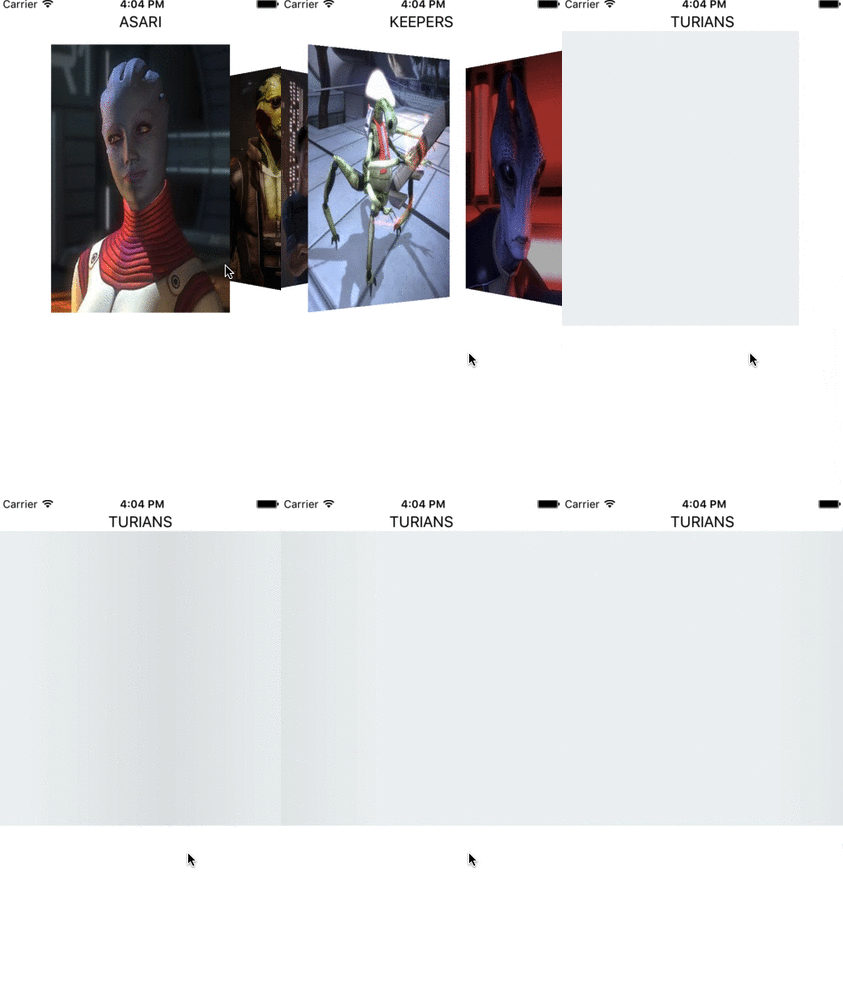
That's how my request to show gradient looks like:
 kornerr
on 25 Jun 2018
kornerr
on 25 Jun 2018
@samsidd Hey I seem to have the same issue as you used to have. I wonder what does it mean by a dispatch of 0.1 sec?
 TaomingHuang
on 4 Jul 2018
TaomingHuang
on 4 Jul 2018
I have the same problem
 bystritskiy
on 7 Jul 2018
bystritskiy
on 7 Jul 2018
+1
 Sorix
on 16 Jul 2018
Sorix
on 16 Jul 2018
The solution for me was to add in file SkeletonView.swift:
DispatchQueue.main.async after addDummyDataSourceIfNeeded() to fileprivate func recursiveShowSkeleton(withType type: SkeletonType, usingColors colors: [UIColor], animated: Bool, animation: SkeletonLayerAnimation?)
But I still have an issue with blinking content before skeleton appears
 dmitrycrys
on 24 Jul 2018
dmitrycrys
on 24 Jul 2018
Hi, this issue should be solved in latest version (1.3).
You need to prepareSkeleton, you can check this PR (https://github.com/Juanpe/SkeletonView/pull/42)
 Juanpe
on 2 Aug 2018
Juanpe
on 2 Aug 2018
still not fixed using 1.4
 romainbiard
on 10 Oct 2018
romainbiard
on 10 Oct 2018
still not fixed
 saxahan
on 16 Oct 2018
saxahan
on 16 Oct 2018
You can achieve with
collectionView.prepareSkeleton { [weak self] (done) in
                if let visibleCells = self?.collectionView.visibleCells {
                    for cell in visibleCells {
                           cell.contentView.showAnimatedSkeleton()
                    }
                }
            }
Still not fixed
 fenixsolorzano
on 18 Oct 2018
fenixsolorzano
on 18 Oct 2018
@Juanpe please fix this ASAP. Temporarly I use saxahan's code to make it working. @saxahan thanks :)
SkeletonView v1.5
 lalkrishna
on 2 May 2019
lalkrishna
on 2 May 2019
still doesn't work
 sergeymild
on 5 Oct 2019
sergeymild
on 5 Oct 2019
This issue has been automatically marked as stale because it has not had recent activity. It will be closed if no further activity occurs. Thank you for your contributions.
![stale[bot] picture](https://avatars3.githubusercontent.com/in/1724?v=4&s=40) stale[bot]
on 4 Dec 2019
stale[bot]
on 4 Dec 2019
Doesn't work in tableviewcell too.
 onderozcan
on 8 Mar 2020
onderozcan
on 8 Mar 2020
Related issues
 jamesTheKid
·
4Comments
jamesTheKid
·
4Comments
 adelbios
·
4Comments
adelbios
·
4Comments
 eduardbosch
·
5Comments
eduardbosch
·
5Comments
 raphaklr
·
5Comments
raphaklr
·
5Comments
 ghost
·
7Comments
ghost
·
7Comments
Most helpful comment
You can achieve with