Skeletonview: Wrong skeleton view width on iPhone 8 plus
What did you do?
Just create a Table View with a skeletonable cell that has views that set its width with Leading and Trailing constraints with 0dp.
What did you expect to happen?
The skeleton view should match the screen width
What happened instead?
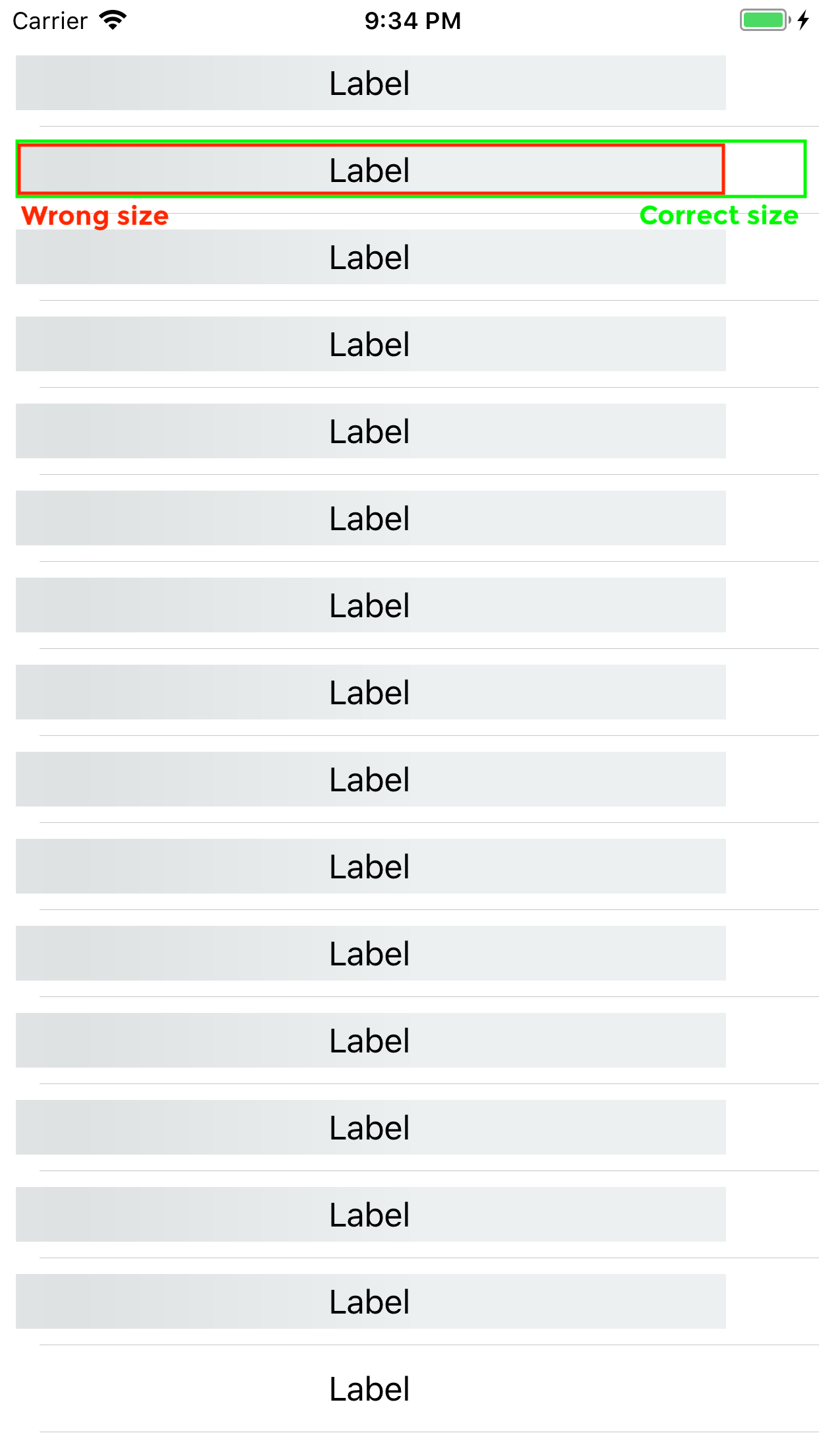
The skeleton view does not match the screen width in an iPhone 8 plus, but it does in an iPhone 5.
iPhone 8 plus (wrong skeleton views width)

iPhone 5 (correct skeleton views width)

Steps to reproduce the behaviour
Just start a new project, follow the steps to add skeletonable to table view and in the skeleton cell, add an imageview that should match cell width defining Leading and Trailing with 0 value.
SkeletonView Environment
SkeletonView version: 1.2
Xcode version: 9.4
Swift version: 4.1
 eduardbosch
All 27 comments
I've done a couple of tests more.
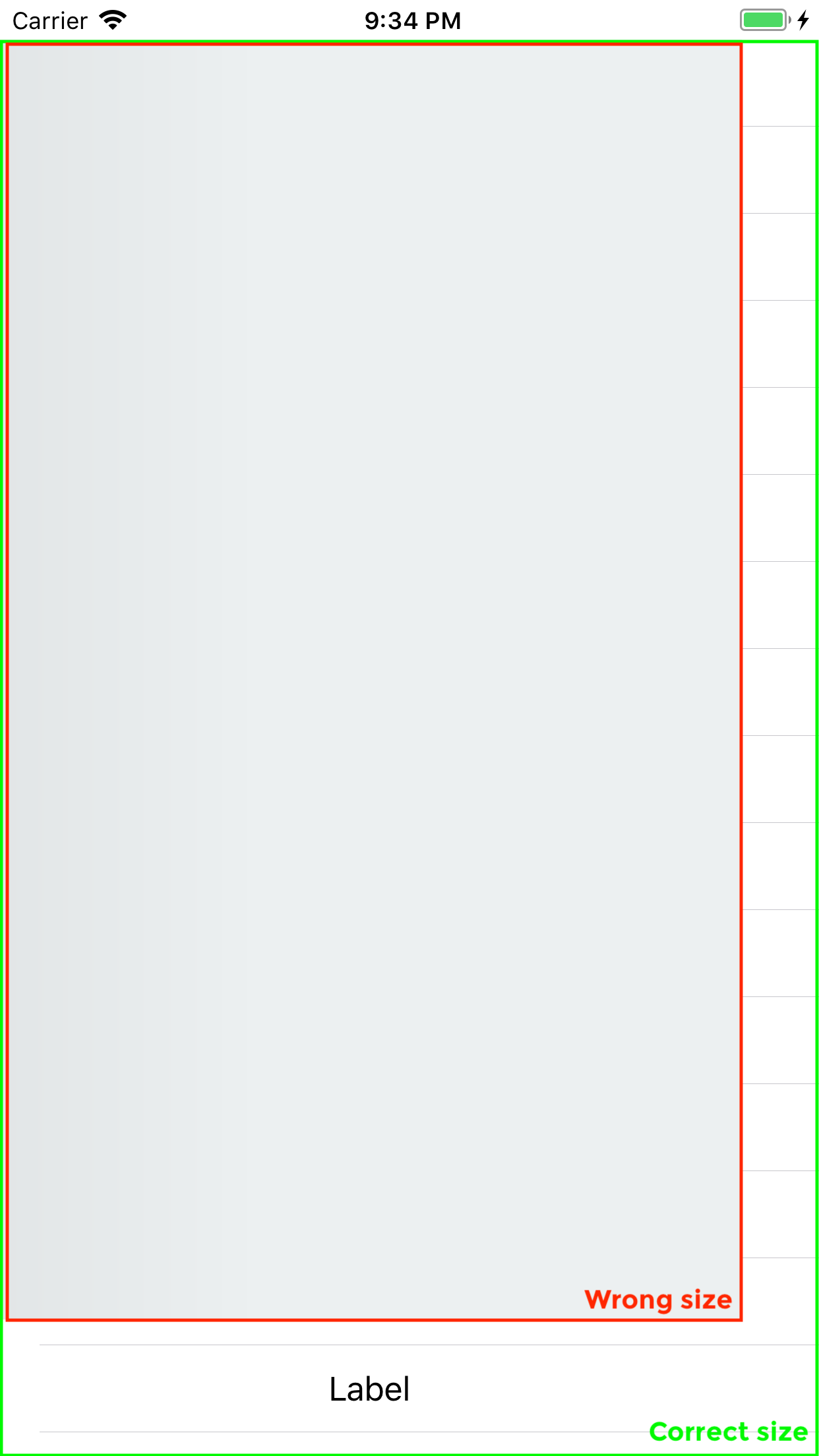
Looks that skeleton tableview does not calculate its bounds correctly and skeleton is only applied to a section of the screen. By fixing this, it'll work well.
Here there are two more screenshots that show that the skeleton tableview bounds are wrong:
When the tableviewcell is skeletonable and some of its subviews are skeletonable, the skeletonable subviews bounds are wrong:
When the tableviewcell is skeletonable and none of its subviews are skeletonable, the table view bounds are wrong:
eduardbosch
on 3 Jun 2018
Ok, I've found my problem. I was calling showSkeleton in viewDidLoad. Moving it to viewDidAppear fixed the issue.
Would be nice to call it anywhere and use original view constraints so skeleton views update its size accordingly. I don't know if this could be difficult or not.
Maybe could be good to add to the docs or README that showSkeleton should be called in viewDidAppear to use the correct view sizes.
Thanks again for this library 😉
eduardbosch
on 4 Jun 2018
I've been playing around with the lib, and sometimes it's good to call showSkeleton in viewDidLoad. Especially when you want the skeleton views to be shown while a Controller in transitioning.
If called in viewDidAppear, the skeleton views won't be shown until the view controller is fully visible on the screen.
Do you think will be good to support calling showSkeleton in viewDidLoad?
eduardbosch
on 4 Jun 2018
Why not resize the layer when you see the bounds of your view controller change? That seems like the most robust way to go about fixing this. Targeting the layer might be difficult.
 ZachOrr
on 4 Jun 2018
ZachOrr
on 4 Jun 2018
@ZachOrr
Which layer do you mean to resize? The skeleton view layer?
Sorry, I've used the lib for a day now, and I haven't dug in a lot.
Could you give me some more tips? 🙂
eduardbosch
on 4 Jun 2018
Yes - try resizing the skeleton layer. You might have to dig through the layer hierarchy to find the layer though, since there isn't a public property that exposes the layer
ZachOrr
on 4 Jun 2018
I've added a PR with a possible fix. Hope it's useful to someone https://github.com/Juanpe/SkeletonView/pull/66
Thanks for guiding me @ZachOrr
eduardbosch
on 5 Jun 2018
@eduardbosch Can we close this issue out?
ZachOrr
on 29 Dec 2018
@Juanpe and I are working on a solution to this issue. It's not finished yet.
@ZachOrr Do you think should we leave this issue open until we merge the feature or we can close it right now?
eduardbosch
on 7 Jan 2019
Whatever you think is best! I saw the linked issue above was merged, so I thought this was fixed. Leaving this open to track seems fine.
ZachOrr
on 8 Jan 2019
Great, I think I'll leave it open until we merge it to develop.
Thanks @ZachOrr
eduardbosch
on 8 Jan 2019
Thanks for your job guys, any updates?
 rumnat
on 17 Apr 2019
rumnat
on 17 Apr 2019
Hi @rumnat !
We didn't had time to work on this feature recently. I hope we can take this feature back and finish it.
Track this issue to know about any updates 🙂
eduardbosch
on 17 Apr 2019
I've just pushed some changes that should fix this issue to this branch https://github.com/Juanpe/SkeletonView/tree/feature/Allow_updating_skeleton_layers
The TableView/ViewController.swift sample has been updated to show how to update the skeleton view layout on viewDidLayoutSubviews.
Please, let me know if it's working as expected.
Many thanks 😃
eduardbosch
on 6 May 2019
    override func viewDidLayoutSubviews() {
        super.viewDidLayoutSubviews()
        view.layoutSkeletonIfNeeded()
    }
Got an error:
dyld: Symbol not found: _$sSo6UIViewC12SkeletonViewE06layoutB8IfNeededyyF
Referenced from: /Users/username/Library/Developer/CoreSimulator/Devices/D4FE16A7-0828-4D3E-A54D-788D66CC7188/data/Containers/Bundle/Application/8EF6A701-4054-4B0F-9179-357C599B321F/appname.app/appname
Expected in: /Users/username/Library/Developer/CoreSimulator/Devices/D4FE16A7-0828-4D3E-A54D-788D66CC7188/data/Containers/Bundle/Application/8EF6A701-4054-4B0F-9179-357C599B321F/appname.app/Frameworks/SkeletonView.framework/SkeletonView
rumnat
on 8 May 2019
Hi @rumnat are you sure you are using the latest commit from the feature/Allow_updating_skeleton_layers branch?
It looks like your project does not find the method layoutSkeletonIfNeeded.
Could you provide a sample project to check it?
eduardbosch
on 8 May 2019
In the podfile I have
pod 'SkeletonView', :git => 'https://github.com/Juanpe/SkeletonView.git', :branch => 'feature/Allow_updating_skeleton_layers'
Also I see the layoutSkeletonIfNeeded() and can jump to definition in the library
rumnat
on 9 May 2019
Clean the project, removing derived data and launching another simulator helped me. It works fine, thanks
rumnat
on 9 May 2019
Thanks @rumnat!
Let me know if you find any issue rotating the phone or with different phone sizes and devices.
eduardbosch
on 9 May 2019
Temporarily workaround that worked for me: Wrapping show method showSkeleton inside DispatchQueue.main.async.
 mamalat
on 18 Jun 2019
mamalat
on 18 Jun 2019
@mamalat this solution won't fix the size on screen rotate if you don't call it again.
Have you checked this https://github.com/Juanpe/SkeletonView/issues/64#issuecomment-489772718 ?
eduardbosch
on 18 Jun 2019
@eduardbosch Helped in my situation where I only support portrait orientation. But whats holding feature/Allow_updating_skeleton_layers from merging into the the master? Can I help with testing?
mamalat
on 18 Jun 2019
@mamalat I'm waiting for some feedback from @Juanpe who is really busy lately.
Sure, it will be great if you can help to test this branch. I'm sure this will speed up merging these changes to master.
This branch allows updating the skeleton layout without recreating all the skeleton layers, just updating its bounds, colours or properties.
Some things that could be nice to test are:
- Check that when the phone is rotated, the skeletons are properly scaled.
- Check that after rotating the phone with a table view / collection view, the skeletons from the cells are scaled properly.
- Check that the methods
updateSkeletonupdates the skeleton properly. For example, changing from gradient to solid skeleton, from animated to non-animated or changing its colours.
Most of these checks are simply covered in the sample project, but you may find something.
It'll be great if you have some time. Don't mind if you can't test it.
Many thanks!
eduardbosch
on 18 Jun 2019
@eduardbosch I can do that, have some spare time.
mamalat
on 19 Jun 2019
Hi guys, thanks for you help. Waiting for your feedback :)
 Juanpe
on 19 Jun 2019
Juanpe
on 19 Jun 2019
This issue has been automatically marked as stale because it has not had recent activity. It will be closed if no further activity occurs. Thank you for your contributions.
![stale[bot] picture](https://avatars3.githubusercontent.com/in/1724?v=4&s=40) stale[bot]
on 27 Aug 2019
stale[bot]
on 27 Aug 2019
Fixes are currently merged and released. I'm closing this.
eduardbosch
on 27 Aug 2019
Related issues
 barankaansert
·
3Comments
barankaansert
·
3Comments
 jamesTheKid
·
4Comments
jamesTheKid
·
4Comments
 son
·
4Comments
son
·
4Comments
 adelbios
·
6Comments
adelbios
·
6Comments
 kak2008
·
4Comments
kak2008
·
4Comments
Most helpful comment
Ok, I've found my problem. I was calling
showSkeletoninviewDidLoad. Moving it toviewDidAppearfixed the issue.Would be nice to call it anywhere and use original view constraints so skeleton views update its size accordingly. I don't know if this could be difficult or not.
Maybe could be good to add to the docs or
READMEthatshowSkeletonshould be called inviewDidAppearto use the correct view sizes.Thanks again for this library 😉