Skaffold: Improve support for registries with self-signed certs (x509: certificate signed by unknown authority)
Expected behavior
Skaffold should allow the use of private registries using self signed certificates.
Actual behavior
Skaffold complains about the certificate being signed by unknown authority.
Information
- Skaffold version: tested with bleeding edge (the version with
skipTLSoption) - Operating system: RedHat 7.5.
- Contents of skaffold.yaml:
apiVersion: skaffold/v1beta15
kind: Config
profiles:
 - name: sub
    build:
      artifacts:
      - image: my-private-registry.com/balchu/gonuts-sub
        context: sub
        kaniko:
          dockerfile: Dockerfile
          skipTLS: true
          buildContext:
            localDir: {}
          cache:
            repo: my-private-registry.com/balchu/gonuts-sub
      cluster:
        dockerConfig:
          secretName: regcred
        namespace: gonuts
      insecureRegistries: #Use this for local registry.  such as microk8s registry.
      - my-private-registry.com
    deploy:
      helm:
        releases:
          - name: gonuts-sub
            chartPath: k8s-manifest/sub
            namespace: gonuts
            wait: true
            values:
              image.repository: my-private-registry.com/balchu/gonuts-sub
Steps to reproduce the behavior
- Find a private registry with a self signed certificate
- Make sure your Dockerfile's base images are also using the private registry.
For example:
# Use base golang image from Docker Hub
FROM my-private-registry.com/golang:1.12.10 as build

WORKDIR /src/github.com/balchua/gonuts

# Copy go.mod and go.sum
ADD ./go.mod /src/github.com/balchua/gonuts/
ADD ./go.sum /src/github.com/balchua/gonuts/
# Install dependencies in go.mod and go.sum
RUN go mod download

# Copy application source code
COPY ./main.go /src/github.com/balchua/gonuts

# Compile the application to /app.
RUN go build -o /app -v .

# Now create separate deployment image
FROM my-private-registry.com/distroless/base
COPY --from=build /app /app
# Cause full tracebacks; also serves to identify this image as a Go image for `skaffold debug`
ENV GOTRACEBACK=all
ENTRYPOINT ["/app"]
Skaffold complains about the private registry's certificates and then it fails. It does not even start the Kaniko pod.
Thanks!
 balchua
All 20 comments
I am getting the same error as well. Is there any workaround yet ?
 raul1991
on 16 Oct 2019
raul1991
on 16 Oct 2019
Hi, thanks for opening, can you share logs please?
 balopat
on 17 Oct 2019
balopat
on 17 Oct 2019
@balopat its a bit tricky to provide the logs. Company policy restricts it. Maybe @raul1991 can help provide logs.
balchua
on 17 Oct 2019
Here are the logs
raul1991
on 17 Oct 2019
@raul1991 I see that these are minikube docker daemon logs - can you try following https://minikube.sigs.k8s.io/docs/tasks/registry/insecure/ to setup the insecure registry for the daemon? Unfortunately this is not something Skaffold can do currently to reconfigure the daemon inside minikube.
@balchua would you be able to send the exact error message at least? That can help identify which part of the process we are failing. Thanks!
balopat
on 17 Oct 2019
Hi @balopat im taking some screenshot and upload it here.
But i got it working somehow. Strangely enough if i have an environment variable DOCKER_CERT_PATH set to the same location where i keep certs needed to talk to docker daemon i get past the point where kaniko pods starts and builds successfully.
I digged through the code and it actually goes thru the code path where the docker api is used.
It arrives to this line.
https://github.com/GoogleContainerTools/skaffold/blob/057c22a9e85ea7d5a4060f7ff8f552c524d70643/pkg/skaffold/docker/client.go#L57
The docker api actually gets all those environment variables it needs such as DOCKER_HOST and DOCKER_CERT_PATH.
Just right after kaniko completes the build it fails again somewhere here.
And then i end up setting this environment variable SSL_CERT_FILE pointing to the registry's ca.crt the same one you normally see in /etc/docker/certs.d/
In short, kaniko build succeeds but processes before and after fails.
balchua
on 18 Oct 2019
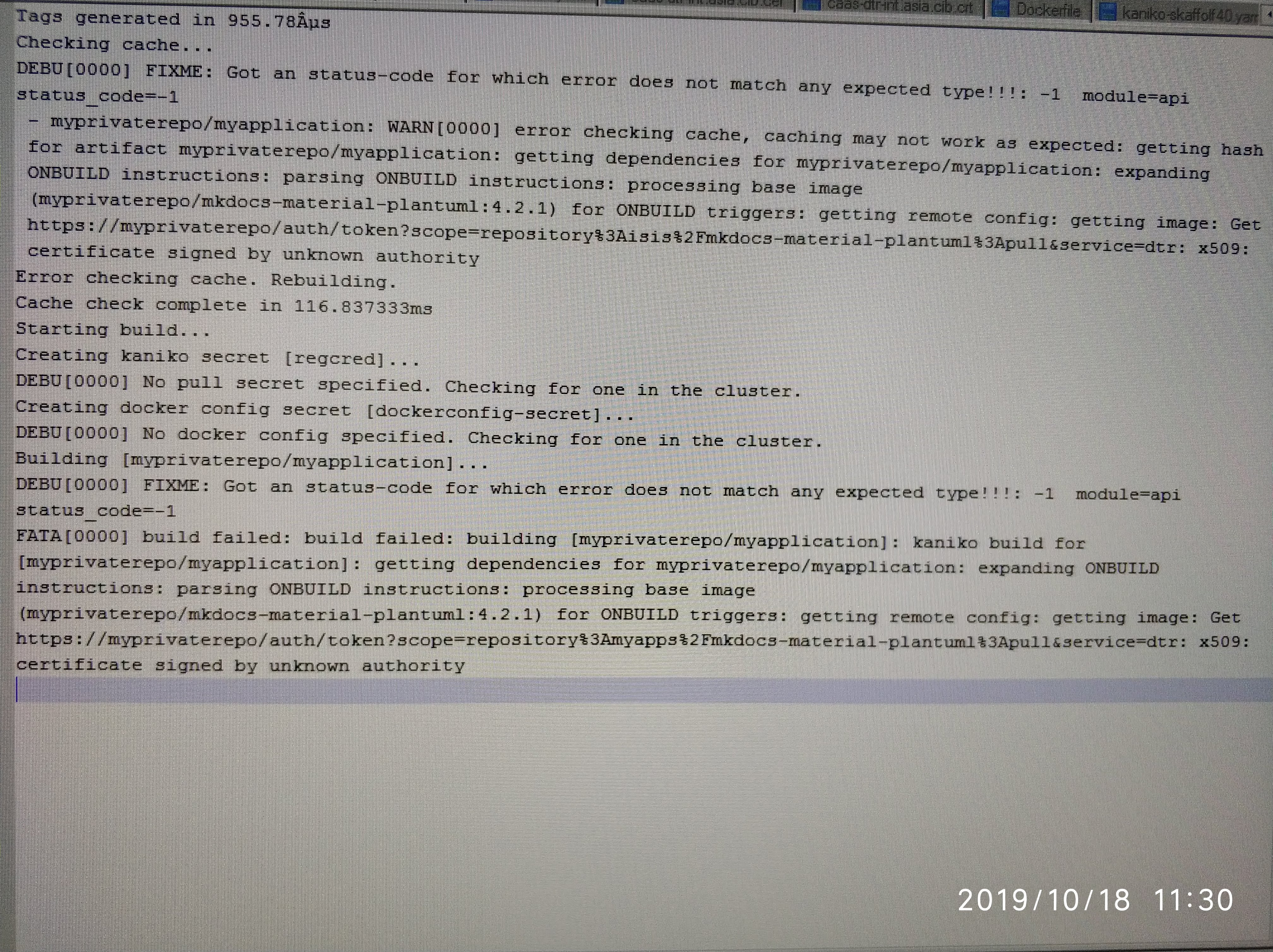 - This screenshot is the error i get before adding the
 DOCKER_CERT_PATH environment variable. The kaniko pod was not started.
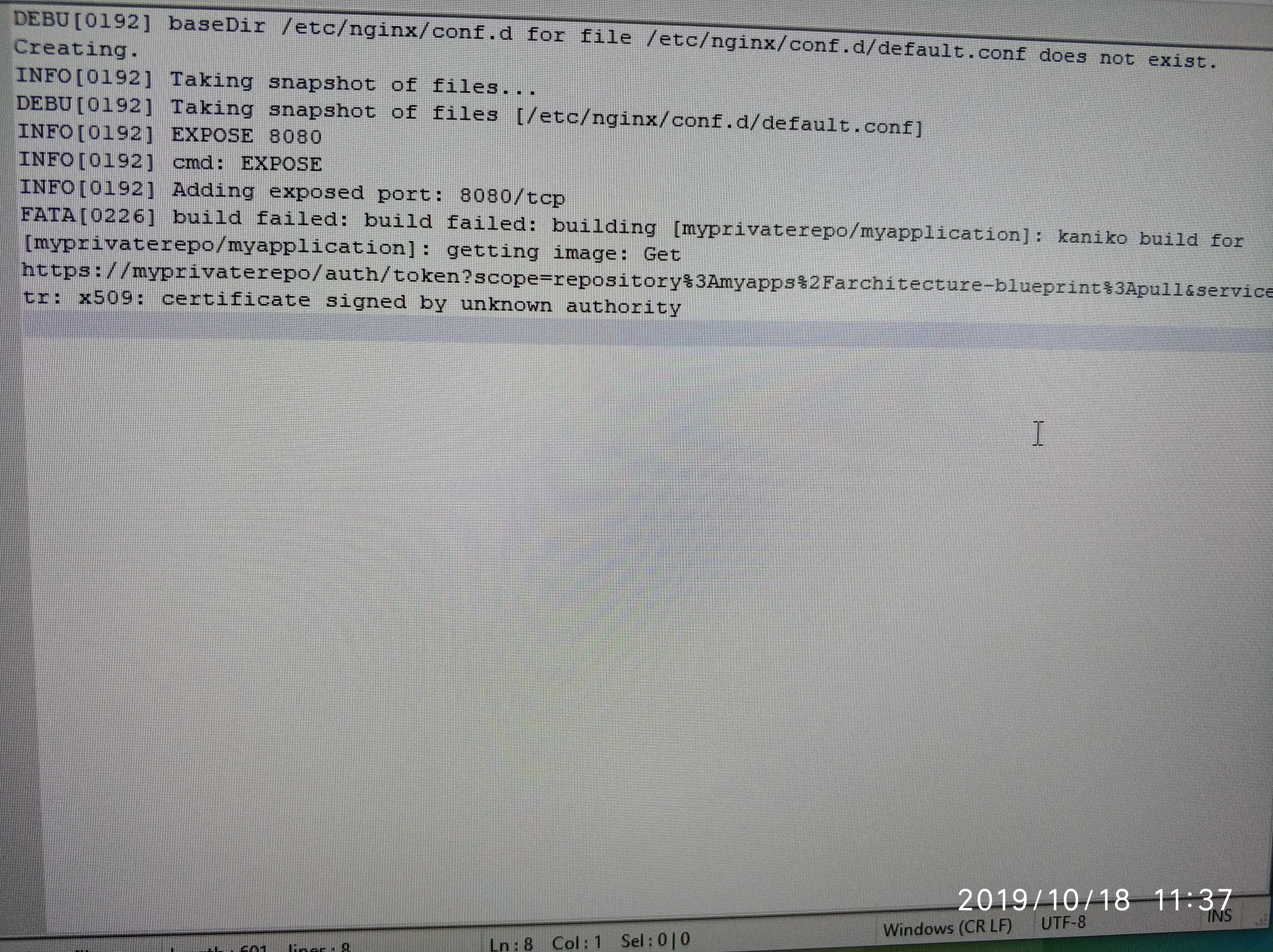 - This screenshot is the error i get if I do not set
 SSL_CERT_FILE environment variable.
balchua
on 18 Oct 2019
Although this issue https://github.com/GoogleContainerTools/skaffold/issues/3116 is talking about jib, i think it could be related.
balchua
on 24 Oct 2019
@balchua thanks for sharing the screenshots!!!
As a workaround - can you try if --cache-artifacts=false helps with the post-failure - I think that is code path that is trying to get the remote config from the registry and fails...
balopat
on 25 Oct 2019
@balopat will give this a go. Thanks
balchua
on 25 Oct 2019
@balopat, same error x509: certificate signed by unknown authority
balchua
on 25 Oct 2019
Is there some progress on this problem? I've just started using skaffold and get the same problem with the certificate.
Generating tags...
 - registry.xxx/registry/go-operator-module -> registry.xxx/registry/go-operator-module:2e754c3-dirty
Building [registry.xxx/registry/go-operator-module]...
build ./src/go/go/main: cannot find module for path ./src/go/go/main
Sending build context to Docker daemon  87.56MB
Step 1/4 : FROM debian
 ---> 8e9f8546050d
Step 2/4 : COPY ./go-operator-module /go-operator-module
 ---> Using cache
 ---> 610911483e88
Step 3/4 : COPY ./deployment/crd.yaml /deployment/crd.yaml
 ---> Using cache
 ---> 90ff482e8478
Step 4/4 : ENTRYPOINT /go-operator-module
 ---> Using cache
 ---> 92744d03147b
Successfully built 92744d03147b
Successfully tagged registry.xxx/registry/go-operator-module:latest
The push refers to repository [registry.xxx/registry/go-operator-module]
c622176a9d88: Layer already exists
29a9b55cfb86: Layer already exists
831b66a484dc: Layer already exists
latest: digest: sha256:4da361823cf991e69eab6fb2b43cba2a959b406400928510ea97576c9ffcaafb size: 949
FATA[0002] failed to build: build failed: building [registry.xxx/registry/go-operator-module]: build artifact: getting image: Get https://registry.xxx:443/v2/: x509: certificate signed by unknown authority
apiVersion: skaffold/v1
kind: Config
metadata:
  name: go-operator-module
build:
  artifacts:
    - image: registry.xxx/registry/go-operator-module
      custom:
        buildCommand: ./build.sh
  insecureRegistries: ["registry.xxx"]
 bframke
on 2 Dec 2019
bframke
on 2 Dec 2019
I resolved this by following instrusctions in https://docs.docker.com/registry/insecure/
cp /etc/docker/certs.d/
update-ca-certificates
 sjgiri
on 30 Jan 2020
sjgiri
on 30 Jan 2020
I am using a self signed certificate on my private registry.
I followed these instructions to locally install the root certificate: https://docs.docker.com/engine/security/certificates/
My app docker image uses a custom base docker image in it's dockerfile. The base image lives on the private registry. If I use the docker client directly from the command line I can docker push and docker pull the base image. I have similar configuration in my jenkins agents and my pipelines use the docker client to pull, build, and push with success.
I am using skaffold version 1.7.0
skaffold dev works fine if my app image uses a base image from dockerhub. When I switch my app image to the custom base image on the private registry, my skaffold dev results with this:
Listing files to watch...
- localhost:5000/myapp-image
FATA[0001] watching files for artifact "localhost:5000/myapp-image": listing files: listing files: expanding ONBUILD instructions: parsing ONBUILD instructions: processing base image (my-remote-private-registry/myproject/baseimage@SHA) for ONBUILD triggers: getting remote config: getting image: Get "https://my-remote-private-registry/v2/": x509: certificate signed by unknown authority
It is beyond my authority to change the private registry from using a self signed certificate. This issue is a show stopper for my team to use skaffold. All of our base images reside on the private registry.
Please do not ignore this issue thinking it is user error and can be resolved with the proper docker config.
 asegretto
on 3 Apr 2020
asegretto
on 3 Apr 2020
@balchua - Thank you for your analysis. I just looked through Skaffold's code and came to the same conclusion. The library we use for fetching image metadata is https://github.com/google/go-containerregistry/ -- they have an open bug that is related:
https://github.com/google/go-containerregistry/issues/211
As you discovered, setting the SSL_CERT_FILE works around this issue on Linux. You can do so for instance by specifying:
env SSL_CERT_FILE=path skaffold dev
On macOS, I believe the equivalent may be to add the certificate to your system keychain. See https://golang.org/pkg/crypto/x509/ for more information.
 tstromberg
on 24 Apr 2020
tstromberg
on 24 Apr 2020
So, the question is then -- what should fixing for Skaffold this look like?
- Should we show the advice of setting
SSL_CERT_FILE? - Should we include all of Docker's certs by default? Is that enough?
- Should an alternative cert be specifiable in the skaffold config?
- Should we allow users to turn-off certificate validation?
tstromberg
on 24 Apr 2020
I am on the latest Ubuntu and that work around does not work around the issue. Did I miss something?
env SSL_CERT_FILE=/etc/docker/certs.d/XXX/ca.crt skaffold dev
Listing files to watch...
- localhost:5000/cbso-ui
Generating tags... - localhost:5000/cbso-ui -> localhost:5000/cbso-ui:58ef2c9
Checking cache... - localhost:5000/cbso-ui: Not found. Building
Found [minikube] context, using local docker daemon.
Building [localhost:5000/cbso-ui]...
Sending build context to Docker daemon 713.2kB
Step 1/17 : FROM XXX/xaas/amazon-node@sha256:b886479e53eb5bc2f9eb7866935f5279573d4f0352d5fbd7c8f4dcb3cfc48f08
FATA[0008] exiting dev mode because first build failed: build failed: building [localhost:5000/cbso-ui]: build artifact: unable to stream build output: Get https://XXX/v2/: x509: certificate signed by unknown authority
ls /etc/docker/certs.d/XXX/
ca.crt
asegretto
on 1 May 2020
@asegretto I think your last error (which is a different type of error from your earlier one in https://github.com/GoogleContainerTools/skaffold/issues/3039#issuecomment-608546305) is when Minikube's internal Docker daemon is trying to access XXX/xaas/amazon-node@... inside Minikube's VM. If that's the case, it's no wonder having /etc/docker/certs.d/ on your local machine doesn't do any good. What's the output of the following on your local machine?
$ mkdir test-tmp && cd test-tmp
$ cat > Dockerfile <<EOF
FROM XXX/xaas/amazon-node@...
EOF
$ eval $(minikube docker-env)
$ docker build .
 chanseokoh
on 2 Jun 2020
chanseokoh
on 2 Jun 2020
My take, if there is a way to specify skip-tls-verify somewhere in skaffold, that will be an option i will choose.
But definitely turned off by default.
So it is a conscious decision from the user to take the necessary risk.
balchua
on 2 Jun 2020
My take, if there is a way to specify
skip-tls-verifysomewhere in skaffold, that will be an option i will choose.
If you are not interested in using self-signed certs, Skaffold does have the flag --insecure-registry, which will try to turn off TLS verification entirely at various points. Depending on where you are seeing the cert failure, this flag may work.
Also note that there are different root causes mixed in this issue thread, and you need to be clear on where it is failing by which component. Various entities access remote registries in different manners throughout the entire Skaffold workflow, and they require different resolutions, workarounds, and bug fixes. For example, for verifying a self-signed server,
- Jib Builder: basically, the JVM is the entity verifying servers. Jib may need to verify and connect to remote registries.
- Docker Builder: the local Docker daemon is the entity. During a build, the daemon may need to connect to remote registries.
- Kaniko Builder: the same story goes on.
- Skaffold binary itself
- go-containerregistry: Skaffold sometimes directly accesses registries using this Go library. The library is supposed to make use of the system certificate store of various OS types by default. Therefore, putting a server certificate into the OS system trust CA store could be one solution for this issue. Also, it seems like
SSL_CERT_FILE(honored by OpenSSL) could be another solution on Linux; in this case, I think the file should contain all the default root CA plus your server certificate. Lastly, AFAICT, the go-containerregistry library doesn't look into the Docker's way of configuring certificates (yet). - github.com/docker/docker/client: Skaffold uses this library to communicate to a Docker daemon. From what you said, it looks like you need a proper cert configuration for Skaffold to be able to connect to a daemon. Your comment seems to suggest that the library honors environment variables like
DOCKER_CERT_PATH.
- go-containerregistry: Skaffold sometimes directly accesses registries using this Go library. The library is supposed to make use of the system certificate store of various OS types by default. Therefore, putting a server certificate into the OS system trust CA store could be one solution for this issue. Also, it seems like
- When using a local cluster (such as Minikube): Minikube's internal Docker daemon may need to connect to remote registries, similar to the Docker Builder case above.
- Kubernetes: a Kubernetes cluster may need to connect to remote registries to pull images pushed by Skaffold.
chanseokoh
on 2 Jun 2020
Related issues
 giladsh1
·
20Comments
giladsh1
·
20Comments
 kasperisager
·
34Comments
kasperisager
·
34Comments
 dcherniv
·
26Comments
dcherniv
·
26Comments
 jimanvlad
·
32Comments
jimanvlad
·
32Comments
 prary
·
28Comments
prary
·
28Comments