Skaffold: Fails to clean up on Ctrl+C
Not sure if I am doing something wrong, but my skaffold no longer wants to clean up when I stop the process. According to the dry run, it's creating resources instead of deleting them (please see below).
Expected behavior
Skaffold shuts down gracefully removing created containers and images.
Actual behavior
This error message is written in the log, skaffold exits leaving running containers behind.
WARN[0192] deployer cleanup: reading manifests: kubectl create:
Running [kubectl --context docker-for-desktop create --dry-run -oyaml
-f /Users/dmoore/projects/test-org-api/app/api/k8s/api.yaml
-f /Users/dmoore/projects/test-org-api/app/db/k8s/000-role.yaml
-f /Users/dmoore/projects/test-org-api/app/db/k8s/020-stolon-sentinel.yaml
-f /Users/dmoore/projects/test-org-api/app/db/k8s/030-secret.yaml
-f /Users/dmoore/projects/test-org-api/app/db/k8s/040-stolon-keeper.yaml
-f /Users/dmoore/projects/test-org-api/app/db/k8s/050-stolon-proxy.yaml
-f /Users/dmoore/projects/test-org-api/app/db/k8s/060-init-db-job.yaml]:
stdout , stderr: , err: signal: interrupt: signal: interrupt
Information
- Skaffold version: v0.27.0
- Operating system: MacOS Mojave 10.14.4
- Contents of skaffold.yaml:
apiVersion: skaffold/v1beta8
kind: Config
deploy:
  kubectl:
    manifests:
    - app/db/k8s/000-role.yaml
    - app/db/k8s/010-role-binding.yaml
    - app/db/k8s/020-stolon-sentinel.yaml
    - app/db/k8s/030-secret.yaml
    - app/db/k8s/040-stolon-keeper.yaml
    - app/db/k8s/050-stolon-proxy.yaml
    - app/db/k8s/060-init-db-job.yaml
    - app/api/k8s/api.yaml
profiles:
- name: dev
  activation:
    - kubeContext: docker-for-desktop
      command: dev
  build:
    artifacts:
    - image: dl-org-db
      docker:
        dockerfile: app/db/Dockerfile
        buildArgs:
          pull: false
    - image: dl-org-api.dev
      context: .
      sync:
        dist/api/**/*: app/api/
      docker:
        dockerfile: app/api/Dockerfile
        target: dev-env
        buildArgs:
          pull: false
Steps to reproduce the behavior
- I run my project with
skaffold dev --port-forward=false - I hit Ctrl+C after some time.
 demisx
All 28 comments
Maybe related #1737
Can you run your command with -v=debug and see if skaffold deploy is successful.
 tejal29
on 1 May 2019
tejal29
on 1 May 2019
I'm still experiencing this issue with the latest bleeding edge f48e7dd. I have no problems starting the app - it just fails to clean up when I hit [CTRL]+C. I ran it with -v=debug and don't see any errors. Works fine with v0.31, though.
demisx
on 6 Aug 2019
This is very odd, I would love to see why it's happening.
We do have integration tests and test the cleanup flow daily. Can you share a minimal open source reproduction of this?
 balopat
on 15 Aug 2019
balopat
on 15 Aug 2019
It's rock solid with v0.31 - never saw this issue. With the latest v0.36 or the bleeding edge skaffold either exits right away upon clicking [Ctrl]+C, thus leaving running containers behind, or it occasionally cleans up with a bunch of warnings as such:
WARN[0102] image [dl-api.test] is not used by the deployment
WARN[0102] image [dl-web] is not used by the deployment
WARN[0102] image [dl-api.dev] is not used by the deployment
WARN[0102] image [docker.elastic.co/elasticsearch/elasticsearch] is not used by the deployment
WARN[0102] image [init-db] is not used by the deployment
WARN[0102] image [dl-logstash] is not used by the deployment
WARN[0102] image [postgres] is not used by the deployment
configmap "api-config" deleted
deployment.apps "dl-api" deleted
service "dl-api" deleted
configmap "db-config" deleted
configmap "es-config" deleted
deployment.apps "elasticsearch" deleted
service "elasticsearch" deleted
job.batch "init-db" deleted
deployment.apps "logstash" deleted
service "logstash" deleted
deployment.apps "postgres" deleted
service "postgres" deleted
deployment.apps "test-api" deleted
configmap "web-config" deleted
deployment.apps "dl-web" deleted
service "dl-web" deleted
Cleanup complete in 1.614273953s
Pruning images...
WARN[0103] builder cleanup: pruning images: Error response from daemon: conflict: unable to delete bfddf00c1a79 (cannot be forced) - image is being used by running container af39c47ca251
@tejal29 Are you working on this issue?
 dgageot
on 28 Aug 2019
dgageot
on 28 Aug 2019
@demisx this should be now fixed #2746. In case of remoteManifests issues might still exist, but you are not using those seemingly.
balopat
on 4 Sep 2019
@balopat This is correct -- I am not using any remoteManifests. I am going to switch from v0.37 to the bleeding edge and let you know if I still see this issue. Thank you for staying on top of it.
demisx
on 4 Sep 2019
Bad news. I was using the latest 81c50fe and just hit [Ctrl]+C. The skaffold process quit immediately leaving behind everything running in k8s cluster. Had to run skaffold delete --kube-context=docker-desktop -p dev again to clean things up.
UPDATE: Been working with this version for the past couple of hours and skaffold failed to clean up on each [Ctrl]+C so far.
demisx
on 4 Sep 2019
@balopat Should not this issue be re-opened?
Clean up on ctrl-c does not work for me either
with
- skaffold 0.39.
- minikube v1.3.1 (hyper-v)
- windows 10
It says "Cleaning up...' on Ctrl-c but nothing happens
 FredericLatour
on 10 Oct 2019
FredericLatour
on 10 Oct 2019
Confirming this issue still exists in the latest v0.39.0/MacOs Mojave. It happens so often, that I made a separate npm script to clean up leftover k8s resources after stopping skaffold.
demisx
on 10 Oct 2019
@demisx @FredericLatour could you share a detailed log?
dgageot
on 10 Oct 2019
@dgageot Any suggestions on how to capture what you are were looking for? Because my skaffold immediately exits as soon as hit [Ctrl]+C. Thank you.
demisx
on 10 Oct 2019
Sure. I would try skaffold dev -vdebug
dgageot
on 10 Oct 2019
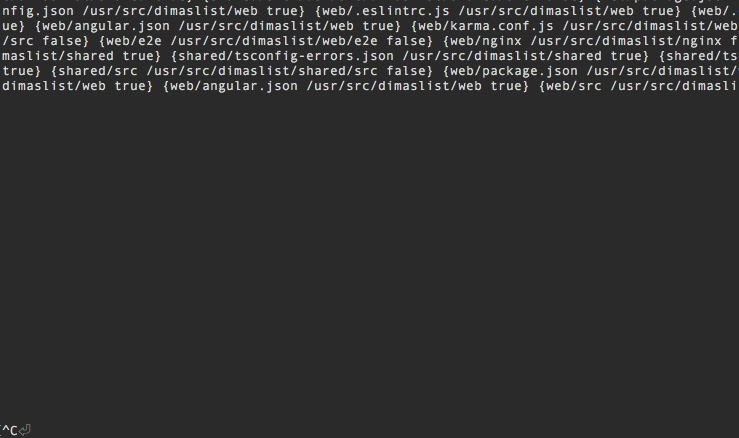
@dgageot I've tried with the debug flag and skaffold wrote tons of info upon startup. The environment started normally. I then hit [Ctrl]+C and all skaffold resource got cleaned up as expected. No issues. I then started skaffold for the second time. It started environment without any issues again. However, this time when I hit [Ctrl]+C after it's being up for a few mins, the skaffold simply quit without writing anything to the debug log (see attached image of last log lines below).
Are you still interested to see all skaffold messages written to the terminal during startup? I want to make sure you do before I start redacting this gigantic log.
demisx
on 11 Oct 2019
On another laptop, I've got some messages written after hitting [Ctrl]+C. All pods were left running:
^CDEBU[3540] Terminating port-forward service-logstash-default-9600
DEBU[3540] Terminating port-forward service-web-default-4200
DEBU[3540] Terminating port-forward service-elasticsearch-default-9200
DEBU[3540] Terminating port-forward service-api-default-3000
DEBU[3540] Terminating port-forward service-postgres-default-5432
Cleaning up...
DEBU[3540] terminated service-elasticsearch-default-9200 due to context cancellation
DEBU[3540] terminated service-api-default-3000 due to context cancellation
DEBU[3540] Running command: [kubectl --context docker-for-desktop create --dry-run -oyaml -f /Users/user/projects/bm/dl/dl-mono/api/app/k8s/dev/db.k8s-config.yaml -f /Users/user/projects/bm/dl/dl-mono/api/app/k8s/dev/postgres.k8s-deployment.yaml -f /Users/user/projects/bm/dl/dl-mono/api/app/k8s/dev/postgres.k8s-service.yaml -f /Users/user/projects/bm/dl/dl-mono/api/app/k8s/dev/init-db.k8s-job.yaml -f /Users/user/projects/bm/dl/dl-mono/api/app/k8s/dev/es.k8s-config.yaml -f /Users/user/projects/bm/dl/dl-mono/api/app/k8s/dev/es.k8s-deployment.yaml -f /Users/user/projects/bm/dl/dl-mono/api/app/k8s/dev/es.k8s-service.yaml -f /Users/user/projects/bm/dl/dl-mono/api/app/k8s/dev/logstash.k8s-deployment.yaml -f /Users/user/projects/bm/dl/dl-mono/api/app/k8s/dev/logstash.k8s-service.yaml -f /Users/user/projects/bm/dl/dl-mono/api/app/k8s/dev/api.k8s-config.yaml -f /Users/user/projects/bm/dl/dl-mono/api/app/k8s/dev/api.k8s-deployment.yaml -f /Users/user/projects/bm/dl/dl-mono/api/app/k8s/dev/api.k8s-service.yaml -f /Users/user/projects/bm/dl/dl-mono/web/k8s/dev/web.k8s-config.yaml -f /Users/user/projects/bm/dl/dl-mono/web/k8s/dev/web.k8s-deployment.yaml -f /Users/user/projects/bm/dl/dl-mono/web/k8s/dev/web.k8s-service.yaml]
DEBU[3540] terminated service-postgres-default-5432 due to context cancellation
DEBU[3540] terminated service-logstash-default-9600 due to context cancellation
DEBU[3540] terminated service-web-default-4200 due to context cancellation
@demisx I'm interested only in the logs just after you press Ctrl-c
dgageot
on 14 Oct 2019
@dgageot Got it. Most often, there is nothing written to the log at all - the process simply quits and exits back to my shell. I'll post it here if I notice anything different.
The same issue exists in the latest v0.40.0
demisx
on 14 Oct 2019
@dgageot same thing for me. Not a show stopper though as I can run a skaffold delete command.
FredericLatour
on 14 Oct 2019
@demisx - you are using the same skaffold.yaml as in the opening comment right?
@FredericLatour - can you share your skaffold.yaml?
Can you provide logs on trace level, with -v trace ?
balopat
on 14 Oct 2019
@balopat Give it or take. Here is the latest, though:
```yaml
apiVersion: skaffold/v1beta13
kind: Config
profiles:
- name: dev
activation:
- command: dev
deploy:
kubectl:
manifests:
- api/app/k8s/dev/db.k8s-config.yaml
- api/app/k8s/dev/postgres.k8s-deployment.yaml
- api/app/k8s/dev/postgres.k8s-service.yaml
- api/app/k8s/dev/init-db.k8s-job.yaml
- api/app/k8s/dev/es.k8s-config.yaml
- api/app/k8s/dev/es.k8s-deployment.yaml
- api/app/k8s/dev/es.k8s-service.yaml
- api/app/k8s/dev/logstash.k8s-deployment.yaml
- api/app/k8s/dev/logstash.k8s-service.yaml
- api/app/k8s/dev/api.k8s-config.yaml
- api/app/k8s/dev/api.k8s-deployment.yaml
- api/app/k8s/dev/api.k8s-service.yaml
- web/k8s/dev/web.k8s-config.yaml
- web/k8s/dev/web.k8s-deployment.yaml
- web/k8s/dev/web.k8s-service.yaml
build:
local:
useBuildkit: true
artifacts:
# Logstash data ingestor service
- image: logstash.dev
context: .
sync:
manual:
- src: 'api/app/logstash/config/dev/pipeline/'
dest: pipeline
docker:
dockerfile: api/app/logstash/Dockerfile
target: logstash.dev
- src: 'api/app/logstash/config/dev/pipeline/'
- image: init-db.dev
context: .
docker:
dockerfile: api/app/db/Dockerfile
target: init-db.prod
buildArgs:
DL_ORG_DEV_NAMESPACE: '{{.DL_ORG_DEV_NAMESPACE}}'
DL_ORG_AWS_ACCOUNT_ID: '{{.DL_ORG_AWS_ACCOUNT_ID}}'
DL_ORG_AWS_IAM_APP_USER_ACCESS_KEY_ID: '{{.DL_ORG_AWS_IAM_APP_USER_ACCESS_KEY_ID}}'
DL_ORG_AWS_IAM_APP_USER_SECRET_ACCESS_KEY: '{{.DL_ORG_AWS_IAM_APP_USER_SECRET_ACCESS_KEY}}'
# API service - image: api.dev
context: .
sync:
manual:
- src: 'api/app/src//'
dest: '/usr/src/dl' - src: 'api/test//'
dest: '/usr/src/dl' - src: 'api/apidoc//'
dest: '/usr/src/dl'
docker:
dockerfile: api/Dockerfile
target: api.dev
buildArgs:
DL_ORG_DEV_NAMESPACE: '{{.DL_ORG_DEV_NAMESPACE}}'
DL_ORG_AWS_ACCOUNT_ID: '{{.DL_ORG_AWS_ACCOUNT_ID}}'
DL_ORG_AWS_IAM_APP_USER_ACCESS_KEY_ID: '{{.DL_ORG_AWS_IAM_APP_USER_ACCESS_KEY_ID}}'
DL_ORG_AWS_IAM_APP_USER_SECRET_ACCESS_KEY: '{{.DL_ORG_AWS_IAM_APP_USER_SECRET_ACCESS_KEY}}'
# Frontend website
- src: 'api/app/src//'
- image: web.dev
context: .
sync:
manual:
- src: 'web/src//'
dest: '/usr/src/dl' - src: 'web/e2e//'
dest: '/usr/src/dl' - src: 'web/*'
dest: '/usr/src/dl'
docker:
dockerfile: web/Dockerfile
target: web.dev
````
- src: 'web/src//'
- image: logstash.dev
- command: dev
demisx
on 14 Oct 2019
@balopat Here you are
apiVersion: skaffold/v1beta14
kind: Config
build:
  artifacts:
    - image: boimage
      context: packages\eklipso-bo
      docker:
        dockerfile: Dockerfile.dev
    - image: jobs
      context: packages\jobs
      sync:
        manual:
          - src: 'src/**/*'
            dest: src
            strip: 'src'
      docker:
        dockerfile: Dockerfile.dev
deploy:
  kubectl:
    manifests:
      - k8s/redis.yaml
      - k8s/docxtopdf.yaml
      - k8s\boweb01-ska.yaml
      - k8s\boweb02-ska.yaml
      - k8s\jobs-ska.yaml
      - k8s\ingress-ska.yaml
profiles:
  - name: Test
    build:
      artifacts:
        - image: container-registry.ovh.net/bo
          context: packages\eklipso-bo
          docker:
            dockerfile: Dockerfile
    deploy:
      kubectl:
        manifests:
          - k8s/boweb01-ska.yaml
          - k8s/boweb02-ska.yaml
          - k8s/ingress-staging.yaml
My dev env:
- skaffold 0.39.
- minikube v1.3.1 (hyper-v)
- windows 10
FredericLatour
on 15 Oct 2019
On windows I'm seeing this. Not sure it ever worked though... @demisx have you ever seen it working on Windows?
On Mac I still can't reproduce it.
balopat
on 15 Oct 2019
@balopat No, I was lucky not to touch Win in a long time. :) I've noticed this started happening around v0.27 update and it's been on and off ever since. Never had a problem with prior versions. I am seeing this on multiple Mac laptops and another developer just confirmed he's having the same issue on his Mac laptop as well.
demisx
on 15 Oct 2019
I have a virtual machine on linux ... I will give it a try when I have some time.
FredericLatour
on 16 Oct 2019
@demisx - not sure why (I'll investigate soon) but it looks like that the bleeding edge on Windows https://storage.googleapis.com/skaffold/builds/latest/skaffold-windows-amd64.exe is working now with Ctrl+C - can you try that?
@FredericLatour thanks! let me know how it goes!
balopat
on 17 Oct 2019
@balopat Sorry, but I only have access to Macs here. Will be happy to test on a Mac when ready.
demisx
on 17 Oct 2019
Well, @balopat was cool enough to take his time and review together what I have going on here locally. It appears that this issue is not in the skaffold per se, but in this npm script that I use to start skaffold in dev mode:
# In package.json
...
"scripts": {
  "skaffold": "skaffold dev -v=info --kube-context=docker-for-desktop --port-forward --cache-artifacts=true",
}
Our initial thought is that even though npm may be passing [Ctrl]+C event to the child skaffold process, but it is not waiting on it to finish before it bails out itself, thus leaving behind k8s pods running. I will do some research to see if there is away to make npm wait until skaffold gracefully terminates.
demisx
on 18 Oct 2019
I was able to get rid of this npm related issue by starting skaffold in a subshell. Closing.
# In package.json
...
"scripts": {
  "skaffold": "(skaffold dev -v=info --kube-context=docker-for-desktop --port-forward --cache-artifacts=true)",
}
Related issues
 cheung-chifung
·
32Comments
cheung-chifung
·
32Comments
 giladsh1
·
20Comments
giladsh1
·
20Comments
 WoLfulus
·
22Comments
WoLfulus
·
22Comments
 corneliusweig
·
37Comments
corneliusweig
·
37Comments
 briandealwis
·
21Comments
briandealwis
·
21Comments
Most helpful comment
@balopat Should not this issue be re-opened?
Clean up on ctrl-c does not work for me either
with
It says "Cleaning up...' on Ctrl-c but nothing happens