Sitespeed.io: clear "from memory cache" and "from disk cache" after prescript
Hi @soulgalore
Is it possible to add a switch to clear the "from memory cache" and "from disk cache" caches after executing prescript?
Because most of the spa resources will be loaded and cached on the login page and the home page that automatically jumps after login.
This will not simulate a user entering the test page directly when they are logged in.
Thanks!
 Nuoky
Nuoky
All 25 comments
Hi @Nuoky do you use Chrome? I've seen people try to running without a cache, checkout for example https://github.com/sitespeedio/sitespeed.io/issues/1707 - could that help you (I haven't tried it myself).
Best
Peter
 soulgalore
on 25 Oct 2018
soulgalore
on 25 Oct 2018
@soulgalore Thank you for your quick reply.
I tried using "--disk-cache-size=1" and "--media-cache=1", but it didn't achieve the desired effect.
I compared the HAR of 7.1.3 and 7.6.2. I found that after executing prescript in 7.1.3, it seems to open the URL in the new tab. In the 7.6.2 version, the URL is opened directly in the current tab.
Is there a way to open a test URL in a new tab like the 7.1.3 version?
Nuoky
on 25 Oct 2018
Hi @Nuoky also seen people tried with:
--browsertime.chrome.args disk-cache-dir=/dev/null
At the moment we clear the following caches: https://github.com/sitespeedio/browsertime-extension/blob/master/background.js#L184-L198 but that happens before preScript.
About the tab, I'm not sure exactly what you mean, can you show me some more?
Best
Peter
soulgalore
on 25 Oct 2018
Hi @soulgalore
Sorry for replying so long.
It has now been confirmed that the problem is not caused by caching.
In the past version of bt (2.5.0) use driver.get (url) to open the test page, and after the 3.xx version use window.location to open the test page, using driver.get (url) is similar to browsing The new tab of the device opens the url. Using window.location runs the page within the current tab.
So my reply to the previous one means: The generated HAR is different from the previous bt version (2.5.0). Is there a way to open the url in the browser's new tab page?
Thanks!
Nuoky
on 8 Nov 2018
Ah ok, I think I understand. So you want it to work like this:
- You run the pre-script (login etc)
- Open a new tab and access the URL you want to measure there?
Best
Peter
soulgalore
on 8 Nov 2018
Right!
Nuoky
on 8 Nov 2018
At the moment there is no way of clearing the cache between URLs (in scripting).
soulgalore
on 26 Jan 2019
What other way of testing pages behind a login do we have?
we have a login dialog that shows and once closed the site (uses angular) loads.. The problem is that all assets are loaded when user get's the login dialog, so we need to clear the cache to get proper data..
Any help is much appreciated :)
 mackelito
on 6 Nov 2019
mackelito
on 6 Nov 2019
HI @mackelito I think I've missed closing this issue, this is doable now. If you use scripting have a look at https://www.sitespeed.io/documentation/sitespeed.io/scripting/#cache. You can either clear the full cache (assets/cookies etc) or just clear the cache and keep cookies.
So the script should be like this:
- navigate to the page
- login the user
- clear the browser cache (keep cookies if you use them to keep the user logged in)
- measure the next page
Is that what you need?
Best
Peter
soulgalore
on 6 Nov 2019
That is what I'm trying to do but it's not working :(
My guess is that the service worker cache is not cleared
````
module.exports = async function(context, commands) {
await commands.navigate(
'https://www.mysite.com/'
);
try {
await commands.wait.byXpath('//*[@id="dialog-0"]/authentication-dialog',3000);
// Enter login credentials
await commands.addText.byId(context.options.user, 'email');
await commands.addText.byId(context.options.password, 'password');

// Click on the submit button with id login
await commands.click.byIdAndWait('login');

// Clear the cache
await commands.cache.clear();

// Wait for element to show
return commands.wait.byId('startpage_section_1',3000);
} catch (e) {
// We try/catch so we will catch if the the input fields can't be found
// The error is automatically logged in Browsertime and re-thrown here
// We could have an alternative flow ...
// else we can just let it cascade since it catched later on and reported in
// the HTML
throw e;
}
};
````
But the result is that not all assets are showing in the result...
eg. no css/js files are requested
mackelito
on 6 Nov 2019
Ah ok, I need check our implementation. For Chrome we send Network.clearBrowserCache using the Chrome devtools protocol. Maybe something else is needed for the service worker. Can you check at https://chromedevtools.github.io/devtools-protocol if you can find something? Then you could use that directly with https://www.sitespeed.io/documentation/sitespeed.io/scripting/#chrome-devtools-protocol
And then I can update or add another method later on?
Best
Peter
soulgalore
on 6 Nov 2019
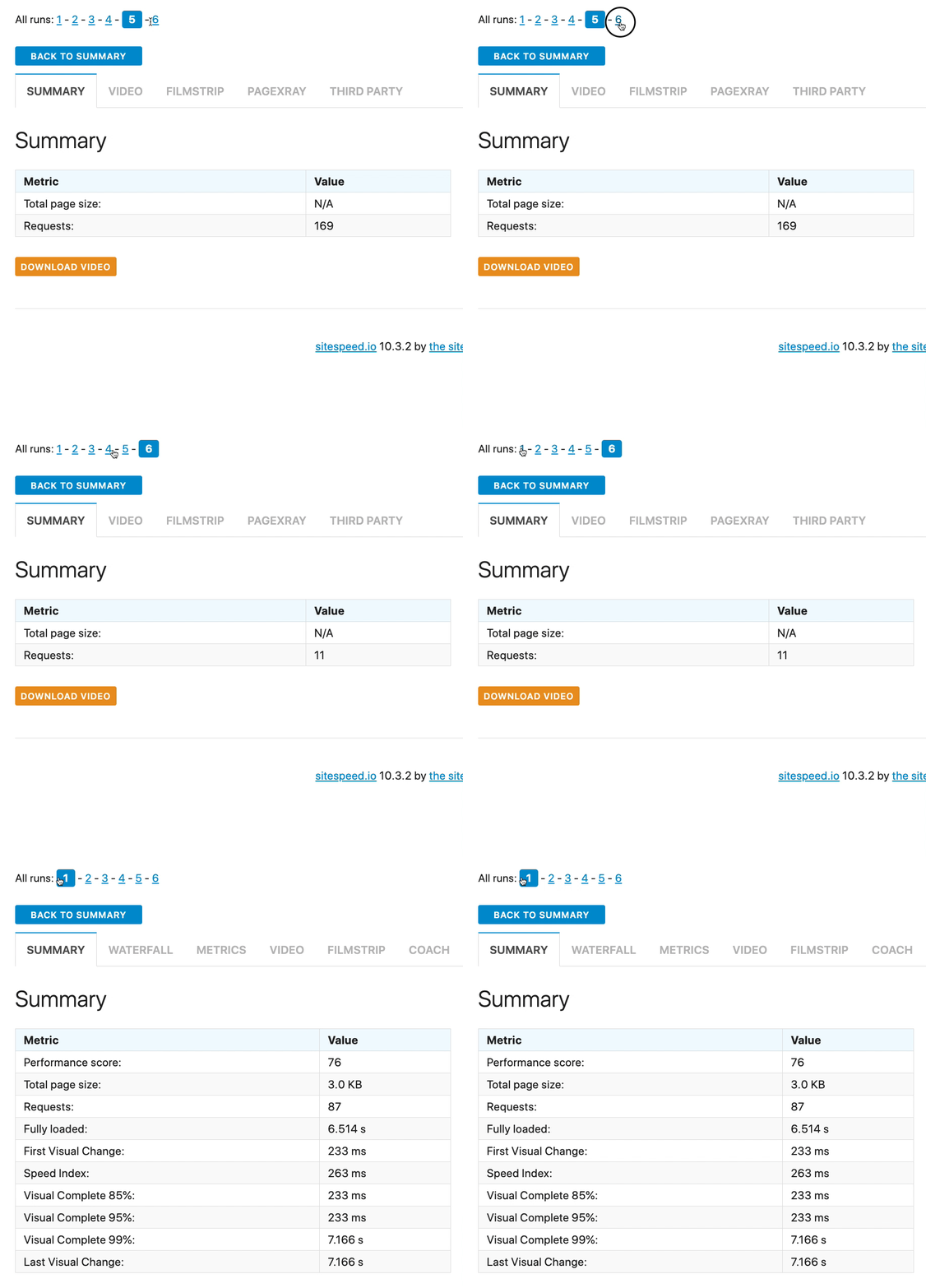
Another "issue" is the iterations.. we set --browsertime.iterations=3 and this is the result:
1-3 looks as expected.. 4-6 are "broken"..
mackelito
on 6 Nov 2019
Please create a new issue for that :)
soulgalore
on 6 Nov 2019
@soulgalore will do.. suggested topic? quite new to sitespeed so not sure how to categories this bug :)
edit: https://github.com/sitespeedio/sitespeed.io/issues/2752
mackelito
on 6 Nov 2019
Great, just create the bug and try to make reproducible see https://www.sitespeed.io/documentation/sitespeed.io/bug-report/#explain-how-to-reproduce-your-issue
Best
Peter
soulgalore
on 6 Nov 2019
Found some ppl that used selenium to clear the data...
````
const driver = context.selenium.driver;
// Opens a new tab
driver.execute_script("window.open()")

// Switch to the newly opened tab
driver.switch_to.window(driver.window_handles[1])

// Navigate to new URL in new tab
driver.get("chrome://settings/clearBrowserData")

// Click on the Clear data button
driver.find_element_by_css_selector("* /deep/ #clearBrowsingDataConfirm").click()

driver.implicitly_wait(60)

// Switch to original tab
driver.switch_to.window(self.driver.window_handles[0])
````
But I get ERROR: [browsertime] TypeError: Cannot read property 'execute_script' of undefined
mackelito
on 6 Nov 2019
Realised it was an older api.. but not able to "convert" it to use the new api :P
mackelito
on 6 Nov 2019
I'm thinking you could try to disable service workers before you load the URL https://chromedevtools.github.io/devtools-protocol/tot/ServiceWorker#method-disable ?
For Chrome we use the Chrome devtools protocol to clear the cache, For Firefox we use a browser extension, there it potentially could work to empty the cache for SW but we haven't implemented it see https://github.com/sitespeedio/browsertime-extension/blob/master/background.js#L180-L221
soulgalore
on 7 Nov 2019
hmm.. we are running tests in chrome so the SW cache should be cleared if I understand you correctly? But looking at the test results I see that it's not.. so I'm missing something or doing something wrong :/
mackelito
on 7 Nov 2019
No then I was unclear. We only use the CDP network call to clear the cache, we need to check with the Chrome team what it actually. I think you should try turn off the Service Worker before measure the page. The documentation at https://chromedevtools.github.io/devtools-protocol/tot/ServiceWorker#method-disable isn't so friendly though :)
soulgalore
on 7 Nov 2019
For reference, I ended up doing this:
    await commands.cache.clear();
    await commands.cdp.send('ServiceWorker.enable');
    await commands.cdp.send('ServiceWorker.stopAllWorkers');
mackelito
on 7 Nov 2019
Thank you @mackelito for sharing!
soulgalore
on 7 Nov 2019
Hey.. we thank you for the awesome work you’ve done! If we ever meet then you have a 🍺 coming your way! 😁
mackelito
on 7 Nov 2019
The original issue: there's a lot of work to making multiple tabs work and I don't see how that will happen.
soulgalore
on 18 Nov 2019
Sorry, it took so long to reply.
I have now solved the problem by the following method:
// clear disk cache and memory cache
await commands.cdp.send('Network.clearBrowserCache');
// In order to solve the problem in chrome, if you redirect to the same URL after logging in, it will not refresh normally
await driver.get('chrome://new-tab-page');
Related issues
 m0nkey
·
6Comments
m0nkey
·
6Comments
 jangrewe
·
7Comments
jangrewe
·
7Comments
 gfoxCartrawler
·
4Comments
soulgalore
·
6Comments
gfoxCartrawler
·
4Comments
soulgalore
·
6Comments
 liranGlik
·
9Comments
liranGlik
·
9Comments