Sitespeed.io: BrowserError: unknown error: Chrome failed to start: exited abnormally
The system was stable until now chrome is failing to start. I also tried to restart the machine itself but no luck. Do you require any logs to help you identifying the root cause of the problem?
Thanks

 davidbonnici1984
All 16 comments
Hey @davidbonnici1984 thanks for the error report. What OS and what version of sitespeed.io is you running? Do you use the default Docker container? In the past there has been issues before that --browsertime.chrome.args no-sandbox helps out (see https://www.sitespeed.io/faq/#chrome-doesnt-work-on-rhel7-or-some-other-nix-flavor) but that wouldn't be something that usually just occur.
Best
Peter
 soulgalore
on 23 Feb 2017
soulgalore
on 23 Feb 2017
Hey @soulgalore, thanks for your input! I am using the default docker container and running it on EC2 instance/s. Host OS is Ubuntu. This issue is intermittent, I still cannot pickup any pattern. I restarted the EC2 itself and there were cases that the problem persisted. Let me try adding this arguments when I am starting the container and will let you know if the situation is improved or not.
Thanks
David
davidbonnici1984
on 24 Feb 2017
Can you how you run (all parameters)? I think @beenanner runs on EC2?
Best
Peter
soulgalore
on 24 Feb 2017
@davidbonnici1984 if you remove the tc options from your runs does it work as expected? This could be related to the network throttling.
 beenanner
on 27 Feb 2017
beenanner
on 27 Feb 2017
Hey @soulgalore relate to my issue https://github.com/sitespeedio/sitespeed.io/issues/1478
After, I install chrome. I got these below errors.
unknown error: Chrome failed to start: exited abnormally
[2017-02-28 16:50:39] Versions OS: linux 3.2.0-23-generic nodejs: v6.10.0 sitespeed.io: 4.3.4 browsertime: 1.0.0-beta.21 coach: 0.30.1
[2017-02-28 16:50:40] Starting chrome for analysing https://www.web-essentials.asia/ 3 time(s)
[2017-02-28 16:50:40] Testing url https://www.web-essentials.asia/ run 1
[2017-02-28 16:51:40] Browser failed to start in time, trying one more time.
[2017-02-28 16:52:40] https://www.web-essentials.asia/ generated the following error in Browsertime BrowserError: unknown error: Chrome failed to start: exited abnormally
  (Driver info: chromedriver=2.27.440175 (9bc1d90b8bfa4dd181fbbf769a5eb5e575574320),platform=Linux 3.2.0-23-generic x86_64)
  (Driver info: chromedriver=2.27.440175 (9bc1d90b8bfa4dd181fbbf769a5eb5e575574320),platform=Linux 3.2.0-23-generic x86_64)
    at BrowsertimeError (/usr/local/lib/node_modules/sitespeed.io/node_modules/browsertime/lib/support/errors.js:5:5)
    at BrowserError (/usr/local/lib/node_modules/sitespeed.io/node_modules/browsertime/lib/support/errors.js:13:5)
    at startBrowser.call.catch.tap.tap.catch.catch (/usr/local/lib/node_modules/sitespeed.io/node_modules/browsertime/lib/core/seleniumRunner.js:81:15)
From previous event:
    at SeleniumRunner.start (/usr/local/lib/node_modules/sitespeed.io/node_modules/browsertime/lib/core/seleniumRunner.js:80:13)
    at runIteration (/usr/local/lib/node_modules/sitespeed.io/node_modules/browsertime/lib/core/engine.js:210:21)
    at Promise.reduce (/usr/local/lib/node_modules/sitespeed.io/node_modules/browsertime/lib/core/engine.js:285:25)
From previous event:
    at Promise.resolve.tap.tap.tap (/usr/local/lib/node_modules/sitespeed.io/node_modules/browsertime/lib/core/engine.js:284:17)
From previous event:
    at Engine.run (/usr/local/lib/node_modules/sitespeed.io/node_modules/browsertime/lib/core/engine.js:283:8)
    at engine.start.then (/usr/local/lib/node_modules/sitespeed.io/lib/plugins/browsertime/analyzer.js:76:26)
    at runCallback (timers.js:651:20)
    at tryOnImmediate (timers.js:624:5)
    at processImmediate [as _immediateCallback] (timers.js:596:5)
From previous event:
    at Object.analyzeUrl (/usr/local/lib/node_modules/sitespeed.io/lib/plugins/browsertime/analyzer.js:76:8)
    at storageManager.createDirForUrl.then.then (/usr/local/lib/node_modules/sitespeed.io/lib/plugins/browsertime/index.js:132:34)
From previous event:
    at Object.processMessage (/usr/local/lib/node_modules/sitespeed.io/lib/plugins/browsertime/index.js:132:14)
    at queue.process (/usr/local/lib/node_modules/sitespeed.io/lib/support/queueHandler.js:157:57)
    at drainItem (/usr/local/lib/node_modules/sitespeed.io/node_modules/concurrent-queue/index.js:92:21)
    at Immediate.drain (/usr/local/lib/node_modules/sitespeed.io/node_modules/concurrent-queue/index.js:73:84)
    at runCallback (timers.js:651:20)
    at tryOnImmediate (timers.js:624:5)
    at processImmediate [as _immediateCallback] (timers.js:596:5)
    at SeleniumRunner.startBrowser (/usr/local/lib/node_modules/sitespeed.io/node_modules/browsertime/lib/core/seleniumRunner.js:37:10)
    at SeleniumRunner.start (/usr/local/lib/node_modules/sitespeed.io/node_modules/browsertime/lib/core/seleniumRunner.js:42:25)
    at runIteration (/usr/local/lib/node_modules/sitespeed.io/node_modules/browsertime/lib/core/engine.js:210:21)
    at Promise.reduce (/usr/local/lib/node_modules/sitespeed.io/node_modules/browsertime/lib/core/engine.js:285:25)
[2017-02-28 16:52:40] Render HTML for 1 page(s)
[2017-02-28 16:52:42] HTML stored in /var/lib/jenkins/sitespeed-result/www.web-essentials.asia/2017-02-28-16-50-39
[2017-02-28 16:52:42] Finished analysing https://www.web-essentials.asia/
jenkins@ci:~$ sitespeed.io https://www.web-essentials.asia --browsertime.chrome.args no-sandbox
[2017-02-28 16:55:52] Versions OS: linux 3.2.0-23-generic nodejs: v6.10.0 sitespeed.io: 4.3.4 browsertime: 1.0.0-beta.21 coach: 0.30.1
[2017-02-28 16:55:53] Starting chrome for analysing https://www.web-essentials.asia 3 time(s)
[2017-02-28 16:55:53] Testing url https://www.web-essentials.asia run 1
[2017-02-28 16:56:53] Browser failed to start in time, trying one more time.
[2017-02-28 16:57:53] https://www.web-essentials.asia generated the following error in Browsertime BrowserError: unknown error: Chrome failed to start: exited abnormally
  (Driver info: chromedriver=2.27.440175 (9bc1d90b8bfa4dd181fbbf769a5eb5e575574320),platform=Linux 3.2.0-23-generic x86_64)
  (Driver info: chromedriver=2.27.440175 (9bc1d90b8bfa4dd181fbbf769a5eb5e575574320),platform=Linux 3.2.0-23-generic x86_64)
    at BrowsertimeError (/usr/local/lib/node_modules/sitespeed.io/node_modules/browsertime/lib/support/errors.js:5:5)
    at BrowserError (/usr/local/lib/node_modules/sitespeed.io/node_modules/browsertime/lib/support/errors.js:13:5)
    at startBrowser.call.catch.tap.tap.catch.catch (/usr/local/lib/node_modules/sitespeed.io/node_modules/browsertime/lib/core/seleniumRunner.js:81:15)
From previous event:
    at SeleniumRunner.start (/usr/local/lib/node_modules/sitespeed.io/node_modules/browsertime/lib/core/seleniumRunner.js:80:13)
    at runIteration (/usr/local/lib/node_modules/sitespeed.io/node_modules/browsertime/lib/core/engine.js:210:21)
    at Promise.reduce (/usr/local/lib/node_modules/sitespeed.io/node_modules/browsertime/lib/core/engine.js:285:25)
From previous event:
    at Promise.resolve.tap.tap.tap (/usr/local/lib/node_modules/sitespeed.io/node_modules/browsertime/lib/core/engine.js:284:17)
From previous event:
    at Engine.run (/usr/local/lib/node_modules/sitespeed.io/node_modules/browsertime/lib/core/engine.js:283:8)
    at engine.start.then (/usr/local/lib/node_modules/sitespeed.io/lib/plugins/browsertime/analyzer.js:76:26)
    at runCallback (timers.js:651:20)
    at tryOnImmediate (timers.js:624:5)
    at processImmediate [as _immediateCallback] (timers.js:596:5)
From previous event:
    at Object.analyzeUrl (/usr/local/lib/node_modules/sitespeed.io/lib/plugins/browsertime/analyzer.js:76:8)
    at storageManager.createDirForUrl.then.then (/usr/local/lib/node_modules/sitespeed.io/lib/plugins/browsertime/index.js:132:34)
From previous event:
    at Object.processMessage (/usr/local/lib/node_modules/sitespeed.io/lib/plugins/browsertime/index.js:132:14)
    at queue.process (/usr/local/lib/node_modules/sitespeed.io/lib/support/queueHandler.js:157:57)
    at drainItem (/usr/local/lib/node_modules/sitespeed.io/node_modules/concurrent-queue/index.js:92:21)
    at Immediate.drain (/usr/local/lib/node_modules/sitespeed.io/node_modules/concurrent-queue/index.js:73:84)
    at runCallback (timers.js:651:20)
    at tryOnImmediate (timers.js:624:5)
    at processImmediate [as _immediateCallback] (timers.js:596:5)
    at SeleniumRunner.startBrowser (/usr/local/lib/node_modules/sitespeed.io/node_modules/browsertime/lib/core/seleniumRunner.js:37:10)
    at SeleniumRunner.start (/usr/local/lib/node_modules/sitespeed.io/node_modules/browsertime/lib/core/seleniumRunner.js:42:25)
    at runIteration (/usr/local/lib/node_modules/sitespeed.io/node_modules/browsertime/lib/core/engine.js:210:21)
    at Promise.reduce (/usr/local/lib/node_modules/sitespeed.io/node_modules/browsertime/lib/core/engine.js:285:25)
[2017-02-28 16:57:53] Render HTML for 1 page(s)
[2017-02-28 16:57:54] HTML stored in /var/lib/jenkins/sitespeed-result/www.web-essentials.asia/2017-02-28-16-55-52
[2017-02-28 16:57:54] Finished analysing https://www.web-essentials.asia
 sakonachhoeurng
on 28 Feb 2017
sakonachhoeurng
on 28 Feb 2017
Hey @sakonachhoeurng
I think you run tests on Jenkins without XVFB? XVFB is virtual framebuffer that you can use instead of your screen, so when the browser start, the XVFB will be used for output. If you use Docker that is handled by default, if you need to handle that yourself. Make xvfb is installed on the server and then there's an option to browsertime to start XVFB with --xvfb so running from sitespeed.io you need to add --browsertime.xvfb to your parameters. That "should" work :)
Best
Peter
soulgalore
on 28 Feb 2017
Yeah many thanks @soulgalore, now we try to use Docker.
sakonachhoeurng
on 28 Feb 2017
Hey @soulgalore
I can solve this problem by run it with sitespeed.io --browsertime.selenium.url SeleniumUrl yourUrl
--browsertime.selenium.url can fix my problem.
FYI: We also use docker and it work now.
Thanks for stay in touch and support us.
Best,
Sakona
sakonachhoeurng
on 28 Feb 2017
@davidbonnici1984 did this work out ok for you? Please re-open if this is still a problem!
soulgalore
on 6 Mar 2017
Am running Protractor srcipts in chrome, form last two days am getting thie exception
Please help me out.
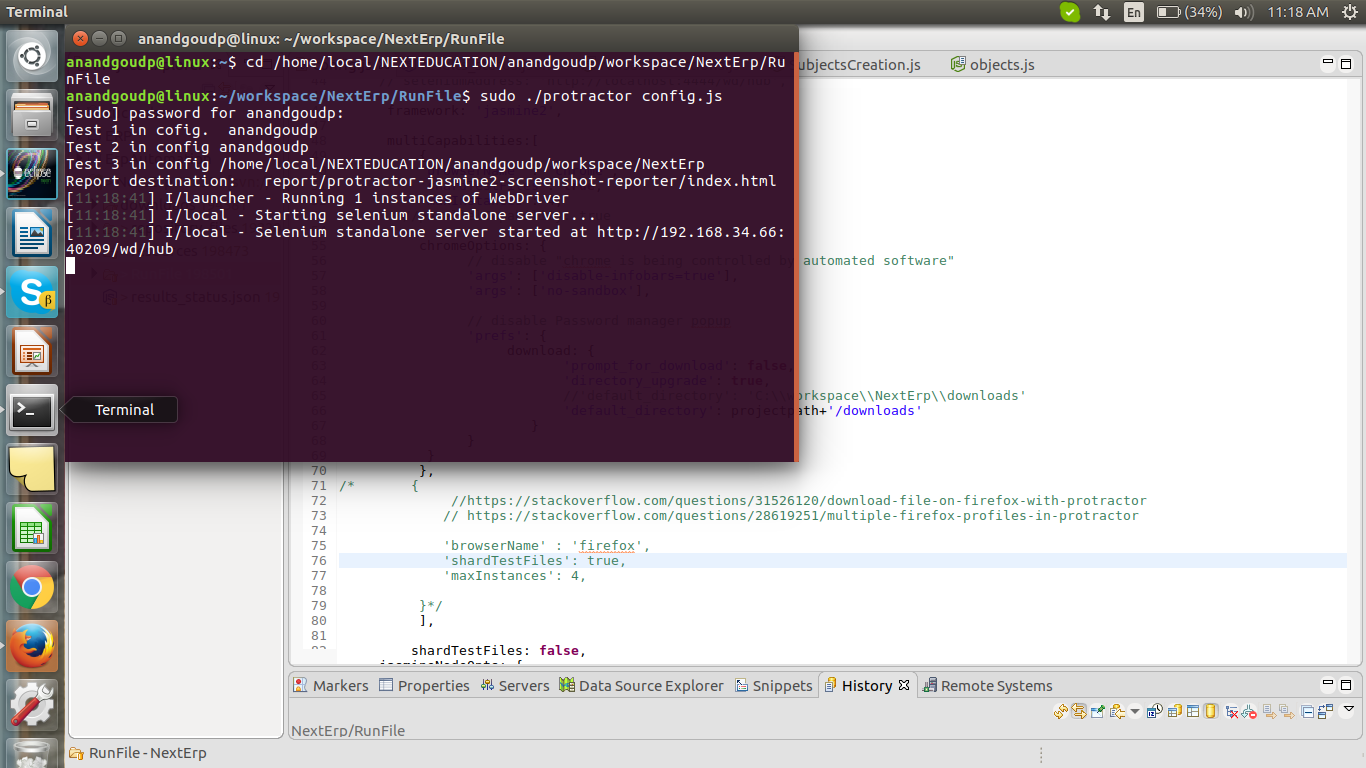

 anandgoudp
on 13 Oct 2017
anandgoudp
on 13 Oct 2017
Hi @anandgoudp
I would say there maybe a mismatch between Chrome and your Chromedriver but you should ask in https://github.com/angular/protractor.
Best
Peter
soulgalore
on 13 Oct 2017
Hey @soulgalore
Can you help me ?
My computer is Centos7 in the VMware software(This linux was installed gnome),
I installed selenium3 + python2.5 +Chrome's version 62(64BIT) and Chromedriver's version 2.33,
I think they are compatible,I am not use docker and Jenkins , only run driver= selenium.webdriver.Chrome(), console was alert message to me :
"selenium.common.exceptions.WebDriverException: Message: unknown error: Chrome failed to start: exited abnormally
(Driver info: chromedriver=2.33.506092 (733a02544d189eeb751fe0d7ddca79a0ee28cce4),platform=Linux 3.10.0-693.el7.x86_64 x86_64)";
can you tell me what shall I do ? Thanks for you!
PS: I think Gnome is a interface, so Centos7 was not install Xvfb
 guohongjie
on 8 Nov 2017
guohongjie
on 8 Nov 2017
Hi @guohongjie make sure that you add --no-sandbox switch to Chrome. Else I think this question is better to ask on the Selenium user group: http://www.seleniumhq.org/support/
Best
Peter
soulgalore
on 8 Nov 2017
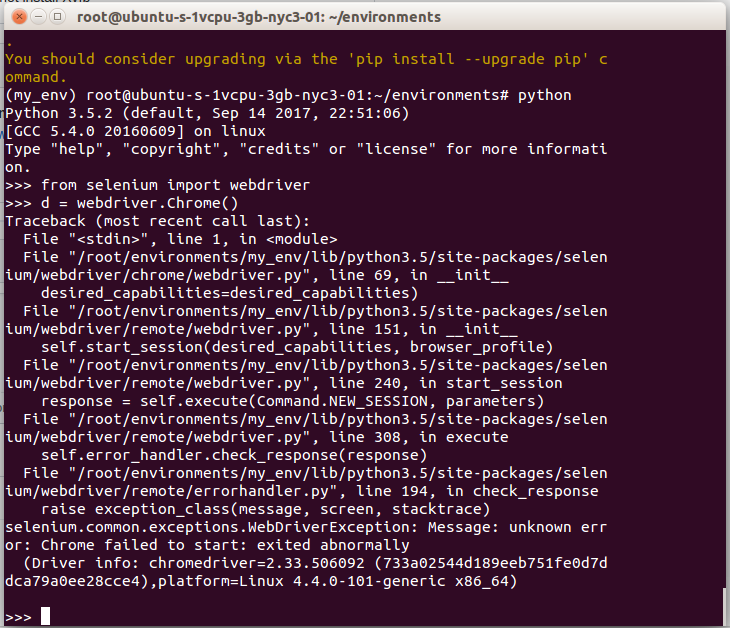
Hi @soulgalore , have a problem with DigitalOcean machine.
Info:
Python 3.5

 alexbuldyaev
on 24 Nov 2017
alexbuldyaev
on 24 Nov 2017
@alexbuldyaev this has nothing to do with sitespeed.io, you should ask the Selenium team.
soulgalore
on 24 Nov 2017
Guys! I've found solution!
Ubuntu:
yml:
- xvfb-run --server-args="-screen 0 1920x1080x24" <<<< OBLIGATORY! pytest --driver Chrome path_to_script/Your_script.py -v
In script (your test):
@pytest.fixture
def chrome_options(chrome_options):
    chrome_options.add_argument('--no-sandbox')  <<<< OBLIGATORY!
    return chrome_options

def test_example(selenium):
    selenium.set_window_size(1920, 1080) <<<< OBLIGATORY!
        selenium.get(SOME_URL)
 UANEMESIS
on 1 Feb 2018
UANEMESIS
on 1 Feb 2018
Related issues
 matti
·
5Comments
soulgalore
·
6Comments
matti
·
5Comments
soulgalore
·
6Comments
 atiro
·
6Comments
atiro
·
6Comments
 gajus
·
9Comments
gajus
·
9Comments
 mizbanpaytakht
·
8Comments
mizbanpaytakht
·
8Comments
Most helpful comment
Yeah many thanks @soulgalore, now we try to use Docker.