Site-kit-wp: Deep links on AdSense dashboard's performance by page table are broken
Bug Description
Deep links in the AdSense dashboard's AnalyticsAdSenseDashboardWidgetTopPagesTable component currently result in a "insufficient permissions" dialog on the Analytics service:
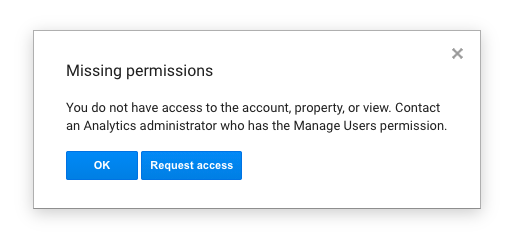
Upon closer inspection, you can see that the value of the authuser query parameter is double-encoded. This is because the full link is run through encodeURI although the value of the authuser param is already URL-encoded by addQueryArgs. This breaks the email address passed in this parameter and causes the service to not be able to match the correct user.
Steps to reproduce
- Get access to an Analytics account which is linked to an AdSense account
- Set up your Google accounts in the browser so that your Google account with access is not your default (i.e.
authuser=1) - Set up Analytics and AdSense using the relevant accounts
- Go to AdSense dashboard
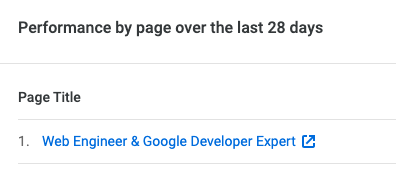
- Click on Page title link in the Performance by page section
- See permissions error dialog above
The commit where this happened shows that there are other values in the URL which need to be encoded, so this should be reworked so that this value is still encoded. See escapeURI
Introduced in 1.14.
_Do not alter or remove anything below. The following sections will be managed by moderators only._
Acceptance criteria
- Deep links from the AdSense performance by page table should work
- Ensure no service URLs are URL encoded in their entirety
Implementation Brief
Analytics Datastore
- Introduce a new
getServiceReportURL( type, reportArgs )selector for getting a deep link for an Analytics report view
typeis a the string report type which is present in the URL (e.g.content-pages,trafficsources-overview, etc)reportArgsis an object of args to be encoded into a report-specific route parameter which provides additional data regarding content drilldown, etc. These are not regular query args, so they must be encoded in a special way for the URL which is only used here
- values must be URL-encoded as
key=valueand joined with& - No
?should be added - the final string must have all encoded
/replaced with~2F(encoded/with%replaced with~) - add a new utility for formatting + encoding of these arguments into the URL segment for use in the path
- values must be URL-encoded as
- returns
getServiceURL()internally, passing along the properpathandquery
- Update
optionsto accept an optionalPrimaryLinkcomponent type, which defaults toLinkfunction - Update the first/primary link component to use the
PrimaryLinkprovided via options (falling back to the default)
AnalyticsAdSenseDashboardWidgetTopPagesTable
- Pass an
options.PrimaryLinkas a call towithSelectto return a higher-orderLinkthat passes it's givenhref(link) through to be thepagePathin a select togetServiceReportURL
Remaining
Test Coverage
- Add Jest coverage for the new
getServiceReportURLselector - Add Jest coverage for the new
reportArgsToURLSegmentutility
Visual Regression Changes
- No visual changes should occur as a result of this code.
QA Brief
- Get access to an Analytics account which is linked to an AdSense account
- Set up your Google accounts in the browser so that your Google account with access is not your default (i.e.
authuser=1) - Set up Analytics and AdSense using the relevant accounts
- Go to AdSense dashboard
- Click on Page title link in the Performance by page section
You should not see a permissions error dialog anymore.
Changelog entry
- Fix broken Analytics frontend deep links on AdSense module page.
 aaemnnosttv
All 14 comments
I'm marking this as a 7 because the QA steps here are specific and a bit tough—for me, I wasn't able to get them to happen and while I tried with the tester plugin, I'm not clear on the steps to set this up if I don't have an Analytics account connected to an AdSense account.
Also: I _think_ I understood the issue here but without being able to replicate it I'm not quite sure.
It seems like that whole URL is fine to decode and re-encode after being combined with pagePath, but if not it seems like those selectors should be reworked to only return either fully escaped or unescaped strings. (The latter seems best and most flexible.)
 tofumatt
on 29 Oct 2020
tofumatt
on 29 Oct 2020
@tofumatt the problem here is from encoding the adsenseDeepLink part – also, this isn't a great name for this variable because it's actually a deep link to _Analytics_ so we should probably fix that here too 😄
Also, it's worth pointing out that we don't need to URL encode large parts of the URL at all. Looking at the commit where this changed (https://github.com/google/site-kit-wp/commit/5debbd93c7a8866e914f93c74d8c4fd262fb3604) it changed the plotKeys=%5B%5D to plotKeys=[] with the added encoding, which I think is better but needs adjustment. There's also another non-standard encoding here which is the ~2F in _r.drilldown=analytics.pagePath:~2F at the end.
This is necessary but should only be applied in one place rather than with pre-encoded parts in different places:
https://github.com/google/site-kit-wp/blob/53af2561cedbfff5976ebd956547a3c34ed6644c/assets/js/modules/analytics/components/dashboard/AnalyticsAdSenseDashboardWidgetTopPagesTable.js#L104-L107
I think maybe we should use addQueryArgs on the path argument to getServiceURL which will encode the values only automatically. We can't apply it to the URL as a whole because the URL because it has a separate path and query parameters separated by a # when a { path } is provided. That doesn't quite solve for the pagePath thing though by itself. I think instead we just need to apply a leading slash to the row.dimensions[ 1 ] before the slashes are encoded.
What do you think?
aaemnnosttv
on 29 Oct 2020
That explanation checks out I think, but I'll admit following through the logic of this is a bit odd, especially as it's not well-documented. For instance: what's up with the weird ~2F encoding of slashes anyway? Is it GA-specific? It's all a bit odd when put together 😆
I've updated the IB for now with those suggestions because I think they'll work for us. Let me know what you think, but I'll admit I'm still a _bit_ hazy on this particular one 😅
tofumatt
on 4 Nov 2020
- Replace
returnwith${ baseURIWithQuery }#${ sanitizedPath };returnin https://github.com/google/site-kit-wp/blob/6a5bb8e29ca68e490e077effd559c91e34de8ef0/assets/js/modules/analytics/datastore/service.js#L55${ baseURIWithQuery }#${ addQueryArgs( sanitizedPath ) };
@tofumatt I think you may have misunderstood my original comment. I was only suggesting we should use addQueryArgs on the path argument to getServiceURL, not change the way it works internally. Also, your suggested use is missing query args to add, which is essentially a no-op.
what's up with the weird
~2Fencoding of slashes anyway? Is it GA-specific?
Yes although it _might_ be used by other services, but there are other instances in the codebase (all Analytics). I didn't notice this before, but it seems to be normally URL-encoded (encodeURIComponent) and then replaces % with ~. I.e. encodeURIComponent('/string/with/slashes/').replaceAll('%', '~')
If this is used elsewhere it would probably benefit from getting a dedicated utility, but that's probably beyond the scope of this issue (changes elsewhere) but we could at least introduce it here 🙂
- Replace
const pagePath = row.dimensions[ 1 ].replace( ///g, '~2F' );withconst pagePath = ( row.dimensions[ 1 ].startsWith( '/' ) ? row.dimensions[ 1 ] :in https://github.com/google/site-kit-wp/blob/6a5bb8e29ca68e490e077effd559c91e34de8ef0/assets/js/modules/analytics/components/dashboard/AnalyticsAdSenseDashboardWidgetTopPagesTable.js#L105/${ row.dimensions[ 1 ] }).replace( ///g, '~2F' );
This is also a bit off as it would not replace slashes if the pagePath started with a slash in the suggested changes, but this replacement should always happen, even if the path is only a slash.
aaemnnosttv
on 4 Nov 2020
Okay, I _think_ I have written an IB that makes sense of what's happening here, but I'll be honest: I'm a bit unclear as to what's happening where and why. If I'm still off on this it might be better that you write the IB and have someone else review it, I might just be blanking on this one! 😅
tofumatt
on 5 Nov 2020
@felixarntz IB is ready for review. I have a working POC but the IB has some improvements on this so there's no PR to go along with it yet. If ready to go, please send it back my way 🙂
aaemnnosttv
on 11 Nov 2020
@felixarntz as an alternative to adding the additional selector right away, we could also just bake that in to the proposed AnalyticsServiceReportLink since that would be the only place it's used so far, so it could do all the same things using the existing getServiceURL selector.
aaemnnosttv
on 11 Nov 2020
@aaemnnosttv IB mostly LGTM, however I'm wondering whether introducing AnalyticsServiceReportLink is a bit overkill. I don't see much benefit in this over calling the getServiceReportURL selector directly and passing the result to the Link component.
 felixarntz
on 12 Nov 2020
felixarntz
on 12 Nov 2020
@felixarntz sure – the main reason is that we need to call that selector for every row in the table, and we can't use useSelect in renderCell directly, it has to be in a functional component. In my POC that I showed you I had a generic Cell component just to kind of get things working.
We can't just use Link directly though because we need to select the URL to pass to it. After taking a closer look, we can actually solve this very nicely with withSelect and allowing the primary link component to be customized in the data table, without adding any additional components 👍 I'll add a draft PR to the IB to illustrate.
aaemnnosttv
on 12 Nov 2020
@felixarntz – I've updated the IB and included a link to the working branch I have which is only about 50 new lines (excluding comments). The nice thing about this approach is that it doesn't require the consuming component of the data table to reimplement classes used when rendering the cell, or the behavior of options.showURLs. I know we generally prefer to use useSelect over withSelect but I think this is the cleanest solution in the given context. We can re-evaluate the best way to handle this in the definition of the new ReportTable component.
aaemnnosttv
on 12 Nov 2020
@aaemnnosttv That sounds good for now. Let's see how we can make it even better via #2249. IB ✅
felixarntz
on 13 Nov 2020
@aaemnnosttv starting to look at this ticket and wondered if you could expand on the QA brief steps. I understand point 1, but I don't understand point 2 Set up your Google accounts in the browser so that your Google account with access is not your default (i.e. authuser=1) Am I checking to see with the Google account (that has Analytics and Adsense linked) when connected to SK, the permission message does not appear?
 wpdarren
on 23 Nov 2020
wpdarren
on 23 Nov 2020
@wpdarren yes, the permission message should not appear. The reason that comes up is that the way it is now, because the part of the URL which identifies the Google account to use is broken, it uses the default Google account. By this I mean the first/primary Google account you're signed in with. You can see which account this is by going to https://myaccount.google.com/. So to test this you need to be using a "secondary account" with Google as the account which has the access. E.g.
- https://myaccount.google.com/ -> personal account (should not have access)
- https://myaccount.google.com/u/1 -> work account (the one that has access)
You can read more about this here: https://support.google.com/accounts/answer/1721977
aaemnnosttv
on 24 Nov 2020
QA update: Pass ✅
- Verified that with a secondary account, no permission message appears in the AdSense performance table. - Screenshot
wpdarren
on 24 Nov 2020
Related issues
 theeducatedbarfly
·
4Comments
felixarntz
·
4Comments
theeducatedbarfly
·
4Comments
felixarntz
·
4Comments
 Loganson
·
5Comments
Loganson
·
5Comments
 quangbahoa
·
5Comments
quangbahoa
·
5Comments
 jamesozzie
·
3Comments
jamesozzie
·
3Comments