Site-kit-wp: AdSense body snippet code is being stripped from AMP singular content types when Yoast plugin is active
Bug Description
For AMP users when using Site Kit to place the AdSense snippet and with Yoast active the body snippet is being removed from the markup for singular content types (pages and posts), resulting in no ads being served.
This occurs with the latest version of Site Kit, the AMP plugin and Yoast. Initially reported in the AMP support forums and just today a similar topic arose today in the Site Kit forums.
Reproducible in support, see below:

Reports (Site Health info visible in trix):
- AMP Support Topic | http://www.thickaccent.com | SH info
- Site Kit Support Topic | https://nerdwork.space/ | Site Health info
A possible similar topic arrived in the AMP forums, with the code being stripped out on mobile. Awaiting additional information but looks similar (same theme others reported, Site Kit placed AdSense snippet and AMP plugin user with Yoast indicators)
Steps to reproduce
- Install & activate latest version of Site Kit (1.17.0), the AMP plugin (2.0.4) & Yoast (15.0)
- Activate AdSense module within Site Kit and allow the plugin to insert AdSense code
- Set the AMP plugin to transitional mode
- Check for AdSense code snippet on AMP URLs (a singular post)
- The snippet appears on category/archive pages only
Additional Context
- Only occurs with Site Kit placed snippet. The
<amp-auto-ads..body code remains in AMP URLs with Yoast active when manually placed.
- Only occurs for singular templates (posts and pages tested)
- Occurs on all themes tested (not specific to Twenty Twenty despite all 3 users who reported using Twenty Twenty)
- Ads appear fine in canonical (non AMP) URLs
- Tested on site with approved AdSense status
- This has been reported in both the AMP plugin support forums and Site Kit
- Yoast plugin version: 15.0 (Not premium from support testing, although others who reported are using premium)
- AMP plugin version: 2.0.4
- Site Kit plugin version: 1.17.0
_Do not alter or remove anything below. The following sections will be managed by moderators only._
Acceptance criteria
- With the latest AMP plugin and Yoast SEO active, the AdSense
amp-auto-adssnippet should be placed in the AMP version of the content as expected in all modes (Standard mode, Transitional mode, Reader mode).
Implementation Brief
- In
includes/Modules/AdSense.phpin the callback handler for thethe_contentfilter, exit early if notin_the_loop:
function( $content ) use ( $client_id ) {
    // Only run for the primary application the `the_content` filter.
    if ( ! in_the_loop() ) {
        return;
    }
    ...
Test Coverage
- Add a new test in
tests/e2e/specs/modules/adsense/setup-new-user.test.js:
it( 'has outputs tag when AMP is active', async () => {
Follow pattern from the test labeled it( 'displays “Your account is getting ready” when the Adsense account is pending review', async () => { to reach the condition where Site Kit should be inserting the AdSense tag on front end pages
Test each AMP mode with current plugin version
await activateAMPWithMode( 'primary' );
await expect( '/' ).toHaveAdSenseTag();Repeat with
secondaryandreadermode.
Visual Regression Changes
- No VRT changes here.
QA Brief
- To test, install the AMP plugin and Yoast SEO plugin.
- Set up Site Kit, including AdSense, setting AdSense to insert the snippet.
- Check all contexts: AMP plugin Standard mode, Transitional mode and Reader mode
- When testing in Standard and Transitional mode, check both the AMP (add
?ampto the URL) and non-AMP versions of the page. - Check in different WordPress contexts: Home page, single post, taxonomy archive (eg. category).
- In all cases the AdSense snippet should be present.
Changelog entry
- Fix compatibility issue where
amp-auto-adselement would not be present in AMP singular content when also using the Yoast SEO plugin.
 jamesozzie
All 15 comments
@jamesozzie I was able to track down the conflict in the way that we are adding the AdSense tag to AMP pages.
Since wp_head will not fire in AMP, we use the wp_body_open action hook, which is the ideal place to output the tag in AMP. However, the wp_body_open hook is new, so to support older versions of WordPress we fall back to adding the tag via the the_content filter run.
The bug occurred because other plugins sometimes call (or indirectly trigger) the_content filter before it is rendered. We limit ourselves to outputting the tag once, so when this happened, we failed to output the tag at all (the one time happened during the early run).
A straightforward fix to this on our end is to only add our content during the main loop run of the filter. This aligns with the recommended way to use the the_content filter (in our case we check when the filter runs since we hook so early here).
Draft PR that uses this approach and fixes the issue for me. cc: @felixarntz what do you think of this approach? https://github.com/google/site-kit-wp/pull/2114
@jamesozzie you should be able to test this fix using the tester plugin and the draft PR.
 adamsilverstein
on 29 Sep 2020
adamsilverstein
on 29 Sep 2020
@adamsilverstein
A straightforward fix to this on our end is to only add our content during the main loop run of the filter. This aligns with the recommended way to use the
the_contentfilter (in our case we check when the filter runs since we hook so early here).
For the most part this sounds good, however I'm not sure whether that will work in the classic AMP Reader Mode, since I believe that doesn't run "the loop". Let's test this fix with Reader Mode in both AMP plugin >=2.0.0 and <2.0.0.
 felixarntz
on 29 Sep 2020
felixarntz
on 29 Sep 2020
Let's test this fix with Reader Mode in both AMP plugin >=2.0.0 and <2.0.0.
Will do.
adamsilverstein
on 29 Sep 2020
Testing results:
Checked for the amp-auto-ads tag output. Based on this testing, the proposed fix will work.
without the in_the_loop check:
AMP Plugin 2.0.4
- Standard mode ❌
- Transitional mode ❌
- Reader mode ✅
AMP Plugin 1.5.5
- Standard mode ❌
- Transitional mode ❌
- Reader mode ✅
with the in_the_loop check in our content callback.
AMP Plugin 2.0.4
- Standard mode ✅
- Transitional mode ✅
- Reader mode ✅
AMP Plugin 1.5.5
- Standard mode ✅
- Transitional mode ✅
- Reader mode ✅
Note
We should be able to write tests that activates each version of the AMP plugin in each mode and tests that the output works as expected, ie. reproduce the testing matrix I did manually.
adamsilverstein
on 30 Sep 2020
@jamesozzie you should be able to test this fix using the tester plugin and the draft PR.
@adamsilverstein All looks good from my side using the Tester plugin.
jamesozzie
on 30 Sep 2020
@adamsilverstein The proposed fix looks good overall.
We should be able to write tests that activates each version of the AMP plugin in each mode and tests that the output works as expected, ie. reproduce the testing matrix I did manually.
How are you thinking to do this? I guess the only way to reliably test this automatically is add further e2e tests - is that what you had in mind? Would be great to cover the testing in the IB too.
Can you also add an estimate?
felixarntz
on 5 Oct 2020
I guess the only way to reliably test this automatically is add further e2e tests
Yea, that is what I was thinking. I will update the IB accordingly.
adamsilverstein
on 6 Oct 2020
@felixarntz I added tests to the IB for the current AMP plugin version. To test older plugin versions, we would need to bundle the plugin or figure out a way to install it directly. As far as I can tell, the current tooling doesn't have a way to download a specific plugin version. Do you think this is worth the added weights, or is it enough to verify compatibility against the current AMP version?
adamsilverstein
on 6 Oct 2020
@adamsilverstein I think using the current version should be sufficient. IB LGTM, can you add an estimate?
felixarntz
on 6 Oct 2020
Added an estimate. While the code changes are relatively minimal, I've included extra time for QA because there are several dependencies and variations to check.
adamsilverstein
on 9 Oct 2020
@adamsilverstein IB ✅
Repeat with
secondaryandreadermode.
Just to clarify, I think it's sufficient here to switch the mode _after_ doing the AdSense setup. We don't need to worry about doing the actual flow in the different modes, we just need to check that the snippet is present in the frontend in each mode.
felixarntz
on 12 Oct 2020
@aaemnnosttv while I have an overview of what needs to be tested, we don't have a QA brief on this ticket. Please could someone add this and I'll jump into testing it. Thank you!
 wpdarren
on 10 Nov 2020
wpdarren
on 10 Nov 2020
Thanks @wpdarren – that should have been added before going to QA, apologies for that. I've asked @adamsilverstein to help out here as he did the original testing to confirm the issue, so stand by for an update here shortlyish 😄
 aaemnnosttv
on 10 Nov 2020
aaemnnosttv
on 10 Nov 2020
@wpdarren I added a QA brief above. A few additional notes:
- You need to have at least signed up for an AdSense account with your Google login for Site Kit to place the AdSense snippet. You should get to a screen that looks like this (if not a completed setup) when you enable the AdSense module:
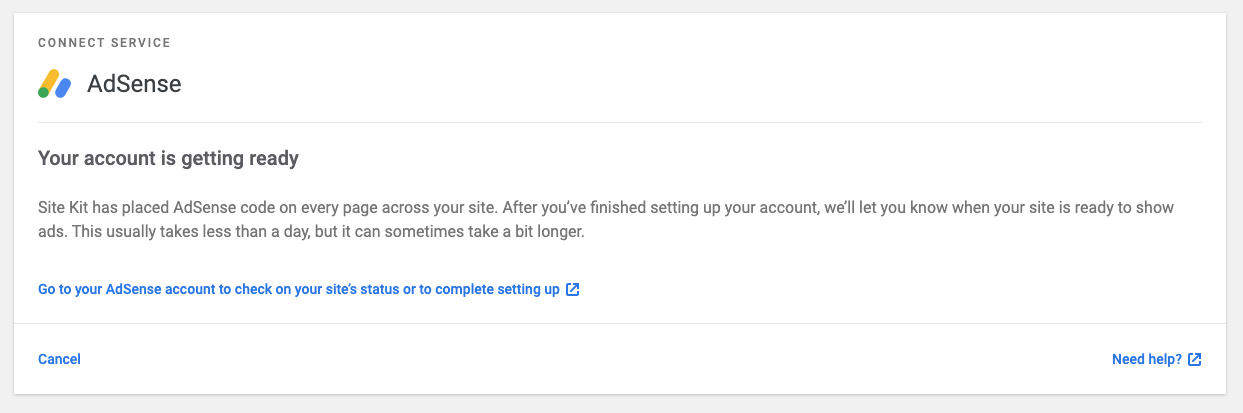
For non AMP pages, the AdSense snippet you are checking for contains adsbygoogle in the URL:

For AMP pages, the AdSense tag starts with <adsense-auto-ads:

adamsilverstein
on 10 Nov 2020
QA update: Pass ✅
Verified:
With Site Kit Adsense module and Yoast / AMP plugins activated.
Home page for Non AMP has the Adsense snippet adsbygoogle
Home page for AMP Transactional mode has the Adsense snippet amp-auto-ads
Home page for AMP Standard mode has the Adsense snippet amp-auto-ads
Home page for AMP Reader mode has the Adsense snippet amp-auto-ads
Page for Non AMP has the Adsense snippet adsbygoogle
Page for AMP Transactional mode has the Adsense snippet amp-auto-ads
Page for AMP Standard mode has the Adsense snippet amp-auto-ads
Page for AMP Reader mode has the Adsense snippet amp-auto-ads
Post for Non AMP has the Adsense snippet adsbygoogle
Post for AMP Transactional mode has the Adsense snippet amp-auto-ads
Post for AMP Standard mode has the Adsense snippet amp-auto-ads
Post for AMP Reader mode has the Adsense snippet amp-auto-ads
Category for Non AMP has the Adsense snippet adsbygoogle
Category for AMP Transactional mode has the Adsense snippet amp-auto-ads
Category for AMP Standard mode has the Adsense snippet amp-auto-ads
Category for AMP Reader mode has the Adsense snippet amp-auto-ads
_AMP code_

_Non AMP code_

Environment:
WP: 5.5.3
PHP: 7.3.21
SiteKit: 1.20.0 (develop breanch)
Yoast: 15.2.1
AMP: 2.0.5
wpdarren
on 11 Nov 2020
Related issues
aaemnnosttv
·
5Comments
felixarntz
·
4Comments
 tofumatt
·
3Comments
tofumatt
·
3Comments
 tunakode
·
4Comments
tunakode
·
4Comments
 jsmshay
·
3Comments
jsmshay
·
3Comments