Site-kit-wp: Fix loading state logic ignoring errors in components
This started as part of #1859, but was since separated out to keep issue scope more manageable. Some module components (mostly setup/settings-related) currently have the problem that the logic for displaying the overall ProgressBar depends on data being returned from an API - however, if an error occurs during an API request, that data will never be populated, keeping the component in an infinite loading state.
Instead of relying on selector-based data to exist, it should be relied upon whether the respective resolver has finished, which will work for both the success and error case.
_Do not alter or remove anything below. The following sections will be managed by moderators only._
Acceptance criteria
- For the condition whether to display a progress bar, JS components that are used in module setup or module settings must not rely on selectors returning
undefinedwhich have a resolver. Whenever a selector has a resolver, such logic should rely onhasFinishedResolutionfor the selector instead.
Implementation Brief
- Update conditionals used for early return with
<ProgressBar>when data selected from the datastore=== undefinedto use! hasFinishedResolutionselector instead (only for selectors with a resolver).
Note, not all selectors have a dedicated selector but use a parent selector which has a resolver. In this case, the "closest" resolver in the selector chain should be checked.
Also, special care should be taken to ensure bugs are not introduced by changing the conditional to return when something isundefined. It will now be possible for these selected values to beundefined(such as in the event of an error) beyond the progress bar conditional, so we should pay extra attention to ensure potential type errors are handled.
assets/js/modules/adsense/components/common/AccountSelect.jsassets/js/modules/adsense/components/common/SiteSteps.jsassets/js/modules/adsense/components/common/UserProfile.jsassets/js/modules/adsense/components/settings/SettingsEdit.jsassets/js/modules/adsense/components/setup/SetupMain.jsassets/js/modules/analytics/components/common/AccountSelect.jsassets/js/modules/analytics/components/common/AccountCreate/index.jsassets/js/modules/tagmanager/components/common/AccountCreate.jsassets/js/modules/tagmanager/components/common/AccountSelect.jsassets/js/modules/tagmanager/components/common/ContainerSelect.js
- Similar to the last bullet, some conditionals used in the same way are missing this check and are not checking
undefinedso they only need the same resolver check added
_You can see an example of this done correctly inassets/js/modules/analytics/components/settings/SettingsEdit.js_
assets/js/modules/analytics/components/common/AccountCreateLegacy.jsassets/js/modules/analytics/components/common/ProfileSelect.jsassets/js/modules/analytics/components/common/PropertySelect.js
QA Brief
- Set up Site Kit on your site;
- Activate and connect AdSense, Analytics, and Tag Manager modules;
- Make sure that setup and settings forms of these modules work as it worked before:
- when data is being fetched, the progress bar is shown;
- when data has been loaded, the progress bar is hidden, and the actual form elements appear.
Changelog entry
- Fix several UI loading state issues across module setup flows.
 felixarntz
All 7 comments
@aaemnnosttv I've copied the relevant piece of the IB from #1859, assigning to you for double-checking and providing an estimate.
felixarntz
on 9 Sep 2020
IB ✅
felixarntz
on 23 Sep 2020
@eugene-manuilov Can you add QA Brief for this one?
felixarntz
on 27 Oct 2020
QA Brief is added.
 eugene-manuilov
on 28 Oct 2020
eugene-manuilov
on 28 Oct 2020
QA ⚠️
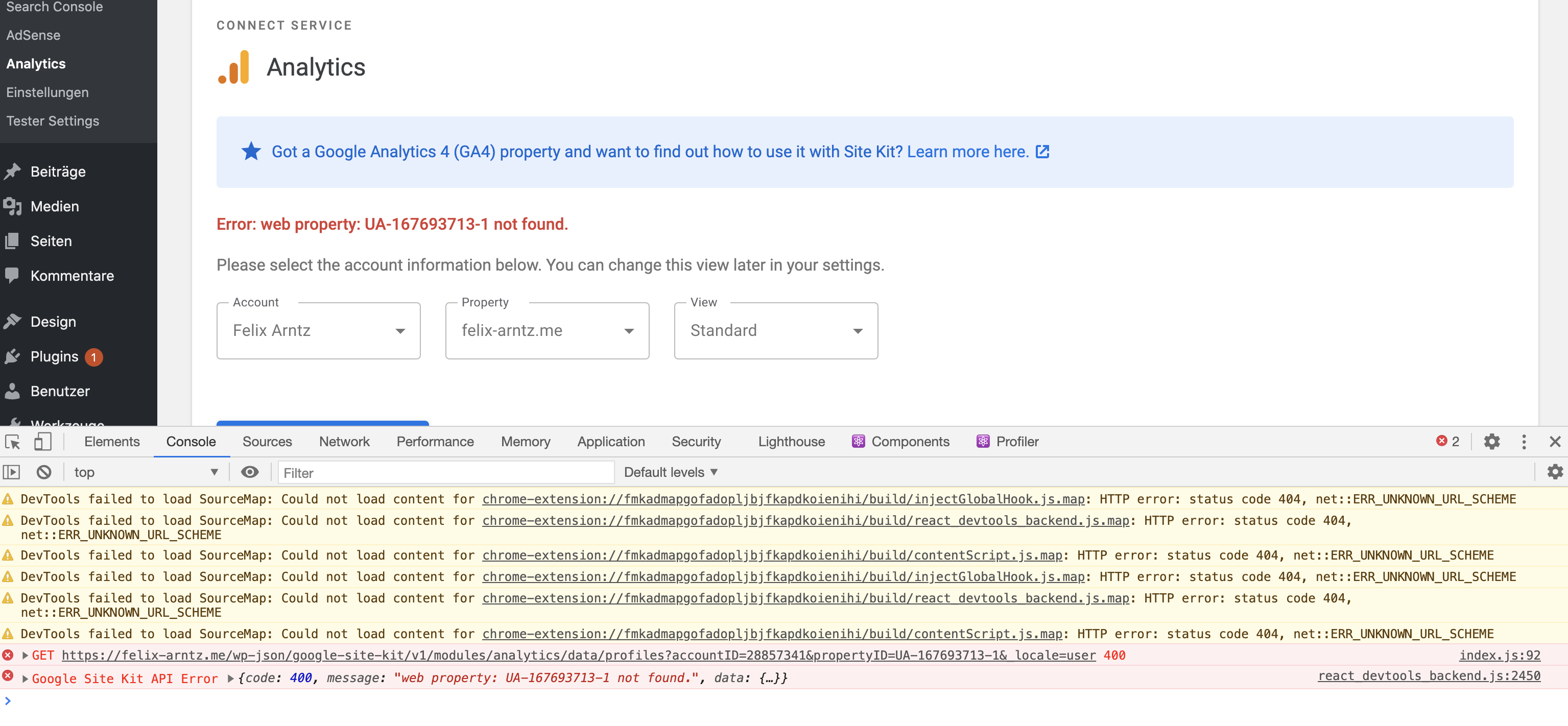
@eugene-manuilov While testing something else, I ran into a problem which is likely a regression caused by the changes here. What I did was the following:
- Go to Analytics setup.
- Choose an Analytics account and property, or rely on the preselected ones if there are.
- Choose another account.
- Now I get an error
web property: UA-xxxxxx-x not found.. For some reason, after updating the account, the plugin makes a request to theprofilesdatapoint with the _previously_ selected property. That property of course is not part of the newly selected account though (you can already tell that because thexxxxxxout of theUA-xxxxxx-xID must match the account ID), therefore it isn't found. I assume there is some out of sync inconsistency introduced here: When selecting another account, we need to update both the account ID and property ID (the latter needs to be immediately set to its "empty" value) to avoid such a request.
Screenshot:
felixarntz
on 30 Oct 2020
@felixarntz i have created a PR that fixes this issue: https://github.com/google/site-kit-wp/pull/2300.
eugene-manuilov
on 30 Oct 2020
Tested
Installed, activated and setup latest SK.
Confirmed functionality specifically around data loading for:
Adsense - Pass
Analytics - Pass
Tag Manager - Pass
One thing to note:
When switching date ranges, we're not showing a loading bar for Analytics and Adsense.
This is unrelated but noting that the loading bars are displayed on refresh.
Passed QA ✅
 cole10up
on 4 Nov 2020
cole10up
on 4 Nov 2020
Related issues
 marrrmarrr
·
5Comments
marrrmarrr
·
5Comments
 quangbahoa
·
5Comments
quangbahoa
·
5Comments
 quindo
·
5Comments
quindo
·
5Comments
 aaemnnosttv
·
3Comments
aaemnnosttv
·
3Comments
 tofumatt
·
5Comments
tofumatt
·
5Comments